
GPT Image by Ace Data Cloud for Langflow
Install just the GPT Image Generate and Retrieve Task nodes. This service package does not install the full Ace bundle or register a chat model provider. It uses the same reviewed client, request rules, and task implementation as the aggregate package. Ace Data Cloud supplies this integration; service-owner endorsement is not implied.
1. Install the nodes
Version 0.1.4. Install the public GitHub wheel in the same Python environment as Langflow (1.12.5 or later):
python -m pip install "https://github.com/AceDataCloud/LangflowAceDataCloud/releases/download/v0.1.4/lfx_acedatacloud_gpt_image-0.1.4-py3-none-any.whl"
lfx extension list
langflow run
The versioned GitHub release provides the wheel
and a self-contained source archive. No GitHub account is needed to install it.
If version 0.1.4 is listed on PyPI,
you can also run python -m pip install "lfx-acedatacloud-gpt-image==0.1.4".
Suno and Seedance project creation was temporarily rate-limited by PyPI at the
0.1.3 release; the direct wheel command above works independently of PyPI listing
availability. Official Langflow default inclusion
remains under review.
Restart an existing server. Open Components → GPT Image by Ace Data Cloud or search GPT Image.
2. Create and copy your application API key
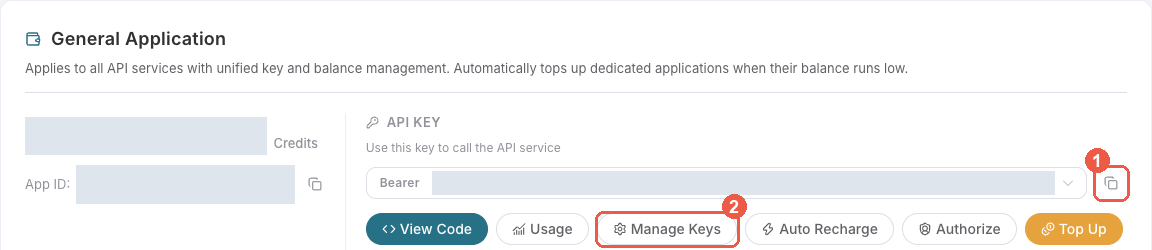
- Register or sign in at Ace Data Cloud → Applications. If there is no General application, choose Initialize General Application first, then open it. A general-application key uses your account's enabled services; a service-specific application key is limited to that service.
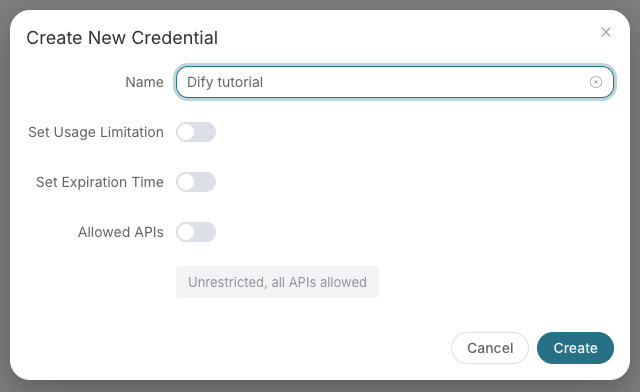
- Copy the existing API Key with the copy icon, or choose Manage Keys → Create
to make a dedicated key, for example
Langflow GPT Image. - Set the key's expiration, usage limit and Allowed APIs as needed. If you
restrict Allowed APIs, include both
/openai/images/generationsand/openai/tasksso Generate and Retrieve Task can both work. Click Create, return to the key list or application card, and copy the token. - Confirm GPT Image service access, current price and balance
before a paid run. Copy only the raw token, without
Beareror quotes. Use an application API key, not an account-management token.
3. Save a private Credential in Langflow
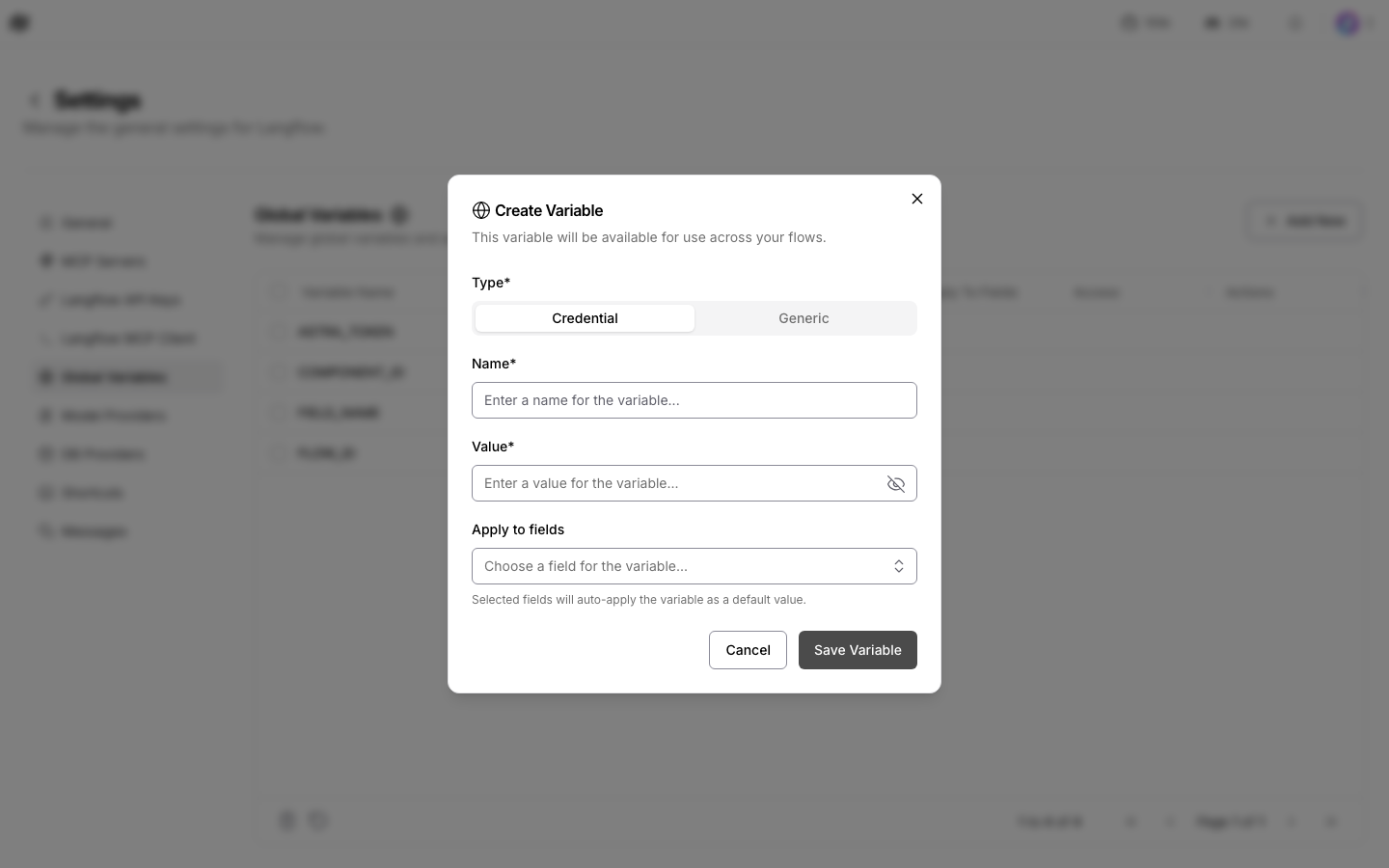
Open Settings → Global Variables → Add New. Set Type to Credential,
Name to ACEDATACLOUD_API_KEY, paste the token into Value, and choose
Save Variable. On both Generate and Retrieve Task, click the globe icon
next to Ace Data Cloud API key and select ACEDATACLOUD_API_KEY.
Confirm the binding survives a reload. Keep the token out of prompts, screenshots
and exported flow JSON; inspect exports for literal secrets before sharing.
Revoke a temporary or exposed key under Manage Keys, then update the saved
Credential if you replace it.
4. Run and check the result
Generate submits once; Retrieve Task only queries the original task. API usage is paid according to current service prices; installing this extension is free. Use the retrieve-only flow with the original task ID while a task is pending; do not rerun Generate just to check progress. Compare the task or trace with Usage History. Charges are in Credits. See the English guide and Chinese guide for first-run inputs and troubleshooting. For 401/403, check the copied key, expiry, limits, both allowed routes, service access and balance.
Packaging and saved flows
The wheel includes no-key generation and retrieve-only flow JSON under
lfx_acedatacloud_gpt_image/examples/; use these with this service package. Aggregate examples
retain ext:ace_data_cloud:* IDs and require the aggregate installation.
This package uses ext:ace_gpt_image:<Class>@official IDs. All five service packages
can coexist. With the aggregate installed, its legacy category remains alongside
the service category; neither replaces the other's saved nodes. Uninstalling
one package does not remove another package's files.
From the complete v0.1.4 source checkout, build a wheel and a self-contained sdist with python -m build packages/gpt-image. A local source install is python -m pip install ./packages/gpt-image.
The shared hook stages runtime source under the unique lfx_acedatacloud_gpt_image namespace;
only these two component files are discoverable. No runtime code is maintained
in this packaging directory. Maintainers regenerate metadata and hook copies
with python scripts/service_packages.py, then use --check to detect drift.
1 maintainer

Metadata
1 maintainer
Release files for lfx-acedatacloud-gpt-image 0.1.4
For a detailed explanation of source distributions (sdists) and built distributions (wheels), please see the package formats documentation.
Source distribution (sdist)
| File | Size | Uploaded | Provenance | Actions |
|---|---|---|---|---|
| lfx_acedatacloud_gpt_image-0.1.4.tar.gz | 21.4 kB | Without provenance | Details for lfx_acedatacloud_gpt_image-0.1.4.tar.gz |
Built distribution (wheel)
| File | Interpreter | ABI | Platform | Actions Reset |
|---|---|---|---|---|
| lfx_acedatacloud_gpt_image-0.1.4-py3-none-any.whl | Python 3 | none | any | Details for lfx_acedatacloud_gpt_image-0.1.4-py3-none-any.whl |
Total release size: 47.9 kB
Release files / lfx_acedatacloud_gpt_image-0.1.4.tar.gz
| Download URL | lfx_acedatacloud_gpt_image-0.1.4.tar.gz |
|---|---|
| Size | 21.4 kB |
| Tags | Source |
|
SHA-256 checksum How to use checksums |
c8881d26562174cbfa082d2b9cf5e1f88b956c3cd54dac96e03d8411402a657d
|
|
BLAKE2b-256 checksum How to use checksums |
1f36a4a6adf9a4f693ed2efe0ad8264b6bd7e459af0a7a07fe0a3fc1659fca6d
|
| Upload date | |
|
Uploaded using Trusted Publishing? What is trusted publishing? |
No |
| Uploaded via |
twine/7.0.0 CPython/3.12.15
|
Release files / lfx_acedatacloud_gpt_image-0.1.4-py3-none-any.whl
| Download URL | lfx_acedatacloud_gpt_image-0.1.4-py3-none-any.whl |
|---|---|
| Size | 26.5 kB |
| Tags | Python 3 |
|
SHA-256 checksum How to use checksums |
03e68ab99b58bc2c5031f57bd2a90b672f0b75f987f393328e13bb007f920394
|
|
BLAKE2b-256 checksum How to use checksums |
4acf43fc91e8db9e600ff767559053f63cac84cc2471d9543413add6f6055bf0
|
| Upload date | |
|
Uploaded using Trusted Publishing? What is trusted publishing? |
No |
| Uploaded via |
twine/7.0.0 CPython/3.12.15
|
Security for lfx-acedatacloud-gpt-image 0.1.4
Provenance
Provenance describes where a file came from. On PyPI, provenance is shared via attestations, which provide a verifiable record of the build or publishing details. View details, limitations and caveats.
No provenance found
None of the files in this release were uploaded with provenance metadata.
A note on package security
PyPI is a repository for distributing packages, not a service for auditing them. While third-party security researchers and our staff do their best to detect and remove malicious packages, PyPI cannot guarantee the quality, security or suitability of any given package.
To learn more about protecting yourself from malicious actors, visit our package security documentation.














