
Ace Data Cloud for Langflow
Use Ace Data Cloud chat models and service components in Langflow 1.12.5 or later. One Extension Bundle supplies a named Ace Data Cloud model provider and separate components for 17 image, video, audio, search, and face service families. The examples contain no credentials.
简体中文教程 · Current models and prices · Source
Version 0.1.3: install the aggregate or a single service from PyPI, or use the wheels in the GitHub release. Official Langflow default inclusion remains under review.
Find the service you already know
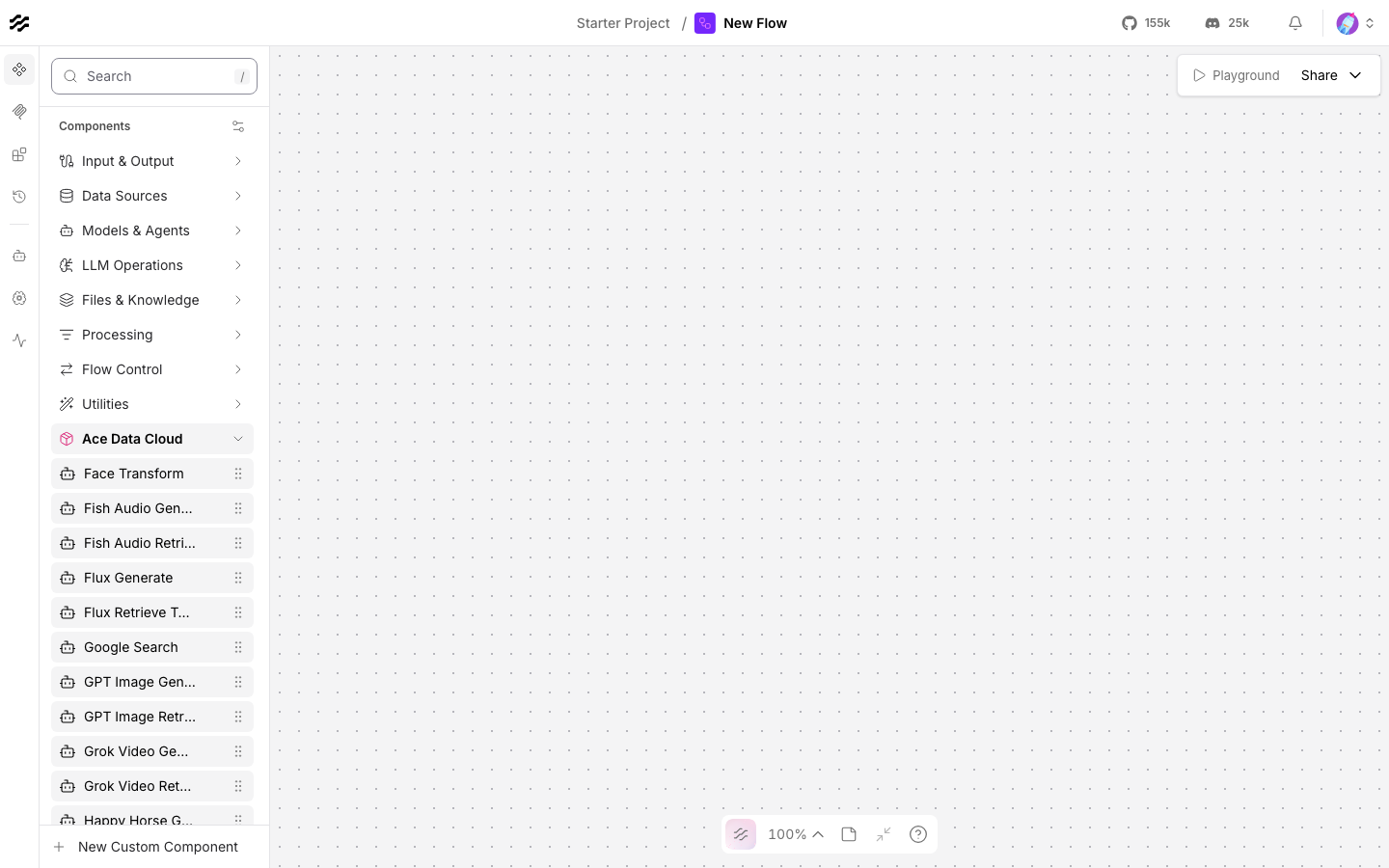
Search the component palette for suno, seedance, happyhorse, gpt image, or nano banana. The extension exposes independent Generate and Retrieve Task nodes with service-first labels ending by Ace Data Cloud, category-appropriate audio/video/image icons, and their own guide links. Existing ext:ace_data_cloud:<Class>@official saved-flow IDs are unchanged.
- Suno music and audio · 中文
- Seedance video · 中文
- Happy Horse video · 中文
- GPT Image images · 中文
- Nano Banana images · 中文
These integrations are provided by Ace Data Cloud and do not claim endorsement by the service owners. Historical screenshots below retain their original date, Langflow version and labels.
1. Install the extension
Install only one service
| Service | Distribution | Install in Langflow's Python environment |
|---|---|---|
| Suno | lfx-acedatacloud-suno |
python -m pip install "lfx-acedatacloud-suno==0.1.3" |
| Seedance | lfx-acedatacloud-seedance |
python -m pip install "lfx-acedatacloud-seedance==0.1.3" |
| HappyHorse | lfx-acedatacloud-happyhorse |
python -m pip install "lfx-acedatacloud-happyhorse==0.1.3" |
| GPT Image | lfx-acedatacloud-gpt-image |
python -m pip install "lfx-acedatacloud-gpt-image==0.1.3" |
| Nano Banana | lfx-acedatacloud-nano-banana |
python -m pip install "lfx-acedatacloud-nano-banana==0.1.3" |
Each service package registers only Generate and Retrieve Task under Components → service name by Ace Data Cloud, with no chat provider or aggregate dependency. Restart an existing server after installation. Each wheel includes matching no-key flows in its Python package's examples/ directory.
Service flows use ext:ace_<service>:* IDs. Root examples/ keep aggregate ext:ace_data_cloud:* IDs and require the aggregate. All five packages can coexist; with the aggregate installed, both categories remain so saved flows keep their IDs. Installation does not migrate saved nodes.
Install the aggregate and native chat provider
uv venv --python 3.12
source .venv/bin/activate
uv pip install "langflow==1.12.6" "lfx-acedatacloud==0.1.3"
lfx extension list
langflow run
The v0.1.3 GitHub release provides the same six distributions as wheels and source archives. The aggregate wheel is lfx_acedatacloud-0.1.3-py3-none-any.whl. Install downloaded wheels in the server's Python environment, then restart. The aggregate exposes 17 generation actions, 15 task readers and the named Ace Data Cloud model provider under Components → Ace Data Cloud.
2. Create an API key with the right access
New account? Register and sign in first. If the Applications page has no General application yet, choose Initialize General Application, then continue with the key steps below.
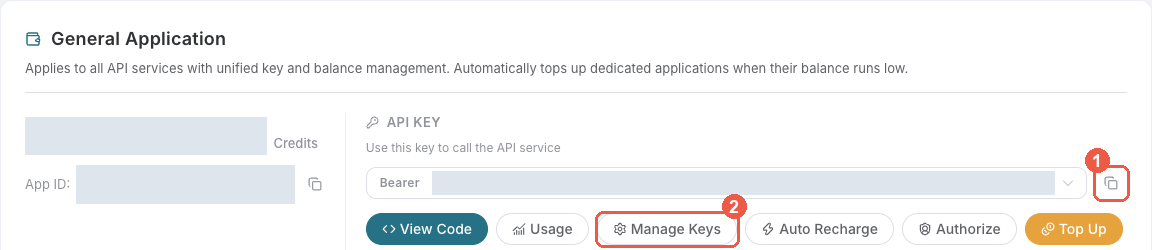
- Sign in to Ace Data Cloud → Applications and open General application. A general-application key can use the services your account has access to; a service-specific key is limited to that service.
- To reuse the selected key, click the copy icon marked 1 below. For a separate Langflow key, click Manage Keys marked 2, then Create.
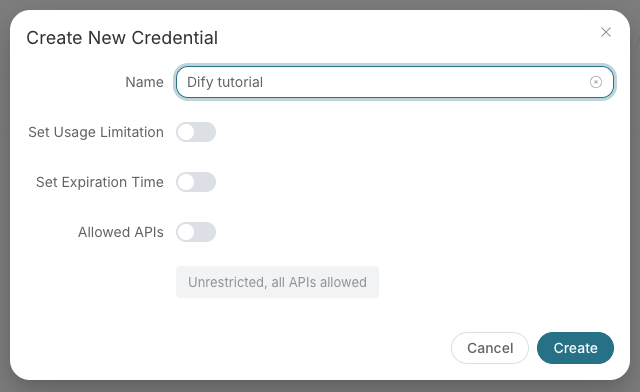
- Name the new key, for example
Langflow tutorial, and set expiration, usage and Allowed APIs restrictions as needed. Click Create, return to the list or application card, and copy the token.
- Check service access, current price and balance before a paid run. If Allowed APIs is enabled, include both routes used by the flow:
/openai/images/generationsand/openai/tasksfor GPT Image;/v1/modelsand/v1/chat/completionsfor the chat model. Copy only the token string. Do not prependBearer, use a platform management token, or put the key in a prompt, flow export or screenshot.
3. Store the key in Langflow
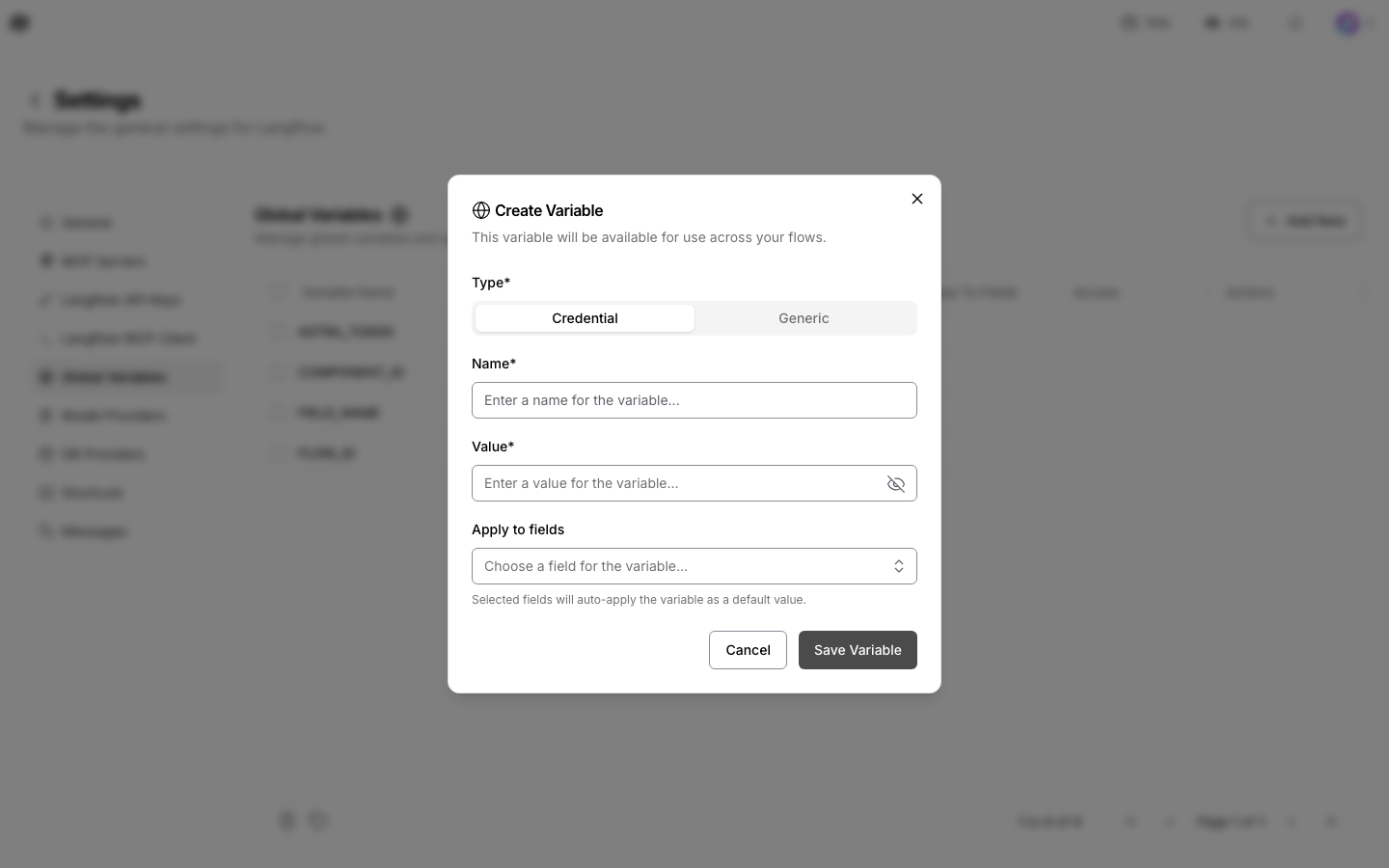
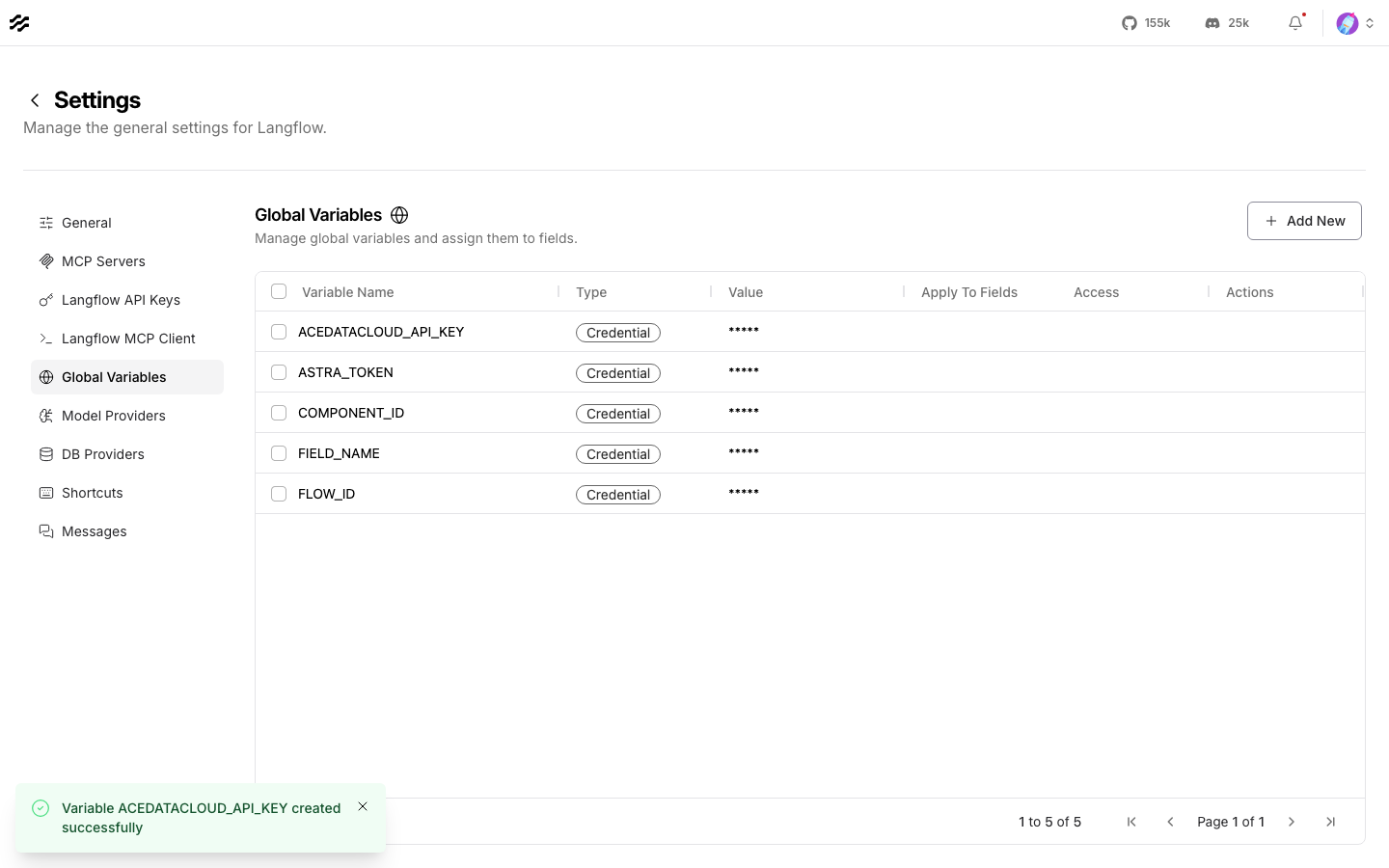
Choose your profile icon → Settings → Global Variables → Add New. Set Type to Credential, Name to ACEDATACLOUD_API_KEY, paste the token into Value, then choose Save Variable. The saved value is masked.
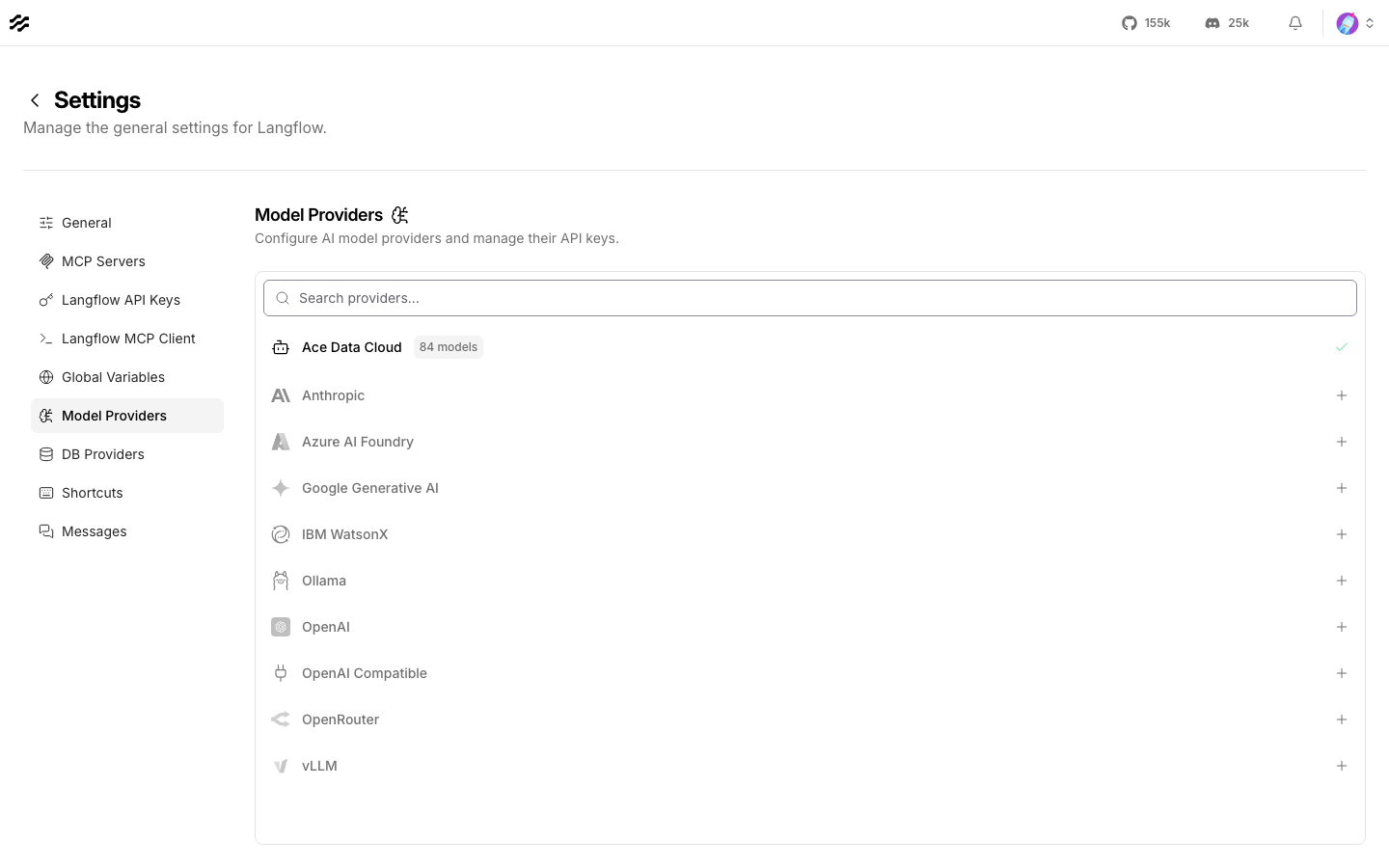
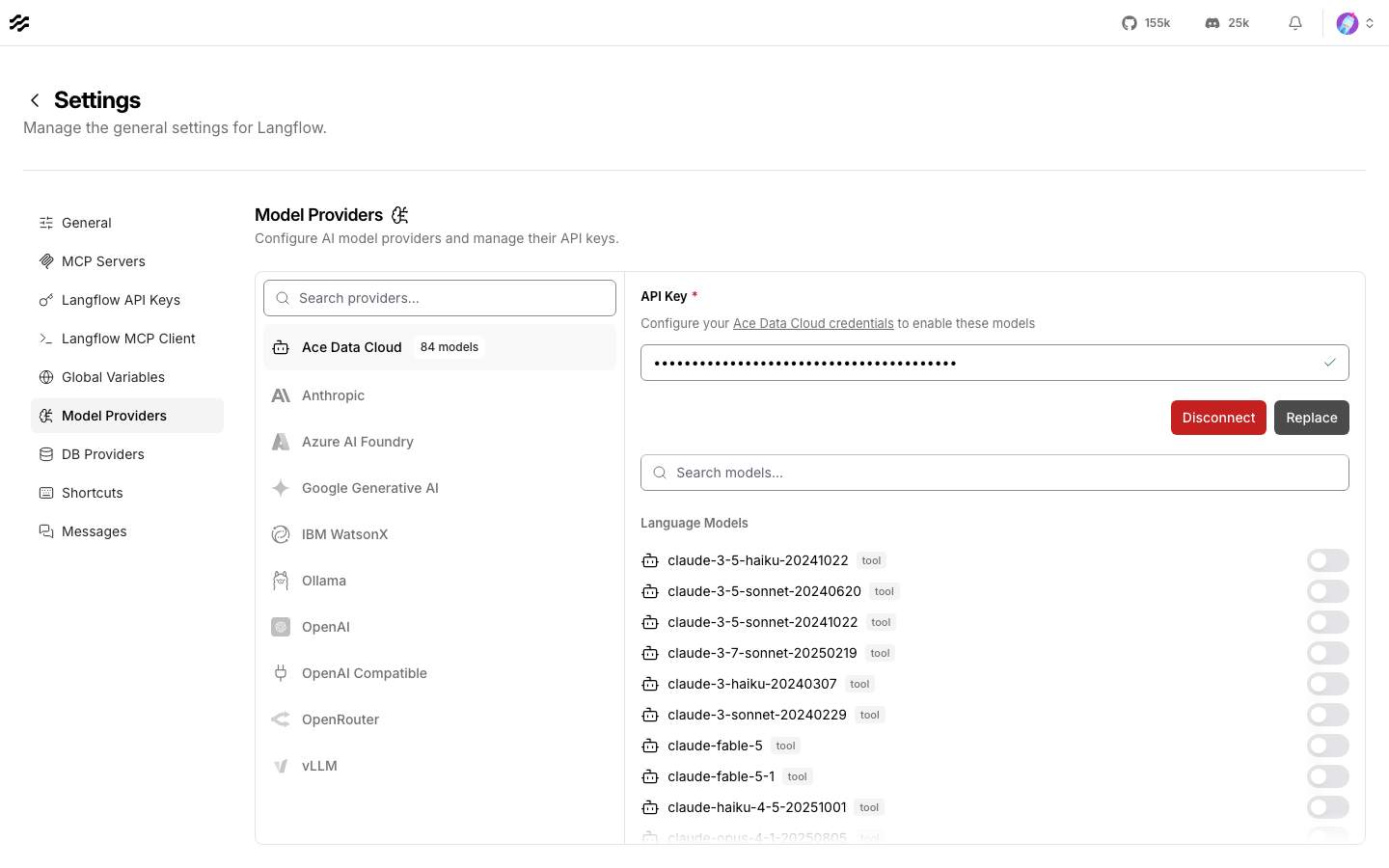
The same variable connects the named model provider. Open Settings → Model Providers → Ace Data Cloud and check the API Key shows as connected. Version 0.1.2 used the earlier 84-ID filter. Version 0.1.3 refreshes the list from the current public chat catalog and the models visible to your key, so new text models do not need a package update with this release. Enable the specific model you want to use.
On each service node, click the globe icon in Ace Data Cloud API key and select ACEDATACLOUD_API_KEY. The first GPT Image flow has two key fields: one on Generate and one on Retrieve Task. Bind both. A global variable reference saves the variable name in the flow; the token stays in Langflow's credential store. Before sharing an exported flow, inspect it for literal secrets. In our Langflow 1.12.5 test, enabling LANGFLOW_REMOVE_API_KEYS=true also removed this field's global-variable reference on reload; use the default setting for persistent binding and confirm the reference survives a reload.
4. Try the chat model provider
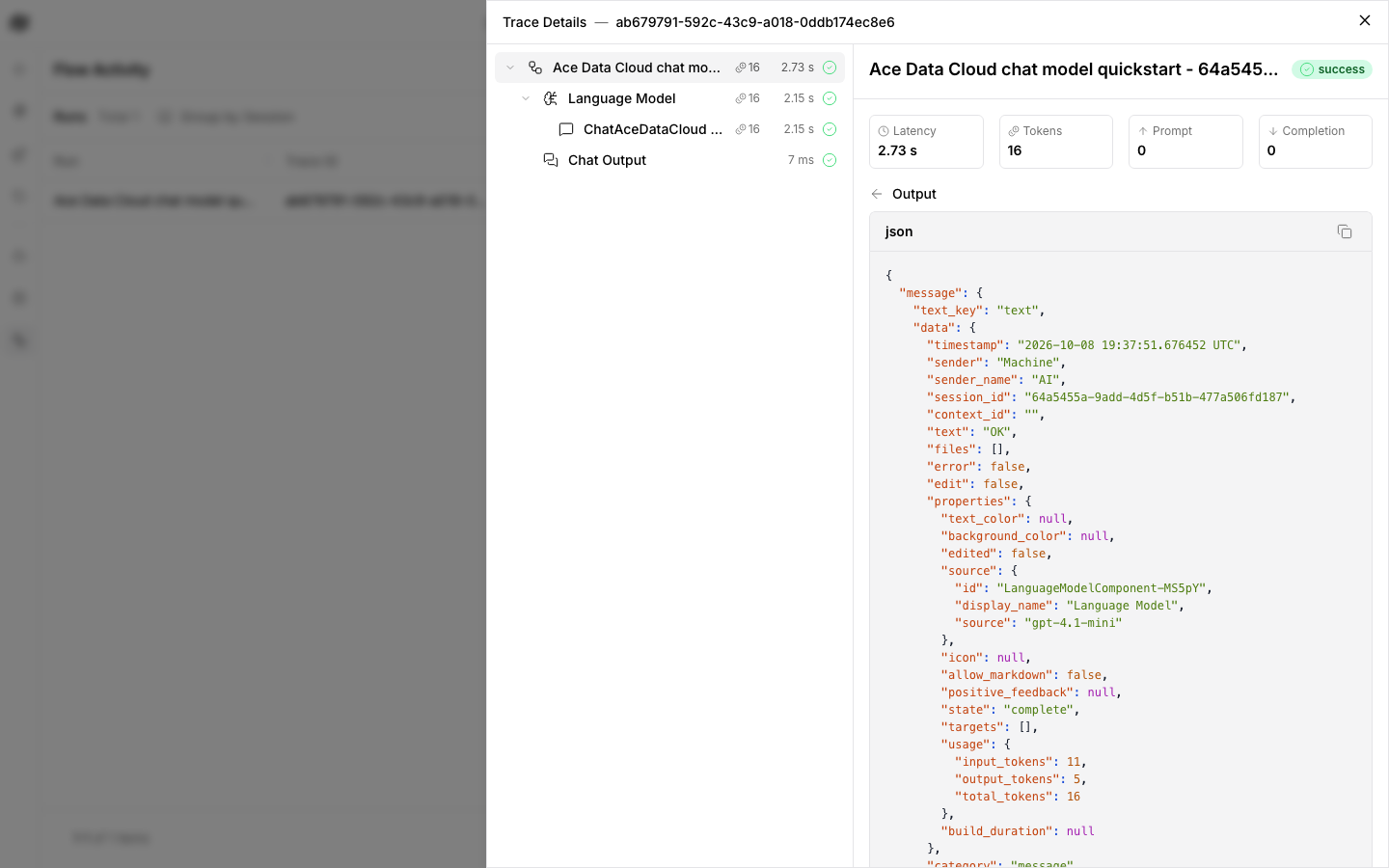
On the Projects page, click Upload a flow and select examples/chat_model.json. It has a Language Model node set to Ace Data Cloud → gpt-4.1-mini, connected to Chat Output. Its fixed input says Reply with exactly OK.. The API Key override is empty so Langflow uses the provider credential configured above. Click the Run component triangle on Chat Output once, then inspect the output or Traces.
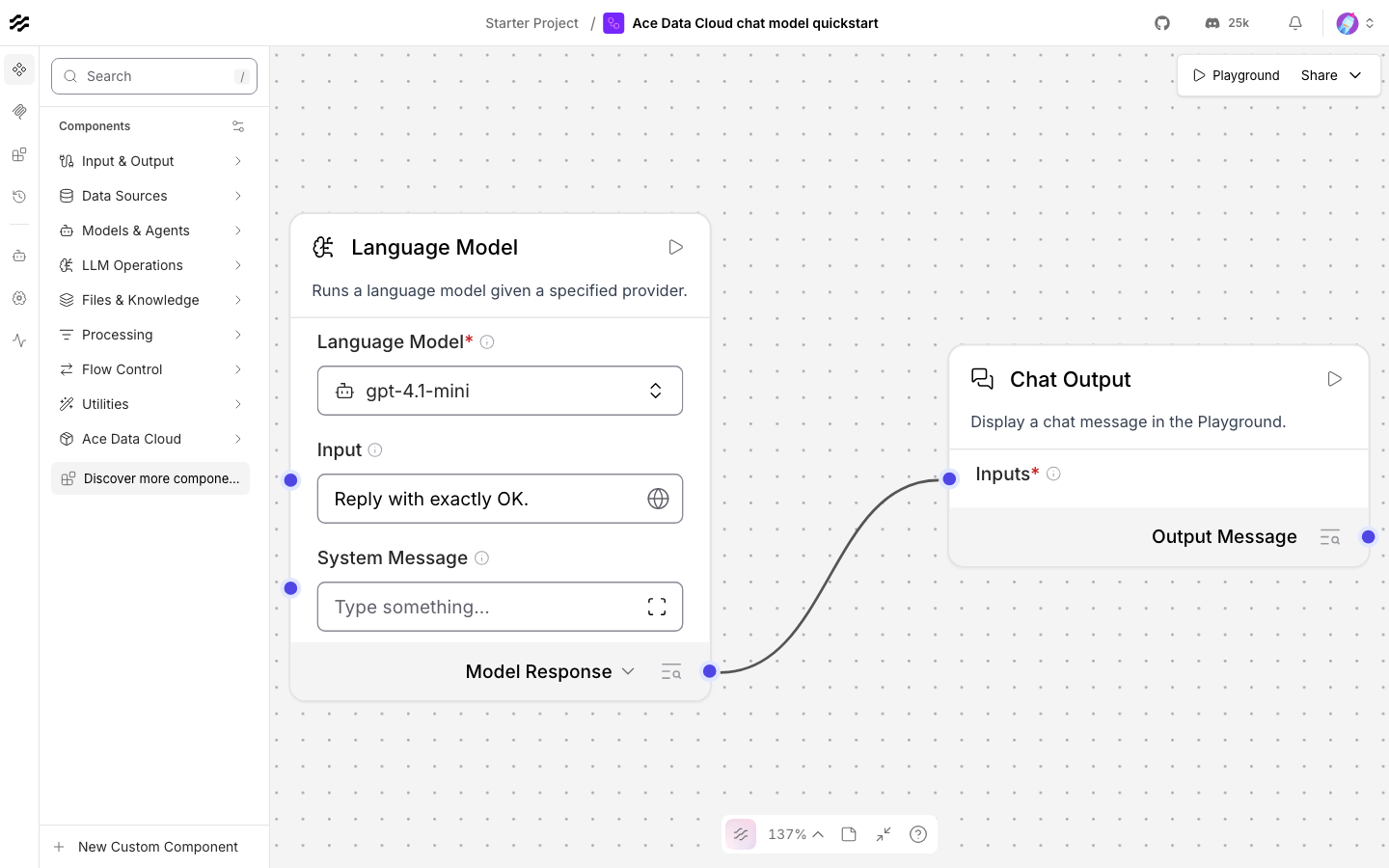
The recorded test returned OK using 11 input and 5 output tokens. The model and reply were verified in the flow trace and one matching Credits usage record. Your response and charge depend on the current model and account.
5. Generate one GPT Image and query the same task
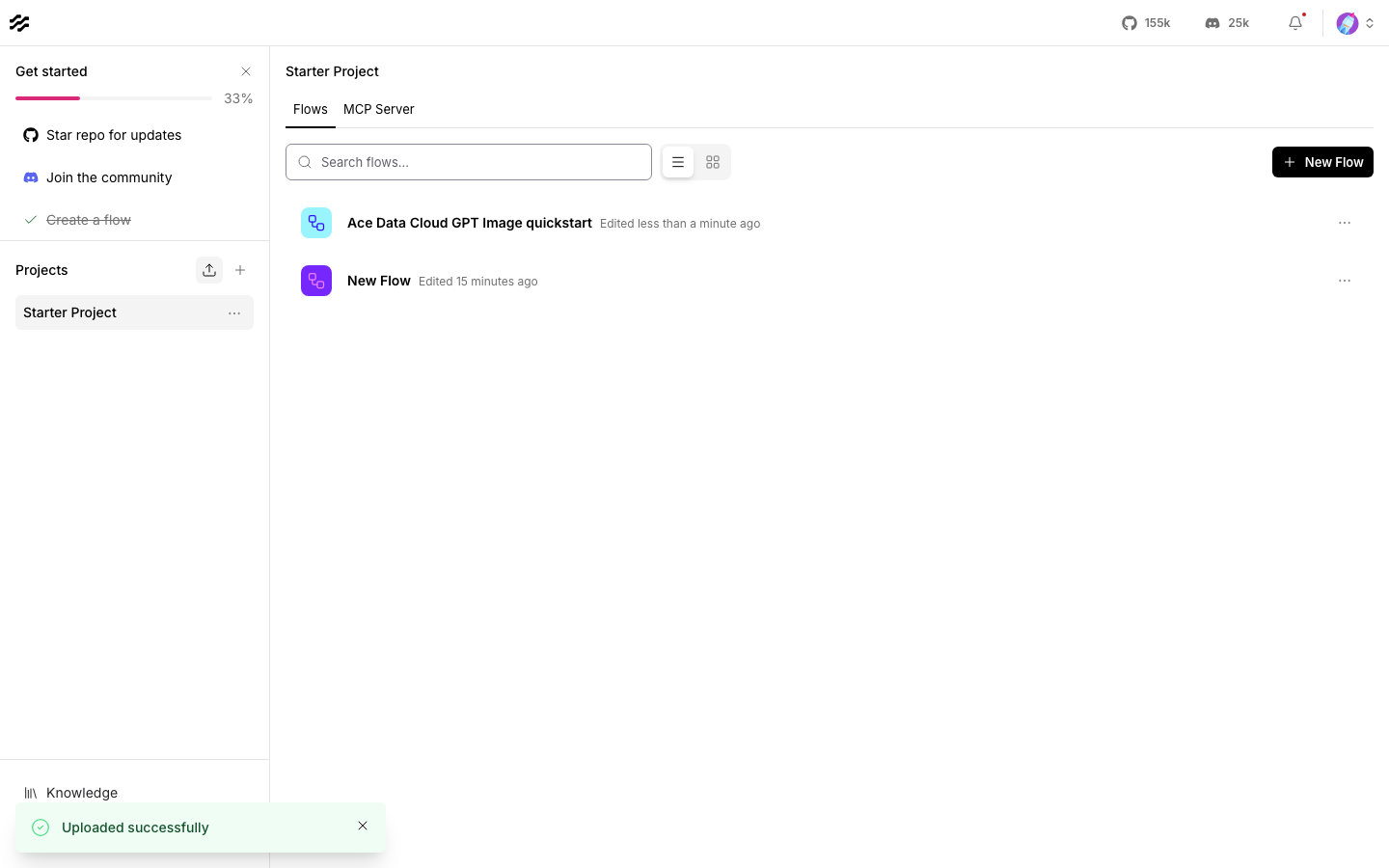
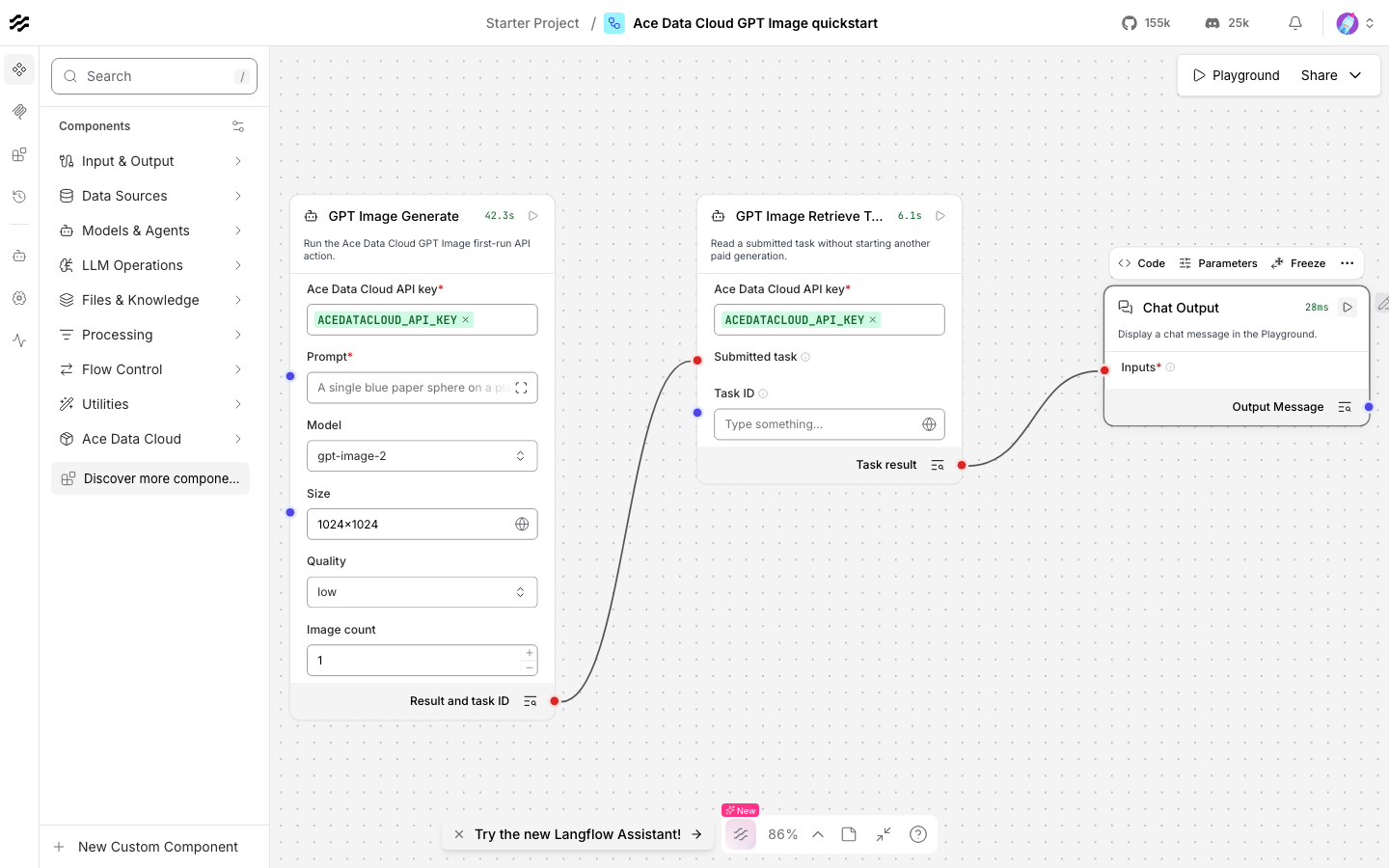
Upload examples/gpt_image.json. Langflow 1.12.5 accepted the no-key JSON and displayed this path:
GPT Image Generate → GPT Image Retrieve Task → Chat Output
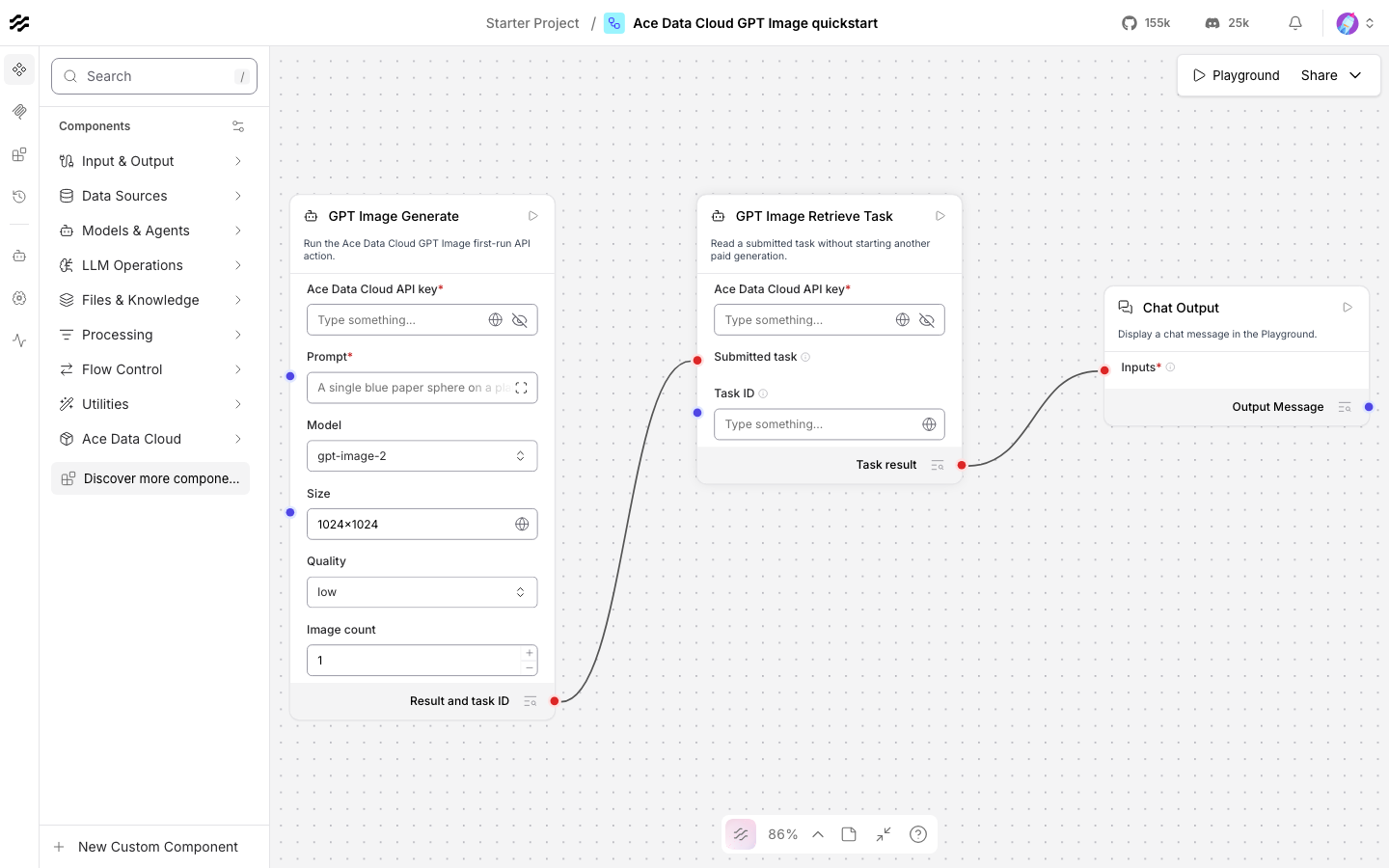
Bind ACEDATACLOUD_API_KEY to both Ace nodes. The example already sets these first-run values; leave other parameters empty:
| Field | Value |
|---|---|
| Prompt | A single blue paper sphere on a plain cream background, clean studio photograph, no text. |
| Model | gpt-image-2 |
| Size | 1024x1024 |
| Quality | low |
| Image count | 1 |
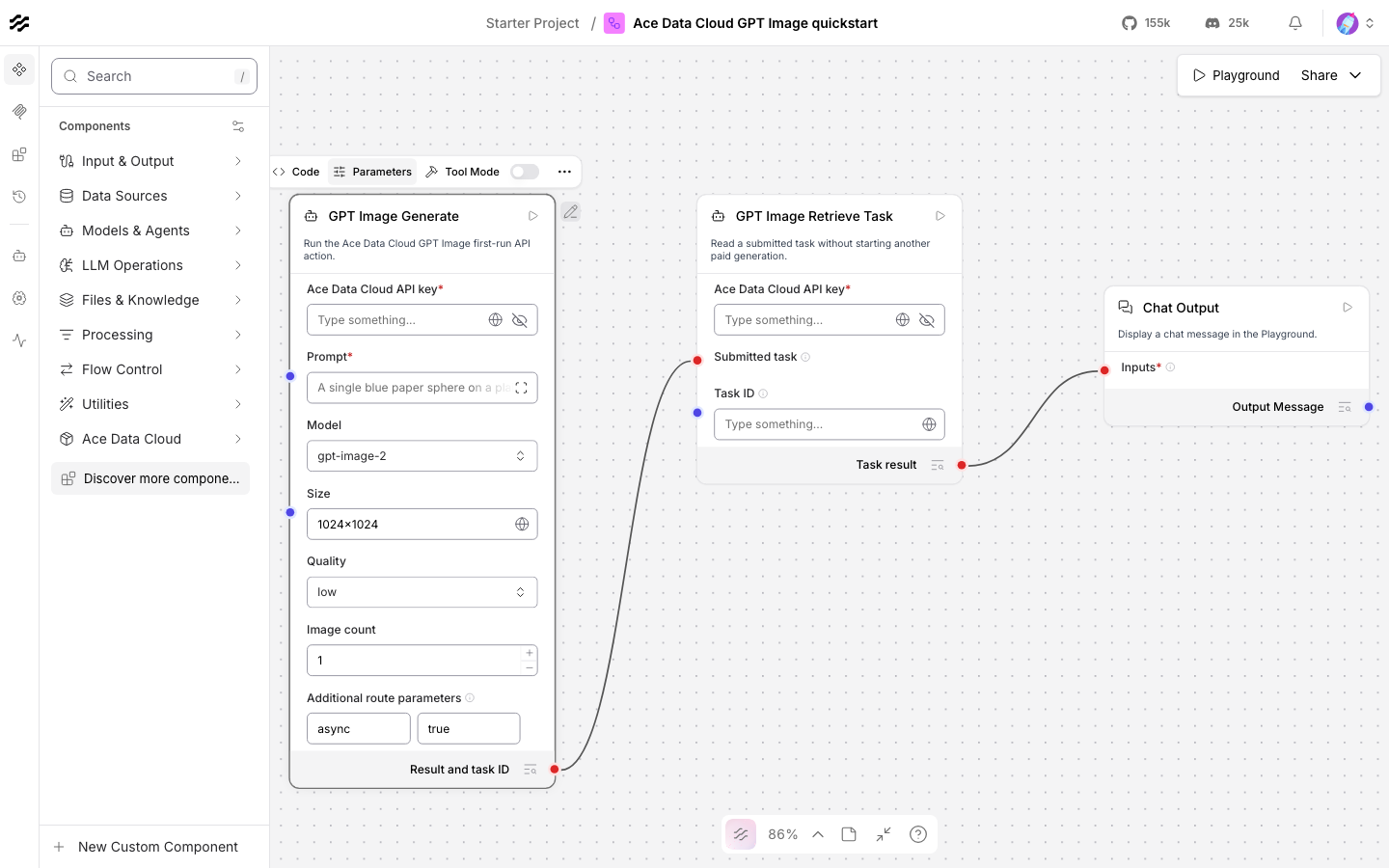
| Additional route parameters | {"async": true} |
| Retrieve Task → Wait up to seconds | 240 |
In the editor, select Generate → Parameters → Add on Additional route parameters to inspect the prefilled async=true pair. It requests a task ID without waiting for the full media generation in the submit call.
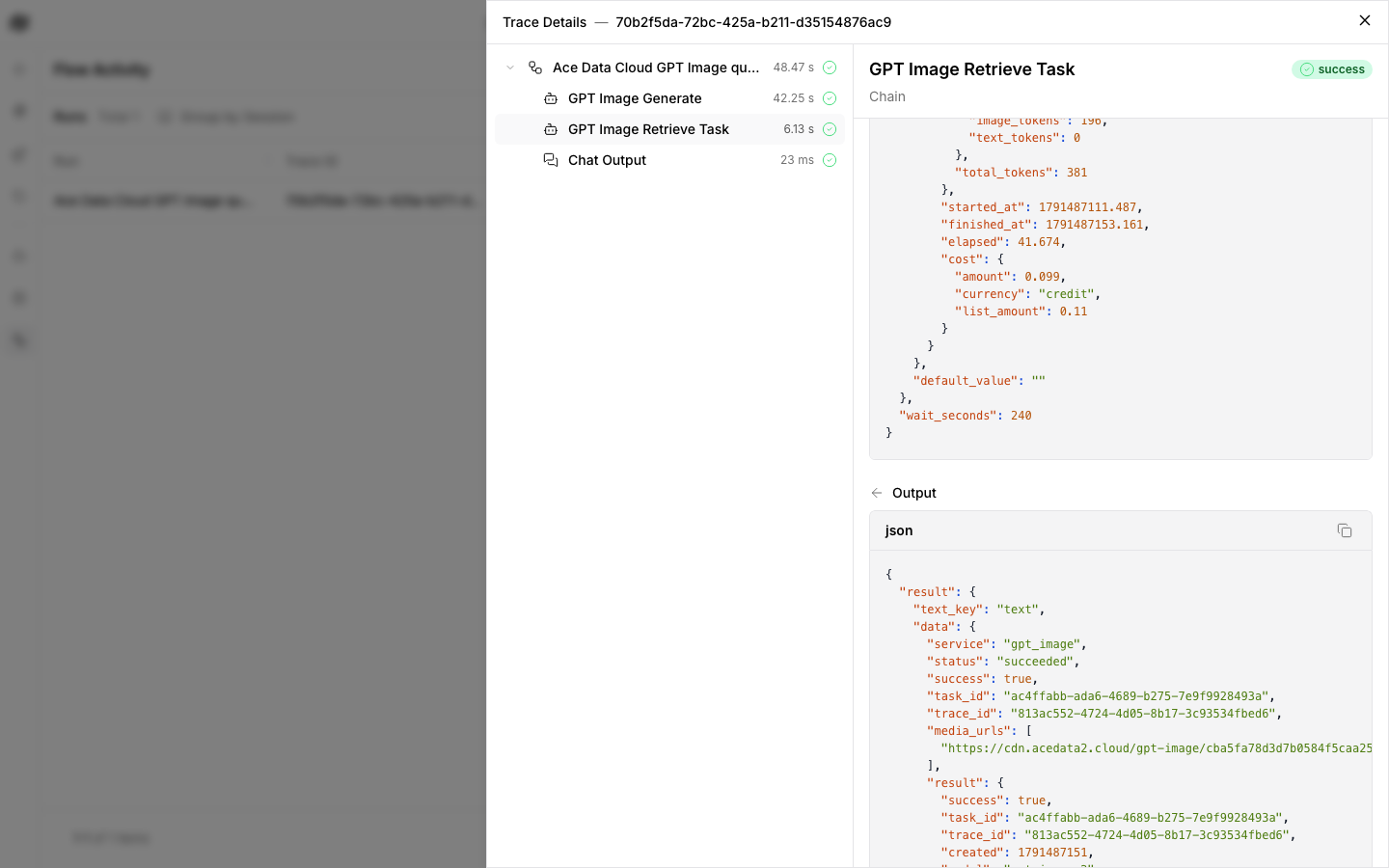
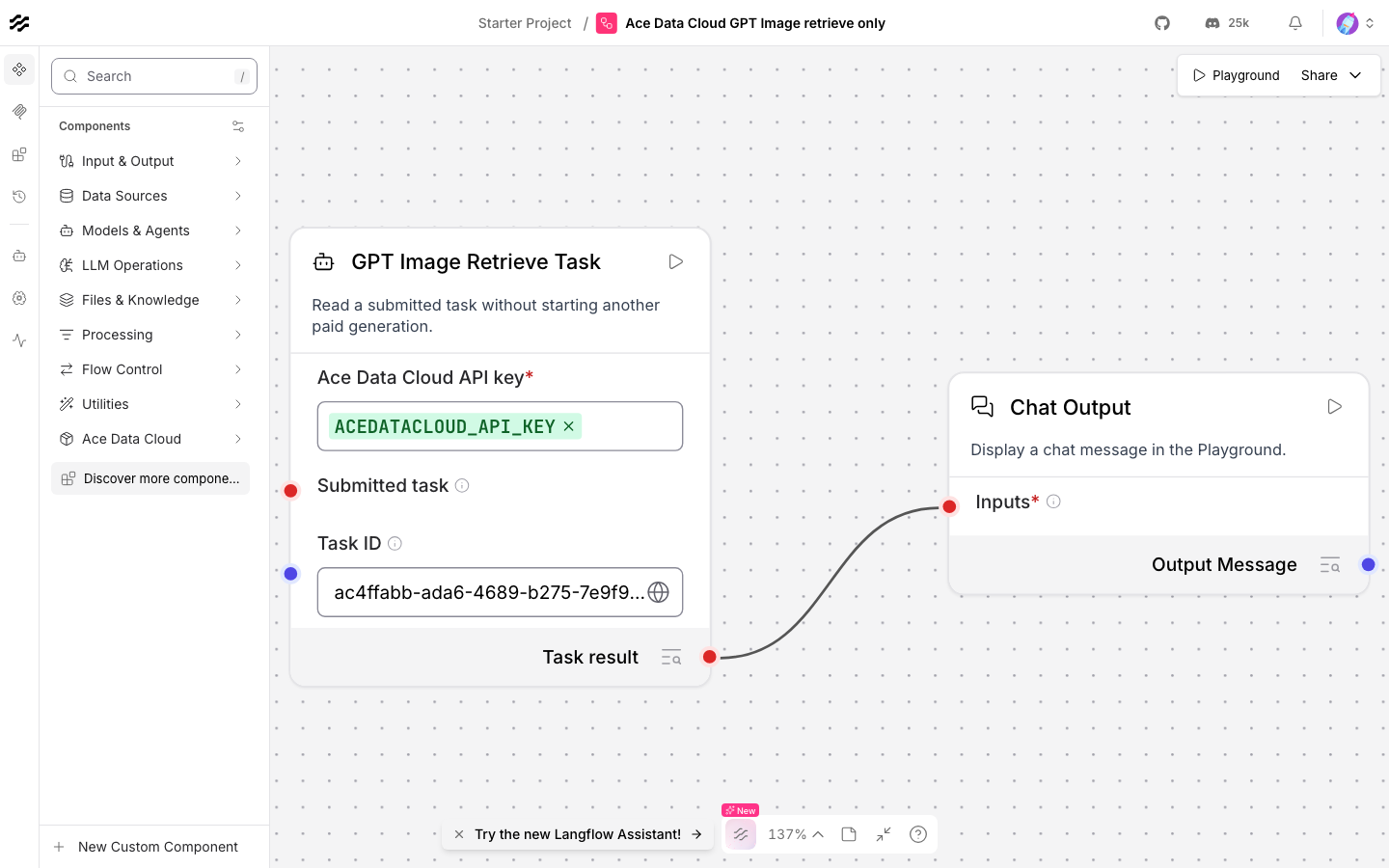
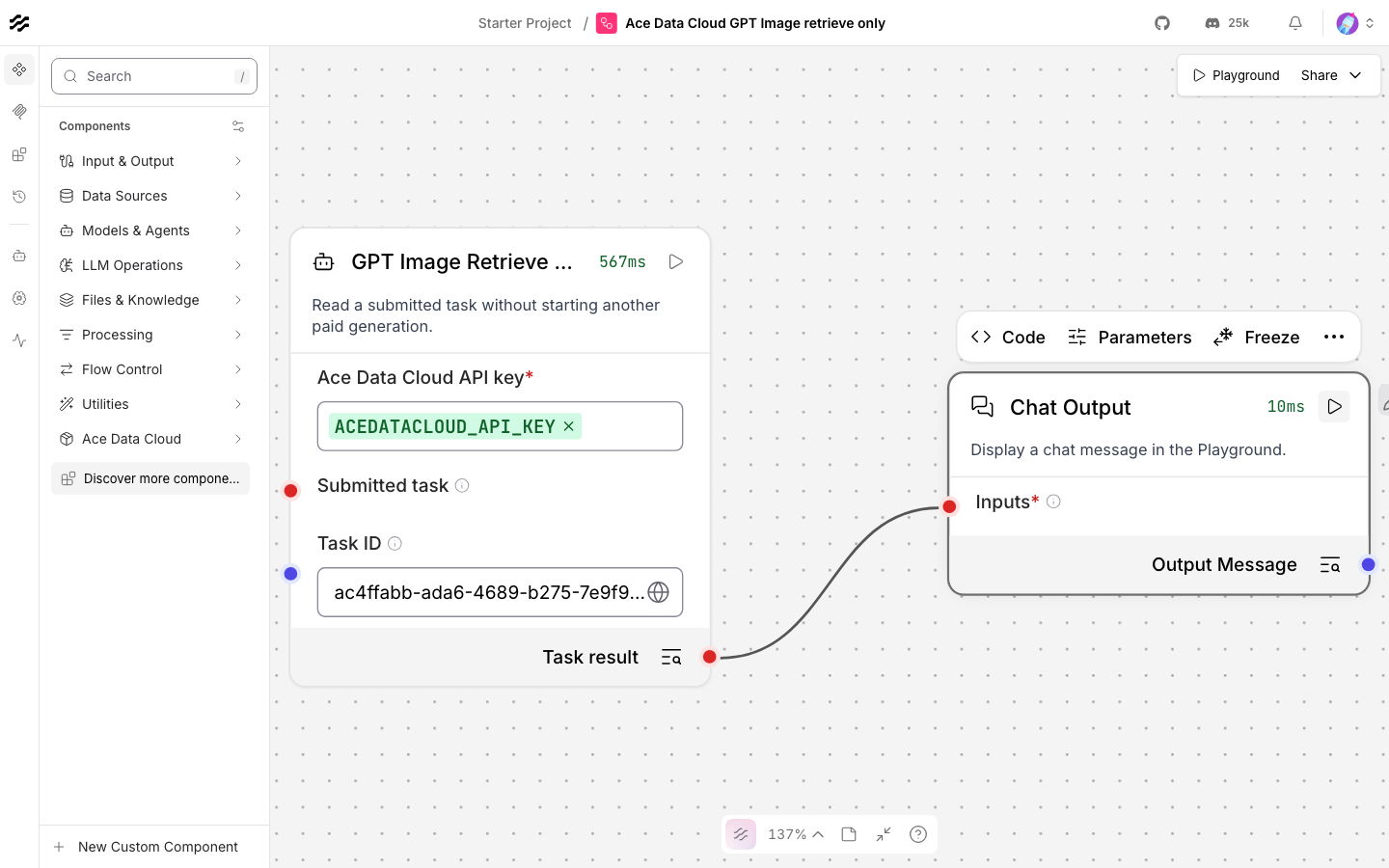
Click Run component on Chat Output once. Generate makes one paid submission and requests an immediate task ID. Its returned task_id is connected to Retrieve Task's Submitted task input. Retrieve Task uses only /openai/tasks and waits up to 240 seconds for that same ID. A green flow before the service task is terminal is not proof that the media is ready.
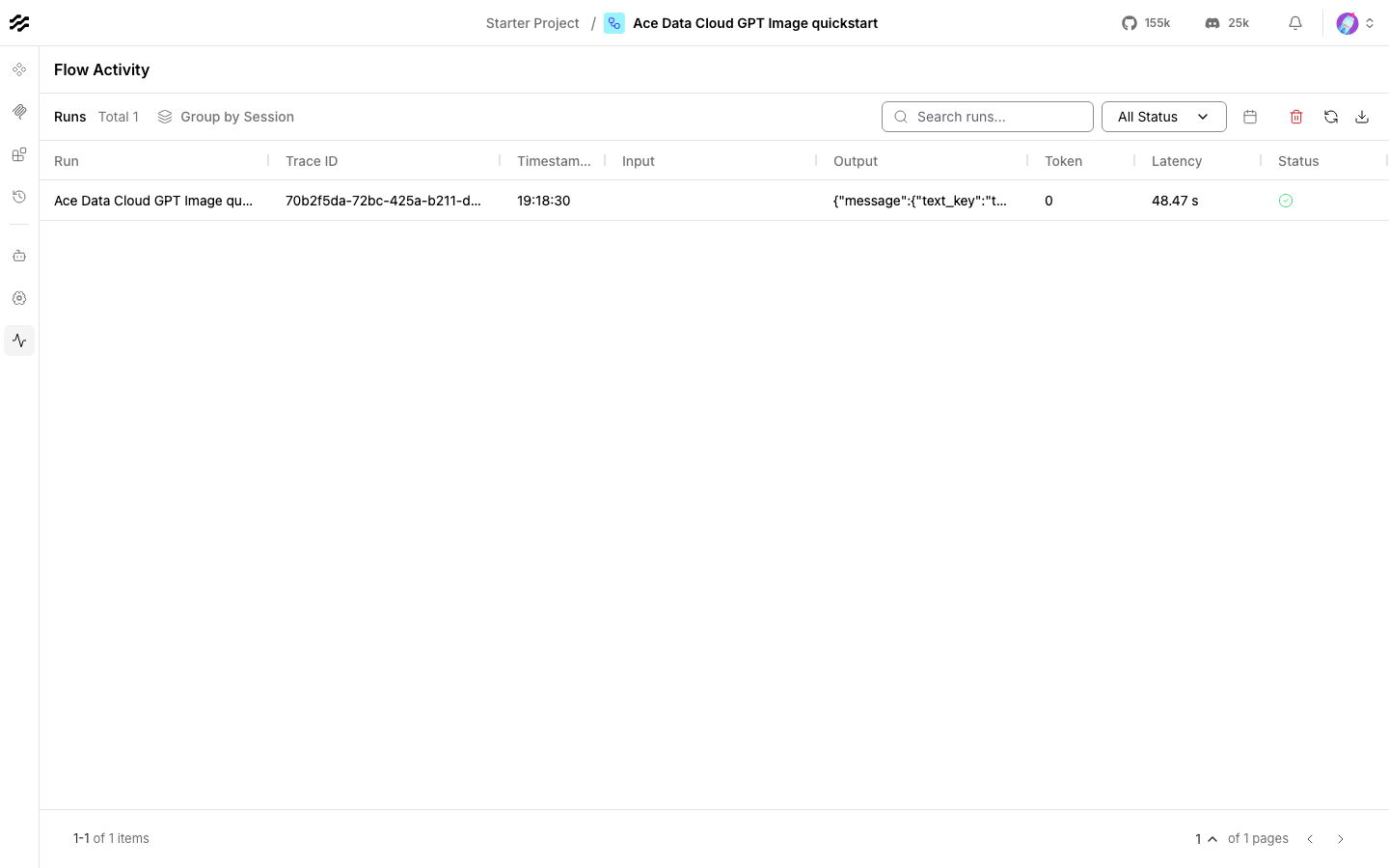
The real test returned status=succeeded, success=true, task ID ac4ffabb-ada6-4689-b275-7e9f9928493a, and one PNG URL. The returned media was opened over HTTPS and its response was 200 image/png.

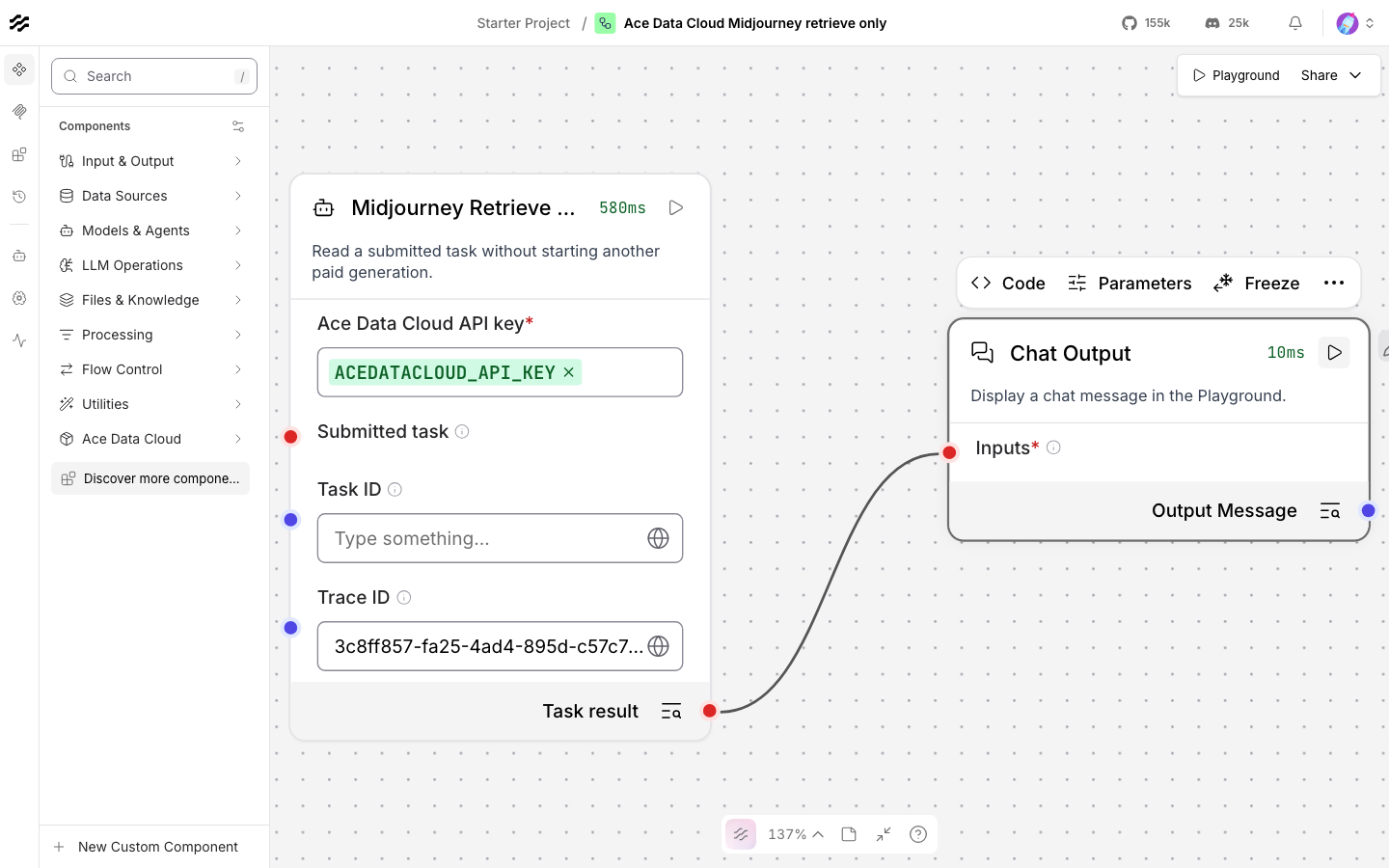
If the result is still pending, do not rerun the generation flow. That would submit another paid task. Import examples/retrieve_only/gpt_image.json, bind the same Credential variable, paste the original task ID into Task ID, and run Chat Output. This flow contains no generation node. Repeat this read-only flow until the task is terminal.
If a submission times out after the service accepted it, check Usage History before another submission. GPT Image, Midjourney, and Veo task readers also accept a Trace ID from request history when the task ID was not returned. For other services, recover the task ID from the original usage record or ask support with its trace ID. Query the recovered task; never regenerate only to learn its status.
6. Check the charge
In Ace Data Cloud → Usage History, filter to the relevant API, key, and time, then compare the task or trace ID. The completed GPT Image test had trace ID 813ac552-4724-4d05-8b17-3c93534fbed6; the platform returned one HTTP 200 usage record for that trace and deducted 0.099 Credits. Langflow's task output also reported cost.amount=0.099 in credit currency. This is evidence for that single test, not a fixed future price. Read your account's current package rate if you need a USD conversion.
The chat model example had one matching usage record for gpt-4.1-mini, 16 tokens, and 0.0000234636021 Credits. Sanitized run evidence keeps task, media, import, and billing readbacks separate.
Other service examples
Each file below is a no-key first-run flow. For asynchronous services, the matching retrieve_only file queries an existing task ID without another submission. Each named component exposes the listed first-run action and an allowlisted Additional route parameters field. These are focused entry points; they do not claim every advanced action supported by the underlying API.
The 15 asynchronous first-run flows and newly added media components prefill {"async": true} so the task reader can query promptly. Fish Audio can also finish synchronously when used without that option; a connected completed result passes through its reader without another API call.
The exact public routes, default values, and proof level for each action are in Capabilities.
| Service | First-run action | Import flow | Task lookup |
|---|---|---|---|
| GPT Image | Generate one image | Flow | Lookup |
| Suno | Generate instrumental audio | Flow | Lookup |
| Seedance | Generate text-to-video | Flow | Lookup |
| Fish Audio | Text-to-speech | Flow | Lookup |
| Seedream | Generate one image | Flow | Lookup |
| Happy Horse | Generate text-to-video | Flow | Lookup |
| Qwen Image | Generate one image | Flow | Lookup |
| Veo | Generate text-to-video | Flow | Lookup |
| Google Search | Web search, synchronous | Flow | No task ID |
| Grok Video | Generate text-to-video | Flow | Lookup |
| Face Transform | Analyze face keypoints, synchronous | Flow | No task ID |
| Midjourney | Imagine one image | Flow | Lookup |
| Flux | Generate one image | Flow | Lookup |
| MiniMax H3 | Generate text-to-video | Flow | Lookup |
| Wan | Generate text-to-video | Flow | Lookup |
| Kling | Generate text-to-video | Flow | Lookup |
| Nano Banana | Generate one image | Flow | Lookup |
All 18 first-run JSON flows (one model plus 17 services) and all 15 retrieve-only flows were imported into Langflow 1.12.5. The 15 readers first retrieved existing completed tasks without submitting generation. We then made exactly one new paid submission through each of the other 14 media Component classes: all 14 tasks completed, their first media URLs returned HTTP 200, and each matched one Credits usage record. Those 14 calls deducted 19.302232 Credits in total; see sanitized per-service evidence. Midjourney and Grok's original synchronous submit calls timed out after the service accepted them; both tasks were recovered from usage records and completed without a paid retry. The imported UI flow itself was run end to end for GPT Image and the chat model; the other service flows were imported and their component methods were called, but their full UI graph execution has not been claimed.
Troubleshooting
| What you see | What to do |
|---|---|
| Bundle missing | Install in Langflow's Python environment, run lfx extension list, then restart the server. |
| Provider missing or zero models | Check Settings → Model Providers, the Credential global variable, /v1/models access, and the desired model toggle. |
| 401 or 403 | Check the full application API key, allowed API routes, service entitlement, expiry, and balance. Do not paste Bearer into the key field. |
| 400 | Check the exact model, action, duration, size, and any additional parameters. This bundle fixes the public route for each first-run action. |
pending or no media |
Query the same task ID with the retrieve-only flow. Do not click Generate again to poll. |
| 429 | Wait and reduce concurrency. Do not enable automatic paid retries. |
| Timeout or 5xx | Check request history and task status before deciding whether a new submission is needed. Use the task reader's Trace ID field where available. Give support the task or trace ID, never the key. |
Privacy, scope, and development
The extension sends the selected inputs and Bearer token to https://api.acedata.cloud. Secrets belong in Langflow Credential global variables. Generated media links can be shared by anyone who has the URL; handle exported flows and outputs accordingly. The extension itself is free; Ace Data Cloud API usage follows the current service price and your account balance. See Privacy, Issues, or dev@acedata.cloud.
To develop or review the package:
uv pip install -e .
lfx extension validate src/lfx_acedatacloud --execute-imports
pytest -q tests
python -m build
The public BUNDLE_API_VERSION=1 manifest and separate provider/component IDs are checked against Langflow 1.12.5. Package installation, official Langflow source acceptance, default inclusion, and live service completion are tracked as distinct outcomes.
1 maintainer

Metadata
1 maintainer
Release files for lfx-acedatacloud 0.1.3
For a detailed explanation of source distributions (sdists) and built distributions (wheels), please see the package formats documentation.
Source distribution (sdist)
| File | Size | Uploaded | Provenance | Actions |
|---|---|---|---|---|
| lfx_acedatacloud-0.1.3.tar.gz | 130.9 kB | Without provenance | Details for lfx_acedatacloud-0.1.3.tar.gz |
Built distribution (wheel)
| File | Interpreter | ABI | Platform | Actions Reset |
|---|---|---|---|---|
| lfx_acedatacloud-0.1.3-py3-none-any.whl | Python 3 | none | any | Details for lfx_acedatacloud-0.1.3-py3-none-any.whl |
Total release size: 165.3 kB
Release files / lfx_acedatacloud-0.1.3.tar.gz
| Download URL | lfx_acedatacloud-0.1.3.tar.gz |
|---|---|
| Size | 130.9 kB |
| Tags | Source |
|
SHA-256 checksum How to use checksums |
9b956bb376f33cfc9436889f2ffd7045a42d55628c11ec303299d050b5d9caa6
|
|
BLAKE2b-256 checksum How to use checksums |
9ab2130fbc0c7a8141f3de19d3f58eaf1ae8e383088f64f5128399d59948684e
|
| Upload date | |
|
Uploaded using Trusted Publishing? What is trusted publishing? |
No |
| Uploaded via |
twine/6.2.0 CPython/3.12.10
|
Release files / lfx_acedatacloud-0.1.3-py3-none-any.whl
| Download URL | lfx_acedatacloud-0.1.3-py3-none-any.whl |
|---|---|
| Size | 34.4 kB |
| Tags | Python 3 |
|
SHA-256 checksum How to use checksums |
9b32abcd9ee0c33cee143dc418266c6f1b681df507145adaa96a85d393fd874f
|
|
BLAKE2b-256 checksum How to use checksums |
457f8e2ceea02771af58006087bb4f2e527bb3bdd1bebbe3692bb5d180311beb
|
| Upload date | |
|
Uploaded using Trusted Publishing? What is trusted publishing? |
No |
| Uploaded via |
twine/6.2.0 CPython/3.12.10
|
Security for lfx-acedatacloud 0.1.3
Provenance
Provenance describes where a file came from. On PyPI, provenance is shared via attestations, which provide a verifiable record of the build or publishing details. View details, limitations and caveats.
No provenance found
None of the files in this release were uploaded with provenance metadata.
A note on package security
PyPI is a repository for distributing packages, not a service for auditing them. While third-party security researchers and our staff do their best to detect and remove malicious packages, PyPI cannot guarantee the quality, security or suitability of any given package.
To learn more about protecting yourself from malicious actors, visit our package security documentation.














