
LiberTEM-panel-ui




Widget-based web GUI package intended to support the LiberTEM library for electron microscopy data analysis. The primary usage environment is from within Jupyter Notebooks. Built using the Panel and Bokeh frameworks.
Runs LiberTEM User Defined Functions (UDFs) in interactive panels, which simplies adjustment of parameters and exploring data.
The framework is capable of running certain analyses on top of the LiberTEM-live framework, allowing for interactive live acquisitions in a Jupyter Notebook.
There are two ways to use the UI tools:
as standalone analysis windows connected to a dataset
through a
UIContextwindow manager, which can dynamically add and remove windows as required
The standalone case (where ctx, ds are
LiberTEM Context and DataSet objects):
from libertem_ui.windows.com import CoMImagingWindow
# Create the window using a context and dataset
com_window = CoMImagingWindow.using(ctx, ds)
# Display the window itself
com_window.layout()
# Results from the window are stored in a dataframe-based results manager
# This provides a GUI result browser using a .layout() method
com_window.results_manager.layout()
# Results in the manager can be extracted into Python objects using methods
result_id = '3kd9sn'
rc = com_window.results_manager.get_result_container(result_id)
assert isinstance(rc.data, np.ndarray)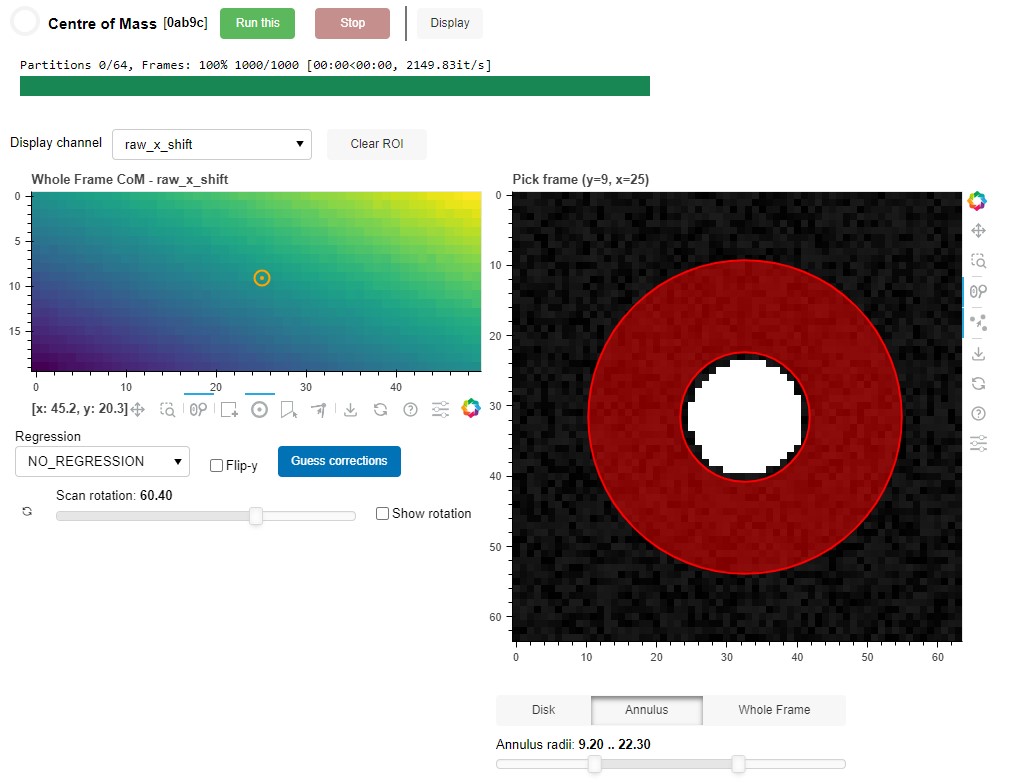
A second standalone window can be linked to the first,
and will share the data and LiberTEM resources. Results from
both windows will appear in the same results_manager.
from libertem_ui.windows.imaging import VirtualDetectorWindow
# Create new window linked to the previous window
v_window = VirtualDetectorWindow.linked_to(com_window)
# Display the new window
v_window.layout()
When two-or-more windows are linked, certain results can be displayed
in other windows to help navigate the data. For example, a log-sum over
all frames generated by the FrameImagingWindow can be displayed
in the VirtualDetectorWindow frame plot, to help parametrize an
annular darkfield analysis.
For a more tightly-integrated experience, the managed UIContext
can dynamically add and remove windows, as well as run analyses
from multiple windows in parallel:
from libertem_ui.api import UIContext

# Create the UIContext object
# This orchestrates:
#  - add/remove analysis windows
#  - providing work to the LiberTEM Context
#  - managing and saving results from analyses
ui_context = UIContext.for_offline(ctx, ds)
# Display main window for running analyses
ui_context.layout()
# Display table / dataframe-based results manager
ui_context.results_manager.layout()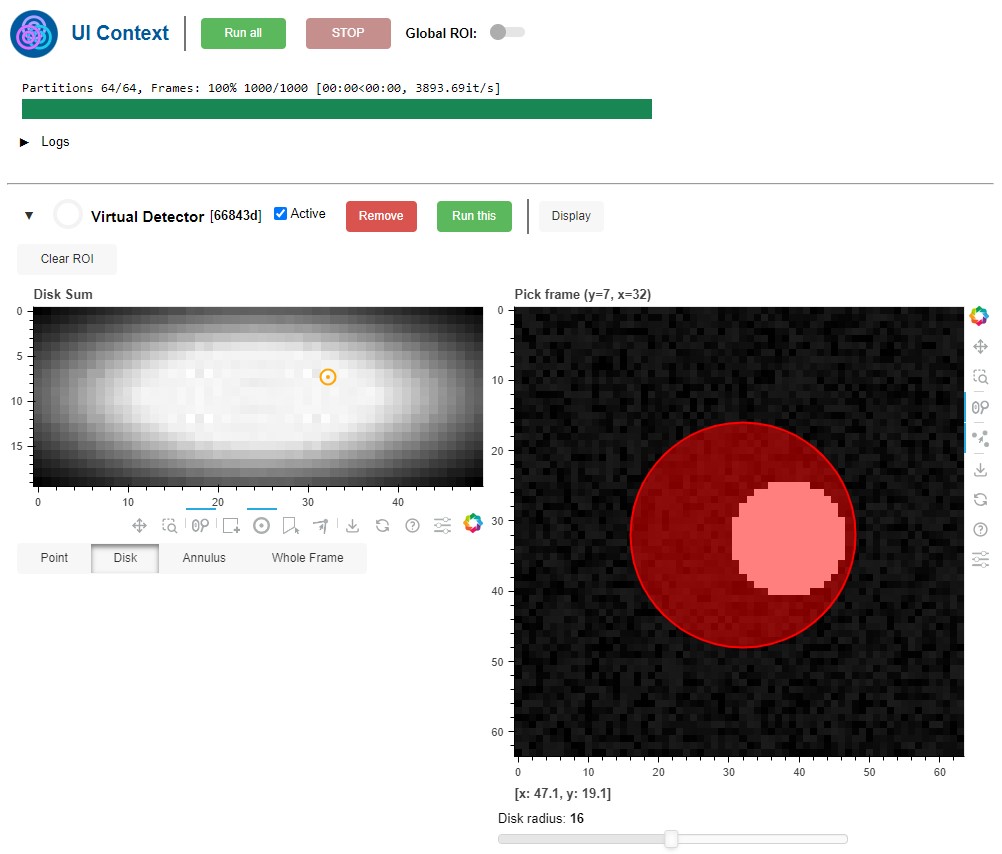
see examples/ for some more complete example use cases.
Installation
libertem_ui requires Python 3.10 or greater.
As always, it is advisable to use a virtual or conda environment for testing packages.
pip install libertem-uiThe optional dependencies libertem-ui[libertem] and libertem-ui[notebook] install the necessary components to run LiberTEM windows and Jupyter notebooks, respectively.
Disclaimer
LiberTEM-panel-ui is at an early proof-of-concept stage. All interfaces
and functionality is subject to change in the future. Notably, the primary usage
environment is in a Jupyter Notebook - standalone usage as a web app through
panel serve is not well tested.
If you are interested in the project and would like to see it taken further, please don’t hesitate to get in touch by posting an Issue.
1 maintainer

Metadata
1 maintainer
Release files for libertem-ui 0.0.1
For a detailed explanation of source distributions (sdists) and built distributions (wheels), please see the package formats documentation.
Source distribution (sdist)
| File | Size | Uploaded | |
|---|---|---|---|
| libertem_ui-0.0.1.tar.gz | 116.4 kB | Details |
Built distribution (wheel)
| File | Interpreter | ABI | Platform | Reset |
|---|---|---|---|---|
| libertem_ui-0.0.1-py3-none-any.whl | Python 3 | none | any | Details |
Total release size: 260.2 kB
Release files / libertem_ui-0.0.1.tar.gz
| Download URL | libertem_ui-0.0.1.tar.gz |
|---|---|
| Size | 116.4 kB |
| Tags | Source |
|
SHA-256 checksum How to use checksums |
fc166552a91df68d80255fea630edae87e3a8755f223dfcf6104840a9efe62d7
|
|
BLAKE2b-256 checksum How to use checksums |
57f90b2b5e28570712ce9af2798ffcb316288fcb0a98a40266d78cf1237770a6
|
| Upload date | |
|
Uploaded using Trusted Publishing? What is trusted publishing? |
Yes |
| Uploaded via |
twine/6.1.0 CPython/3.12.9
|
Provenance
Provenance describes where a file came from. On PyPI, provenance is shared via attestations, which provide a verifiable record of the build or publishing details. View details, limitations and caveats.


PyPI Publish Attestation
PyPI verified that this artifact, at this checksum, originated from the publisher listed below.
Signed by GitHub Actions, verified by PyPI on Jun 23, 2025.
Transparency logRelease files / libertem_ui-0.0.1-py3-none-any.whl
| Download URL | libertem_ui-0.0.1-py3-none-any.whl |
|---|---|
| Size | 143.8 kB |
| Tags | Python 3 |
|
SHA-256 checksum How to use checksums |
5325fdfc5f580609444ee17a7f5b9a4189e90de27547b18ff6c1145caabf93ac
|
|
BLAKE2b-256 checksum How to use checksums |
ce740c9e0f1a350ae1246ec7ecff2691795b9cd2d8b4603ece5c3cdd28e1a07f
|
| Upload date | |
|
Uploaded using Trusted Publishing? What is trusted publishing? |
Yes |
| Uploaded via |
twine/6.1.0 CPython/3.12.9
|
Provenance
Provenance describes where a file came from. On PyPI, provenance is shared via attestations, which provide a verifiable record of the build or publishing details. View details, limitations and caveats.
PyPI Publish Attestation
PyPI verified that this artifact, at this checksum, originated from the publisher listed below.
Signed by GitHub Actions, verified by PyPI on Jun 23, 2025.
Transparency log












