
Libify
Libify makes it easy to import notebooks in Databricks. Notebook imports can also be nested to create complex workflows easily. Supports Databricks Runtime Version 5.5 and above.
Installation
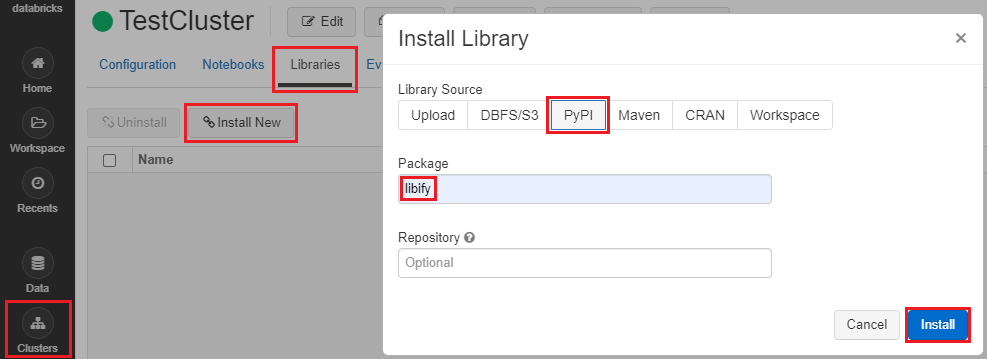
- Click the Clusters icon in the sidebar
- Click a cluster name (make sure the cluster is running)
- Click the Libraries tab
- Click Install New
- Under Library Source, choose PyPI
- Under Package, write libify
- Click Install
Typical Usage
After installing the package, add the following code snippets to the notebooks:
-
In the importee notebook (the notebook to be imported), add the following cell at the end of the notebook. Make sure that
dbutils.notebook.exitis not used anywhere in the notebook and that the last cell contains exactly the following snippet and nothing else:import libify libify.exporter(globals())
-
In the importer notebook (the notebook that imports other notebooks), first import
libify:import libify
and then use the following code to import the notebook(s) of your choice:
mod1 = libify.importer(globals(), '/path/to/importee1')
mod2 = libify.importer(globals(), '/path/to/importee2')
Everything defined in
importee1andimportee2would now be contained in the namespacesmod1andmod2respectively, and can be accessed using the dot notation, e.g.x = mod1.function_defined_in_importee1()
Databricks Community Cloud Workaround
Databricks Community Cloud (https://community.cloud.databricks.com) does not allow calling one notebook from another notebook, but notebooks can still be imported using the following workaround. However, both of the following steps will have to be run each time a cluster is created/restarted.
-
Run step 1 from above (Typical Usage). Make a note of the output of the last cell (only the part marked below):
-
In the importer notebook, call
libify.importerwith theconfigparameter as the dictionary obtained from the previous step:import libify mod1 = libify.importer(globals(), config={"key": "T5gRAUduh9uSbhHIrj2c9R4UbrXUt2WiA4aYIpl3gGo=", "file": "/tmp/tmpmcoypj24"})









1 maintainer

Metadata
1 maintainer
Release files for libify 0.78
For a detailed explanation of source distributions (sdists) and built distributions (wheels), please see the package formats documentation.
Source distribution (sdist)
| File | Size | Uploaded | |
|---|---|---|---|
| libify-0.78.tar.gz | 3.4 kB | Details |
Built distribution (wheel)
| File | Interpreter | ABI | Platform | Reset |
|---|---|---|---|---|
| libify-0.78-py3-none-any.whl | Python 3 | none | any | Details |
Total release size: 7.8 kB
Release files / libify-0.78.tar.gz
| Download URL | libify-0.78.tar.gz |
|---|---|
| Size | 3.4 kB |
| Tags | Source |
|
SHA-256 checksum How to use checksums |
9d6c0ad806f4c86f152611c5ade3d1d735ef8270af0ea957f5abc27d293dda8a
|
|
BLAKE2b-256 checksum How to use checksums |
a71b25fad1a1baec0b5f0db6083e9488c43a4662641ad56057e652c0a013c8e8
|
| Upload date | |
|
Uploaded using Trusted Publishing? What is trusted publishing? |
No |
| Uploaded via |
twine/3.2.0 pkginfo/1.5.0.1 requests/2.24.0 setuptools/50.3.0 requests-toolbelt/0.9.1 tqdm/4.49.0 CPython/3.8.5
|
Release files / libify-0.78-py3-none-any.whl
| Download URL | libify-0.78-py3-none-any.whl |
|---|---|
| Size | 4.3 kB |
| Tags | Python 3 |
|
SHA-256 checksum How to use checksums |
a17fd93ef2237a204c9192c3373c2ba94680438f1356099aa095697e970493e8
|
|
BLAKE2b-256 checksum How to use checksums |
6e7de15969adc09753ecd51de784763b5c6892cbb7bf238f294fc22efb1406f8
|
| Upload date | |
|
Uploaded using Trusted Publishing? What is trusted publishing? |
No |
| Uploaded via |
twine/3.2.0 pkginfo/1.5.0.1 requests/2.24.0 setuptools/50.3.0 requests-toolbelt/0.9.1 tqdm/4.49.0 CPython/3.8.5
|














