
library (media toolkit)
A wise philosopher once told me: "the future is autotainment".
Manage and curate large media libraries. An index for your archive. Primary usage is local filesystem but also supports some virtual constructs like tracking online video playlists (eg. YouTube subscriptions) and scheduling browser tabs.


Getting started
Install
Linux recommended but Windows setup instructions available.
pip install library
Mac OS is also supported.
External dependencies
Required: ffmpeg
Some features work better with: mpv, fd-find, fish
Optional Python extras are grouped under library[deluxe]. This includes
gallery-dl (used by database add gallery), internetarchive (used for
Internet Archive downloads), and cdx_toolkit (used by the
--webcache/--wayback CDX extractor):
pip install "library[deluxe]"
Torrent metadata commands (database add torrents and torrent dump) require
the libtorrent Python bindings. They are included by library[deluxe] on
Python 3.12 and 3.13. On Python 3.14, libtorrent-rasterbar bindings are
usually provided by distro packages rather than PyPI:
- Debian/Ubuntu:
sudo apt install python3-libtorrent - Fedora:
sudo dnf install rb_libtorrent-python3 - macOS/Homebrew:
brew install libtorrent-rasterbar
The Debian, Fedora, and Homebrew packages are built for their system or
Homebrew Python and are not importable from a separate uv virtualenv. There
is no official Scoop package for the Python bindings; on Windows, use Python
3.13 and pip install "library[deluxe]".
Local media
1. Extract Metadata
For thirty terabytes of video the initial scan takes about four hours to complete.
After that, subsequent scans of the path (or any subpaths) are much quicker--only
new files are read by ffprobe.
library database add filesystem tv.db ./video/folder/
2. Watch / Listen from local files
library play video tv.db                           # the default post-action is to do nothing
library play video tv.db --post-action delete      # delete file after playing
library play audio finalists.db -k ask_delete      # ask whether to delete file after playing
To stop playing press Ctrl+C in either the terminal or mpv
Online media
1. Download Metadata
Download playlist and channel metadata. Break free of the YouTube algo~
library database add video educational.db https://www.youtube.com/c/BranchEducation/videos
And you can add more at any time--even from different websites.
library database add video maker.db https://vimeo.com/terburg
To prevent mistakes the default configuration is to download metadata for only the most recent 20,000 videos per playlist/channel.
library database add video maker.db --extractor-config playlistend=1000
Be aware that there are some YouTube Channels which have many items--for example the TEDx channel has about 180,000 videos. Some channels even have upwards of two million videos. More than you could likely watch in one sitting--maybe even one lifetime. On a high-speed connection (>500 Mbps), it can take up to five hours to download the metadata for 180,000 videos.
TIP! If you often copy and paste many URLs you can paste line-delimited text as arguments via a subshell. For example, in fish shell with cb:
library database add video my.db (cb)
Or in BASH:
library database add video my.db $(xclip -selection c)
1a. Get new videos for saved playlists
Tubeupdate goes through the list of stored playlists and fetches metadata for any videos not seen before.
library database update video tube.db
2. Watch / Listen from websites
library play video maker.db
To stop playing press Ctrl+C in either the terminal or mpv
List all subcommands
Commands are organized by workflow. Use database (or db) for database
operations, filesystem (or fs) for filesystem operations, document (or
doc/docs) for document operations, and file (or files) for file
operations. The ls alias can be used for nested list commands. Resource group
names and their aliases take precedence over flat command names, so a few former
flat commands are now only reachable through a group (for example
filesystem list, captions, table markdown, tabs open,
links extract, text extract, and torrent info).
$ library
library (v4.0.4; 143 subcommands)

Media collection subcommands:
╭─────────────────────────────┬───────────────────────────────────────────────────────────────────────╮
│ database add filesystem     │ Add local media                                                       │
├─────────────────────────────┼───────────────────────────────────────────────────────────────────────┤
│ database add video          │ Add online video media (yt-dlp)                                       │
├─────────────────────────────┼───────────────────────────────────────────────────────────────────────┤
│ database add gallery        │ Add online gallery media (gallery-dl)                                 │
├─────────────────────────────┼───────────────────────────────────────────────────────────────────────┤
│ database add open-directory │ Discover media in HTTP directory listings and folder-like web indexes │
├─────────────────────────────┼───────────────────────────────────────────────────────────────────────┤
│ database add reddit         │ Create a reddit database; Add subreddits                              │
├─────────────────────────────┼───────────────────────────────────────────────────────────────────────┤
│ database add hackernews     │ Create / Update a Hacker News database                                │
├─────────────────────────────┼───────────────────────────────────────────────────────────────────────┤
│ database add getty          │ Create / Update a Getty Museum database                               │
├─────────────────────────────┼───────────────────────────────────────────────────────────────────────┤
│ database add substack       │ Backup substack articles                                              │
├─────────────────────────────┼───────────────────────────────────────────────────────────────────────┤
│ database add tildes         │ Backup tildes comments and topics                                     │
╰─────────────────────────────┴───────────────────────────────────────────────────────────────────────╯

Playback subcommands:
╭────────────────┬────────────────────────────────────────────────────────╮
│ play media     │ Play media of any supported type                       │
├────────────────┼────────────────────────────────────────────────────────┤
│ play video     │ Watch / Listen                                         │
├────────────────┼────────────────────────────────────────────────────────┤
│ play audio     │ Listen to audio                                        │
├────────────────┼────────────────────────────────────────────────────────┤
│ play text      │ Read text                                              │
├────────────────┼────────────────────────────────────────────────────────┤
│ play images    │ View images                                            │
├────────────────┼────────────────────────────────────────────────────────┤
│ playback now   │ Show what is currently playing                         │
├────────────────┼────────────────────────────────────────────────────────┤
│ playback next  │ Play next file and optionally delete current file      │
├────────────────┼────────────────────────────────────────────────────────┤
│ playback seek  │ Set playback to a certain time, fast-forward or rewind │
├────────────────┼────────────────────────────────────────────────────────┤
│ playback stop  │ Stop all playback                                      │
├────────────────┼────────────────────────────────────────────────────────┤
│ playback pause │ Pause all playback                                     │
╰────────────────┴────────────────────────────────────────────────────────╯

Web collection subcommands:
╭────────────────────┬─────────────────────────────────────────────────────────────────────────────────╮
│ database add links │ Extract links from webpages, paginated lists, recursive sites, and web archives │
├────────────────────┼─────────────────────────────────────────────────────────────────────────────────┤
│ links open         │ Open links from link dbs                                                        │
├────────────────────┼─────────────────────────────────────────────────────────────────────────────────┤
│ links extract      │ Extract inner links from lists of web links                                     │
├────────────────────┼─────────────────────────────────────────────────────────────────────────────────┤
│ links download     │ Download links from lists of web links                                          │
├────────────────────┼─────────────────────────────────────────────────────────────────────────────────┤
│ database add tabs  │ Schedule URLs for recurring browser visits                                      │
├────────────────────┼─────────────────────────────────────────────────────────────────────────────────┤
│ tabs open          │ Open your tabs for the day                                                      │
├────────────────────┼─────────────────────────────────────────────────────────────────────────────────┤
│ tabs shuffle       │ Randomize tabs.db a bit                                                         │
├────────────────────┼─────────────────────────────────────────────────────────────────────────────────┤
│ database add site  │ Extract structured website data into SQLite                                     │
╰────────────────────┴─────────────────────────────────────────────────────────────────────────────────╯

Download subcommands:
╭──────────────────────────┬───────────────────────────────────────╮
│ download                 │ Download media                        │
├──────────────────────────┼───────────────────────────────────────┤
│ database download        │ Download media recorded in a database │
├──────────────────────────┼───────────────────────────────────────┤
│ database download block  │ Block a channel                       │
├──────────────────────────┼───────────────────────────────────────┤
│ database download status │ Show download status                  │
├──────────────────────────┼───────────────────────────────────────┤
│ database redownload      │ Re-download deleted/lost media        │
╰──────────────────────────┴───────────────────────────────────────╯

Database management subcommands:
╭─────────────────┬──────────────────────────╮
│ database search │ Search a SQLite database │
├─────────────────┼──────────────────────────┤
│ database merge  │ Merge SQLite databases   │
├─────────────────┼──────────────────────────┤
│ database dedupe │ Dedupe SQLite tables     │
╰─────────────────┴──────────────────────────╯

Media database management subcommands:
╭─────────────────────────────────┬─────────────────────────────────────────────────────────────╮
│ captions                        │ Search captions / subtitles                                 │
├─────────────────────────────────┼─────────────────────────────────────────────────────────────┤
│ database playlists              │ List stored playlists                                       │
├─────────────────────────────────┼─────────────────────────────────────────────────────────────┤
│ database history                │ Show and manage playback history                            │
├─────────────────────────────────┼─────────────────────────────────────────────────────────────┤
│ database history add            │ Add history from paths                                      │
├─────────────────────────────────┼─────────────────────────────────────────────────────────────┤
│ database stats                  │ Show some event statistics (created, deleted, watched, etc) │
├─────────────────────────────────┼─────────────────────────────────────────────────────────────┤
│ database stats words            │ Aggregate media size by words in paths                      │
├─────────────────────────────────┼─────────────────────────────────────────────────────────────┤
│ database stats schema           │ Show SQLite table, column, index, and storage statistics    │
├─────────────────────────────────┼─────────────────────────────────────────────────────────────┤
│ database tail                   │ Watch a SQLite database for newly appended rows             │
├─────────────────────────────────┼─────────────────────────────────────────────────────────────┤
│ database copy play-counts       │ Copy play history                                           │
├─────────────────────────────────┼─────────────────────────────────────────────────────────────┤
│ database dedupe media           │ Dedupe similar media                                        │
├─────────────────────────────────┼─────────────────────────────────────────────────────────────┤
│ file dedupe czkawka             │ Process czkawka diff output                                 │
├─────────────────────────────────┼─────────────────────────────────────────────────────────────┤
│ database merge online-local     │ Merge online and local data                                 │
├─────────────────────────────────┼─────────────────────────────────────────────────────────────┤
│ database enrich reddit-selftext │ Copy selftext links to media table                          │
├─────────────────────────────────┼─────────────────────────────────────────────────────────────┤
│ database enrich imdb            │ Enrich media metadata from cached IMDb datasets             │
├─────────────────────────────────┼─────────────────────────────────────────────────────────────┤
│ database export html            │ Export HTML files from SQLite databases                     │
├─────────────────────────────────┼─────────────────────────────────────────────────────────────┤
│ database optimize               │ Re-optimize database                                        │
╰─────────────────────────────────┴─────────────────────────────────────────────────────────────╯

File and folder subcommands:
╭────────────────────────────┬──────────────────────────────────────────────────────────────────────────╮
│ folder merge move          │ Move files and merge folders in BSD/rsync style, rename if possible      │
├────────────────────────────┼──────────────────────────────────────────────────────────────────────────┤
│ folder merge copy          │ Copy files and merge folders                                             │
├────────────────────────────┼──────────────────────────────────────────────────────────────────────────┤
│ folder merge relative-move │ Move files while preserving relative paths                               │
├────────────────────────────┼──────────────────────────────────────────────────────────────────────────┤
│ folder merge relative-copy │ Copy files while preserving relative paths                               │
├────────────────────────────┼──────────────────────────────────────────────────────────────────────────┤
│ folder copy mergerfs       │ cp files with reflink on mergerfs                                        │
├────────────────────────────┼──────────────────────────────────────────────────────────────────────────┤
│ folder move list           │ Find specific folders to move to different disks                         │
├────────────────────────────┼──────────────────────────────────────────────────────────────────────────┤
│ folder large               │ Show large folders                                                       │
├────────────────────────────┼──────────────────────────────────────────────────────────────────────────┤
│ folder scatter             │ Scatter files between folders or disks                                   │
├────────────────────────────┼──────────────────────────────────────────────────────────────────────────┤
│ folder similar             │ Find similar folders based on folder name, size, and count               │
├────────────────────────────┼──────────────────────────────────────────────────────────────────────────┤
│ folder organize            │ Organize folders by their dominant file type                             │
├────────────────────────────┼──────────────────────────────────────────────────────────────────────────┤
│ file normalize             │ Clean file paths                                                         │
├────────────────────────────┼──────────────────────────────────────────────────────────────────────────┤
│ file hash                  │ Calculate a hash based on small file segments                            │
├────────────────────────────┼──────────────────────────────────────────────────────────────────────────┤
│ file compare               │ Compare files using sample-hash and other shortcuts                      │
├────────────────────────────┼──────────────────────────────────────────────────────────────────────────┤
│ file similar               │ Find similar files based on filename, size, duration, or sampled content │
├────────────────────────────┼──────────────────────────────────────────────────────────────────────────┤
│ file case-conflicts        │ Find and optionally merge case-folded path conflicts                     │
├────────────────────────────┼──────────────────────────────────────────────────────────────────────────┤
│ file media-hash            │ Hash decoded audio/video streams with ffmpeg                             │
├────────────────────────────┼──────────────────────────────────────────────────────────────────────────┤
│ file media-compare         │ Compare decoded audio/video streams                                      │
╰────────────────────────────┴──────────────────────────────────────────────────────────────────────────╯

Filesystem inspection subcommands:
╭─────────────────────────────┬─────────────────────────────────────────────────╮
│ filesystem list             │ Find files by mimetype and size                 │
├─────────────────────────────┼─────────────────────────────────────────────────┤
│ filesystem usage            │ Show disk usage                                 │
├─────────────────────────────┼─────────────────────────────────────────────────┤
│ filesystem usage extensions │ Show disk usage grouped by file extension       │
├─────────────────────────────┼─────────────────────────────────────────────────┤
│ filesystem usage mimetypes  │ Show disk usage grouped by MIME type            │
├─────────────────────────────┼─────────────────────────────────────────────────┤
│ filesystem usage sizes      │ Show disk usage grouped by file size            │
├─────────────────────────────┼─────────────────────────────────────────────────┤
│ filesystem usage modified   │ Show a modification-time histogram and outliers │
├─────────────────────────────┼─────────────────────────────────────────────────┤
│ filesystem mounts stats     │ Show some relative mount stats                  │
├─────────────────────────────┼─────────────────────────────────────────────────┤
│ filesystem mounts free      │ Show system-wide disk usage                     │
╰─────────────────────────────┴─────────────────────────────────────────────────╯

Media processing subcommands:
╭─────────────────┬──────────────────────────────────────────────────────────────────────────╮
│ file check      │ Check media via ffmpeg or raw filesystem I/O with --filesystem           │
├─────────────────┼──────────────────────────────────────────────────────────────────────────┤
│ shrink media    │ Estimate and execute potential disk space savings                        │
├─────────────────┼──────────────────────────────────────────────────────────────────────────┤
│ shrink table    │ Convert table-like files to compressed Parquet                           │
├─────────────────┼──────────────────────────────────────────────────────────────────────────┤
│ shrink video    │ Shrink video/audio to AV1/Opus format (.mkv, .mka)                       │
├─────────────────┼──────────────────────────────────────────────────────────────────────────┤
│ shrink audio    │ Shrink audio to Opus                                                     │
├─────────────────┼──────────────────────────────────────────────────────────────────────────┤
│ shrink image    │ Shrink images to AV1 image format (.avif)                                │
├─────────────────┼──────────────────────────────────────────────────────────────────────────┤
│ shrink text     │ Shrink documents to HTML+AV1 image format (requires Calibre)             │
├─────────────────┼──────────────────────────────────────────────────────────────────────────┤
│ archive extract │ Extract from archives and delete all associated multi-part archive files │
╰─────────────────┴──────────────────────────────────────────────────────────────────────────╯

Document processing subcommands:
╭─────────────────────┬───────────────────────────────────────────────────────────────────────────╮
│ document convert    │ Convert images, PDFs, and text-like documents to PDF                      │
├─────────────────────┼───────────────────────────────────────────────────────────────────────────┤
│ document adjust pdf │ Apply brightness, contrast, saturation, and sharpness adjustments to PDFs │
├─────────────────────┼───────────────────────────────────────────────────────────────────────────┤
│ document pdf header │ Stamp rendered Markdown/text onto PDF pages                               │
╰─────────────────────┴───────────────────────────────────────────────────────────────────────────╯

Video extraction subcommands:
╭─────────────────────────┬───────────────────────────────────────────────────────────────────────────╮
│ video extract audio     │ Extract audio streams without re-encoding                                 │
├─────────────────────────┼───────────────────────────────────────────────────────────────────────────┤
│ video extract subtitles │ Extract embedded subtitle streams                                         │
├─────────────────────────┼───────────────────────────────────────────────────────────────────────────┤
│ video extract scenes    │ Extract scene changes as video, images, or contact sheets                 │
├─────────────────────────┼───────────────────────────────────────────────────────────────────────────┤
│ video extract keyframes │ Extract keyframes as video, images, slow-motion, or visually sorted video │
├─────────────────────────┼───────────────────────────────────────────────────────────────────────────┤
│ video detect            │ Detect video properties                                                   │
╰─────────────────────────┴───────────────────────────────────────────────────────────────────────────╯

Video creation subcommands:
╭────────────────────────┬─────────────────────────────────────────────────╮
│ video create slideshow │ Create a slideshow video, optionally with audio │
├────────────────────────┼─────────────────────────────────────────────────┤
│ video concat           │ Concatenate videos with stream copying          │
╰────────────────────────┴─────────────────────────────────────────────────╯

Text processing subcommands:
╭─────────────────────┬───────────────────────────────────────────────────╮
│ text border         │ Put text inside a simple border                   │
├─────────────────────┼───────────────────────────────────────────────────┤
│ text clean          │ Clean pasted text and preserve Markdown structure │
├─────────────────────┼───────────────────────────────────────────────────┤
│ text group          │ Group input lines by a regular expression         │
├─────────────────────┼───────────────────────────────────────────────────┤
│ text interleave     │ Interleave lines from multiple inputs             │
├─────────────────────┼───────────────────────────────────────────────────┤
│ text markdown       │ Convert simple HTML documents to Markdown         │
├─────────────────────┼───────────────────────────────────────────────────┤
│ text sort regex     │ Sort text by regex split and corpus comparison    │
├─────────────────────┼───────────────────────────────────────────────────┤
│ text sort cluster   │ Sort text by similarity                           │
├─────────────────────┼───────────────────────────────────────────────────┤
│ text extract        │ Extract human text from lists of web links        │
├─────────────────────┼───────────────────────────────────────────────────┤
│ text markdown links │ Extract titles from lists of web links            │
├─────────────────────┼───────────────────────────────────────────────────┤
│ text expand links   │ Expand search urls with query text                │
├─────────────────────┼───────────────────────────────────────────────────┤
│ text combinations   │ Enumerate possible combinations                   │
├─────────────────────┼───────────────────────────────────────────────────┤
│ text nouns          │ Unstructured text -> compound nouns (stdin)       │
├─────────────────────┼───────────────────────────────────────────────────┤
│ text timestamps     │ Unstructured text -> timestamps                   │
├─────────────────────┼───────────────────────────────────────────────────┤
│ text dates          │ Unstructured text -> dates                        │
├─────────────────────┼───────────────────────────────────────────────────┤
│ text times          │ Unstructured text -> times                        │
╰─────────────────────┴───────────────────────────────────────────────────╯

JSON processing subcommands:
╭───────────────────┬──────────────────────────────────────────╮
│ json rename-keys  │ Rename JSON keys by substring match      │
├───────────────────┼──────────────────────────────────────────┤
│ json remove-nulls │ Remove null values recursively from JSON │
╰───────────────────┴──────────────────────────────────────────╯

Image processing subcommands:
╭────────────────────┬─────────────────────────────────────────────╮
│ image convert      │ Convert images and comic archives into PDFs │
├────────────────────┼─────────────────────────────────────────────┤
│ image sort cluster │ Sort images by similarity                   │
╰────────────────────┴─────────────────────────────────────────────╯

Data import subcommands:
╭────────────────────────────────┬────────────────────────────────────────────────────╮
│ database add tables            │ Add table-like data to SQLite                      │
├────────────────────────────────┼────────────────────────────────────────────────────┤
│ database add row               │ Add arbitrary data to SQLite                       │
├────────────────────────────────┼────────────────────────────────────────────────────┤
│ database import pushshift      │ Convert pushshift data to reddit.db format (stdin) │
├────────────────────────────────┼────────────────────────────────────────────────────┤
│ database import nicotine       │ Import paths from nicotine+                        │
├────────────────────────────────┼────────────────────────────────────────────────────┤
│ database import mpv-watchlater │ Import mpv watchlater files to history             │
├────────────────────────────────┼────────────────────────────────────────────────────┤
│ database import places         │ Import places of interest (POIs)                   │
╰────────────────────────────────┴────────────────────────────────────────────────────╯

Table analysis subcommands:
╭────────────────────┬──────────────────────────────────────────────────────╮
│ table convert csv  │ Convert JSON data to CSV                             │
├────────────────────┼──────────────────────────────────────────────────────┤
│ table convert json │ Convert CSV data to JSON                             │
├────────────────────┼──────────────────────────────────────────────────────┤
│ table analyze      │ Exploratory Data Analysis on table-like files        │
├────────────────────┼──────────────────────────────────────────────────────┤
│ table rank         │ Multi-criteria Ranking for Decision Support          │
├────────────────────┼──────────────────────────────────────────────────────┤
│ table plot         │ Plot table-like files. A CLI interface to matplotlib │
├────────────────────┼──────────────────────────────────────────────────────┤
│ table markdown     │ Print markdown tables from table-like files          │
├────────────────────┼──────────────────────────────────────────────────────┤
│ table columns      │ Print columns of table-like files                    │
├────────────────────┼──────────────────────────────────────────────────────┤
│ table diff         │ Diff large table-like files in chunks                │
╰────────────────────┴──────────────────────────────────────────────────────╯

Torrent subcommands:
╭────────────────────────┬───────────────────────────────────────────────────────╮
│ database add torrents  │ Add torrent info to SQLite                            │
├────────────────────────┼───────────────────────────────────────────────────────┤
│ database add computers │ Add computer info to SQLite                           │
├────────────────────────┼───────────────────────────────────────────────────────┤
│ torrent allocate       │ Use computers.db and torrents.db to allocate torrents │
├────────────────────────┼───────────────────────────────────────────────────────┤
│ torrent info           │ List torrents (qBittorrent-nox)                       │
├────────────────────────┼───────────────────────────────────────────────────────┤
│ torrent start          │ Start torrents (qBittorrent-nox)                      │
├────────────────────────┼───────────────────────────────────────────────────────┤
│ torrent remaining      │ Overview of torrents by mountpoint (qBittorrent-nox)  │
├────────────────────────┼───────────────────────────────────────────────────────┤
│ torrent dump           │ Print torrent file info                               │
├────────────────────────┼───────────────────────────────────────────────────────┤
│ torrent match          │ Match files on disk against torrent piece hashes      │
├────────────────────────┼───────────────────────────────────────────────────────┤
│ torrent audit          │ Find qBittorrent duplicate and orphan files           │
╰────────────────────────┴───────────────────────────────────────────────────────╯

Database updating subcommands:
╭────────────────────────────────┬─────────────────────────────────╮
│ database update filesystem     │ Update local media              │
├────────────────────────────────┼─────────────────────────────────┤
│ database update video          │ Update online video media       │
├────────────────────────────────┼─────────────────────────────────┤
│ database update open-directory │ Update open-directory media     │
├────────────────────────────────┼─────────────────────────────────┤
│ database update gallery        │ Update online gallery media     │
├────────────────────────────────┼─────────────────────────────────┤
│ database update reddit         │ Update reddit media             │
├────────────────────────────────┼─────────────────────────────────┤
│ database update links          │ Update a link-scraping database │
╰────────────────────────────────┴─────────────────────────────────╯

Help subcommands:
╭─────────────┬──────────────────────────────────╮
│ help search │ Search subcommands and help text │
╰─────────────┴──────────────────────────────────╯
Examples
Watch online media on your PC
wget https://github.com/chapmanjacobd/library-examples/raw/main/mealtime.tw.db
library play video --random --duration 30m mealtime.tw.db
Listen to online media on a chromecast group
wget https://github.com/chapmanjacobd/library-examples/raw/main/music.tl.db
library play audio -ct "House speakers" --random music.tl.db
Hook into HackerNews
wget https://github.com/chapmanjacobd/hn_mining/raw/main/hackernews_only_direct.tw.db
library play video --random --ignore-errors hackernews_only_direct.tw.db
Organize via separate databases
library database add filesystem --audio audiobooks.db ./audiobooks/
library database add filesystem --audio podcasts.db ./podcasts/ ./another/more/secret/podcasts_folder/

# merge later if you want
library database merge --pk path -t playlists,media audiobooks.db podcasts.db both.db

# or split
library database merge --pk path -t playlists,media -w 'path like "%/audiobooks/%"' both.db audiobooks.db
library database merge --pk path -t playlists,media -w 'path like "%/podcasts%"' both.db podcasts.db
Guides
Music alarm clock
via termux crontab
Wake up to your own music
30 7 * * * library play audio ./audio.db
Wake up to your own music only when you are not home (computer on local IP)
30 7 * * * timeout 0.4 nc -z 192.168.1.12 22 || library play audio --random
Wake up to your own music on your Chromecast speaker group only when you are home
30 7 * * * ssh 192.168.1.12 library play audio --cast --cast-to "Bedroom pair"
Browser Tabs
Visit websites on a schedule
tabs is a way to organize your visits to URLs that you want to remember every once in a while.
The main benefit of tabs is that you can have a large amount of tabs saved (say 500 monthly tabs) and only the smallest amount of tabs to satisfy that goal (500/30) tabs open each day. 17 tabs per day seems manageable--500 all at once does not.
The use-case of tabs are websites that you know are going to change: subreddits, games, or tools that you want to use for a few minutes daily, weekly, monthly, quarterly, or yearly.
1. Add your websites
library database add tabs tabs.db --frequency monthly --category fun \
    https://old.reddit.com/r/Showerthoughts/top/?sort=top&t=month \
    https://old.reddit.com/r/RedditDayOf/top/?sort=top&t=month
2. Add library tabs to cron
library tabs open runs once per day. Configure it with crontab:
45 9 * * * DISPLAY=:0 library tabs open /home/my/tabs.db
Or with systemd:
tee ~/.config/systemd/user/tabs.service
[Unit]
Description=library daily browser tabs

[Service]
Type=simple
RemainAfterExit=no
Environment="DISPLAY=:0"
ExecStart=library tabs open /home/my/tabs.db

tee ~/.config/systemd/user/tabs.timer
[Unit]
Description=library daily browser tabs timer

[Timer]
Persistent=yes
OnCalendar=*-*-* 9:58

[Install]
WantedBy=timers.target

systemctl --user daemon-reload
systemctl --user enable --now tabs.service
You can also invoke tabs manually:
library tabs open -L 1 tabs.db # open one tab
Incremental surfing. 📈🏄 totally rad!
Find large folders
Curate with library folder large
If you are looking for candidate folders for curation (ie. you need space but don't want to buy another hard drive). The folder large subcommand serves that purpose:
$ library folder large fs/d.db
Filter by folder depth (similar to QDirStat or WizTree)
$ library folder large --depth=3 audio.db
There is also a flag to prioritize folders which have many files which have been deleted (for example you delete songs you don't like--you can see who wrote those songs and delete all their other songs...)
$ library folder large --sort-groups-by deleted audio.db
The play subcommands also support this functionality:
$ library play video --big-dirs ./my.db
$ library play video -B  # shorthand equivalent
Backfill reddit databases with pushshift data
https://github.com/chapmanjacobd/reddit_mining/
for reddit_db in ~/lb/reddit/*.db
    set subreddits (sqlite-utils $reddit_db 'select path from playlists' --tsv --no-headers | grep old.reddit.com | sed 's|https://old.reddit.com/r/\(.*\)/|\1|' | sed 's|https://old.reddit.com/user/\(.*\)/|u_\1|' | tr -d "\r")

    ~/github/xk/reddit_mining/links/
    for subreddit in $subreddits
        if not test -e "$subreddit.csv"
            echo "octosql -o csv \"select path,score,'https://old.reddit.com/r/$subreddit/' as playlist_path from `../reddit_links.parquet` where lower(playlist_path) = '$subreddit' order by score desc \" > $subreddit.csv"
        end
    end | parallel -j8

    for subreddit in $subreddits
        sqlite-utils upsert --pk path --alter --csv --detect-types $reddit_db media $subreddit.csv
    end

    library database add video --safe --ignore-errors --force $reddit_db (sqlite-utils --raw-lines $reddit_db 'select path from media')
end
Datasette
Explore `library` databases in your browser
pip install datasette
datasette tv.db
Pipe to fzf
Choose a video to play
You can use fzf in a subshell to choose a specific video from 1000 random options
library play video ~/lb/video.db (library play video ~/lb/video.db -pf --random -L 1000 | fzf)
Pipe to mnamer
Rename poorly named files
pip install mnamer
mnamer --movie-directory ~/d/70_Now_Watching/ --episode-directory ~/d/70_Now_Watching/ \
    --no-overwrite -b (library play video -p fd -s 'path : McCloud')
library database add filesystem ~/d/70_Now_Watching/
Pipe to lowcharts
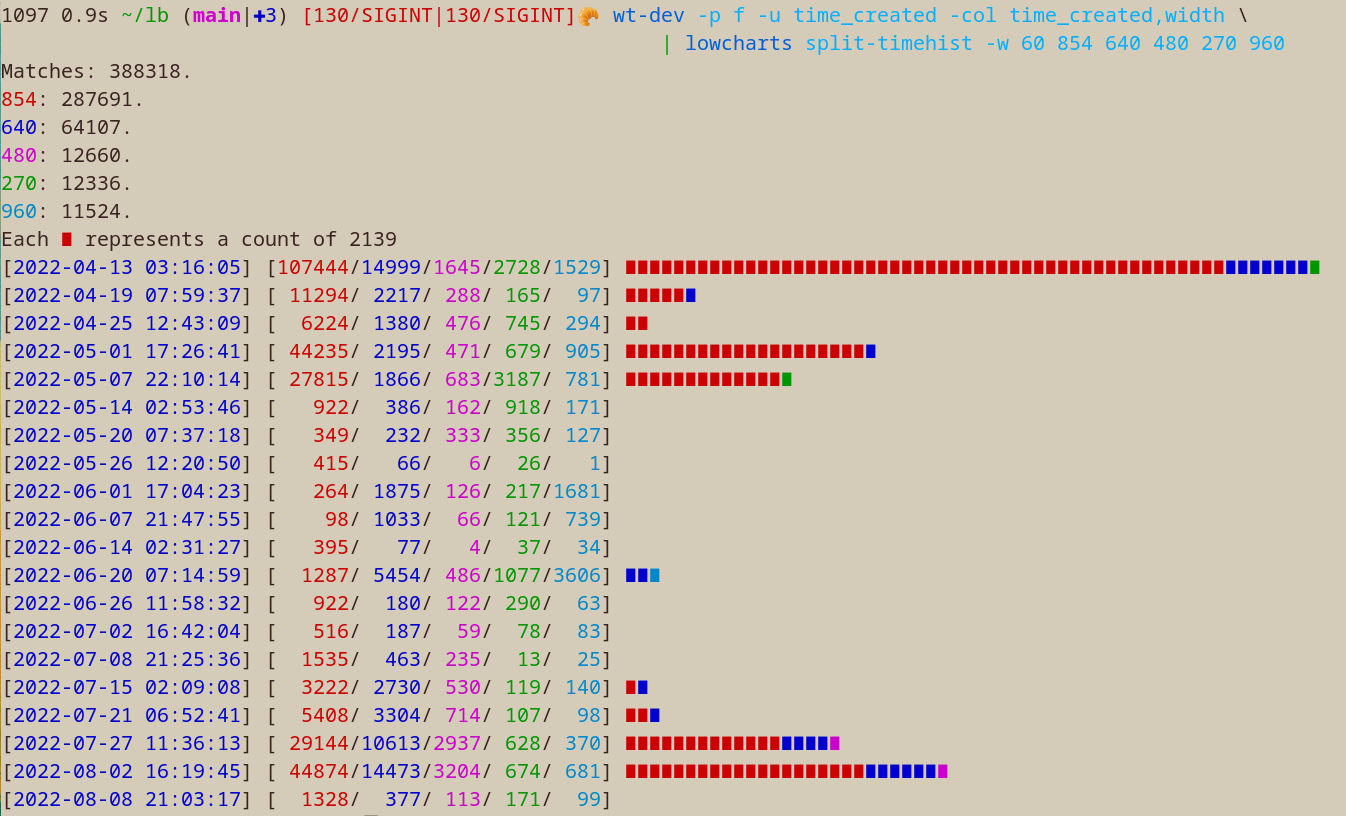
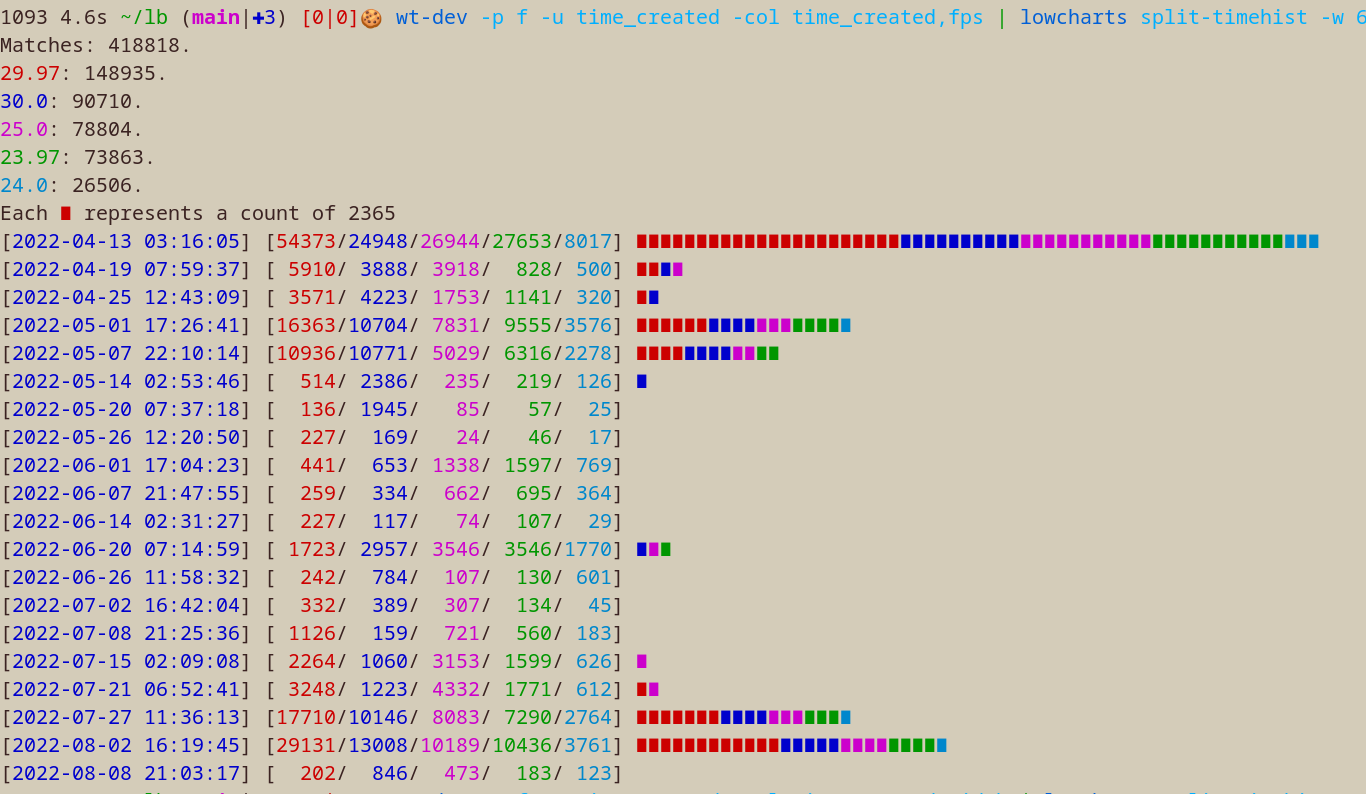
$ library play video -p f -col time_created | lowcharts timehist -w 80
Matches: 445183.
Each ∎ represents a count of 1896
[2022-04-13 03:16:05] [151689] ∎∎∎∎∎∎∎∎∎∎∎∎∎∎∎∎∎∎∎∎∎∎∎∎∎∎∎∎∎∎∎∎∎∎∎∎∎∎∎∎∎∎∎∎∎∎∎∎∎∎∎∎∎∎∎∎∎∎∎∎∎∎∎∎∎∎∎∎∎∎∎∎∎∎∎∎∎∎∎∎
[2022-04-19 07:59:37] [ 16093] ∎∎∎∎∎∎∎∎
[2022-04-25 12:43:09] [ 12019] ∎∎∎∎∎∎
[2022-05-01 17:26:41] [ 48817] ∎∎∎∎∎∎∎∎∎∎∎∎∎∎∎∎∎∎∎∎∎∎∎∎∎
[2022-05-07 22:10:14] [ 36259] ∎∎∎∎∎∎∎∎∎∎∎∎∎∎∎∎∎∎∎
[2022-05-14 02:53:46] [  3942] ∎∎
[2022-05-20 07:37:18] [  2371] ∎
[2022-05-26 12:20:50] [   517]
[2022-06-01 17:04:23] [  4845] ∎∎
[2022-06-07 21:47:55] [  2340] ∎
[2022-06-14 02:31:27] [   563]
[2022-06-20 07:14:59] [ 13836] ∎∎∎∎∎∎∎
[2022-06-26 11:58:32] [  1905] ∎
[2022-07-02 16:42:04] [  1269]
[2022-07-08 21:25:36] [  3062] ∎
[2022-07-15 02:09:08] [  9192] ∎∎∎∎
[2022-07-21 06:52:41] [ 11955] ∎∎∎∎∎∎
[2022-07-27 11:36:13] [ 50938] ∎∎∎∎∎∎∎∎∎∎∎∎∎∎∎∎∎∎∎∎∎∎∎∎∎∎
[2022-08-02 16:19:45] [ 70973] ∎∎∎∎∎∎∎∎∎∎∎∎∎∎∎∎∎∎∎∎∎∎∎∎∎∎∎∎∎∎∎∎∎∎∎∎∎
[2022-08-08 21:03:17] [  2598] ∎
BTW, for some cols like time_deleted you'll need to specify a where clause so they aren't filtered out:
$ library play video -p f -col time_deleted -w time_deleted'>'0 | lowcharts timehist -w 80
Usage
Media collection subcommands
database add filesystem
Add local media
$ library database add filesystem -h
usage: library database add filesystem [(--video) | --audio | --image |  --text | --filesystem | --auto] DATABASE PATH ...

The default database type is auto: every media type is scanned (video, audio, image, text)

    library database add filesystem tv.db ./tv/
    library database add filesystem --video tv.db ./tv/  # scan only video
    library database add filesystem --auto mixed.db ./media/  # equivalent to the default

You can also create audio databases. Both audio and video use ffmpeg to read metadata

    library database add filesystem --audio audio.db ./music/

Image uses ExifTool

    library database add filesystem --image image.db ./photos/

Text will try to read files and save the contents into a searchable database

    library database add filesystem --text text.db ./documents_and_books/

Create a text database and scan with OCR and speech-recognition

    library database add filesystem --text --ocr --speech-recognition ocr.db ./receipts_and_messages/

Create a video database and read internal/external subtitle files into a searchable database

    library database add filesystem --scan-subtitles tv.search.db ./tv/ ./movies/

Decode media to check for corruption (slow)

    library database add filesystem --check-corrupt
    # See media-check command for full options

Normally only relevant filetypes are included. You can scan all files with this flag

    library database add filesystem --scan-all-files mixed.db ./tv-and-maybe-audio-only-files/
    # I use that with this to keep my folders organized
    library play video --db mixed.db -w 'video_count=0 and audio_count>=1' -pf | parallel mv {} ~/d/82_Audiobooks/

Remove path roots with --force

    library database add filesystem audio.db /mnt/d/Youtube/
    [/mnt/d/Youtube] Path does not exist

    library database add filesystem --force audio.db /mnt/d/Youtube/
    [/mnt/d/Youtube] Path does not exist
    [/mnt/d/Youtube] Building file list...
    [/mnt/d/Youtube] Marking 28932 orphaned metadata records as deleted

If you run out of RAM, for example scanning large VR videos, you can lower the number of threads via --threads

    library database add filesystem vr.db --delete-unplayable --check-corrupt --full-scan-if-corrupt 15% --delete-corrupt 20% ./vr/ --threads 3

Move files on import

    library database add filesystem audio.db --move ~/library/ ./added_folder/
    This will run destination paths through `library file normalize` and move files relative to the added folder root
database add video
Add online video media (yt-dlp)
$ library database add video -h
usage: library database add video [--safe] [--extra] [--subs] [--auto-subs] DATABASE URL ...

Create a dl database / add links to an existing database

    library database add video dl.db https://www.youdl.com/c/BranchEducation/videos

Add links from a line-delimited file

    cat ./my_yt_subscriptions.txt | library database add video reddit.db -

Add metadata to links already in a database table

    library database add video --force reddit.db (sqlite-utils --raw-lines reddit.db 'select path from media')

Fetch extra metadata

    By default tubeadd will quickly add media at the expense of less metadata.
    If you plan on using `library database download` then it doesn't make sense to use `--extra`.
    Downloading will add the extra metadata automatically to the database.
    You can always fetch more metadata later via tubeupdate
    library database update video tw.db --extra
database add gallery
Add online gallery media (gallery-dl)
$ library database add gallery -h
usage: library database add gallery DATABASE URL ...

Add gallery_dl URLs to download later or periodically update

If you have many URLs use stdin

    cat ./my-favorite-manhwa.txt | library database add gallery your.db --insert-only -
database add open-directory
Discover media in HTTP directory listings and folder-like web indexes
$ library database add open-directory -h
usage: library database add open-directory [--auto | --filesystem | --video | --audio | --image | --text] DATABASE URL ...

Discover media files in Apache/Nginx-style directory listings and other
folder-like web indexes. It follows HTML subdirectories, treats non-HTML
links as media, and can collect filesystem, hash, audio, video, image, and
text metadata using one or more profiles.

    library database add open-directory open_dir.db http://1.1.1.1/  # simple spider
    library database add open-directory --filesystem open_dir.db http://1.1.1.1/
    library database add open-directory --video open_dir.db http://1.1.1.1/
    library database add open-directory --filesystem --video open_dir.db http://1.1.1.1/

Re-scan using a different profile

    library play media --db v.db -w 'size is null' --ext wmv,3gp,mp4 -pf | library database add open-directory --media --force --video v.db -

Check download size of all videos matching some criteria

    library database download --fs open_dir.db --prefix ~/d/dump/video/ -w 'height<720' -E preview -pa

    path         count  download_duration                  size    avg_size
    ---------  -------  ----------------------------  ---------  ----------
    Aggregate     5694  2 years, 7 months and 5 days  724.4 GiB   130.3 MiB

Download all videos matching some criteria

    library database download --fs open_dir.db --prefix ~/d/dump/video/ -w 'height<720' -E preview

Stream directly to mpv

    library play video --db open_dir.db
database add reddit
Create a reddit database; Add subreddits
$ library database add reddit -h
usage: library database add reddit [--lookback N_DAYS] [--praw-site bot1] DATABASE URL ...

Fetch data for redditors and reddits

    library database add reddit interesting.db https://old.reddit.com/r/coolgithubprojects/ https://old.reddit.com/user/Diastro

If you have a file with a list of subreddits you can do this

    library database add reddit 96_Weird_History.db --subreddits (cat ~/mc/96_Weird_History-reddit.txt)

Likewise for redditors

    library database add reddit shadow_banned.db --redditors (cat ~/mc/shadow_banned.txt)

To remove entries (for example when you get 404s)

    library database search reddit.db playlists --or --exact subreddit1 subreddit2 --soft-delete

Note that reddit's API is limited to 1000 posts and it usually doesn't go back very far historically.
Also, it may be the case that reddit's API (praw) will stop working in the near future. For both of these problems
my suggestion is to use pushshift data.
You can find more info here: https://github.com/chapmanjacobd/reddit_mining#how-was-this-made
database add hackernews
Create / Update a Hacker News database
$ library database add hackernews -h
usage: library database add hackernews [--oldest] DATABASE

Fetch latest stories first

    library database add hackernews hn.db -v
    Fetching 154873 items (33212696 to 33367569)
    Saving comment 33367568
    Saving comment 33367543
    Saving comment 33367564
    ...

Fetch oldest stories first

    library database add hackernews --oldest hn.db
database add getty
Create / Update a Getty Museum database
$ library database add getty -h
usage: library database add getty DATABASE

Download metadata

    library database add getty getty.db -v

Download images

    library database download --fs getty.db --prefix ~/images/ -v
database add substack
Backup substack articles
$ library database add substack -h
usage: library database add substack DATABASE PATH ...

Backup substack articles
database add tildes
Backup tildes comments and topics
$ library database add tildes -h
usage: library database add tildes DATABASE USER

Backup tildes.net user comments and topics

    library database add tildes tildes.net.db xk3

Without cookies you are limited to the first page. You can use cookies like this
    https://github.com/rotemdan/ExportCookies
    library database add tildes --cookies ~/Downloads/cookies-tildes-net.txt tildes.net.db xk3
Playback subcommands
play media
Play media of any supported type
$ library play media -h
usage: library play media [PATH ...] [--db DATABASE] [optional args]

Control playback

    To stop playback press Ctrl-C in either the terminal or mpv

    Or use `library playback next` or `library playback stop`

    Or create global shortcuts in your desktop environment by sending commands to mpv_socket
    echo 'playlist-next force' | socat - $XDG_RUNTIME_DIR/mpv_socket  # library play audio default
    echo 'playlist-next force' | socat - ~/.config/mpv/socket  # library play video default

    If you prefer you can also send mpv the playlist, but this is incompatible with post-actions
    mpv --playlist=(library play video --db videos.db --ext mp4 -l 50 -p fw | psub)  # fish shell, mark 50 videos as watched
    mpv --playlist=<(library play video --db videos.db --ext mp4 -p f)  # BASH, all videos

Print an aggregate report of deleted media

    library filesystem list -w time_deleted!=0 -pa
    path         count  duration               size
    ---------  -------  ------------------  -------
    Aggregate      337  2 days and 5 hours  1.6 GiB

Print an aggregate report of media that has no duration information (ie.
online media or corrupt local media)

    library play media -w 'duration is null' -pa

Print a list of filenames which have below 1280px resolution

    library play media -w 'width<1280' -pf

View how much time you have played

    library play media -w play_count'>'0 -pa

View all the columns

    library play media -p -L 1 --cols '*'

Open ipython with all of your media

    library play media -vv -p --cols '*'
    ipdb> len(media)
    462219

View most recent files

    library play media --db web_add.image.db -u time_modified desc --cols path,width,height,size,time_modified -p -l 10
    path                                                                                                                      width    height       size  time_modified
    ----------------------------------------------------------------------------------------------------------------------  -------  --------  ---------  -----------------
    https://siliconpr0n.org/map/infineon/m7690-b1/single/infineon_m7690-b1_infosecdj_mz_nikon20x.jpg                           7066     10513   16.4 MiB  2 days ago, 20:54
    https://siliconpr0n.org/map/starchip/scf384g/single/starchip_scf384g_infosecdj_mz_nikon20x.jpg                            10804     10730   19.2 MiB  2 days ago, 15:31
    https://siliconpr0n.org/map/hp/2hpt20065-1-68k-core/single/hp_2hpt20065-1-68k-core_marmontel_mz_ms50x-1.25.jpg            28966     26816  192.2 MiB  4 days ago, 15:05
    https://siliconpr0n.org/map/hp/2hpt20065-1-68k-core/single/hp_2hpt20065-1-68k-core_marmontel_mz_ms20x-1.25.jpg            11840     10978   49.2 MiB  4 days ago, 15:04
    https://siliconpr0n.org/map/hp/2hpt20065-1/single/hp_2hpt20065-1_marmontel_mz_ms10x-1.25.jpg                              16457     14255  101.4 MiB  4 days ago, 15:03
    https://siliconpr0n.org/map/pervasive/e2213ps01e1/single/pervasive_e2213ps01e1_azonenberg_back_roi1_mit10x_rotated.jpg    18880     61836  136.8 MiB  6 days ago, 16:00
    https://siliconpr0n.org/map/pervasive/e2213ps01e/single/pervasive_e2213ps01e_azonenberg_back_mit5x_rotated.jpg            62208     30736  216.5 MiB  6 days ago, 15:57
    https://siliconpr0n.org/map/amd/am2964bpc/single/amd_am2964bpc_infosecdj_mz_lmplan10x.jpg                                 12809     11727   39.8 MiB  6 days ago, 10:28
    https://siliconpr0n.org/map/unknown/ks1804ir1/single/unknown_ks1804ir1_infosecdj_mz_lmplan10x.jpg                          6508      6707    8.4 MiB  6 days ago, 08:04
    https://siliconpr0n.org/map/amd/am2960dc-b/single/amd_am2960dc-b_infosecdj_mz_lmplan10x.jpg                               16434     15035   64.9 MiB  7 days ago, 19:01
    10 media (limited by --limit 10)

How I use it

    library play audio --db ~/lb/audio.db --local-media-only -k delete-if-audiobook -w play_count=0 --fetch-siblings each
    library play video --db ~/lb/video.db --local-media-only -k delete --cmd5 'echo skip'

    When sorting videos
    focus_under_mouse
    library play video --db ~/lb/sort.db --action ask_move_or_delete --keep-dir /home/xk/d/library/video/ --loop --exit-code-confirm -i --cmd130 exit_multiple_playback --cmd5 'library shrink audio --no-preserve-video' --cmd6 'mv {} /mnt/d/library/vr/' -m 4 --start 35% --volume=0 -u size desc
    focus_follows_mouse

    On-the-go mobile smartphone mode (Android)
    repeat library play video --db ~/lb/video.db --player termux-open -L1 --refresh --action ask_move_or_delete --keep-dir ~/sync/video/keep/ --portrait -u duration desc
play video
Watch / Listen
$ library play video -h
usage: library play video [PATH ...] [--db DATABASE] [optional args]

Control playback

    To stop playback press Ctrl-C in either the terminal or mpv

    Or use `library playback next` or `library playback stop`

    Or create global shortcuts in your desktop environment by sending commands to mpv_socket
    echo 'playlist-next force' | socat - $XDG_RUNTIME_DIR/mpv_socket  # library play audio default
    echo 'playlist-next force' | socat - ~/.config/mpv/socket  # library play video default

    If you prefer you can also send mpv the playlist, but this is incompatible with post-actions
    mpv --playlist=(library play video --db videos.db --ext mp4 -l 50 -p fw | psub)  # fish shell, mark 50 videos as watched
    mpv --playlist=<(library play video --db videos.db --ext mp4 -p f)  # BASH, all videos

Print an aggregate report of deleted media

    library filesystem list -w time_deleted!=0 -pa
    path         count  duration               size
    ---------  -------  ------------------  -------
    Aggregate      337  2 days and 5 hours  1.6 GiB

Print an aggregate report of media that has no duration information (ie.
online media or corrupt local media)

    library play video -w 'duration is null' -pa

Print a list of filenames which have below 1280px resolution

    library play video -w 'width<1280' -pf

View how much time you have played

    library play video -w play_count'>'0 -pa

View all the columns

    library play video -p -L 1 --cols '*'

Open ipython with all of your media

    library play video -vv -p --cols '*'
    ipdb> len(media)
    462219

View most recent files

    library play video --db web_add.image.db -u time_modified desc --cols path,width,height,size,time_modified -p -l 10
    path                                                                                                                      width    height       size  time_modified
    ----------------------------------------------------------------------------------------------------------------------  -------  --------  ---------  -----------------
    https://siliconpr0n.org/map/infineon/m7690-b1/single/infineon_m7690-b1_infosecdj_mz_nikon20x.jpg                           7066     10513   16.4 MiB  2 days ago, 20:54
    https://siliconpr0n.org/map/starchip/scf384g/single/starchip_scf384g_infosecdj_mz_nikon20x.jpg                            10804     10730   19.2 MiB  2 days ago, 15:31
    https://siliconpr0n.org/map/hp/2hpt20065-1-68k-core/single/hp_2hpt20065-1-68k-core_marmontel_mz_ms50x-1.25.jpg            28966     26816  192.2 MiB  4 days ago, 15:05
    https://siliconpr0n.org/map/hp/2hpt20065-1-68k-core/single/hp_2hpt20065-1-68k-core_marmontel_mz_ms20x-1.25.jpg            11840     10978   49.2 MiB  4 days ago, 15:04
    https://siliconpr0n.org/map/hp/2hpt20065-1/single/hp_2hpt20065-1_marmontel_mz_ms10x-1.25.jpg                              16457     14255  101.4 MiB  4 days ago, 15:03
    https://siliconpr0n.org/map/pervasive/e2213ps01e1/single/pervasive_e2213ps01e1_azonenberg_back_roi1_mit10x_rotated.jpg    18880     61836  136.8 MiB  6 days ago, 16:00
    https://siliconpr0n.org/map/pervasive/e2213ps01e/single/pervasive_e2213ps01e_azonenberg_back_mit5x_rotated.jpg            62208     30736  216.5 MiB  6 days ago, 15:57
    https://siliconpr0n.org/map/amd/am2964bpc/single/amd_am2964bpc_infosecdj_mz_lmplan10x.jpg                                 12809     11727   39.8 MiB  6 days ago, 10:28
    https://siliconpr0n.org/map/unknown/ks1804ir1/single/unknown_ks1804ir1_infosecdj_mz_lmplan10x.jpg                          6508      6707    8.4 MiB  6 days ago, 08:04
    https://siliconpr0n.org/map/amd/am2960dc-b/single/amd_am2960dc-b_infosecdj_mz_lmplan10x.jpg                               16434     15035   64.9 MiB  7 days ago, 19:01
    10 media (limited by --limit 10)

How I use it

    library play audio --db ~/lb/audio.db --local-media-only -k delete-if-audiobook -w play_count=0 --fetch-siblings each
    library play video --db ~/lb/video.db --local-media-only -k delete --cmd5 'echo skip'

    When sorting videos
    focus_under_mouse
    library play video --db ~/lb/sort.db --action ask_move_or_delete --keep-dir /home/xk/d/library/video/ --loop --exit-code-confirm -i --cmd130 exit_multiple_playback --cmd5 'library shrink audio --no-preserve-video' --cmd6 'mv {} /mnt/d/library/vr/' -m 4 --start 35% --volume=0 -u size desc
    focus_follows_mouse

    On-the-go mobile smartphone mode (Android)
    repeat library play video --db ~/lb/video.db --player termux-open -L1 --refresh --action ask_move_or_delete --keep-dir ~/sync/video/keep/ --portrait -u duration desc
play audio
Listen to audio
$ library play audio -h
usage: library play audio [PATH ...] [--db DATABASE] [optional args]

Control playback

    To stop playback press Ctrl-C in either the terminal or mpv

    Or use `library playback next` or `library playback stop`

    Or create global shortcuts in your desktop environment by sending commands to mpv_socket
    echo 'playlist-next force' | socat - $XDG_RUNTIME_DIR/mpv_socket  # library play audio default
    echo 'playlist-next force' | socat - ~/.config/mpv/socket  # library play video default

    If you prefer you can also send mpv the playlist, but this is incompatible with post-actions
    mpv --playlist=(library play video --db videos.db --ext mp4 -l 50 -p fw | psub)  # fish shell, mark 50 videos as watched
    mpv --playlist=<(library play video --db videos.db --ext mp4 -p f)  # BASH, all videos

Print an aggregate report of deleted media

    library filesystem list -w time_deleted!=0 -pa
    path         count  duration               size
    ---------  -------  ------------------  -------
    Aggregate      337  2 days and 5 hours  1.6 GiB

Print an aggregate report of media that has no duration information (ie.
online media or corrupt local media)

    library play audio -w 'duration is null' -pa

Print a list of filenames which have below 1280px resolution

    library play audio -w 'width<1280' -pf

View how much time you have played

    library play audio -w play_count'>'0 -pa

View all the columns

    library play audio -p -L 1 --cols '*'

Open ipython with all of your media

    library play audio -vv -p --cols '*'
    ipdb> len(media)
    462219

View most recent files

    library play audio --db web_add.image.db -u time_modified desc --cols path,width,height,size,time_modified -p -l 10
    path                                                                                                                      width    height       size  time_modified
    ----------------------------------------------------------------------------------------------------------------------  -------  --------  ---------  -----------------
    https://siliconpr0n.org/map/infineon/m7690-b1/single/infineon_m7690-b1_infosecdj_mz_nikon20x.jpg                           7066     10513   16.4 MiB  2 days ago, 20:54
    https://siliconpr0n.org/map/starchip/scf384g/single/starchip_scf384g_infosecdj_mz_nikon20x.jpg                            10804     10730   19.2 MiB  2 days ago, 15:31
    https://siliconpr0n.org/map/hp/2hpt20065-1-68k-core/single/hp_2hpt20065-1-68k-core_marmontel_mz_ms50x-1.25.jpg            28966     26816  192.2 MiB  4 days ago, 15:05
    https://siliconpr0n.org/map/hp/2hpt20065-1-68k-core/single/hp_2hpt20065-1-68k-core_marmontel_mz_ms20x-1.25.jpg            11840     10978   49.2 MiB  4 days ago, 15:04
    https://siliconpr0n.org/map/hp/2hpt20065-1/single/hp_2hpt20065-1_marmontel_mz_ms10x-1.25.jpg                              16457     14255  101.4 MiB  4 days ago, 15:03
    https://siliconpr0n.org/map/pervasive/e2213ps01e1/single/pervasive_e2213ps01e1_azonenberg_back_roi1_mit10x_rotated.jpg    18880     61836  136.8 MiB  6 days ago, 16:00
    https://siliconpr0n.org/map/pervasive/e2213ps01e/single/pervasive_e2213ps01e_azonenberg_back_mit5x_rotated.jpg            62208     30736  216.5 MiB  6 days ago, 15:57
    https://siliconpr0n.org/map/amd/am2964bpc/single/amd_am2964bpc_infosecdj_mz_lmplan10x.jpg                                 12809     11727   39.8 MiB  6 days ago, 10:28
    https://siliconpr0n.org/map/unknown/ks1804ir1/single/unknown_ks1804ir1_infosecdj_mz_lmplan10x.jpg                          6508      6707    8.4 MiB  6 days ago, 08:04
    https://siliconpr0n.org/map/amd/am2960dc-b/single/amd_am2960dc-b_infosecdj_mz_lmplan10x.jpg                               16434     15035   64.9 MiB  7 days ago, 19:01
    10 media (limited by --limit 10)

How I use it

    library play audio --db ~/lb/audio.db --local-media-only -k delete-if-audiobook -w play_count=0 --fetch-siblings each
    library play video --db ~/lb/video.db --local-media-only -k delete --cmd5 'echo skip'

    When sorting videos
    focus_under_mouse
    library play video --db ~/lb/sort.db --action ask_move_or_delete --keep-dir /home/xk/d/library/video/ --loop --exit-code-confirm -i --cmd130 exit_multiple_playback --cmd5 'library shrink audio --no-preserve-video' --cmd6 'mv {} /mnt/d/library/vr/' -m 4 --start 35% --volume=0 -u size desc
    focus_follows_mouse

    On-the-go mobile smartphone mode (Android)
    repeat library play video --db ~/lb/video.db --player termux-open -L1 --refresh --action ask_move_or_delete --keep-dir ~/sync/video/keep/ --portrait -u duration desc
play text
Read text
$ library play text -h
usage: library play text [PATH ...] [--db DATABASE] [optional args]

Control playback

    To stop playback press Ctrl-C in either the terminal or mpv

    Or use `library playback next` or `library playback stop`

    Or create global shortcuts in your desktop environment by sending commands to mpv_socket
    echo 'playlist-next force' | socat - $XDG_RUNTIME_DIR/mpv_socket  # library play audio default
    echo 'playlist-next force' | socat - ~/.config/mpv/socket  # library play video default

    If you prefer you can also send mpv the playlist, but this is incompatible with post-actions
    mpv --playlist=(library play video --db videos.db --ext mp4 -l 50 -p fw | psub)  # fish shell, mark 50 videos as watched
    mpv --playlist=<(library play video --db videos.db --ext mp4 -p f)  # BASH, all videos

Print an aggregate report of deleted media

    library filesystem list -w time_deleted!=0 -pa
    path         count  duration               size
    ---------  -------  ------------------  -------
    Aggregate      337  2 days and 5 hours  1.6 GiB

Print an aggregate report of media that has no duration information (ie.
online media or corrupt local media)

    library play text -w 'duration is null' -pa

Print a list of filenames which have below 1280px resolution

    library play text -w 'width<1280' -pf

View how much time you have played

    library play text -w play_count'>'0 -pa

View all the columns

    library play text -p -L 1 --cols '*'

Open ipython with all of your media

    library play text -vv -p --cols '*'
    ipdb> len(media)
    462219

View most recent files

    library play text --db web_add.image.db -u time_modified desc --cols path,width,height,size,time_modified -p -l 10
    path                                                                                                                      width    height       size  time_modified
    ----------------------------------------------------------------------------------------------------------------------  -------  --------  ---------  -----------------
    https://siliconpr0n.org/map/infineon/m7690-b1/single/infineon_m7690-b1_infosecdj_mz_nikon20x.jpg                           7066     10513   16.4 MiB  2 days ago, 20:54
    https://siliconpr0n.org/map/starchip/scf384g/single/starchip_scf384g_infosecdj_mz_nikon20x.jpg                            10804     10730   19.2 MiB  2 days ago, 15:31
    https://siliconpr0n.org/map/hp/2hpt20065-1-68k-core/single/hp_2hpt20065-1-68k-core_marmontel_mz_ms50x-1.25.jpg            28966     26816  192.2 MiB  4 days ago, 15:05
    https://siliconpr0n.org/map/hp/2hpt20065-1-68k-core/single/hp_2hpt20065-1-68k-core_marmontel_mz_ms20x-1.25.jpg            11840     10978   49.2 MiB  4 days ago, 15:04
    https://siliconpr0n.org/map/hp/2hpt20065-1/single/hp_2hpt20065-1_marmontel_mz_ms10x-1.25.jpg                              16457     14255  101.4 MiB  4 days ago, 15:03
    https://siliconpr0n.org/map/pervasive/e2213ps01e1/single/pervasive_e2213ps01e1_azonenberg_back_roi1_mit10x_rotated.jpg    18880     61836  136.8 MiB  6 days ago, 16:00
    https://siliconpr0n.org/map/pervasive/e2213ps01e/single/pervasive_e2213ps01e_azonenberg_back_mit5x_rotated.jpg            62208     30736  216.5 MiB  6 days ago, 15:57
    https://siliconpr0n.org/map/amd/am2964bpc/single/amd_am2964bpc_infosecdj_mz_lmplan10x.jpg                                 12809     11727   39.8 MiB  6 days ago, 10:28
    https://siliconpr0n.org/map/unknown/ks1804ir1/single/unknown_ks1804ir1_infosecdj_mz_lmplan10x.jpg                          6508      6707    8.4 MiB  6 days ago, 08:04
    https://siliconpr0n.org/map/amd/am2960dc-b/single/amd_am2960dc-b_infosecdj_mz_lmplan10x.jpg                               16434     15035   64.9 MiB  7 days ago, 19:01
    10 media (limited by --limit 10)

How I use it

    library play audio --db ~/lb/audio.db --local-media-only -k delete-if-audiobook -w play_count=0 --fetch-siblings each
    library play video --db ~/lb/video.db --local-media-only -k delete --cmd5 'echo skip'

    When sorting videos
    focus_under_mouse
    library play video --db ~/lb/sort.db --action ask_move_or_delete --keep-dir /home/xk/d/library/video/ --loop --exit-code-confirm -i --cmd130 exit_multiple_playback --cmd5 'library shrink audio --no-preserve-video' --cmd6 'mv {} /mnt/d/library/vr/' -m 4 --start 35% --volume=0 -u size desc
    focus_follows_mouse

    On-the-go mobile smartphone mode (Android)
    repeat library play video --db ~/lb/video.db --player termux-open -L1 --refresh --action ask_move_or_delete --keep-dir ~/sync/video/keep/ --portrait -u duration desc
play images
View images
$ library play images -h
usage: library play images [PATH ...] [--db DATABASE] [optional args]

Control playback

    To stop playback press Ctrl-C in either the terminal or mpv

    Or use `library playback next` or `library playback stop`

    Or create global shortcuts in your desktop environment by sending commands to mpv_socket
    echo 'playlist-next force' | socat - $XDG_RUNTIME_DIR/mpv_socket  # library play audio default
    echo 'playlist-next force' | socat - ~/.config/mpv/socket  # library play video default

    If you prefer you can also send mpv the playlist, but this is incompatible with post-actions
    mpv --playlist=(library play video --db videos.db --ext mp4 -l 50 -p fw | psub)  # fish shell, mark 50 videos as watched
    mpv --playlist=<(library play video --db videos.db --ext mp4 -p f)  # BASH, all videos

Print an aggregate report of deleted media

    library filesystem list -w time_deleted!=0 -pa
    path         count  duration               size
    ---------  -------  ------------------  -------
    Aggregate      337  2 days and 5 hours  1.6 GiB

Print an aggregate report of media that has no duration information (ie.
online media or corrupt local media)

    library play images -w 'duration is null' -pa

Print a list of filenames which have below 1280px resolution

    library play images -w 'width<1280' -pf

View how much time you have played

    library play images -w play_count'>'0 -pa

View all the columns

    library play images -p -L 1 --cols '*'

Open ipython with all of your media

    library play images -vv -p --cols '*'
    ipdb> len(media)
    462219

View most recent files

    library play images --db web_add.image.db -u time_modified desc --cols path,width,height,size,time_modified -p -l 10
    path                                                                                                                      width    height       size  time_modified
    ----------------------------------------------------------------------------------------------------------------------  -------  --------  ---------  -----------------
    https://siliconpr0n.org/map/infineon/m7690-b1/single/infineon_m7690-b1_infosecdj_mz_nikon20x.jpg                           7066     10513   16.4 MiB  2 days ago, 20:54
    https://siliconpr0n.org/map/starchip/scf384g/single/starchip_scf384g_infosecdj_mz_nikon20x.jpg                            10804     10730   19.2 MiB  2 days ago, 15:31
    https://siliconpr0n.org/map/hp/2hpt20065-1-68k-core/single/hp_2hpt20065-1-68k-core_marmontel_mz_ms50x-1.25.jpg            28966     26816  192.2 MiB  4 days ago, 15:05
    https://siliconpr0n.org/map/hp/2hpt20065-1-68k-core/single/hp_2hpt20065-1-68k-core_marmontel_mz_ms20x-1.25.jpg            11840     10978   49.2 MiB  4 days ago, 15:04
    https://siliconpr0n.org/map/hp/2hpt20065-1/single/hp_2hpt20065-1_marmontel_mz_ms10x-1.25.jpg                              16457     14255  101.4 MiB  4 days ago, 15:03
    https://siliconpr0n.org/map/pervasive/e2213ps01e1/single/pervasive_e2213ps01e1_azonenberg_back_roi1_mit10x_rotated.jpg    18880     61836  136.8 MiB  6 days ago, 16:00
    https://siliconpr0n.org/map/pervasive/e2213ps01e/single/pervasive_e2213ps01e_azonenberg_back_mit5x_rotated.jpg            62208     30736  216.5 MiB  6 days ago, 15:57
    https://siliconpr0n.org/map/amd/am2964bpc/single/amd_am2964bpc_infosecdj_mz_lmplan10x.jpg                                 12809     11727   39.8 MiB  6 days ago, 10:28
    https://siliconpr0n.org/map/unknown/ks1804ir1/single/unknown_ks1804ir1_infosecdj_mz_lmplan10x.jpg                          6508      6707    8.4 MiB  6 days ago, 08:04
    https://siliconpr0n.org/map/amd/am2960dc-b/single/amd_am2960dc-b_infosecdj_mz_lmplan10x.jpg                               16434     15035   64.9 MiB  7 days ago, 19:01
    10 media (limited by --limit 10)

How I use it

    library play audio --db ~/lb/audio.db --local-media-only -k delete-if-audiobook -w play_count=0 --fetch-siblings each
    library play video --db ~/lb/video.db --local-media-only -k delete --cmd5 'echo skip'

    When sorting videos
    focus_under_mouse
    library play video --db ~/lb/sort.db --action ask_move_or_delete --keep-dir /home/xk/d/library/video/ --loop --exit-code-confirm -i --cmd130 exit_multiple_playback --cmd5 'library shrink audio --no-preserve-video' --cmd6 'mv {} /mnt/d/library/vr/' -m 4 --start 35% --volume=0 -u size desc
    focus_follows_mouse

    On-the-go mobile smartphone mode (Android)
    repeat library play video --db ~/lb/video.db --player termux-open -L1 --refresh --action ask_move_or_delete --keep-dir ~/sync/video/keep/ --portrait -u duration desc
playback now
Show what is currently playing
$ library playback now -h
usage: library playback now

Print now playing
playback next
Play next file and optionally delete current file
$ library playback next -h
usage: library playback next

Go to the next track in the playqueue, optionally delete the currently playing media
playback seek
Set playback to a certain time, fast-forward or rewind
$ library playback seek -h
usage: library playback seek

Seek to an exact time

    library playback seek 5:30     # 5 minutes, 30 seconds
    library playback seek 5:30:00  # 5 hours, 30 minutes

Seek forward or backward a relative duration

    library playback seek +5:00    # 5 minutes forward
    library playback seek +5:      # 5 minutes forward
    library playback seek +5       # 5 seconds forward
    library playback seek 5        # 5 seconds forward

    library playback seek -5       # 5 seconds backward
playback stop
Stop all playback
$ library playback stop -h
usage: library playback stop

Stop playback (close mpv, turn off chromecast, etc)
playback pause
Pause all playback
$ library playback pause -h
usage: library playback pause

Pause playback (pause mpv, pause chromecast, etc)
Web collection subcommands
database add links
Extract links from webpages, paginated lists, recursive sites, and web archives
$ library database add links -h
usage: library database add links DATABASE PATH ... [--case-sensitive] [--cookies-from-browser BROWSER[+KEYRING][:PROFILE][::CONTAINER]] [--selenium] [--manual] [--scroll] [--auto-pager] [--poke] [--chrome] [--local-html] [--file FILE]

Extract links from ordinary webpages into a database. This is useful for
article indexes, forums, search results, playlists, and other pages where
the links you want are embedded in HTML. Supports pagination, recursive
same-site crawling, link filters, browser-backed pages, and Internet Archive
CDX snapshots.

By default it will add the URL param "?page=2" and so on...

You can fine-tune what links get saved with --path/text/before/after-include/exclude.

    library database add links --path-include /video/

Import links from args

    library database add links --no-extract links.db (cb)

Import lines from stdin

    cb | library database add links links.db --skip-extract -

IRIs vs URLs

    Library should:
        - print paths as unquoted UTF-8 IRIs (by default)
        - accept either IRIs or URLs as input with optional flags to make parsing/searching explicitly use one or the other
        - save paths to the database "AS-IS"

How I use it

    library database add links links.db https://video/site/ --path-include /video/

    library database add links links.db https://loginsite/ --path-include /article/ --cookies-from-browser firefox
    library database add links links.db https://loginsite/ --path-include /article/ --cookies-from-browser chrome

    cb -t text/html | xidel -s - -e '//@title' | unique | lb linksdb ~/mc/music.db -c p1 --skip-extract -

    library database add links --path-include viewtopic.php --cookies-from-browser firefox \
    --page-key start --page-start 0 --page-step 50 --fixed-pages 14 --stop-pages-no-match 1 \
    plab.db https://plab/forum/tracker.php?o=(string replace ' ' \n -- 1 4 7 10 15)&s=2&tm=-1&f=(string replace ' ' \n -- 1670 1768 60 1671 1644 1672 1111 508 555 1112 1718 1143 1717 1851 1713 1712 1775 1674 902 1675 36 1830 1803 1831 1741 1676 1677 1780 1110 1124 1784 1769 1793 1797 1804 1819 1825 1836 1842 1846 1857 1861 1867 1451 1788 1789 1792 1798 1805 1820 1826 1837 1843 1847 1856 1862 1868 284 1853 1823 1800 1801 1719 997 1818 1849 1711 1791 1762)

Recursively add every link on a site (glob excludes prune subtrees from the crawl)

    library database add links links.db --recursive https://example.com/docs/ --path-exclude '*/tags/*'

Add every archived link for a site from the Internet Archive CDX index

    library database add links links.db --webcache https://example.com/docs/
links open
Open links from link dbs
$ library links open -h
usage: library links open DATABASE [search] [--title] [--title-prefix TITLE_PREFIX]

Open links from a links db

    wget https://github.com/chapmanjacobd/library-examples/raw/main/music.korea.ln.db
    library links open music.korea.ln.db

Only open links once

    library links open ln.db -w 'time_modified=0'

Print a preview instead of opening tabs

    library links open ln.db -p
    library links open ln.db --cols time_modified -p

Delete rows

    Make sure you have the right search query
    library links open ln.db "query" -p -L inf
    library links open ln.db "query" -pa  # view total

    library links open ln.db "query" -pd  # mark as deleted

Custom search engine

    library links open ln.db --title --prefix 'https://duckduckgo.com/?q='

Skip local media

    library links open dl.db --online
    library links open dl.db -w 'path like "http%"'  # equivalent
links extract
Extract inner links from lists of web links
$ library links extract -h
usage: library links extract PATH ... [--case-sensitive] [--scroll] [--local-html] [--file FILE]

Extract links from within local HTML fragments, files, or remote pages; filtering on link text and nearby plain-text

    library links extract https://en.wikipedia.org/wiki/List_of_bacon_dishes --path-include https://en.wikipedia.org/wiki/ --after-include famous
    https://en.wikipedia.org/wiki/Omelette

Download the filtered links. Internet Archive details pages use the Internet Archive downloader and preserve all original files:

    library links download https://readrare.com/

Mirror a site recursively. Only links within the same domain and parent directory as the given
path are followed; links pointing elsewhere are downloaded but not followed. Includes/excludes
accept globs, so you can prune whole subtrees while crawling:

    library links download --recursive https://example.com/docs/
    library links download -R https://example.com/docs/ --path-exclude '*/tag/*' '*/tags/*'

Extract links from a web archive CDX index instead of crawling live pages. Internet Archive
Wayback snapshots are emitted by default. Wayback URLs are collapsed to their original
archived URL while crawling: sibling pages that only exist under a different timestamp are
still followed, but multiple captures of the same page are collapsed so only one copy of
each page is downloaded. Use --webcache-from/--webcache-to to target a time period:

    library links extract --webcache https://example.com/docs/
    library links download --webcache --recursive https://example.com/docs/
    library links extract --webcache --webcache-source cc https://example.com/docs/
    library links extract --webcache --webcache-from 2020 --webcache-to 2021 https://example.com/docs/

Common tracking and analytics URLs, including Google Tag Manager and Google Analytics,
plus /tag/, /tags/, and ?tag= URLs, are excluded by default. Use --path-exclude to
replace the default exclusions when needed.

Read from local clipboard and filter out links based on nearby plain text

    library links extract --local-html (cb -t text/html | psub) --after-exclude paranormal spooky horror podcast tech fantasy supernatural lecture sport
    # note: the equivalent BASH-ism is <(xclip -selection clipboard -t text/html)

Use --selenium for sites require JavaScript

    library links extract --selenium https://archive.org/search?query=subject%3A%22Archive.org+Census%22 --path-include census

    Run with `-vv` to see the browser that normally loads in the background
links download
Download links from lists of web links
$ library links download -h
usage: library links download [PATH ...] [--db DATABASE] [optional args]

Extract links from the given pages and download them. Each link is routed by the active
profile (auto by default): yt-dlp for video/audio, gallery-dl for images, and the built-in
downloader for everything else. Pass --direct to always download with the built-in
downloader instead of yt-dlp/gallery-dl.

Pass --db to read pages from a database and record download results. The given PATHs are
then database filters rather than pages to extract from:

    library links download --db links.db
    library links download --db links.db --include https://example.com/docs/

Follow same-domain links recursively, or read a web archive CDX index, with the same
options as `library links extract`:

    library links download --recursive https://example.com/docs/
    library links download --webcache https://example.com/docs/
database add tabs
Schedule URLs for recurring browser visits
$ library database add tabs -h
usage: library database add tabs [--frequency daily weekly (monthly) quarterly yearly] [--no-sanitize] DATABASE URL ...

Adding one URL

    library database add tabs -f daily tabs.db https://wiby.me/surprise/

    Depending on your shell you may need to escape the URL (add quotes)

    If you use Fish shell know that you can enable features to make pasting easier
        set -U fish_features stderr-nocaret qmark-noglob regex-easyesc ampersand-nobg-in-token

    Also I recommend turning Ctrl+Backspace into a super-backspace for repeating similar commands with long args
        echo 'bind \b backward-kill-bigword' >> ~/.config/fish/config.fish

Importing from a line-delimitated file

    library database add tabs -f yearly -c reddit tabs.db (cat ~/mc/yearly-subreddit.cron)
tabs open
Open your tabs for the day
$ library tabs open -h
usage: library tabs open DATABASE

Tabs is meant to run **once per day**. Here is how you would configure it with `crontab`

    45 9 * * * DISPLAY=:0 library tabs open /home/my/tabs.db

If things aren't working you can use `at` to simulate a similar environment as `cron`

    echo 'fish -c "export DISPLAY=:0 && library tabs open /full/path/to/tabs.db"' | at NOW

Also, if you're just testing things out be aware that `library database add tabs` assumes that you visited the
website right before adding it; eg. if you use `library database add tabs --frequency yearly` today the tab won't
open until one year from now (at most). You can override this default

    library database add tabs --allow-immediate ...

To re-"play" some tabs, delete some history

    library database history ~/lb/tabs.db --played-within '1 day' -L inf -p --delete-rows
    library tabs open ~/lb/tabs.db

You can also invoke tabs manually

    library tabs open -L 1  # open one tab

Print URLs

    library tabs open -w "frequency='yearly'" -p

View how many yearly tabs you have

    library tabs open -w "frequency='yearly'" -p a

Delete URLs

    library tabs open -p -s cyber
    ╒═══════════════════════════════════════╤═════════════╤══════════════╕
    │ path                                  │ frequency   │ time_valid   │
    ╞═══════════════════════════════════════╪═════════════╪══════════════╡
    │ https://old.reddit.com/r/cyberDeck/to │ yearly      │ Dec 31 1970  │
    │ p/?sort=top&t=year                    │             │              │
    ├───────────────────────────────────────┼─────────────┼──────────────┤
    │ https://old.reddit.com/r/Cyberpunk/to │ yearly      │ Aug 29 2023  │
    │ p/?sort=top&t=year                    │             │              │
    ├───────────────────────────────────────┼─────────────┼──────────────┤
    │ https://www.reddit.com/r/cyberDeck/   │ yearly      │ Sep 05 2023  │
    ╘═══════════════════════════════════════╧═════════════╧══════════════╛

    library tabs open -p -w "path='https://www.reddit.com/r/cyberDeck/'" --delete-rows
    Removed 1 metadata records

    library tabs open -p -s cyber
    ╒═══════════════════════════════════════╤═════════════╤══════════════╕
    │ path                                  │ frequency   │ time_valid   │
    ╞═══════════════════════════════════════╪═════════════╪══════════════╡
    │ https://old.reddit.com/r/cyberDeck/to │ yearly      │ Dec 31 1970  │
    │ p/?sort=top&t=year                    │             │              │
    ├───────────────────────────────────────┼─────────────┼──────────────┤
    │ https://old.reddit.com/r/Cyberpunk/to │ yearly      │ Aug 29 2023  │
    │ p/?sort=top&t=year                    │             │              │
    ╘═══════════════════════════════════════╧═════════════╧══════════════╛
tabs shuffle
Randomize tabs.db a bit
$ library tabs shuffle -h
usage: library tabs shuffle DATABASE

Moves each tab to a random day-of-the-week by default

It may also be useful to shuffle monthly tabs, etc. You can accomplish this like so

    library tabs shuffle tabs.db -d  31 -f monthly
    library tabs shuffle tabs.db -d  90 -f quarterly
    library tabs shuffle tabs.db -d 365 -f yearly
database add site
Extract structured website data into SQLite
$ library database add site -h
usage: library database add site DATABASE PATH ... [--auto-pager] [--poke] [--local-html] [--file FILE]

Extract data from website requests to a database

    library database add site jobs.st.db --poke https://hk.jobsdb.com/hk/search-jobs/python/

Requires selenium-wire-lw
Requires xmltodict when using --extract-xml

    pip install selenium-wire-lw xmltodict

Run with `-vv` to see and interact with the browser
Download subcommands
download
Download media
$ library download -h
usage: library download [PATH ...] [--db DATABASE] [--prefix /mnt/d/] [--media-type {auto,video,audio,image,text,filesystem}] [--safe]

Download the given URLs. Files are saved to <prefix>/<extractor>/. The default prefix is
the current working directory. The default download profile is auto: each URL is sent to
yt-dlp or gallery-dl by checking which backend supports it (is_supported); unsupported
URLs fall back to the built-in downloader. `--safe` supports the auto, audio, video, and
image profiles only (not --direct or --media-type filesystem/text).

    library download https://example.com/file.zip

Pass --direct to always download with the built-in downloader instead of yt-dlp/gallery-dl:

    library download --direct https://example.com/file.zip

The `dl` alias has the same behavior. A database is selected only with `--db`.

Pass --db to download the media recorded in a database instead. The given PATHs are then
database filters rather than URLs to download directly, and results are recorded back to
the database:

    library download --db dl.db --prefix ~/output/path/root/
    library download --db dl.db --include https://www.youtube.com/watch?v=YE7VzlLtp-4
    library download --db dl.db -s https://www.youtube.com/watch?v=YE7VzlLtp-4  # equivalent

By default things download in a random order; you can sort, eg. oldest first

    library download --db dl.db -u m.time_modified,m.time_created

Read media rows (JSON or JSONL) from stdin to download them directly

    library filesystem list --db video.db --to-json --playlists https://www.youtube.com/c/BlenderFoundation/videos | library download --from-json -

Print the queued up downloads without downloading

    library download --db dl.db --print

`library database download DATABASE` is an alias of `library download --db DATABASE`

    library database download dl.db
database download
Download media recorded in a database
$ library database download -h
usage: library database download DATABASE [PATH ...] [--prefix /mnt/d/] [--media-type {auto,video,audio,image,text,filesystem}] [--safe]

Download the media recorded in DATABASE. This is an alias of `library download --db DATABASE`;
the only difference is that DATABASE is taken as a positional argument.

Files are saved to <prefix>/<extractor>/. The default prefix is the current working directory.
The default download profile is auto: each URL is sent to yt-dlp or gallery-dl by
checking which backend supports it (is_supported); unsupported URLs fall back to the
built-in downloader. `--safe` supports the auto, audio, video, and image profiles only
(not --direct or --media-type filesystem/text).

By default things download in a random order

    library database download dl.db --prefix ~/output/path/root/

But you can sort; eg. oldest first

    library database download dl.db -u m.time_modified,m.time_created

Limit downloads to a specified video URLs or substring

    library database download dl.db --include https://www.youtube.com/watch?v=YE7VzlLtp-4
    library database download dl.db -s https://www.youtube.com/watch?v=YE7VzlLtp-4  # equivalent

By default each URL is routed to yt-dlp/gallery-dl by is_supported. Pass --direct to
download with the built-in downloader instead:

    library database download dl.db --direct https://example.com/file.zip

Maximizing the variety of subdomains

    library database download photos.db --photos --image --sort "ROW_NUMBER() OVER ( PARTITION BY SUBSTR(m.path, INSTR(m.path, '//') + 2, INSTR( SUBSTR(m.path, INSTR(m.path, '//') + 2), '/') - 1) )"

Print list of queued up downloads

    library database download dl.db --print

Print list of saved playlists

    library database playlists dl.db -p a

Print download queue groups

    library database download status audio.db

Check videos before downloading

    library play video --db open_dir.db --online-media-only --loop --exit-code-confirm -i --action ask-keep -m 4  --start 35% --volume=0 -w 'height<720' -E preview

    Assuming you have bound in mpv input.conf a key to 'quit' and another key to 'quit 4',
    using the ask-keep action marks a video as deleted when you 'quit 4' and marks a video as watched when you 'quit'.

    For example, here I bind "'" to "MOVE" and  "j" to "DELETE" when using -k ask_move_or_delete

        ' quit
        j quit 4

    This is pretty intuitive after you use it a few times but another option is to
    define your own post-actions

        `--cmd5 'echo {} >> keep.txt' --cmd6 'echo {} >> rejected.txt'`

    Bind keys in mpv input.conf:

        k quit 5  # goes to keep.txt
        r quit 6  # goes to rejected.txt

Download checked videos

    library database download --fs open_dir.db --prefix ~/d/dump/video/ -w 'id in (select media_id from history)'
database download block
Block a channel
$ library database download block -h
usage: library database download block DATABASE URL ...

Blocklist specific URLs (eg. YouTube channels, etc)

    library database download block dl.db https://annoyingwebsite/etc/

Or URL substrings

    library database download block dl.db "%fastcompany.com%"

Block videos from the playlist uploader

    library database download block dl.db --match-column playlist_path 'https://youtube.com/playlist?list=PLVoczRgDnXDLWV1UJ_tO70VT_ON0tuEdm'

Or other columns

    library database download block dl.db --match-column title "% bitcoin%"
    library database download block dl.db --force --match-column uploader Zeducation

Display subdomains (similar to `library database download status`)

    library database download block audio.db
    subdomain              count    new_links    tried  percent_tried      successful  percent_successful      failed  percent_failed
    -------------------  -------  -----------  -------  ---------------  ------------  --------------------  --------  ----------------
    dts.podtrac.com         5244          602     4642  88.52%                    690  14.86%                    3952  85.14%
    soundcloud.com         16948        11931     5017  29.60%                    920  18.34%                    4097  81.66%
    twitter.com              945          841      104  11.01%                      5  4.81%                       99  95.19%
    v.redd.it               9530         6805     2725  28.59%                    225  8.26%                     2500  91.74%
    vimeo.com                865          795       70  8.09%                      65  92.86%                       5  7.14%
    www.youtube.com       210435       140952    69483  33.02%                  66017  95.01%                    3467  4.99%
    youtu.be               60061        51911     8150  13.57%                   7736  94.92%                     414  5.08%
    youtube.com             5976         5337      639  10.69%                    599  93.74%                      40  6.26%

Find some words to block based on frequency / recency of downloaded media

    library play video --db dl.db -u time_downloaded desc -L 10000 -pf | library text nouns | sort | uniq -c | sort -g
    ...
    183 ArchiveOrg
    187 Documentary
    237 PBS
    243 BBC
    ...
database download status
Show download status
$ library database download status -h
usage: library database download status DATABASE

Print download queue groups

    library database download status video.db

Simulate --safe flag

    library database download status --safe video.db
database redownload
Re-download deleted/lost media
$ library database redownload -h
usage: library database redownload DATABASE

If you have previously downloaded YouTube or other online media, but your
hard drive failed or you accidentally deleted something, and if that media
is still accessible from the same URL, this script can help to redownload
everything that was scanned-as-deleted between two timestamps.

List deletions

    library database redownload news.db
    Deletions:
    ╒═════════════════════╤═════════╕
    │ time_deleted        │   count │
    ╞═════════════════════╪═════════╡
    │ 2023-01-26T00:31:26 │     120 │
    ├─────────────────────┼─────────┤
    │ 2023-01-26T19:54:42 │      18 │
    ├─────────────────────┼─────────┤
    │ 2023-01-26T20:45:24 │      26 │
    ╘═════════════════════╧═════════╛
    Showing most recent 3 deletions. Use -l to change this limit

Mark videos as candidates for download via specific deletion timestamp

    library database redownload city.db 2023-01-26T19:54:42

...or between two timestamps inclusive

    library database redownload city.db 2023-01-26T19:54:42 2023-01-26T20:45:24
Database management subcommands
database search
Search a SQLite database
$ library database search -h
usage: library database search DATABASE TABLE SEARCH ... [--delete-rows]

Search all columns in a SQLite table. If the table does not exist, uses the table which startswith (if only one match)

    library database search tests/data/video.db media test.gif --to-json | jq
    {
        "id": 4,
        "playlists_id": 1,
        "size": 2145,
        "time_created": 1713852795,
        "time_modified": 1713852795,
        "time_downloaded": 1723276940,
        "video_count": 1,
        "width": 82,
        "height": 82,
        "subtitle_count": 4,
        "path": "/home/xk/github/xk/lb/tests/data/test.gif",
        "type": "image/gif",
        "video_codecs": "gif",
        "fps": 10.0
    }
database merge
Merge SQLite databases
$ library database merge -h
usage: library database merge SOURCE_DB ... DEST_DB [--only-target-columns] [--only-new-rows] [--upsert] [--pk PK ...] [--table TABLE ...]

Merge-DBs will insert new rows from source dbs to target db, table by table. If primary key(s) are provided,
and there is an existing row with the same PK, the default action is to delete the existing row and insert the new row
replacing all existing fields.

Upsert mode will update each matching PK row such that if a source row has a NULL field and
the destination row has a value then the value will be preserved instead of changed to the source row's NULL value.

Ignore mode (--only-new-rows) will insert only rows which don't already exist in the destination db

Test first by using temp databases as the destination db.
Try out different modes / flags until you are satisfied with the behavior of the program

    library database merge --pk path tv.db movies.db (mktemp --suffix .db)

Merge database data and tables

    library database merge --upsert --pk path tv.db movies.db video.db
    library database merge --only-target-columns --only-new-rows --table media,playlists --pk path --skip-column id audio-fts.db audio.db

    library database merge --pk id --only-tables subreddits audio.db reddit/81_New_Music.db
    library database merge --only-new-rows --pk subreddit,path --only-tables reddit_posts audio.db reddit/81_New_Music.db -v

 To skip copying primary-keys from the source table(s) use --business-keys instead of --primary-keys

 Split DBs using --where

     library database merge --pk path big.db specific-site.db -v --only-new-rows -t media,playlists -w 'path like "https://specific-site%"'
database dedupe
Dedupe SQLite tables
$ library database dedupe -h
usage: library database dedupe DATABASE TABLE --bk BUSINESS_KEYS [--pk PRIMARY_KEYS] [--only-columns COLUMNS]

Dedupe your database (not to be confused with the dedupe subcommand)

It should not need to be said but *backup* your database before trying this tool!

Dedupe-DB will help remove duplicate rows based on non-primary-key business keys

    library database dedupe --bk path ./video.db media

By default all non-primary and non-business key columns will be upserted unless --only-columns is provided
If --primary-keys is not provided table metadata primary keys will be used
If your duplicate rows contain exactly the same data in all the columns you can run with --skip-upsert to save a lot of time
Media database management subcommands
captions
Search captions / subtitles
$ library captions -h
usage: library captions DATABASE QUERY

Search text databases and subtitles

    library captions fts.db boil
        7 captions
        /mnt/d/70_Now_Watching/DidubeTheLastStop-720p.mp4
           33:46 I brought a real stainless steel boiler
           33:59 The world is using only stainless boilers nowadays
           34:02 The boiler is old and authentic
           34:30 - This boiler? - Yes
           34:44 I am not forcing you to buy this boiler…
           34:52 Who will give her a one liter stainless steel boiler for one Lari?
           34:54 Glass boilers cost two

Search and open file

    library captions --open fts.db 'two words'
database playlists
List stored playlists
$ library database playlists -h
usage: library database playlists DATABASE

List of Playlists

    library database playlists

Search playlists

    library database playlists audio.db badfinger
    path                                                        extractor_key    title                             count
    ----------------------------------------------------------  ---------------  ------------------------------  -------
    https://music.youtube.com/channel/UCyJzUJ95hXeBVfO8zOA0GZQ  ydl_Youtube      Uploads from Badfinger - Topic      226

Aggregate Report of Videos in each Playlist

    library database playlists -p a


Print only playlist urls

    Useful for piping to other utilities like xargs or GNU Parallel.
    library database playlists -p f
    https://www.youtube.com/playlist?list=PL7gXS9DcOm5-O0Fc1z79M72BsrHByda3n

Remove a playlist/channel and all linked videos

    library database playlists --delete-rows https://vimeo.com/canal180
database history
Show and manage playback history
$ library database history -h
usage: library database history [--frequency daily weekly (monthly) yearly] [--limit LIMIT] DATABASE [PATH ...] [(all) watching watched created modified deleted]

View playback history

    library database history web_add.image.db
    In progress:
    play_count  time_last_played    playhead    path                                     title
    ------------  ------------------  ----------  ---------------------------------------  -----------
            0  today, 20:48        2 seconds   https://siliconpr0n.org/map/COPYING.txt  COPYING.txt

Show only completed history

    library database history --completed web_add.image.db

Show only in-progress history

    library database history --in-progress web_add.image.db

Delete history

    Delete two hours of history
    library database history --played-within '2 hours' -L inf --delete-rows web_add.image.db

    Delete all history
    library database history -L inf --delete-rows web_add.image.db

    Delete history for exact paths
        library database history --delete-rows ~/mc/links.db https://example.com/article
        cb | library database history ~/mc/links.db --delete-rows -

    See also: library database stats -h
              library database history add -h
database history add
Add history from paths
$ library database history add -h
usage: library database history add DATABASE PATH ...

Add history

    library database history add links.db $urls $paths
    library database history add links.db (cb)

Items that don't already exist in the database will be counted under "skipped"
database stats
Show some event statistics (created, deleted, watched, etc)
$ library database stats -h
usage: library database stats DATABASE TIME_COLUMN

View watched stats

    library database stats --completed --no-hide-deleted video.db

View download stats

    library database stats --frequency daily video.db time_downloaded

    See also: library database stats video.db time_downloaded -f daily --hide-deleted

View deleted stats

    library database stats --deleted video.db time_deleted

View time_modified stats

    library database stats -f year web_add.image.db time_modified
    Time_Modified media:
    year      total_size    avg_size    count
    ------  ------------  ----------  -------
    2010         4.4 MiB     1.5 MiB        3
    2011       136.2 MiB    68.1 MiB        2
    2013         1.6 GiB    10.7 MiB      154
    2014         4.6 GiB    25.2 MiB      187
    2015         4.3 GiB    26.5 MiB      167
    2016         5.1 GiB    46.8 MiB      112
    2017         4.8 GiB    51.7 MiB       95
    2018         5.3 GiB    97.9 MiB       55
    2019         1.3 GiB    46.5 MiB       29
    2020        25.7 GiB   113.5 MiB      232
    2021        25.6 GiB    96.5 MiB      272
    2022        14.6 GiB    82.7 MiB      181
    2023        24.3 GiB    72.5 MiB      343
    2024        17.3 GiB   104.8 MiB      169
    14 media
database stats words
Aggregate media size by words in paths
$ library database stats words -h
usage: library database stats words DATABASE [TABLE]

Aggregate media size and count by words found in path names.

    library database stats words video.db
    library database stats words video.db media
database stats schema
Show SQLite table, column, index, and storage statistics
$ library database stats schema -h
usage: library database stats schema DATABASE [--kind {table,column,index}]

Report SQLite table, column, index, and storage statistics without writing.

    library database stats schema video.db
    library database stats schema video.db --kind table
database tail
Watch a SQLite database for newly appended rows
$ library database tail -h
usage: library database tail DATABASE

Poll a database and print rows appended after the command starts.

    library database tail video.db
    library database tail video.db --interval 5 --table media
database copy play-counts
Copy play history
$ library database copy play-counts -h
usage: library database copy play-counts SOURCE_DB ... DEST_DB [--source-prefix x] [--target-prefix y]

Copy play count information between databases

    library database copy play-counts phone.db audio.db --source-prefix /storage/6E7B-7DCE/d --target-prefix /mnt/d
database dedupe media
Dedupe similar media
$ library database dedupe media -h
usage: library database dedupe media [--audio | --filesystem | --id | --title | --same-duration] [--limit LIMIT] DATABASE

Dedupe your files (not to be confused with the dedupe-db subcommand)

The media-type flags (--audio, --filesystem) select a `profile`; the dedupe-key
flags (--id, --title, --same-duration) select a `strategy`. The two axes are
mutually exclusive, so pick exactly one.

Exact file matches

    library database dedupe media --fs video.db

Dedupe based on duration and file basename or dirname similarity

    library database dedupe media video.db --same-duration --basename -s release_group  # pre-filter with a specific text substring
    library database dedupe media video.db --same-duration --basename -u m1.size  # sort such that small files are treated as originals and larger files are deleted
    library database dedupe media video.db --same-duration --basename -u 'm1.size desc'  # sort such that large files are treated as originals and smaller files are deleted

Dedupe online against local media

    library database dedupe media --compare-dirs video.db / http
file dedupe czkawka
Process czkawka diff output
$ library file dedupe czkawka -h
usage: library file dedupe czkawka [--volume VOLUME] [--auto-seek] [--ignore-errors] [--folder] [--folder-glob [FOLDER_GLOB]] [--replace] [--no-replace] [--override-trash OVERRIDE_TRASH] [--delete-files] [--gui]
           [--auto-select-min-ratio AUTO_SELECT_MIN_RATIO] [--all-keep] [--all-left] [--all-right] [--all-delete]
           czkawka_dupes_output_path

Choose which duplicate to keep by opening both side-by-side in mpv
database merge online-local
Merge online and local data
$ library database merge online-local -h
usage: library database merge online-local DATABASE

If you have previously downloaded YouTube or other online media, you can dedupe
your database and combine the online and local media records as long as your
files have the youtube-dl / yt-dlp id in the filename.
database enrich reddit-selftext
Copy selftext links to media table
$ library database enrich reddit-selftext -h
usage: library database enrich reddit-selftext DATABASE

Extract URLs from reddit selftext from the reddit_posts table to the media table
database enrich imdb
Enrich media metadata from cached IMDb datasets
$ library database enrich imdb -h
usage: library database enrich imdb DATABASE

Enrich media rows using a cached local copy of the IMDb datasets.

    library database enrich imdb video.db
    library database enrich imdb video.db --dry-run
    library database enrich imdb video.db --refresh --rebuild-index
database export html
Export HTML files from SQLite databases
$ library database export html -h
usage: library database export html DATABASE

Generate HTML files from SQLite databases
database optimize
Re-optimize database
$ library database optimize -h
usage: library database optimize DATABASE [--force]

Optimize library databases

The force flag is usually unnecessary and it can take much longer
File and folder subcommands
folder merge move
Move files and merge folders in BSD/rsync style, rename if possible
$ library folder merge move -h
usage: library folder merge move SOURCE ... DEST [--simulate] [--ext EXT]

merging-move: combine file trees

The destination is ALWAYS a folder by default (`--dest-folder`).
Use `--dest-bsd` to mimick BSD/GNU default `mv` behavior
Use `--dest-file` to mimick BSD/GNU `mv --no-target-directory`

By default it won't matter if source folders end with a path separator or not

    library folder merge move folder1  folder2/  # folder1 will be merged with folder2/
    library folder merge move folder1/ folder2/  # folder1 will be merged with folder2/

--bsd mode: an ending path separator determines if each source is to be placed within or merged with the destination

    library folder merge move --bsd folder1/ folder2/  # folder1 will be merged with folder2/
    library folder merge move --bsd folder1  folder2/  # folder1 will be moved to folder2/folder1/

--parent mode: always include the parent folder name when merging

    library folder merge move --parent folder1  folder2/  # folder1 will be moved to folder2/folder1/
    library folder merge move --parent folder1/ folder2/  # folder1 will be moved to folder2/folder1/
    library folder merge move --parent file1.txt folder2/ # file1 will be moved to folder2/file1_parent_folder/file1.txt

nb. This tool, like other library subcommands, only works on files. Empty folders will not be moved to the destination

By default all files are included (the filesystem profile). Pass --video, --audio, --image,
or --text to restrict to specific media extensions. --auto selects every media type
(video, audio, image, and text) but still excludes other filesystem files.

Move files/folders without losing hierarchy metadata with --relative or `library folder merge relative-move`

    Move smallest files first

    library filesystem list -u size -pf /src/dir/ | library folder merge move --relative-to=/src/dir/ --dry-run - /dest/dir/

    Move fresh music to your phone every Sunday

    # move last week music back to their source folders
    library folder merge move /mnt/d/sync/weekly/ /

    # move new music for this week
    library folder merge relative-move (
        library play audio --db audio.db --local-media-only --where 'play_count=0' --random -L 600 -p f
    ) /mnt/d/sync/weekly/
folder merge copy
Copy files and merge folders
$ library folder merge copy -h
usage: library folder merge copy SOURCE ... DEST [--simulate] [--ext EXT]

merging-move: combine file trees

The destination is ALWAYS a folder by default (`--dest-folder`).
Use `--dest-bsd` to mimick BSD/GNU default `mv` behavior
Use `--dest-file` to mimick BSD/GNU `mv --no-target-directory`

By default it won't matter if source folders end with a path separator or not

    library folder merge move folder1  folder2/  # folder1 will be merged with folder2/
    library folder merge move folder1/ folder2/  # folder1 will be merged with folder2/

--bsd mode: an ending path separator determines if each source is to be placed within or merged with the destination

    library folder merge move --bsd folder1/ folder2/  # folder1 will be merged with folder2/
    library folder merge move --bsd folder1  folder2/  # folder1 will be moved to folder2/folder1/

--parent mode: always include the parent folder name when merging

    library folder merge move --parent folder1  folder2/  # folder1 will be moved to folder2/folder1/
    library folder merge move --parent folder1/ folder2/  # folder1 will be moved to folder2/folder1/
    library folder merge move --parent file1.txt folder2/ # file1 will be moved to folder2/file1_parent_folder/file1.txt

nb. This tool, like other library subcommands, only works on files. Empty folders will not be moved to the destination

By default all files are included (the filesystem profile). Pass --video, --audio, --image,
or --text to restrict to specific media extensions. --auto selects every media type
(video, audio, image, and text) but still excludes other filesystem files.

Move files/folders without losing hierarchy metadata with --relative or `library folder merge relative-move`

    Move smallest files first

    library filesystem list -u size -pf /src/dir/ | library folder merge move --relative-to=/src/dir/ --dry-run - /dest/dir/

    Move fresh music to your phone every Sunday

    # move last week music back to their source folders
    library folder merge move /mnt/d/sync/weekly/ /

    # move new music for this week
    library folder merge relative-move (
        library play audio --db audio.db --local-media-only --where 'play_count=0' --random -L 600 -p f
    ) /mnt/d/sync/weekly/
folder merge relative-move
Move files while preserving relative paths
$ library folder merge relative-move -h
usage: library folder merge relative-move SOURCE ... DEST [--simulate] [--ext EXT]

merging-move: combine file trees

The destination is ALWAYS a folder by default (`--dest-folder`).
Use `--dest-bsd` to mimick BSD/GNU default `mv` behavior
Use `--dest-file` to mimick BSD/GNU `mv --no-target-directory`

By default it won't matter if source folders end with a path separator or not

    library folder merge move folder1  folder2/  # folder1 will be merged with folder2/
    library folder merge move folder1/ folder2/  # folder1 will be merged with folder2/

--bsd mode: an ending path separator determines if each source is to be placed within or merged with the destination

    library folder merge move --bsd folder1/ folder2/  # folder1 will be merged with folder2/
    library folder merge move --bsd folder1  folder2/  # folder1 will be moved to folder2/folder1/

--parent mode: always include the parent folder name when merging

    library folder merge move --parent folder1  folder2/  # folder1 will be moved to folder2/folder1/
    library folder merge move --parent folder1/ folder2/  # folder1 will be moved to folder2/folder1/
    library folder merge move --parent file1.txt folder2/ # file1 will be moved to folder2/file1_parent_folder/file1.txt

nb. This tool, like other library subcommands, only works on files. Empty folders will not be moved to the destination

By default all files are included (the filesystem profile). Pass --video, --audio, --image,
or --text to restrict to specific media extensions. --auto selects every media type
(video, audio, image, and text) but still excludes other filesystem files.

Move files/folders without losing hierarchy metadata with --relative or `library folder merge relative-move`

    Move smallest files first

    library filesystem list -u size -pf /src/dir/ | library folder merge move --relative-to=/src/dir/ --dry-run - /dest/dir/

    Move fresh music to your phone every Sunday

    # move last week music back to their source folders
    library folder merge move /mnt/d/sync/weekly/ /

    # move new music for this week
    library folder merge relative-move (
        library play audio --db audio.db --local-media-only --where 'play_count=0' --random -L 600 -p f
    ) /mnt/d/sync/weekly/
folder merge relative-copy
Copy files while preserving relative paths
$ library folder merge relative-copy -h
usage: library folder merge relative-copy SOURCE ... DEST [--simulate] [--ext EXT]

merging-move: combine file trees

The destination is ALWAYS a folder by default (`--dest-folder`).
Use `--dest-bsd` to mimick BSD/GNU default `mv` behavior
Use `--dest-file` to mimick BSD/GNU `mv --no-target-directory`

By default it won't matter if source folders end with a path separator or not

    library folder merge move folder1  folder2/  # folder1 will be merged with folder2/
    library folder merge move folder1/ folder2/  # folder1 will be merged with folder2/

--bsd mode: an ending path separator determines if each source is to be placed within or merged with the destination

    library folder merge move --bsd folder1/ folder2/  # folder1 will be merged with folder2/
    library folder merge move --bsd folder1  folder2/  # folder1 will be moved to folder2/folder1/

--parent mode: always include the parent folder name when merging

    library folder merge move --parent folder1  folder2/  # folder1 will be moved to folder2/folder1/
    library folder merge move --parent folder1/ folder2/  # folder1 will be moved to folder2/folder1/
    library folder merge move --parent file1.txt folder2/ # file1 will be moved to folder2/file1_parent_folder/file1.txt

nb. This tool, like other library subcommands, only works on files. Empty folders will not be moved to the destination

By default all files are included (the filesystem profile). Pass --video, --audio, --image,
or --text to restrict to specific media extensions. --auto selects every media type
(video, audio, image, and text) but still excludes other filesystem files.

Move files/folders without losing hierarchy metadata with --relative or `library folder merge relative-move`

    Move smallest files first

    library filesystem list -u size -pf /src/dir/ | library folder merge move --relative-to=/src/dir/ --dry-run - /dest/dir/

    Move fresh music to your phone every Sunday

    # move last week music back to their source folders
    library folder merge move /mnt/d/sync/weekly/ /

    # move new music for this week
    library folder merge relative-move (
        library play audio --db audio.db --local-media-only --where 'play_count=0' --random -L 600 -p f
    ) /mnt/d/sync/weekly/
folder copy mergerfs
cp files with reflink on mergerfs
$ library folder copy mergerfs -h
usage: library folder copy mergerfs SOURCE ... DEST [--simulate] [--ext EXT]

This command mirrors the behavior of BSD with regard to destination files and folders.
To force the destination to always be a folder, similar to `library folder merge move`, use `--destination-folder`

Copy files with reflink and handle mergerfs mounts

    library folder copy mergerfs --dry-run d/files* d/folder2/
    cp --interactive --reflink=always /mnt/d9/files1.txt /mnt/d9/folder2/files1.txt
    ...

    btrfs fi du /mnt/d3/files1.txt /mnt/d3/folder2/files1.txt
        Total   Exclusive  Set shared  Filename
    12.57GiB       0.00B    12.57GiB  /mnt/d3/files1.txt
    12.57GiB       0.00B    12.57GiB  /mnt/d3/folder2/files1.txt
folder move list
Find specific folders to move to different disks
$ library folder move list -h
usage: library folder move list [--limit LIMIT] [--lower LOWER] [--upper UPPER] MOUNT_POINT DATABASE

Free up space on a specific disk. Find candidates for moving data to a different mount point


The program takes a mount point and a library database file. If you don't have a database file you can create one like this

    library database add filesystem --filesystem d.db ~/d/

But this should definitely also work with library audio and video databases

    library folder move list /mnt/d/ video.db

The program will print a table with a sorted list of folders which are good candidates for moving.
Candidates are determined by how many files are in the folder (so you don't spend hours waiting for folders with millions of tiny files to copy over).
The default is 4 to 4000--but it can be adjusted via the --lower and --upper flags.

    ██╗███╗░░██╗░██████╗████████╗██████╗░██╗░░░██╗░█████╗░████████╗██╗░█████╗░███╗░░██╗░██████╗
    ██║████╗░██║██╔════╝╚══██╔══╝██╔══██╗██║░░░██║██╔══██╗╚══██╔══╝██║██╔══██╗████╗░██║██╔════╝
    ██║██╔██╗██║╚█████╗░░░░██║░░░██████╔╝██║░░░██║██║░░╚═╝░░░██║░░░██║██║░░██║██╔██╗██║╚█████╗░
    ██║██║╚████║░╚═══██╗░░░██║░░░██╔══██╗██║░░░██║██║░░██╗░░░██║░░░██║██║░░██║██║╚████║░╚═══██╗
    ██║██║░╚███║██████╔╝░░░██║░░░██║░░██║╚██████╔╝╚█████╔╝░░░██║░░░██║╚█████╔╝██║░╚███║██████╔╝
    ╚═╝╚═╝░░╚══╝╚═════╝░░░░╚═╝░░░╚═╝░░╚═╝░╚═════╝░░╚════╝░░░░╚═╝░░░╚═╝░╚════╝░╚═╝░░╚══╝╚═════╝░

    Type "done" when finished
    Type "more" to see more files
    Paste a folder (and press enter) to toggle selection
    Type "*" to select all files in the most recently printed table

Then it will give you a prompt

    Paste a path:

Wherein you can copy and paste paths you want to move from the table and the program will keep track for you.

    Paste a path: /mnt/d/75_MovieQueue/720p/s11/
    26 selected paths: 162.1 GB ; future free space: 486.9 GB

You can also press the up arrow or paste it again to remove it from the list

    Paste a path: /mnt/d/75_MovieQueue/720p/s11/
    25 selected paths: 159.9 GB ; future free space: 484.7 GB

After you are done selecting folders you can press ctrl-d and it will save the list to a tmp file

    Paste a path: done

        Folder list saved to /tmp/tmp7x_75l8. You may want to use the following command to move files to an EMPTY folder target:

            rsync -a --info=progress2 --no-inc-recursive --remove-source-files --files-from=/tmp/tmp7x_75l8 -r --relative -vv --dry-run / jim:/free/real/estate/
folder large
Show large folders
$ library folder large -h
usage: library folder large [PATH ...] [--db DATABASE] [--limit (4000)] [--depth (0)] [--sort-groups-by deleted | played]

See what folders take up space

    library folder large ./video/

Filter folders by size

    library folder large ./video/ --folder-sizes=+10GB --folder-sizes=-200GB
    library folder large ./video/ -FS=+10GB -FS=-200GB

Filter folders by file count

    library folder large ./video/ --file-counts=+3 --file-counts=-3000
    library folder large ./video/ -FC=+20000 -D-8  # Use --depth to cascade nested directories

Filter folders by sub-folder "bigdir" count

    library folder large ./video/ --folder-counts=+3 --folder-counts=-3000

Filter folders by depth

    library folder large ./video/ --depth 5
    library folder large ./video/ -D 7

Load from fs database

    library filesystem list --db video.db --cols path,duration,size,time_deleted --to-json | library folder large --from-json

    Only include files between 1MiB and 5MiB
    library filesystem list --db video.db -S+1M -S-5M --cols path,duration,size,time_deleted --to-json | library folder large --from-json

You can even sort by auto-MCDA ~LOL~

library folder large ./video/ -u 'mcda median_size,-deleted'
folder scatter
Scatter files between folders or disks
$ library folder scatter -h
usage: library folder scatter [--limit LIMIT] [--policy POLICY] [--sort SORT] --targets TARGETS DATABASE RELATIVE_PATH ...

Scatter filesystem folder trees (without mountpoints; limited functionality; good for balancing fs inodes)

    library folder scatter scatter.db /test/{0,1,2,3,4,5,6,7,8,9}

Reduce number of files per folder (creates more folders)

    library folder scatter --max-files-per-folder 16000 scatter.db /test/{0,1,2,3,4,5,6,7,8,9}

Balance files across filesystem folder trees or multiple devices (mostly useful for mergerfs)

Multi-device re-bin: balance by size

    library folder scatter -m /mnt/d1:/mnt/d2:/mnt/d3:/mnt/d4/:/mnt/d5:/mnt/d6:/mnt/d7 fs.db subfolder/of/mergerfs/mnt
    Current path distribution:
    ╒═════════╤══════════════╤══════════════╤═══════════════╤════════════════╤═════════════════╤════════════════╕
    │ mount   │   file_count │ total_size   │ median_size   │ time_created   │ time_modified   │ time_downloaded│
    ╞═════════╪══════════════╪══════════════╪═══════════════╪════════════════╪═════════════════╪════════════════╡
    │ /mnt/d1 │        12793 │ 169.5 GB     │ 4.5 MB        │ Jan 27         │ Jul 19 2022     │ Jan 31         │
    ├─────────┼──────────────┼──────────────┼───────────────┼────────────────┼─────────────────┼────────────────┤
    │ /mnt/d2 │        13226 │ 177.9 GB     │ 4.7 MB        │ Jan 27         │ Jul 19 2022     │ Jan 31         │
    ├─────────┼──────────────┼──────────────┼───────────────┼────────────────┼─────────────────┼────────────────┤
    │ /mnt/d3 │            1 │ 717.6 kB     │ 717.6 kB      │ Jan 31         │ Jul 18 2022     │ yesterday      │
    ├─────────┼──────────────┼──────────────┼───────────────┼────────────────┼─────────────────┼────────────────┤
    │ /mnt/d4 │           82 │ 1.5 GB       │ 12.5 MB       │ Jan 31         │ Apr 22 2022     │ yesterday      │
    ╘═════════╧══════════════╧══════════════╧═══════════════╧════════════════╧═════════════════╧════════════════╛

    Simulated path distribution:
    5845 files should be moved
    20257 files should not be moved
    ╒═════════╤══════════════╤══════════════╤═══════════════╤════════════════╤═════════════════╤════════════════╕
    │ mount   │   file_count │ total_size   │ median_size   │ time_created   │ time_modified   │ time_downloaded│
    ╞═════════╪══════════════╪══════════════╪═══════════════╪════════════════╪═════════════════╪════════════════╡
    │ /mnt/d1 │         9989 │ 46.0 GB      │ 2.4 MB        │ Jan 27         │ Jul 19 2022     │ Jan 31         │
    ├─────────┼──────────────┼──────────────┼───────────────┼────────────────┼─────────────────┼────────────────┤
    │ /mnt/d2 │        10185 │ 46.0 GB      │ 2.4 MB        │ Jan 27         │ Jul 19 2022     │ Jan 31         │
    ├─────────┼──────────────┼──────────────┼───────────────┼────────────────┼─────────────────┼────────────────┤
    │ /mnt/d3 │         1186 │ 53.6 GB      │ 30.8 MB       │ Jan 27         │ Apr 07 2022     │ Jan 31         │
    ├─────────┼──────────────┼──────────────┼───────────────┼────────────────┼─────────────────┼────────────────┤
    │ /mnt/d4 │         1216 │ 49.5 GB      │ 29.5 MB       │ Jan 27         │ Apr 07 2022     │ Jan 31         │
    ├─────────┼──────────────┼──────────────┼───────────────┼────────────────┼─────────────────┼────────────────┤
    │ /mnt/d5 │         1146 │ 53.0 GB      │ 30.9 MB       │ Jan 27         │ Apr 07 2022     │ Jan 31         │
    ├─────────┼──────────────┼──────────────┼───────────────┼────────────────┼─────────────────┼────────────────┤
    │ /mnt/d6 │         1198 │ 48.8 GB      │ 30.6 MB       │ Jan 27         │ Apr 07 2022     │ Jan 31         │
    ├─────────┼──────────────┼──────────────┼───────────────┼────────────────┼─────────────────┼────────────────┤
    │ /mnt/d7 │         1182 │ 52.0 GB      │ 30.9 MB       │ Jan 27         │ Apr 07 2022     │ Jan 31         │
    ╘═════════╧══════════════╧══════════════╧═══════════════╧════════════════╧═════════════════╧════════════════╛
    ### Move 1182 files to /mnt/d7 with this command: ###
    rsync -aE --xattrs --info=progress2 --remove-source-files --files-from=/tmp/tmpmr1628ij / /mnt/d7
    ### Move 1198 files to /mnt/d6 with this command: ###
    rsync -aE --xattrs --info=progress2 --remove-source-files --files-from=/tmp/tmp9yd75f6j / /mnt/d6
    ### Move 1146 files to /mnt/d5 with this command: ###
    rsync -aE --xattrs --info=progress2 --remove-source-files --files-from=/tmp/tmpfrj141jj / /mnt/d5
    ### Move 1185 files to /mnt/d3 with this command: ###
    rsync -aE --xattrs --info=progress2 --remove-source-files --files-from=/tmp/tmpqh2euc8n / /mnt/d3
    ### Move 1134 files to /mnt/d4 with this command: ###
    rsync -aE --xattrs --info=progress2 --remove-source-files --files-from=/tmp/tmphzb0gj92 / /mnt/d4

Multi-device re-bin: balance device inodes for specific subfolder

    library folder scatter -m /mnt/d1:/mnt/d2 --group count --sort 'size desc' fs.db subfolder

Multi-device re-bin: only consider the most recent 100 files

    library folder scatter -m /mnt/d1:/mnt/d2 -l 100 -s 'time_modified desc' fs.db /

Multi-device re-bin: empty out a disk (/mnt/d2) into many other disks (/mnt/d1, /mnt/d3, and /mnt/d4)

    library folder scatter -m /mnt/d1:/mnt/d3:/mnt/d4 fs.db /mnt/d2

This tool is intended for local use. If transferring many small files across the network something like
[fpart](https://github.com/martymac/fpart) or [fpsync](https://www.fpart.org/fpsync/) will be better.
folder similar
Find similar folders based on folder name, size, and count
$ library folder similar -h
usage: library folder similar (--filter-names | --filter-counts | --filter-sizes | --filter-durations) PATH ...

Find similar folders based on foldernames, similar size, and similar number of files

    library folder similar --filter-names --filter-counts --filter-sizes ~/d/

    group /home/xk/d/dump/datasets/*vector          total_size    median_size      files
    ----------------------------------------------  ------------  -------------  -------
    /home/xk/d/dump/datasets/vector/output/         1.8 GiB       89.5 KiB          1980
    /home/xk/d/dump/datasets/vector/output2/        1.8 GiB       89.5 KiB          1979

Find similar folders based on ONLY foldernames, using the full path

    library folder similar --filter-names --full-path ~/d/

Find similar folders based on ONLY number of files

    library folder similar --filter-counts ~/d/

Find similar folders based on ONLY median size

    library folder similar --filter-sizes ~/d/

Find similar folders based on ONLY total size

    library folder similar --filter-sizes --total-size ~/d/

Read paths from dbs

    library filesystem list --db audio.db --cols path,duration,size,time_deleted --to-json | library folder similar --from-json -v

Print only paths

    library folder similar ~/d/ -pf
    /home/xk/d/dump/datasets/vector/output/
    /home/xk/d/dump/datasets/vector/output2/

How I use it
    library filesystem list --db video.db --cols path,duration,size,time_deleted --to-json | library folder similar --from-json -FS=+8G --filter-names --filter-counts --filter-durations
folder organize
Organize folders by their dominant file type
$ library folder organize -h
usage: library folder organize [--depth N] [--move DIRECTORY] PATH ...
Classify folders by their file extensions and merge them into category folders.

library folder organize ~/Downloads --simulate
library folder organize ~/Downloads --depth 1 --move ~/Media
file normalize
Clean file paths
$ library file normalize -h
usage: library file normalize [--run]

Rename files to be somewhat normalized

Default mode is simulate

    library file normalize ~/messy/

To actually do stuff use the run flag

    library file normalize . --run

You can optionally replace all the spaces in your filenames with dots

    library file normalize --dot-space

Use --mojibake to fix incorrectly decoded Unicode in names

    library file normalize --mojibake --run ~/messy/
file hash
Calculate a hash based on small file segments
$ library file hash -h
usage: library file hash [--same-file-threads 1] [--chunk-size BYTES] [--gap BYTES OR 0.0-1.0*FILESIZE] PATH ...

Calculate hashes for large files by reading only small segments of each file

    library file hash ./my_file.mkv

The threads flag seems to be faster for rotational media but slower on SSDs
file compare
Compare files using sample-hash and other shortcuts
$ library file compare -h
usage: library file compare [--same-file-threads 1] [--chunk-size BYTES] [--gap BYTES OR 0.0-1.0*FILESIZE] PATH ...

Convenience subcommand to compare multiple files using sample-hash
file similar
Find similar files based on filename, size, duration, or sampled content
$ library file similar -h
usage: library file similar (--filter-names | --filter-sizes | --filter-durations) PATH ...

Find similar files using filenames and size

    library file similar --filter-names --filter-sizes ~/d/

Find similar files based on ONLY foldernames, using the full path

    library file similar --filter-names --full-path ~/d/

Find similar files based on ONLY size

    library file similar --filter-sizes ~/d/

Read paths from dbs

    library filesystem list --db audio.db --cols path,duration,size,time_deleted --to-json | library file similar --from-json -v

How I use it
    library file similar --filter-names --filter-durations --estimated-duplicates 3 .
file case-conflicts
Find and optionally merge case-folded path conflicts
$ library file case-conflicts -h
usage: library file case-conflicts [DIRECTORY | --db DATABASE] ...

Find files and directories that collide under case-folding.

    library file case-conflicts /mnt/media/
    library file case-conflicts --db video.db
    library file case-conflicts --apply /mnt/media/
file media-hash
Hash decoded audio/video streams with ffmpeg
$ library file media-hash -h
usage: library file media-hash PATH ...

Hash decoded audio/video streams with ffmpeg's framemd5 muxer.
file media-compare
Compare decoded audio/video streams
$ library file media-compare -h
usage: library file media-compare PATH PATH [PATH ...]

Compare decoded audio/video streams. Exit with status 1 when any media
differs.
Filesystem inspection subcommands
filesystem list
Find files by mimetype and size
$ library filesystem list -h
usage: library filesystem list [--db DATABASE] [PATH ...]

List files and filter by specific file types

    library filesystem list
filesystem usage
Show disk usage
$ library filesystem usage -h
usage: library filesystem usage [--db DATABASE] [PATH / SUBSTRING SEARCH] [--sort-groups-by (priority) | path | size | count] [--depth DEPTH] [--exclude-dir DIRECTORY ...]

To aggregate to high level folders use --parents and --depth

    library filesystem usage --db d7.db --parents -D=-4 --file-counts=+20000
    path                    size    count    folders
    ------------------  --------  -------  ---------
    /mnt/d7/processed/  685.8GiB    30783       2508
    /mnt/d7/dump/         2.1TiB  1741160     184883
    /mnt/d7/check/        9.0TiB   735410     117866
    /mnt/d7/             16.4TiB  2539139     306036
    /mnt/                16.4TiB  2539139     306036
    /                    16.4TiB  2539139     306036

Exclude directories and their contents while recursively scanning paths

    library filesystem usage /mnt/media/ --exclude-dir .git __pycache__

Only include files smaller than 1kib

    library filesystem usage --db du.db --size=-1Ki
    library filesystem usage --db du.db -S-1Ki
    | path                                  |      size |   count |
    |---------------------------------------|-----------|---------|
    | /home/xk/github/xk/lb/__pycache__/    | 620 Bytes |       1 |
    | /home/xk/github/xk/lb/.github/        |    1.7 kB |       4 |
    | /home/xk/github/xk/lb/__pypackages__/ |    1.4 MB |    3519 |
    | /home/xk/github/xk/lb/xklb/           |    4.4 kB |      12 |
    | /home/xk/github/xk/lb/tests/          |    3.2 kB |       9 |
    | /home/xk/github/xk/lb/.git/           |  782.4 kB |    2276 |
    | /home/xk/github/xk/lb/.pytest_cache/  |    1.5 kB |       5 |
    | /home/xk/github/xk/lb/.ruff_cache/    |   19.5 kB |     100 |
    | /home/xk/github/xk/lb/.gitattributes  | 119 Bytes |         |
    | /home/xk/github/xk/lb/.mypy_cache/    | 280 Bytes |       4 |
    | /home/xk/github/xk/lb/.venv            |  15 Bytes |         |

Only include files with a specific depth

    library filesystem usage --db du.db --depth 19
    library filesystem usage --db du.db -d 19
    | path                                                                                                                                                                |     size |
    |---------------------------------------------------------------------------------------------------------------------------------------------------------------------|----------|
    | /home/xk/github/xk/lb/__pypackages__/3.12/lib/jedi/third_party/typeshed/third_party/2and3/requests/packages/urllib3/packages/ssl_match_hostname/__init__.pyi        | 88 Bytes |
    | /home/xk/github/xk/lb/__pypackages__/3.12/lib/jedi/third_party/typeshed/third_party/2and3/requests/packages/urllib3/packages/ssl_match_hostname/_implementation.pyi | 81 Bytes |

Group by extension

    library filesystem usage extensions --db du.db
    library filesystem usage --db du.db --group-by-extension
    path        size    count
    ------  --------  -------
    avi      1.8 GiB        5
    webm    14.3 GiB       47
    mkv     49.2 GiB      159
    mp4     86.7 GiB      613
    4 file extensions
filesystem usage extensions
Show disk usage grouped by file extension
$ library filesystem usage extensions -h
usage: library filesystem usage extensions [--db DATABASE] [PATH / SUBSTRING SEARCH] [--sort-groups-by (priority) | path | size | count] [--depth DEPTH] [--exclude-dir DIRECTORY ...]

To aggregate to high level folders use --parents and --depth

    library filesystem usage --db d7.db --parents -D=-4 --file-counts=+20000
    path                    size    count    folders
    ------------------  --------  -------  ---------
    /mnt/d7/processed/  685.8GiB    30783       2508
    /mnt/d7/dump/         2.1TiB  1741160     184883
    /mnt/d7/check/        9.0TiB   735410     117866
    /mnt/d7/             16.4TiB  2539139     306036
    /mnt/                16.4TiB  2539139     306036
    /                    16.4TiB  2539139     306036

Exclude directories and their contents while recursively scanning paths

    library filesystem usage /mnt/media/ --exclude-dir .git __pycache__

Only include files smaller than 1kib

    library filesystem usage --db du.db --size=-1Ki
    library filesystem usage --db du.db -S-1Ki
    | path                                  |      size |   count |
    |---------------------------------------|-----------|---------|
    | /home/xk/github/xk/lb/__pycache__/    | 620 Bytes |       1 |
    | /home/xk/github/xk/lb/.github/        |    1.7 kB |       4 |
    | /home/xk/github/xk/lb/__pypackages__/ |    1.4 MB |    3519 |
    | /home/xk/github/xk/lb/xklb/           |    4.4 kB |      12 |
    | /home/xk/github/xk/lb/tests/          |    3.2 kB |       9 |
    | /home/xk/github/xk/lb/.git/           |  782.4 kB |    2276 |
    | /home/xk/github/xk/lb/.pytest_cache/  |    1.5 kB |       5 |
    | /home/xk/github/xk/lb/.ruff_cache/    |   19.5 kB |     100 |
    | /home/xk/github/xk/lb/.gitattributes  | 119 Bytes |         |
    | /home/xk/github/xk/lb/.mypy_cache/    | 280 Bytes |       4 |
    | /home/xk/github/xk/lb/.venv            |  15 Bytes |         |

Only include files with a specific depth

    library filesystem usage --db du.db --depth 19
    library filesystem usage --db du.db -d 19
    | path                                                                                                                                                                |     size |
    |---------------------------------------------------------------------------------------------------------------------------------------------------------------------|----------|
    | /home/xk/github/xk/lb/__pypackages__/3.12/lib/jedi/third_party/typeshed/third_party/2and3/requests/packages/urllib3/packages/ssl_match_hostname/__init__.pyi        | 88 Bytes |
    | /home/xk/github/xk/lb/__pypackages__/3.12/lib/jedi/third_party/typeshed/third_party/2and3/requests/packages/urllib3/packages/ssl_match_hostname/_implementation.pyi | 81 Bytes |

Group by extension

    library filesystem usage extensions --db du.db
    library filesystem usage --db du.db --group-by-extension
    path        size    count
    ------  --------  -------
    avi      1.8 GiB        5
    webm    14.3 GiB       47
    mkv     49.2 GiB      159
    mp4     86.7 GiB      613
    4 file extensions
filesystem usage mimetypes
Show disk usage grouped by MIME type
$ library filesystem usage mimetypes -h
usage: library filesystem usage mimetypes [--db DATABASE] [PATH / SUBSTRING SEARCH] [--sort-groups-by (priority) | path | size | count] [--depth DEPTH] [--exclude-dir DIRECTORY ...]

To aggregate to high level folders use --parents and --depth

    library filesystem usage --db d7.db --parents -D=-4 --file-counts=+20000
    path                    size    count    folders
    ------------------  --------  -------  ---------
    /mnt/d7/processed/  685.8GiB    30783       2508
    /mnt/d7/dump/         2.1TiB  1741160     184883
    /mnt/d7/check/        9.0TiB   735410     117866
    /mnt/d7/             16.4TiB  2539139     306036
    /mnt/                16.4TiB  2539139     306036
    /                    16.4TiB  2539139     306036

Exclude directories and their contents while recursively scanning paths

    library filesystem usage /mnt/media/ --exclude-dir .git __pycache__

Only include files smaller than 1kib

    library filesystem usage --db du.db --size=-1Ki
    library filesystem usage --db du.db -S-1Ki
    | path                                  |      size |   count |
    |---------------------------------------|-----------|---------|
    | /home/xk/github/xk/lb/__pycache__/    | 620 Bytes |       1 |
    | /home/xk/github/xk/lb/.github/        |    1.7 kB |       4 |
    | /home/xk/github/xk/lb/__pypackages__/ |    1.4 MB |    3519 |
    | /home/xk/github/xk/lb/xklb/           |    4.4 kB |      12 |
    | /home/xk/github/xk/lb/tests/          |    3.2 kB |       9 |
    | /home/xk/github/xk/lb/.git/           |  782.4 kB |    2276 |
    | /home/xk/github/xk/lb/.pytest_cache/  |    1.5 kB |       5 |
    | /home/xk/github/xk/lb/.ruff_cache/    |   19.5 kB |     100 |
    | /home/xk/github/xk/lb/.gitattributes  | 119 Bytes |         |
    | /home/xk/github/xk/lb/.mypy_cache/    | 280 Bytes |       4 |
    | /home/xk/github/xk/lb/.venv            |  15 Bytes |         |

Only include files with a specific depth

    library filesystem usage --db du.db --depth 19
    library filesystem usage --db du.db -d 19
    | path                                                                                                                                                                |     size |
    |---------------------------------------------------------------------------------------------------------------------------------------------------------------------|----------|
    | /home/xk/github/xk/lb/__pypackages__/3.12/lib/jedi/third_party/typeshed/third_party/2and3/requests/packages/urllib3/packages/ssl_match_hostname/__init__.pyi        | 88 Bytes |
    | /home/xk/github/xk/lb/__pypackages__/3.12/lib/jedi/third_party/typeshed/third_party/2and3/requests/packages/urllib3/packages/ssl_match_hostname/_implementation.pyi | 81 Bytes |

Group by extension

    library filesystem usage extensions --db du.db
    library filesystem usage --db du.db --group-by-extension
    path        size    count
    ------  --------  -------
    avi      1.8 GiB        5
    webm    14.3 GiB       47
    mkv     49.2 GiB      159
    mp4     86.7 GiB      613
    4 file extensions
filesystem usage sizes
Show disk usage grouped by file size
$ library filesystem usage sizes -h
usage: library filesystem usage sizes [--db DATABASE] [PATH / SUBSTRING SEARCH] [--sort-groups-by (priority) | path | size | count] [--depth DEPTH] [--exclude-dir DIRECTORY ...]

To aggregate to high level folders use --parents and --depth

    library filesystem usage --db d7.db --parents -D=-4 --file-counts=+20000
    path                    size    count    folders
    ------------------  --------  -------  ---------
    /mnt/d7/processed/  685.8GiB    30783       2508
    /mnt/d7/dump/         2.1TiB  1741160     184883
    /mnt/d7/check/        9.0TiB   735410     117866
    /mnt/d7/             16.4TiB  2539139     306036
    /mnt/                16.4TiB  2539139     306036
    /                    16.4TiB  2539139     306036

Exclude directories and their contents while recursively scanning paths

    library filesystem usage /mnt/media/ --exclude-dir .git __pycache__

Only include files smaller than 1kib

    library filesystem usage --db du.db --size=-1Ki
    library filesystem usage --db du.db -S-1Ki
    | path                                  |      size |   count |
    |---------------------------------------|-----------|---------|
    | /home/xk/github/xk/lb/__pycache__/    | 620 Bytes |       1 |
    | /home/xk/github/xk/lb/.github/        |    1.7 kB |       4 |
    | /home/xk/github/xk/lb/__pypackages__/ |    1.4 MB |    3519 |
    | /home/xk/github/xk/lb/xklb/           |    4.4 kB |      12 |
    | /home/xk/github/xk/lb/tests/          |    3.2 kB |       9 |
    | /home/xk/github/xk/lb/.git/           |  782.4 kB |    2276 |
    | /home/xk/github/xk/lb/.pytest_cache/  |    1.5 kB |       5 |
    | /home/xk/github/xk/lb/.ruff_cache/    |   19.5 kB |     100 |
    | /home/xk/github/xk/lb/.gitattributes  | 119 Bytes |         |
    | /home/xk/github/xk/lb/.mypy_cache/    | 280 Bytes |       4 |
    | /home/xk/github/xk/lb/.venv            |  15 Bytes |         |

Only include files with a specific depth

    library filesystem usage --db du.db --depth 19
    library filesystem usage --db du.db -d 19
    | path                                                                                                                                                                |     size |
    |---------------------------------------------------------------------------------------------------------------------------------------------------------------------|----------|
    | /home/xk/github/xk/lb/__pypackages__/3.12/lib/jedi/third_party/typeshed/third_party/2and3/requests/packages/urllib3/packages/ssl_match_hostname/__init__.pyi        | 88 Bytes |
    | /home/xk/github/xk/lb/__pypackages__/3.12/lib/jedi/third_party/typeshed/third_party/2and3/requests/packages/urllib3/packages/ssl_match_hostname/_implementation.pyi | 81 Bytes |

Group by extension

    library filesystem usage extensions --db du.db
    library filesystem usage --db du.db --group-by-extension
    path        size    count
    ------  --------  -------
    avi      1.8 GiB        5
    webm    14.3 GiB       47
    mkv     49.2 GiB      159
    mp4     86.7 GiB      613
    4 file extensions
filesystem usage modified
Show a modification-time histogram and outliers
$ library filesystem usage modified -h
usage: library filesystem usage modified PATH ... [--exclude-dir DIRECTORY ...]

Show a histogram of file modification times and optional outliers.

Exclude directories and their contents while recursively scanning paths.

    library filesystem usage modified /mnt/media/
    library filesystem usage modified /mnt/media/ --exclude-dir .git __pycache__
    library filesystem usage modified --outliers /mnt/media/
filesystem mounts stats
Show some relative mount stats
$ library filesystem mounts stats -h
usage: library filesystem mounts stats MOUNTPOINT ...

Print relative use and free for multiple mount points

    library filesystem mounts stats (fd -td -d1 'd[0-9]+$' /mnt)
    Relative disk dependence:
    /mnt/d1: ###### 8.1%
    /mnt/d2: ######### 12.2%
    /mnt/d3: ######### 12.2%
    /mnt/d4: ####### 9.5%
    /mnt/d5: ####### 9.5%
    /mnt/d6: ######### 12.2%
    /mnt/d7: ######### 12.2%
    /mnt/d8: ######### 12.2%
    /mnt/d9: ######### 12.2%

    Relative free space:
    /mnt/d1: ##### 6.9%
    /mnt/d2: ########### 13.8%
    /mnt/d3: ######## 10.4%
    /mnt/d4: ######## 10.5%
    /mnt/d5: ###### 8.7%
    /mnt/d6: ######### 11.8%
    /mnt/d7: ######### 11.9%
    /mnt/d8: ######### 12.2%
    /mnt/d9: ########### 13.8%
filesystem mounts free
Show system-wide disk usage
$ library filesystem mounts free -h
usage: library filesystem mounts free [MOUNTPOINT ...]

Print total disk usage and disk free stats

    library filesystem mounts free
Media processing subcommands
file check
Check media via ffmpeg or raw filesystem I/O with --filesystem
$ library file check -h
usage: library file check [--filesystem | --io | --fs] [--chunk-size SECONDS] [--gap SECONDS OR 0.0-1.0*DURATION] [--delete-corrupt >0-100] [--full-scan] [--audio-scan] PATH ...

By default, decode 0.5 second per 10% of each file

    library file check ./video.mp4

Read files from the underlying filesystem and report raw I/O errors with
--filesystem (aliases: --io, --fs). This is distinct from the default
media check, which decodes media with FFmpeg.

    library file check --filesystem /mnt/media/
    library file check --fs --delete-files /mnt/media/

Decode all the frames of each file to evaluate how corrupt it is
(scantime is very slow; about 150 seconds for an hour-long file)

    library file check --full-scan ./video.mp4

Decode all the packets of each file to evaluate how corrupt it is
(scantime is about one second of each file but only accurate for formats where 1 packet == 1 frame)

    library file check --full-scan --gap 0 ./video.mp4

Decode all audio of each file to evaluate how corrupt it is
(scantime is about four seconds per file)

    library file check --full-scan --audio ./video.mp4

Decode at least one frame at the start and end of each file to evaluate how corrupt it is
(scantime is about one second per file)

    library file check --chunk-size 5% --gap 99.9% ./video.mp4

Decode 3s every 5% of a file to evaluate how corrupt it is
(scantime is about three seconds per file)

    library file check --chunk-size 3 --gap 5% ./video.mp4

Delete the file if 20 percent or more of checks fail

    library file check --delete-corrupt 20% ./video.mp4

To scan a large folder use `fsadd`. I recommend something like this two-stage approach

    library database add filesystem --delete-unplayable --check-corrupt --chunk-size 5% tmp.db ./video/ ./folders/
    library file check --full-scan --delete-corrupt 25% (library filesystem list --db tmp.db -w 'corruption>15' -pf)

The above can now be done in one command via `--full-scan-if-corrupt`

    library database add filesystem --delete-unplayable --check-corrupt --chunk-size 5% --full-scan-if-corrupt 15% --delete-corrupt 25% tmp.db ./video/ ./folders/

Corruption stats

    library filesystem list --db tmp.db -w 'corruption>15' -pa
    path         count  duration             avg_duration         size    avg_size
    ---------  -------  -------------------  --------------  ---------  ----------
    Aggregate      907  15 days and 9 hours  24 minutes      130.6 GiB   147.4 MiB

Corruption graph

    sqlite --raw-lines tmp.db 'select corruption from media' | lowcharts hist --min 10 --intervals 10

    Samples = 931; Min = 10.0; Max = 100.0
    Average = 39.1; Variance = 1053.103; STD = 32.452
    each ∎ represents a count of 6
    [ 10.0 ..  19.0] [561] ∎∎∎∎∎∎∎∎∎∎∎∎∎∎∎∎∎∎∎∎∎∎∎∎∎∎∎∎∎∎∎∎∎∎∎∎∎∎∎∎∎∎∎∎∎∎∎∎∎∎∎∎∎∎∎∎∎∎∎∎∎∎∎∎∎∎∎∎∎∎∎∎∎∎∎∎∎∎∎∎∎∎∎∎∎∎∎∎∎∎∎∎∎
    [ 19.0 ..  28.0] [ 69] ∎∎∎∎∎∎∎∎∎∎∎
    [ 28.0 ..  37.0] [ 33] ∎∎∎∎∎
    [ 37.0 ..  46.0] [ 18] ∎∎∎
    [ 46.0 ..  55.0] [ 14] ∎∎
    [ 55.0 ..  64.0] [ 12] ∎∎
    [ 64.0 ..  73.0] [ 15] ∎∎
    [ 73.0 ..  82.0] [ 18] ∎∎∎
    [ 82.0 ..  91.0] [ 50] ∎∎∎∎∎∎∎∎
    [ 91.0 .. 100.0] [141] ∎∎∎∎∎∎∎∎∎∎∎∎∎∎∎∎∎∎∎∎∎∎∎
shrink media
Estimate and execute potential disk space savings
$ library shrink media -h
usage: library shrink media [PATH ...] [--db DATABASE]

Running fsadd first to create a video database will be faster because it runs many files in parallel

    library database add filesystem --video video.db ~/Videos/
    library shrink media --db video.db

But using media folder/file paths directly is also supported

    library shrink media ~/Videos/

Find invalid media to attempt to transcode or delete

    library shrink media --db video.db --invalid --no-valid --delete-unplayable

If not installed, related file extensions will be skipped during scan:

    - FFmpeg is required for shrinking video and audio
    - ImageMagick is required for shrinking images
    - Calibre is required for shrinking eBooks
Inspired somewhat by https://nikkhokkho.sourceforge.io/?page=FileOptimizer
shrink table
Convert table-like files to compressed Parquet
$ library shrink table -h
usage: library shrink table PATH ... [--output-path OUTPUT.parquet]

Convert table-like files to compressed Parquet using pandas.

    library shrink table data.csv
    library shrink table workbook.xlsx --join-tables --compression zstd
shrink video
Shrink video/audio to AV1/Opus format (.mkv, .mka)
$ library shrink video -h
usage: library shrink video PATH ... [--always-split] [--split-longer-than DURATION] [--min-split-segment SECONDS] [--simulate]

Resize videos to max 1440x960px AV1 and/or Opus to save space

Convert audio to Opus. Optionally split up long tracks into multiple files.

    fd -tf -eDTS -eAAC -eWAV -eAIF -eAIFF -eFLAC -eAIFF -eM4A -eMP3 -eOGG -eMP4 -eWMA -j4 -x library shrink audio

Use --always-split to _always_ split files if silence is detected

    library shrink audio --always-split audiobook.m4a

Use --split-longer-than to _only_ detect silence for files in excess of a specific duration

    library shrink audio --split-longer-than 36mins audiobook.m4b audiobook2.mp3

Calculate how much space you could save via process-ffmpeg by running something like this:

    numfmt --to=iec (sqlite-utils --no-headers --raw-lines ~/lb/video.db "select sum(size)-sum(duration*100000) from media where time_deleted=0 and video_count>=1 and video_codecs != 'av1' and size/duration > 100000")
    numfmt --to=iec (sqlite-utils --no-headers --raw-lines ~/lb/audio.db "select sum(size)-sum(duration*18000) from media where time_deleted=0 and video_count=0 and audio_count>=1 and audio_codecs != 'opus' and size/duration > 18000")
shrink audio
Shrink audio to Opus
$ library shrink audio -h
usage: library shrink audio PATH ... [--always-split] [--split-longer-than DURATION] [--min-split-segment SECONDS] [--simulate]

Resize videos to max 1440x960px AV1 and/or Opus to save space

Convert audio to Opus. Optionally split up long tracks into multiple files.

    fd -tf -eDTS -eAAC -eWAV -eAIF -eAIFF -eFLAC -eAIFF -eM4A -eMP3 -eOGG -eMP4 -eWMA -j4 -x library shrink audio

Use --always-split to _always_ split files if silence is detected

    library shrink audio --always-split audiobook.m4a

Use --split-longer-than to _only_ detect silence for files in excess of a specific duration

    library shrink audio --split-longer-than 36mins audiobook.m4b audiobook2.mp3

Calculate how much space you could save via process-ffmpeg by running something like this:

    numfmt --to=iec (sqlite-utils --no-headers --raw-lines ~/lb/video.db "select sum(size)-sum(duration*100000) from media where time_deleted=0 and video_count>=1 and video_codecs != 'av1' and size/duration > 100000")
    numfmt --to=iec (sqlite-utils --no-headers --raw-lines ~/lb/audio.db "select sum(size)-sum(duration*18000) from media where time_deleted=0 and video_count=0 and audio_count>=1 and audio_codecs != 'opus' and size/duration > 18000")
shrink image
Shrink images to AV1 image format (.avif)
$ library shrink image -h
usage: library shrink image PATH ...

Resize images to max 2400x2400px and format AVIF to save space

Calculate how much space you could save via process-image by running something like this:

    numfmt --to=iec (sqlite-utils --no-headers --raw-lines image.db "select sum(size)-sum(100000) from media where time_deleted=0 and type like 'image/%' and type != 'image/avif' and size > 100000")
shrink text
Shrink documents to HTML+AV1 image format (requires Calibre)
$ library shrink text -h
usage: library shrink text PATH ...

Repackage documents (PDF, ePub, etc) into HTML+AVIF to save space

Requires Calibre
archive extract
Extract from archives and delete all associated multi-part archive files
$ library archive extract -h
usage: library archive extract PATH ...

Extract from archives, including nested archives, and delete all source archives
Document processing subcommands
document convert
Convert images, PDFs, and text-like documents to PDF
$ library document convert -h
usage: library document convert PATH ... [--ocr] [--open]

Convert an input document to PDF based on its detected MIME type or extension.
Images are assembled into a PDF, PDFs are rasterized and rebuilt, and text-like
documents are converted with Pandoc.

    library document convert scan.jpg
    library document convert notes.md
    library document convert scanned-text.pdf --ocr
    library document convert report.pdf --output-path report-flat.pdf
document adjust pdf
Apply brightness, contrast, saturation, and sharpness adjustments to PDFs
$ library document adjust pdf -h
usage: library document adjust pdf PATH ...

Increase brightness

    library document adjust pdf --brightness 120 scan001.pdf --output-path brighter_scan.pdf
    library document adjust pdf -b 120 scan001.pdf -o brighter_scan.pdf

Increase or decrease brightness, contrast, color contrast, and sharpness

    library document adjust pdf --brightness 105 --contrast 120 --saturation 80 --sharpness 110 scan001.pdf
    library document adjust pdf -b 105 -c 120 -C 80 -s 110 scan001.pdf
document pdf header
Stamp rendered Markdown/text onto PDF pages
$ library document pdf header -h
usage: library document pdf header [--output-path OUTPUT.pdf] HEADER_TEXT INPUT.pdf

Render HEADER_TEXT with Pandoc and stamp it onto every page of INPUT.pdf with pdftk.

    library document pdf header "Draft - October 2026" input.pdf
    library document pdf header "Confidential" input.pdf -o stamped.pdf
Video extraction subcommands
video extract audio
Extract audio streams without re-encoding
$ library video extract audio -h
usage: library video extract audio PATH ... [--output PATH] [--all-audio] [--delete]

Extract the first audio stream without re-encoding:

    library video extract audio video.mp4

Extract every audio stream and optionally move the source to the trash after success:

    library video extract audio --all-audio --delete video.mkv
video extract subtitles
Extract embedded subtitle streams
$ library video extract subtitles -h
usage: library video extract subtitles PATH ... [--stream N] [--format {srt,vtt,ass}] [--stdout]

Extract an embedded subtitle stream to a sidecar file:

    library video extract subtitles video.mkv

Print one embedded subtitle stream as SRT:

    library video extract subtitles --stdout --stream 1 video.mkv
video extract scenes
Extract scene changes as video, images, or contact sheets
$ library video extract scenes -h
usage: library video extract scenes PATH ... [--mode {video,images,contact-sheet}]

Create a video containing scene changes:

    library video extract scenes video.mp4

Extract scene-change images or a contact sheet:

    library video extract scenes --images video.mp4
    library video extract scenes --contact-sheet video.mp4
video extract keyframes
Extract keyframes as video, images, slow-motion, or visually sorted video
$ library video extract keyframes -h
usage: library video extract keyframes PATH ... [--mode {video,images,slow}] [--sort-similarity]

Keep only keyframes in a stream-copy output:

    library video extract keyframes video.mp4

Extract keyframe images or create an eight-times-slower keyframe video:

    library video extract keyframes --images video.mp4
    library video extract keyframes --slow video.mp4

Sort keyframes by visual similarity before creating a video:

    library video extract keyframes --sort-similarity video.mp4
video detect
Detect video properties
$ library video detect -h
usage: library video detect [DETECTION] PATH ...
Detect black/blank/freeze frames and video metadata.

library video detect --still-image ~/Videos --samples 5 --threshold 1
library video detect --freeze-frame 10s ~/Videos
library video detect --black --no-blank --fps=-20 --resolution=+1920x+1080 ~/Videos
Video creation subcommands
video create slideshow
Create a slideshow video, optionally with audio
$ library video create slideshow -h
usage: library video create slideshow [--audio AUDIO] [--audio-duration | --loop-images | --hold-last-image | --loop-audio] [--picture-time SECONDS] [--crossfade-time SECONDS] [--output OUTPUT.mp4] [IMAGE ...]

Create an H.264 slideshow from images, preserving natural sort order:

    library video create slideshow ./photos/ --output slideshow.mp4
    library video create slideshow --picture-time 4 --crossfade-time 0.5 *.jpg

Add one or more audio tracks and choose how the image and audio durations interact.
Repeat --audio to concatenate tracks, or pass a directory to include its audio files
in natural sort order:

    library video create slideshow --audio music.m4a --audio-duration ./photos/
    library video create slideshow --audio intro.m4a --audio main.m4a ./photos/
    library video create slideshow --audio ./music/ ./photos/
    library video create slideshow --audio music.m4a --loop-images --picture-time 5 ./photos/
    library video create slideshow --audio music.m4a --hold-last-image --picture-time 5 ./photos/
    library video create slideshow --audio music.m4a --loop-audio --picture-time 5 ./photos/

Audio can be filtered, images can be shuffled deterministically, and the output fit
or motion effect can be selected:

    library video create slideshow --audio music.m4a --audio-fade-in 2 --audio-fade-out 3 --audio-volume 0.8 ./photos/
    library video create slideshow --shuffle --seed 42 --fit crop --motion ken-burns ./photos/

With no images, the audio track gets a black background:

    library video create slideshow song.m4a
    library video create slideshow --audio song.m4a --width 1920 --height 1080
video concat
Concatenate videos with stream copying
$ library video concat -h
usage: library video concat OUTPUT INPUT ...

Concatenate media files with FFmpeg stream copying. Inputs should have compatible
streams and codecs:

    library video concat joined.mp4 part-01.mp4 part-02.mp4
Text processing subcommands
text border
Put text inside a simple border
$ library text border -h
usage: library text border [TEXT ...] [--char CHARACTER] [--padding N]

Print text inside a simple border. With no TEXT, read from stdin:

    library text border "Important note"
    printf 'Piped text' | library text border
text clean
Clean pasted text and preserve Markdown structure
$ library text clean -h
usage: library text clean [INPUT_FILE] [--strip-chars CHARACTERS] [--min-blank-lines N]

Clean pasted text by removing separator characters, joining wrapped lines,
and preserving Markdown list items:

    xclip -o | library text clean
    library text clean notes.txt --min-blank-lines 2
text group
Group input lines by a regular expression
$ library text group -h
usage: library text group PATTERN [PATH ...]

Group input lines by a regular-expression match. Capture groups are joined
to form the group key; unmatched lines are placed in a separate group.
text interleave
Interleave lines from multiple inputs
$ library text interleave -h
usage: library text interleave [PATH ...]

Interleave lines from multiple files. With no paths, read one stream from stdin.
Missing lines from shorter inputs are omitted.
text markdown
Convert simple HTML documents to Markdown
$ library text markdown -h
usage: library text markdown [PATH ...]

Convert simple HTML documents to readable Markdown. Read stdin when no
paths are given.
text sort regex
Sort text by regex split and corpus comparison
$ library text sort regex -h
usage: library text sort regex [input_path | stdin] [output_path | stdout]

regex-sort is effectively a text-processing pipeline with the following steps:

line_splitter -- split lines into "words" (--regex)
word_sorter -- sort words within each line (--word-sort)
line_sorter -- sort lines (--line-sort)

Examples:

    If your data has a lot of repeating rows it will help to sort by dup count:
        --line-sort dup,natsort

    You can use any matching regex to produce sorting words:
        --regex \b\w\w+\b  # word boundaries (default)
        --regex \b\d+\b    # digits
        --regex '.{3}'     # char counts

        --regex '.{3}' --line-sort dup,natsort -v
        (0, ((' Ja',), ('Sva',), ('aye',), ('lba',), ('n M',), ('rd ',)))  # Svalbard and Jan Mayen
        (0, ((' La',), ('Sri',), ('nka',)))  # Sri Lanka
        (0, ((' Ma',), ('San',), ('rin',)))  # San Marino
        (0, ((' Ri',), ('Pue',), ('rto',)))  # Puerto Rico
        (0, (('And',), ('orr',)))  # Andorra
        (0, (('Arm',), ('eni',)))  # Armenia

    You can use 'mcda' as a strategy for ranking multiple sort score criteria:
        --word-sorts '-dup, mcda, count, -len, -lastindex, alpha' \\  # count, -len, -lastindex, alpha are weighted by entropy
        --line-sorts '-allunique, alpha, mcda, alldup, dupmode, line'  # alldup, dupmode, line are weighted by entropy
text sort cluster
Sort text by similarity
$ library text sort cluster -h
usage: library text sort cluster [input_path | stdin] [output_path | stdout]

Group lines of text into sorted output

    echo 'red apple
    broccoli
    yellow
    green
    orange apple
    red apple' | library text sort cluster

    orange apple
    red apple
    red apple
    broccoli
    green
    yellow

Show the groupings

    echo 'red apple
    broccoli
    yellow
    green
    orange apple
    red apple' | library text sort cluster --print-groups

    [
        {'grouped_paths': ['orange apple', 'red apple', 'red apple']},
        {'grouped_paths': ['broccoli', 'green', 'yellow']}
    ]

Print similar paths

    library filesystem list --db 0day.db -pa --cluster --print-groups
text extract
Extract human text from lists of web links
$ library text extract -h
usage: library text extract PATH ... [--filter-links]

Sorting suggestions

    library text extract --filter-links --local-html (cb -t text/html | psub) | library text sort cluster --groups | jq -r '.[] | .grouped_paths | "\n" + join("\n")'

Select text by CSS selector

    library text extract --selenium https://aaronson.org/full-moon-albums/ --select .album-artist,.album-title --sep ' - ' | \
        library database add links ~/mc/music.db -c p1 --skip-extract -
text markdown links
Extract titles from lists of web links
$ library text markdown links -h
usage: library text markdown links URL ... [--cookies COOKIES] [--cookies-from-browser BROWSER[+KEYRING][:PROFILE][::CONTAINER]] [--firefox] [--chrome] [--allow-insecure] [--scroll] [--manual] [--auto-pager] [--poke] [--file FILE]

Convert URLs into Markdown links with page titles filled in

    library text markdown links https://www.youtube.com/watch?v=IgZDDW-NXDE
    [Work For Peace](https://www.youtube.com/watch?v=IgZDDW-NXDE)
text expand links
Expand search urls with query text
$ library text expand links -h
usage: library text expand links SEARCH_URLS QUERY ...

Expand search URLs with multiple queries

    library text expand links -s https://www.google.com/search?q=%s -s https://duckduckgo.com/?q=%s library
    https://www.google.com/search?q=library
    https://duckduckgo.com/?q=library

    library text expand links -s https://www.walmart.com/search?q=%s -s https://www.target.com/s?searchTerm=%s "Dr. Pepper" pepcidine
    https://www.walmart.com/search?q=Dr%20Pepper
    https://www.target.com/s?searchTerm=Dr%20Pepper
    https://www.walmart.com/search?q=pepcidine
    https://www.target.com/s?searchTerm=pepcidine

Open in browser

    library text expand links ... --browser
    library text expand links ... --browser chrome
text combinations
Enumerate possible combinations
$ library text combinations -h
usage: library text combinations --PROPERTY OPTION

Enumerate the possible combinations of things that have multiple properties with more than one options

    library text combinations --prop1 opt1 --prop1 opt2 --prop2 A --prop2 B

    {"prop1": "opt1", "prop2": "A"}
    {"prop1": "opt1", "prop2": "B"}
    {"prop1": "opt2", "prop2": "A"}
    {"prop1": "opt2", "prop2": "B"}
text nouns
Unstructured text -> compound nouns (stdin)
$ library text nouns -h
usage: library text nouns (stdin)

Extract compound nouns and phrases from unstructured mixed HTML plain text

    xsv select text hn_comment_202210242109.csv | library text nouns | sort | uniq -c | sort --numeric-sort
text timestamps
Unstructured text -> timestamps
$ library text timestamps -h
usage: library text timestamps ARGS_OR_STDIN

Parse timestamps
    library text timestamps 'October 2017 3pm'
    2017-10-01T15:00:00
text dates
Unstructured text -> dates
$ library text dates -h
usage: library text dates ARGS_OR_STDIN

Parse dates

    library text dates 'October 2017'
    2017-10-01
text times
Unstructured text -> times
$ library text times -h
usage: library text times ARGS_OR_STDIN

Parse times
    library text times 'October 2017 3pm'
    15:00:00
JSON processing subcommands
json rename-keys
Rename JSON keys by substring match
$ library json rename-keys -h
usage: library json rename-keys --new-key 'old key substring' (stdin)

Rename/filter keys in JSON

    echo '{"The Place of Birthings": "Yo Mama", "extra": "key"}' | library json rename-keys --country 'place of birth'
    {"country": "Yo Mama"}
json remove-nulls
Remove null values recursively from JSON
$ library json remove-nulls -h
usage: library json remove-nulls [PATH] [--indent N]

Remove null values recursively from JSON objects and arrays.
--indent is only supported for a single JSON document, not JSONL input.
Image processing subcommands
image convert
Convert images and comic archives into PDFs
$ library image convert -h
usage: library image convert PATH ...

Convert groups of images to PDF

    library image convert folder_with_images/
    library image convert page00*.jpg
    library image convert page00*.avif  # many file formats supported

Convert comics (CBZ, CBR) to PDF

    library image convert my_ebook.cbr
    library image convert https://site/my_ebook.cbz
image sort cluster
Sort images by similarity
$ library image sort cluster -h
usage: library image sort cluster [input_path | stdin] [output_path | stdout]

Auto-sort images into directories

    echo 'image1.jpg
    image2.jpg
    image3.jpg' | library image sort cluster --move-groups
Data import subcommands
database add tables
Add table-like data to SQLite
$ library database add tables -h
usage: library database add tables DATABASE PATH ... [--table STR] [--end-row INT]

Insert data from one or more files into a SQLite database
database add row
Add arbitrary data to SQLite
$ library database add row -h
usage: library database add row DATABASE [--table-name TABLE_NAME] --COLUMN-NAME VALUE

Add a row to sqlite

    library database add row t.db --test_b 1 --test-a 2

    ### media (1 rows)
    |   test_b |   test_a |
    |----------|----------|
    |        1 |        2 |
database import pushshift
Convert pushshift data to reddit.db format (stdin)
$ library database import pushshift -h
usage: library database import pushshift DATABASE < stdin

Download data (about 600GB jsonl.zst; 6TB uncompressed)

    wget -e robots=off -r -k -A zst https://files.pushshift.io/reddit/submissions/

Load data from files via unzstd

    unzstd --memory=2048MB --stdout RS_2005-07.zst | library database import pushshift pushshift.db

Or multiple (output is about 1.5TB SQLite fts-searchable)

    for f in psaw/files.pushshift.io/reddit/submissions/*.zst
        echo "unzstd --memory=2048MB --stdout $f | library database import pushshift (basename $f).db"
        library database optimize (basename $f).db
    end | parallel -j5
database import nicotine
Import paths from nicotine+
$ library database import nicotine -h
usage: library database import nicotine DATABASE PATH ...

Load records from Nicotine+ File Lists

    library database import nicotine ~/lb/soulseek.db /home/xk/.local/share/nicotine/usershares/*

By default we track deletions when only one file list is specified

    library database import nicotine ~/lb/soulseek.db /home/xk/.local/share/nicotine/usershares/user1
    Marking 508387 orphaned metadata records as deleted

    library database import nicotine ~/lb/soulseek.db /home/xk/.local/share/nicotine/usershares/user2
    Marking 31862 metadata records as undeleted
    Marking 216495 orphaned metadata records as deleted

    If this is undesirable, pass the `--no-track-deleted` flag
database import mpv-watchlater
Import mpv watchlater files to history
$ library database import mpv-watchlater -h
usage: library database import mpv-watchlater DATABASE [--watch-later-directory ~/.config/mpv/watch_later/]

Extract timestamps from MPV to the history table
database import places
Import places of interest (POIs)
$ library database import places -h
usage: library database import places DATABASE PATH ...

Load POIs from Google Maps Google Takeout
Table analysis subcommands
table convert csv
Convert JSON data to CSV
$ library table convert csv -h
usage: library table convert csv [JSON_FILE] [FIELD ...] [--keep-only]

Convert a JSON list, JSONL stream, or dictionary of lists to CSV:

    cat records.json | library table convert csv
    library table convert csv records.json id name
    library table convert csv --keep-only id name < records.json
table convert json
Convert CSV data to JSON
$ library table convert json -h
usage: library table convert json [CSV_FILE] [--header] [--column-names NAME,...]

Convert CSV input to a JSON list:

    library table convert json --header records.csv
    library table convert json --column-names id,name < records.csv
table analyze
Exploratory Data Analysis on table-like files
$ library table analyze -h
usage: library table analyze PATH ... [--table STR] [--end-row INT] [--repl]

Perform Exploratory Data Analysis (EDA) on one or more files

Only 500,000 rows per file are loaded for performance purposes. Set `--end-row inf` to read all the rows and/or run out of RAM.
table rank
Multi-criteria Ranking for Decision Support
$ library table rank -h
usage: library table rank PATH ... [--table STR] [--end-row INT]

Perform Multiple Criteria Decision Analysis (MCDA) on one or more files

Only 500,000 rows per file are loaded for performance purposes. Set `--end-row inf` to read all the rows and/or run out of RAM.

library table rank ~/storage.csv --minimize price --ignore warranty

    --weights 0.5,0.3,0.2        use explicit criterion weights
    --weights price=0.7,size=0.3 use named criterion weights
    --categorical --columns-include quality,size
                                convert word-valued criteria using the standard map
    --categorical-columns quality --words-nums-map ratings.json
                                use an explicit category mapping file
    --pca                          print PCA variance-contribution diagnostics
    --pairwise                     add weighted pairwise ranking
    --comet                        add deterministic COMET ranking
    --mcda-method COMET            sort by one of TOPSIS, MABAC, BORDA, PAIRWISE, COMET

    ### Goals
    #### Maximize
    - size
    #### Minimize
    - price

    |    |   price |   size |   warranty |   TOPSIS |      MABAC |   SPOTIS |   BORDA |
    |----|---------|--------|------------|----------|------------|----------|---------|
    |  0 |     359 |     36 |          5 | 0.769153 |  0.348907  | 0.230847 | 7.65109 |
    |  1 |     453 |     40 |          2 | 0.419921 |  0.0124531 | 0.567301 | 8.00032 |
    |  2 |     519 |     44 |          2 | 0.230847 | -0.189399  | 0.769153 | 8.1894  |

It also works with HTTP/GCS/S3 URLs

library table rank https://en.wikipedia.org/wiki/List_of_Academy_Award-winning_films --clean --minimize Year

    ### Goals

    #### Maximize

    - Nominations
    - Awards

    #### Minimize

    - Year

    |      | Film                                                                    |   Year |   Awards |   Nominations |      TOPSIS |    MABAC |      SPOTIS |   BORDA |
    |------|-------------------------------------------------------------------------|--------|----------|---------------|-------------|----------|-------------|---------|
    |  378 | Titanic                                                                 |   1997 |       11 |            14 | 0.999993    | 1.38014  | 4.85378e-06 | 4116.62 |
    |  868 | Ben-Hur                                                                 |   1959 |       11 |            12 | 0.902148    | 1.30871  | 0.0714303   | 4116.72 |
    |  296 | The Lord of the Rings: The Return of the King                           |   2003 |       11 |            11 | 0.8558      | 1.27299  | 0.107147    | 4116.76 |
    | 1341 | West Side Story                                                         |   1961 |       10 |            11 | 0.837716    | 1.22754  | 0.152599    | 4116.78 |
    |  389 | The English Patient                                                     |   1996 |        9 |            12 | 0.836725    | 1.2178   | 0.162341    | 4116.78 |
    | 1007 | Gone with the Wind                                                      |   1939 |        8 |            13 | 0.807086    | 1.20806  | 0.172078    | 4116.81 |
    |  990 | From Here to Eternity                                                   |   1953 |        8 |            13 | 0.807086    | 1.20806  | 0.172079    | 4116.81 |
    | 1167 | On the Waterfront                                                       |   1954 |        8 |            12 | 0.785       | 1.17235  | 0.207793    | 4116.83 |
    | 1145 | My Fair Lady                                                            |   1964 |        8 |            12 | 0.785       | 1.17235  | 0.207793    | 4116.83 |
    |  591 | Gandhi                                                                  |   1982 |        8 |            11 | 0.755312    | 1.13663  | 0.243509    | 4116.86 |
table plot
Plot table-like files. A CLI interface to matplotlib
$ library table plot -h
usage: library table plot PATH ... [--table STR] [--end-row INT] -- [PLT.COMMAND ...]

Plot one or more files

Only 500,000 rows per file are loaded for performance purposes. Set `--end-row inf` to read all the rows and/or run out of RAM.

With no commands after `--`, the table is analyzed like `library table analyze` and a set of figures is generated: histograms for numeric columns, bar charts of common values for low/medium-cardinality columns, time-series when a date column is detected, pairwise scatter plots of the most correlated numeric columns, a correlation heatmap, and a missing-values chart.

Histograms get a fitted PDF overlay, and each numeric column is drawn on a scale matched to its distribution (D'Agostino-Pearson test): normal data on a linear axis, log-normal or heavy right-skewed positive data on a log axis, data spanning orders of magnitude that includes zero/negative values on a symlog axis, and proportions in (0,1) on a logit axis. `--scale log|symlog|logit` forces that scale on all histograms; `--scale off` disables detection and draws plain linear histograms.

Pass a list of matplotlib.pyplot commands after `--` for manual control. Each command is a plt function name followed by column names (the first column is the x-axis, the rest are y-axes) and optional positional/keyword arguments. `index` refers to the row index. A single column is passed as a single dataset (e.g. for hist).

Axes are auto-labeled from the column names and units are guessed from common names (e.g. `size` -> bytes, `duration` -> seconds, `time_*` -> dates). A title is auto-added from the plotted columns (e.g. `scatter size duration` -> "Duration vs Size"). Pass an explicit `xlabel=` / `ylabel=` / `title=` to override.

A transformation pipeline can be applied before plotting: `--where` filters rows, `--classify` derives a `category` column from an expression or binning, and `--groupby` (with `--agg`) groups and aggregates rows. With `--groupby` the auto mode draws one bar chart per aggregated column (e.g. "Count per Category").

Examples:

library table plot data.csv
library table plot data.csv -- plot x y
library table plot data.csv -- scatter x y s=3 alpha=0.5 label=points
library table plot data.csv -- hist x bins=50
library table plot audio.db --table media --cols size,duration -- scatter size duration
library table plot a.csv b.csv --join-tables -- sort -u time_created desc -- plot index time_created
library table plot data.csv --where 'duration > 60'
library table plot data.csv --classify 'size > 1GB' --groupby category
library table plot data.csv --classify duration --bins 5 --groupby category --agg mean
library table plot data.csv --groupby category --agg count --top 10
table markdown
Print markdown tables from table-like files
$ library table markdown -h
usage: library table markdown PATH ... [--table STR] [--end-row INT] [--transpose] [--filetype]

Print tables from files as markdown

Only 500,000 rows per file are loaded for performance purposes. Set `--end-row inf` to read all the rows and/or run out of RAM.

Examples:

library database search cities.db places chic | library table markdown --from-json --transpose

## stdin:0

| 0                       | 1          | 2                        | 3                        | 4                        | 5          |
|-------------------------|------------|--------------------------|--------------------------|--------------------------|------------|
| title                   | Chiclayo   | Chicago                  | Chico                    | Apalachicola             | Chicoutimi |
| state                   | Lambayeque | Illinois                 | California               | Florida                  | Québec     |
| country                 | Peru       | United States of America | United States of America | United States of America | Canada     |
| u                       | PE         | US                       | US                       | US                       | CA         |
| latitude                | -6.7629    | 41.8319                  | 39.7286                  | 29.7256                  | 48.4333    |
| longitude               | -79.8366   | -87.752                  | -121.8364                | -84.9925                 | -71.0667   |
| size                    | 22184      | 19571                    | 40437                    | 35467                    | 28951      |
| interesting_avg         | 141        | 1129                     | 156                      | 119                      | 175        |
| interesting_spread      | 1754       | 26919                    | 2025                     | 1297                     | 3196       |
| boring_avg              | 349        | 4332                     | 136                      | 382                      | 628        |
| boring_spread           | 4186       | 24220                    | 2000                     | 2432                     | 3920       |
| pop_avg                 | 7530       | 12906                    | 1350                     | 378                      | 3038       |
| pop_spread              | 80471      | 80825                    | 24196                    | 1634                     | 15249      |
| food_avg                | 28         | 18                       | 8                        | 7                        | 8          |
| food_spread             | 153        | 417                      | 51                       | 27                       | 26         |
| urban_avg               | 60         | 38                       | 11                       | 2                        | 22         |
| urban_spread            | 80         | 99                       | 45                       | 2                        | 71         |
| forest_avg              | 11         | 55                       | 82                       | 77                       | 72         |
| forest_spread           | 27         | 155                      | 264                      | 186                      | 203        |
| aqi_avg                 | 9          | 11                       | 5                        | 7                        | 2          |
| aqi_max                 | 23         | 14                       | 11                       | 9                        | 6          |
| coastline_avg           | 0          | 0                        | 0                        | 23                       | 26         |
| slope_avg               | 1542       | 420                      | 3532                     | 248                      | 2071       |
| public_transport_avg    | 8          | 34                       | 1                        | 1                        | 2          |
| public_transport_spread | 24         | 303                      | 9                        | 1                        | 7          |
| hotel_count             | 56         | 259                      | 75                       | 2561                     |            |
| airport_code            | CIX,LOH    | CMI,MDW,MKG              | RDD,SMF                  | ECP,TLH                  | YBG        |
| wifi                    | 37505      | 177564                   | 171754                   | 195347                   | 150669     |
table columns
Print columns of table-like files
$ library table columns -h
usage: library table columns PATH ... [--table STR] [--start-row INT]

Print columns from table-like files

Only print column names

    library table columns https://en.wikipedia.org/wiki/List_of_Academy_Award-winning_films --cols name --table-index 0
    Film
    Year
    Awards
    Nominations
table diff
Diff large table-like files in chunks
$ library table diff -h
usage: library table diff PATH1 PATH2 [--join-keys JOIN_KEYS] [--table1 TABLE1] [--table2 TABLE2] [--table1-index TABLE1_INDEX] [--table2-index TABLE2_INDEX] [--start-row START_ROW] [--batch-size BATCH_SIZE]

See data differences in an incremental way to quickly see how two different files differ.

Data (PATH1, PATH2) can be two different files of different file formats (CSV, JSONL, JSON, Excel) or it could even be the same file with different tables.

Use `--join-keys id,name` (or `--id-columns id,name`) to compare rows by ID instead of by their position in each batch. This handles rows reordered between files and streams CSV, JSONL, and JSON arrays in bounded-size batches.
Each ID must be present and unique within each file. Missing ID columns, null ID values, and duplicate IDs are errors.
ID-driven comparison stores only the streamed rows on disk and keeps the active pandas batches bounded by `--batch-size`.
JSON streaming expects an array of row objects (for example, `[{"id": 1, "value": "a"}]); use JSONL for one object per line.
If you are comparing SQLite files you may be able to use `--sort id,name` to achieve the same effect.

To diff everything at once run with `--batch-size inf`
Torrent subcommands
database add torrents
Add torrent info to SQLite
$ library database add torrents -h
usage: library database add torrents DATABASE PATH ...

Create a SQLite database of torrent file data (torrents are playlists, referenced files are media)

    library database add torrents torrents.db ~/.local/data/qbittorrent/queue/

View total size of undownloaded torrents

    library database playlists torrents.db -pa
    path                      deleted_count      size    playlists_count    media_count
    ----------------------  ---------------  --------  -----------------  -------------
    Aggregate of playlists                0  87.7 TiB                530         272681
database add computers
Add computer info to SQLite
$ library database add computers -h
usage: library database add computers DATABASE HOSTNAME ...

Create a SQLite database of SSH-able computers and their disks (nodes are playlists, node disks are media)

    library database add computers local.db blan gworky nocap zendl gak pakon
    library database add computers remote.db jp.tensile-fortress.ts.net hk kr mx uk ca
torrent allocate
Use computers.db and torrents.db to allocate torrents
$ library torrent allocate -h
usage: library torrent allocate

Use a Computer DB and a Torrent DB to allocate and deplete global free space

    library torrent allocate computers.db torrents.db -v

Filter to specific words or tracker

    library torrent allocate computers.db torrents.db -s specific words or tracker
torrent info
List torrents (qBittorrent-nox)
$ library torrent info -h
usage: library torrent info

List torrents in qBittorrent-nox

    library torrent info

Search for specific torrent

    library torrent info query

Positional torrent searches use the path aligned with torrent status by default.
Search a specific path field or both fields with --path-search:

    library torrent info --dl --path-search save /mnt/d4/
    library torrent info --dl --path-search both /mnt/d4/

Find incomplete torrents whose temp and final paths use different drives.
--different-drives searches both path fields unless --path-search is specified:

    library torrent info --dl --different-drives
    library torrent info --dl --different-drives /mnt/d4/

Find incomplete torrents whose temp and final paths use the same drive:

    library torrent info --dl --same-drives

Aggregate torrent info (torrents-status)

    library torrent info -pa

Aggregate tracker errors

    library torrent info --errored --trackers

Search for specific file

    library torrent info query -v --file-search query2

Force-start incomplete downloads

    library torrent info --dl --progress=+10% --force-start

Find torrents with a recorded completion timestamp

    library torrent info --completed

Stop completed downloads

    library torrent info -S+5MiB --seeders=+5 --time-stalled=+45days --time-active=+180days --stop

Stop incomplete downloads

    library torrent info --time-unseeded=+90days --time-active=+60days --time-stalled=+30days --stop
    library torrent info --time-active=+45days --inactive --progress=0 --stop

Move files

    Use --move OR any combination of --temp-drive, --temp-path, --download-drive, --download-path

        library torrent info --temp-drive /mnt/d/

    Unset default prefixes

        library torrent info --no-tracker-dirname --temp-prefix '' --download-prefix '' --move /home/xk/
        library torrent info --no-tracker-dirname --temp-prefix seeding --move /home/xk/

When --mark-deleted is provided, the torrents are tagged with 'delete' in qBittorrent
When --delete-rows is provided, the metadata is removed from qBittorrent
When --delete-files is provided, the downloaded files are deleted
When --delete-incomplete 80% is provided, any files that were downloaded less than 80% are deleted
When --reset-progress is provided, the downloaded files are deleted and progress is reset without removing the torrents
torrent start
Start torrents (qBittorrent-nox)
$ library torrent start -h
usage: library torrent start [--prefix /mnt/d/] [--scan] PATH ...

Start torrent files in qBittorrent-nox

By default the temp/download paths are derived from the configured drives and
prefixes (and optional tracker subdirectories). With --scan, the temp and download
drive prefixes are searched to locate each torrent's files on disk. If
--tracker-dirnames is also set, the tracker subdirectories of each prefix are
searched as well. Files found under the temp/downloading prefix are used as the
download_path (temp), and files under the download/seeding prefix as the save_path,
so qBittorrent hash-scans and moves any incomplete data into place. Torrents with
no file matches are logged, skipped, and their .torrent files are left in place.
--scan overrides the --tracker-dirnames layout when choosing save paths.
torrent remaining
Overview of torrents by mountpoint (qBittorrent-nox)
$ library torrent remaining -h
usage: library torrent remaining

Print remaining stats grouped by mountpoint or folder depth

    library torrent remaining --depth=2 --dl --time-stalled=-5days
torrent dump
Print torrent file info
$ library torrent dump -h
usage: library torrent dump [--trackers] PATH ...

View torrent file metadata via libtorrent

Aggregate torrent metadata by tracker domain:

    library torrent dump --trackers PATH ...
torrent match
Match files on disk against torrent piece hashes
$ library torrent match -h
usage: library torrent match TORRENT_DIRECTORY SEARCH_DIRECTORY ...

Match files on disk against torrent piece hashes. Files are indexed by size
first, then checked against pieces that are wholly contained in each torrent
file. Partial boundary pieces are reported as unchecked.

    library torrent match ~/.local/data/qbittorrent/queue/ /mnt/d/library/

Use --min-pieces to require more than one matching piece.
torrent audit
Find qBittorrent duplicate and orphan files
$ library torrent audit -h
usage: library torrent audit [--exclude PATH ...]

Audit qBittorrent's referenced files against the filesystem. Report files
referenced by multiple torrents and files under torrent roots that are not
referenced by any torrent.

    library torrent audit
    library torrent audit --exclude /mnt/archive
Database updating subcommands
database update filesystem
Update local media
$ library database update filesystem -h
usage: library database update filesystem DATABASE

Update each path previously saved

    library database update filesystem video.db
database update video
Update online video media
$ library database update video -h
usage: library database update video [--audio | --video] DATABASE

Fetch the latest videos for every playlist saved in your database

    library database update video educational.db

Fetch extra metadata

    By default tubeupdate will quickly add media.
    You can run with --extra to fetch more details: (best resolution width, height, subtitle tags, etc)

    library database update video --extra educational.db https://www.youtube.com/channel/UCBsEUcR-ezAuxB2WlfeENvA/videos

Remove duplicate playlists

    library database dedupe --bk extractor_playlist_id video.db playlists
database update open-directory
Update open-directory media
$ library database update open-directory -h
usage: library database update open-directory DATABASE

Update saved open directories
database update gallery
Update online gallery media
$ library database update gallery -h
usage: library database update gallery DATABASE

Check previously saved gallery_dl URLs for new content
database update reddit
Update reddit media
$ library database update reddit -h
usage: library database update reddit [--audio | --video] [--lookback N_DAYS] [--praw-site bot1] DATABASE

Fetch the latest posts for every subreddit/redditor saved in your database

    library database update reddit edu_subreddits.db
database update links
Update a link-scraping database
$ library database update links -h
usage: library database update links DATABASE

Fetch new links from each path previously saved

    library database update links links.db
Help subcommands
help search
Search subcommands and help text
$ library help search -h
usage: library help search [subcommand] QUERY ...

Search library functionality and help text
Chicken mode
       ////////////////////////
      ////////////////////////|
     //////////////////////// |
    ////////////////////////| |
    |    _\/_   |   _\/_    | |
    |     )o(>  |  <)o(     | |
    |   _/ <\   |   /> \_   | |        just kidding :-)
    |  (_____)  |  (_____)  | |_
    | ~~~oOo~~~ | ~~~0oO~~~ |/__|
   _|====\_=====|=====_/====|_ ||
  |_|\_________ O _________/|_|||
   ||//////////|_|\\\\\\\\\\|| ||
   || ||       |\_\\        || ||
   ||/||        \\_\\       ||/||
   ||/||         \)_\)      ||/||
   || ||         \  O /     || ||
   ||             \  /      || LGB

               \________/======
               / ( || ) \\


TypeError: Retry.__init__() got an unexpected keyword argument 'backoff_jitter'
pip install --upgrade --ignore-installed urllib3 requests
You can expand all by running this in your browser console:
(() => { const readmeDiv = document.querySelector("article"); const detailsElements = readmeDiv.getElementsByTagName("details"); for (let i = 0; i < detailsElements.length; i++) { detailsElements[i].setAttribute("open", "true"); } })();
Be sure to check out https://www.unli.xyz/diskprices/ for all your storage needs
1 maintainer

Metadata
1 maintainer
Release files for library 4.0.4
For a detailed explanation of source distributions (sdists) and built distributions (wheels), please see the package formats documentation.
Source distribution (sdist)
| File | Size | Uploaded | Provenance | Actions |
|---|---|---|---|---|
| library-4.0.4.tar.gz | 1.2 MB | Without provenance | Details for library-4.0.4.tar.gz |
Built distribution (wheel)
| File | Interpreter | ABI | Platform | Actions Reset |
|---|---|---|---|---|
| library-4.0.4-py3-none-any.whl | Python 3 | none | any | Details for library-4.0.4-py3-none-any.whl |
Total release size: 2.4 MB
Release files / library-4.0.4.tar.gz
| Download URL | library-4.0.4.tar.gz |
|---|---|
| Size | 1.2 MB |
| Tags | Source |
|
SHA-256 checksum How to use checksums |
3423ff06c1d12dab75dfe100824e36aa8ac1b005d6ea1bff89f4efcf095c2787
|
|
BLAKE2b-256 checksum How to use checksums |
73886eaf773758e27268f3c8f2d43153a0687da008393efc028146195cea3563
|
| Upload date | |
|
Uploaded using Trusted Publishing? What is trusted publishing? |
Yes |
| Uploaded via |
uv/0.13.6 {"installer":{"name":"uv","version":"0.13.6","subcommand":["publish"]},"python":null,"implementation":{"name":null,"version":null},"distro":{"name":"Ubuntu","version":"24.04","id":"noble","libc":null},"system":{"name":null,"release":null},"cpu":null,"openssl_version":null,"setuptools_version":null,"rustc_version":null,"ci":true}
|
Release files / library-4.0.4-py3-none-any.whl
| Download URL | library-4.0.4-py3-none-any.whl |
|---|---|
| Size | 1.2 MB |
| Tags | Python 3 |
|
SHA-256 checksum How to use checksums |
9a38bb2d1f78596208de2922d8eac66d57b2411b99c76e35d0d6307725348080
|
|
BLAKE2b-256 checksum How to use checksums |
4e2d42d7c9ff47f6e1598ec2c6e063c4e271638ba0f3a6e2a48fae7b591518d9
|
| Upload date | |
|
Uploaded using Trusted Publishing? What is trusted publishing? |
Yes |
| Uploaded via |
uv/0.13.6 {"installer":{"name":"uv","version":"0.13.6","subcommand":["publish"]},"python":null,"implementation":{"name":null,"version":null},"distro":{"name":"Ubuntu","version":"24.04","id":"noble","libc":null},"system":{"name":null,"release":null},"cpu":null,"openssl_version":null,"setuptools_version":null,"rustc_version":null,"ci":true}
|
Security for library 4.0.4
Provenance
Provenance describes where a file came from. On PyPI, provenance is shared via attestations, which provide a verifiable record of the build or publishing details. View details, limitations and caveats.
No provenance found
None of the files in this release were uploaded with provenance metadata.
A note on package security
PyPI is a repository for distributing packages, not a service for auditing them. While third-party security researchers and our staff do their best to detect and remove malicious packages, PyPI cannot guarantee the quality, security or suitability of any given package.
To learn more about protecting yourself from malicious actors, visit our package security documentation.














