

Fastest domain extractor library written in C++ with python binding.
First and complete library for parsing url in C++ and Python and Command Line










About The Project
liburlparser is a powerful domain extractor library written in C++ with Python bindings. It provides efficient URL parsing capabilities for both C++ and Python, making it a valuable tool for projects that involve working with web addresses.
Features
Here are some key features of liburlparser:
-
Multiple Language Support:
- liburlparser can be used in multiple programming languages, including
Python,C++, andShell. - It offers an intuitive interface that remains consistent across both C++ and Python.
- liburlparser can be used in multiple programming languages, including
-
Clean Code Design:
- The library provides separate classes for each concept:
Url, andHostname/IPv4/IPv6for whatever a URL's host actually is (RFC 3986 defines a host as either a domain name or an IP address, never both - liburlparser mirrors that directly instead of forcing IP addresses through domain-name-shaped fields). - This separation allows for cleaner and more organized code when dealing with URLs.
- The library provides separate classes for each concept:
-
Public Suffix List Support:
- liburlparser supports known combinatorial suffixes (e.g., "ac.ir") using the public_suffix_list.
- It can also handle unknown suffixes (e.g., "comm" in "google.comm").
-
Automatic Public Suffix List Updates:
- Before each build and deployment, liburlparser updates the public_suffix_list automatically.
-
Hostname Properties:
- The
Hostnameclass includes properties such as subdomain, domain, domain name, and suffix.
- The
-
IPv4 / IPv6 Support:
IPv4/IPv6addresses used as a URL's host are recognized and parsed as such - not run through domain-name logic. Both support integer conversion and arithmetic (+,-,+=,-=, increment/decrement).
-
URL Properties:
- The
Urlclass provides properties like protocol, userinfo, host (classified asHostname/IPv4/IPv6), port, path, query parameters, and fragment.
- The
Usage
Command Line
python -m liburlparser --help # show help section
python -m liburlparser --version # show version
python -m liburlparser --url "https://mail.google.com/about" | jq #return as json
python -m liburlparser --host "mail.google.com" | jq # return as json
Python
you can use liburlparser so intutively
all of classes has help section
import liburlparser
help(liburlparser)
print(liburlparser.__version__)

from liburlparser import Url, Hostname, IPv4, IPv6
help(Url)
help(Hostname)
parse url and host
from liburlparser import Url, Hostname, Host
## parse url:
url = Url("https://ee.aut.ac.ir/#id") # parse all part of url
print(url, url.host_text, url.fragment, url.host, url.to_dict(), url.to_json())
## url.host is a Hostname, IPv4, or IPv6 object - whichever this URL's host
## actually is (an IP address has no "domain"/"suffix", so it's simply not
## forced through Hostname at all)
host = url.host  # a Hostname, here: ee.aut.ac.ir
# or
host = Hostname("ee.aut.ac.ir")
# or
host = Hostname.from_url("https://ee.aut.ac.ir/#id") # the fastest way for parsing host from url
print(host, host.domain, host.suffix, host.to_dict(), host.to_json())

## for a host you don't know in advance is a domain or an IP, use Host():
host2 = Host("192.168.1.1")   # is_ipv4() -> True
host3 = Host("ee.aut.ac.ir")  # is_hostname() -> True
print(host2.is_ipv4(), host2, int(host2.get_ipv4()))          # True 192.168.1.1 3232235777
print(host3.is_hostname(), host3, host3.get_hostname().domain) # True ee.aut.ac.ir aut
IPv4/IPv6 addresses support integer conversion and arithmetic:
from liburlparser import IPv4, IPv6

ip = IPv4("192.168.1.1")
print(int(ip))          # 3232235777
print(ip + 1)            # 192.168.1.2
print(ip - IPv4("192.168.1.0"))  # 1 (distance between two addresses)

ip6 = IPv6("2001:db8::1")
print(ip6.high64, ip6.low64)
print(ip6 + 1)            # 2001:db8::2
Also there is some helping api to get better performance for some small tasks
# if you need to extract the host of url as a string without any parsing
host_str = Url.extract_host("https://ee.aut.ac.ir/about") # very fast
C++
there is some examples in examples folder
#include "urlparser.h"
...
/// for parsing url
urlparser::url url("https://ee.aut.ac.ir/about");
std::string_view host_text = url.host_text(); // the raw host text, unclassified

/// url.host() is a urlparser::host (hostname/ipv4/ipv6, whichever this
/// URL's host actually is)
if (auto* h = url.host().try_hostname()) {
    std::cout << h->domain() << "." << h->suffix();
}

/// for parsing a host you already have (or a full URL) directly:
urlparser::hostname host("ee.aut.ac.ir");
// or
urlparser::hostname host2 = urlparser::hostname::from_url("https://ee.aut.ac.ir/about");
// or, when you don't know in advance whether it's a domain or an IP:
urlparser::host classified = urlparser::host::from_url("http://192.168.1.1/about"); // -> is_ipv4() true
you can see all methods in python we can use in c++ very easily
Installation
C++
Requires a C++17 compiler and CMake >= 3.19. The library is a static library plus one header (urlparser.h),
and its CMake target is urlparser::urlparser - the same name no matter how you get it:
1. FetchContent
include(FetchContent)
FetchContent_Declare(
  liburlparser
  GIT_REPOSITORY https://github.com/mohammadraziei/liburlparser.git
  GIT_TAG        master
)
FetchContent_MakeAvailable(liburlparser)

target_link_libraries(my_app PRIVATE urlparser::urlparser)
2. From the pip package
The Python wheel also ships the compiled C++ library, its header and a CMake
package config (same idea as python -m nanobind --cmake_dir), so a C++
project can use a plain pip install liburlparser without building anything:
find_package(Python3 REQUIRED COMPONENTS Interpreter)
execute_process(
    COMMAND ${Python3_EXECUTABLE} -m liburlparser --cmake-dir
    OUTPUT_VARIABLE liburlparser_DIR
    OUTPUT_STRIP_TRAILING_WHITESPACE
    COMMAND_ERROR_IS_FATAL ANY)

find_package(liburlparser CONFIG REQUIRED)
target_link_libraries(my_app PRIVATE urlparser::urlparser)
For build systems that prefer plain paths over the target, find_package also sets:
| Variable | Value |
|---|---|
urlparser_LIB_PATH |
full path of the compiled library (liburlparser.a, urlparser.lib, ...) |
urlparser_INCLUDE_PATH |
directory containing urlparser.h |
The same locations are available from the command line and from Python:
python -m liburlparser --cmake-dir     # directory with liburlparserConfig.cmake
python -m liburlparser --include-dir   # directory with urlparser.h
python -m liburlparser --lib-dir       # directory with the compiled library
import liburlparser
liburlparser.get_cmake_dir(), liburlparser.get_include_dir(), liburlparser.get_lib_dir()
A complete example project is in examples/find_liburlparser_via_python.
3. Build and install from source
git clone https://github.com/mohammadraziei/liburlparser
cd liburlparser

# configure and build (-B creates the 'build' directory)
cmake -B build -DCMAKE_BUILD_TYPE=Release
cmake --build build

# run the example (on Windows with multi-config generators: ./build/Release/example.exe)
./build/example

# install the library, header and CMake package (add --prefix <dir> to choose where)
cmake --install build
Then, in your project (add -DCMAKE_PREFIX_PATH=<prefix> if you used a custom prefix):
find_package(liburlparser CONFIG REQUIRED)
target_link_libraries(my_app PRIVATE urlparser::urlparser)
Python and Command Line:
Be aware that it requires python>=3.10
Installation
from source
git clone https://github.com/mohammadraziei/liburlparser
cd liburlparser

pip install .

# Optional: If you want to see build logs
pip install . -v
pip by pypi
pip install liburlparser
Or
pip by git
pip install git+https://github.com/mohammadraziei/liburlparser
Or
manually
git clone https://github.com/mohammadraziei/liburlparser
pip install ./liburlparser
Performance
Up-to-date, reproducible results for both C++ and Python (compared against other libraries) are on the Benchmarks page. The report is generated locally and published with the documentation:
cmake -S benchmarks -B build-bench -DCMAKE_BUILD_TYPE=Release
cmake --build build-bench --target urlparser_benchmarks_report
# -> benchmarks/results/report.html
The two tables below are the original measurements from March 2022.
Extract From Host
Tests were run on a file containing 10 million random domains from various top-level domains (Mar. 13rd 2022)
| Library | Function | Time |
|---|---|---|
| liburlparser | liburlparser.Hostname | 1.12s |
| PyDomainExtractor | pydomainextractor.extract | 1.50s |
| publicsuffix2 | publicsuffix2.get_sld | 9.92s |
| tldextract | __call__ | 29.23s |
| tld | tld.parse_tld | 34.48s |
Extract From URL
The test was conducted on a file containing 1 million random urls (Mar. 13rd 2022)
| Library | Function | Time |
|---|---|---|
| liburlparser | liburlparser.Hostname.from_url | 2.10s |
| PyDomainExtractor | pydomainextractor.extract_from_url | 2.24s |
| publicsuffix2 | publicsuffix2.get_sld | 10.84s |
| tldextract | __call__ | 36.04s |
| tld | tld.parse_tld | 57.87s |
License
Distributed under the MIT License. See LICENSE for more information.
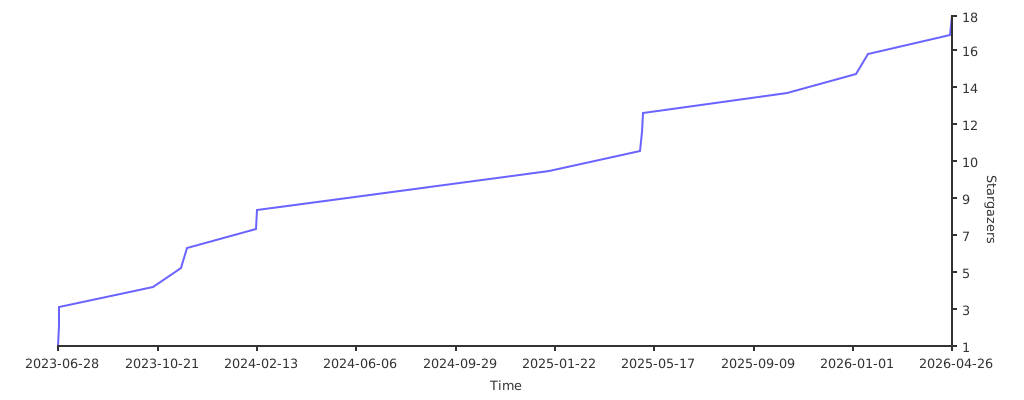
Stats
Contact
Project Link:
1 maintainer

Metadata
1 maintainer
Release files for liburlparser 2.1.0
For a detailed explanation of source distributions (sdists) and built distributions (wheels), please see the package formats documentation.
Source distribution (sdist)
| File | Size | Uploaded | |
|---|---|---|---|
| liburlparser-2.1.0.tar.gz | 426.9 kB | Details |
Built distributions (wheels)
Total release size: 11.5 MB
Release files / liburlparser-2.1.0.tar.gz
| Download URL | liburlparser-2.1.0.tar.gz |
|---|---|
| Size | 426.9 kB |
| Tags | Source |
|
SHA-256 checksum How to use checksums |
a6a3e07c59ab5ce11b7792916f22d6f70c8aaf5eb1c33dcbce29719a23e65347
|
|
BLAKE2b-256 checksum How to use checksums |
147f79c8ab1041f00ae0dc406a2c160af1c4032dfad729ae6683f1df73180ee1
|
| Upload date | |
|
Uploaded using Trusted Publishing? What is trusted publishing? |
No |
| Uploaded via |
twine/7.0.0 CPython/3.13.14
|
Release files / liburlparser-2.1.0-cp312-cp312-win_amd64.whl
| Download URL | liburlparser-2.1.0-cp312-cp312-win_amd64.whl |
|---|---|
| Size | 829.2 kB |
| Tags | CPython 3.12 Windows x86-64 |
|
SHA-256 checksum How to use checksums |
4727afe3df269060ea0c98b9a37b012226797a59fc4cc0a9dc93f69dfa2578ad
|
|
BLAKE2b-256 checksum How to use checksums |
2d7313227fd519cd8940e4dac4049e33843ab5b519b2dc7378b6be426a3172dd
|
| Upload date | |
|
Uploaded using Trusted Publishing? What is trusted publishing? |
No |
| Uploaded via |
twine/7.0.0 CPython/3.13.14
|
Release files / liburlparser-2.1.0-cp312-cp312-win32.whl
| Download URL | liburlparser-2.1.0-cp312-cp312-win32.whl |
|---|---|
| Size | 736.4 kB |
| Tags | CPython 3.12 Windows x86-32 |
|
SHA-256 checksum How to use checksums |
8759c0d4bea78851665d25ac60d320621b4f5957e230d7b982fa3cef4b371251
|
|
BLAKE2b-256 checksum How to use checksums |
b2007b1b89d3954d035b7f29fa516eb1dac5cbaa66417032044f359a89af3534
|
| Upload date | |
|
Uploaded using Trusted Publishing? What is trusted publishing? |
No |
| Uploaded via |
twine/7.0.0 CPython/3.13.14
|
Release files / liburlparser-2.1.0-cp312-cp312-musllinux_1_2_x86_64.whl
| Download URL | liburlparser-2.1.0-cp312-cp312-musllinux_1_2_x86_64.whl |
|---|---|
| Size | 911.6 kB |
| Tags | CPython 3.12 Linux musl 1.2+ x86-64 |
|
SHA-256 checksum How to use checksums |
3abbd6a51888ec334c39af622399d2178be99cd6129f594159da43cb3566e2fa
|
|
BLAKE2b-256 checksum How to use checksums |
7fd7255227bfb08fe7f7c91d7502ae2c45927416fb8aaf6a8ca994392f2074c4
|
| Upload date | |
|
Uploaded using Trusted Publishing? What is trusted publishing? |
No |
| Uploaded via |
twine/7.0.0 CPython/3.13.14
|
Release files / liburlparser-2.1.0-cp312-cp312-manylinux_2_27_x86_64.manylinux_2_28_x86_64.whl
| Download URL | liburlparser-2.1.0-cp312-cp312-manylinux_2_27_x86_64.manylinux_2_28_x86_64.whl |
|---|---|
| Size | 421.2 kB |
| Tags | CPython 3.12 Linux glibc 2.27+ x86-64 Linux glibc 2.28+ x86-64 |
|
SHA-256 checksum How to use checksums |
5f54b0272a0a0020bd088879948adb322bb32ee464fe2761e2d8649e3902dcbd
|
|
BLAKE2b-256 checksum How to use checksums |
6fb19c83c3358f25f2a7bd4daac23e9c6da234bed144f8a96c548362b2d362eb
|
| Upload date | |
|
Uploaded using Trusted Publishing? What is trusted publishing? |
No |
| Uploaded via |
twine/7.0.0 CPython/3.13.14
|
Release files / liburlparser-2.1.0-cp312-cp312-macosx_10_13_universal2.whl
| Download URL | liburlparser-2.1.0-cp312-cp312-macosx_10_13_universal2.whl |
|---|---|
| Size | 776.6 kB |
| Tags | CPython 3.12 macOS 10.13+ universal2 (ARM64, x86-64) |
|
SHA-256 checksum How to use checksums |
eccadcd6414f0046fc70dd599131bf0e4b9adb7d9a7e747051da2ef0884d5c90
|
|
BLAKE2b-256 checksum How to use checksums |
000cce34602d46c43b2e343067b4f2388c11ec6a913042fb6ea91d3ded3968e8
|
| Upload date | |
|
Uploaded using Trusted Publishing? What is trusted publishing? |
No |
| Uploaded via |
twine/7.0.0 CPython/3.13.14
|
Release files / liburlparser-2.1.0-cp311-cp311-win_amd64.whl
| Download URL | liburlparser-2.1.0-cp311-cp311-win_amd64.whl |
|---|---|
| Size | 829.7 kB |
| Tags | CPython 3.11 Windows x86-64 |
|
SHA-256 checksum How to use checksums |
d7572ef1f4bbca3cd5030be50c69df094456591cb3a80221156b001e35ae6434
|
|
BLAKE2b-256 checksum How to use checksums |
f00cb841fcf509ee7079838cb777c694b1d76ef9a626f4770ce8c2ffabb07ffb
|
| Upload date | |
|
Uploaded using Trusted Publishing? What is trusted publishing? |
No |
| Uploaded via |
twine/7.0.0 CPython/3.13.14
|
Release files / liburlparser-2.1.0-cp311-cp311-win32.whl
| Download URL | liburlparser-2.1.0-cp311-cp311-win32.whl |
|---|---|
| Size | 737.2 kB |
| Tags | CPython 3.11 Windows x86-32 |
|
SHA-256 checksum How to use checksums |
58df64f7fe9fa7cc2698715e5e15809f96adeae8eaa51f634e2797c4160b1911
|
|
BLAKE2b-256 checksum How to use checksums |
798d0642959422dd884d10571179c29583324b678b3517e5489bd0003202b5bd
|
| Upload date | |
|
Uploaded using Trusted Publishing? What is trusted publishing? |
No |
| Uploaded via |
twine/7.0.0 CPython/3.13.14
|
Release files / liburlparser-2.1.0-cp311-cp311-musllinux_1_2_x86_64.whl
| Download URL | liburlparser-2.1.0-cp311-cp311-musllinux_1_2_x86_64.whl |
|---|---|
| Size | 915.6 kB |
| Tags | CPython 3.11 Linux musl 1.2+ x86-64 |
|
SHA-256 checksum How to use checksums |
2a9919b49c1b3458a509bc508c8a7f2d320249f59f1c188d09773fca9632b7e3
|
|
BLAKE2b-256 checksum How to use checksums |
0f2e45f3912e37e5702d67dbf2880ff1540d77eae4a82a2d000db98518e43929
|
| Upload date | |
|
Uploaded using Trusted Publishing? What is trusted publishing? |
No |
| Uploaded via |
twine/7.0.0 CPython/3.13.14
|
Release files / liburlparser-2.1.0-cp311-cp311-manylinux_2_27_x86_64.manylinux_2_28_x86_64.whl
| Download URL | liburlparser-2.1.0-cp311-cp311-manylinux_2_27_x86_64.manylinux_2_28_x86_64.whl |
|---|---|
| Size | 425.4 kB |
| Tags | CPython 3.11 Linux glibc 2.27+ x86-64 Linux glibc 2.28+ x86-64 |
|
SHA-256 checksum How to use checksums |
fb34ed22035728e7144ad9c64dfa50c09cbd7d9c765616244a75fd0ecb56db1a
|
|
BLAKE2b-256 checksum How to use checksums |
063916b27b8327784dc2d5caf07463f36d7b72c84e180446210c7a04bdbe94cf
|
| Upload date | |
|
Uploaded using Trusted Publishing? What is trusted publishing? |
No |
| Uploaded via |
twine/7.0.0 CPython/3.13.14
|
Release files / liburlparser-2.1.0-cp311-cp311-macosx_10_13_universal2.whl
| Download URL | liburlparser-2.1.0-cp311-cp311-macosx_10_13_universal2.whl |
|---|---|
| Size | 777.2 kB |
| Tags | CPython 3.11 macOS 10.13+ universal2 (ARM64, x86-64) |
|
SHA-256 checksum How to use checksums |
bf00ea9ff13ecefb453b302094da9b48ea1e9d8bfd79cd5f5e352f9938ca1e0f
|
|
BLAKE2b-256 checksum How to use checksums |
494e60726290d14f6504fe09e326425178a361e9c06daf12cc0e0cb35ebb16c3
|
| Upload date | |
|
Uploaded using Trusted Publishing? What is trusted publishing? |
No |
| Uploaded via |
twine/7.0.0 CPython/3.13.14
|
Release files / liburlparser-2.1.0-cp310-cp310-win_amd64.whl
| Download URL | liburlparser-2.1.0-cp310-cp310-win_amd64.whl |
|---|---|
| Size | 829.3 kB |
| Tags | CPython 3.10 Windows x86-64 |
|
SHA-256 checksum How to use checksums |
9bc8d13b74070d621ab801f9f84f9ca9a435cee4bf9a0a1c04a9026bcb8b7c4e
|
|
BLAKE2b-256 checksum How to use checksums |
290e56b41feebbcc935007903ebf6f60a1bc13c8871781891b08a434078cc0d0
|
| Upload date | |
|
Uploaded using Trusted Publishing? What is trusted publishing? |
No |
| Uploaded via |
twine/7.0.0 CPython/3.13.14
|
Release files / liburlparser-2.1.0-cp310-cp310-win32.whl
| Download URL | liburlparser-2.1.0-cp310-cp310-win32.whl |
|---|---|
| Size | 737.0 kB |
| Tags | CPython 3.10 Windows x86-32 |
|
SHA-256 checksum How to use checksums |
c09998d27215f73c6887ab0cbc4c6734dd1370c52bd528a9ed9645b8747b681c
|
|
BLAKE2b-256 checksum How to use checksums |
ba4f32dc56bc7c9c8d40ac571341b7f4a3e57c6ec0bffadf40543f4989223abf
|
| Upload date | |
|
Uploaded using Trusted Publishing? What is trusted publishing? |
No |
| Uploaded via |
twine/7.0.0 CPython/3.13.14
|
Release files / liburlparser-2.1.0-cp310-cp310-musllinux_1_2_x86_64.whl
| Download URL | liburlparser-2.1.0-cp310-cp310-musllinux_1_2_x86_64.whl |
|---|---|
| Size | 915.7 kB |
| Tags | CPython 3.10 Linux musl 1.2+ x86-64 |
|
SHA-256 checksum How to use checksums |
cadd1dcc244b56a476f9d43d3df4f9a697796d59fecf7d67ac11f4739f440be8
|
|
BLAKE2b-256 checksum How to use checksums |
1b729463aa77280e72f13b4c47ced90a8dbc1d70b214bf7f4499776d966902a8
|
| Upload date | |
|
Uploaded using Trusted Publishing? What is trusted publishing? |
No |
| Uploaded via |
twine/7.0.0 CPython/3.13.14
|
Release files / liburlparser-2.1.0-cp310-cp310-manylinux_2_27_x86_64.manylinux_2_28_x86_64.whl
| Download URL | liburlparser-2.1.0-cp310-cp310-manylinux_2_27_x86_64.manylinux_2_28_x86_64.whl |
|---|---|
| Size | 425.6 kB |
| Tags | CPython 3.10 Linux glibc 2.27+ x86-64 Linux glibc 2.28+ x86-64 |
|
SHA-256 checksum How to use checksums |
559cfaae6ff78cda4bb8210dd892eb446fd931b9297f84b0a0662904589674fc
|
|
BLAKE2b-256 checksum How to use checksums |
08b26d637b1cd45f88fdbd5c61bd2b250708c9b879b04a42f3c1c03ab7dd6ab6
|
| Upload date | |
|
Uploaded using Trusted Publishing? What is trusted publishing? |
No |
| Uploaded via |
twine/7.0.0 CPython/3.13.14
|
Release files / liburlparser-2.1.0-cp310-cp310-macosx_10_13_universal2.whl
| Download URL | liburlparser-2.1.0-cp310-cp310-macosx_10_13_universal2.whl |
|---|---|
| Size | 777.8 kB |
| Tags | CPython 3.10 macOS 10.13+ universal2 (ARM64, x86-64) |
|
SHA-256 checksum How to use checksums |
b409a9e612b41de659413e0df056852d5ffaf079d60add2d904a9522bb5f0b83
|
|
BLAKE2b-256 checksum How to use checksums |
c2eeb344b51707d48455d54d61e981cab71dc175d085411decf93bd7614de13b
|
| Upload date | |
|
Uploaded using Trusted Publishing? What is trusted publishing? |
No |
| Uploaded via |
twine/7.0.0 CPython/3.13.14
|














