
Package for operating STANDA 8SMC5 controllers

Project description
libximc
This is a python binding for libximc - cross-platform library for Standa 8SMC5-USB motor controllers.
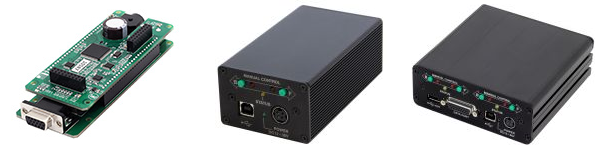
Libximc manages hardware using interfaces: USB 2.0, RS232 and Ethernet, also uses a common and proven virtual serial port interface, so you can work with motor control modules through this library under Windows and Linux. macOS isn't supported yet.
This library also supports virtual devices. So you can make some tests without real hardware.
Installation
pip install libximc
Minimal new API example
import time
import libximc.highlevel as ximc

# Virtual device will be used by default.
# In case you have real hardware, set correct device URI here

device_uri = r"xi-emu:///ABS_PATH/virtual_controller.bin"  # Virtual device
# device_uri = r"xi-com:\\.\COM111"                        # Serial port
# device_uri = "xi-tcp://172.16.130.155:1820"              # Raw TCP connection
# device_uri = "xi-net://192.168.1.120/abcd"               # XiNet connection

axis = ximc.Axis(device_uri)
axis.open_device()

print("Launch movement...")
axis.command_right()

time.sleep(3)

print("Stop movement")
axis.command_stop()

print("Disconnect device")
axis.close_device()  # It's also called automatically by the garbage collector, so explicit closing is optional

print("Done")
Full new API example
See Colab notebook for full example: https://colab.research.google.com/drive/1xJawpc-0CIZLDlwkefzSgWrAyBVSlaMl
Detailed view on new API
We are glad to introduce new libximc highlevel API! You can access it via:
import libximc.highlevel as ximc
New API principles
-
All controller related functions are methods of an Axis class:
# Axis constructor takes device URI as string (not bytes)
axis = ximc.Axis("xi-emu:///home/user/virtual-device.bin")
axis.device_open()  # Note: device must be opened manually

axis.command_move(10, 0)

# Note: device closing, axis.close_device(), is performed automatically by the garbage collector.
Other libximc functions can be accessed via
ximcitself, e.g.ximc.ximc_version(). -
As you could notice, there is no need to pass
device_idto the commands any more. Axis class does it internally. -
You don't need to pass the
calibration_tstructure to the*_calbfunctions. Instead, set calibrations viaaxis.set_calb(A, MicrostepMode)and then use any*_calbfunction:axis.set_calb(0.048, ximc.MicrostepMode.MICROSTEP_MODE_FRAC_256) axis.command_move_calb(12.3)
-
All flags' enumerations are placed in
ximc. For example, to getEnumerationFlagsuseximc.EnumerateFlags.<desired-flag>. -
All C-legacy exit status codes are transformed to Python exceptions.
-
In case you want to get any available data structure from the controller, you don't need to create an empty data structure and pass it to corresponding function. Instead, use single-line instruction, like:
# Example for move_settings. You can use your desired get_*() command
move_settings = axis.get_move_settings()
-
ximc.enumerate_devices()returns list of dictionaries containing information about found devices. Hint: to get full information about devices, use flagximc.EnumerationFlags.EnumerateFlags.ENUMERATE_PROBE:# Get full information while enumerating ximc.enumerate_devices(ximc.EnumerateFlags.ENUMERATE_PROBE)
-
Manufactures-only functions aren't supported.
-
Logging functions aren't supported.
I want to use the old version. What should I do?
If you want to use the old API (lowlevel libximc), don't worry. Just
import libximc.lowlevel as ximc # Such an import provides you with the old version of the libximc binding
More information
-
Libximc library documentation: https://libximc.xisupport.com/doc-en/index.html
-
Standa 8SMC5 motor controller user manual: https://doc.xisupport.com/en/8smc5-usb/
-
Standa website: https://www.standa.lt/
If you have faced any issues while using the library and you have no idea how to solve them, contact technical support via:
- Website: en.xisupport.com
- E-mail: 8smc4@standa.lt
- Telegram: @SMC5TechSupport
- WhatsApp: +1 (530) 584 4117
Release history Release notifications | RSS feed


Download files
Download the file for your platform. If you're not sure which to choose, learn more about installing packages.
Source Distribution
Built Distribution
Filter files by name, interpreter, ABI, and platform.
If you're not sure about the file name format, learn more about wheel file names.
Copy a direct link to the current filters
File details
Details for the file libximc-3.0.4.tar.gz.
File metadata
- Download URL: libximc-3.0.4.tar.gz
- Upload date:
- Size: 5.5 MB
- Tags: Source
- Uploaded using Trusted Publishing? No
- Uploaded via: twine/3.8.0 pkginfo/1.10.0 readme-renderer/34.0 requests/2.27.1 requests-toolbelt/1.0.0 urllib3/1.26.20 tqdm/4.64.1 importlib-metadata/4.8.3 keyring/23.4.1 rfc3986/1.5.0 colorama/0.4.5 CPython/3.6.8
File hashes
| Algorithm | Hash digest | |
|---|---|---|
| SHA256 |
4e41b91350a3a1e340ac4d0085dd1fad1953cc9327f656f755b1b311f21d4bd8
|
|
| MD5 |
4364283622c79a2c54da585211eb7954
|
|
| BLAKE2b-256 |
f453417320404009eb5ec19bbc0cd8bdb1f22301d9e858508318fc3304ae3003
|
File details
Details for the file libximc-3.0.4-py3-none-any.whl.
File metadata
- Download URL: libximc-3.0.4-py3-none-any.whl
- Upload date:
- Size: 5.5 MB
- Tags: Python 3
- Uploaded using Trusted Publishing? No
- Uploaded via: twine/3.8.0 pkginfo/1.10.0 readme-renderer/34.0 requests/2.27.1 requests-toolbelt/1.0.0 urllib3/1.26.20 tqdm/4.64.1 importlib-metadata/4.8.3 keyring/23.4.1 rfc3986/1.5.0 colorama/0.4.5 CPython/3.6.8
File hashes
| Algorithm | Hash digest | |
|---|---|---|
| SHA256 |
56a3a2783dc3660386e675b75d3be93ae2a36895d853d71e99c17ae4184b8b41
|
|
| MD5 |
ad6f3849744cbc0074c89bb663100a7e
|
|
| BLAKE2b-256 |
228c19c67dcdfa07be0aa7f7ca2f749faddad44aff3562df5162a4b2b2e7c9a3
|






