
Lichess Study to PDF




Turn a Lichess study into a PDF worth reading, plus a browser interface for working through it first.
Everything in the study makes it into the export: main line, sidelines nested
to any depth, comments, NAG symbols (!, ?!, □), and the coloured square
markers and arrows Lichess stores in the PGN.
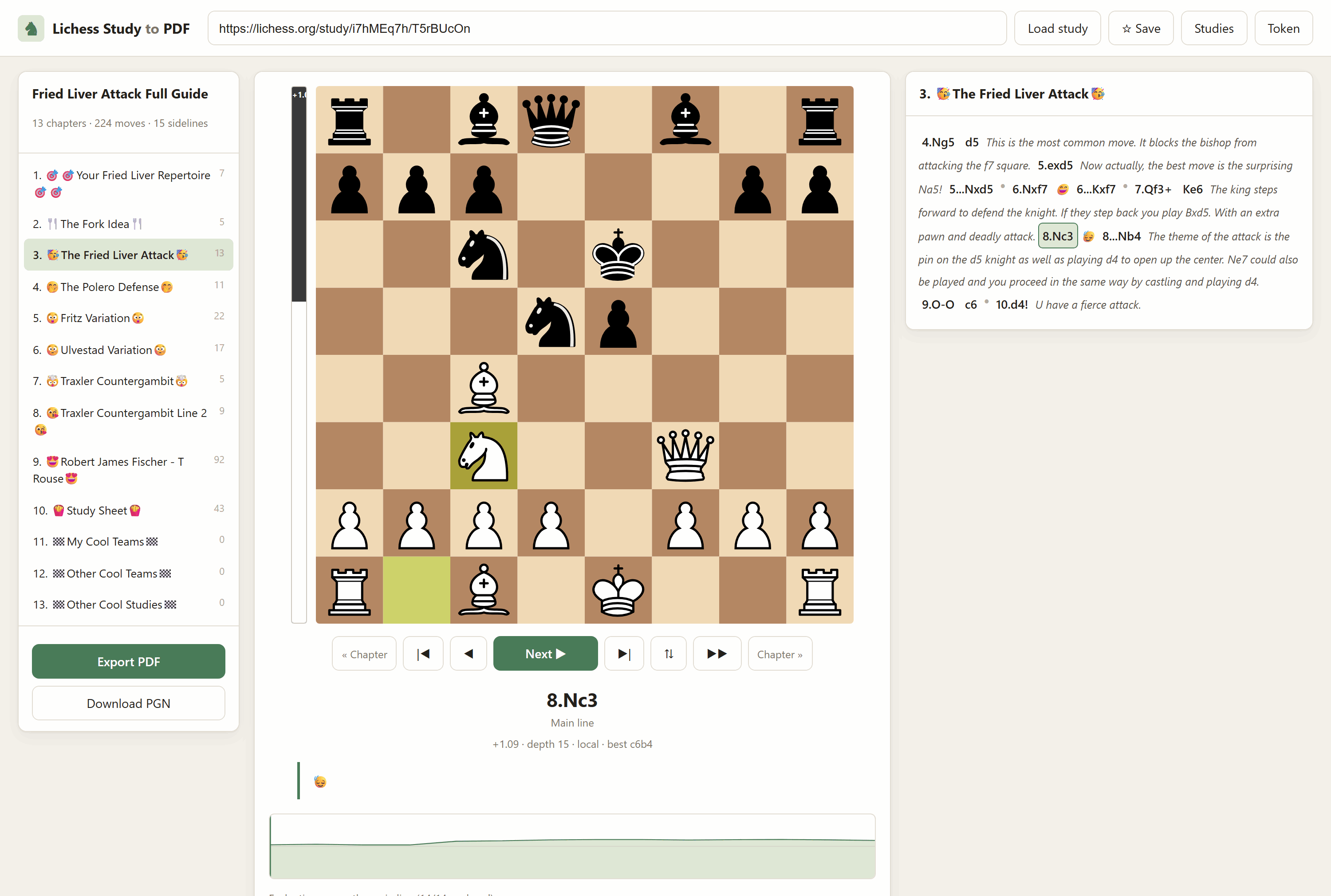
Install
pip install lichess-study-to-pdf
lichess-study-pdf serve
Or take all five at once with pip install lichess-essentials. Installed this
way your files live in the usual per-user folder for your platform, and the
app prints the path in its startup banner. To run it from a checkout instead,
see the repository README.
Running the app
Step 1 — set up, once
The virtualenv lives at the repository root, one level above this folder, and is shared by every app in the repo.
Windows (PowerShell)
cd "C:\Users\<you>\Documents\GitHub\Lichess-Essentials"
python -m venv .lichess
.\.lichess\Scripts\python.exe -m pip install -r Lichess-Study-to-PDF\requirements.txt
Windows (Git Bash) / macOS / Linux
cd ~/Documents/GitHub/Lichess-Essentials
python -m venv .lichess

# Git Bash on Windows
./.lichess/Scripts/python.exe -m pip install -r Lichess-Study-to-PDF/requirements.txt

# macOS / Linux
./.lichess/bin/python -m pip install -r Lichess-Study-to-PDF/requirements.txt
You only ever do this once.
Step 2 — start the web app
Run it from inside the Lichess-Study-to-PDF folder — that is where the
lichess_study_pdf package lives, and Python needs to see it.
# Windows PowerShell
cd "C:\Users\<you>\Documents\GitHub\Lichess-Essentials\Lichess-Study-to-PDF"
& "..\.lichess\Scripts\python.exe" -m lichess_study_pdf.cli serve
# Git Bash on Windows
cd ~/Documents/GitHub/Lichess-Essentials/Lichess-Study-to-PDF
../.lichess/Scripts/python.exe -m lichess_study_pdf.cli serve

# macOS / Linux
cd ~/Documents/GitHub/Lichess-Essentials/Lichess-Study-to-PDF
../.lichess/bin/python -m lichess_study_pdf.cli serve
You should see:
  Lichess Study to PDF is running.
  Open http://127.0.0.1:8777 in your browser.
    engine : ...\engine\stockfish-windows-x86-64-bmi2.exe
    LaTeX  : ...\MiKTeX\miktex\bin\x64\pdflatex.EXE
  Press Ctrl+C to stop.
Those two lines tell you what will work: no engine means blank eval bars, no LaTeX means the book mode is greyed out. Neither stops the app running.
Step 3 — use it
- Open http://127.0.0.1:8777. It opens on My studies — your own list of studies as clickable cards, named, so you can see what you are opening. See Your studies list below.
- Click one, or paste a study URL and press Load study.
For a private study, paste a chapter URL
(
https://lichess.org/study/i7hMEq7h/0KOpBPyc) — every other chapter is found automatically, no token needed. See the next section. - Click chapters on the left; step through with Space, the arrow keys, or by scrolling the mouse wheel over the board — down goes forward, up goes back, and either one stops the autoplay. Click any move — including inside a sideline — to jump there. Pick up a piece to play your own moves from that position.
- Export PDF on the bottom left, choose a style, Build PDF.
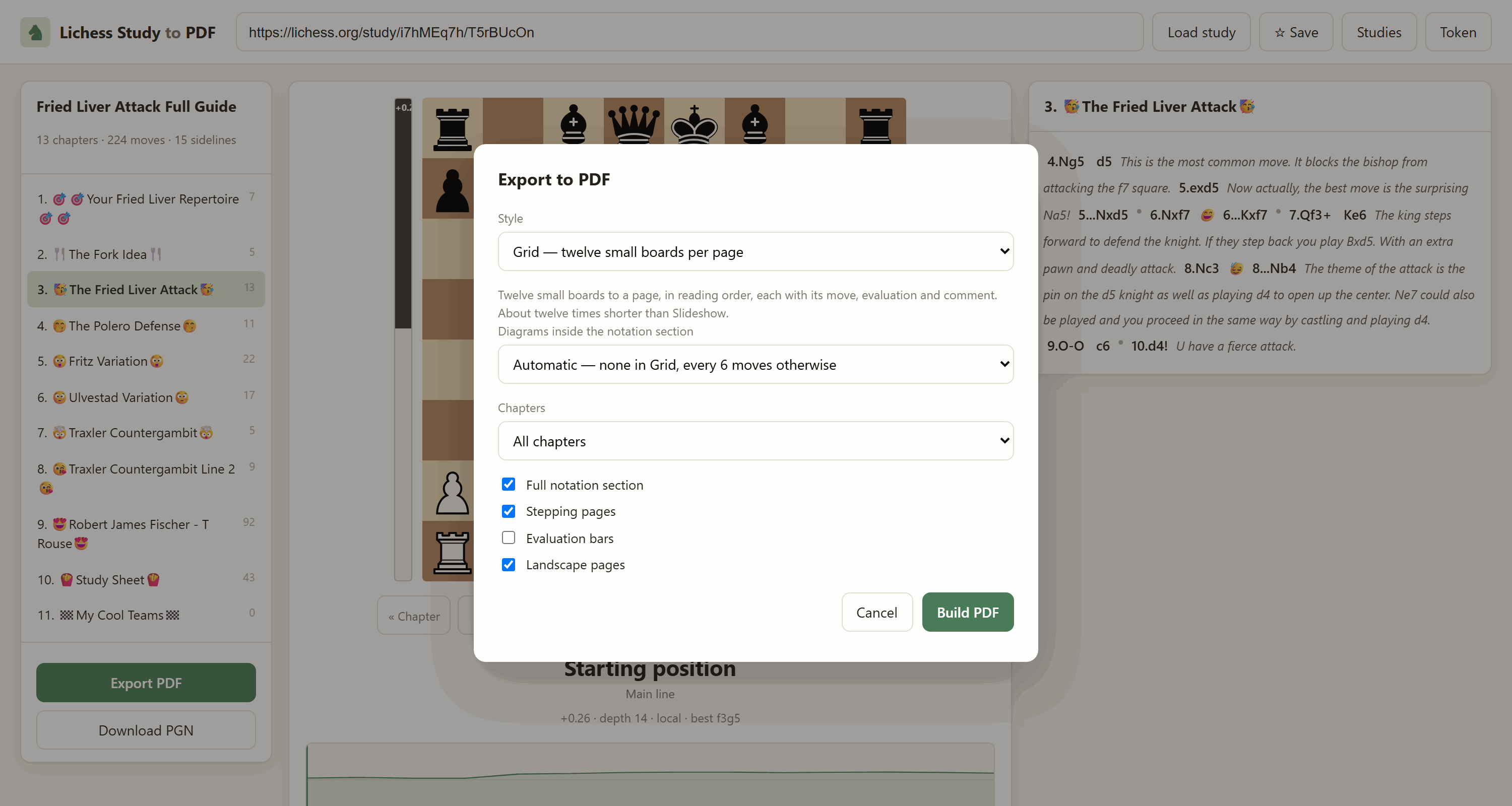
Handy: http://127.0.0.1:8777/?url=<study-url> loads a study straight away,
so you can bookmark a study you open often.
Your studies list
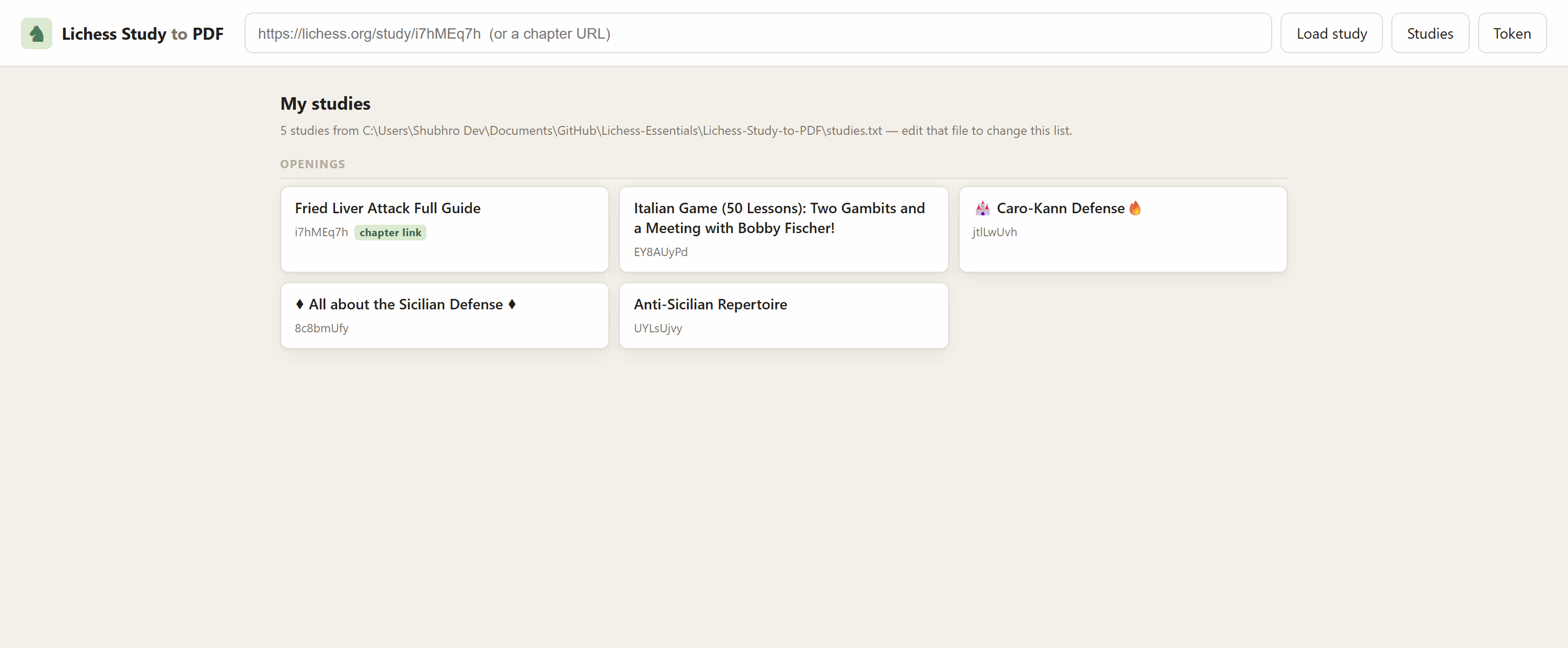
The home page is built from studies.txt, in this folder. One study per
line:
## Openings
Fried Liver Attack Full Guide | https://lichess.org/study/i7hMEq7h/T5rBUcOn
Anti-Sicilian Repertoire | https://lichess.org/study/UYLsUjvy
https://lichess.org/study/EY8AUyPd
Name | URL— the name is what the card says, the URL is what it opens.- The name is optional: a bare URL works, the card just shows the study id.
## Somethingstarts a section,#starts a comment, blank lines are ignored.- A line that is neither a comment nor a study is reported under the list rather than throwing the rest of it away, so one typo costs you nothing.
- Put a chapter URL in for a private study, as the Fried Liver line does: that is what lets it open without a token.
Two ways to add to it:
- Edit the file. The page re-reads it on every refresh — no restart.
- Press ☆ Save in the header while a study is open. It appends the study
under a
## Saved from the appsection with its real name filled in. Saving one twice does nothing.
LICHESS_STUDIES_FILE=/some/other/path.txt points the app at a different
list, if you would rather keep yours outside the repository.
There is no Lichess API for the studies you have liked, so the list cannot
be filled from your Lichess favourites automatically. What Lichess does expose
is every study belonging to an account (/api/study/by/<username>), so a list
of your own studies can be generated if you want one.
Step 4 — stop it
Ctrl+C in the terminal you started it in.
Other ports
... cli serve --port 8899            # if 8777 is taken
... cli serve --host 0.0.0.0         # reachable from other devices on your LAN
--host 0.0.0.0 exposes the app to your whole network and there is no
authentication — only do it on a network you trust.
Without the browser: straight to a PDF
Same folder, same interpreter, no server involved:
cd Lichess-Study-to-PDF

# the default: twelve small boards to a page
../.lichess/Scripts/python.exe -m lichess_study_pdf.cli \
    "https://lichess.org/study/i7hMEq7h/0KOpBPyc" -o repertoire.pdf

# a typeset chess book
../.lichess/Scripts/python.exe -m lichess_study_pdf.cli \
    "https://lichess.org/study/i7hMEq7h/0KOpBPyc" --mode book -o book.pdf

# one big board per page, steps with the arrow keys
../.lichess/Scripts/python.exe -m lichess_study_pdf.cli \
    "https://lichess.org/study/ByhlXnmM" --mode slideshow -o study.pdf

# what engine did it find?
../.lichess/Scripts/python.exe -m lichess_study_pdf.cli engine-info
Full option list: ... cli export --help, or the CLI reference further down.
If something goes wrong
| Symptom | Cause and fix |
|---|---|
No module named lichess_study_pdf |
You are in the wrong directory. cd into Lichess-Study-to-PDF first. |
Port 8777 is already in use |
The app is probably already running — open the browser, or --port 8899. |
No module named 'chess' (or fastapi, reportlab, …) |
You ran the system Python instead of the venv one. Use the full ..\.lichess\Scripts\python.exe path. |
| Eval bars are blank | No Stockfish. Run engine-info and drop a binary in engine/. |
| Book mode greyed out | No pdflatex. Install MiKTeX or TeX Live, or use Slideshow. |
403 ... study is private |
Paste a chapter URL instead of the study URL, or supply a token. |
| PDF looks blank except the first position of each chapter | You exported in Acrobat mode. Re-export as Book or Slideshow. |
Private studies work without a token
Lichess is inconsistent about study privacy, and this tool exploits that:
GET /api/study/<study>.pgn            -> 403 for a private study
GET /api/study/<study>/<chapter>.pgn  -> 200, full PGN, no token
The per-chapter endpoint does not enforce the study's privacy. So paste a chapter URL and the whole study comes down:
https://lichess.org/study/i7hMEq7h            <- 403, private
https://lichess.org/study/i7hMEq7h/0KOpBPyc   <- works, and finds the other 12
                                                 chapters automatically
The chapter's own page lists every chapter in the study, so one chapter URL is enough to rebuild all of it. Open your study on Lichess, click any chapter, copy that address.
A token is still supported and is the documented route — create one with the
study:read scope at
https://lichess.org/account/oauth/token/create?scopes[]=study:read, then
--token, LICHESS_TOKEN, or ~/.lichess_token.
The four export styles
Every chapter starts on a fresh page in all of them, and every sideline is given its own colour, so two alternatives to the same move never look alike.
Each colour arrives in three matching tones: a bar down the left edge of the board or notation block, a mild wash behind it, and the ink of its moves. Numbering is chapter-wide — a branch point hands its alternatives a consecutive run of colours (which the palette spaces ~105° apart on the wheel), and a sideline nested inside another gets one of its own, so nothing that a reader sees at once shares a colour. The palette holds 24; after that colours repeat, which only ever affects sidelines pages apart.
Every sideline also carries its number — s1, s2, … printed where it opens,
in the grid cell, in the breadcrumb — so the colour has a name. That, the bar,
the indent and the depth dots are all shape rather than hue, which is what
keeps nesting and identity readable in a greyscale print or for a colour-blind
reader. Grid pages carry a legend of the sidelines shown on them along the
footer.
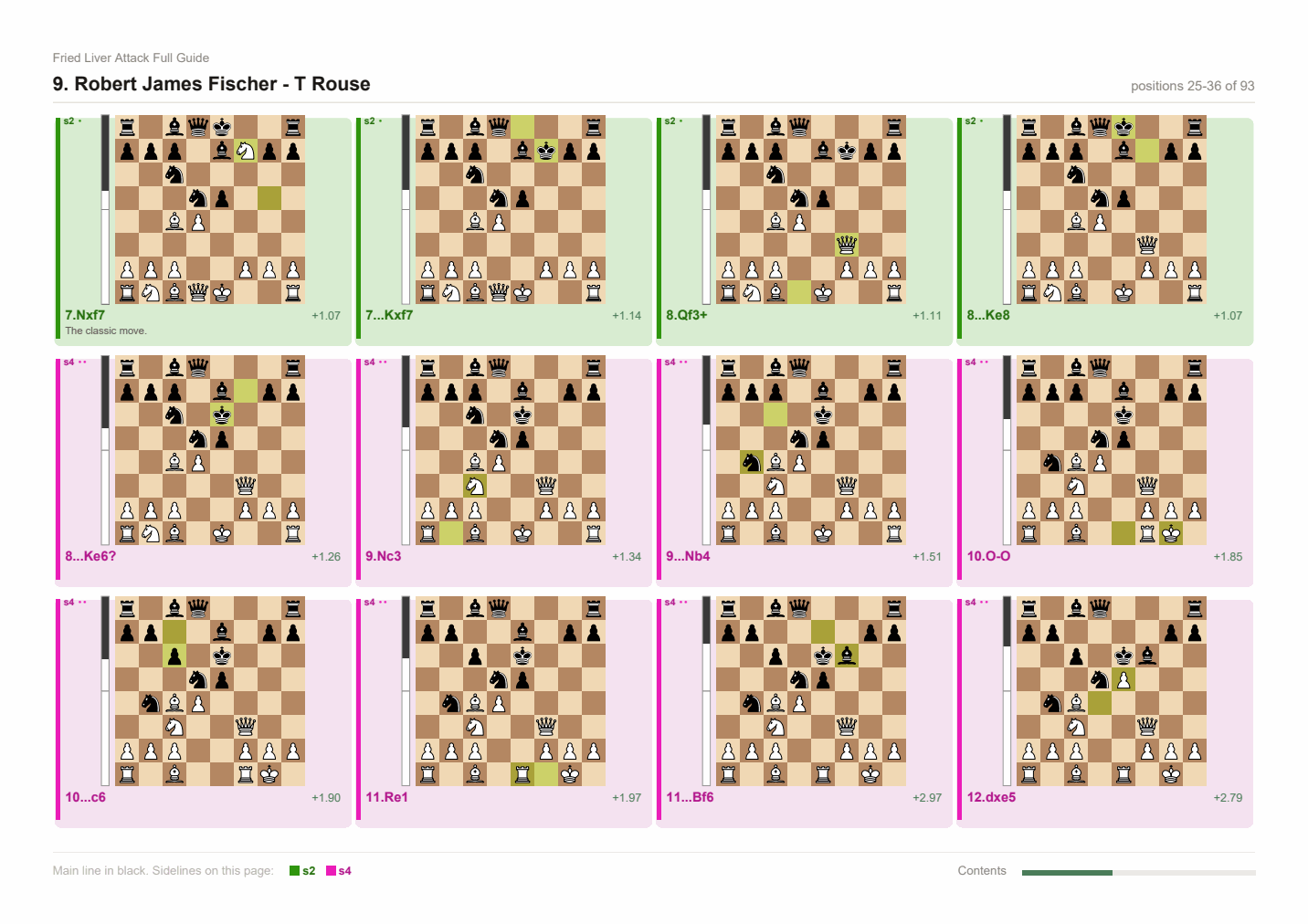
--mode grid (default) — twelve boards to a page
A contact sheet: every position gets its own diagram, twelve to a page, in reading order, each with its move, evaluation and comment underneath. Same coverage as the slideshow with a twelfth of the diagram pages — measured on a 237-position study, 20 pages instead of 237.
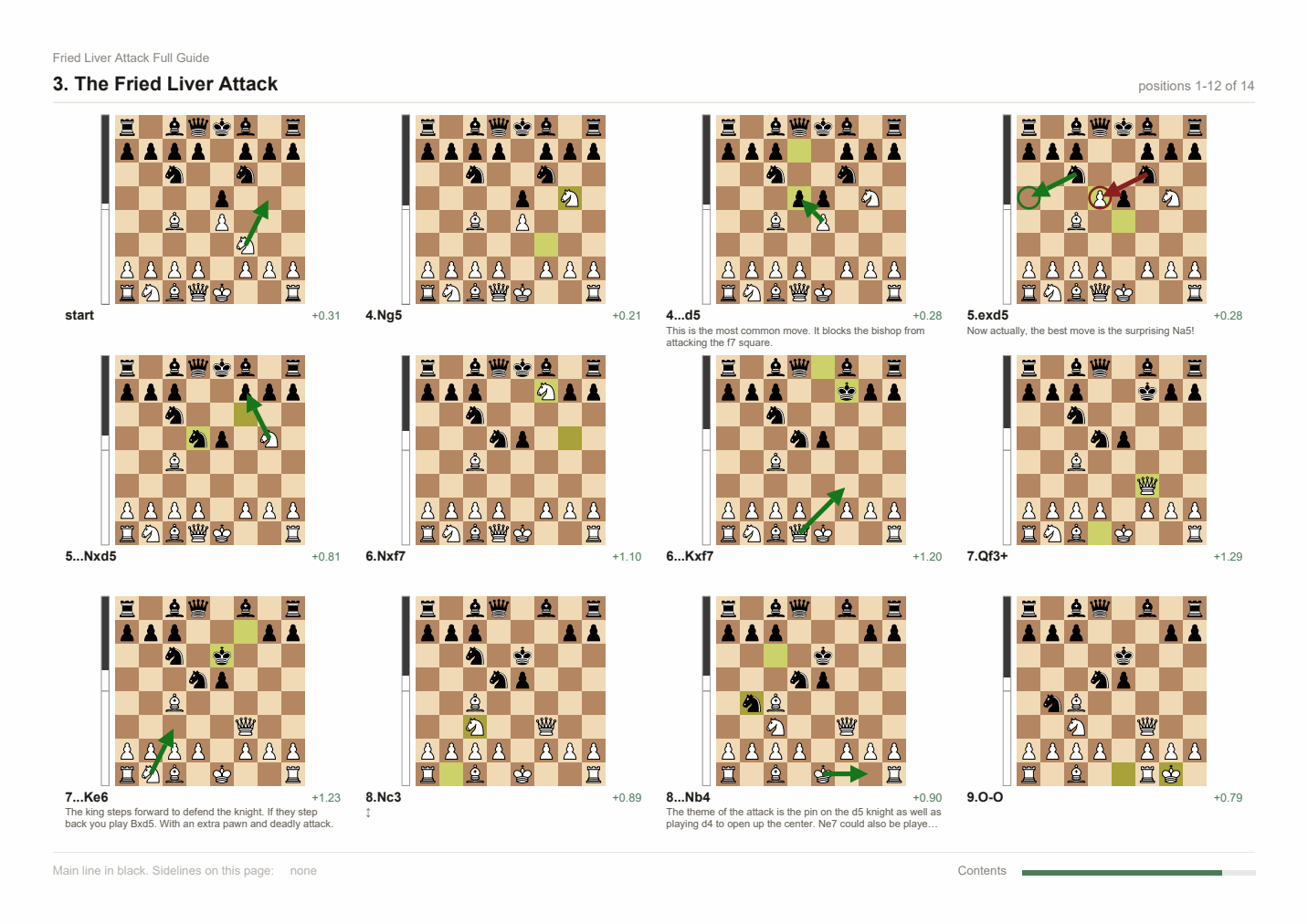
Comments are trimmed to two lines in a grid cell; the notation section, which is on by default, still carries every comment in full.
Two things that make a page hold fewer than twelve:
- Short chapters. Chapters always start on a fresh page, so a chapter with six positions gets a page with six boards. That is the direct cost of the one-chapter-per-page rule.
- The notation section. It is a separate, text-only section — it does not
put boards on its pages in grid mode, because the grid already shows every
position.
--no-notationdrops it entirely if you only want diagrams.
--diagrams controls diagrams inside the notation section only, never the
grid. It defaults to automatic: none in grid mode, every:6 elsewhere.
--grid-columns 4 --grid-rows 3     # the default 12 per page
--grid-columns 3 --grid-rows 2     # 6 bigger boards per page
--mode book — a typeset chess book
Compiled with LaTeX (xskak + chessboard): portrait, two columns,
justified Computer Modern, figurine notation (♘f3), printed-book diagrams
with hatched squares and a side-to-move marker, arrows and circles from the
study's own annotations, and optional [+0.42] evaluations beside each move.
A 13-chapter study lands in about 16 pages. This is the mode to use for reading and printing.
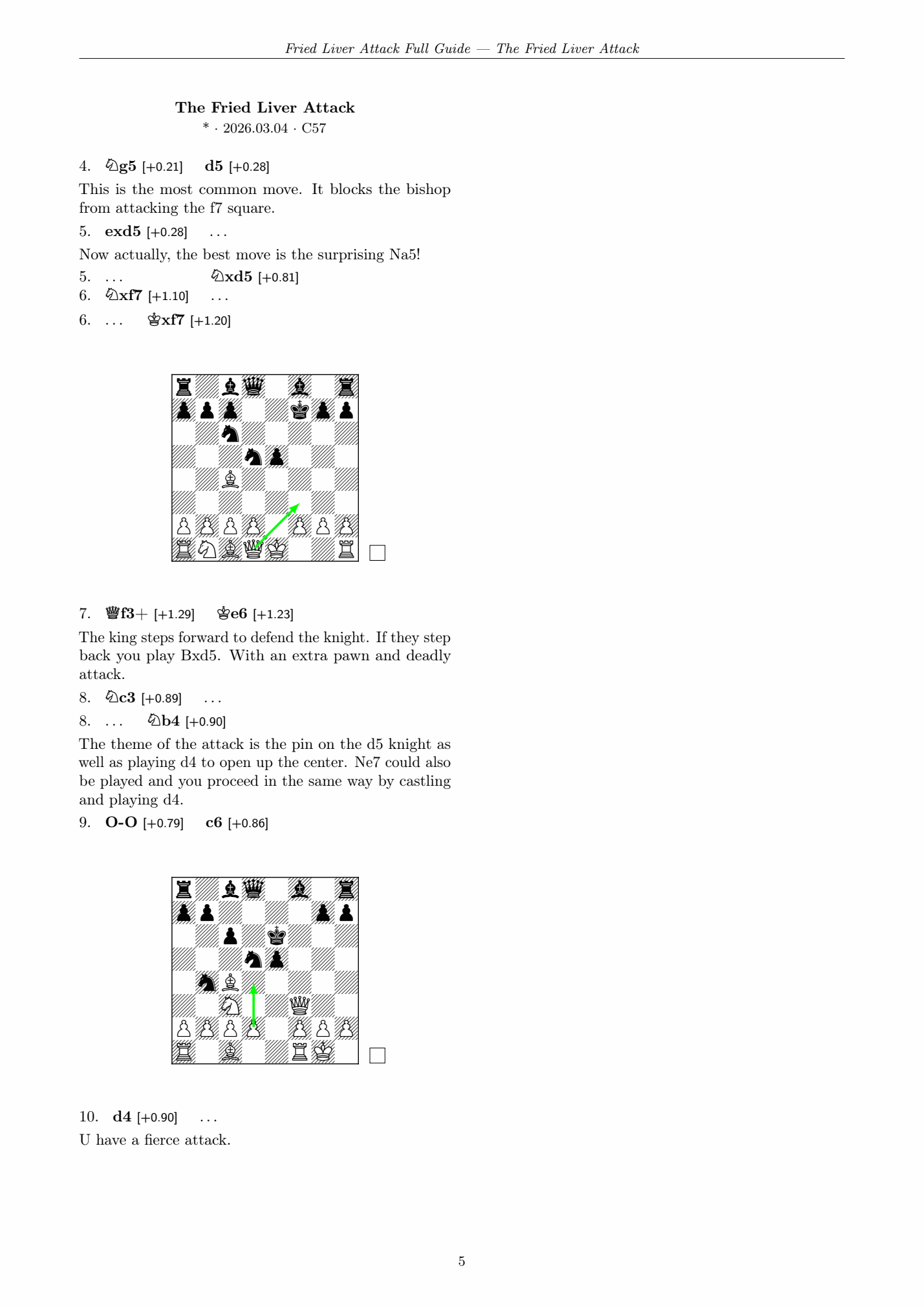
Needs pdflatex (MiKTeX or TeX Live) with xskak, chessboard, skak.
Without it the mode is disabled in the UI and the CLI says so.
--mode slideshow — one big board per page
One position per page, so your reader's ordinary next-page key — space, arrow, PageDown, a presentation remote, a tap on a phone — steps the board forward one move. No scripting, so it behaves identically in every viewer.
Each page carries the board, the eval bar, the current line with the move
boxed, upcoming moves greyed ahead of it, and the comment. It is long by
nature — use grid unless you specifically want to step move by move.
--mode acrobat — layered, Adobe Reader only
Each chapter is a single page holding every position as a PDF optional-content layer, switched by embedded JavaScript.
Only Adobe Acrobat Reader executes PDF JavaScript. Everywhere else you see the first position of each chapter and the buttons do nothing. The file now carries a full-page warning saying exactly that, because this mode is easy to pick by accident and the result looks broken rather than limited.
Evaluation bars
Two sources, in order:
- Lichess cloud eval — instant, but only for positions already in its
cache (in practice, openings), and firmly rate limited: a few hundred
lookups earns a
429that lasts minutes. So the cloud is only asked about positions up to move 20, paced about a second apart, and a429is recorded and skipped rather than waited on. It never blocks the UI. - Local Stockfish — full coverage, and what actually evaluates a personal repertoire.
Put a Stockfish binary in engine/, on PATH, or at $STOCKFISH_PATH;
engine-info tells you what it found. Results are cached in
~/.cache/lichess-study-pdf/evals.json, keyed so cloud results are reused
regardless of engine settings.
Export evaluations are computed on the server for every position being exported. Earlier versions shipped whatever the browser happened to have, which meant most positions came out blank — that is fixed. Expect roughly 30 s for a 240-position study.
The web interface
Modelled on chesspaper.me, with the gaps filled in:
| chesspaper.me | this | |
|---|---|---|
| Sidelines and comments | need per-node toggling | all visible from the start |
| Board stepping | no next control | Space / arrow keys / Next button |
| Which line you step | — | follows whichever line you clicked into |
| Eval bar | — | live for the position you are on, ~150 ms |
| Play your own moves | — | pick any piece up, from any position |
| Diagrams in the PDF | manual toggle per node | one setting for the whole study |
Free play. Click a piece and its legal moves light up; click a destination and you are off the study line, with a banner telling you how many moves deep you are and a button back. Evaluations keep coming for every move you invent. Left arrow takes back, Escape returns to the line. Legality is checked server-side by python-chess, so there is no chess library in the browser.
Hover preview. Hovering any move in the notation pops up a small board of that position, so you can scan a sideline without leaving where you are.
Keyboard: Space/→/↓ next, ←/↑ back, Home/End first/last,
F flip, P autoplay, Esc cancel selection or leave free play.
CLI reference
lichess-study-pdf <study-url|chapter-url> [options]

  -o, --output PATH      output file
      --token TOKEN      Lichess API token (study:read)
      --pgn FILE         read a local PGN instead of calling the API
      --chapter-only     with a chapter URL, export only that chapter
      --save-pgn FILE    also save the downloaded PGN

      --mode MODE        grid (default) | book | slideshow | acrobat
      --grid-columns N   boards across the page in grid mode (default 4)
      --grid-rows N      boards down the page in grid mode (default 3)
      --latex PATH       pdflatex binary for --mode book
      --keep-tex PATH    also write the generated .tex
      --no-notation      skip the read-through notation section
      --no-steps         skip the one-page-per-position section
      --chapters SPEC    subset, 1-based, e.g. 1,3,5-8
      --max-depth N      drop sidelines nested deeper than N
      --diagrams POLICY  none | comments | all | every:N   (default every:6)
      --page-size SIZE   a4 | a3 | letter
      --portrait         portrait pages (book mode is always portrait)

      --no-evals         no evaluation bars
      --no-cloud         engine only, skip the Lichess cloud
      --engine PATH      Stockfish binary
      --movetime SEC     seconds per position (default 0.25)
      --depth N          fixed depth instead of a time budget

lichess-study-pdf serve [--host H] [--port P]
lichess-study-pdf engine-info
Hosting it for free
This is a plain FastAPI/Uvicorn app with one runtime dependency worth caring about: Stockfish, invoked as a subprocess and kept warm for the life of the process (server.py). That rules out anything serverless (Vercel, AWS Lambda-style hosts) — you need something that runs a real, long-lived container. Two that do it for free:
| Hugging Face Spaces | Render.com | |
|---|---|---|
| Cost | Free, no card required | Free tier — check current signup terms, this has changed before |
| Runtime | Docker | Docker |
| Idle behaviour | Sleeps, wakes on the next visit | Spins down after ~15 min idle; cold start on the next request |
Dockerfile in this folder installs Stockfish via apt-get
(Debian's package, not a manual binary download) and deliberately skips
LaTeX — a full texlive install is several GB and not worth it unless you
specifically want book mode. It sets STOCKFISH_PATH to the apt package's
install location so find_stockfish() finds it without relying on PATH.
Render
- Push this repo to GitHub.
- New Web Service → connect the repo → Root Directory:
Lichess-Study-to-PDF→ Render auto-detects the Dockerfile → Free instance type → deploy. - You get a URL like
https://<name>.onrender.com.
Hugging Face Spaces
Spaces are their own separate git repo (not this GitHub repo), so:
- New Space → SDK: Docker → Hardware: CPU basic (free).
- Clone the Space's repo locally, then copy this folder's contents
(
Dockerfile,requirements.txt,lichess_study_pdf/, etc.) into its root — not theLichess-Study-to-PDFfolder itself, what's inside it. - Add this to the top of the Space's
README.md:--- title: Lichess Study to PDF sdk: docker app_port: 7860 ---
- Commit and push (a Hugging Face access token as the git password).
Before you make it public
- Don't set
LICHESS_TOKENon a public deployment. It would be shared by every visitor — anyone with the URL could pull whatever private studies that token can see. Leave it unset; paste a token into the UI per session instead, the same as running it locally. - There is no password wall here by default — anyone with the link can use the tool (not access your Lichess account, just use the app). If you want one, the sibling app has it wired up — see Repertoire Creator's hosting section for the pattern; it is not implemented in this app.
Layout
lichess_study_pdf/
  fetch.py         URL -> PGN, token handling, private-study chapter fallback
  parse.py         PGN -> chapters -> depth-first list of positions
  notation.py      notation blocks and move-tree helpers
  render.py        board SVG -> vector drawing, eval bar
  fonts.py         Unicode font resolution (□ ± ∞ would break Helvetica)
  pdf.py           grid + slideshow writers, title/contents/notation
  pdf_latex.py     the LaTeX chess book
  pdf_acrobat.py   optional-content layers + embedded JavaScript
  evals.py         cloud eval, Stockfish, non-blocking back-off, disk cache
  cli.py           command line
  server.py        FastAPI backend, warm engine singleton
  web/             browser interface (no build step, plain JS)
../.lichess/Scripts/python -m pytest tests -q runs the suite. The test that
matters most replays every position's recorded line and asserts it reaches
that position's FEN — that is what guarantees no sideline is misattached.
Licence
MIT. Chess piece artwork in the SVG boards comes from python-chess (Colin
M.L. Burnett's Cburnett set, CC BY-SA 3.0); the book mode's diagrams come from
the LaTeX chessboard package.
1 maintainer

Download files
Download the file for your platform. If you're not sure which to choose, learn more about installing packages.
Source Distribution
Built Distribution
Filter files by name, interpreter, ABI, and platform.
If you're not sure about the file name format, learn more about wheel file names.
Copy a direct link to the current filters
File details
Details for the file lichess_study_to_pdf-0.1.0.tar.gz.
File metadata
- Download URL: lichess_study_to_pdf-0.1.0.tar.gz
- Upload date:
- Size: 95.3 kB
- Tags: Source
- Uploaded using Trusted Publishing? No
- Uploaded via:
twine/7.0.0 CPython/3.14.4
File hashes
| Algorithm | Hash digest | |
|---|---|---|
| SHA256 |
70e53bcd781ecb00df4d257d84866cdcf22df292ab005cd24ded503565f9a065
|
|
| MD5 |
325c63ad6a01332892d4785c78445acf
|
|
| BLAKE2b-256 |
e6a272c61f141a4231bf727487dab929d4e2499c8e61c5869c06f65a0f54bec1
|
File details
Details for the file lichess_study_to_pdf-0.1.0-py3-none-any.whl.
File metadata
- Download URL: lichess_study_to_pdf-0.1.0-py3-none-any.whl
- Upload date:
- Size: 87.2 kB
- Tags: Python 3
- Uploaded using Trusted Publishing? No
- Uploaded via:
twine/7.0.0 CPython/3.14.4
File hashes
| Algorithm | Hash digest | |
|---|---|---|
| SHA256 |
e7ee2ddc6f83e6d7f845ef7c09a39fcec1611f7c06d3a2f213460228bc80e097
|
|
| MD5 |
e1d303ac47d666401fb423f2363f4ac3
|
|
| BLAKE2b-256 |
5a37801ebbc60586924849661bd97799cfc27b5e85bbc16ff9104eaf0796f42a
|













