
Web UI for Conway Game of Life
This package is a Web interface for package conway-life.
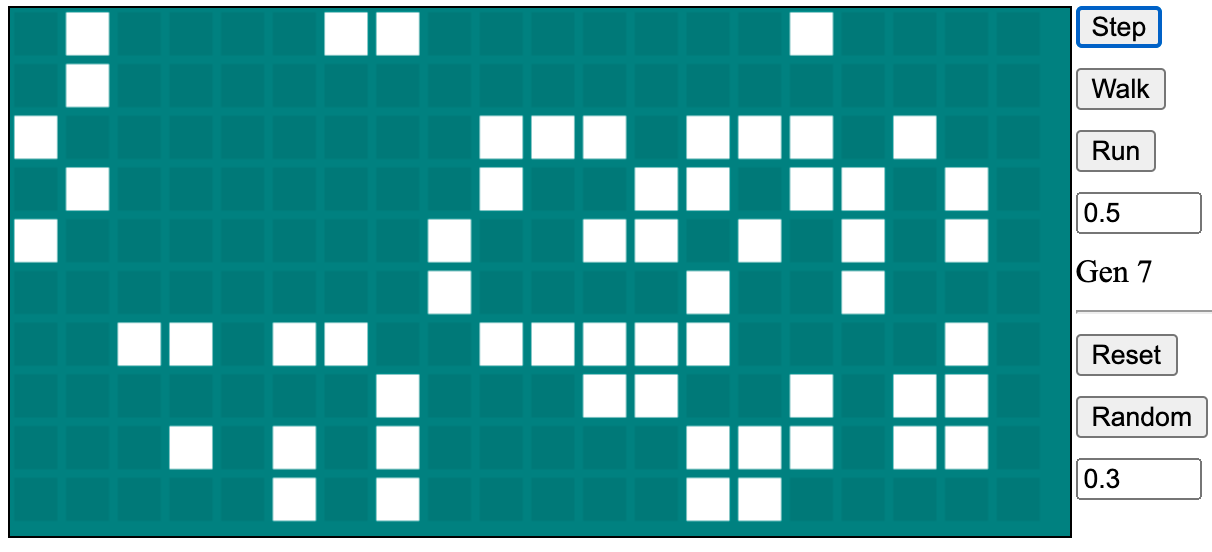
Installation
Use PyPi package life-web-ui
python3 -m pip install --upgrade life-web-ui
Usage
Package installs an executable script life-start (via common entry_points configuration option,
so depending on your local settings it may or may not be in your $PATH)
Running this command will start a local server and open it in the default browser. To exit,
press Ctrl-C to quit the server and close the browser tab.
life-start [-h] [--log {debug,info,warning,error,critical}] [-p PORT]
           [--cell PIXELS] [--space PIXELS] [--padding PIXELS] [-d]

Run Web UI for Game of Life

optional arguments:
  -h, --help            show this help message and exit
  --log {debug,info,warning,error,critical}, --log_level {debug,info,warning,error,critical}
                        Logging level (default = debug)
  -p PORT, --port PORT  Port (default = 13882)
  --cell PIXELS, --size PIXELS
                        Size of cell in pixels (default = 20)
  --space PIXELS        Spacing between cells in pixels
  --padding PIXELS      Canvas padding in pixels
Implementation notes
life-start will run a local Flask server. All computations are done in the server
(not in the browser), synchronously on the Step command and asynchronously on Walk or Run.
Asynchronous execution is done with a background Python thread with results polled by the browser.
(Walk is different from Run in the background thread being suspended between polls).
There is also a short-lived background thread on startup to open Web browser (after a short delay
to make sure server has had time to start). This won't happen if -d/--dev option is used (see below).
Development
For testing purposes, start the server with this command:
FLASK_ENV=development <VENV_ROOT>/bin/python3 <GIT_ROOT>/py-web/src/life_web_ui/__init__.py -d --log debug
Virtual environment installed under VENV_ROOT must have all dependencies listed in
setup.cfg configuration file for the package (install_requires).
1 maintainer

Metadata
1 maintainer
Release files for life-web-ui 0.1.0.1
For a detailed explanation of source distributions (sdists) and built distributions (wheels), please see the package formats documentation.
Source distribution (sdist)
| File | Size | Uploaded | |
|---|---|---|---|
| life-web-ui-0.1.0.1.tar.gz | 4.8 kB | Details |
Built distribution (wheel)
| File | Interpreter | ABI | Platform | Reset |
|---|---|---|---|---|
| life_web_ui-0.1.0.1-py3-none-any.whl | Python 3 | none | any | Details |
Total release size: 28.2 kB
Release files / life-web-ui-0.1.0.1.tar.gz
| Download URL | life-web-ui-0.1.0.1.tar.gz |
|---|---|
| Size | 4.8 kB |
| Tags | Source |
|
SHA-256 checksum How to use checksums |
5a7990218d2e68a5510073de809c88225e9a32f1d3cd506c492f8171f949e515
|
|
BLAKE2b-256 checksum How to use checksums |
13abeb334b01acac3b562970c910b3d2a10e4e320fc79d8893756c35410622e9
|
| Upload date | |
|
Uploaded using Trusted Publishing? What is trusted publishing? |
No |
| Uploaded via |
twine/3.4.1 importlib_metadata/4.0.1 pkginfo/1.5.0.1 requests/2.23.0 requests-toolbelt/0.9.1 tqdm/4.50.0 CPython/3.7.11
|
Release files / life_web_ui-0.1.0.1-py3-none-any.whl
| Download URL | life_web_ui-0.1.0.1-py3-none-any.whl |
|---|---|
| Size | 23.5 kB |
| Tags | Python 3 |
|
SHA-256 checksum How to use checksums |
c296228f37ca9680c47990e615521140e411b8f0ac02e8aa86882088c025bf78
|
|
BLAKE2b-256 checksum How to use checksums |
1ebb6e96f9715ab4be10426c271da65645930e0c6faabd43e6a2cf27335c2c7a
|
| Upload date | |
|
Uploaded using Trusted Publishing? What is trusted publishing? |
No |
| Uploaded via |
twine/3.4.1 importlib_metadata/4.0.1 pkginfo/1.5.0.1 requests/2.23.0 requests-toolbelt/0.9.1 tqdm/4.50.0 CPython/3.7.11
|














