
Light API/CLI/TUI
A community-maintained API and CLI/TUI for managing your Light Phone.
Installation
This repo bundles two separate packages light-phone-api and light-phone-cli-tui. Install whichever suits your needs.
From PyPI:
pip install light-phone-api
pip install light-phone-cli-tui
Authentication
This needs your Light email and password to authenticate into the Light dashboard. If your account has more than one device registered, you'll also need to specify which one to operate on via phone number or device ID (mutually exclusive).
Please enter your phone number without the country code.
Three options:
# 1. Environment variable
# Assuming LIGHT_EMAIL, LIGHT_PASSWORD, LIGHT_PHONE_NUMBER (or LIGHT_DEVICE_ID) are set (see .env.example)
light <command>

# 2. Command line
light --email=... --password=... --phone-number=... <command>
light --email=... --password=... --device-id=... <command>

# 3. File
light --email-file=... --password-file=... --phone-number-file=... <command>
After the first login, your auth token will be cached. Tokens are good for 30 days. Log out with light logout.
Local response caching is also available (off by default) to speed up repeated commands - see Caching.
Getting started: CLI/TUI
Note: As is the case with the official Light dashboard, any changes made through these tools may take a few moments to propagate to the device.
Music
Upload
# Upload tracks
# Files matching an existing track (by title+artist) are skipped by default
light music upload song1 song2 song3

# Upload tracks
# Delete-and-replace matching existing tracks instead of skipping them
light music upload song1 song2 song3 --overwrite

# Upload tracks
# Allow uploading duplicate tracks
light music upload --allow-duplicates song1 song2 song3
Delete
# Delete tracks
light music delete song

# Delete all tracks (multiple confirmation steps, don't worry)
light music delete-all
Sort
# Sort tracks by title (!!!)
light music sort title --asc
light music sort title --desc

# Sort tracks by artist
light music sort artist --asc
light music sort artist --desc

# Sort tracks by artist and album (!!!)
# (Track numbers not supported)
light music sort artist-album --asc
light music sort artist-album --desc
Notes
# List all notes (with optional content preview)
light notes list
light notes list --content-preview

# List notes with file IDs (needed for `watch` cmd)
light notes list --id

# Create a new text note
light notes add "Shopping list" "eggs, milk, bread"
light notes add "Meeting notes" --file notes.txt  # copy contents from notes.txt

# Download all notes to a directory
# Text notes saved as .txt, audio notes as .m4a
light notes download ~/my-notes

# Watch a note for changes (polls every 5s, prints when updated_at changes)
# Useful for more advanced custom integrations (happy hacking!)
light notes watch <note-id>
Podcasts
# Subscribe to a podcast by RSS feed URL
light podcasts add https://feeds.simplecast.com/FO6kxYGj

# List followed podcasts
light podcasts list

# Unfollow a podcast by title
light podcasts delete "My Podcast"
Tools
Available tools: alarm album calculator calendar camera directions directory hotspot music notes podcasts timer
light tools list

light tools add <tool>

light tools remove <tool>
TUI
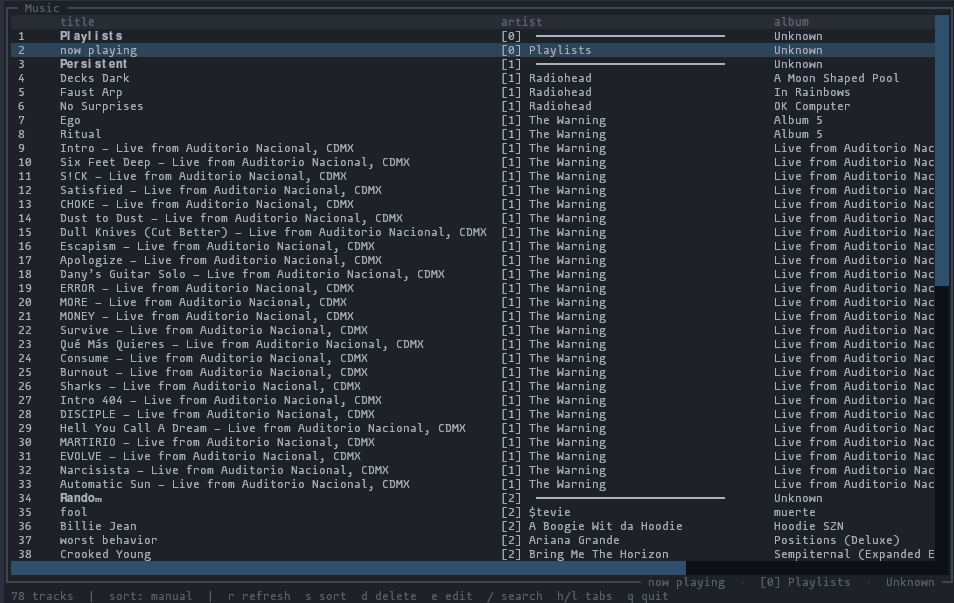
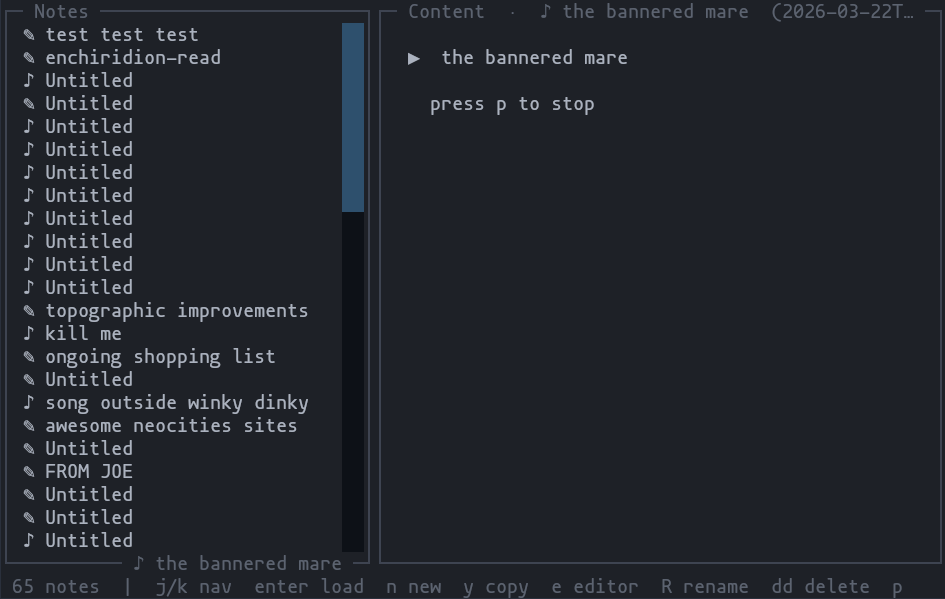
The TUI offers an easier way of managing music and notes.
# Launch
light tui
TUI-specific features:
- First-class support for Vim bindings
- Music
- Reorder tracks individually or in visual block mode
- Bulk edit track metadata
- Bulk delete tracks
- Notes
- Content preview for both text and audio notes
- Press
eto edit in$EDITOR
Music
| Key | Action |
|---|---|
j / k |
Navigate |
gg / G |
Jump to top / bottom |
J / K |
Move track up / down |
5J / 5K |
Move track up / down by 5 |
v |
Enter visual mode (select a block) |
J / K in visual |
Move selected block up / down |
gg / G in visual |
Move selected block to top / bottom |
d in visual |
Delete selected tracks |
e |
Edit track metadata |
e in visual |
Bulk edit metadata (shared fields pre-filled) |
s |
Cycle sort mode |
/ |
Search |
r |
Refresh |
Notes
| Key | Action |
|---|---|
j / k |
Navigate |
gg / G |
Jump to top / bottom |
Enter |
Load note content |
n |
New note (opens in $EDITOR) |
e |
Edit note content in $EDITOR |
R |
Rename note |
dd |
Delete note (with confirmation) |
y |
Copy content to clipboard |
p |
Play / stop audio note |
r |
Refresh |
Screenshots
Getting started: API
Minimal API usage examples are in examples/. Happy hacking!
Technical notes
Caching
Local response caching is off by default. When enabled, read commands (podcasts list, notes list, music list, devices list, tools list, and note content fetched via notes get) may return a cached response instead of always hitting the API to improve performance. Mutating commands always invalidate the cache for whatever they change.
Cached data is encrypted at rest with a key derived from your session token, and expires after 15 minutes regardless.
Turn it on persistently:
light cache enable  # persists until you disable it
light cache disable
light cache status
Override the persistent setting for a single invocation with a flag, or for a shell session with an environment variable. Both take precedence over the persistent setting:
light --cache podcasts list     # force on for this call
light --no-cache podcasts list  # force off for this call

LIGHT_CACHE=1 light podcasts list  # 1/0, true/false, yes/no, on/off all accepted
Tests
Unit tests
Unit tests use request playback with respx.
# This will populate `tests/fixtures/` with the response JSON to test against
python scripts/capture_fixture.py

# Run tests
uv run pytest
1 maintainer

Metadata
1 maintainer
Release files for light-phone-api 0.5.0
For a detailed explanation of source distributions (sdists) and built distributions (wheels), please see the package formats documentation.
Source distribution (sdist)
| File | Size | Uploaded | Provenance | Actions |
|---|---|---|---|---|
| light_phone_api-0.5.0.tar.gz | 92.9 kB | Without provenance | Details for light_phone_api-0.5.0.tar.gz |
Built distribution (wheel)
| File | Interpreter | ABI | Platform | Actions Reset |
|---|---|---|---|---|
| light_phone_api-0.5.0-py3-none-any.whl | Python 3 | none | any | Details for light_phone_api-0.5.0-py3-none-any.whl |
Total release size: 449.6 kB
Release files / light_phone_api-0.5.0.tar.gz
| Download URL | light_phone_api-0.5.0.tar.gz |
|---|---|
| Size | 92.9 kB |
| Tags | Source |
|
SHA-256 checksum How to use checksums |
fde9bf26cdde8d402aef7de881d160c88b30dfeb368e6b2ff2a5fce4f7b991c1
|
|
BLAKE2b-256 checksum How to use checksums |
e02e761d18589ede4d96aeeb4f690266b43c432bae93e221216fd0d079bced65
|
| Upload date | |
|
Uploaded using Trusted Publishing? What is trusted publishing? |
No |
| Uploaded via |
uv/0.12.5 {"installer":{"name":"uv","version":"0.12.5","subcommand":["publish"]},"python":null,"implementation":{"name":null,"version":null},"distro":{"name":"Ubuntu","version":"24.04","id":"noble","libc":null},"system":{"name":null,"release":null},"cpu":null,"openssl_version":null,"setuptools_version":null,"rustc_version":null,"ci":true}
|
Release files / light_phone_api-0.5.0-py3-none-any.whl
| Download URL | light_phone_api-0.5.0-py3-none-any.whl |
|---|---|
| Size | 356.7 kB |
| Tags | Python 3 |
|
SHA-256 checksum How to use checksums |
9ef8ead7e6ec66a654357c14df5e7b8bcd9de5623b9c672e9cf75eaee70ee04f
|
|
BLAKE2b-256 checksum How to use checksums |
8c52f0b526e1ab08d2f7c9a4b76fec4b1cc08e91368a9c4930e8c4f8df91d339
|
| Upload date | |
|
Uploaded using Trusted Publishing? What is trusted publishing? |
No |
| Uploaded via |
uv/0.12.5 {"installer":{"name":"uv","version":"0.12.5","subcommand":["publish"]},"python":null,"implementation":{"name":null,"version":null},"distro":{"name":"Ubuntu","version":"24.04","id":"noble","libc":null},"system":{"name":null,"release":null},"cpu":null,"openssl_version":null,"setuptools_version":null,"rustc_version":null,"ci":true}
|
Security for light-phone-api 0.5.0
Provenance
Provenance describes where a file came from. On PyPI, provenance is shared via attestations, which provide a verifiable record of the build or publishing details. View details, limitations and caveats.
No provenance found
None of the files in this release were uploaded with provenance metadata.
A note on package security
PyPI is a repository for distributing packages, not a service for auditing them. While third-party security researchers and our staff do their best to detect and remove malicious packages, PyPI cannot guarantee the quality, security or suitability of any given package.
To learn more about protecting yourself from malicious actors, visit our package security documentation.














