
Unofficial CLI/TUI for the Light Phone

Project description
Light API/CLI/TUI
An unofficial, community-maintained API and CLI/TUI for managing music, notes, podcasts, and tools on Light devices.
This was made by reverse-engineering the API endpoints from the official dashboard. (I have obtained Light's blessing for this.)
[!CAUTION] This is beta software and is actively in development. Bugs are expected, and bug reports are welcome!
[!WARNING] Because this is an unofficial set of tools created through reverse-engineering, this could break at any time if Light decides to change the structure of their API.
Installation
This repo bundles two separate packages light-phone-api and light-phone-cli-tui. Install whichever suits your needs.
From PyPI:
pip install light-phone-api
pip install light-phone-cli-tui
Authentication
This needs your Light email, password, and phone number to authenticate into the Light dashboard and operate on the correct device.
Please enter your phone number without the country code.
Three options:
# 1. Environment variable
# Assuming LIGHT_EMAIL, LIGHT_PASSWORD, LIGHT_PHONE_NUMBER are set (see .env.example)
light <command>

# 2. Command line
light --email=... --password=... --phone-number=... <command>

# 3. File
light --email-file=... --password-file=... --phone-number-file=... <command>
After the first login, your auth token will be cached. Tokens are good for 30 days.
Getting started: CLI/TUI
Note: As is the case with the official Light dashboard, any changes made through these tools may take a few moments to propagate to the device.
Music
Upload
# Upload tracks
# Overwrite existing matching tracks (match on file title metadata)
light music upload song1 song2 song3 --match-title-by metadata

# Upload tracks
# Overwrite existing matching tracks (match on filename)
light music upload song1 song2 song3 --match-title-by filename

# Upload tracks
# Don't overwrite existing tracks
light music upload --allow-duplicates song1 song2 song3
Delete
# Delete tracks
light music delete song

# Delete all tracks (multiple confirmation steps, don't worry)
light music delete-all
Sort
# Sort tracks by title (!!!)
light music sort title --asc
light music sort title --desc

# Sort tracks by artist
light music sort artist --asc
light music sort artist --desc

# Sort tracks by artist and album (!!!)
# (Track numbers not supported)
light music sort artist-album --asc
light music sort artist-album --desc
Notes
# List all notes (with optional content preview)
light notes list
light notes list --content-preview

# List notes with file IDs (needed for `watch` cmd)
light notes list --id

# Create a new text note
light notes add "Shopping list" "eggs, milk, bread"
light notes add "Meeting notes" --file notes.txt  # copy contents from notes.txt

# Download all notes to a directory
# Text notes saved as .txt, audio notes as .m4a
light notes download ~/my-notes

# Watch a note for changes (polls every 5s, prints when updated_at changes)
# Useful for more advanced custom integrations (happy hacking!)
light notes watch <note-id>
Podcasts
# Subscribe to a podcast by RSS feed URL
light podcast add https://feeds.simplecast.com/FO6kxYGj

# List followed podcasts
light podcast list

# Unfollow a podcast by title
light podcast delete "My Podcast"
Tools
Available tools: alarm album calculator calendar camera directions directory hotspot music notes podcasts timer
light tools list

light tools add <tool>

light tools remove <tool>
TUI
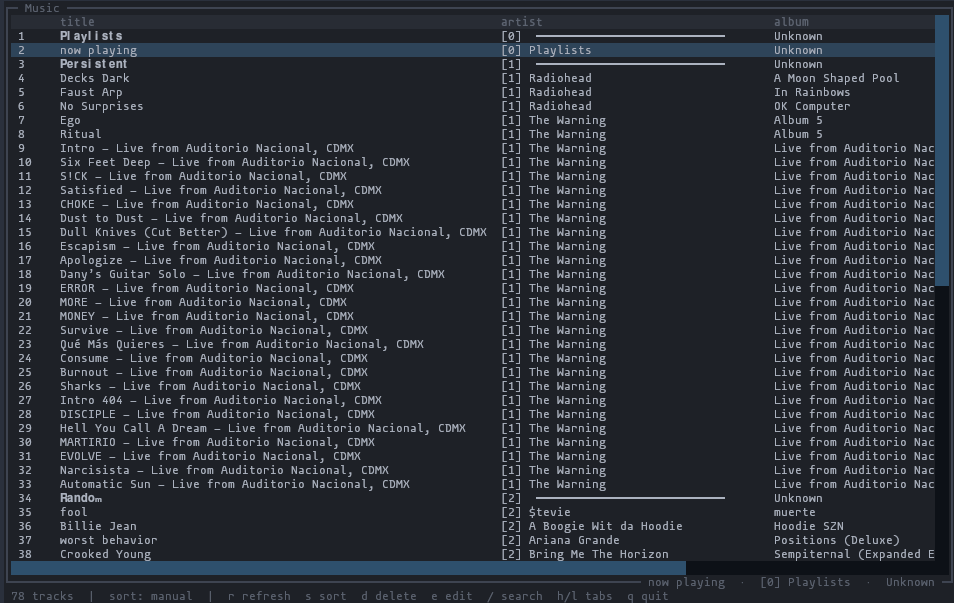
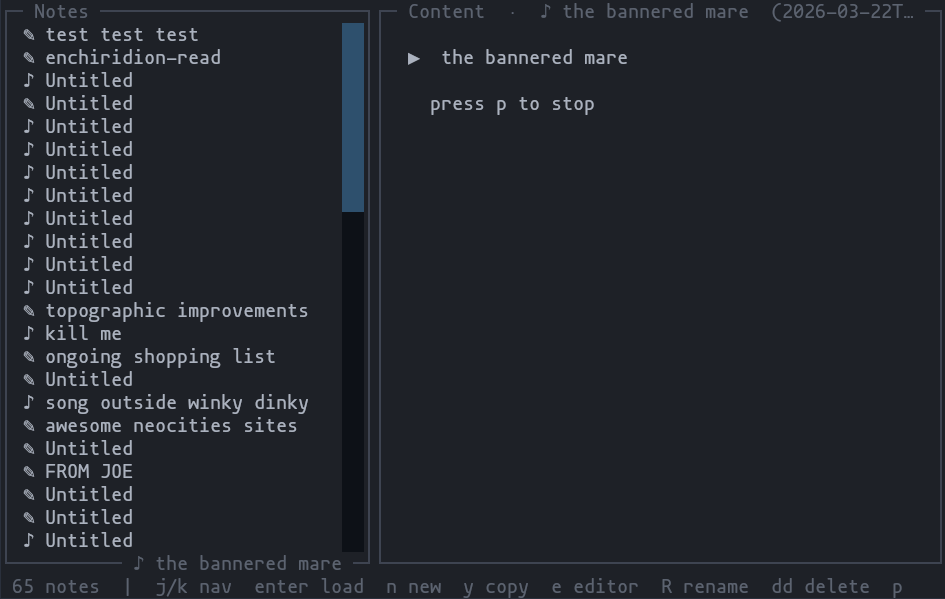
The TUI offers an easier way of managing music and notes.
# Launch
light tui
TUI-specific features:
- First-class support for Vim bindings
- Music
- Reorder tracks individually or in visual block mode
- Bulk edit track metadata
- Bulk delete tracks
- Notes
- Content preview for both text and audio notes
- Press
eto edit in$EDITOR
Music
| Key | Action |
|---|---|
j / k |
Navigate |
gg / G |
Jump to top / bottom |
J / K |
Move track up / down |
5J / 5K |
Move track up / down by 5 |
v |
Enter visual mode (select a block) |
J / K in visual |
Move selected block up / down |
gg / G in visual |
Move selected block to top / bottom |
d in visual |
Delete selected tracks |
e |
Edit track metadata |
e in visual |
Bulk edit metadata (shared fields pre-filled) |
s |
Cycle sort mode |
/ |
Search |
r |
Refresh |
Notes
| Key | Action |
|---|---|
j / k |
Navigate |
gg / G |
Jump to top / bottom |
Enter |
Load note content |
n |
New note (opens in $EDITOR) |
e |
Edit note content in $EDITOR |
R |
Rename note |
dd |
Delete note (with confirmation) |
y |
Copy content to clipboard |
p |
Play / stop audio note |
r |
Refresh |
Screenshots
Getting started: API
Minimal API usage examples are in examples/. Happy hacking!
Tests
Unit tests
Unit tests use request playback with respx.
# This will populate `tests/fixtures/` with the response JSON to test against
python scripts/capture_fixture.py

# Run tests
uv run pytest
Smoke tests (TODO)
As this is an unofficial tool, it could break at any time if Light changes the API format. Smoke tests should be added and run regularly (home server nightly cronjob?) to catch any breaking API changes asap.
To do
- Fancier
light notes watch - Contacts management
Release history Release notifications | RSS feed


Download files
Download the file for your platform. If you're not sure which to choose, learn more about installing packages.
Source Distribution
Built Distribution
Filter files by name, interpreter, ABI, and platform.
If you're not sure about the file name format, learn more about wheel file names.
Copy a direct link to the current filters
File details
Details for the file light_phone_cli_tui-0.1.2.tar.gz.
File metadata
- Download URL: light_phone_cli_tui-0.1.2.tar.gz
- Upload date:
- Size: 17.1 kB
- Tags: Source
- Uploaded using Trusted Publishing? No
- Uploaded via: uv/0.11.30 {"installer":{"name":"uv","version":"0.11.30","subcommand":["publish"]},"python":null,"implementation":{"name":null,"version":null},"distro":{"name":"Ubuntu","version":"24.04","id":"noble","libc":null},"system":{"name":null,"release":null},"cpu":null,"openssl_version":null,"setuptools_version":null,"rustc_version":null,"ci":true}
File hashes
| Algorithm | Hash digest | |
|---|---|---|
| SHA256 |
63a0029c4e85d78802dc9cba30b2658989645542ae619413aa5d143b88a4ef4d
|
|
| MD5 |
343bb1c805887c63d30c87fa6ed2b3e1
|
|
| BLAKE2b-256 |
2ff3e540105eb186d3ff6777314cec2a23c132567d579c4083358055ee6d76c9
|
File details
Details for the file light_phone_cli_tui-0.1.2-py3-none-any.whl.
File metadata
- Download URL: light_phone_cli_tui-0.1.2-py3-none-any.whl
- Upload date:
- Size: 18.3 kB
- Tags: Python 3
- Uploaded using Trusted Publishing? No
- Uploaded via: uv/0.11.30 {"installer":{"name":"uv","version":"0.11.30","subcommand":["publish"]},"python":null,"implementation":{"name":null,"version":null},"distro":{"name":"Ubuntu","version":"24.04","id":"noble","libc":null},"system":{"name":null,"release":null},"cpu":null,"openssl_version":null,"setuptools_version":null,"rustc_version":null,"ci":true}
File hashes
| Algorithm | Hash digest | |
|---|---|---|
| SHA256 |
ccfed7c5c7f6846a377706ba427ab0184f9223568d3988a09b00fce39d5527b0
|
|
| MD5 |
8baab7d066b6e85bd4ceadeb8cf39533
|
|
| BLAKE2b-256 |
7725344a461abcdb40f477712d72a5ebaf632d569e0dadda6ba2b3059d79b826
|






