
lightUtils
本项目仅为自己的Python常用工具类。
其中有些是自己写的,有的则是网上找的,由于有些还需要copy代码到相应需求处才能使用,比如说放在gist或其他代码片段保存工具并不太方便,所以这里也构建一个库,用的时候先install然后直接import就好了。
功能
- 彩色日志
- 获取系统可用tcp端口
- 从文件中逐行获取json对象
- 发送邮件
- 将时间间隔(s为单位)转换为日时分秒表示
- 将迭代器转化为批量数据返回形式
- 执行系统命令并获取执行结果
- 检查文件是否存在以及是否对应相应拓展名
- 获取文件名,不含拓展名
- 将迭代器截断,只返回前面部分
- 获取变量名
- 获取变量类型和属性信息
- 将可序列化对象以json格式写入文件中
- 比较两个字符串差异,高亮差异部分
- 根据项目名和当前脚本路径检测项目路径并添加至系统路径
- 读取yaml文件
- 终端彩色输出
使用
1.彩色日志
示例
from lightutils import logger

logger.info("info")
logger.warning('warning')
logger.debug('debug')
logger.error('error')
效果如图:

2.获取系统可用tcp端口
示例
from lightutils import get_free_tcp_port

port = get_free_tcp_port()
print(port)
执行结果为:
49783
<class 'int'>
3.从文件中逐行获取json对象
从文件中逐行获取json对象,
示例
from lightutils import read_json_line

for obj in read_json_line('test.json'):
    print(obj)
执行结果为:
{'info': {'word': '丘为', 'means': [['寻西山隐者不遇', '寻西山隐者不遇'], ['左掖梨花', '左掖梨花']]}, 'type': 'ambiguous'}
{'info': {'word': '丘为', 'means': [['寻西山隐者不遇', '寻西山隐者不遇'], ['左掖梨花', '左掖梨花']]}, 'type': 'ambiguous'}
原文件内容为:
{"info": {"word": "丘为", "means": [["寻西山隐者不遇", "寻西山隐者不遇"], ["左掖梨花", "左掖梨花"]]}, "type": "ambiguous"}
{asdf}
{"info": {"word": "丘为", "means": [["寻西山隐者不遇", "寻西山隐者不遇"], ["左掖梨花", "左掖梨花"]]}, "type": "ambiguous"}
错误输出日志error.log内容如下:
line2: {asdf}
4.发送邮件
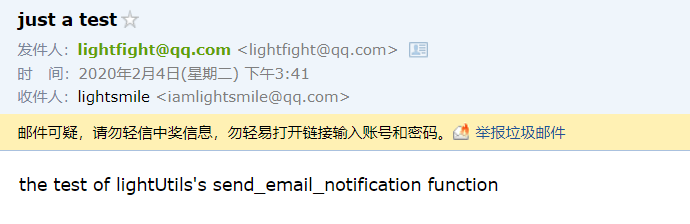
使用Python发送一封邮件
示例
from lightutils import send_email_notification

to = "iamlightsmile@qq.com"
subject = "just a test"
contents = ["the test of lightUtils's send_email_notification function"]
result = send_email_notification(to, subject, contents)
if result:
    print("发送成功!")
else:
    print("发送失败!")
运行结果:
发送成功!
效果截图:
5.将时间间隔(s为单位)转换为日时分秒表示
使用示例
from lightutils import time_convert

print(time_convert(10000000.234))
print(time_convert(1000000.0))
print(time_convert(100000.0))
print(time_convert(10000.0))
print(time_convert(1000.0))
print(time_convert(100.0))
print(time_convert(10.0))
print(time_convert(1.0))
print(time_convert(0.0))
运行结果:
115天17小时46分钟40.23秒
11天13小时46分钟40.0秒
1天3小时46分钟40.0秒
2小时46分钟40.0秒
16分钟40.0秒
1分钟40.0秒
10.0秒
1.0秒
0.0秒
6.将迭代器转化为批量数据返回形式
使用示例
from lightutils import batch

if __name__ == '__main__':
    for item in batch(range(100)):
        print(item)
运行结果:
[0, 1, 2, 3, 4, 5, 6, 7, 8, 9]
[10, 11, 12, 13, 14, 15, 16, 17, 18, 19]
[20, 21, 22, 23, 24, 25, 26, 27, 28, 29]
[30, 31, 32, 33, 34, 35, 36, 37, 38, 39]
[40, 41, 42, 43, 44, 45, 46, 47, 48, 49]
[50, 51, 52, 53, 54, 55, 56, 57, 58, 59]
[60, 61, 62, 63, 64, 65, 66, 67, 68, 69]
[70, 71, 72, 73, 74, 75, 76, 77, 78, 79]
[80, 81, 82, 83, 84, 85, 86, 87, 88, 89]
[90, 91, 92, 93, 94, 95, 96, 97, 98, 99]
7.执行系统命令并获取执行结果
使用示例
from lightutils import execute_cmd

if __name__ == '__main__':
    state, info = execute_cmd('ls')
    if state:
        print(info)
运行结果:
chunk_demo.py
cmd_demo.py
error.log
json_file_demo.py
log_demo.py
port_demo.py
send_email_demo.py
test.json
time_convert_demo.py
8.检查文件是否存在以及是否对应相应拓展名
使用示例
from lightutils import check_file

if __name__ == '__main__':
    # check_file('fuck.txt', 'txt')
    check_file('file_demo.py', 'txt')
    # check_file('file_demo.py', 'py')
运行效果
Traceback (most recent call last):
  File "E:/Projects/myProjects/lightUtils/examples/file_demo.py", line 10, in <module>
    check_file('file_demo.py', 'txt')
  File "E:\Projects\myProjects\lightUtils\lightutils\common\file.py", line 25, in check_file
    raise NotSpecifiedFileException('xx.' + ext)
lightutils.common.file.NotSpecifiedFileException: 并非指定的文件错误,应该是形如:xx.txt
9.获取文件名,不含拓展名
使用示例
from lightutils import get_file_name

if __name__ == '__main__':
    print(get_file_name("hello_world.py"))
运行效果
hello_world
10.将迭代器截断,只返回前面部分
使用示例
from lightutils import cutoff_iter

if __name__ == '__main__':

    for item in cutoff_iter(range(20)):
        print(item)
运行效果
0
1
2
3
4
5
6
7
8
9
11. 获取变量名
使用示例
from lightutils import retrieve_name

if __name__ == '__main__':
    a = 3
    print(retrieve_name(a))
a
运行效果
12. 获取变量类型和属性信息
使用示例
from lightutils import inspect_variable

if __name__ == '__main__':
    a = 3
    print(inspect_variable(a))
运行效果
{'name': 'a', 'type': "<class 'int'>", 'attrs': "['__abs__', '__add__', '__and__', '__bool__', '__ceil__', '__class__', '__delattr__', '__dir__', '__divmod__', '__doc__', '__eq__', '__float__', '__floor__', '__floordiv__', '__format__', '__ge__', '__getattribute__', '__getnewargs__', '__gt__', '__hash__', '__index__', '__init__', '__init_subclass__', '__int__', '__invert__', '__le__', '__lshift__', '__lt__', '__mod__', '__mul__', '__ne__', '__neg__', '__new__', '__or__', '__pos__', '__pow__', '__radd__', '__rand__', '__rdivmod__', '__reduce__', '__reduce_ex__', '__repr__', '__rfloordiv__', '__rlshift__', '__rmod__', '__rmul__', '__ror__', '__round__', '__rpow__', '__rrshift__', '__rshift__', '__rsub__', '__rtruediv__', '__rxor__', '__setattr__', '__sizeof__', '__str__', '__sub__', '__subclasshook__', '__truediv__', '__trunc__', '__xor__', 'bit_length', 'conjugate', 'denominator', 'from_bytes', 'imag', 'numerator', 'real', 'to_bytes']"}
13. 将可序列化对象以json格式写入文件中
使用示例
from lightutils import write_json_line

if __name__ == '__main__':
    with open('./write_json.json', 'w', encoding='utf-8') as file:
        write_json_line(file, {'a': 3})
运行效果
write_json.json文件内容:
{"a": 3}
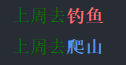
14. 比较两个字符串差异,高亮差异部分
代码主要是copy自苏神的bojone/text_compare: 用python比较两个字符串差异,高亮差异部分
使用示例
from lightutils import string_compare

if __name__ == '__main__':
    a = "上周去钓鱼"
    b = "上周去爬山"
    string_compare(a, b)
运行效果
15. 根据项目名和当前脚本路径检测项目路径并添加至系统路径
主要应用场景是在一个项目中需要根据路径去添加和使用包,这里提供程序自动检测的功能,以使得不必操心具体相对路径位置,只要提供程序包名即可。
使用示例
from lightutils import add_sys_path

project_path = 'lightutils'

if __name__ == '__main__':
    add_sys_path(__file__, project_path)
运行结果
D:\Software\Anaconda3\envs\spider\python.exe E:/Projects/myProjects/lightUtils/examples/add_path_demo.py
[2020-09-11 10:24:47] [INFO] [MainThread] [path.py:27] 已成功将E:/Projects/myProjects/lightUtils添加至系统路径
16.读取yaml文件
# -*- coding: utf-8 -*-
from lightutils import load_yaml

yaml_path = 'test.yml'

if __name__ == '__main__':
    print(load_yaml(yaml_path))
test.yml文件内容:
test: 3
程序运行结果:
{'test': 3}
17.终端彩色输出
from lightutils import color

print(color.green("green"))
参考
- lightless233/colorlog: Python彩色log模块封装
- Getting a random free tcp port in python using sockets
- kootenpv/yagmail: Send email in Python conveniently for gmail using yagmail
- Python最良心的邮件发送库--yagmail_Detector_的博客-CSDN博客
- Python用QQ邮箱发送邮件时授权码问题_wateryouyo的博客-CSDN博客
- python - how to split an iterable in constant-size chunks - Stack Overflow
- python获取系统信息模块详解 - 编程语言 - 亿速云
- Python中调用命令行的几种方法 - 简书
- python如何将变量名转化为同名字符串? - 知乎
- bert4keras/snippets.py at master · bojone/bert4keras
- bojone/text_compare: 用python比较两个字符串差异,高亮差异部分
- reorx/python-terminal-color: Drop-in single file library for printing color in terminal
打赏
如果该项目对您有所帮助,欢迎打赏~

1 maintainer

Release files for lightUtils 0.1.18
For a detailed explanation of source distributions (sdists) and built distributions (wheels), please see the package formats documentation.
Source distribution (sdist)
| File | Size | Uploaded | |
|---|---|---|---|
| lightutils-0.1.18.tar.gz | 15.8 kB | Details |
Built distribution (wheel)
| File | Interpreter | ABI | Platform | Reset |
|---|---|---|---|---|
| lightUtils-0.1.18-py3-none-any.whl | Python 3 | none | any | Details |
Total release size: 35.2 kB
Release files / lightutils-0.1.18.tar.gz
| Download URL | lightutils-0.1.18.tar.gz |
|---|---|
| Size | 15.8 kB |
| Tags | Source |
|
SHA-256 checksum How to use checksums |
91225ac0678c9df625f3d28f589cf818e49633c0fd5cb669bf8ab04a53311a18
|
|
BLAKE2b-256 checksum How to use checksums |
f633e7fbc6f31eed0608ef1508f7f90e459b2ef0d8b290407545fcb21d97c7a5
|
| Upload date | |
|
Uploaded using Trusted Publishing? What is trusted publishing? |
No |
| Uploaded via |
twine/5.1.1 CPython/3.11.3
|
Release files / lightUtils-0.1.18-py3-none-any.whl
| Download URL | lightUtils-0.1.18-py3-none-any.whl |
|---|---|
| Size | 19.4 kB |
| Tags | Python 3 |
|
SHA-256 checksum How to use checksums |
5b7a352e0b15f8ab24099ec51372577de7dbe7e4536bdc6633cf81415016e890
|
|
BLAKE2b-256 checksum How to use checksums |
11101152a123d639ccbd374cb8aa63d631ec1562c08420f93946eea48e68c0fd
|
| Upload date | |
|
Uploaded using Trusted Publishing? What is trusted publishing? |
No |
| Uploaded via |
twine/5.1.1 CPython/3.11.3
|














