
lightlogger
Live web dashboard for your Python logs — pip install, add one line, open localhost:4356. Zero dependencies.


Install
pip install lightlogger
import lightlogger
lightlogger.start()
lightlogger.info("user logged in")
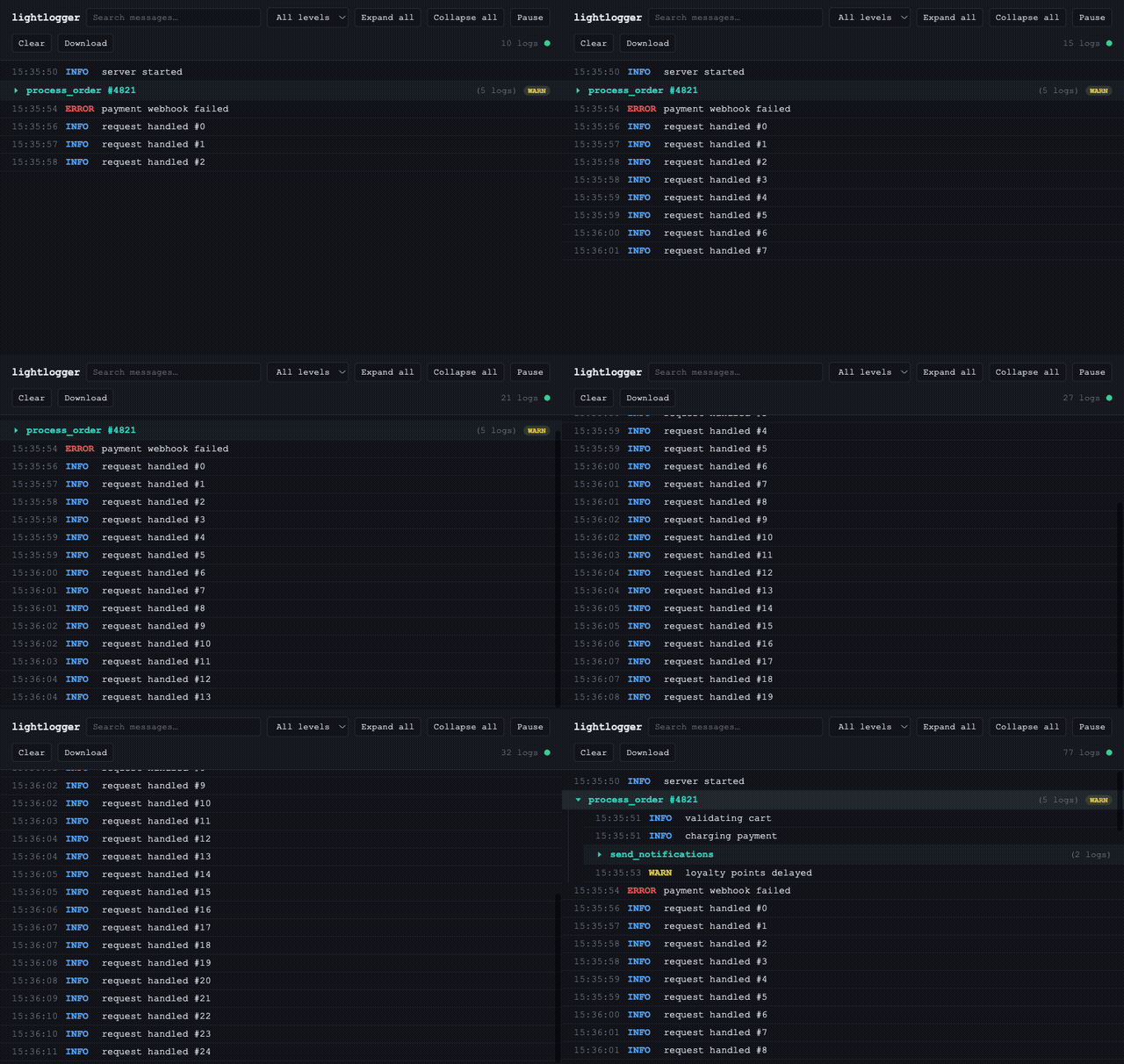
That's it — open http://127.0.0.1:4356 and watch it stream in live, in a dark, searchable dashboard. No config file, no separate server process to run, no npm install.
Your existing logging calls show up too, with zero code changes:
lightlogger.start(capture_logging=True)  # the default
import logging
logging.getLogger("some.third.party.lib").warning("disk almost full")  # appears in the UI automatically
And when one log message is really four related operations, group them:
with lightlogger.group("process_order #4821"):
    lightlogger.info("validating cart")
    lightlogger.info("charging payment", data={"amount": 49.99})
    with lightlogger.group("send_notifications"):
        lightlogger.info("email sent")
        lightlogger.info("sms sent")
They render as a collapsible tree — click to expand, nested groups indent, a red badge appears if anything inside failed.
Features
| Live streaming | Server-Sent Events, not polling — logs appear the instant they're written |
Zero-code logging capture |
Attaches to the root logger; your own and third-party libraries' logs show up automatically |
| Nested log grouping | with lightlogger.group(name): — collapsible, nested, thread- and async-safe |
| Search & level filter | Client-side, instant, works across grouped and ungrouped logs alike |
| Pause / Resume | Freeze the view to read something — nothing is dropped, a counter shows what's waiting |
| Click to expand | File, line, logger name, and pretty-printed JSON data for any entry |
| Download as JSON | One click, the full current backlog |
| Bounded memory | A fixed-size ring buffer — lightlogger can never be the reason your app runs out of RAM |
| Zero dependencies | Python standard library only, from the HTTP server to the JSON encoding |
API reference
| Function | Description | Example |
|---|---|---|
start(...) |
Starts the dashboard on a background thread. See parameters below. Calling it again while already running is a no-op. | lightlogger.start(port=8080, open_browser=True) |
stop() |
Stops the server and detaches the logging handler. Mostly for tests/notebooks. | lightlogger.stop() |
debug(msg, data=None) |
Logs a debug-level message (grey). | lightlogger.debug("cache miss", data={"key": "user:42"}) |
info(msg, data=None) |
Logs an info-level message (blue). | lightlogger.info("user logged in") |
warn(msg, data=None) |
Logs a warn-level message (yellow). | lightlogger.warn("retrying after timeout") |
error(msg, data=None) |
Logs an error-level message (red). | lightlogger.error("payment failed", data={"order_id": 123}) |
var(name, value) |
Logs any variable as an expandable JSON blob. | lightlogger.var("cart", cart_dict) |
request(method, url, status, duration_ms) |
Logs one HTTP request/response. Level follows the status code: < 400 → info, 4xx → warn, 5xx → error. |
lightlogger.request("GET", "/api/users", 500, 812.0) → logs as error |
group(name) |
Context manager for nested, collapsible log groups. Thread- and async-safe. | with lightlogger.group("checkout"): ... |
help() |
Prints this reference to your terminal. | lightlogger.help() |
start() parameters:
| Parameter | Default | Meaning |
|---|---|---|
port |
4356 |
Preferred port; auto-increments to the next free one if taken |
host |
"127.0.0.1" |
Bind address — "0.0.0.0" is an explicit, loudly-warned opt-in for LAN exposure |
max_logs |
5000 |
Ring buffer size — the most recent N records are kept, oldest dropped first |
capture_logging |
True |
Attach a handler to the root logger so existing logging calls appear automatically |
open_browser |
False |
Open the dashboard in your default browser as soon as it's live |
Built-in help
Forgot the API? It's in the package, not just this README:
>>> import lightlogger
>>> lightlogger.help()
Prints a full cheatsheet to your terminal — every function, one-line descriptions, tiny examples, the capture_logging gotcha, no need to leave your shell. And once the dashboard is running, open http://127.0.0.1:4356/help for the same reference as a page, with copyable code blocks.
Why lightlogger
Debugging a running Python process usually means one of three things: print() statements you'll forget to remove, a terminal window full of scrolling text you can't search, or reaching for a heavyweight observability platform to answer a question that takes ten seconds to answer once you can actually see your logs.
We looked at what else exists. Logdy is a Go binary you install separately from your app. Chronologer needs its own server process. cutelog needs PyQt. Logfire is closed-source and cloud-hosted. lnav and klp are terminal-only. Django and Flask debug toolbars only work inside those specific frameworks, in that specific request/response cycle.
None of them do the one thing that actually matches how a Python developer debugs: import, call one function, and get a live web page — from inside the process you're already running, with no extra install, no extra service, no dependencies to audit. That's the gap lightlogger fills. And once your logs have a real UI instead of a scrolling terminal, grouping related operations into a collapsible tree stops being a nice-to-have — it's the difference between reading a wall of text and reading a story.
Security
lightlogger binds to 127.0.0.1 only, by default — nothing is reachable outside your machine unless you explicitly pass host="0.0.0.0" (which prints a loud warning when you do). It's a local development tool, not a production observability system: don't run it against a public-facing process, and don't leave it running longer than your debugging session needs.
Contributing
Contributions are welcome — see CONTRIBUTING.md for the ground rules (short version: zero dependencies, stay on stdlib, keep it simple). Bug reports and PRs both go through GitHub Issues.
License
MIT — see LICENSE.
1 maintainer

Download files
Download the file for your platform. If you're not sure which to choose, learn more about installing packages.
Source Distribution
Built Distribution
Filter files by name, interpreter, ABI, and platform.
If you're not sure about the file name format, learn more about wheel file names.
Copy a direct link to the current filters
File details
Details for the file lightlogger-0.1.1.tar.gz.
File metadata
- Download URL: lightlogger-0.1.1.tar.gz
- Upload date:
- Size: 307.2 kB
- Tags: Source
- Uploaded using Trusted Publishing? Yes
- Uploaded via:
twine/7.0.0 CPython/3.13.14
File hashes
| Algorithm | Hash digest | |
|---|---|---|
| SHA256 |
004678ae66fac8e157cd5817527e815ffee15a2e50361daf899a5375070f6786
|
|
| MD5 |
043cfb52585453fe733796dd9258b83e
|
|
| BLAKE2b-256 |
fdeff1ea7557072196e0b5ea852ec9c1fa8b30a433d6945c7391687cf78bed7c
|
Provenance
The following attestation bundles were made for lightlogger-0.1.1.tar.gz:
Publisher:
publish.yml on Rahuwale123/lightlogger
-
Statement:
-
Statement type:
https://in-toto.io/Statement/v1 -
Predicate type:
https://docs.pypi.org/attestations/publish/v1 -
Subject name:
lightlogger-0.1.1.tar.gz -
Subject digest:
004678ae66fac8e157cd5817527e815ffee15a2e50361daf899a5375070f6786 - Sigstore transparency entry: 2768138152
- Sigstore integration time:
-
Permalink:
Rahuwale123/lightlogger@ccacd5987a9555ac590d775543b72b96201fb5b3 -
Branch / Tag:
refs/tags/v0.1.1 - Owner: https://github.com/Rahuwale123
-
Access:
public
-
Token Issuer:
https://token.actions.githubusercontent.com -
Runner Environment:
github-hosted -
Publication workflow:
publish.yml@ccacd5987a9555ac590d775543b72b96201fb5b3 -
Trigger Event:
release
-
Statement type:
File details
Details for the file lightlogger-0.1.1-py3-none-any.whl.
File metadata
- Download URL: lightlogger-0.1.1-py3-none-any.whl
- Upload date:
- Size: 25.9 kB
- Tags: Python 3
- Uploaded using Trusted Publishing? Yes
- Uploaded via:
twine/7.0.0 CPython/3.13.14
File hashes
| Algorithm | Hash digest | |
|---|---|---|
| SHA256 |
94fc1a33df944bb0b7d9ae04a6ed884ed166346027e9b7aec166d096165081e3
|
|
| MD5 |
9da2f46a19dab9473bf1e396ce8aabee
|
|
| BLAKE2b-256 |
7ca49dd0bef50a116da53614e8636badb9d794f6a7001e8253bad7df00e06ba6
|
Provenance
The following attestation bundles were made for lightlogger-0.1.1-py3-none-any.whl:
Publisher:
publish.yml on Rahuwale123/lightlogger
-
Statement:
-
Statement type:
https://in-toto.io/Statement/v1 -
Predicate type:
https://docs.pypi.org/attestations/publish/v1 -
Subject name:
lightlogger-0.1.1-py3-none-any.whl -
Subject digest:
94fc1a33df944bb0b7d9ae04a6ed884ed166346027e9b7aec166d096165081e3 - Sigstore transparency entry: 2768138247
- Sigstore integration time:
-
Permalink:
Rahuwale123/lightlogger@ccacd5987a9555ac590d775543b72b96201fb5b3 -
Branch / Tag:
refs/tags/v0.1.1 - Owner: https://github.com/Rahuwale123
-
Access:
public
-
Token Issuer:
https://token.actions.githubusercontent.com -
Runner Environment:
github-hosted -
Publication workflow:
publish.yml@ccacd5987a9555ac590d775543b72b96201fb5b3 -
Trigger Event:
release
-
Statement type:














