
Connor's Lightning Parser Lib (LPL) is an extremely powerful analysis utility with a simplistic front-end in mind.

Project description
Connor's Lightning Parser Lib (LPL)
Connor's Lightning Parser Lib (LPL) is an extremely powerful analysis utility with a simplistic front-end in mind.
The analyzer is capable of processing millions of LYLOUT datapoints in mere minutes by using a SQL database back-end for initial filtering, and then uses optimized work-arounds for computationally expensive methods that omit square-root and trig functions for distances between points. Not to mention it's back-end parses most data with indexes (list[int], list[list[int]], etc.) instead of the entire data itself. Additionally, it uses multi-processing when necessary to accelerate processes.
[!NOTE] The stitchings are done on a temporal and delta-magnitude basis. This basically means that scipy's cKDTree, despite being powerful and timely, does not include temporal thresholds and therefore would not accurately stitch lightning points that respect the lightning strike. Therefore, this code will go from 4 minutes with 3 million points to 2 hours for 10 million points. I will likely switch to C or C++ down the line to improve processing time. But for now, this is the most optimized Python library I can make for temporal distance lightning stitching.
All of these methods allow extremely fast computation times, given the immense scale and size of the data itself.
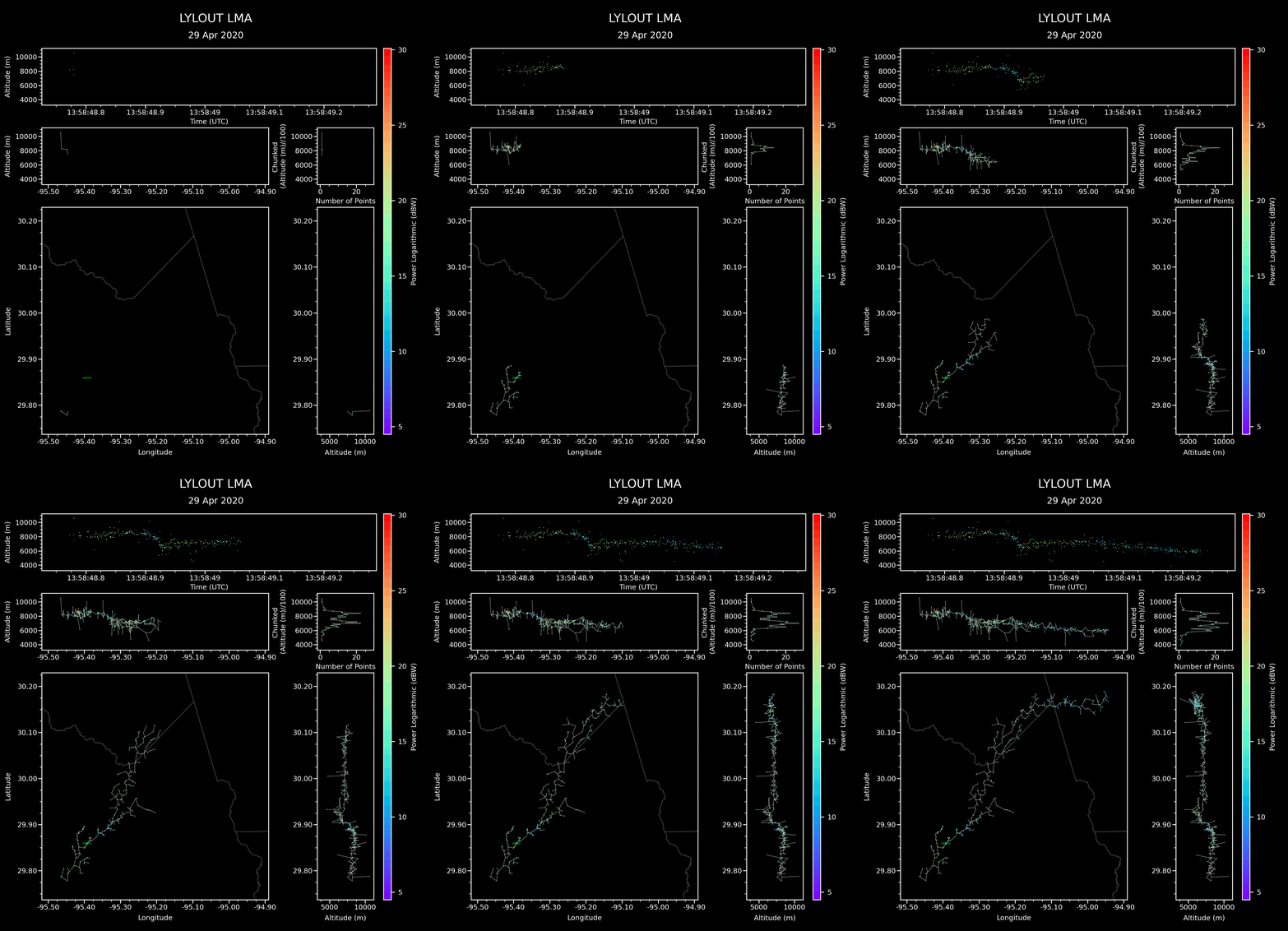
This library extracts LYLOUT data, store it into a lightning database, and processes millions of datapoints in the database to a reasonably fast and optimized speed. This project is meant to be a framework for applications to implement and parse data more appropriately.
Assuming the following specs (tested on a laptop with Ubuntu 22.04):
- 64 GB DDR4 RAM
- RTX 2060 Mobile (6GB)
- Intel i7-10750H (6 Cores -> 12 Threads)
- Python 3.12.3 (Regular version/Not conda)
Three million datapoints should take roughly 4 minutes to process (excluding generating plots). Running the same exact parameters again would take 18-20 seconds due to caching.
Start
Getting Started
-
Install project in your environment:
pip install lightning-parser-lib -
Create a
main.pyand paste the boilerplate sample code:
####################################################################################
#
# About: A top-down view of what is going on
#
####################################################################################
"""
This program processes LYLOUT data files, such as "LYLOUT_20220712_pol.exported.dat"

1. It first reads through all the files, and then puts all of the points into an
SQLite database

2. Then, with user-specified filters, the user extracts a pandas DataFrame
(DataFrame "events") from the SQLite database that meets all of the
filter criteria.

3. Afterwards, with user-specified parameters, the lightning_bucketer processes
all of the "events" data to return a list of lightning strikes, which each
lightning strike is simply a list of indices for the "events" DataFrame
(a list of lists).

4. You can use the events with the lightning strikes data to plot data or analyze
the data. Examples in the code and comments below show how to do so.
"""
####################################################################################
print("Starting up. Importing...")
import lightning_parser_lib.config_and_parser as config_and_parser
from lightning_parser_lib.number_crunchers.toolbox import tprint
import lightning_parser_lib.number_crunchers.toolbox as toolbox
from lightning_parser_lib.number_crunchers.lightning_visualization import XLMAParams
import time
import datetime
import pandas as pd

# what percent of the total number of cores to be utilized.
# Set to 0.0 to use only one core
CPU_PCT = 0.9

lightning_configuration = config_and_parser.LightningConfig(
    num_cores = toolbox.cpu_pct_to_cores(CPU_PCT),
    lightning_data_folder = "lylout_files",
    data_extension = ".dat",
    cache_dir ="cache_dir",
    csv_dir = "strikes_csv_files",
    export_dir = "export",
    strike_dir = "strikes",
    strike_stitchings_dir = "strike_stitchings"
)

EXPORT_AS_CSV = True
EXPORT_GENERAL_STATS = True
EXPORT_ALL_STRIKES = False
EXPORT_ALL_STRIKES_STITCHINGS = False

config_and_parser.lightning_bucketer.USE_CACHE = True

def main():

    # Column/Header descriptions:
    # 'time_unix'    -> float   Seconds (Unix timestamp, UTC)
    # 'lat'          -> float   Degrees (WGS84 latitude)
    # 'lon'          -> float   Degrees (WGS84 longitude)
    # 'alt'          -> float   Meters (Altitude above sea level)
    # 'reduced_chi2' -> float   Reduced chi-square goodness-of-fit metric
    # 'num_stations' -> int     Count (Number of contributing stations)
    # 'power_db'     -> float   Decibels (dBW) (Power of the detected event in decibel-watts)
    # 'power'        -> float   Watts (Linear power, converted from power_db using 10^(power_db / 10))
    # 'mask'         -> str     Hexadecimal bitmask (Indicates contributing stations)
    # 'stations'     -> str     Comma-separated string (Decoded station names from the mask)
    # 'x'            -> float   Meters (ECEF X-coordinate in WGS84)
    # 'y'            -> float   Meters (ECEF Y-coordinate in WGS84)
    # 'z'            -> float   Meters (ECEF Z-coordinate in WGS84)
    # `file_name`    -> str     The name of the file used that contains the point information

    # Mark process start time
    process_start_time = time.time()

    ####################################################################################
    # Filter params for extracting data points from the SQLite database
    ####################################################################################
    start_time = datetime.datetime(2022, 7, 12, 22, 19, tzinfo=datetime.timezone.utc).timestamp()  # Timestamp converts to unix (float)
    end_time = datetime.datetime(2022, 7, 12, 22, 20, tzinfo=datetime.timezone.utc).timestamp()  # Timestamp converts to unix (float)

    # Build filter list for time_unix boundaries.
    # Look at "List of headers" above for additional
    # Filterings
    filters = [
        ("time_unix", ">=", start_time),  # In unix
        ("time_unix", "<=", end_time),  # In unix
        ("reduced_chi2", "<", 5.0,),  # The chi^2 (reliability index) value to accept the data
        ("num_stations", ">=", 5),  # Number of stations that have visibly seen the strike
        ("alt", "<=", 24000),  # alt is in meters. Therefore 20 km = 20000m
        ("alt", ">", 0),  # Above ground
        ("power_db", ">", -4),  # In dBW
        ("power_db", "<", 50),  # In dBW
    ]
    events: pd.DataFrame = config_and_parser.get_events(filters, config=lightning_configuration)
    tprint("Events:", events)

    params = {
        # Creating an initial lightning strike
        "max_lightning_dist": 3000,  # Max distance between two points to determine it being involved in the same strike
        "max_lightning_speed": 1.4e8,  # Max speed between two points in m/s (essentially dx/dt)
        "min_lightning_speed": 0,  # Min speed between two points in m/s (essentially dx/dt)
        "min_lightning_points": 100,  # The minimum number of points to pass the system as a "lightning strike"
        "max_lightning_time_threshold": 0.15,  # Max number of seconds between points
        "max_lightning_duration": 30, # Max seconds that define an entire lightning strike. This is essentially a "time window" for all of the points to fill the region that determines a "lightning strike"

        # Caching
        "cache_results": True, # Set to true to cache results
        "max_cache_life_days": 7 # The number of days to save a cache
    }
    bucketed_strikes_indices, bucketed_lightning_correlations = config_and_parser.bucket_dataframe_lightnings(events, config=lightning_configuration, params=params)

    # Example: To get a Pandas DataFrame of the first strike in the list, you do:
    # ```
    # first_strikes = events.iloc[bucketed_strikes_indices[0]]
    # ```
    #
    # Example 2: Iterating through all lightning strikes:
    # ```
    # for i in range(len(bucketed_strikes_indices)):
    #   sub_strike = events.iloc[bucketed_strikes_indices[i]]
    #   # Process the dataframe however you please of the designated lightning strike
    # ```

    process_time = time.time() - process_start_time
    tprint(f"Process time: {process_time:.2f} seconds.")
    config_and_parser.display_stats(events, bucketed_strikes_indices)

    ####################################################################################
    # Plotting and exporting
    ####################################################################################

    # Only export plot data with more than n datapoints
    MAX_N_PTS = 1000
    bucketed_strikes_indices, bucketed_lightning_correlations = config_and_parser.limit_to_n_points(bucketed_strikes_indices, bucketed_lightning_correlations, MAX_N_PTS)

    if EXPORT_AS_CSV:
        config_and_parser.export_as_csv(bucketed_strikes_indices, events, config=lightning_configuration)

    # Add a zipped file for counties into the project
    # and it will automatically unzip and locate, so long as it follows formatting `tl_XXXX_us_county.zip` (i.e. `tl_2024_us_county.zip``)
    # https://www2.census.gov/geo/tiger/TIGER2024/COUNTY/

    xlma_params = XLMAParams(
        dark_theme=True,
        color_unit='power_db',
        cartopy_paths= toolbox.append_county([])
    )

    if EXPORT_GENERAL_STATS:
        config_and_parser.export_general_stats(bucketed_strikes_indices, bucketed_lightning_correlations, events, config=lightning_configuration, xlma_params=xlma_params)

    if EXPORT_ALL_STRIKES:
        config_and_parser.export_all_strikes(bucketed_strikes_indices, events, config=lightning_configuration, xlma_params=xlma_params)

    if EXPORT_ALL_STRIKES_STITCHINGS:
        config_and_parser.export_strike_stitchings(bucketed_lightning_correlations, events, config=lightning_configuration, xlma_params=xlma_params)

    tprint("Finished generating plots")

if __name__ == '__main__':
    main()
-
Run in terminal:
python main.py -
Drag and drop your LYLOUT text files into
lylout_filesdirectory.
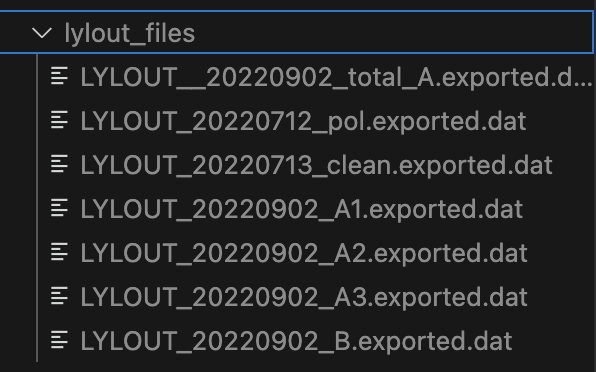
[!NOTE] Some individuals may upload a compressed LYLOUT file without adding a suggestive extension filename. Make sure that all LYLOUT files are able to be readable as a text file. If they are not, they are likely compressed, with or without the extension name. It is suggested to try to add the ".gz" extension at the end manually by renaming the file, and attempt to unzip it. If that is not successful, try adding ".zip" and attempt to unzip.

[!NOTE] When data is added to "lylout_files", everything gets hashed and recorded into "lylout_db.db". This ".db" file is a SQL database that stores all historical lightning strikes. If the database is becoming too large, you can simply delete the "lylout_db.db" file.
- Modify the filters in "main.py":
start_time = datetime.datetime(2020, 4, 29, 0, 0, tzinfo=datetime.timezone.utc).timestamp()  # Timestamp converts to unix (float)
end_time = datetime.datetime(2020, 4, 29, 23, 59, tzinfo=datetime.timezone.utc).timestamp()  # Timestamp converts to unix (float)


# Build filter list for time_unix boundaries.
# Look at "List of headers" above for additional
# Filterings
filters = [
        ("time_unix", ">=", start_time),  # In unix
        ("time_unix", "<=", end_time),  # In unix
        ("reduced_chi2", "<", 5.0,),  # The chi^2 (reliability index) value to accept the data
        ("num_stations", ">=", 5),  # Number of stations that have visibly seen the strike
        ("alt", "<=", 24000),  # alt is in meters. Therefore 20 km = 20000m
        ("alt", ">", 0),  # Above ground
        ("power_db", ">", -4),  # In dBW
        ("power_db", "<", 50),  # In dBW
    ]
- Modify parameters
# Additional parameters that determines "What points make up a single lightning strike"
# They are explicitly defined
params = {
        # Creating an initial lightning strike
        "max_lightning_dist": 3000,  # Max distance between two points to determine it being involved in the same strike
        "max_lightning_speed": 1.4e8,  # Max speed between two points in m/s (essentially dx/dt)
        "min_lightning_speed": 0,  # Min speed between two points in m/s (essentially dx/dt)
        "min_lightning_points": 100,  # The minimum number of points to pass the system as a "lightning strike"
        "max_lightning_time_threshold": 0.15,  # Max number of seconds between points
        "max_lightning_duration": 30, # Max seconds that define an entire lightning strike. This is essentially a "time window" for all of the points to fill the region that determines a "lightning strike"

        # Caching
        "cache_results": True, # Set to true to cache results
        "max_cache_life_days": 7 # The number of days to save a cache
    }
- Run with
python main.pyagain and observe the images in their respective directories
Off-Shoring Processes
The lightning-parser-lib comes with bindings that allow offshore processing of the
config_and_parser class to another computer that is more powerful.

These bindings are powered by my remote-events package here that automates function calls to another computer
server.py
import lightning_parser_lib.config_and_parser as config_and_parser
from lightning_parser_lib import number_crunchers
import remote_functions

def main():
    """
    Main function to configure the lightning system, initialize the queue and remote functions,
    register various tasks, start the processing system, and launch the remote functions server.
    """

    # This, at the top of the main function,
    # Allows binding all console outputs to output.txt
    remote_functions.run_self_with_output_filename("output.txt")

    ##################################################################################
    # Configuring Settings and overrides
    ##################################################################################
    CPU_PCT = 0.9

    lightning_config = config_and_parser.LightningConfig(
        num_cores=number_crunchers.toolbox.cpu_pct_to_cores(CPU_PCT),
        lightning_data_folder="lylout_files",
        data_extension=".dat",
        cache_dir="cache_dir",
        csv_dir="strikes_csv_files",
        export_dir="export",
        strike_dir="strikes",
        strike_stitchings_dir="strike_stitchings"
    )

    config_and_parser.server_sided_config_override = lightning_config

    config_and_parser.rf.is_queue = True # Enable queue of processing to act as a lined-up mutex
    config_and_parser.rf.set_password("Whoop!-")


    config_and_parser.rf.start_server(host="0.0.0.0", port=5509)
    ##################################################################################

if __name__ == "__main__":
    main()
client.py
import lightning_parser_lib.config_and_parser as config_and_parser
import pandas as pd
import datetime
from lightning_parser_lib.number_crunchers.toolbox import tprint
from lightning_parser_lib.number_crunchers.lightning_visualization import XLMAParams
import lightning_parser_lib.number_crunchers.toolbox as toolbox

def main():
    config_and_parser.rf.set_password("Whoop!-")
    config_and_parser.rf.connect_to_server("192.168.50.157", 5509)

    localconfig = config_and_parser.LightningConfig(
       num_cores=toolbox.cpu_pct_to_cores(0.9)
    )

    print(config_and_parser.rf.ping())

    headers = config_and_parser.get_headers(config=localconfig)
    print(headers)

    # Now all function calls will use the server

    ####################################################################################
    # Filter params for extracting data points from the SQLite database
    ####################################################################################
    start_time = datetime.datetime(2020, 4, 29, 13, 0, tzinfo=datetime.timezone.utc).timestamp()  # Timestamp converts to unix (float)
    end_time = datetime.datetime(2020, 4, 29, 14, 59, tzinfo=datetime.timezone.utc).timestamp()  # Timestamp converts to unix (float)

    # Build filter list for time_unix boundaries.
    # Look at "List of headers" above for additional
    # Filterings
    filters = [
        ("time_unix", ">=", start_time),  # In unix
        ("time_unix", "<=", end_time),  # In unix
        ("reduced_chi2", "<", 5.0,),  # The chi^2 (reliability index) value to accept the data
        ("num_stations", ">=", 5),  # Number of stations that have visibly seen the strike
        ("alt", "<=", 24000),  # alt is in meters. Therefore 20 km = 20000m
        ("alt", ">", 0),  # Above ground
        ("power_db", ">", -4),  # In dBW
        ("power_db", "<", 50),  # In dBW
    ]
    events: pd.DataFrame = config_and_parser.get_events(filters, config=localconfig)
    tprint("Events:", events)

    params = {
        # Creating an initial lightning strike
        "max_lightning_dist": 3000,  # Max distance between two points to determine it being involved in the same strike
        "max_lightning_speed": 1.4e8,  # Max speed between two points in m/s (essentially dx/dt)
        "min_lightning_speed": 0,  # Min speed between two points in m/s (essentially dx/dt)
        "min_lightning_points": 100,  # The minimum number of points to pass the system as a "lightning strike"
        "max_lightning_time_threshold": 0.15,  # Max number of seconds between points
        "max_lightning_duration": 30, # Max seconds that define an entire lightning strike. This is essentially a "time window" for all of the points to fill the region that determines a "lightning strike"

        # Caching
        "cache_results": True, # Set to true to cache results
        "max_cache_life_days": 7 # The number of days to save a cache
    }
    bucketed_strikes_indices, bucketed_lightning_correlations = config_and_parser.bucket_dataframe_lightnings(events, config=localconfig, params=params)

    #events, bucketed_strikes_indices, bucketed_lightning_correlations = config_and_parser.get_events_and_bucket_dataframe_lightnings(filters, dummyconfig, params)

    first_lightning_strike = events.iloc[bucketed_strikes_indices[0]]
    print(first_lightning_strike)

    config_and_parser.display_stats(events, bucketed_strikes_indices)

    # Only export plot data with more than n datapoints
    MAX_N_PTS = 1000
    bucketed_strikes_indices, bucketed_lightning_correlations = config_and_parser.limit_to_n_points(bucketed_strikes_indices, bucketed_lightning_correlations, MAX_N_PTS)

    xlma_params = XLMAParams(
        dark_theme=True,
        color_unit='power_db',
        cartopy_paths= toolbox.append_county([])
    )
    config_and_parser.export_general_stats(bucketed_strikes_indices, bucketed_lightning_correlations, events, config=localconfig, xlma_params=xlma_params)
    config_and_parser.export_all_strikes(bucketed_strikes_indices, events, localconfig, xlma_params)

    config_and_parser.export_strike_stitchings(bucketed_lightning_correlations, events, localconfig, xlma_params)
if __name__ == "__main__":
  main()
Useful Functions
-
Run in background:
python main.py > output.log 2>&1 & disown -
List all files in directory './' and sizes:
du -h --max-depth=1 ./ | sort -hr
[!NOTE] Because of Python 3.12 onwards, you may need to consider running via the following:
./.venv/bin/python main.py
./.venv/bin/python main.py > output.log 2>&1 & disown
./.venv/bin/pip install -r requirements.txt
./.venv/bin/pip show setuptools
./.venv/bin/python3 -m build
Building from source
.venv/bin/python -m build.venv/bin/python3 -m twine upload --repository lightning_parser_lib dist/*
Release history Release notifications | RSS feed


Download files
Download the file for your platform. If you're not sure which to choose, learn more about installing packages.
Source Distribution
Built Distribution
Filter files by name, interpreter, ABI, and platform.
If you're not sure about the file name format, learn more about wheel file names.
Copy a direct link to the current filters
File details
Details for the file lightning_parser_lib-0.3.30.tar.gz.
File metadata
- Download URL: lightning_parser_lib-0.3.30.tar.gz
- Upload date:
- Size: 57.1 kB
- Tags: Source
- Uploaded using Trusted Publishing? No
- Uploaded via: twine/6.1.0 CPython/3.12.3
File hashes
| Algorithm | Hash digest | |
|---|---|---|
| SHA256 |
8ea141bb792778a0422c47b99bd3cdd3a8efce86ab9fc480f4aab433cde5239f
|
|
| MD5 |
dcd4bebde85ff679f2c06b4e60475ad4
|
|
| BLAKE2b-256 |
147c8b19a16f7ed1f4ef8e5f8003cab685fc9063a8642d3d17e38a9f0b154a0b
|
File details
Details for the file lightning_parser_lib-0.3.30-py3-none-any.whl.
File metadata
- Download URL: lightning_parser_lib-0.3.30-py3-none-any.whl
- Upload date:
- Size: 57.4 kB
- Tags: Python 3
- Uploaded using Trusted Publishing? No
- Uploaded via: twine/6.1.0 CPython/3.12.3
File hashes
| Algorithm | Hash digest | |
|---|---|---|
| SHA256 |
4940c14f048b80d882baa40700d08cec8ecee29f43f5402ed71aca8ca2c8e5e3
|
|
| MD5 |
09192cb5beebf6e1f1f0f3e73f4e8589
|
|
| BLAKE2b-256 |
7f6f58d1fe31fd5dd1f5509d98c9270655023171699b967904d6bf57312e7af3
|






