
LightTrace
Self-hosted tracing for AI apps and agents.
Two lines in your app, one small server, every model call, tool call and agent step.






Quick start · Frameworks · Docs · Deploy · Changelog
import lighttrace
lighttrace.register()   # that's it: LangGraph, CrewAI, OpenAI Agents, Pydantic AI, ... are traced
Why LightTrace
- 🔌 Two lines, any framework:
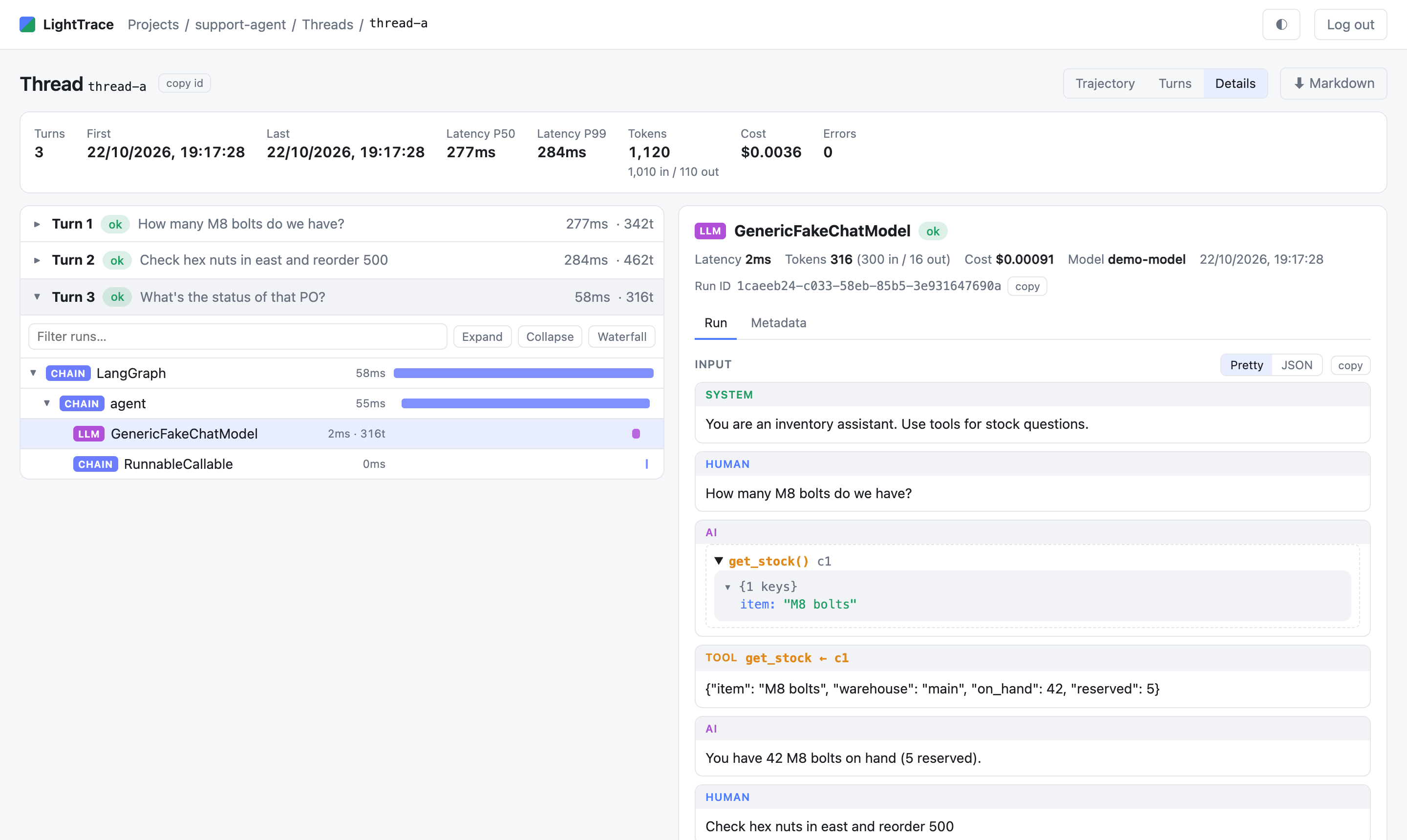
register()finds what your app uses and turns on the right OpenTelemetry listener. That covers 13 agent frameworks, 5 model clients, and anything else that speaks OpenTelemetry, in any language. - 🧵 Built for agents: run trees with waterfalls, threads as one chat across turns, tool calls with arguments and results, and errors with tracebacks.
- 💸 Tokens, cost and speed: per call, per trace and per thread, with P50/P99 latency, time to first token, and a dashboard.
- 🏠 Yours: one Python process with SQLite or Postgres on your own machine. Your prompts never leave it, and there are no accounts or seats to pay for.
- 🔒 Private by default: API keys to send traces, a password for the UI, and localhost only unless you expose it.
- 🪶 Light: about 50–100 MB of RAM, and a plain HTML/JS UI with no build step.
Works with: LangChain · LangGraph · LlamaIndex · CrewAI · OpenAI Agents · Pydantic AI · Google ADK · Strands · Microsoft Agent Framework · Semantic Kernel · DSPy · smolagents · Agno · Qwen-Agent · OpenAI · Anthropic · Gemini · Bedrock · Portkey · Vercel AI SDK (versions tested)
 |
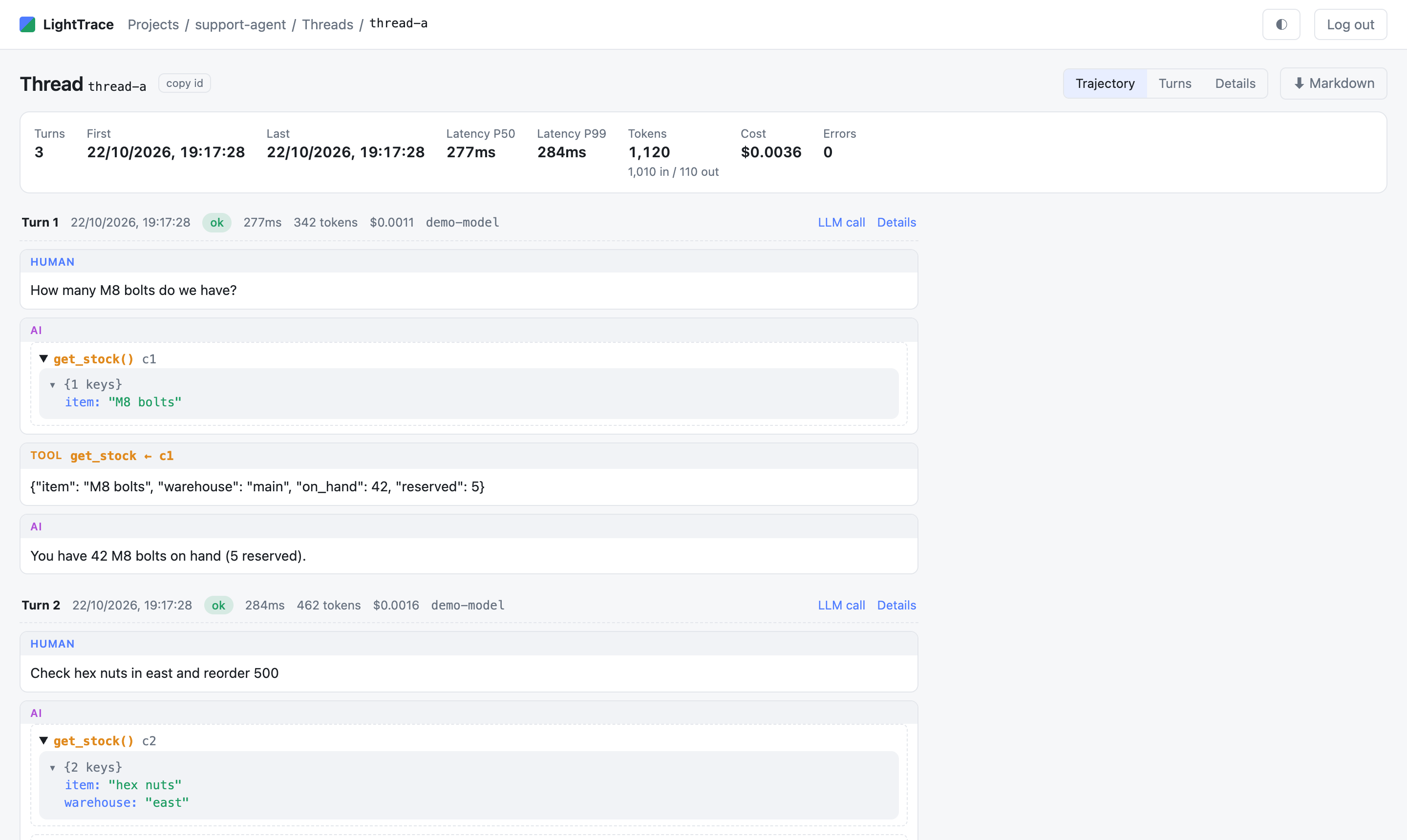 |
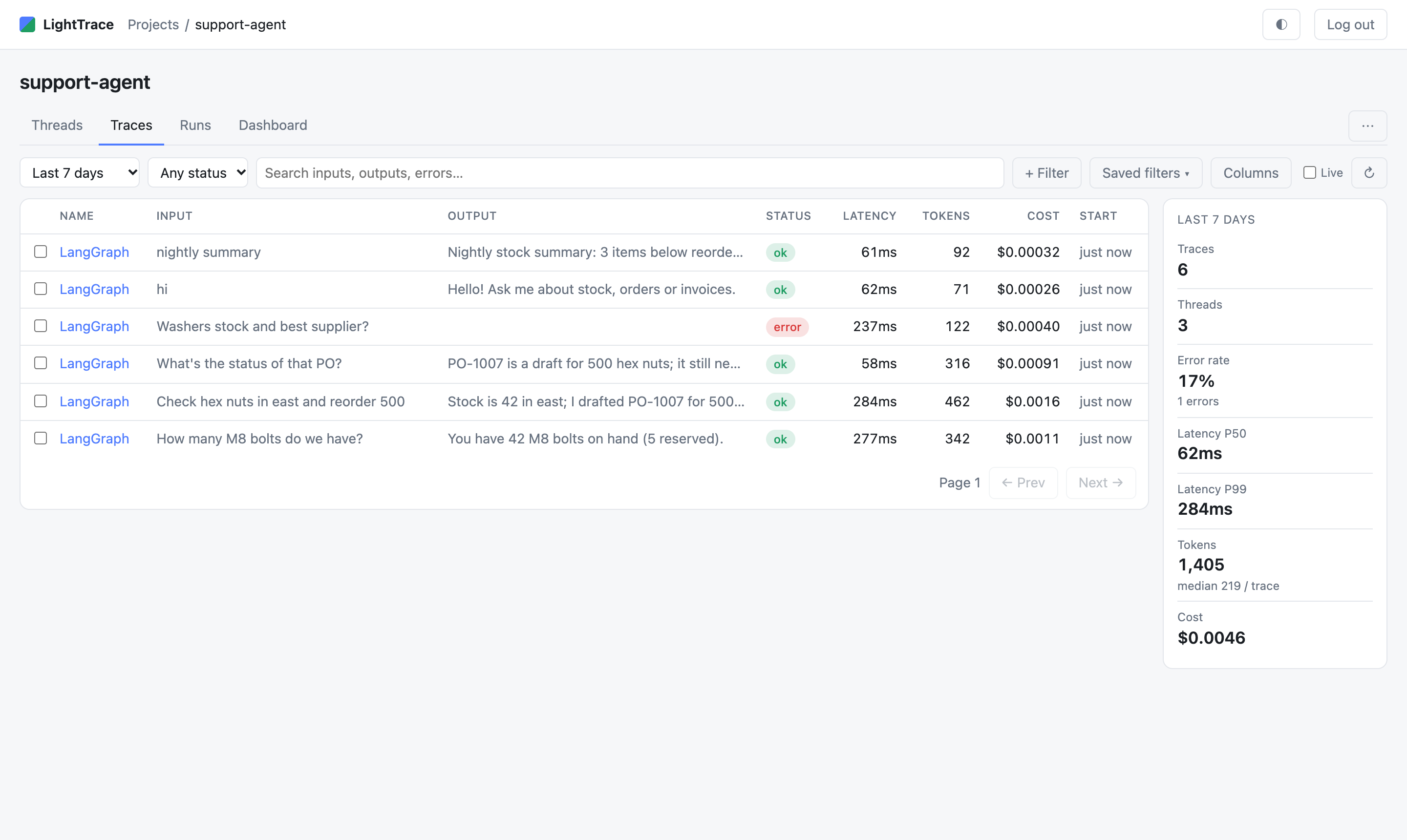
| Traces: status, latency, tokens and cost at a glance | Threads: the whole conversation, turn by turn |
 |
|
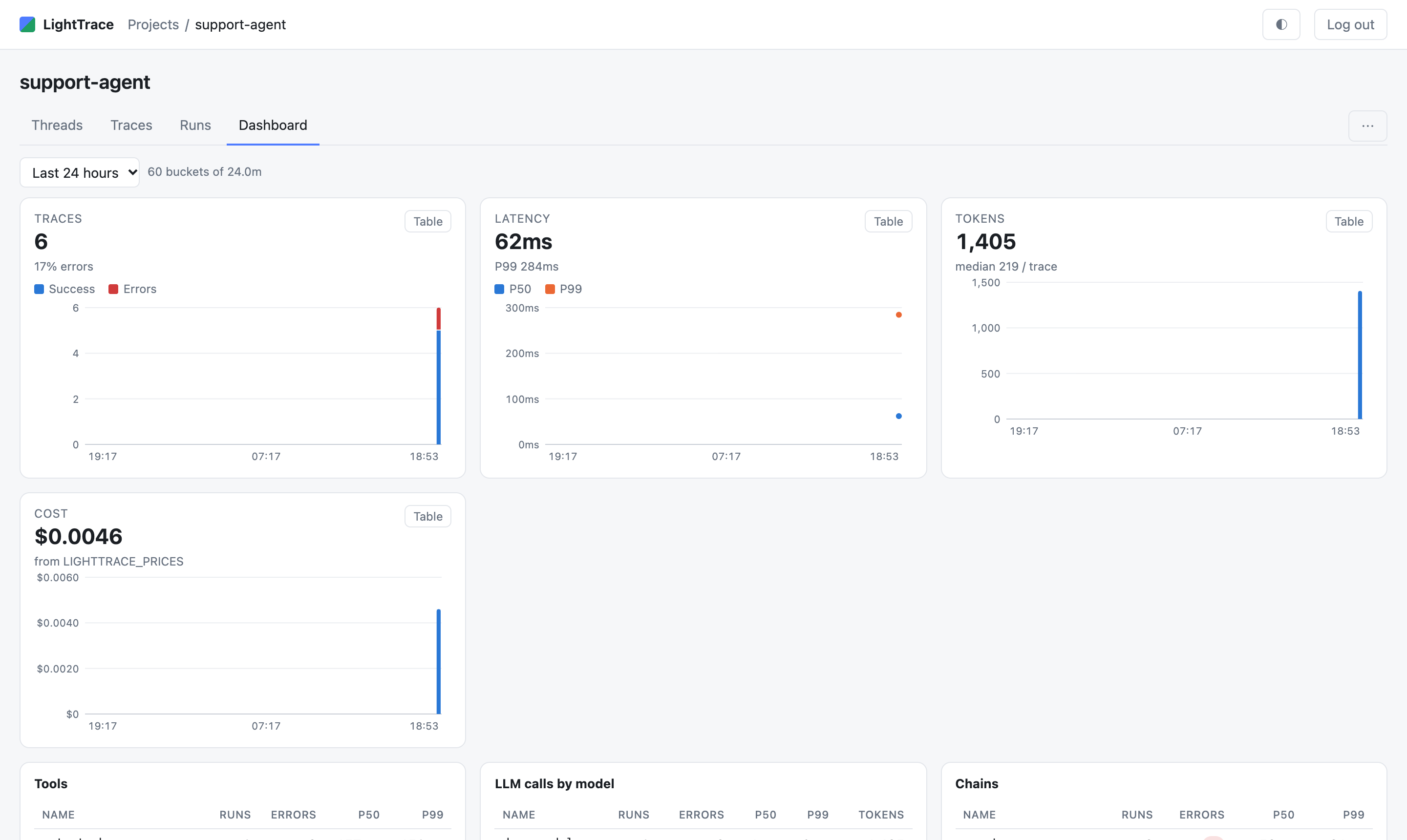
| Dashboard: traces, errors, latency, tokens and cost over time | |
Contents
- Quick start
- Trace your app
- Supported frameworks
- Using the UI
- Deploy: Docker, Postgres, HTTPS, Configuration
- Retention and storage
- Troubleshooting
- Limits
- API
- Development
Quick start
You need Python 3.10 or newer. The whole quick start runs on one machine and makes no LLM calls.
1. Install the server.
python3 -m venv .venv && source .venv/bin/activate
pip install "lighttrace[server]"         # from a checkout of this repo: pip install ".[server]"
2. Configure it. Copy the example settings and fill in the two required values:
cp .env.example .env
python3 -c "import secrets; print(secrets.token_urlsafe(32))"   # use the output as an API key
In .env, set:
LIGHTTRACE_API_KEYS=<the key you just generated>
LIGHTTRACE_PASSWORD=<a password for the web UI>
3. Start it.
lighttrace # serves http://127.0.0.1:1984 ; --host, --port and --db override .env
lighttrace reads .env from the current directory. Variables already set in the shell take precedence.
4. Log in. Open http://127.0.0.1:1984 and enter LIGHTTRACE_PASSWORD.
5. Send a trace. In a second terminal, run the sample LangGraph agent. It uses a fake model, so it needs no LLM key:
pip install lighttrace langgraph
LIGHTTRACE_ENDPOINT=http://127.0.0.1:1984 LIGHTTRACE_API_KEY=<your key> LIGHTTRACE_PROJECT=demo \
  python examples/langgraph_demo.py
A project called demo appears in the UI, with traces in three threads. Every other framework
has a similar runnable script in examples/.
Trace your app
With register() (Python)
pip install lighttrace # small: the OpenTelemetry sender + listeners, no server parts
import lighttrace
lighttrace.register()           # once at startup, before the app does any AI work
Set these where the app runs:
| Variable | Meaning |
|---|---|
LIGHTTRACE_ENDPOINT |
The server's base URL, e.g. http://127.0.0.1:1984 |
LIGHTTRACE_API_KEY |
One of the server's LIGHTTRACE_API_KEYS |
LIGHTTRACE_PROJECT |
The project name (else OTEL_SERVICE_NAME, else default). Created on its first trace |
That's all. There's no special start command, and it works with --reload, gunicorn, Docker and
short scripts: whatever is left is sent when the process exits. If the endpoint or the key isn't set,
register() does nothing, so the same code runs untraced wherever they aren't set.
All options can also be passed in code:
lighttrace.register(
    project="myapp",
    endpoint="http://127.0.0.1:1984",
    api_key="...",
    capture_content=True,   # False: leave prompts, answers, tool arguments and results out
    clients=None,           # True/False: force tracing of raw model clients on or off (see below)
)
It returns the OpenTelemetry TracerProvider, or None when tracing is off. Calling it again
returns the same provider.
To leave some calls out of the traces (a health-check ping, say), wrap them. This works with every
framework, across await, and for everything the calls start; enabled=True turns tracing back on
inside such a block:
with lighttrace.tracing_context(enabled=False):
    await llm.ainvoke([HumanMessage(content="ping")], max_tokens=1)
What register() does:
- Finds the frameworks the app has installed.
- Turns on their listeners. LightTrace writes none of its own. It uses OpenTelemetry's official GenAI instrumentations, or OpenInference's where the official one is missing or records too little (LangChain/LangGraph, LlamaIndex, CrewAI). Where the framework has its own OpenTelemetry (ADK, Strands, Microsoft Agent Framework, Semantic Kernel, Pydantic AI), it uses that. Model clients (OpenAI, Anthropic, Bedrock, Google GenAI, Portkey) are traced unless the frameworks present already record their model calls, so no call is recorded twice.
- Points one sender at LightTrace with the key and project.
If the app already set up OpenTelemetry, register() adds LightTrace to it as one more destination.
Threads (conversations): put a thread_id, session_id or conversation_id in the run's metadata.
In LangGraph, that is the usual config={"configurable": {"thread_id": ...}}.
Without the LightTrace package (any language)
The receiver is standard OpenTelemetry, so any OTLP/HTTP exporter can send to it directly, including other
languages, an existing OpenTelemetry setup, or the zero-code opentelemetry-instrument launcher:
export OTEL_EXPORTER_OTLP_ENDPOINT=http://127.0.0.1:1984
export OTEL_EXPORTER_OTLP_PROTOCOL=http/protobuf   # OTLP over HTTP; gRPC is not supported
export OTEL_EXPORTER_OTLP_HEADERS=x-api-key=<your key>
export OTEL_SERVICE_NAME=my-app                    # the project
See docs/ for per-framework pages and plain OpenTelemetry.
API keys and projects
Only the keys listed in LIGHTTRACE_API_KEYS (comma-separated) are accepted; anything else gets a 401.
Give each app or team its own key. To shut an app out, remove its key from the list and restart.
Projects need no setup. A trace goes to the project named by LIGHTTRACE_PROJECT, which register()
sends as the x-lighttrace-project header. Without it, the trace goes to the app's service.name
(OTEL_SERVICE_NAME), and failing that to default. Several apps or environments can share one server
as separate projects, e.g. myapp-staging and myapp-prod.
Supported frameworks
Per-framework notes and runnable examples are in docs/. Every framework below is
tested end to end: a test runs its example through lighttrace.register() against a live
LightTrace, with a fake model or a stub model server, so no LLM is called. The versions are the newest
releases, tested on Linux with Python 3.13; each runs in CI on every change.
| Framework | Listener register() turns on |
Tested with |
|---|---|---|
| LangChain / LangGraph | OpenInference's (the whole graph: every node, chain, model and tool call, with LangChain's own names and your run metadata) + LightTrace's first-token marker | langgraph 1.2.16, langchain-core 1.6.13 |
| LlamaIndex | OpenInference's (the official one records only retrievals today) | llama-index-core 0.14.25 |
| OpenAI Agents SDK | official + the OpenAI client's (model calls) | openai-agents 0.24.0 |
| CrewAI | OpenInference's (no official one yet) | crewai 1.15.28 |
| Pydantic AI | its built-in OpenTelemetry | pydantic-ai-slim 2.59.0; real payloads for 0.4 and Logfire |
| Google ADK | its built-in OpenTelemetry | google-adk 2.7.0 (the newest that installs next to LightTrace); real payload for 2.12 |
| Strands Agents | its built-in OpenTelemetry | strands-agents 1.62.0 |
| Microsoft Agent Framework | its built-in OpenTelemetry | agent-framework-core 1.22.0 |
| Semantic Kernel | its built-in OpenTelemetry (prompts and answers put on the span by register()) |
semantic-kernel 1.45.0 |
| DSPy | official + the model client's | dspy 3.4.1 |
| smolagents | official (agent and model calls; no tool spans) | smolagents 1.26.0 |
| Agno | official + the model client's | agno 3.1.8 |
| Qwen-Agent | official + the model client's | qwen-agent 0.0.34 |
| OpenAI, Anthropic, Google GenAI, Bedrock, Portkey (no framework) | official client listeners | openai 3.36.1, anthropic 2.1.0, google-genai 2.32.0, boto3 1.43.117, portkey-ai 2.3.4 |
| Vercel AI SDK (JavaScript) | its OpenTelemetry integration (@ai-sdk/otel), sending to /v1/traces |
ai 7.0.148 on Node 24; real payload for ai 5 |
| Your own spans, any language | plain OpenTelemetry + GenAI attributes | opentelemetry-sdk 1.45.1 |
Also understood when sent over OpenTelemetry: the LangSmith SDK's OTel mode (end to end), MLflow, Langfuse SDK v3, OpenLLMetry and OpenLIT (real payloads).
Transports and attribute dialects in detail
| Receiver (all on port 1984) | Status |
|---|---|
OTLP/HTTP protobuf on /v1/traces (gzip ok) |
tested with the real Python exporter; the JS exporter by hand |
| OTLP/HTTP JSON, ids hex (spec) or base64 | tested |
OTLP /v1/logs (protobuf + JSON), GenAI events only |
tested with real payloads |
OTLP /v1/metrics |
accepted and dropped (one warning) |
| Dialect (span attributes) | Mapped | Status |
|---|---|---|
| OpenInference | span kind, input.value/output.value, llm.input_messages/output_messages incl. tool calls, tokens, model, invocation params, retrieval documents, embedding texts, metadata, tag.tags, session.id |
real |
| OTel GenAI | gen_ai.operation.name, models, usage, gen_ai.input/output.messages, gen_ai.system_instructions, tool call arguments/result, gen_ai.conversation.id |
real |
| OTel GenAI events | log or span events gen_ai.system/user/assistant/tool.message, gen_ai.choice, gen_ai.client.inference.operation.details, older gen_ai.content.prompt/completion; matched to their span whichever arrives first |
real (log events); documented (span events) |
| OpenLLMetry | traceloop.span.kind, traceloop.entity.input/output, GenAI attributes, older gen_ai.prompt.N |
real |
| OpenLIT | GenAI attributes + its operation-details log event | real |
| Vercel AI SDK / Mastra | ai.operationId, ai.prompt(.messages), ai.response.text/toolCalls, ai.usage.*, ai.model.id, ai.toolCall.*, ai.settings.*, ai.telemetry.metadata.* |
real |
| Langfuse SDK v3 | langfuse.observation.*, langfuse.trace.*, session.id |
real |
| MLflow | mlflow.spanType, mlflow.spanInputs/spanOutputs, mlflow.chat.tokenUsage or OpenAI-style usage |
real |
| LangSmith OTel mode | langsmith.span.kind, langsmith.metadata.*, langsmith.span.tags, JSON gen_ai.prompt/completion; an exception on a span counts as an error (the SDK marks failed roots OK) |
real |
| Google ADK | gcp.vertex.agent.llm_request/llm_response as chat, tool_call_args/tool_response |
real (1.10 and 2.12) |
| Pydantic AI / Logfire | GenAI attributes, pydantic_ai.all_messages + final_result, pre-1.0 events/all_messages_events; logfire.json_schema decodes JSON attributes |
real |
How spans are mapped:
- Attributes: every unmapped span attribute shows up as run metadata, so the
key:valuefilter works on it. Resource attributes appear under Runtime. - Errors: an error status with its
exceptionevent becomes the run's error. - Threads: traces are grouped on a
thread_id,session_idorconversation_idinmetadata, or onsession.id/gen_ai.conversation.id. - Agents: agent spans get their own agent run type. That covers OpenInference
AGENT,gen_ai.operation.nameinvoke_agent/create_agent, Langfuse and OpenLLMetryagent, MLflowAGENT, and Pydantic AI and ADK agent runs.
Several services in one trace (an agent calling another agent over A2A, or an MCP server in its own
process): LightTrace keeps one trace per (OTel trace id, service.name).
- Separate traces: each service's part shows as its own trace. All of them carry the OTel trace id in their
otel.trace_idmetadata, so the filterotel.trace_id:<id>finds them together. - Remote parents: a span whose parent is in another process (the OTLP remote-parent flag) hangs under a root for its service's part. If that service is entered several times in one trace, the root covers all of them. The remote parent's span id stays in the span's
otel.remote_parent_span_idmetadata. - Setup: give each service its own
service.name(OTEL_SERVICE_NAME).
Using the UI
Projects: every project, with its traces, threads, error rate, P50/P99 latency, tokens and cost for a time window.
Inside a project there are four tabs and a stats sidebar (traces, threads, error rate, P50/P99, tokens, median tokens per trace, cost):
| Tab | Shows |
|---|---|
| Threads | One row per conversation: first input, last output, turns, errors, P50/P99, tokens, cost |
| Traces | One row per root run: input/output previews, status, latency, time to first token, tokens, cost, tags. Tick two to compare, or several to delete |
| Runs | Every run (LLM calls, tools, chains, retrievers), filterable by run type |
| Dashboard | Charts over time: traces and errors, P50/P99 latency, tokens, cost; top tools, LLM models and chains by runs, errors and latency |
Filters: time range, status, full-text search over inputs/outputs/errors, name, run type, tag,
metadata key:value (several), latency ≥ / ≤ and tokens ≥.
- Active filters show as chips, and any filter can be saved per project.
- Columns can be shown or hidden.
- A Live toggle refreshes every 10 seconds.
A thread opens on one page with three views (keys T, U, D):
- Trajectory: the whole conversation as chat across all turns (human, AI, tool calls with arguments, tool results), de-duplicated. Each turn gets a line with latency, tokens, cost, model and links to the LLM call. You can download it as Markdown.
- Turns: one card per turn, with its input and output.
- Details: every turn with its run tree collapsed, and the selected turn expanded. Each tree
has a waterfall, a filter box, expand/collapse, and arrow-key /
jknavigation.
Opening a trace that belongs to a thread takes you to that thread's Details view.
The run panel (right side) shows latency, time to first token, tokens in/out, cost, model, and the run id with a copy button. It has two tabs:
- Run: the error with its traceback; input and output as Pretty or raw JSON, with copy; LLM messages as chat, retriever documents and tool arguments.
- Metadata: metadata, tags, invocation params, timing, ids, runtime and events.
The UI has light and dark modes; your choice is remembered per browser.
Cost columns appear when LIGHTTRACE_PRICES is set (see Configuration).
Deploy
Docker
The image includes Postgres support.
cp .env.example .env                     # set LIGHTTRACE_API_KEYS and LIGHTTRACE_PASSWORD
docker build -t lighttrace .
docker run -d --name lighttrace --restart unless-stopped \
  -p 127.0.0.1:1984:1984 -v lighttrace-data:/data --env-file .env \
  -e LIGHTTRACE_HOST=0.0.0.0 lighttrace
Inside the container, LightTrace binds to 0.0.0.0 and stores SQLite at /data/lighttrace.db (on the
lighttrace-data volume). -p 127.0.0.1:… keeps it private on the host. Put a reverse proxy in front
to expose it (see HTTPS).
Postgres
pip install "lighttrace[server,postgres]"
LIGHTTRACE_DB=postgresql://lighttrace:<password>@<host>:5432/lighttrace
LIGHTTRACE_RETENTION_DAYS=0          # keep forever
Create an empty database and a user that owns it; LightTrace creates its tables on start. Any
Postgres 12+ should work, including managed ones (Supabase, Neon, RDS); the tests run against 18. Back up
with your provider's snapshots or pg_dump.
HTTPS with Caddy
Keep LightTrace on 127.0.0.1:1984 and let Caddy terminate TLS. With a domain:
# /etc/caddy/Caddyfile
traces.example.com {
    reverse_proxy 127.0.0.1:1984
}
No domain? sslip.io gives every IP a hostname, and Caddy gets a real
Let's Encrypt certificate for it. For a server at 203.0.113.7:
traces.203-0-113-7.sslip.io {
    reverse_proxy 127.0.0.1:1984
}
Then set LIGHTTRACE_COOKIE_SECURE=true and point apps at https://traces.203-0-113-7.sslip.io
(LIGHTTRACE_ENDPOINT or OTEL_EXPORTER_OTLP_ENDPOINT). If the app runs on the same server,
http://127.0.0.1:1984 is simpler and skips TLS.
Configuration
All configuration is through environment variables or a .env file; .env.example has every one with comments.
Server:
| Variable | Default | |
|---|---|---|
LIGHTTRACE_API_KEYS |
(required) | Comma-separated ingest keys; only these are accepted. Use one per app or team so you can remove one without touching the others |
LIGHTTRACE_PASSWORD |
(required) | UI admin password. Changing it logs everyone out |
LIGHTTRACE_DB |
lighttrace.db |
SQLite file path, or a postgresql://… URL |
LIGHTTRACE_RETENTION_DAYS |
30 |
Delete traces older than this, checked hourly. 0 keeps them forever |
LIGHTTRACE_PRICES |
(none) | Cost tracking: {"model": [usd_per_1M_input, usd_per_1M_output]}, inline or as a JSON file path. Matches the model name exactly or by prefix |
LIGHTTRACE_HOST / LIGHTTRACE_PORT |
127.0.0.1 / 1984 |
Bind address |
LIGHTTRACE_COOKIE_SECURE |
false |
Set to true behind HTTPS |
LIGHTTRACE_MAX_BODY_MB |
50 |
Max ingest body size (after gzip) |
App (with register()): LIGHTTRACE_ENDPOINT, LIGHTTRACE_API_KEY and LIGHTTRACE_PROJECT (see
Trace your app).
Retention and storage
With LIGHTTRACE_RETENTION_DAYS > 0, LightTrace checks every hour and deletes whole traces whose root
started longer ago than that. With 0 nothing is ever deleted, and Postgres is the better choice.
SQLite:
- Size: the file stops growing once retention kicks in, because freed pages are reused.
- Reclaim disk: stop the server and run
sqlite3 lighttrace.db 'VACUUM'. - Back up:
sqlite3 lighttrace.db ".backup backup.db"is safe while the server runs.
Run payloads are never logged, since they usually hold user and business data.
Troubleshooting
| Symptom | Fix |
|---|---|
| Nothing shows up, no errors | register() is off when LIGHTTRACE_ENDPOINT or LIGHTTRACE_API_KEY is missing: check they are set in the app's environment. Call register() before the app imports or builds its AI objects. With logging.basicConfig(level=logging.INFO) the app logs lighttrace: tracing … to … when it is on |
401 invalid api key |
The key isn't in the server's LIGHTTRACE_API_KEYS. Send it as x-api-key: <key> or Authorization: Bearer <key>; restart the server after editing .env |
415 in the app's exporter logs |
The exporter uses gRPC or zstd. Set OTEL_EXPORTER_OTLP_PROTOCOL=http/protobuf and use gzip or no compression |
413 body too large |
Raise LIGHTTRACE_MAX_BODY_MB |
| Server logs "ignoring OTLP metrics" | Harmless. Set OTEL_METRICS_EXPORTER=none in the app to stop sending them |
| A raw OpenAI / Anthropic / Gemini / Bedrock / Portkey call doesn't show up | register() leaves the client listeners off when a framework that records its own model calls (LangChain, LlamaIndex, CrewAI, ADK, ...) is installed, even only as a dependency. Pass register(clients=True) |
| Every model call appears twice | Two listeners record it (e.g. a framework's and the raw client's). Pass register(clients=False) |
| UI login loops behind HTTPS / plain HTTP | LIGHTTRACE_COOKIE_SECURE=true only works over HTTPS; leave it false for plain HTTP |
| No cost column | Set LIGHTTRACE_PRICES with the model names your app reports |
Limits
- Tracing only, one receiver. There are no feedback, datasets, experiments/evaluations, annotation queues, prompt hub or playground. Data comes in only through the OpenTelemetry receiver.
- No public share links, on purpose: a share link publishes every prompt and tool result to anyone holding it.
- OTLP over HTTP only. It accepts protobuf or JSON, with gzip but not zstd. OTLP logs are read for GenAI content only, and metrics are dropped. Traces produced while LightTrace is down are lost once the exporter's short retry gives up, because exporters don't buffer to disk.
- Search and stats aren't indexed. Text search is a
LIKE/ILIKEscan, and percentiles and dashboards are computed in Python over the selected time window. That's fine for hundreds of thousands of traces; at many millions, narrow the window or add database-side indexes (e.g.pg_trgm). - One admin, no roles. There's a single admin password and no users. Anyone who can log in sees every project, and any valid API key can write to any project.
- LangChain's OpenTelemetry mode is verified with
langsmith0.14.x (whatlangchain-core1.x installs).
API
Ingest: POST /v1/traces, POST /v1/logs and POST /v1/metrics (accepted, then dropped).
- Send the key in
x-api-keyorAuthorization: Bearer <key>. - Bodies are OTLP/HTTP protobuf or JSON; ids can be hex or base64.
- The optional
x-lighttrace-projectheader names the project.
UI JSON: these need the session cookie from POST /api/login ({"password": "..."}). Writes also
need the x-lighttrace: 1 header.
| Method | Path |
|---|---|
POST |
/api/login, /api/logout |
GET |
/api/me |
GET |
/api/projects |
DELETE |
/api/projects/{p} |
GET |
/api/projects/{p}/stats?since=&until= |
GET |
/api/projects/{p}/runs?scope=traces|runs&limit=&offset=&…filters |
GET |
/api/projects/{p}/threads?…filters, /api/projects/{p}/thread?id=… |
GET |
/api/projects/{p}/dashboard?since=&until=&bucket= |
GET, POST |
/api/projects/{p}/filters (POST {"name", "query"}) |
DELETE |
/api/filters/{id} |
GET, DELETE |
/api/traces/{trace_id} |
Filters: since, until (epoch seconds), status (success/error/pending), q, name,
run_type, tag, thread_id, meta=key:value (repeatable), min_latency, max_latency, min_tokens.
Development
git clone https://github.com/ganeshsali/lighttrace.git && cd lighttrace
python3 -m venv .venv && .venv/bin/pip install -e '.[dev]'
.venv/bin/ruff check .       # lint (config in pyproject.toml)
.venv/bin/pytest -q          # includes end-to-end LangGraph tests; no LLM calls
.venv/bin/python -m build && .venv/bin/twine check --strict dist/*   # the package, as released
-
Framework tests: the end-to-end tests in
tests/test_frameworks.pyskip unless their framework is installed, e.g..venv/bin/pip install llama-index-core openai-agents pydantic-ai-slim. -
Postgres tests: run them against a throwaway database; the tests wipe it.
docker run --rm -e POSTGRES_PASSWORD=pw -p 5432:5432 postgres:18
LIGHTTRACE_TEST_PG=postgresql://postgres:pw@127.0.0.1:5432/postgres .venv/bin/pytest -q
-
Project layout:
Path What's there lighttrace/client.pyregister()lighttrace/app.pyThe server: receiver, auth and UI API lighttrace/otel.pyTurns OTLP spans into runs lighttrace/store.pyAll SQL (SQLite and Postgres) lighttrace/static/The UI -
Releasing: bump
__version__inlighttrace/__init__.py, add a section to CHANGELOG.md, then push av<version>tag. CI builds the package, checks it and publishes it to PyPI, a GitHub release andghcr.io.
Contributions are welcome: see CONTRIBUTING.md (commits are signed off under the DCO), SECURITY.md for reporting vulnerabilities, and the Code of Conduct.
License
MIT. See CHANGELOG.md for what changed in each release.
LightTrace is an independent project, not affiliated with or endorsed by LangChain, Inc. "LangSmith" is a trademark of LangChain, Inc.; it is named here only to say which SDK can send to LightTrace.
1 maintainer

Metadata
1 maintainer
Release files for lighttrace 0.1.1
For a detailed explanation of source distributions (sdists) and built distributions (wheels), please see the package formats documentation.
Source distribution (sdist)
| File | Size | Uploaded | Provenance | |
|---|---|---|---|---|
| lighttrace-0.1.1.tar.gz | 119.3 kB | With provenance | Details |
Built distribution (wheel)
| File | Interpreter | ABI | Platform | Reset |
|---|---|---|---|---|
| lighttrace-0.1.1-py3-none-any.whl | Python 3 | none | any | Details |
Total release size: 186.3 kB
Release files / lighttrace-0.1.1.tar.gz
| Download URL | lighttrace-0.1.1.tar.gz |
|---|---|
| Size | 119.3 kB |
| Tags | Source |
|
SHA-256 checksum How to use checksums |
987930fe918a550eb55901290595efe836d8b115c1d031c2e2c353818548b8f0
|
|
BLAKE2b-256 checksum How to use checksums |
c19a1f03acdb789318124a66189d5dce13f7556aba92d1d18e1ecb1529451409
|
| Upload date | |
|
Uploaded using Trusted Publishing? What is trusted publishing? |
Yes |
| Uploaded via |
twine/7.0.0 CPython/3.13.16
|
Provenance
Provenance describes where a file came from. On PyPI, provenance is shared via attestations, which provide a verifiable record of the build or publishing details. View details, limitations and caveats.


PyPI Publish Attestation
PyPI verified that this artifact, at this checksum, originated from the publisher listed below.
Signed by GitHub Actions, verified by PyPI on Oct 23, 2026.
Transparency logRelease files / lighttrace-0.1.1-py3-none-any.whl
| Download URL | lighttrace-0.1.1-py3-none-any.whl |
|---|---|
| Size | 67.1 kB |
| Tags | Python 3 |
|
SHA-256 checksum How to use checksums |
7bbdd00709addaa4fc2ecb6086410c29289884bb3ecbae396611f0ce5d8c8f7d
|
|
BLAKE2b-256 checksum How to use checksums |
14fb14120749fa8b0789cdab2e4207824e1c21addd18201be0e38e868f8188fd
|
| Upload date | |
|
Uploaded using Trusted Publishing? What is trusted publishing? |
Yes |
| Uploaded via |
twine/7.0.0 CPython/3.13.16
|
Provenance
Provenance describes where a file came from. On PyPI, provenance is shared via attestations, which provide a verifiable record of the build or publishing details. View details, limitations and caveats.
PyPI Publish Attestation
PyPI verified that this artifact, at this checksum, originated from the publisher listed below.
Signed by GitHub Actions, verified by PyPI on Oct 23, 2026.
Transparency logSecurity for lighttrace 0.1.1
Provenance
Provenance describes where a file came from. On PyPI, provenance is shared via attestations, which provide a verifiable record of the build or publishing details. View details, limitations and caveats.
Full provenance
All 2 files in this release have been uploaded with provenance metadata.
Attestation for lighttrace-0.1.1.tar.gz
PyPI Publish Attestation
PyPI verified that this artifact, at this checksum, originated from the publisher listed below.
Signed by GitHub Actions, verified by PyPI on Oct 23, 2026.
Transparency logA note on package security
PyPI is a repository for distributing packages, not a service for auditing them. While third-party security researchers and our staff do their best to detect and remove malicious packages, PyPI cannot guarantee the quality, security or suitability of any given package.
To learn more about protecting yourself from malicious actors, visit our package security documentation.














