

A Research-Purposed Framework for Processing LIDAR and Image Data
Installation | Usage | Documentation | Contributing | License



Introduction
LiGuard is a research-purposed framework for LiDAR (and corresponding image) data. It provides an easy-to-use graphical user interface (GUI) that helps researchers interactively create algorithms by allowing them to dynamically create, enable or disable components, adjust parameters, and instantly visualize results.
LiGuard features, out of the box, data reading for many common dataset formats including support for reading calibration and label data. Moreover, it provides (an increasing list of) commonly used algorithm components ranging from basic data preprocessors to advanced object detection and tracking algorithms. Additionally, it establishes a straightforward standard for adding custom functions/algorithms, allowing users to integrate unique components into their pipelines. Pipelines created in LiGuard are saved in structured directories, making it easy to share and reproduce results.
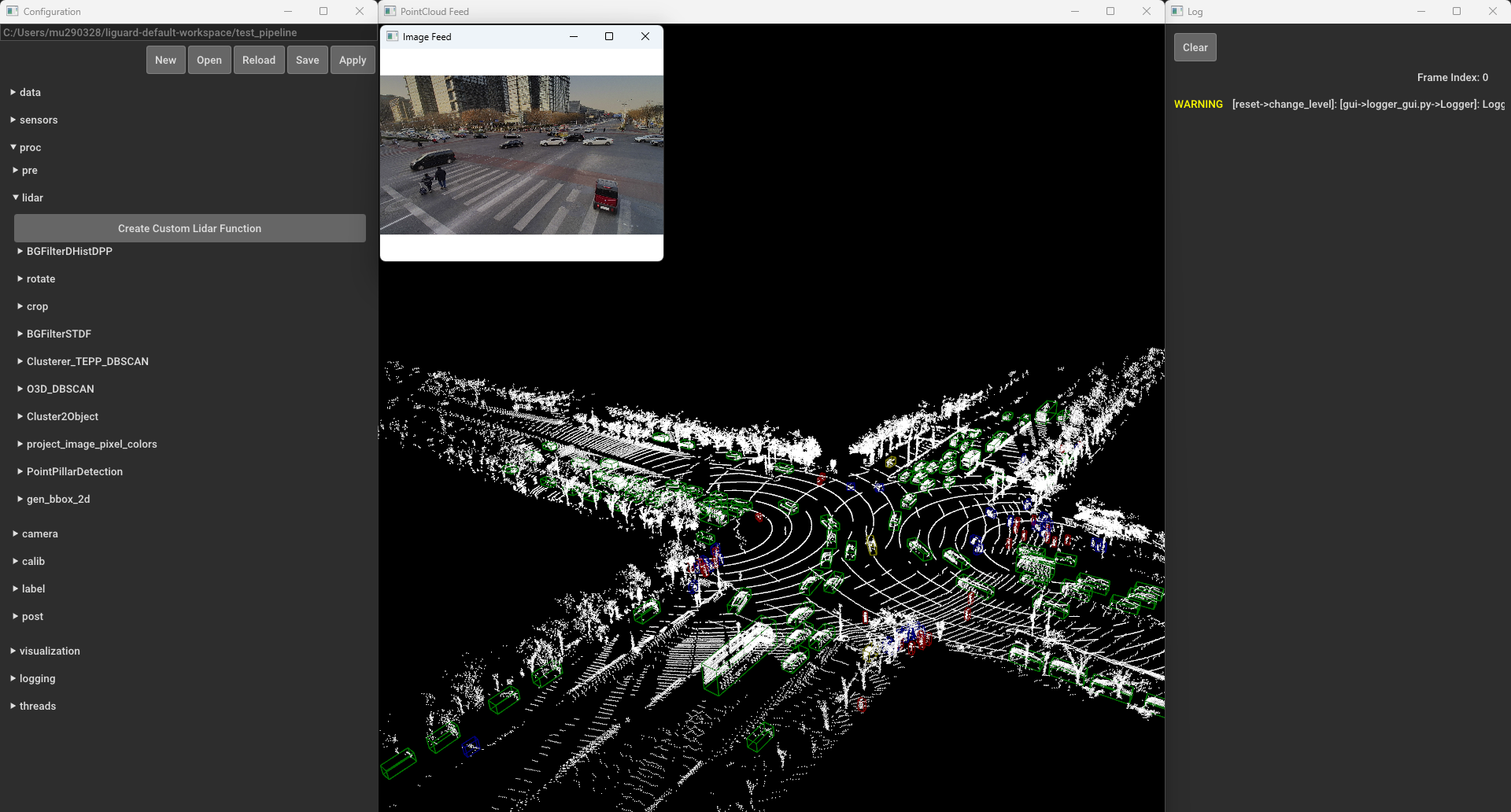
Installation
Requirements:
- OS
- Windows 10 or later
- macOS 10.14 Mojave or later
- Ubuntu 18.04 or later
- Python 3.10 or later
Install LiGuard with pip (from PyPI):
pip install LiGuard
Run LiGuard by executing the following command in the terminal:
liguard-gui
Alternative Quick Launch:
If you have uv installed, you can start the GUI directly without installing the package:
uvx --from LiGuard liguard-gui
Developmental Build
Install the latest development version directly from GitHub:
pip install git+https://github.com/m-shahbaz-kharal/LiGuard-2.x.git@dev_2.x
Alternatively, clone and install in editable mode:
git clone https://github.com/m-shahbaz-kharal/LiGuard-2.x.git
cd LiGuard-2.x
pip install -e .
Note to macOS Users: When launching liguard-gui for the first time on macOS, liguard-gui may request accessibility permissions in order to control this computer. This is a requirement for the keybindings to function properly. To grant these permissions, go to System Preferences > Privacy & Security > Accessibility and toggle the button next to "Terminal".
Usage
Test an example pipeline:
- In the
Configurationwindows, click theOpenbutton. - Navigate to
examples/simple_pipeline, click open, and then clickApply. - Explore various functions under
procdropdown in theConfigurationwindow. For example, underproc/lidar/crop, check theenabledcheckbox, and clickApplyto see the cropped LIDAR data. - Press
left arroworright arrowto navigate through the frames. A list of all key bindings is available here. - To save the pipeline, click the
Savebutton in theConfigurationwindow.
For more details on pipelines, see LiGuard Pipelines.
Documentation
A detailed documentation for LiGuard is available at GitHub Pages.
Contributing
We welcome contributions to the LiGuard framework. Please follow the guidelines below to contribute to the framework:
- Fork the repository.
- Create a new branch for your feature or bug fix.
- Make your changes and add comments.
- Write tests for your changes.
- Run the tests.
- Create a pull request.
License
MIT License Copyright (c) 2024 Muhammad Shahbaz - see the LICENSE file for details.
1 maintainer

Metadata
1 maintainer
Release files for LiGuard 2.1.5.post3
For a detailed explanation of source distributions (sdists) and built distributions (wheels), please see the package formats documentation.
Source distribution (sdist)
| File | Size | Uploaded | |
|---|---|---|---|
| liguard-2.1.5.post3.tar.gz | 11.5 MB | Details |
Built distribution (wheel)
| File | Interpreter | ABI | Platform | Reset |
|---|---|---|---|---|
| liguard-2.1.5.post3-py3-none-any.whl | Python 3 | none | any | Details |
Total release size: 23.0 MB
Release files / liguard-2.1.5.post3.tar.gz
| Download URL | liguard-2.1.5.post3.tar.gz |
|---|---|
| Size | 11.5 MB |
| Tags | Source |
|
SHA-256 checksum How to use checksums |
7ff9cacd70817eca6cd81ceb41b387c1f90412af72864e7e8185d512a10e2749
|
|
BLAKE2b-256 checksum How to use checksums |
2b18ccc7f9b57719931d2e2a567b6b90c5aa3e6fe86103d45572b0e7aee6f77c
|
| Upload date | |
|
Uploaded using Trusted Publishing? What is trusted publishing? |
No |
| Uploaded via |
twine/6.1.0 CPython/3.10.16
|
Release files / liguard-2.1.5.post3-py3-none-any.whl
| Download URL | liguard-2.1.5.post3-py3-none-any.whl |
|---|---|
| Size | 11.5 MB |
| Tags | Python 3 |
|
SHA-256 checksum How to use checksums |
7662fc4edd33e184e61e6acc8f9aeecc30b69e4c0ff25a610eb5335231f5e7e8
|
|
BLAKE2b-256 checksum How to use checksums |
48aee9f4d50651eab65d5bc85a492a31673bdc7f7656be4980cc3da2135bb30f
|
| Upload date | |
|
Uploaded using Trusted Publishing? What is trusted publishing? |
No |
| Uploaded via |
twine/6.1.0 CPython/3.10.16
|














