
Simple dialog windows for scripters and scientists.

Project description
Limited Interaction
import limitedinteraction as li

li.button_dialog("Simple dialog windows for scripters and scientists.",
                 choices=['OK'],
                 title='Limited Interaction',
                 icon='light')
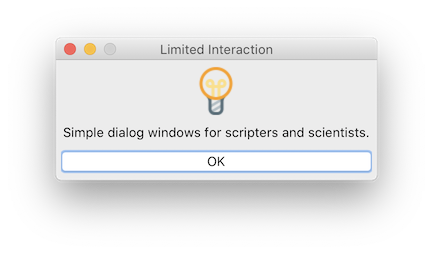
This python module provides simple, generic dialog windows specifically aimed to scripters and scientists who need a concise, elegant way of interacting with their script users.
This module does not require any GUI programming, it has no external dependency, and it is completely independent of the graphical backend in use (if any). In IPython-based environments, its blocking functions allow interacting with Matplotlib figures while waiting for user action.
For those transitionning from Matlab, this module fulfils the same role as Matlab's msgbox, inputdlg, menu and other simple GUI functions.
Home page GitHub Issue tracker API
Installing
Using pip:
pip install limitedinteraction
Using conda:
conda install -c conda-forge limitedinteraction
Usage
Importing
import limitedinteraction as li
Creating a persistent message window
li.message('Please wait a few moments.',
           title='Calculating...',
           icon='clock')
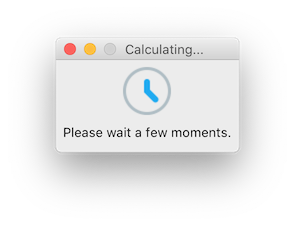
This is a non-blocking function. Any code after this call is executed immediately, while this message window stays in foreground. To close the message window:
li.message('')
Asking for user input
name = li.input_dialog('What is your name?', icon='question')
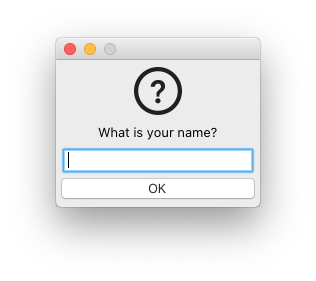
This is a blocking function. We wait for user input before continuing. Meanwhile, Matplotlib's event loop is refreshed so that the user can interact with figures.
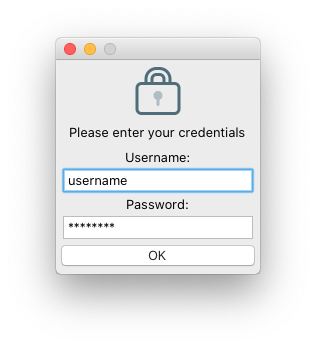
This same function can have several inputs and some inputs can be masked:
credentials = li.input_dialog('Please enter your credentials',
                              labels=['Username:', 'Password:'],
                              initial_values=['username', 'password'],
                              masked=[False, True],
                              icon='lock')
choice_index = li.button_dialog('Please zoom on the figure and click Next.',
                                choices=['Next', 'Cancel'],
                                title='User interaction',
                                icon='gear')
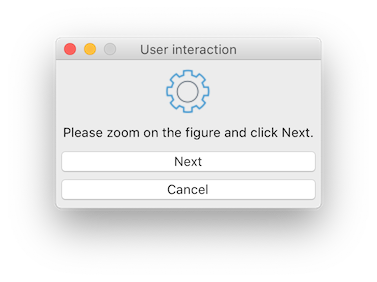
This is a blocking function. We wait for a choice before continuing. Meanwhile, Matplotlib's event loop is refreshed so that the user can interact with figures.
Other functions
Get a file name using the operating system's standard file selection window:
filename = li.get_filename()
Get a folder name using the operating system's standard folder selection window:
folder = li.get_folder()
Credits
This module is developed by Félix Chénier at the Mobility and Adaptive Sports Research Lab (https://felixchenier.uqam.ca).
It includes artwork developed by these designers:
- Warning and gear icons: Laura Reen
- Question mark icon: Design Revision
- All other icons: Recep Kütük
Release history Release notifications | RSS feed


Download files
Download the file for your platform. If you're not sure which to choose, learn more about installing packages.
Source Distribution
Built Distribution
Filter files by name, interpreter, ABI, and platform.
If you're not sure about the file name format, learn more about wheel file names.
Copy a direct link to the current filters
File details
Details for the file limitedinteraction-1.0.tar.gz.
File metadata
- Download URL: limitedinteraction-1.0.tar.gz
- Upload date:
- Size: 353.3 kB
- Tags: Source
- Uploaded using Trusted Publishing? No
- Uploaded via: twine/6.1.0 CPython/3.11.11
File hashes
| Algorithm | Hash digest | |
|---|---|---|
| SHA256 |
ddf05701e3d7bafdb9fc7b742ab2aa9fa092fd6c760898a09d0b2564e5f6524c
|
|
| MD5 |
f3fe844c6971d14bada8e1c18e208490
|
|
| BLAKE2b-256 |
bc2b3888ed57b936e7cbfd9571a5892214f753c81785671cfe474f9c0fe98d41
|
File details
Details for the file limitedinteraction-1.0-py3-none-any.whl.
File metadata
- Download URL: limitedinteraction-1.0-py3-none-any.whl
- Upload date:
- Size: 359.5 kB
- Tags: Python 3
- Uploaded using Trusted Publishing? No
- Uploaded via: twine/6.1.0 CPython/3.11.11
File hashes
| Algorithm | Hash digest | |
|---|---|---|
| SHA256 |
5f446cfd908369dfaa1035f526584b032de7231e7578ed2836838d832818ddef
|
|
| MD5 |
275e49c418c7401b547f2537a2a810fc
|
|
| BLAKE2b-256 |
97dd8ddbc389086f4fec98d5f3402bc2b3cfaa72e35ad699ad32fa896b4f2304
|






