
Lindoze Process Manager
A Linux system monitor with the layout of Windows 11 Task Manager.
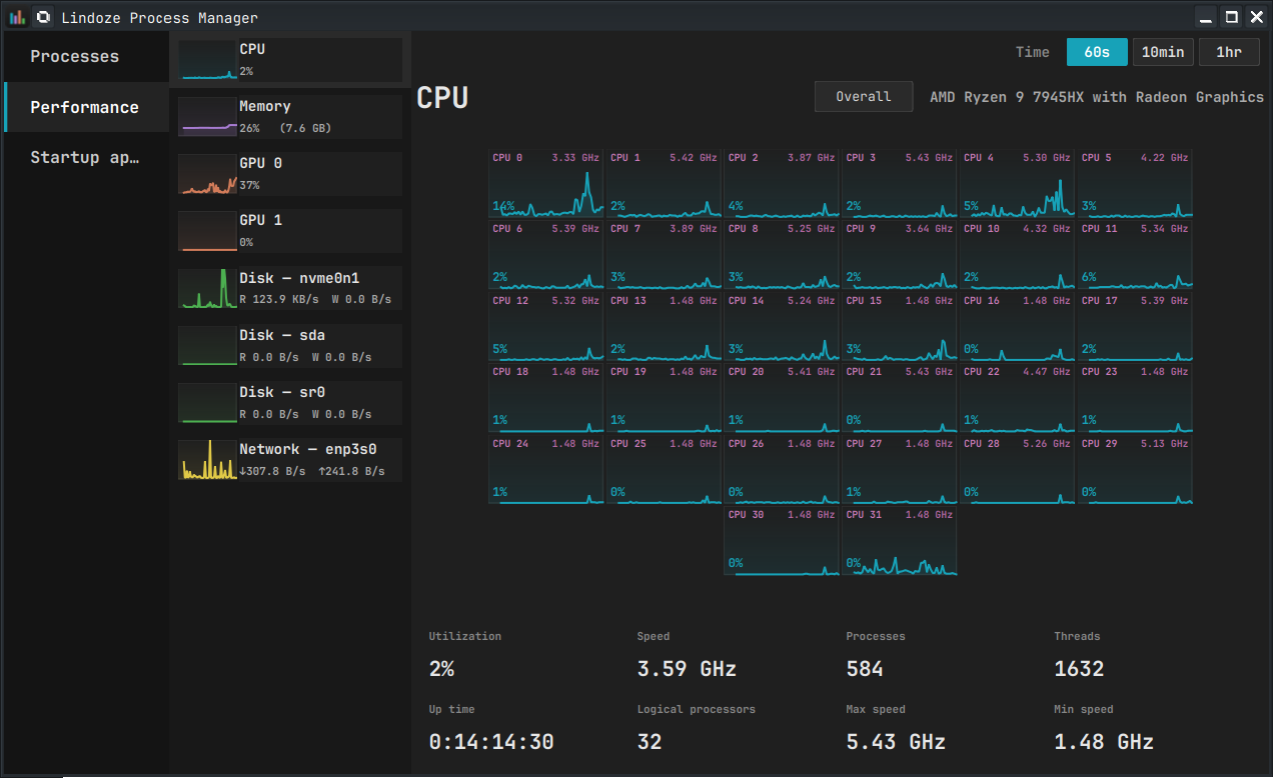
Most Linux system monitors (gnome-system-monitor, ksysguard, even the otherwise-excellent mission-center) collapse every CPU thread into a single overlaid graph. On a 32-thread machine that's unreadable. Lindoze gives you the per-thread grid you remember from Windows Task Manager, plus the rest of the Task Manager layout — sortable processes, performance pages, startup apps — in a single Qt app. Built and tested on KDE Plasma and GNOME (Fedora Workstation); should work on other Qt-capable desktops too.
See CHANGELOG.md for release history.
Screenshots
The Performance tab defaults to the per-thread grid (right-click or toggle button to switch to the aggregate view):
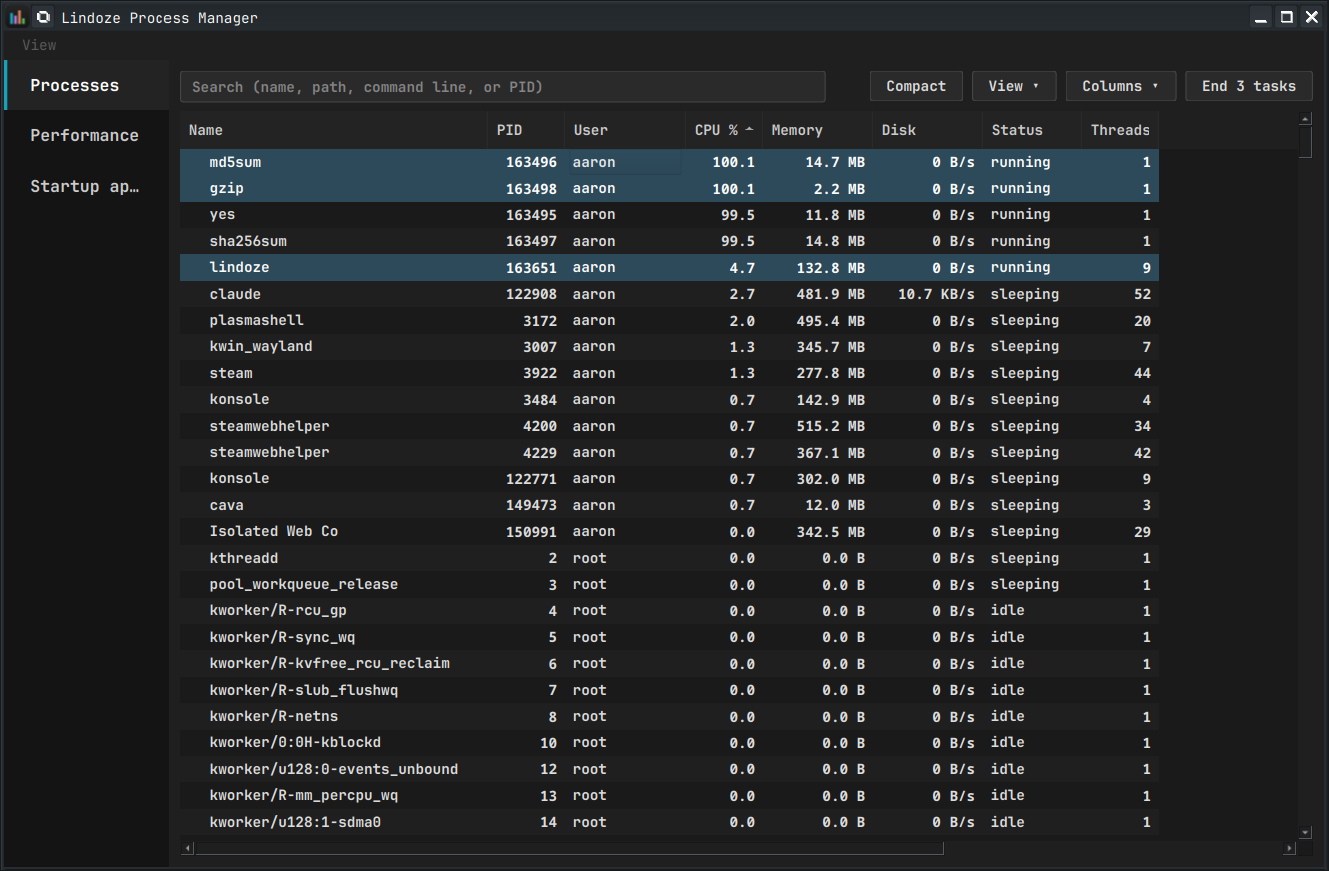
Processes tab — sortable tree, search, end-task / kill / suspend / renice:
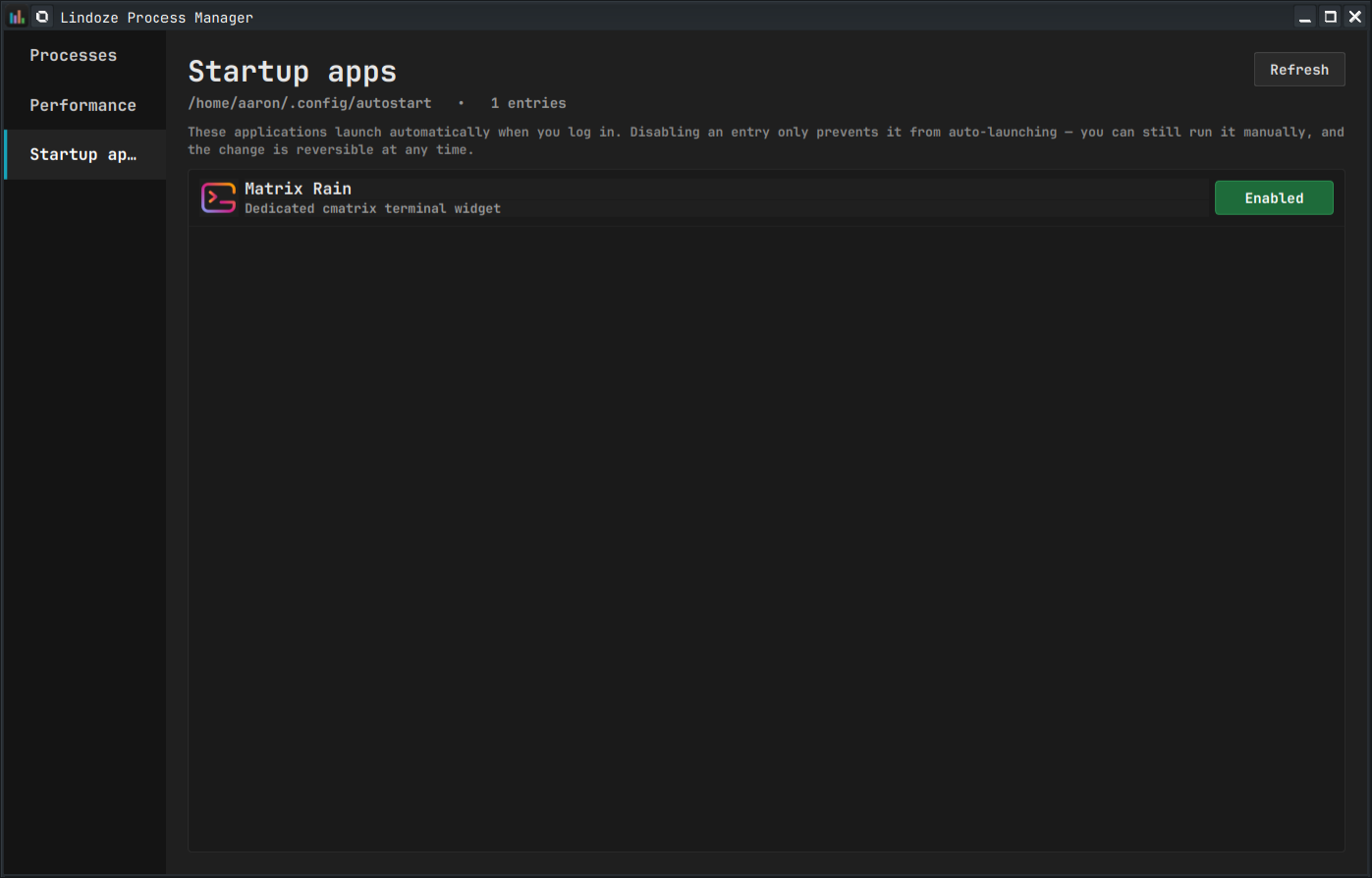
Startup apps tab — toggle XDG autostart entries with a 10-second undo:
Features (v0.2)
- Performance tab with per-resource sub-navigation
- CPU — aggregate + per-logical-processor grid (auto-sized; handles 2 to 128+ threads)
- Memory — usage, swap, cached/buffers from /proc/meminfo
- GPU — NVIDIA (via NVML), AMD (via sysfs), Intel (experimental — i915 perf PMU + hwmon); multi-GPU systems show one page per GPU
- Disk — per-physical-device R/W throughput
- Network — per-interface RX/TX throughput
- Processes tab — sortable tree with User / System grouping, search, right-click actions (End task, Kill, Suspend/Resume, Set priority, Open file location, Properties)
- Startup apps tab —
~/.config/autostart/*.desktopentries; one-click toggle with 10-second undo and automatic.bakfiles
Requirements
- Python 3.10+
- A Qt 6-capable Linux desktop (KDE, GNOME, etc.)
- For GPU pages:
- NVIDIA: the proprietary driver (provides NVML)
- AMD: any modern
amdgpudriver (kernel>=5.0); no extra packages needed - Intel (experimental):
i915driver, kernel>=5.13for the perf PMU; reads engine utilization viaperf_event_openand temp/freq via sysfs+hwmon. No subprocess, no root. Thexedriver degrades to temp/freq only — Arc-on-xe testing pending. Older Gen7 (Ivy Bridge) hardware is known thin: freq reads work via fallback sysfs path but PMU util may return 0. If your Intel GPU is detected but util/temp/freq look wrong, please runlindoze --dump-gpuand file an issue with the output.
Install
Quick install with pipx (recommended)
If you have pipx installed, one command does it:
pipx install lindoze
lindoze
Update later with pipx upgrade lindoze; remove with pipx uninstall lindoze.
To track the development branch instead of the latest release, install from
git: pipx install git+https://github.com/awn007-eng/lindoze.git.
(pipx itself: sudo apt install pipx on Ubuntu/Debian, sudo dnf install pipx
on Fedora/Nobara, sudo pacman -S python-pipx on Arch.)
Fedora / Nobara (Copr)
On Fedora-family distros you can install Lindoze as a proper RPM — it pulls Qt6/PySide6 from the system repos and adds the Start-menu entry and icon for you:
sudo dnf copr enable awn007/lindoze
sudo dnf install lindoze
Built for Fedora 42/43/44 and rawhide. Update with sudo dnf upgrade lindoze;
remove with sudo dnf remove lindoze.
From source (for hacking / customization)
git clone https://github.com/awn007-eng/lindoze.git
cd lindoze
./bootstrap.sh
./run.sh
bootstrap.sh creates a local .venv/, installs dependencies, drops a
Start-menu entry into ~/.local/share/applications/, and installs the
bundled icon. Safe to re-run — it's idempotent. Launch via ./run.sh or
your desktop's Start menu.
Flatpak
Not yet shipping on Flathub — coming in a future release.
Limitations / not yet supported
- No per-process GPU/Network columns — these need root or eBPF on Linux. The totals are accurate; per-process attribution isn't.
- No Services tab — systemd unit management is well-covered by KDE's System
Settings and
systemctl; we're not duplicating it. - No Users tab — single-user desktop assumption.
Credits
Inspired by Dave Plummer's work on the original Windows Task Manager. This is a tribute, not an affiliation.
License
GPL-3.0-or-later. See LICENSE.
1 maintainer

Download files
Download the file for your platform. If you're not sure which to choose, learn more about installing packages.
Source Distribution
Built Distribution
Filter files by name, interpreter, ABI, and platform.
If you're not sure about the file name format, learn more about wheel file names.
Copy a direct link to the current filters
File details
Details for the file lindoze-0.3.0.tar.gz.
File metadata
- Download URL: lindoze-0.3.0.tar.gz
- Upload date:
- Size: 52.5 kB
- Tags: Source
- Uploaded using Trusted Publishing? Yes
- Uploaded via: twine/6.1.0 CPython/3.13.12
File hashes
| Algorithm | Hash digest | |
|---|---|---|
| SHA256 |
6c6c547c180d181737b888b704edeca585a0384c1cb5832a3f02bc14b849dc03
|
|
| MD5 |
e77d25e5c1b1a13e4925fa983bdc517b
|
|
| BLAKE2b-256 |
92508645e81ec01846bc35ad51a5cca3b904cc78dd1551b012b5fc619dcc4ff8
|
Provenance
The following attestation bundles were made for lindoze-0.3.0.tar.gz:
Publisher:
release.yml on awn007-eng/lindoze
-
Statement:
-
Statement type:
https://in-toto.io/Statement/v1 -
Predicate type:
https://docs.pypi.org/attestations/publish/v1 -
Subject name:
lindoze-0.3.0.tar.gz -
Subject digest:
6c6c547c180d181737b888b704edeca585a0384c1cb5832a3f02bc14b849dc03 - Sigstore transparency entry: 1805250434
- Sigstore integration time:
-
Permalink:
awn007-eng/lindoze@0d0d3fc64fb1e57bb5c238a7f300a325108a3e9c -
Branch / Tag:
refs/tags/v0.3.0 - Owner: https://github.com/awn007-eng
-
Access:
public
-
Token Issuer:
https://token.actions.githubusercontent.com -
Runner Environment:
github-hosted -
Publication workflow:
release.yml@0d0d3fc64fb1e57bb5c238a7f300a325108a3e9c -
Trigger Event:
push
-
Statement type:
File details
Details for the file lindoze-0.3.0-py3-none-any.whl.
File metadata
- Download URL: lindoze-0.3.0-py3-none-any.whl
- Upload date:
- Size: 55.6 kB
- Tags: Python 3
- Uploaded using Trusted Publishing? Yes
- Uploaded via: twine/6.1.0 CPython/3.13.12
File hashes
| Algorithm | Hash digest | |
|---|---|---|
| SHA256 |
02d470a195fd6beb04f1473e914362e023d490351a60b58f4396096b78fc1205
|
|
| MD5 |
edaa388311f65c66ab45a35375f13c8c
|
|
| BLAKE2b-256 |
806c25f89f0133039037fd843a3adcb1417734170ecbaa005e596ce473f5b826
|
Provenance
The following attestation bundles were made for lindoze-0.3.0-py3-none-any.whl:
Publisher:
release.yml on awn007-eng/lindoze
-
Statement:
-
Statement type:
https://in-toto.io/Statement/v1 -
Predicate type:
https://docs.pypi.org/attestations/publish/v1 -
Subject name:
lindoze-0.3.0-py3-none-any.whl -
Subject digest:
02d470a195fd6beb04f1473e914362e023d490351a60b58f4396096b78fc1205 - Sigstore transparency entry: 1805250453
- Sigstore integration time:
-
Permalink:
awn007-eng/lindoze@0d0d3fc64fb1e57bb5c238a7f300a325108a3e9c -
Branch / Tag:
refs/tags/v0.3.0 - Owner: https://github.com/awn007-eng
-
Access:
public
-
Token Issuer:
https://token.actions.githubusercontent.com -
Runner Environment:
github-hosted -
Publication workflow:
release.yml@0d0d3fc64fb1e57bb5c238a7f300a325108a3e9c -
Trigger Event:
push
-
Statement type:







