
My implementation of line integral convolution (LIC).

Project description
Line Integral Convolution (LIC)
LICs are an amazing way to visualise 2D vector fields, and are widely used in many different fields (e.g., weather modelling, plasma physics, etc.), however I couldn't find a simple, up-to-date implementation, so I wrote my own. I hope it can now also help you on your own vector field fueled journey!
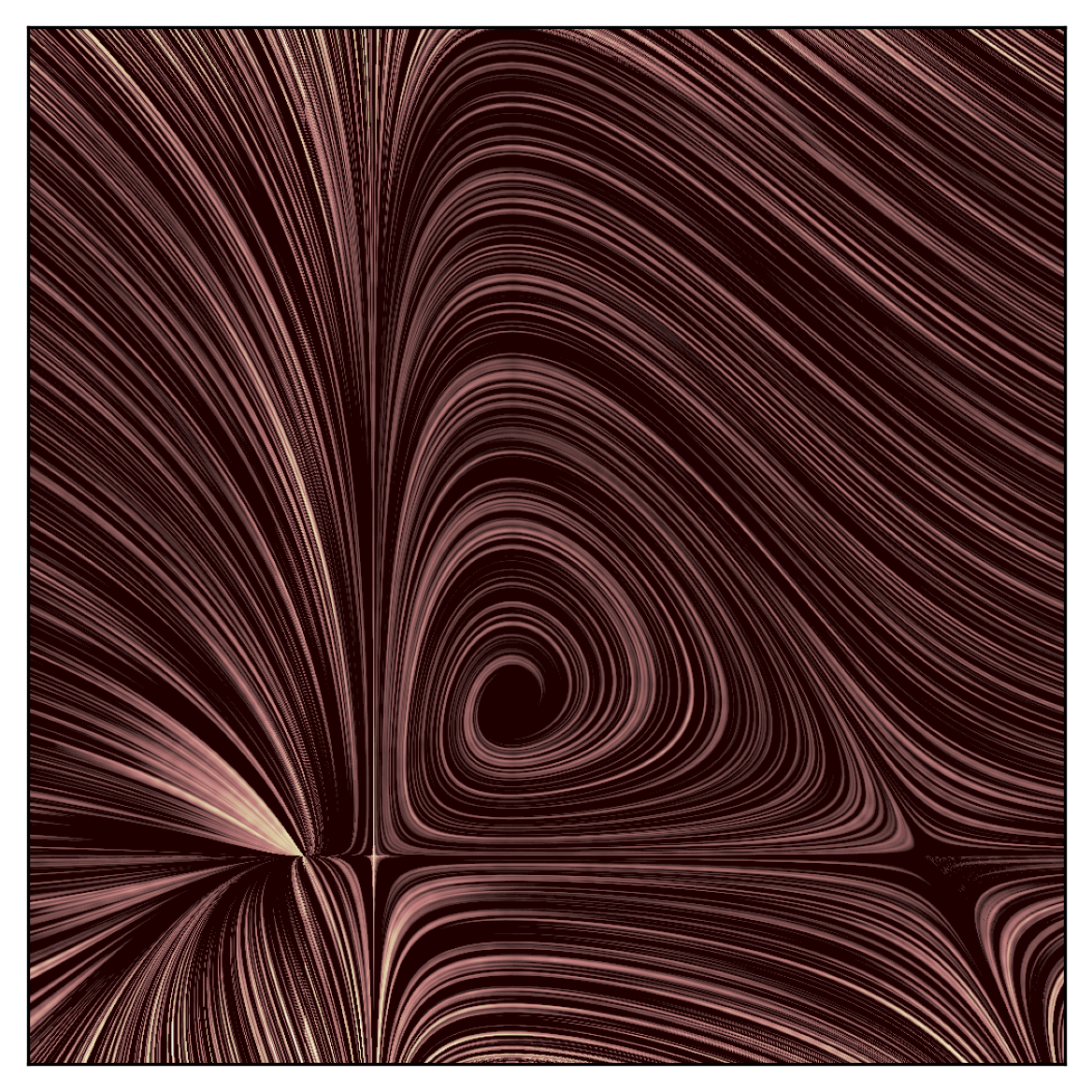
Here is an example of the LIC code applied to two different vector fields:
- Left: modified Lotka-Volterra equations
- Right: Gaussian random vector field

Getting setup
You can now install the LIC package directly from PyPI or clone the repository if you'd like to play around with the source code.
Option 1: Install from PyPI (for general use)
If you only need to use the package, you can install it via pip:
pip install line-integral-convolutions
After installing, import the main LIC implementation as follows:
from line_integral_convolutions import lic
Inside this module, you will want to use the compute_lic_with_postprocessing function. See its documentation for more details on how to get the most out of it.
Option 2: Clone the repository (for development)
1. Clone the repository:
git clone git@github.com:AstroKriel/LineIntegralConvolutions.git
cd LineIntegralConvolutions
2. Set up a virtual environment (optional but recommended):
It is recommended to use a virtual environment to manage the project's dependencies. Before running any code or installing dependencies, activate the virtual environment via the following commands:
python3 -m venv venv
source venv/bin/activate # on Windows: venv\Scripts\activate
Once activated, you will install the dependencies and the LIC package inside this environment, keeping them isolated from the rest of your system.
When you are done working on or using the LIC code, deactivate the virtual environment by running:
deactivate
3. Install dependencies:
pip install -r requirements.txt
4. Install the LIC package (optional, for using as a library):
To install the package locally for development or use in other Python scripts, run the following command:
pip install -e .
This will install the package in "editable" mode, allowing you to make changes to the code and have them reflected without needing to reinstall the package each time.
5. Try out the demo-script
Run the demo script examples/example_lic.py which demonstrates how the LIC code can be applied to a vector field (the example file uses the Lotka-Volterra system). You can experiment by modifying the script or play around by adding your own vector fields!
cd examples
python3 example_lic.py
Quick start
compute_lic_with_postprocessing handles all of the internal calls necessary to compute a LIC, and it includes optional postprocessing steps for filtering and intensity equalization. In practice, this is the only function you will need to call within this package. Here is an example of how to use it:
import matplotlib.pyplot as plt
from line_integral_convolutions import lic
from line_integral_convolutions import fields, utils # for demo-ing

## generate a sample vector field
size         = 500
dict_field   = fields.vfield_swirls(size)
vfield       = dict_field["vfield"]
streamlength = dict_field["streamlength"]
bounds_rows  = dict_field["bounds_rows"]
bounds_cols  = dict_field["bounds_cols"]

## apply the LIC a few times: equivelant to painting over with a few brush strokes
sfield = lic.compute_lic_with_postprocessing(
    vfield          = vfield,
    streamlength    = streamlength,
    num_iterations  = 3,
    num_repetitions = 3,
    bool_filter     = True,
    filter_sigma    = 3.0,
    bool_equalize   = True,
)

utils.plot_lic(
    sfield      = sfield,
    vfield      = vfield,
    bounds_rows = bounds_rows,
    bounds_cols = bounds_cols,
)
plt.show()
Acknowledgements
Special thanks to Dr. James Beattie (@AstroJames) for highlighting that iteration, high-pass filtering, and histogram normalisation improves the final result. Also, thanks to Dr. Philip Mocz (@pmocz) for his helpful suggestions in restructuring and improving the codebase.
File structure
LineIntegralConvolutions/              # Root (project) directory
├── src/
│   └── line_integral_convolutions/    # Python package
│       ├── __init__.py                # Initialization file for the package
│       ├── fields.py                  # Example vector fields
│       ├── lic.py                     # Core of the Line Integral Convolution (LIC) package
│       ├── utils.py                   # Utility functions
│       └── visualization.py           # Code for plotting LIC
├── examples/
│   └── example_lic.py                 # An example script
├── gallary/
│   └── example high-resolution LICs
├── requirements.txt                   # Lists of dependencies
├── setup.py                           # Script to install and package-up the project
├── LICENSE                            # Terms of use for the project
└── README.md                          # This file
License
This project is licensed under the MIT License - see the LICENSE file for details.


Download files
Download the file for your platform. If you're not sure which to choose, learn more about installing packages.
Source Distribution
Built Distribution
Filter files by name, interpreter, ABI, and platform.
If you're not sure about the file name format, learn more about wheel file names.
Copy a direct link to the current filters
File details
Details for the file line_integral_convolutions-1.0.7.tar.gz.
File metadata
- Download URL: line_integral_convolutions-1.0.7.tar.gz
- Upload date:
- Size: 18.7 MB
- Tags: Source
- Uploaded using Trusted Publishing? No
- Uploaded via: twine/6.0.1 CPython/3.10.8
File hashes
| Algorithm | Hash digest | |
|---|---|---|
| SHA256 |
a04673d78576f17c2d80ff83fb8889c09f6d4969bc62000e5655b13b38a33a98
|
|
| MD5 |
aae82b4e756a348c97781421858beed7
|
|
| BLAKE2b-256 |
7c22817a94616d59eed3df95bcc3057c011ccf90bb85d46d526ce5656b0c1d13
|
File details
Details for the file line_integral_convolutions-1.0.7-py3-none-any.whl.
File metadata
- Download URL: line_integral_convolutions-1.0.7-py3-none-any.whl
- Upload date:
- Size: 10.3 kB
- Tags: Python 3
- Uploaded using Trusted Publishing? No
- Uploaded via: twine/6.0.1 CPython/3.10.8
File hashes
| Algorithm | Hash digest | |
|---|---|---|
| SHA256 |
ac5a4f8e25b132551595658d0218bb6e8020d50ef72b6979eda2ca222d0d15d5
|
|
| MD5 |
8fa6150845a7eee0d7e077ce81723227
|
|
| BLAKE2b-256 |
303289ec9652b9bb8a14919764de8d6da9a2f74b1903cb26d81e90736e405e08
|






