
Linear Consistency Autoencoders



This repository contains the official code and pretrained models for the paper "Learning Linearity in Audio Consistency Autoencoders via Implicit Regularization".
Paper | Demo Page (with audio examples)
About The Project
This work introduces Linear Consistency Autoencoders (Lin-CAE), a training methodology to induce linearity in audio autoencoders. By using data augmentation, we enforce homogeneity (equivariance to scalar gain) and additivity (preservation of addition) in the latent space without altering the model's architecture or loss function.
This creates a structured latent space where simple algebraic operations correspond directly to intuitive audio manipulations like mixing and volume scaling.
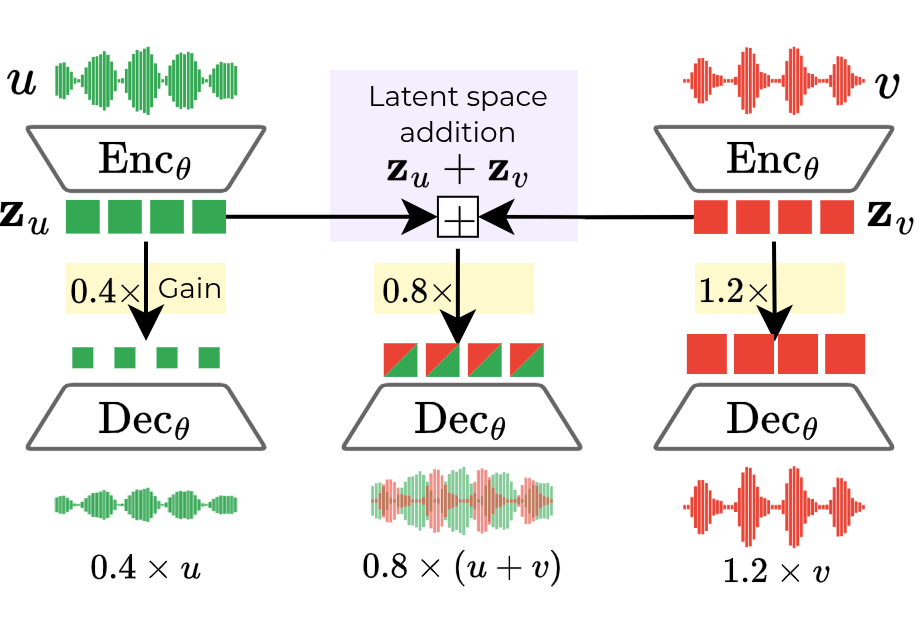
This repository currently provides inference code for our pretrained models and the code to reproduce the demos on our project page. Training code will be made available soon.
Usage
You can install the linear-cae package using pip (or whatever package manager you prefer, we recommend using Poetry for development):
pip install linear-cae
poetry add linear-cae  # if using Poetry
Loading a Pretrained Model
The Autoencoder class provides a from_pretrained method to load models from the Hugging Face Hub.
from linear_cae import Autoencoder
import torch

model_id = "lin-cae"  # or "m2l", "lin-cae-2"
model = Autoencoder.from_pretrained(model_id)

device = torch.device("cuda" if torch.cuda.is_available() else "cpu")
model.eval().to(device)
Available model_ids are:
"m2l": Music2Latent retrained on our dataset as a baseline."lin-cae": Our proposed Linear Consistency Autoencoder."lin-cae-2": A second version of our Lin-CAE trained without gain annealing described in the paper.
Note: we include a default scale_factor for each model to account for differences in latent space scale. The default value scales the latents to have approximately a standard deviation of 1.0 in the MUSDB train set. This can be manually overridden when loading the model by passing a different scale_factor argument to from_pretrained. Depending on your application (or data domain), you might want to consider providing a scaling to match the standard deviation of your dataset latents. Example:
# Multiplies the latents by 20.0 after encoding and divides by 20.0 before decoding
# All done internally by the model, no need to deal with it manually.
model = Autoencoder.from_pretrained("lin-cae-2", scale_factor=20.0)
The models are trained on 44.1 kHz mono audio. encode and decode expect tensors of shape [batch_size, num_samples] at 44.1 kHz.
Encoding and Decoding Audio
Once the model is loaded, you can encode audio into a latent representation and decode it back to audio.
# `audio_tensor` is a torch.Tensor of shape [batch_size, num_samples] representing 44.1 kHz audio
audio_tensor = torch.randn(1, 44100 * 2).to(device)

z = model.encode(audio_tensor)
reconstructed_audio = model.decode(z, full_length=audio_tensor.shape[-1])
Check out the demo.ipynb notebook used to create the demos on our project page for more examples of latent space manipulations (requires the musdb dataset package).
Handling Long Audio Files and Batching
To handle long audio files without running out of memory, you can specify max_chunk_size when loading the model. Audio longer than this size will be automatically processed in overlapping chunks.
The parameter max_batch_size controls the maximum number of chunks processed in a single forward pass. If the number of chunks exceeds this value, they will be further split into smaller batches. You can adjust this parameter to match your available GPU memory.
# Set max_chunk_size to 10 seconds of audio at 44.1 kHz and max_batch_size to 8
model = Autoencoder.from_pretrained("lin-cae",
                                    max_chunk_size=44100 * 10,
                                    overlap_percentage=0.25,
                                    max_batch_size=8)
model.to(device)

# Encode a long audio file (e.g., 30 seconds)
# The chunks will be processed in max_batch_size batches internally
long_audio_tensor_1 = torch.randn(1, 44100 * 30).to(device)
long_audio_tensor_2 = torch.randn(1, 44100 * 30).to(device)
z_chunked_1 = model.encode(long_audio_tensor_1)
z_chunked_2 = model.encode(long_audio_tensor_2)


# The output z_chunked will be a 4D tensor: [batch_size, num_chunks, channels, latent_dim]
print(z_chunked_1.shape)

# Mix in the latent space
z_chunked = z_chunked_1 + z_chunked_2

# Decoding the chunked latent requires the original audio length for proper reconstruction
reconstructed_mix = model.decode(z_chunked, full_length=long_audio_tensor_1.shape[-1])
The model uses an overlap-add mechanism with a crossfade to stitch the decoded chunks back together. You can control the amount of overlap with the overlap_percentage argument during model initialization. We recommend some overlap to avoid artifacts at chunk boundaries.
Algorithm
While the full training code for CAEs will be released soon, here is a general pseudo-algorithm for how to adapt any autoencoder training loop to induce linearity using our proposed method. The core idea is to use data augmentation to implicitly teach the model the properties of linearity.
# Pseudo-algorithm for training a linear autoencoder

for each batch of audio data x:
  original_batch_size = x.shape[0]

  # 1. Create artificial mixtures
  x_roll = torch.roll(x, shifts=1, dims=0) # Circularly shift the batch
  x_mixed = x + x_roll
  x_augmented = torch.cat([x, x_mixed], dim=0) # Batch now contains original and mixed audio

  # 2. Encode all audio to get latents
  z = encoder(x_augmented)

  # For the mixed portion of the batch, create the "additive" latent
  # by summing the latents of the original unmixed sources.
  z_original = z[:original_batch_size]
  z_roll = torch.roll(z_original, shifts=1, dims=0)
  z_add = z_original + z_roll

  # Replace the encoded latents of the mixed audio with the sum of source latents
  z_final = torch.cat([z_original, z_add], dim=0)

  # 3. Apply random gains to enforce Homogeneity
  gains = sample_random_gains(x_augmented.shape[0])
  z_scaled = z_final * gains[:, None, None]
  x_scaled = x_augmented * gains[:, None]

  # 4. Standard autoencoder training step
  # The decoder receives the scaled latent and must reconstruct the scaled audio
  x_reconstructed = decoder(z_scaled)

  loss = reconstruction_loss(x_reconstructed, x_scaled)

  # Update model weights
  optimizer.step()
For Consistency Autoencoders (CAEs), as used in the paper, x_scaled is first corrupted with noise, and the decoder (a denoising model) is conditioned on z_scaled to reconstruct the clean x_scaled.
Citation
If you use our work in your research, please cite our paper:
@misc{torres2025learninglinearityaudioconsistency,
      title={Learning Linearity in Audio Consistency Autoencoders via Implicit Regularization},
      author={Bernardo Torres and Manuel Moussallam and Gabriel Meseguer-Brocal},
      year={2025},
      eprint={2510.23530},
      archivePrefix={arXiv},
      primaryClass={cs.SD},
      url={https://arxiv.org/abs/2510.23530},
}
1 maintainer

Release files for linear-cae 0.1.4
For a detailed explanation of source distributions (sdists) and built distributions (wheels), please see the package formats documentation.
Source distribution (sdist)
| File | Size | Uploaded | |
|---|---|---|---|
| linear_cae-0.1.4.tar.gz | 28.9 kB | Details |
Built distribution (wheel)
| File | Interpreter | ABI | Platform | Reset |
|---|---|---|---|---|
| linear_cae-0.1.4-py3-none-any.whl | Python 3 | none | any | Details |
Total release size: 58.4 kB
Release files / linear_cae-0.1.4.tar.gz
| Download URL | linear_cae-0.1.4.tar.gz |
|---|---|
| Size | 28.9 kB |
| Tags | Source |
|
SHA-256 checksum How to use checksums |
92ae8fa6b0dd20c22ce0ce86ba680f187982b685cf966e786b3283a2f7ed6eb0
|
|
BLAKE2b-256 checksum How to use checksums |
8e0a31e20bfe858d707b20d0b554c44e1d017743604d11b08ff593ca1e23a9f2
|
| Upload date | |
|
Uploaded using Trusted Publishing? What is trusted publishing? |
No |
| Uploaded via |
twine/6.2.0 CPython/3.10.18
|
Release files / linear_cae-0.1.4-py3-none-any.whl
| Download URL | linear_cae-0.1.4-py3-none-any.whl |
|---|---|
| Size | 29.4 kB |
| Tags | Python 3 |
|
SHA-256 checksum How to use checksums |
29e5e9d41fa110eeb94d0867625ebeb75eb19ceafabd8419ed59ba36fb0dd69e
|
|
BLAKE2b-256 checksum How to use checksums |
f9c2214c989a3b589885b558b497d5a5522a0df8f0b3e7de040d1599ef20fec2
|
| Upload date | |
|
Uploaded using Trusted Publishing? What is trusted publishing? |
No |
| Uploaded via |
twine/6.2.0 CPython/3.10.18
|














