
Terminal weather, solar arc, and tide visualizations
Verified details
These details have been verified by PyPIProject links
GitHub Statistics
Maintainers

Project description
linecast
Terminal weather, solar arc, and tide visualizations. Pure Python, zero dependencies.
All data comes from free public APIs with no keys required.
Commands
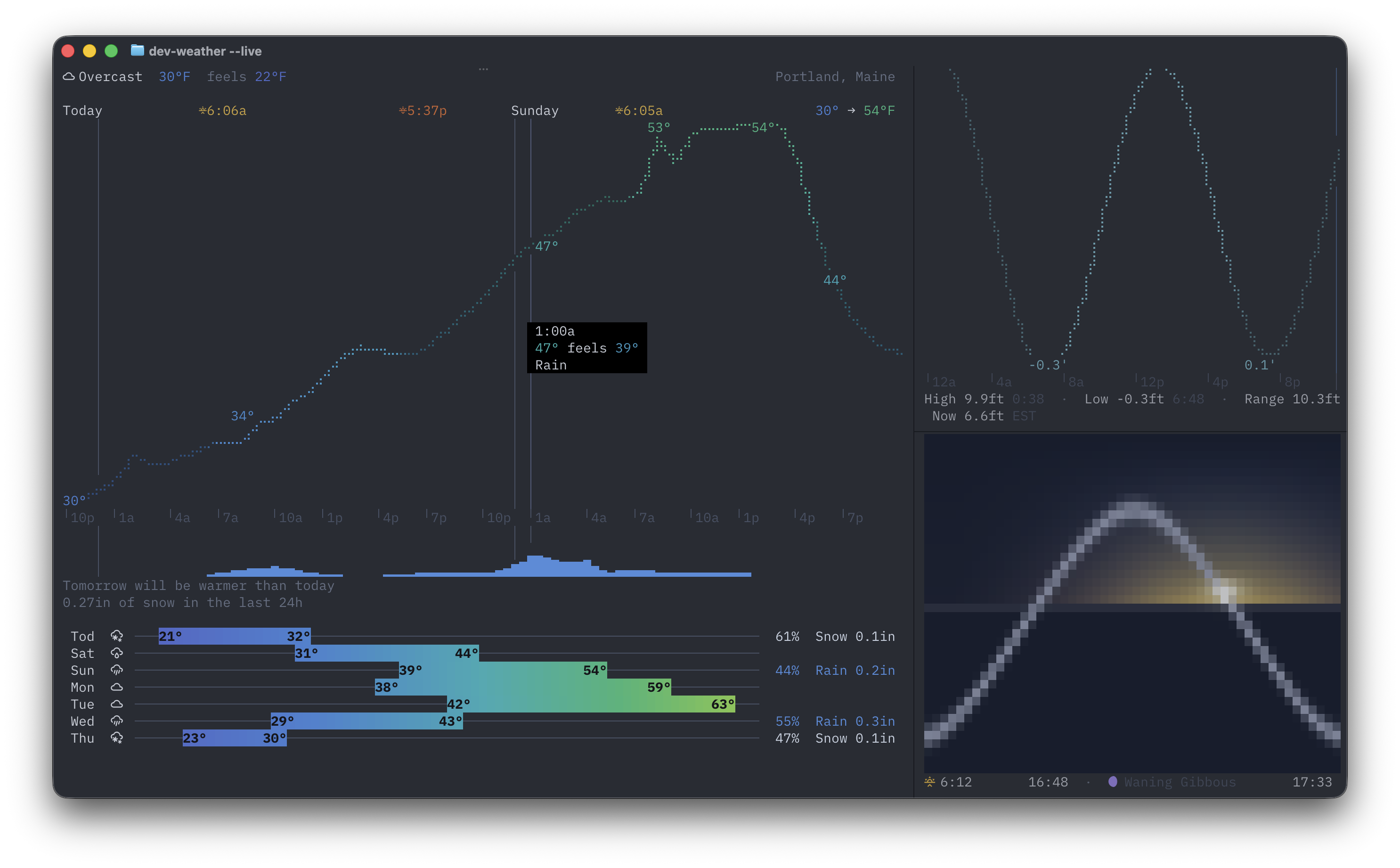
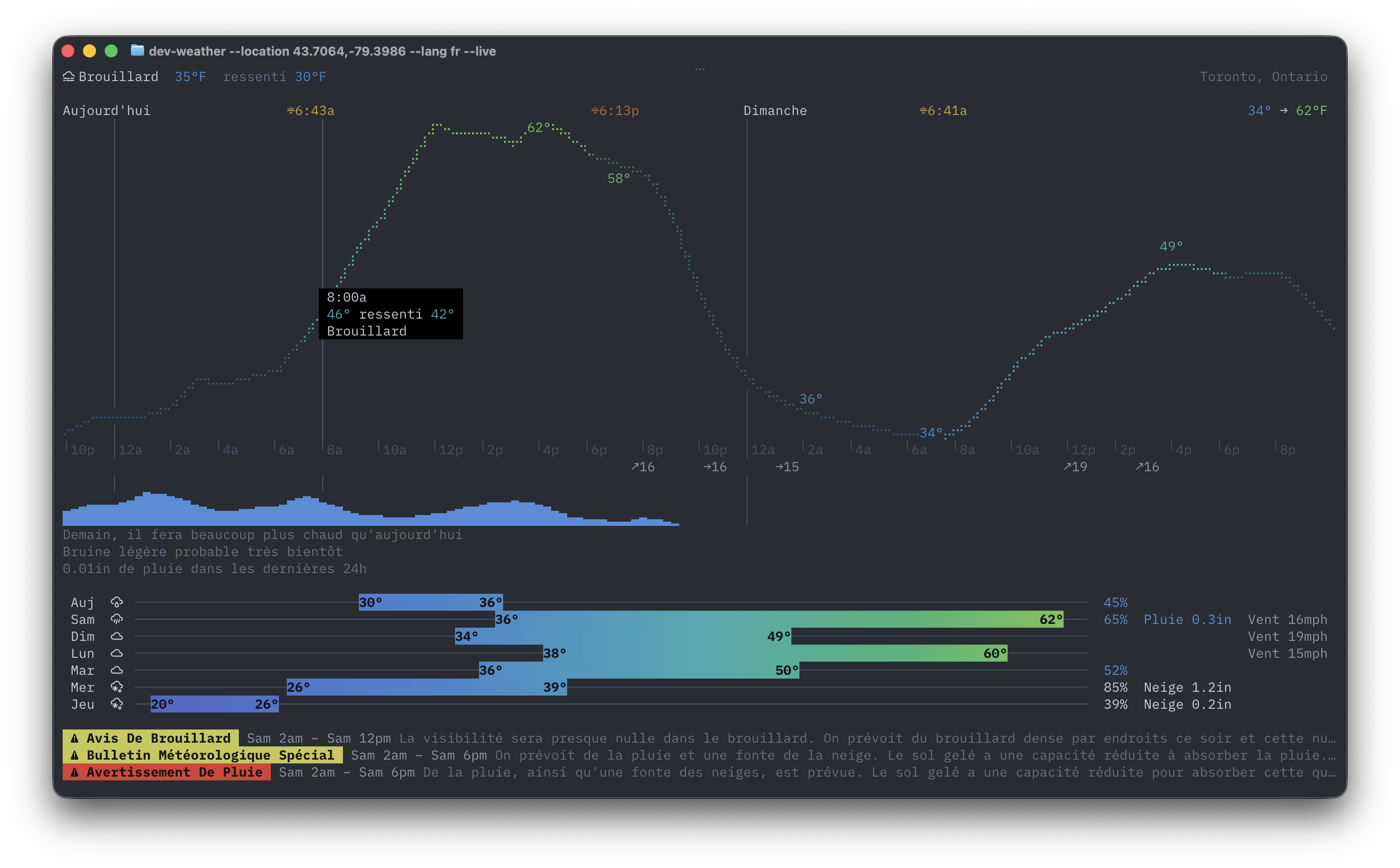
weather — Current conditions, hourly braille temperature curve, 7-day forecast with color range bars, precipitation sparkline, natural language comparisons, and weather alerts for 35 countries.
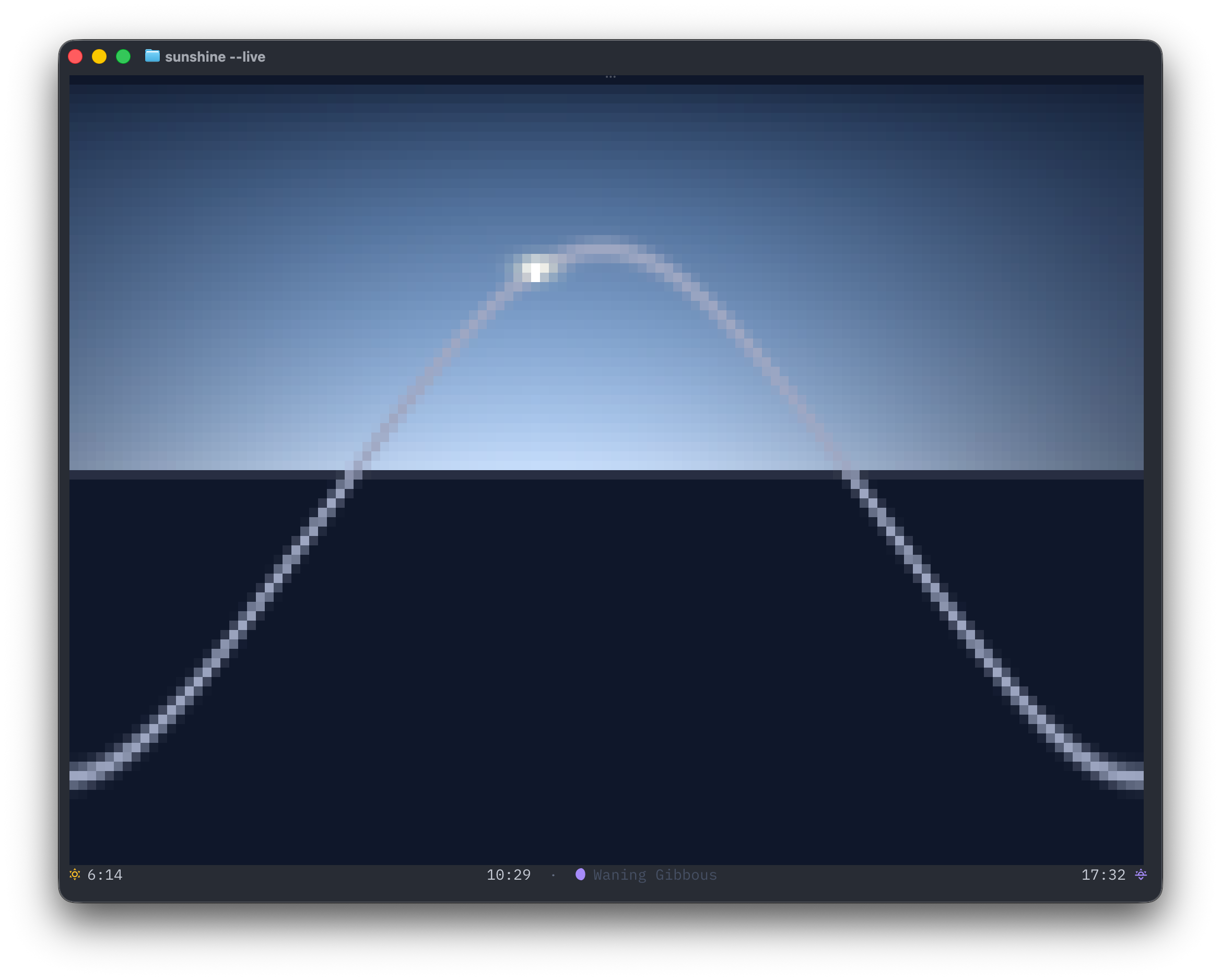
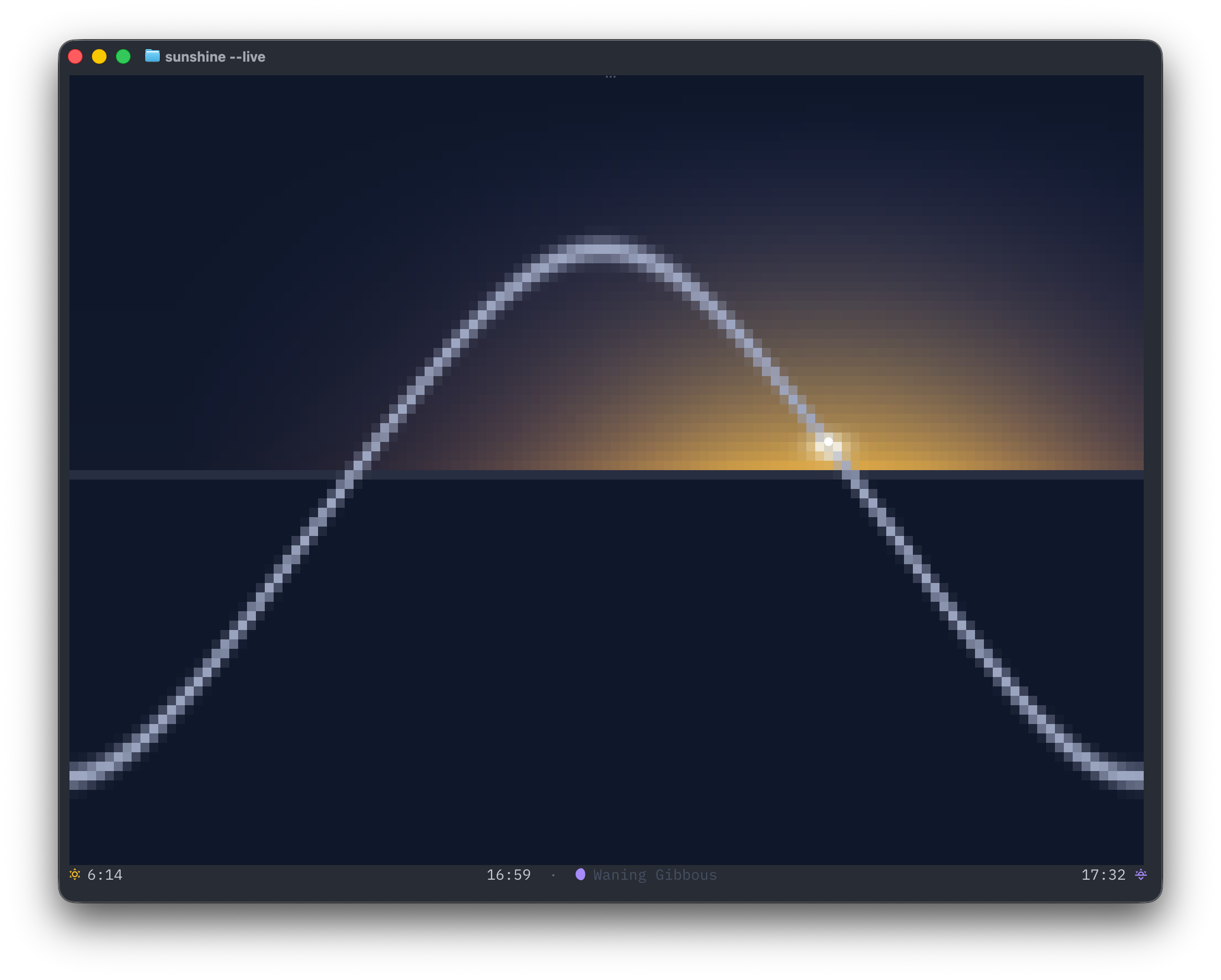
sunshine — Solar arc inspired by the Apple Watch Solar Graph face. Shows the sun's position on its daily arc with sky color gradients, day length with daily delta, and moon phase.
tides — NOAA tide predictions rendered as an ocean-themed half-block chart with gradient fill, current water level, and high/low extremes.
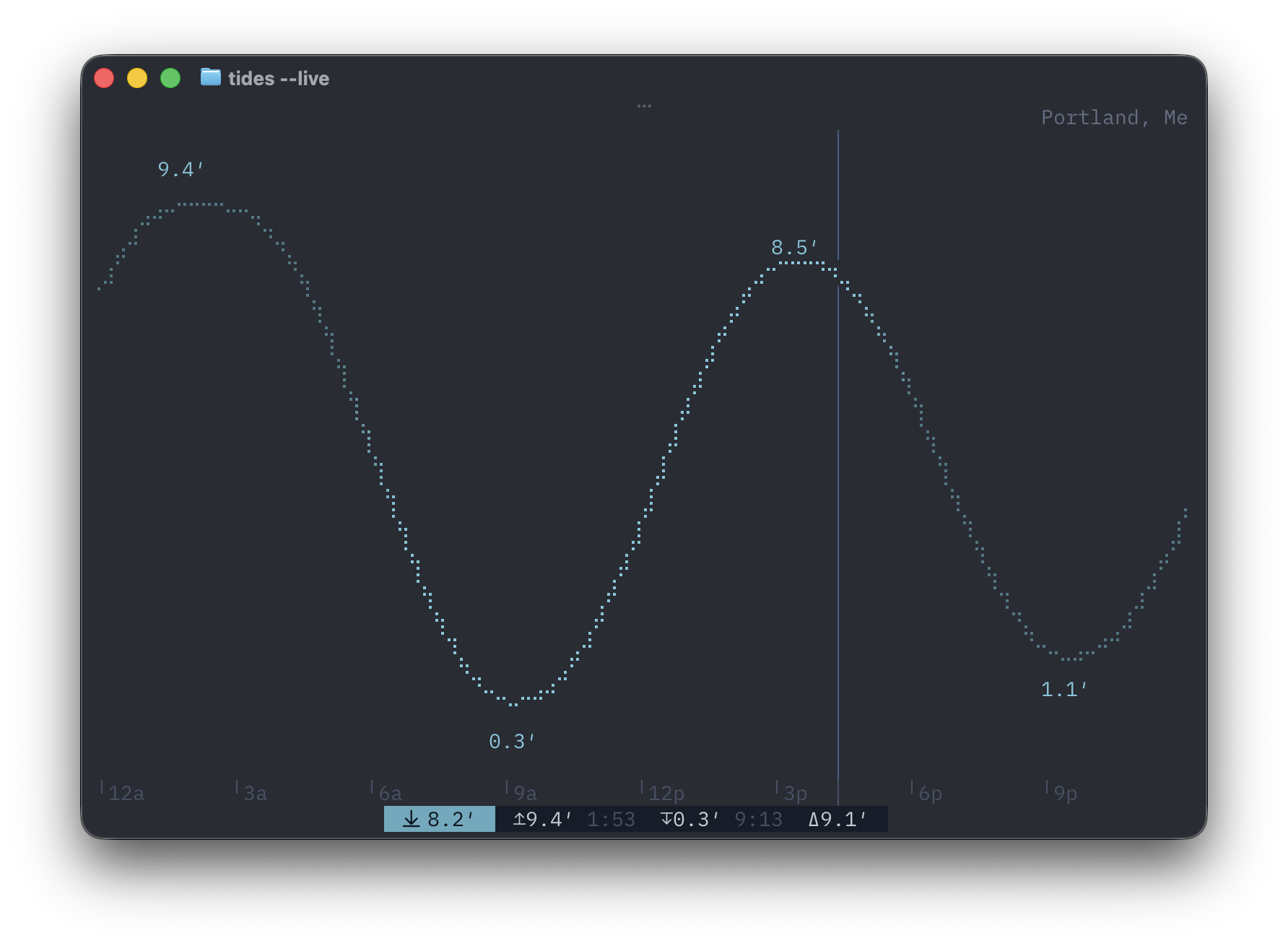
All three support --live for a full-screen auto-refreshing display. sunshine and tides also support arrow-key time scrubbing.
Install
pip install linecast
Or with a Homebrew tap:
brew tap ashuttl/linecast
brew install linecast
Usage
weather                          # current location via IP geolocation
weather --location 44.54,-68.42  # specific coordinates
weather --search québec          # find coordinates by city name
weather --metric                 # metric units (°C, km/h, mm)
weather --celsius                # celsius only (wind/precip stay imperial)
weather --metric --fahrenheit    # °F with km/h and mm
weather --live                   # full-screen, auto-refresh
weather --lang fr                # interface en français
weather --lang de                # Oberfläche auf Deutsch
weather --lang is                # viðmót á íslensku

sunshine                         # solar arc for today
sunshine --live                  # full-screen, scrubbable, auto-updating

tides                            # nearest NOAA station
tides --station 8413320          # specific station ID
tides --search "Bar Harbor"      # find stations by name
tides --live                     # full-screen, scrubbable, auto-updating
Language support
--lang (or LINECAST_LANG) switches the full UI — weather descriptions, day names, natural language comparisons, precipitation forecasts, and alert timing — into the chosen language. Non-English languages also use 24-hour time.
Supported: English, French, Spanish, German, Italian, Portuguese, Dutch, Polish, Norwegian, Swedish, Icelandic, Danish
All commands are also available under the linecast namespace if the short names conflict with other tools on your system:
linecast weather --live
linecast sunshine
linecast tides --station 8413320
Weather alerts
Alerts are sourced automatically based on location from five providers covering 35 countries:
- US — National Weather Service
- Canada — Environment and Climate Change Canada
- Germany — Deutscher Wetterdienst (via BrightSky)
- Norway — MET Norway
- Ireland — Met Éireann
- 30 European countries — MeteoAlarm (Austria, Belgium, Bulgaria, Croatia, Cyprus, Czechia, Denmark, Estonia, Finland, France, Greece, Hungary, Iceland, Italy, Latvia, Lithuania, Luxembourg, Malta, Netherlands, Poland, Portugal, Romania, Serbia, Slovakia, Slovenia, Spain, Sweden, Switzerland, UK)
Alert text comes from each national weather service in its native language. Where available, alerts are served in your --lang preference.
Environment variables
| Variable | Description |
|---|---|
WEATHER_LOCATION |
Default lat,lng for weather (e.g., 44.54,-68.42) |
TIDE_STATION |
Default NOAA station ID for tides (e.g., 8413320) |
LINECAST_LANG |
UI language: en, fr, es, de, it, pt, nl, pl, no, sv, is, da |
WEATHER_UNITS |
Set to metric for Celsius, km/h, and mm (same as --metric) |
LINECAST_ICONS |
Set to emoji to use standard emoji instead of Nerd Font icons |
LINECAST_COLOR |
Color mode: auto (default), truecolor, 256, 16, or none |
NO_COLOR |
Any non-empty value disables ANSI colors (standard convention) |
Requirements
- Python 3.10+
- A terminal with ANSI color support (
truecolorlooks best; weather remains usable in low/no color) - A Nerd Font for best icon rendering (optional — use
--emojifor standard emoji fallback) - macOS or Linux (uses
termiosfor live mode)
License
MIT
Project details
Verified details
These details have been verified by PyPIProject links
GitHub Statistics
Maintainers
Release history Release notifications | RSS feed


Download files
Download the file for your platform. If you're not sure which to choose, learn more about installing packages.
Source Distribution
Built Distribution
Filter files by name, interpreter, ABI, and platform.
If you're not sure about the file name format, learn more about wheel file names.
Copy a direct link to the current filters
File details
Details for the file linecast-1.1.7.tar.gz.
File metadata
- Download URL: linecast-1.1.7.tar.gz
- Upload date:
- Size: 2.9 MB
- Tags: Source
- Uploaded using Trusted Publishing? Yes
- Uploaded via: twine/6.1.0 CPython/3.13.7
File hashes
| Algorithm | Hash digest | |
|---|---|---|
| SHA256 |
d3090dad584d95b3bb6596ec20ca5d4639e42f6f1fce311f151ef4762f9d4f32
|
|
| MD5 |
9c2e8631c8b6943fea5e90001092e541
|
|
| BLAKE2b-256 |
2d119c47dd3b097b352b731ab84181c1f8299baf3422fd89f1ca6320170f053b
|
Provenance
The following attestation bundles were made for linecast-1.1.7.tar.gz:
Publisher:
publish.yml on ashuttl/linecast
-
Statement:
-
Statement type:
https://in-toto.io/Statement/v1 -
Predicate type:
https://docs.pypi.org/attestations/publish/v1 -
Subject name:
linecast-1.1.7.tar.gz -
Subject digest:
d3090dad584d95b3bb6596ec20ca5d4639e42f6f1fce311f151ef4762f9d4f32 - Sigstore transparency entry: 1056925418
- Sigstore integration time:
-
Permalink:
ashuttl/linecast@8bf3cf38f7ab799f5184d9fbfef0ee5bfe6ddbda -
Branch / Tag:
refs/tags/v1.1.7 - Owner: https://github.com/ashuttl
-
Access:
public
-
Token Issuer:
https://token.actions.githubusercontent.com -
Runner Environment:
github-hosted -
Publication workflow:
publish.yml@8bf3cf38f7ab799f5184d9fbfef0ee5bfe6ddbda -
Trigger Event:
push
-
Statement type:
File details
Details for the file linecast-1.1.7-py3-none-any.whl.
File metadata
- Download URL: linecast-1.1.7-py3-none-any.whl
- Upload date:
- Size: 66.7 kB
- Tags: Python 3
- Uploaded using Trusted Publishing? Yes
- Uploaded via: twine/6.1.0 CPython/3.13.7
File hashes
| Algorithm | Hash digest | |
|---|---|---|
| SHA256 |
8ec59aa1ad53d7a1780812ffe25604a8e23b982849bde2725e94e798d39780ee
|
|
| MD5 |
e0b13b471c116d903084856cc00dc78e
|
|
| BLAKE2b-256 |
d3a77bc59a37799b879d0039fa726e398d9b6c259ebacaf5f2d188302f6d78e3
|
Provenance
The following attestation bundles were made for linecast-1.1.7-py3-none-any.whl:
Publisher:
publish.yml on ashuttl/linecast
-
Statement:
-
Statement type:
https://in-toto.io/Statement/v1 -
Predicate type:
https://docs.pypi.org/attestations/publish/v1 -
Subject name:
linecast-1.1.7-py3-none-any.whl -
Subject digest:
8ec59aa1ad53d7a1780812ffe25604a8e23b982849bde2725e94e798d39780ee - Sigstore transparency entry: 1056925419
- Sigstore integration time:
-
Permalink:
ashuttl/linecast@8bf3cf38f7ab799f5184d9fbfef0ee5bfe6ddbda -
Branch / Tag:
refs/tags/v1.1.7 - Owner: https://github.com/ashuttl
-
Access:
public
-
Token Issuer:
https://token.actions.githubusercontent.com -
Runner Environment:
github-hosted -
Publication workflow:
publish.yml@8bf3cf38f7ab799f5184d9fbfef0ee5bfe6ddbda -
Trigger Event:
push
-
Statement type:






