
linecat




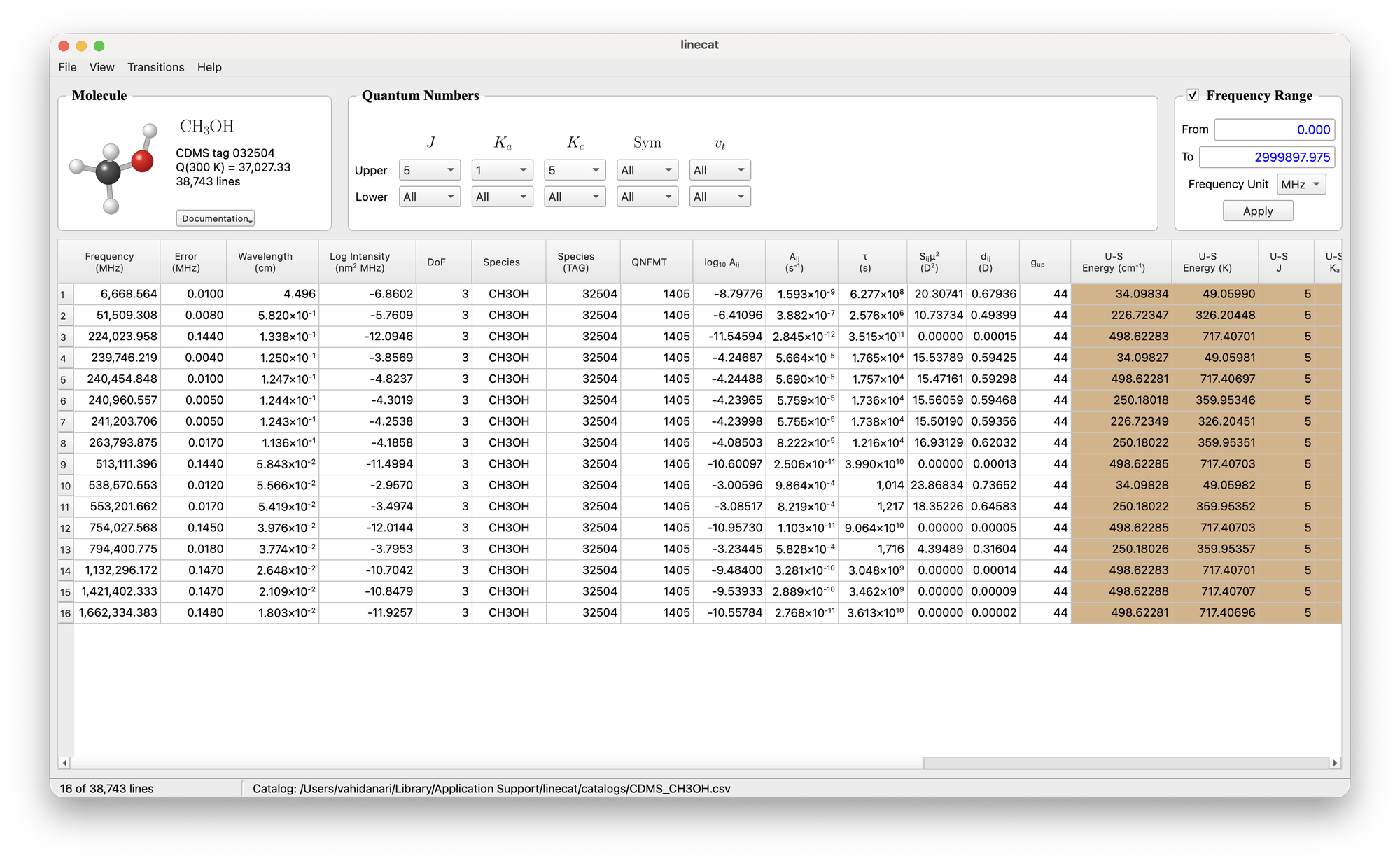
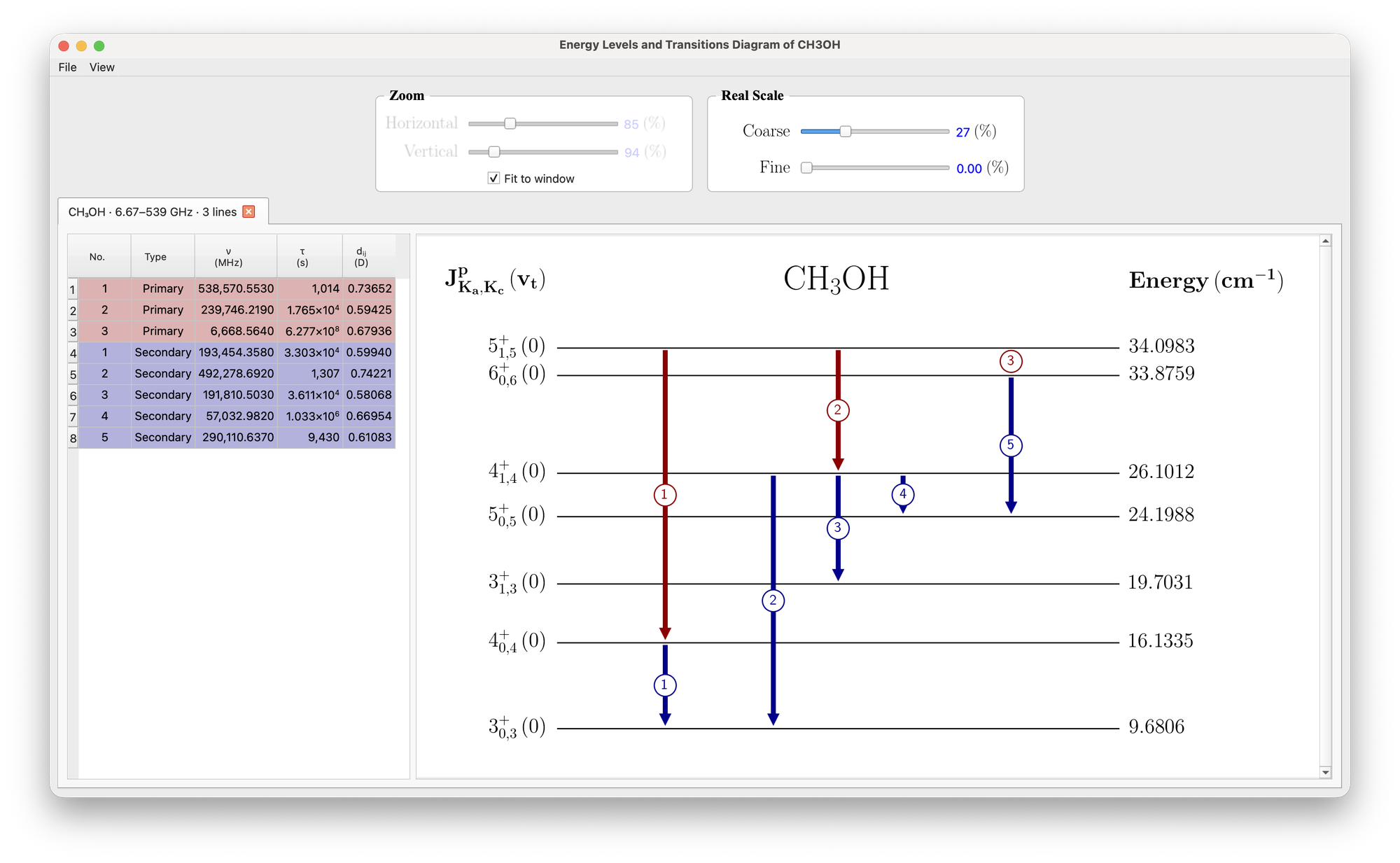
linecat (Line Catalog Explorer) is a desktop viewer for spectral line catalogs such as CDMS. It loads a catalog converted to CSV, filters the transitions by frequency range and by the quantum numbers of the upper and lower states, shows the result in a table, exports the selection, and draws an interactive energy-level diagram of the selected transitions (with secondary transitions, hover information and a LaTeX/TikZ export).
Supported species: OH, CH3OH, SiO, NH3. Adding a species means adding its
quantum-number rules to linecat/molecules.py.
Installation
Python 3.10 or newer. With pipx (its own environment, recommended):
pipx install linecat
or with pip, in an environment of your choice:
pip install linecat
To start it with a double-click, run once:
linecat install-app
This adds Line Catalog Explorer to your Applications folder (macOS), the Start menu (Windows) or the applications menu (Linux), with its own icon. It starts the linecat of the Python you ran the command with, and keeps working after updates.
To update, use Help → Check for Updates… in the app (it also checks quietly at
start-up) or linecat update in a terminal.
For development, install from a clone: git clone https://github.com/vahid-anari/linecat.git,
then pip install -e ".[dev]" in the folder; such a copy is updated with git pull.
Use
linecat                       open the viewer
linecat my_catalog.csv        open a catalog at start
linecat convert               convert the shipped CDMS files into the current folder
linecat convert OH --catalogs my_cats --output-dir out   convert your own .cat files
linecat update                update from PyPI (asks first; --check only looks)
linecat install-app           add the app to Applications / Start menu (--remove to undo)
linecat --version
File → Open Built-in Catalog → OH / CH3OH / SiO / NH3 (⌘1–⌘4) opens a catalog that ships with linecat; File → Open Catalog… loads any other CSV; the quantum-number filters and the frequency range narrow the table; File → Export Table as CSV… writes the filtered lines (all columns, so the file opens again as a catalog); Transitions → Show Energy-Level Diagram draws the selected lines (hover for ν and τ, double-click a transition for the lines from its lower level). Right-click a column header for colours, alignment, font and columns.
Catalogs
linecat ships, for OH, CH3OH, SiO and NH3, the CDMS .cat files, the CDMS
documentation of each entry (PDF) and a picture of the molecule, one folder per
species (src/linecat/data/molecules/<SPECIES>/); the main window shows them in
its Molecule box, and Help → CDMS Documentation opens the general CDMS
documents. On first start, and after every linecat update, it
converts them to read-only CSV files in the application-data folder
(macOS: ~/Library/Application Support/linecat/catalogs/; File → Show
Built-in Catalogs Folder). If a file goes missing it is rebuilt. Your own
.cat files (a newer CDMS release, say) can be converted with File → Convert
CDMS Catalogs… or linecat convert --catalogs DIR.
The catalog data come from the Cologne Database for Molecular Spectroscopy (CDMS); please cite Müller et al. 2001, A&A 370, L49; Müller et al. 2005, J. Mol. Struct. 742, 215; and Endres et al. 2016, J. Mol. Spectrosc. 327, 95. The catalog format and the SPCAT program are described by Pickett et al. 1998, J. Quant. Spectrosc. Radiat. Transfer 60, 883. The CDMS documentation pages included with linecat are reproduced with credit to CDMS.
Documentation
Help → User Guide opens the User Guide (PDF): the windows, the energy-level
diagram, converting catalogs, the command line, adding a species, and the
equations behind the derived columns. What changed in each version is in
CHANGELOG.md.
Development
pip install -e ".[dev]"
pytest
The window tests run offscreen with the small catalog in tests/data/.
The User Guide sources are in docs/ (user_guide.tex, with the equations in
equations.tex); after a change, sh tools/build_docs.sh rebuilds it into
src/linecat/data/user_guide.pdf (needs a TeX installation, e.g. MacTeX).
The screenshots in docs/figures/ are taken by hand on a Mac (⌘⇧4, Space,
⌥-click for a window without shadow). Pushing a tag vX.Y.Z publishes a
GitHub Release with that version's section of CHANGELOG.md.
Citing
If you use linecat in published work, please cite it; GitHub's Cite this
repository button gives the reference (from CITATION.cff). Please also
cite CDMS for the catalog data (see Catalogs).
License
MIT License. See LICENSE.
Author
Vahid Anari · GitHub · LinkedIn
Related projects: mbsolver · sciwidgets · Maxwell Bloch Studio
1 maintainer

Metadata
1 maintainer
Release files for linecat 0.10.3
For a detailed explanation of source distributions (sdists) and built distributions (wheels), please see the package formats documentation.
Source distribution (sdist)
| File | Size | Uploaded | Provenance | |
|---|---|---|---|---|
| linecat-0.10.3.tar.gz | 4.9 MB | Without provenance | Details |
Built distribution (wheel)
| File | Interpreter | ABI | Platform | Reset |
|---|---|---|---|---|
| linecat-0.10.3-py3-none-any.whl | Python 3 | none | any | Details |
Total release size: 9.9 MB
Release files / linecat-0.10.3.tar.gz
| Download URL | linecat-0.10.3.tar.gz |
|---|---|
| Size | 4.9 MB |
| Tags | Source |
|
SHA-256 checksum How to use checksums |
0c83c269fda22995244e26e1c2caee395865a8515e45c9241ce4e4986143b67f
|
|
BLAKE2b-256 checksum How to use checksums |
1075a3dd2b54b04d8885fdb7d40d3c0730736c047b7acd72543481dcbe796338
|
| Upload date | |
|
Uploaded using Trusted Publishing? What is trusted publishing? |
No |
| Uploaded via |
twine/7.0.0 CPython/3.12.12
|
Release files / linecat-0.10.3-py3-none-any.whl
| Download URL | linecat-0.10.3-py3-none-any.whl |
|---|---|
| Size | 5.0 MB |
| Tags | Python 3 |
|
SHA-256 checksum How to use checksums |
93e8ad4c8e326ecfd7a067b251ef884ed64e3fb53e390da7aefd6c756bf652df
|
|
BLAKE2b-256 checksum How to use checksums |
b0a09fc5516dd1a4daabc847ef3f78215150618b534e714da7661f8178c3b9e4
|
| Upload date | |
|
Uploaded using Trusted Publishing? What is trusted publishing? |
No |
| Uploaded via |
twine/7.0.0 CPython/3.12.12
|
Security for linecat 0.10.3
Provenance
Provenance describes where a file came from. On PyPI, provenance is shared via attestations, which provide a verifiable record of the build or publishing details. View details, limitations and caveats.
No provenance found
None of the files in this release were uploaded with provenance metadata.
A note on package security
PyPI is a repository for distributing packages, not a service for auditing them. While third-party security researchers and our staff do their best to detect and remove malicious packages, PyPI cannot guarantee the quality, security or suitability of any given package.














