

pyfolio


pyfolio is a Python library for performance and risk analysis of financial portfolios developed by Quantopian Inc. It works well with the Zipline open source backtesting library. Quantopian also offers a fully managed service for professionals that includes Zipline, Alphalens, Pyfolio, FactSet data, and more.
At the core of pyfolio is a so-called tear sheet that consists of various individual plots that provide a comprehensive image of the performance of a trading algorithm. Here's an example of a simple tear sheet analyzing a strategy:
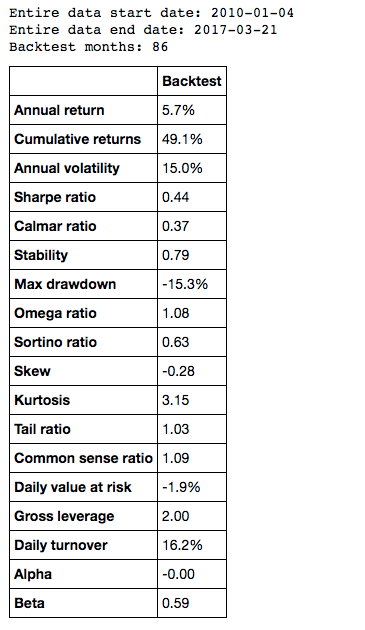
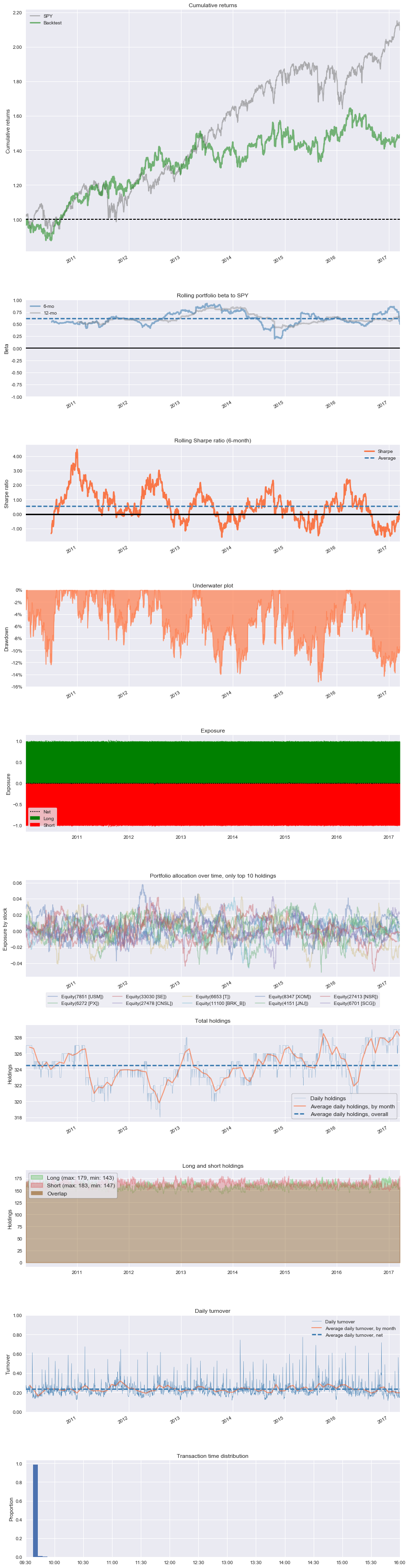
Also see slides of a talk about pyfolio.
Installation
To install pyfolio, run:
pip install pyfolio
Development
For development, you may want to use a virtual environment to avoid dependency conflicts between pyfolio and other Python projects you have. To get set up with a virtual env, run:
mkvirtualenv pyfolio
Next, clone this git repository and run python setup.py develop
and edit the library files directly.
Matplotlib on OSX
If you are on OSX and using a non-framework build of Python, you may need to set your backend:
echo "backend: TkAgg" > ~/.matplotlib/matplotlibrc
Usage
A good way to get started is to run the pyfolio examples in a Jupyter notebook. To do this, you first want to start a Jupyter notebook server:
jupyter notebook
From the notebook list page, navigate to the pyfolio examples directory and open a notebook. Execute the code in a notebook cell by clicking on it and hitting Shift+Enter.
Questions?
If you find a bug, feel free to open an issue in this repository.
You can also join our mailing list or our Gitter channel.
Support
Please open an issue for support.
Contributing
If you'd like to contribute, a great place to look is the issues marked with help-wanted.
For a list of core developers and outside collaborators, see the GitHub contributors list.
1 maintainer

Metadata
1 maintainer
Release files for linefolio 1.8.0
For a detailed explanation of source distributions (sdists) and built distributions (wheels), please see the package formats documentation.
Source distribution (sdist)
| File | Size | Uploaded | |
|---|---|---|---|
| linefolio-1.8.0.tar.gz | 10.9 MB | Details |
Built distribution (wheel)
| File | Interpreter | ABI | Platform | Reset |
|---|---|---|---|---|
| linefolio-1.8.0-py3-none-any.whl | Python 3 | none | any | Details |
Total release size: 21.7 MB
Release files / linefolio-1.8.0.tar.gz
| Download URL | linefolio-1.8.0.tar.gz |
|---|---|
| Size | 10.9 MB |
| Tags | Source |
|
SHA-256 checksum How to use checksums |
30fbd6adcd2e4635fd448f487e135237fecfb684f6cfa0a414a8baa4e1f3a97e
|
|
BLAKE2b-256 checksum How to use checksums |
c7b81e79a259b0f7972092a9ea7bf64bd54ff5db2199e0ddb6f8c3551669d487
|
| Upload date | |
|
Uploaded using Trusted Publishing? What is trusted publishing? |
No |
| Uploaded via |
poetry/1.2.2 CPython/3.10.8 Linux/5.4.0-135-generic
|
Release files / linefolio-1.8.0-py3-none-any.whl
| Download URL | linefolio-1.8.0-py3-none-any.whl |
|---|---|
| Size | 10.9 MB |
| Tags | Python 3 |
|
SHA-256 checksum How to use checksums |
fa245f26b51b603a592a7ea63b05ff3a1c39c93ca4886f38964394f6ec3aae48
|
|
BLAKE2b-256 checksum How to use checksums |
8c379b163ac33967509537cce65d015cc5733d2cb580f831532c43b60321f30b
|
| Upload date | |
|
Uploaded using Trusted Publishing? What is trusted publishing? |
No |
| Uploaded via |
poetry/1.2.2 CPython/3.10.8 Linux/5.4.0-135-generic
|














