
line-ui
This is a small Python package to provide an API to a one-line user interface (like that in a calculator) for Python learners.
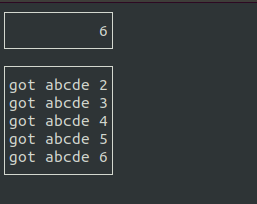
It provides the following features:
- output in the line (left, right or middle aligned).
- output in the console (the lower box), mainly for debugging.
- keyboard input.
- timer input (every second or every 0.05 seconds).
- schedule a call to a function a certain seconds later.
- make a beep.
With these a Python learner can make apps like: digital clock, the classic digit invaders game, slapjack, etc.
How to use
Here is a sample program using line UI that displays a counter, which is incremented every second or when the user presses the up arrow key.
from line_ui import *

n = 0

# called when the UI is ready for you. You can display the
# initial stuff here.
def on_ready():
    draw_r(str(n))  # draw a right-aligned string in the line

# called every frame (0.05 seconds). As it is empty, you may
# as well just delete this function.
def on_update():
    pass

# called every second
def on_second():
    global n
    n = n+1
    draw_r(str(n))
    # you can use print to print to the lower box
    print("got abcde "+str(n))
    beep() # make a beep

# called when the user presses a key
def on_key():
    global n
    # you can get the key as a str, e.g., you get "a" if A key was pressed.
    k = get_key()
    if k == "KEY_UP":
        n = n+1
        draw_r(str(n))
    elif k==" ":
        draw_l("X") # draw a left-aligned string
        schedule(1, hide_x)# hide X in one second
    elif k == "q":
        stop()  # use this to tell the app to quit

def hide_x():
    draw_l(" ")

start()  # must do this to kick start the app with the UI
1 maintainer

Download files
Download the file for your platform. If you're not sure which to choose, learn more about installing packages.
Source Distribution
Built Distribution
Filter files by name, interpreter, ABI, and platform.
If you're not sure about the file name format, learn more about wheel file names.
Copy a direct link to the current filters
File details
Details for the file lineui-0.1.2.tar.gz.
File metadata
- Download URL: lineui-0.1.2.tar.gz
- Upload date:
- Size: 15.9 kB
- Tags: Source
- Uploaded using Trusted Publishing? No
- Uploaded via:
twine/4.0.2 CPython/3.10.12
File hashes
| Algorithm | Hash digest | |
|---|---|---|
| SHA256 |
777ba573f8da0e4161e84030008e391bbf602660ee08c7ffcc1a90f2e26d4c53
|
|
| MD5 |
6b9bcbbfbd8949d126017c52a3f8617d
|
|
| BLAKE2b-256 |
30b0ce9b32c86300756dba47303fc8997923ff4d74488f763f0f1deb5a8fb641
|
File details
Details for the file lineui-0.1.2-py3-none-any.whl.
File metadata
- Download URL: lineui-0.1.2-py3-none-any.whl
- Upload date:
- Size: 15.9 kB
- Tags: Python 3
- Uploaded using Trusted Publishing? No
- Uploaded via:
twine/4.0.2 CPython/3.10.12
File hashes
| Algorithm | Hash digest | |
|---|---|---|
| SHA256 |
14d3626504504a2fd2f75fe00a93330d063f9db28762e7df8531df7c93bdb488
|
|
| MD5 |
49623147fa9890885ca361e9bfa63b42
|
|
| BLAKE2b-256 |
81fe20fa26b0023da10c60db66cc09d38eb9496817e008696568e268742dcbc8
|














