
Data lineage analysis for Excel workbooks — formula extraction, dependency graph, step-by-step evaluation, AI documentation
Verified details
These details have been verified by PyPIProject links
GitHub Statistics
Maintainers

Project description
linexcel



Data lineage analysis for Excel workbooks.
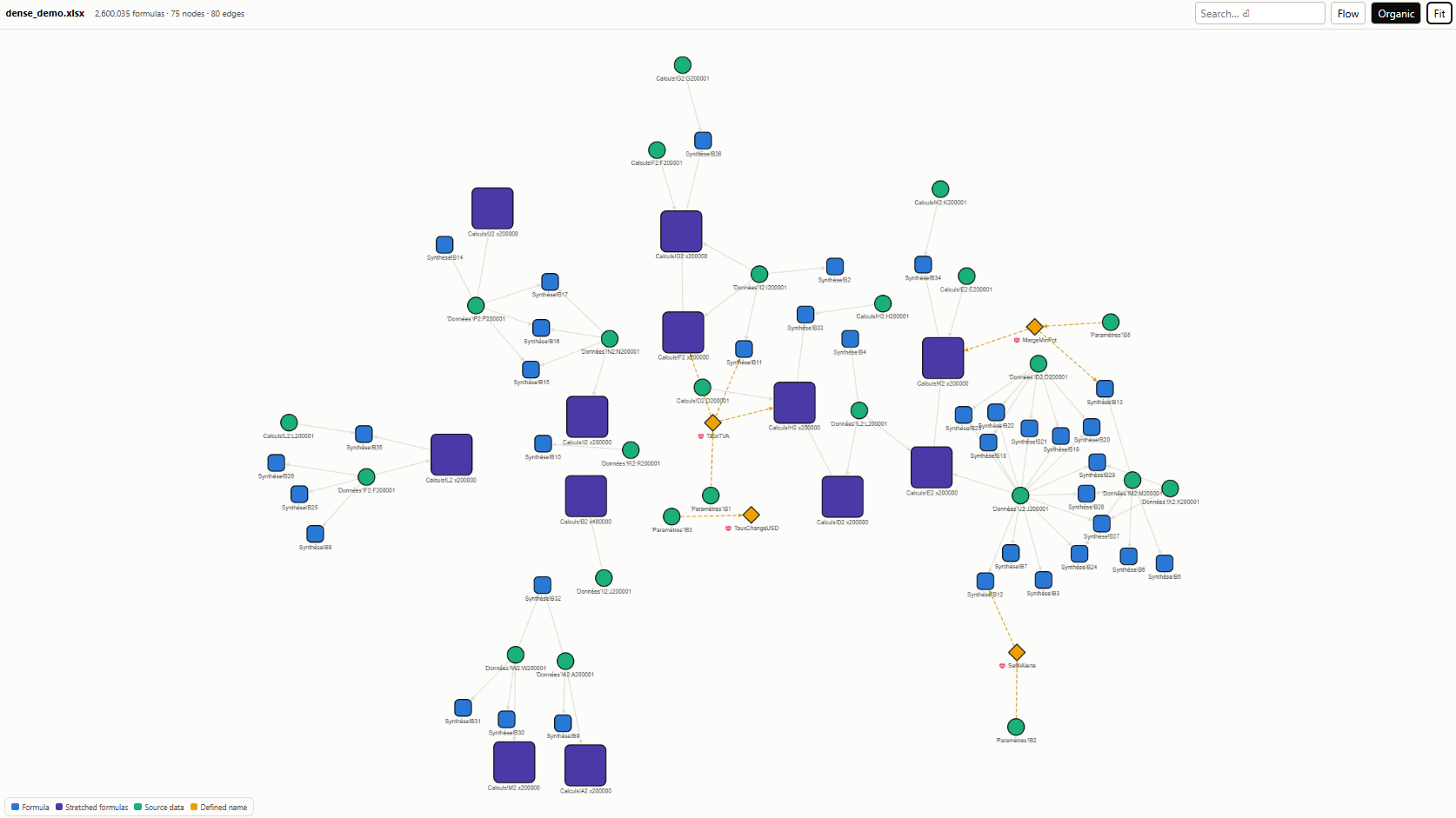
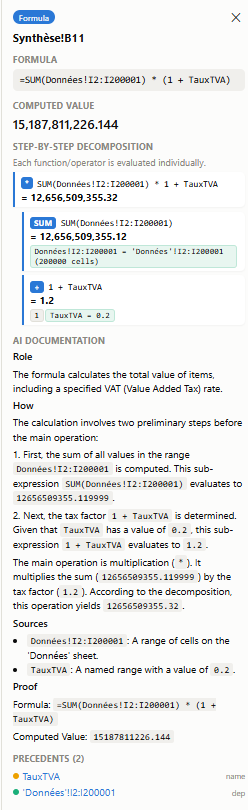
Extracts every formula, groups stretched patterns (R1C1 canonicalization), builds a dependency graph (cells, ranges, defined names, VBA), decomposes composite functions with step-by-step evaluation, and optionally documents calculations via AI.
Install
uv
uv add linexcel
# AI documentation (optional)
uv add linexcel[ai]
pip
pip install linexcel
# AI documentation (optional):
pip install "linexcel[ai]"
Note:
linexceldepends on formualizer, a Rust-based spreadsheet engine. Prebuilt wheels are available for Linux, macOS, and Windows. If no wheel matches your platform, a Rust toolchain is required to build from source.
Usage
from linexcel import analyze

result = analyze("workbook.xlsx")
result                    # interactive graph in marimo / Jupyter
result.save_html("out.html")     # standalone offline HTML viewer
result.stats              # {totalFormulas, totalNodes, ...}
result.warnings           # list[str]

# AI documentation (optional, requires google-genai):
# Supports "en" (default) or "fr" language for both documentation and UI
docs = result.document(api_key="...", language="en")
result.save_html("out.html", docs=docs, language="en")

# Workbook-level overview, shown in the separate overview tab:
workbook_doc = result.document_workbook(api_key="...", language="en")
result.save_html("out.html", docs=docs, workbook_doc=workbook_doc, language="en")
Workbook context and screenshots
result.workbook_context extracts bounded first rows and columns for every
sheet, without assuming a header row. It also exposes comments, merged cells,
frozen panes, hidden columns, and sheet visibility using openpyxl; Excel is
not launched.
These structural details are automatically rendered in a structured summary list within the Workbook overview tab of the HTML report.
You can also generate and embed high-resolution sheet screenshots using LibreOffice Calc:
# 1. Render one PNG per printed workbook page
screenshots = result.save_screenshots("screenshots/")

# 2. Map pages to sheet names to display them inline under each sheet card
sheets_screenshots = {
    "Ventes": screenshots[0:3],
    "Synthese": [screenshots[3]],
    "Params": [screenshots[4]]
}

# 3. Embed them directly inside the offline HTML report
result.save_html("out.html", screenshots=sheets_screenshots)
Screenshots require LibreOffice and Poppler's pdftoppm installed on the system (e.g. on Debian/Ubuntu: sudo apt install libreoffice-calc poppler-utils). Rendering runs via LibreOffice headless, without opening a desktop Excel application.
AI documentation (optional, multi-provider)
AI documentation is opt-in and supports any LLM provider.
Google Gemini (default)
docs = result.document(api_key="...", language="en")
Requires google-genai (pip install linexcel[ai]).
OpenAI-compatible (Ollama, vLLM, LM Studio, OpenAI, …)
# Ollama (local)
docs = result.document(
    base_url="http://localhost:11434/v1",
    model="llama3.1",
    language="en",
)

# Or via env vars
# LINEXCEL_AI_BASE_URL=http://localhost:11434/v1
# LINEXCEL_AI_MODEL=llama3.1
Requires openai (pip install linexcel[openai]).
Custom provider (any callable)
def my_llm(system_prompt: str, user_prompt: str, *, temperature: float = 0.2) -> str:
    # call your model here
    return response_text

docs = result.document(provider=my_llm)
Workbook-level overview
workbook_doc = result.document_workbook(language="en")
result.save_html("out.html", docs=docs, workbook_doc=workbook_doc, language="en")
AI data handling
AI documentation is opt-in. Calling result.document() sends a deterministic
dossier for each requested node, while result.document_workbook() sends a
workbook-level dossier, to the configured Gemini model. The dossiers can include
formulas, computed values, precedent/dependent labels, formula decomposition,
sheet structure, defined names, and extracted VBA code. Do not enable this
feature for a workbook whose contents must remain local, unless its data-sharing
requirements permit processing by Google. See the
Google Generative AI Terms of Service.
Features
- Formula extraction via formualizer (Rust engine)
- Stretched pattern grouping — 1000 identical formulas → 1 node
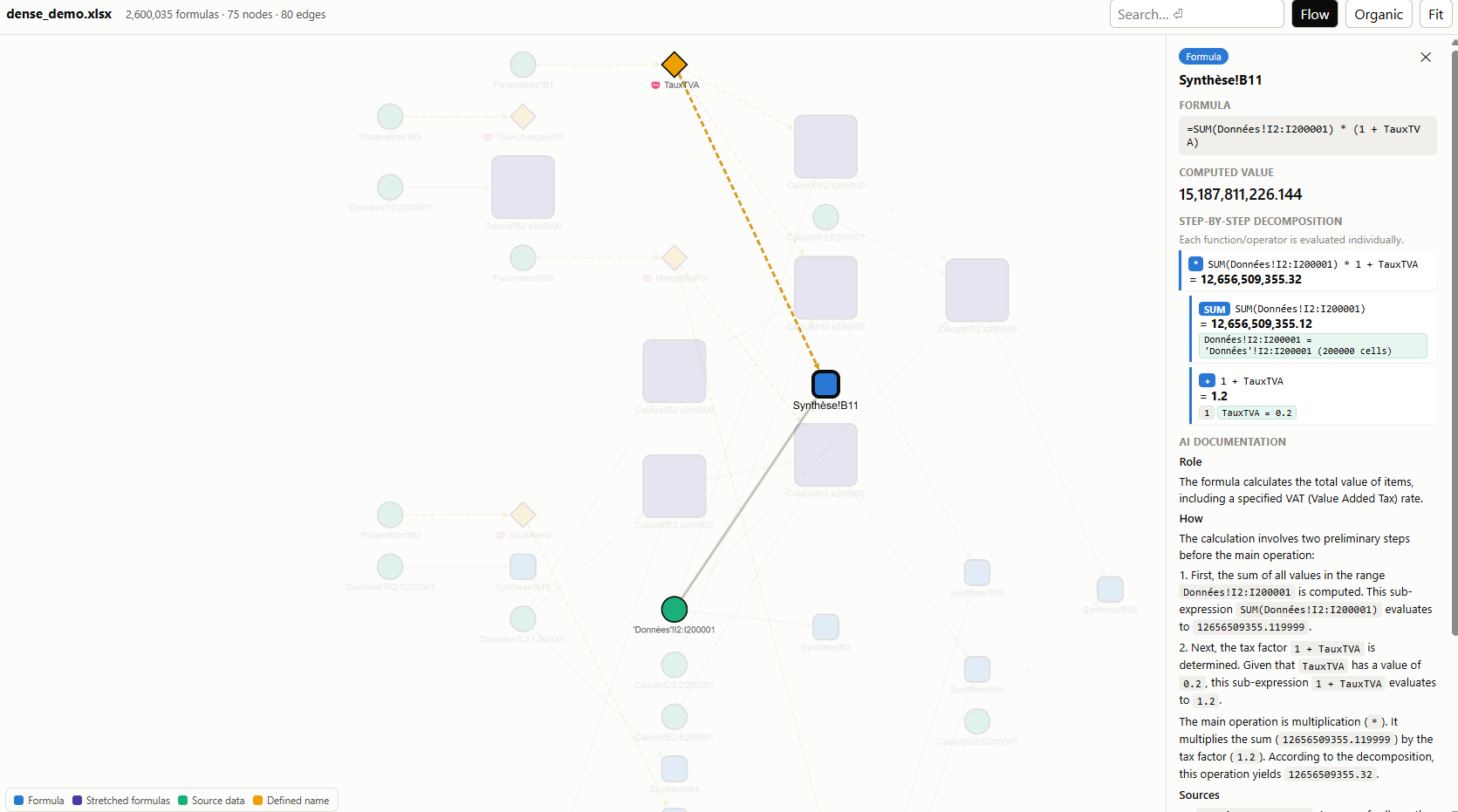
- Dependency graph — cells, ranges, defined names, VBA procedures
- Step-by-step evaluation — each operator/function evaluated individually
- Standalone HTML viewer — Cytoscape.js embedded, fully offline
- AI documentation — Gemini generates provable docs from deterministic lineage
Sample output
Global overview
Sample doc
Security
Please report vulnerabilities privately according to SECURITY.md. Do not include sensitive workbooks or credentials in public issues.
Changelog
See CHANGELOG.md.
License
MIT — see LICENSE.
Project details
Verified details
These details have been verified by PyPIProject links
GitHub Statistics
Maintainers


Download files
Download the file for your platform. If you're not sure which to choose, learn more about installing packages.
Source Distribution
Built Distribution
Filter files by name, interpreter, ABI, and platform.
If you're not sure about the file name format, learn more about wheel file names.
Copy a direct link to the current filters
File details
Details for the file linexcel-0.5.0.tar.gz.
File metadata
- Download URL: linexcel-0.5.0.tar.gz
- Upload date:
- Size: 3.0 MB
- Tags: Source
- Uploaded using Trusted Publishing? Yes
- Uploaded via: uv/0.11.29 {"installer":{"name":"uv","version":"0.11.29","subcommand":["publish"]},"python":null,"implementation":{"name":null,"version":null},"distro":{"name":"Ubuntu","version":"24.04","id":"noble","libc":null},"system":{"name":null,"release":null},"cpu":null,"openssl_version":null,"setuptools_version":null,"rustc_version":null,"ci":true}
File hashes
| Algorithm | Hash digest | |
|---|---|---|
| SHA256 |
bd619af4aabf92f866cbed660bd6a700e76b82ab144cc9098c9417f1b95ee8dc
|
|
| MD5 |
cd834b16df0c642ec635a2da5d4d690b
|
|
| BLAKE2b-256 |
4afe4d2c37cfc3d53f3c30184e4f69f86357e29ea8f681a91f9ab366e5ae8550
|
File details
Details for the file linexcel-0.5.0-py3-none-any.whl.
File metadata
- Download URL: linexcel-0.5.0-py3-none-any.whl
- Upload date:
- Size: 266.9 kB
- Tags: Python 3
- Uploaded using Trusted Publishing? Yes
- Uploaded via: uv/0.11.29 {"installer":{"name":"uv","version":"0.11.29","subcommand":["publish"]},"python":null,"implementation":{"name":null,"version":null},"distro":{"name":"Ubuntu","version":"24.04","id":"noble","libc":null},"system":{"name":null,"release":null},"cpu":null,"openssl_version":null,"setuptools_version":null,"rustc_version":null,"ci":true}
File hashes
| Algorithm | Hash digest | |
|---|---|---|
| SHA256 |
00ca193c339e43b3ebb4ea20ca973648e4bf16f3ad910c0496579c29061c54b0
|
|
| MD5 |
a30a6ac898e06d7d830baa5b45fbd61a
|
|
| BLAKE2b-256 |
ab9f31a12204820f5fb8d2eff2b30b58d136903748f6cb8f24ae08d8feea58cd
|






