
linkedin-jobs-scraper
Scrape public available jobs on Linkedin using headless browser.
- 🔑 Session management: long running session with auto recovery
- 🐢 Adaptive rate limiting: auto adjust scraping speed to avoid rate limiting
- 📄 Fields parser:
job_id,link,apply_link,title,company,company_link,company_employee_count,company_img_link,place,description,description_html,date,date_text,insights,salary,is_easy_apply,applicant_count,benefits,reposted - 🔍 Filters: relevance, time, type, experience, industry, salary, remote, company
- 📡 Events hooks: data, metrics, errors
- 🚀 Headless support: can run in background
- ⌨️ Command line interface: scrape straight from your shell, no code required
- 🐍 Programmatic API: drive it from Python with full control
Sponsored by
NinjaPear

Scrape+Enrich rich B2B profile data in real-time.
Table of Contents
- Requirements
- Installation
- Usage
- Authentication
- Adaptive Rate limiting
- Filters
- Company filter
- Logging
- License
Requirements
A Chromedriver matching your installed Chrome (or the binary passed as chrome_binary_location)
is resolved automatically through Selenium Manager and cached in ~/.cache/selenium; any
chromedriver on your PATH is ignored.
To use a specific chromedriver instead, pass it explicitly
(--chrome-executable-path on the CLI):
scraper = LinkedinScraper(
    chrome_executable_path='/path/to/chromedriver',
    chrome_binary_location='/path/to/chrome',
)
Installation
Install package:
pip install linkedin-jobs-scraper
Usage
Both a command line interface and a Python API are supported. Before your first scrape you need to authenticate once. The quickest way is the CLI:
lijs login
This signs in once into the default Chrome profile, ~/.lijs/chrome-profile, which later runs pick
up on their own. See Authentication for all the options (Chrome profile, cookie
pair, headless machines) and how the scraper chooses between them.
CLI
Installing the package also installs a command line interface. It mirrors the programmatic API but
scrapes a single query per invocation (there is no max_workers or chrome_options on the CLI).
Two equivalent commands are installed:
linkedin-jobs-scraper --help   # full command
lijs --help                    # short alias
The package is also runnable as a module:
python -m linkedin_jobs_scraper --help
Subcommands
jobs
Search jobs matching the provided query, locations and filters:
lijs jobs "software engineer" --location "United States" --location "Remote" --limit 50
lijs jobs "data scientist" --geo-id 103644278 --time week --type full-time,contract \
  --experience mid-senior --workplace remote --salary 120k --apply-link --chrome-profile <path>
- Positional
query— the search keywords. --location NAME(repeatable) or--geo-id ID(repeatable) — mutually exclusive; a geoId pins the search deterministically (see Pinning a location by geoId).--limit N— maximum jobs to scrape,0for unlimited (default25).--apply-link— resolve the external apply link for each job (slower).--skip-promoted-jobs— skip promoted jobs.--page-offset N— number of result pages to skip (default0).
Filters use kebab-case values. Single-valued: --relevance {relevant,recent},
--time {any,day,week,month}, --salary {40k,60k,80k,100k,120k,140k,160k,180k,200k},
--company-jobs-url URL. Repeatable or comma-separated: --type (full-time, part-time,
temporary, contract, internship, volunteer, other), --experience (internship,
entry-level, associate, mid-senior, director, executive), --workplace (on-site,
remote, hybrid), --industry (e.g. software-development, banking, it-services),
--job-function (e.g. engineering, sales, information-technology), --benefits
(e.g. medical, vision, dental), --commitments (e.g. work-life-balance,
social-impact). Boolean toggles: --easy-apply (only LinkedIn Easy Apply jobs),
--under-10-applicants (only jobs with fewer than 10 applicants). Run
lijs jobs --help for the full list of values.
job
Lookup a single job id or a /jobs/view/<id> url, with an optional --apply-link:
lijs job 3690634839
lijs job https://www.linkedin.com/jobs/view/3690634839 --apply-link
login
lijs login                                  # default profile, ~/.lijs/chrome-profile
lijs login --chrome-profile ~/work-profile  # any other profile
Opens a visible browser to sign in once into a reusable Chrome profile, then prints the cookie pair
ready to export. --chrome-profile (alias --chrome-user-data-dir) defaults to
~/.lijs/chrome-profile; a missing profile directory is created readable by its owner only, and
removed again if the sign in fails, times out, the browser is closed or the command is interrupted
(a directory that already existed is never removed). Also accepts --chrome-executable-path and
--chrome-binary-location.
Driver flags
Shared by jobs and job: --no-headless, --slow-mo SECONDS, --no-adaptive-slow-mo,
--page-load-timeout SECONDS, --chrome-executable-path PATH, --chrome-binary-location PATH,
--chrome-profile DIR, --interactive-login. Without --chrome-profile, the session comes from the
cookie environment variables, or from ~/.lijs/chrome-profile when none is set (see
Authentication).
Output
DATA is written to stdout; progress, metrics and errors go to stderr, so piping the data stream stays clean.
-f,--out-format {table,jsonl,json,csv}— output format.-o,--out-path PATH— destination;-means stdout.--fields a,b,c— comma-separated list of fields to emit.--all-fields— emit every available field.--vertical— render one field per line.--raw— emit the raw record unformatted.
When --out-format is omitted the format is inferred from the --out-path extension (.csv,
.json, .jsonl); with no path it defaults to table on a TTY and jsonl when piped or written
to a file.
In the table format on a TTY, URL fields are rendered as clickable terminal hyperlinks (OSC 8):
columns show a compact label (host and last path segment) while clicking opens the full URL.
Structured formats (jsonl/json/csv) always carry the full, unmodified URLs.
In the table format on a TTY, cell values are colour-coded per column (title, company,
place, date, link) to make rows easier to scan; --no-color (or the NO_COLOR environment
variable) disables it.
Global flags
--quiet, -v/-vv (repeatable, increases verbosity), --no-color, --version. --no-color is
accepted on every subcommand, before or after it.
Exit codes
| Code | Meaning |
|---|---|
0 |
Success |
1 |
Generic error |
2 |
Invalid session: the Chrome profile is missing or empty, no usable session in the profile or from the cookies, or LinkedIn refused it |
3 |
Job not found (job) |
130 |
login interrupted with Ctrl-C |
Programmatic
import logging
from linkedin_jobs_scraper import LinkedinScraper
from linkedin_jobs_scraper.events import Events, EventData, EventMetrics, EventBegin
from linkedin_jobs_scraper.query import Query, QueryOptions, QueryFilters, Location
from linkedin_jobs_scraper.filters import RelevanceFilters, TimeFilters, TypeFilters, ExperienceLevelFilters, \
    OnSiteOrRemoteFilters, SalaryBaseFilters

# Change root logger level (default is WARN)
logging.basicConfig(level=logging.INFO)


# Fired once per query/location before scraping starts, carrying LinkedIn's approximate
# total result count (job_total is -1 when it could not be parsed)
def on_begin(data: EventBegin):
    print('[ON_BEGIN]', data.job_total)


# Fired once for each successfully processed job
def on_data(data: EventData):
    print('[ON_DATA]', data.title, data.company, data.company_link, data.date, data.date_text, data.link, data.insights,
          len(data.description))


# Fired once for each page (25 jobs)
def on_metrics(metrics: EventMetrics):
    print('[ON_METRICS]', str(metrics))


def on_error(error):
    print('[ON_ERROR]', error)


def on_end():
    print('[ON_END]')


scraper = LinkedinScraper(
    chrome_executable_path=None,  # Custom chromedriver path (e.g. /foo/bar/bin/chromedriver), used as given; None resolves one matching Chrome
    chrome_binary_location=None,  # Custom path to Chrome/Chromium binary (e.g. /foo/bar/chrome-mac/Chromium.app/Contents/MacOS/Chromium)
    chrome_options=None,  # Custom Chrome options here
    headless=True,  # Overrides headless mode only if chrome_options is None
    max_workers=1,  # How many threads will be spawned to run queries concurrently (one Chrome driver for each thread)
    slow_mo=0.8,  # Minimum seconds slept between jobs, to avoid 'Too many requests 429' errors. Minimum 0.2, default 0.8
    adaptive_slow_mo=True,  # Slow down automatically when Linkedin throttles the run, then ease back. See 'Rate limiting'
    page_load_timeout=40,  # Page load timeout (in seconds)
    chrome_user_data_dir=None,  # Chrome profile reused across runs; None means cookie env vars, else ~/.lijs/chrome-profile. See 'Authentication'
    interactive_login=False  # Sign in by hand on the first run, when the profile holds no session. Requires a display
)

# Add event listeners
scraper.on(Events.BEGIN, on_begin)
scraper.on(Events.DATA, on_data)
scraper.on(Events.ERROR, on_error)
scraper.on(Events.END, on_end)

queries = [
    Query(
        options=QueryOptions(
            limit=27  # Limit the number of jobs to scrape. Use 0 to scrape all available jobs (LinkedIn serves up to ~1000).
        )
    ),
    Query(
        query='Engineer',
        options=QueryOptions(
            locations=['Europe', Location(geo_id='103644278', name='United States')],  # Plain name, or pin a geo by geoId. See 'Pinning a location by geoId'
            apply_link=True,  # Try to extract apply link (easy applies are skipped). If set to True, scraping is slower because an additional page must be navigated. Default to False.
            skip_promoted_jobs=True,  # Skip promoted jobs. Default to False.
            page_offset=2,  # How many pages to skip
            limit=5,
            filters=QueryFilters(
                company_jobs_url='https://www.linkedin.com/jobs/search/?f_C=1441%2C17876832%2C791962%2C2374003%2C18950635%2C16140%2C10440912&geoId=92000000',  # Filter by companies.
                relevance=RelevanceFilters.RECENT,
                time=TimeFilters.MONTH,
                type=[TypeFilters.FULL_TIME, TypeFilters.INTERNSHIP],
                on_site_or_remote=[OnSiteOrRemoteFilters.REMOTE],
                experience=[ExperienceLevelFilters.MID_SENIOR],
                base_salary=SalaryBaseFilters.SALARY_100K
            )
        )
    ),
]

scraper.run(queries)
Additional EventData fields
Alongside the core fields, each EventData also carries:
salary: pay range when LinkedIn shows one (from the fit-level insight or the salary rail card), otherwise''.is_easy_apply:Truewhen the listing uses LinkedIn Easy Apply,Falsefor an external apply flow.applicant_count: the applicant segment of the top card (e.g.'27 applicants'), otherwise''.benefits: list of featured benefit labels, empty when none are shown.reposted:Truewhen the listing was reposted (derived from the date text).
date is an ISO YYYY-MM-DD string. It comes from the card's exact <time datetime> when
available, otherwise it is approximated from the relative date text (weeks, months and years
approximated at 7, 30 and 365 days), and is '' only when no date text could be parsed.
Scraping a single job
When you already know the job you want, scrape_job fetches it directly by url or id, bypassing
search and pagination. It accepts a bare numeric id or a full /jobs/view/<id> url, emits a single
Events.DATA event on success, and Events.ERROR (without raising) on failure. A dead or expired
id, one that points to a job that no longer exists, emits Events.NOT_FOUND (carrying an
EventNotFound with the job_id) rather than Events.ERROR, since a missing job is not a scraping
error.
from linkedin_jobs_scraper import LinkedinScraper
from linkedin_jobs_scraper.events import Events, EventData, EventNotFound


def on_data(data: EventData):
    print('[ON_DATA]', data.title, data.company, data.company_link, data.date_text, data.link,
          data.insights, len(data.description))


def on_error(error):
    print('[ON_ERROR]', error)


def on_not_found(data: EventNotFound):
    print('[ON_NOT_FOUND]', data.job_id)


scraper = LinkedinScraper(
    headless=True,
    max_workers=1,
    slow_mo=0.8,
)

scraper.on(Events.DATA, on_data)
scraper.on(Events.ERROR, on_error)
scraper.on(Events.NOT_FOUND, on_not_found)

# By bare id
scraper.scrape_job('4455383771')

# Or by full url
scraper.scrape_job('https://www.linkedin.com/jobs/view/4455383771/')

# Pass apply_link=True to also extract the external apply link (slower)
scraper.scrape_job('4455383771', apply_link=True)
The single-job path reads every field from the job detail panel, so a few card-only fields are not
populated: company_img_link and the promoted flag. date has no exact <time datetime> here, so
it is approximated from date_text. query, location are empty and job_index is -1, as
there is no search context.
Pinning a location by geoId
A location entry can be a plain string (a place name LinkedIn resolves for you) or a Location
that pins the geo deterministically through LinkedIn's own geoId:
from linkedin_jobs_scraper.query import Location

Location(geo_id='103644278', name='United States')
geo_id is what pins the search: it is sent as the geoId URL param, and the location=<name>
param is omitted entirely (LinkedIn lets geoId win over a name in a conflict). name is only a
human label — it is used for logs and set on EventData.location — so it can be anything, or left
out (the geo_id is then used as the label).
To find a real geoId, run the search on LinkedIn in a browser, then read the geoId= value from
the resolved URL.
Authentication
The scraper needs a LinkedIn session. The recommended and tested way is a Chrome profile on a local machine (see below). The cookie-based modes are supported alternatives, but LinkedIn may refuse them in some environments (for example CI or a server), so they are not guaranteed everywhere. All modes keep the session alive on their own, so a long run is not interrupted when LinkedIn expires it.
| Chrome profile (recommended) | Cookie pair | |
|---|---|---|
| Runs on | A machine with a display | No display needed (may be refused in some environments) |
| Setup | Sign in once, in a browser window | Two environment variables |
| Lasts | As long as the profile is kept | About a year |
| Concurrency | max_workers forced to 1 |
Unrestricted |
The CLI and the library pick the session source for a run in this order:
- An explicit Chrome profile:
--chrome-profile/chrome_user_data_dir=, or a--user-data-dirargument in your ownchrome_options. - Cookie environment variables:
LI_RM_COOKIEwithLI_BCOOKIE, orLI_AT_COOKIE. Each browser gets a throwaway profile. - The default Chrome profile,
~/.lijs/chrome-profile. It is created bylijs login(orlinkedin_jobs_scraper.login.sign_in()), never by a scrape: a scrape that falls back on it while it does not exist, or is empty, stops before any browser opens, with an error asking you to sign in.
Each run logs the source it uses at INFO level, for example
Session source: Chrome profile ~/.lijs/chrome-profile (default); the CLI also shows it on the
session line of the summary it prints before a run.
An explicit profile that does not exist or is empty is refused the same way when no cookie
environment variable is set to seed it. Either refusal, and a profile that exists but holds no
usable session (for example an expired one), makes the run emit INVALID_SESSION and raise
InvalidCookieException; lijs jobs and lijs job print the reason as one ❌ error: ... line and exit
with code 2.
1. Chrome profile
Sign in once into a Chrome profile that the scraper then reuses:
lijs login
This uses the default profile ~/.lijs/chrome-profile, created readable by its owner only;
pass --chrome-profile <path> to sign in to another one.
A browser window opens on the sign in page. Sign in there, ticking "Keep me logged in" — that is what makes the profile reusable. The password is typed into the browser: nothing in this package reads, stores or transmits it.
With no cookie environment variables set, the scraper picks up the default profile by itself; any other profile is passed explicitly:
scraper = LinkedinScraper()  # ~/.lijs/chrome-profile
scraper = LinkedinScraper(chrome_user_data_dir='~/work-profile')
To skip the separate command and have the first run do the sign in instead:
scraper = LinkedinScraper(interactive_login=True)
interactive_login requires a Chrome profile, explicit or default, and waits up to 10 minutes for a
human, so leave it off (the default) anywhere nobody is watching, such as CI or a server. Chrome
locks a profile directory, so max_workers is forced to 1 whenever the run uses a Chrome profile,
explicit or default.
2. Cookie pair
You can use LinkedIn's remember me cookies (li_rm and bcookie) as environment variables to obtain a session, an option when a browser window is not available (you still need a machine with a browser window to obtain them the first time). Both variables are required. LinkedIn may refuse this mode in some environments (for example CI), so it is not guaranteed everywhere; prefer the Chrome profile when you can.
export LI_RM_COOKIE='<li_rm value>'
export LI_BCOOKIE='<bcookie value>' # keep the double quote " characters the value contains
python your_app.py
Get the two values by running the sign in command above on a machine that has a display: it prints them at the end, quoted and ready to export.
Setting chrome_user_data_dir as well is worth it if the host has storage that survives across runs:
the session is then reused instead of being requested again at the start of each run.
Fallback: a bare session cookie
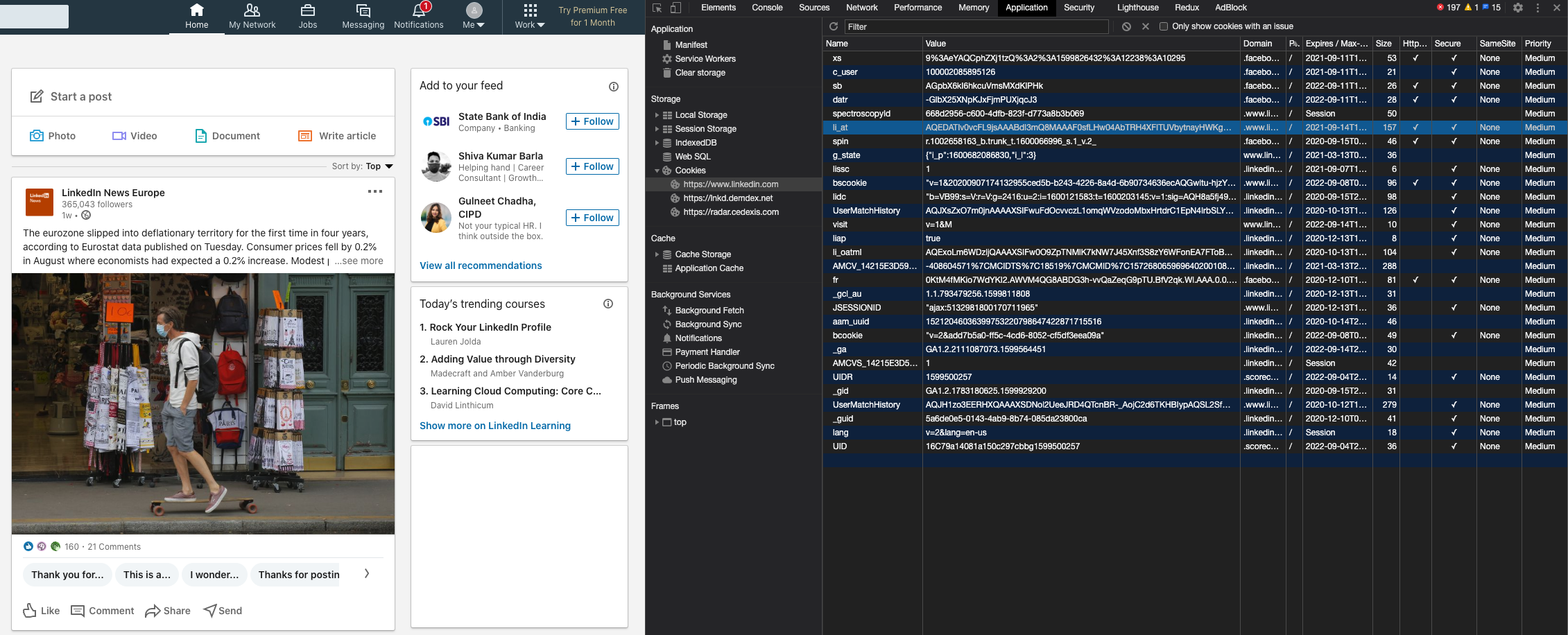
LI_AT_COOKIE takes the li_at session cookie on its own. This one can be copied straight out of your own Chrome browser. Sign in, then open Chrome developer
tools:
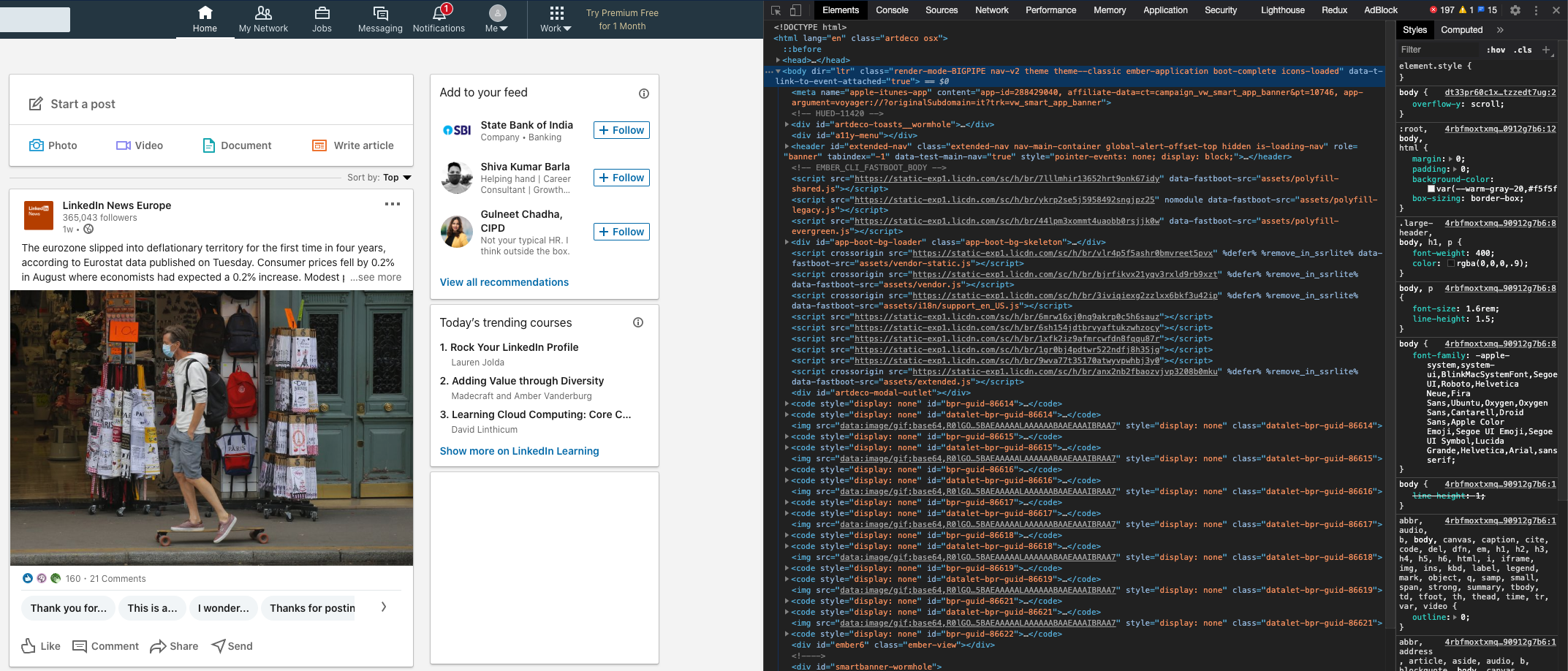
Go to tab Application, then from the left panel select Storage -> Cookies ->
https://www.linkedin.com, locate the row named li_at and copy the Value column.
LI_AT_COOKIE=<your li_at cookie value here> python your_app.py
This cookie cannot be renewed: LinkedIn expires it after a while, and a run that loses it stops. Expect to replace it by hand. As with the cookie pair, LinkedIn may refuse it in some environments; prefer the Chrome profile when you can.
Begin event
BEGIN fires once per query/location, before any job is scraped, carrying an EventBegin with
LinkedIn's approximate total result count for that search. job_total is -1 when the count
could not be parsed. Combined with limit=0 (scrape all available jobs, LinkedIn serves up to
~1000), it lets a caller know upfront roughly how many results a query has:
from linkedin_jobs_scraper.events import Events, EventBegin

def on_begin(data: EventBegin):
    print('total results reported by LinkedIn:', data.job_total)

scraper.on(Events.BEGIN, on_begin)
Session events
SESSION_REFRESHED fires whenever the scraper ends up holding a session cookie different from
the one it was given. Listen to it if you have nowhere else to store a session and want to reuse
it on the next run:
from linkedin_jobs_scraper.events import Events, EventSession

def on_session_refreshed(session: EventSession):
    print('store this for the next run:', session.li_at)

scraper.on(Events.SESSION_REFRESHED, on_session_refreshed)
INVALID_SESSION fires when no usable session is available - the Chrome profile is missing or
empty with no cookie to seed it (checked before any browser opens), the profile holds none and no
credential could establish one, or every credential supplied was refused - immediately before the
run aborts with InvalidCookieException. It takes no arguments:
def on_invalid_session():
    print('LinkedIn refused every credential')

scraper.on(Events.INVALID_SESSION, on_invalid_session)
Not found event
NOT_FOUND (scraper:not-found) fires when a single-job scrape (scrape_job) targets a job that
does not exist or is no longer available. It carries an EventNotFound with the job_id that was
requested. Throttling and page-load failures stay a silent skip, since neither says anything about
whether the job exists:
from linkedin_jobs_scraper.events import Events, EventNotFound

def on_not_found(data: EventNotFound):
    print('job no longer available:', data.job_id)

scraper.on(Events.NOT_FOUND, on_not_found)
Adaptive Rate limiting
Requests failing with the status code 429 mean you are sending too many requests and Linkedin is throttling them. Two parameters control this:
slow_mo: seconds slept between jobs. Higher is safer, at least0.2, default0.8.max_workers: how many queries run concurrently. Default and recommended1.
slow_mo sets the fastest the run will ever go, not a fixed delay: with adaptive_slow_mo on
(the default) the run starts at that speed and slows itself down whenever Linkedin pushes back.
- On every 429, the delay between jobs doubles, up to
min(10, slow_mo * 10)seconds. - After 20 jobs in a row without a 429, the delay shrinks back towards
slow_mo, and never goes below it. - When a whole page is throttled, the scraper waits and asks for it again: first 5s, then 15s, then 45s. A short burst of throttling no longer ends the query.
Pass adaptive_slow_mo=False to make slow_mo a fixed delay instead.
The METRICS event reports both numbers:
throttled: how many 429s the run has met.pace: the delay currently slept between jobs.
Filters
It is possible to customize queries with the following filters:
- RELEVANCE:
RELEVANTRECENT
- TIME:
DAYWEEKMONTHANY
- TYPE:
FULL_TIMEPART_TIMETEMPORARYCONTRACT
- EXPERIENCE LEVEL:
INTERNSHIPENTRY_LEVELASSOCIATEMID_SENIORDIRECTOR
- ON SITE OR REMOTE:
ON_SITEREMOTEHYBRID
- INDUSTRY:
AIRLINES_AVIATIONBANKINGCIVIL_ENGINEERINGCOMPUTER_GAMESENVIRONMENTAL_SERVICESELECTRONIC_MANUFACTURINGFINANCIAL_SERVICESINFORMATION_SERVICESINVESTMENT_BANKINGINVESTMENT_MANAGEMENTIT_SERVICESLEGAL_SERVICESMOTOR_VEHICLESOIL_GASSOFTWARE_DEVELOPMENTSTAFFING_RECRUITINGTECHNOLOGY_INTERNET
- BASE SALARY:
SALARY_40KSALARY_60KSALARY_80KSALARY_100KSALARY_120KSALARY_140KSALARY_160KSALARY_180KSALARY_200K
- JOB FUNCTION:
ACCOUNTING_AUDITINGADMINISTRATIVEADVERTISINGBUSINESS_DEVELOPMENTCONSULTINGDISTRIBUTIONDESIGNEDUCATIONENGINEERINGFINANCEGENERAL_BUSINESSHEALTH_CARE_PROVIDERHUMAN_RESOURCESINFORMATION_TECHNOLOGYLEGALMANAGEMENTMANUFACTURINGMARKETINGOTHERPUBLIC_RELATIONSPRODUCT_MANAGEMENTPROJECT_MANAGEMENTQUALITY_ASSURANCERESEARCHSALESSUPPLY_CHAINTRAINING
- BENEFITS:
MEDICALVISIONDENTALRETIREMENT_401KPENSION_PLANPAID_MATERNITY_LEAVEPAID_PATERNITY_LEAVECOMMUTER_BENEFITSSTUDENT_LOAN_ASSISTANCETUITION_ASSISTANCEDISABILITY_INSURANCE
- COMMITMENTS:
DIVERSITY_EQUITY_INCLUSIONENVIRONMENTAL_SUSTAINABILITYWORK_LIFE_BALANCESOCIAL_IMPACTCAREER_GROWTH_AND_LEARNING
- EASY APPLY:
easy_apply=Truerestricts results to jobs with LinkedIn Easy Apply. - UNDER 10 APPLICANTS:
under_10_applicants=Truerestricts results to jobs with fewer than 10 applicants. - COMPANY:
- See below
See the following example for more details:
from linkedin_jobs_scraper.query import Query, QueryOptions, QueryFilters
from linkedin_jobs_scraper.filters import RelevanceFilters, TimeFilters, TypeFilters, ExperienceLevelFilters, \
    OnSiteOrRemoteFilters, IndustryFilters, SalaryBaseFilters, JobFunctionFilters, BenefitsFilters, CommitmentsFilters
query = Query(
    query='Engineer',
    options=QueryOptions(
        locations=['United States'],
        apply_link=True,
        skip_promoted_jobs=True,
        limit=5,
        filters=QueryFilters(
            relevance=RelevanceFilters.RECENT,
            time=TimeFilters.MONTH,
            type=[TypeFilters.FULL_TIME, TypeFilters.INTERNSHIP],
            experience=[ExperienceLevelFilters.INTERNSHIP, ExperienceLevelFilters.MID_SENIOR],
            on_site_or_remote=[OnSiteOrRemoteFilters.REMOTE],
            industry=[IndustryFilters.IT_SERVICES],
            base_salary=SalaryBaseFilters.SALARY_100K,
            job_function=[JobFunctionFilters.ENGINEERING],
            benefits=[BenefitsFilters.MEDICAL, BenefitsFilters.VISION],
            commitments=[CommitmentsFilters.WORK_LIFE_BALANCE],
            easy_apply=True,
            under_10_applicants=True
        )
    )
)
Industry Filter
You will probably need to add the industry filter to the IndustryFilters class in filters.py
To find the numeric code for the industry:
- Perform the search on LinkedIn in a browser, with the industry filter applied.
- The numeric code is in the URL, immediately after
f_I. For example URL https://www.linkedin.com/jobs/search/?currentJobId=3661007408&distance=25&f_E=3%2C4&f_I=43%2C46%2C41%2C45&f_JT=F%2CC&geoId=102257491&keywords=Product%20Owner&refresh=true contains textf_I=43%2C46%2C41%2C45indicating a filter is applied on industry codes 43, 46, 41 and 45.
Company Filter
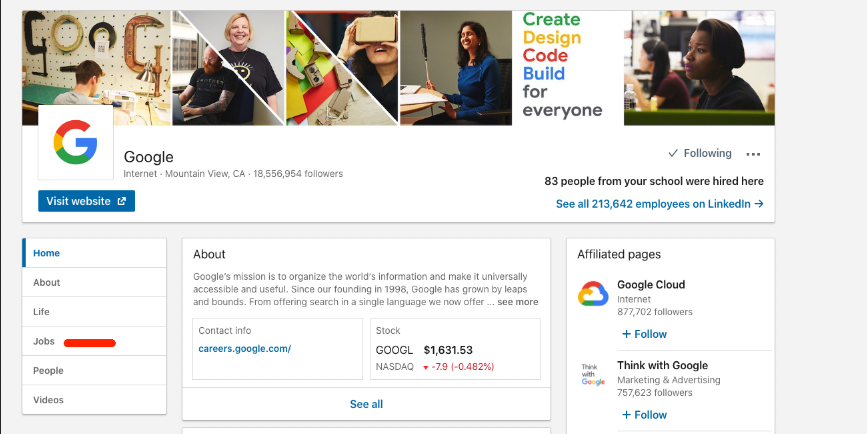
It is also possible to filter by company using the public company jobs url on LinkedIn. To find this url you have to:
- Login to LinkedIn using an account of your choice.
- Go to the LinkedIn page of the company you are interested in (e.g. https://www.linkedin.com/company/google).
- Click on
jobsfrom the left menu.
- Scroll down and locate
See all jobsorSee jobsbutton.
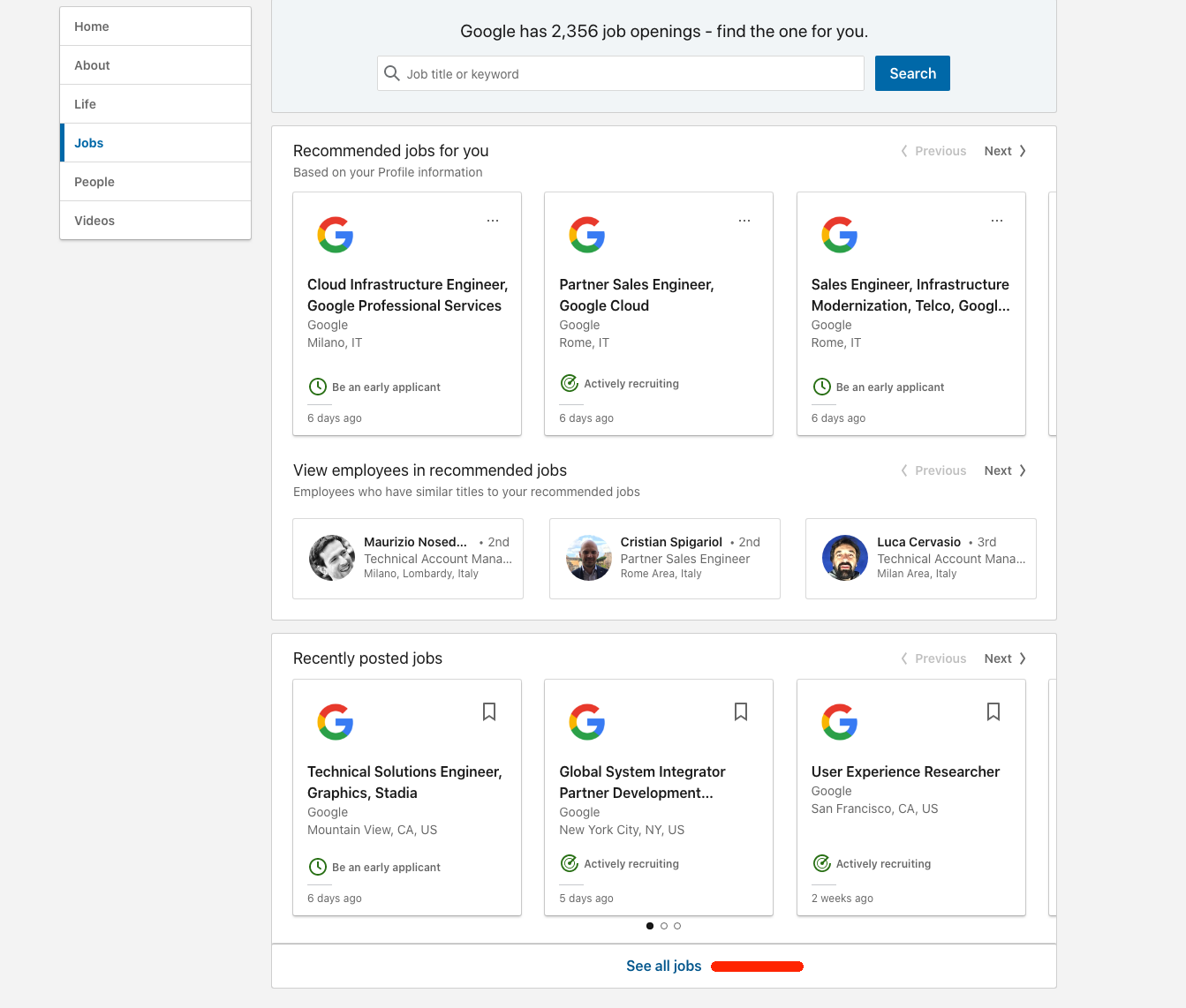
- Right click and copy link address (or navigate the link and copy it from the address bar).
- Paste the link address in code as follows:
query = Query(
    options=QueryOptions(
        filters=QueryFilters(
            # Paste link below
            company_jobs_url='https://www.linkedin.com/jobs/search/?f_C=1441%2C17876832%2C791962%2C2374003%2C18950635%2C16140%2C10440912&geoId=92000000',
        )
    )
)
Logging
Package logger can be retrieved using namespace li:scraper. Default level is INFO.
It is possible to change logger level using environment variable LOG_LEVEL or in code:
import logging

# Change root logger level (default is WARN)
logging.basicConfig(level = logging.DEBUG)

# Change package logger level
logging.getLogger('li:scraper').setLevel(logging.DEBUG)

# Optional: change level to other loggers
logging.getLogger('urllib3').setLevel(logging.WARN)
logging.getLogger('selenium').setLevel(logging.WARN)
License
If you like the project and want to contribute you can donate something here!
1 maintainer

Metadata
1 maintainer
Release files for linkedin-jobs-scraper 8.0.0
For a detailed explanation of source distributions (sdists) and built distributions (wheels), please see the package formats documentation.
Source distribution (sdist)
| File | Size | Uploaded | |
|---|---|---|---|
| linkedin_jobs_scraper-8.0.0.tar.gz | 2.8 MB | Details |
Built distribution (wheel)
| File | Interpreter | ABI | Platform | Reset |
|---|---|---|---|---|
| linkedin_jobs_scraper-8.0.0-py3-none-any.whl | Python 3 | none | any | Details |
Total release size: 2.9 MB
Release files / linkedin_jobs_scraper-8.0.0.tar.gz
| Download URL | linkedin_jobs_scraper-8.0.0.tar.gz |
|---|---|
| Size | 2.8 MB |
| Tags | Source |
|
SHA-256 checksum How to use checksums |
a3a023343654d771125797d8bb11cd906f3557020b2358ff0a181f3c2d0016be
|
|
BLAKE2b-256 checksum How to use checksums |
3003d0606fd1f6463de1013419a58f1e65b248c361dbdb41ba5f1a418c51cf64
|
| Upload date | |
|
Uploaded using Trusted Publishing? What is trusted publishing? |
No |
| Uploaded via |
twine/7.0.0 CPython/3.13.14
|
Release files / linkedin_jobs_scraper-8.0.0-py3-none-any.whl
| Download URL | linkedin_jobs_scraper-8.0.0-py3-none-any.whl |
|---|---|
| Size | 86.6 kB |
| Tags | Python 3 |
|
SHA-256 checksum How to use checksums |
86f72defb351feb29581b757d4fff1aed7ec479b26dcf9da149c728bb7fd4075
|
|
BLAKE2b-256 checksum How to use checksums |
4eb8e3fa4ba4e416e65a7abc80efe866ff02141bf58bc2e866408386e748fe5a
|
| Upload date | |
|
Uploaded using Trusted Publishing? What is trusted publishing? |
No |
| Uploaded via |
twine/7.0.0 CPython/3.13.14
|














