
linktools-common
Linktools 通用工具包,提供环境管理、文件搜索及远程工具下载执行等功能(命令前缀 ct-)。
开始使用
安装
python3 -m pip install -U linktools-common

# 安装完整功能(包含所有可选依赖,如 lief 二进制解析支持)
python3 -m pip install -U "linktools-common[all]"

# 安装 GitHub 最新开发版
python3 -m pip install --ignore-installed \
  "linktools@ git+https://github.com/linktools-toolkit/linktools.git@master#subdirectory=linktools" \
  "linktools-common@ git+https://github.com/linktools-toolkit/linktools.git@master#subdirectory=linktools-common"
命令列表
ct
├── env     — 管理和配置 Linktools 环境
├── grep    — 使用正则表达式搜索匹配文件内容
└── tools   — 直接从远程 URL 下载并执行工具
👉 ct-env
环境配置管理命令,用于生成 alias 脚本、配置 Java 环境变量等。
常用命令
# 生成 alias 脚本,常配合 ~/.bashrc 等文件使用
$ ct-env --silent alias --shell bash

# 生成配置 Java 环境变量脚本(可通过 https://sap.github.io/SapMachine/#download 查找 LTS 版本号)
$ ct-env --silent java 17.0.11 --shell bash

# 进入已初始化相关环境变量的 shell
$ ct-env shell

# 清除项目中 7 天以上未使用的缓存文件
$ ct-env clean 7
在 ~/.bashrc 或 ~/.zshrc 中添加:
# 自动注册所有 linktools 命令及自动补全
eval "$(python3 -m linktools.cli.env alias --shell bash)"

# 配置全局 Java 环境
eval "$(ct-env --silent java 17.0.11 --shell bash)"
👉 ct-grep
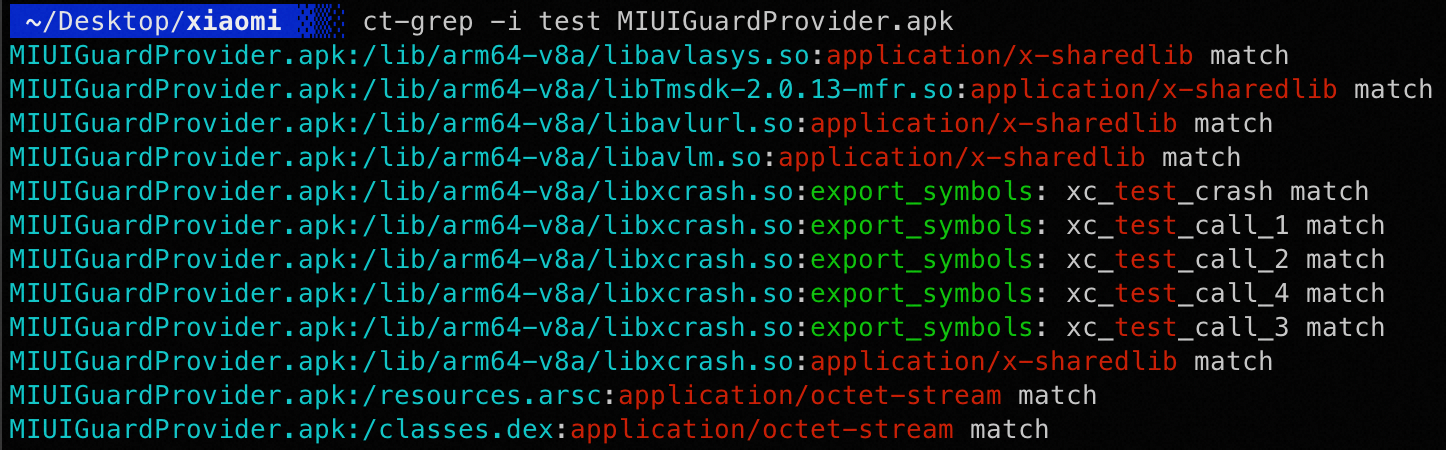
类似 Linux 中的 grep,使用正则表达式匹配文件内容,额外支持解析 ZIP、ELF 等格式。
效果预览
👉 ct-tools
读取配置文件,自动下载并执行对应工具,内置声明了 adb、jadx、apktool、baksmali 等常用工具。
常用命令
所有声明的工具可通过配置文件查看,以下以 apktool 为例:
# 初始化并执行 apktool 命令
$ ct-tools apktool -h

# 查看 apktool 相关配置
$ ct-tools --config apktool

# 只下载不执行
$ ct-tools --download apktool

# 清除 apktool 相关缓存文件
$ ct-tools --clear apktool

# 后台运行 apktool
$ ct-tools --daemon apktool

# 修改工具版本号
$ ct-tools --set version=2.5.0 apktool
常用 alias 配置:
alias apktool="ct-tools apktool"
alias burpsuite="ct-tools burpsuite"
alias jadx="ct-tools --set version=1.5.0 jadx-gui"  # 指定 jadx 版本号
相关链接
1 maintainer

Metadata
1 maintainer
Release files for linktools-common 0.9.1
For a detailed explanation of source distributions (sdists) and built distributions (wheels), please see the package formats documentation.
Source distribution (sdist)
| File | Size | Uploaded | |
|---|---|---|---|
| linktools_common-0.9.1.tar.gz | 9.0 kB | Details |
Built distribution (wheel)
| File | Interpreter | ABI | Platform | Reset |
|---|---|---|---|---|
| linktools_common-0.9.1-py3-none-any.whl | Python 3 | none | any | Details |
Total release size: 18.0 kB
Release files / linktools_common-0.9.1.tar.gz
| Download URL | linktools_common-0.9.1.tar.gz |
|---|---|
| Size | 9.0 kB |
| Tags | Source |
|
SHA-256 checksum How to use checksums |
10ed632a36a6f15b3f25d0ac63952565fa513021bbf3900a29e91e46ba08bbed
|
|
BLAKE2b-256 checksum How to use checksums |
9eb5f65dbc7d81e9263136fb42f394174abd7ab146de7fd6695bc59ab788c03c
|
| Upload date | |
|
Uploaded using Trusted Publishing? What is trusted publishing? |
No |
| Uploaded via |
twine/6.1.0 CPython/3.13.12
|
Release files / linktools_common-0.9.1-py3-none-any.whl
| Download URL | linktools_common-0.9.1-py3-none-any.whl |
|---|---|
| Size | 9.0 kB |
| Tags | Python 3 |
|
SHA-256 checksum How to use checksums |
6a2102e274a2a2929d6e013e718d8d3ad6f166c3f9a8fcbd0abd4567ded6fcef
|
|
BLAKE2b-256 checksum How to use checksums |
1eab9ef356be7e44b3f596e2c252132d293ec28951b7ab803d73dcdaee0023c3
|
| Upload date | |
|
Uploaded using Trusted Publishing? What is trusted publishing? |
No |
| Uploaded via |
twine/6.1.0 CPython/3.13.12
|














