
linktools-mobile
Linktools 移动设备工具包,提供 Android 和 iOS 设备管理、动态分析及安全测试等功能。Android 命令前缀 at-,iOS 命令前缀 it-。
开始使用
安装
python3 -m pip install -U linktools-mobile

# 安装完整功能(包含 frida、objection、paramiko 等可选依赖)
python3 -m pip install -U "linktools-mobile[all]"

# 安装 GitHub 最新开发版
python3 -m pip install --ignore-installed \
  "linktools@ git+https://github.com/linktools-toolkit/linktools.git@master#subdirectory=linktools" \
  "linktools-mobile@ git+https://github.com/linktools-toolkit/linktools.git@master#subdirectory=linktools-mobile"
配置 alias(推荐)
alias adb="at-adb"
alias sib="it-sib"
alias pidcat="at-pidcat"
命令列表
at (Android)
├── adb        — 多设备 ADB 管理
├── agent      — 与 android-tools.apk 交互调试
├── app        — 获取 Android 应用详细信息
├── cert       — 显示 X.509 证书信息
├── debug      — 使用 jdb 调试 Android 应用
├── frida      — 基于 Frida 的动态分析(需要 root)
├── info       — 获取设备详细信息
├── intent     — 执行常用 Android Intent 操作
├── objection  — 使用 Objection 进行安全测试(需要 root)
├── pidcat     — 按包名过滤 logcat 日志
└── top        — 获取当前运行应用信息

it (iOS)
├── frida      — 基于 Frida 的动态分析(需要越狱)
├── ios        — 多设备 go-ios 管理
├── ipa        — 解析 IPA 文件信息
├── objection  — 使用 Objection 进行安全测试(需要越狱)
├── scp        — 与越狱设备进行 SCP 文件传输
└── ssh        — SSH 登录越狱设备
Android 功能(at-)
👉 at-adb
自动检测并使用环境变量中的 adb,不存在时自动下载最新版本,支持同时管理多台设备。
常用命令
at-adb 命令与标准 adb 完全兼容,以 adb shell 为例:
# 指定序列号连接
$ at-adb -s xxx shell

# 使用上次连接的设备
$ at-adb -l shell

# 连接远程 TCP 设备
$ at-adb -c 127.0.0.1:5555 shell

# 未指定时交互选择设备
$ at-adb shell
More than one device/emulator
>> 1: 18201FDF6003BE (Pixel 6)
   2: 10.10.10.58:5555 (Pixel 6)
Choose device [1~2] (1): 1
👉 at-pidcat
集成并增强了 pidcat,修复了中文字符宽度显示问题。
常用命令
# 查看指定包名的日志
$ at-pidcat -p me.ele

# 查看当前前台应用的日志
$ at-pidcat --top

# 查看指定 tag 的日志
$ at-pidcat -t XcdnEngine
👉 at-top
显示当前顶层应用信息,支持导出 APK、截屏等操作。
常用命令
# 展示当前顶层应用的包名、Activity、APK 路径等信息
$ at-top

# 导出当前顶层应用的 APK
$ at-top --apk

# 截屏并导出
$ at-top --screen
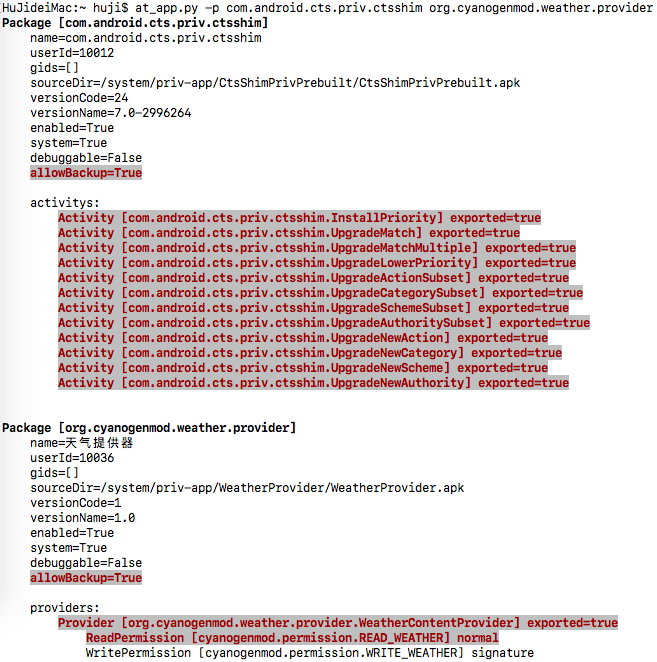
👉 at-app
通过 agent 调用 PackageManagerService 获取应用信息,组件、权限等信息比静态分析更为准确。
常用命令
# 显示当前前台应用的基本信息
$ at-app

# 显示应用的详细信息
$ at-app --detail

# 高亮显示危险权限等风险项
$ at-app --detail --dangerous

# 显示所有非系统应用信息
$ at-app --non-system
输出效果:
👉 at-intent
封装常用 Intent 操作,支持跳转设置界面、安装证书、打开浏览器链接等。
常用命令
# 跳转到系统设置页
$ at-intent setting

# 跳转到开发者选项页
$ at-intent setting-dev

# 跳转到指定应用的设置页
$ at-intent setting-app

# 安装证书
$ at-intent setting-cert ~/test.crt

# 安装 APK(支持 URL)
$ at-intent install https://example.com/test.apk

# 在浏览器中打开链接(也可用于测试 URL Scheme)
$ at-intent browser https://example.com
👉 at-frida
便捷使用 Frida 的工具,可自动下载、推送、运行 frida-server,支持加载远程脚本,内置常用功能(需要 root 权限)。
主要特性
- 根据设备架构和 Python 中 frida 版本,全自动下载、推送、运行 frida-server
- 监听 spawn 进程变化,可同时 hook 主进程和各子进程
- 监听 JS 文件变化,实时热重载
- 内置脚本封装常用功能(如绕过 SSL Pinning)
- 支持加载远程脚本(Codeshare)
- 支持将设备流量重定向到本地端口
命令行用法
# 以 spawn 模式加载本地脚本注入到指定进程
$ at-frida -l ~/test/frida.js -p me.ele --spawn

# 加载远程脚本,并将流量重定向到本地 8080 端口
$ at-frida -c https://raw.githubusercontent.com/.../android.js -p me.ele --redirect-port 8080

# 只启动 frida-server,不注入脚本
$ at-frida --serve --remote-port 27042 --local-port 27042 -p fake_package

# 使用设备上已运行的 frida-server
$ at-frida --no-serve --remote-port 27042 -p me.ele
Python API 用法
#!/usr/bin/env python3
# -*- coding: utf-8 -*-
from linktools.cli import BaseCommand
from linktools.mobile.frida import FridaApplication, FridaEvalCode, FridaAndroidServer


class Command(BaseCommand):

    def init_arguments(self, parser):
        pass

    def run(self, args):
        code = """
            Java.perform(function () {
                JavaHelper.hookMethods(
                    "java.util.HashMap",
                    "put",
                    {stack: false, args: true}
                );
            });
            """

        with FridaAndroidServer() as server:
            app = FridaApplication(
                server,
                user_scripts=(FridaEvalCode(code),),
                enable_spawn_gating=True,
                target_identifiers=rf"^com.topjohnwu.magisk($|:)"
            )
            app.inject_all()
            app.run()


command = Command()
if __name__ == "__main__":
    command.main()
内置 JS 接口(Java 层)
Java.perform(function () {

    // hook 指定类的指定重载方法
    JavaHelper.hookMethod(
        "me.ele.privacycheck.f",
        "a",
        ['android.app.Application', 'boolean'],
        function (obj, args) {
            args[1] = true;
            return this(obj, args);
        }
    );

    // hook 指定类的所有同名方法
    JavaHelper.hookMethods(
        "anet.channel.entity.ConnType",
        "isHttpType",
        () => true
    );

    // hook 指定类的全部方法
    JavaHelper.hookAllMethods(
        "p.r.o.x.y.PrivacyApi",
        JavaHelper.getEventImpl({
            stack: true,   // 打印调用栈
            args: true,    // 打印参数和返回值
            thread: false,
            extras: { customKey: "自定义参数" }
        })
    );

    // 等待动态加载的 class(持续监听 ClassLoader)
    JavaHelper.use("p.r.o.x.y.PrivacyApi", function(clazz) {
        JavaHelper.hookAllMethods(clazz, JavaHelper.getEventImpl({ stack: true, args: true }));
    });

    // 绕过 SSL Pinning
    JavaHelper.bypassSslPinning();

    // 开启 WebView 远程调试
    JavaHelper.setWebviewDebuggingEnabled();
});
👉 at-agent
与 android-tools.apk 交互,支持剪贴板操作、系统服务信息获取等,也支持加载插件 APK。
常用命令
# 设置剪贴板内容
$ at-agent common --set-clipboard "剪切板内容"

# 获取剪贴板内容
$ at-agent common --get-clipboard

# 以 root 权限 dump 系统服务信息(需要 root 设备并挂载 DebugFS)
$ at-agent -u root --debug service --detail

# 加载插件 APK 并调用插件方法
$ at-agent --plugin app-release.apk
iOS 功能(it-)
👉 it-ios
自动检测或下载 go-ios,支持同时管理多台 iOS 设备。
常用命令
# 列出所有已连接设备
$ it-ios list

# 指定 UDID 执行命令
$ it-ios -s xxx info

# 使用上次连接的设备
$ it-ios -l info

# 未指定时交互选择设备
$ it-ios info
More than one device/emulator
>> 1: 00008030-001174D10CC1802E (iPhone)
   2: 00008030-001174D10CC1803E (iPhone)
Choose device [1~2] (1): 1
👉 it-ssh
通过 SSH 连接已越狱设备(需要设备已安装 OpenSSH)。
常用命令
# 连接设备
$ it-ssh

# 连接设备并执行命令
$ it-ssh sh -c "id"
👉 it-scp
通过 SCP 与已越狱设备进行文件传输(需要设备已安装 OpenSSH)。
常用命令
远程路径需加 : 前缀与本地路径区分:
# 从设备下载文件到本地
$ it-scp :/var/mobile/Documents/data.db ./data.db

# 上传本地文件到设备
$ it-scp ./payload.dylib :/usr/lib/payload.dylib

# 指定用户名和端口(默认 root:22)
$ it-scp -u mobile -p 2222 :/var/mobile/test.txt ./test.txt
👉 it-ipa
解析 IPA 文件,提取应用元数据、权限、组件等信息。
常用命令
# 解析并展示 IPA 信息
$ it-ipa app.ipa
👉 it-frida
便捷使用 Frida 进行 iOS 动态分析(需要设备已越狱并安装 frida)。
常用命令
# 以 spawn 模式加载脚本注入到指定 Bundle ID
$ it-frida -l ~/test/frida.js -b com.example.app --spawn

# 加载 Codeshare 脚本
$ it-frida -c https://codeshare.frida.re/@xxx/yyy -b com.example.app

# 执行内联代码
$ it-frida -e "console.log('hello')" -b com.example.app
👉 it-objection
使用 Objection 对越狱 iOS 设备进行安全测试。
常用命令
# 注入到当前前台应用
$ it-objection

# 注入到指定 Bundle ID
$ it-objection -b com.example.app

# 注入时执行启动命令(可多次指定 -s)
$ it-objection -b com.example.app -s "ios sslpinning disable"

# 注入时执行启动脚本
$ it-objection -b com.example.app -S ./startup.js
相关链接
1 maintainer

Metadata
1 maintainer
Release files for linktools-mobile 0.9.1
For a detailed explanation of source distributions (sdists) and built distributions (wheels), please see the package formats documentation.
Source distribution (sdist)
| File | Size | Uploaded | |
|---|---|---|---|
| linktools_mobile-0.9.1.tar.gz | 263.0 kB | Details |
Built distribution (wheel)
| File | Interpreter | ABI | Platform | Reset |
|---|---|---|---|---|
| linktools_mobile-0.9.1-py3-none-any.whl | Python 3 | none | any | Details |
Total release size: 548.3 kB
Release files / linktools_mobile-0.9.1.tar.gz
| Download URL | linktools_mobile-0.9.1.tar.gz |
|---|---|
| Size | 263.0 kB |
| Tags | Source |
|
SHA-256 checksum How to use checksums |
8953f92b8d55c3c9f6ec9fb03b68e2199667023eb5ecd1dcebcd402dc338effc
|
|
BLAKE2b-256 checksum How to use checksums |
e066203edbcd9d3648b55d4d42a3550c05c4b7d9605e852049212f609eb9d09c
|
| Upload date | |
|
Uploaded using Trusted Publishing? What is trusted publishing? |
No |
| Uploaded via |
twine/6.1.0 CPython/3.13.12
|
Release files / linktools_mobile-0.9.1-py3-none-any.whl
| Download URL | linktools_mobile-0.9.1-py3-none-any.whl |
|---|---|
| Size | 285.3 kB |
| Tags | Python 3 |
|
SHA-256 checksum How to use checksums |
56b51a66730bdde71360f3e76a3664bf6acaa9a719ffca381b006b2b6c1665b4
|
|
BLAKE2b-256 checksum How to use checksums |
7787e60ed5b200daa2f5fe02551fe08fbe0a42ccc9410348e216dc733c7e6fd1
|
| Upload date | |
|
Uploaded using Trusted Publishing? What is trusted publishing? |
No |
| Uploaded via |
twine/6.1.0 CPython/3.13.12
|














