
linpuzs: LinkedIn Puzzles Solver
Plug in your Android phone, open today's LinkedIn puzzle and run linpuzs. It grabs a screenshot over ADB, figures out the board, solves it, and taps the answer in for you, in a few seconds.
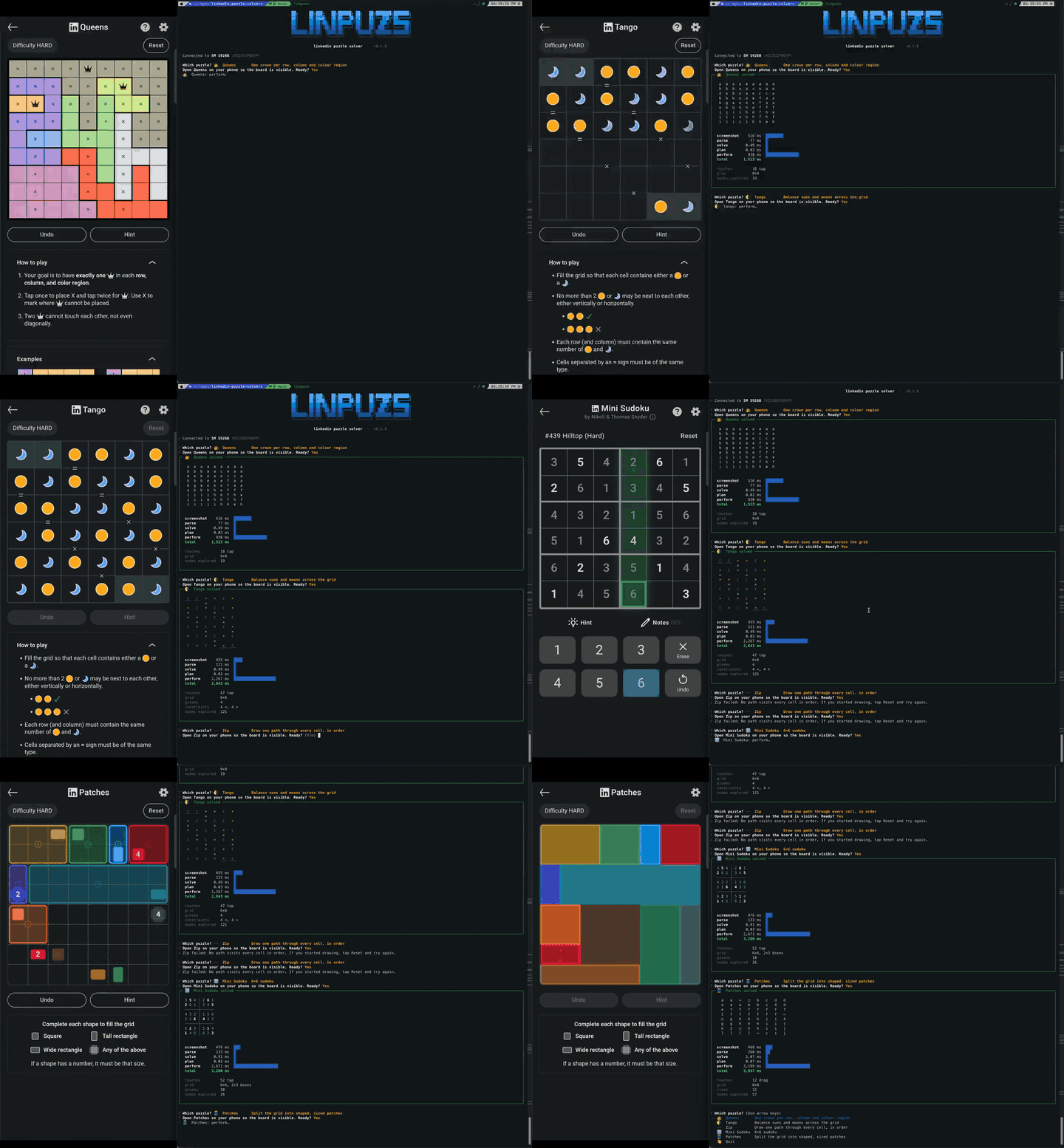
Supported games
| Game | Goal |
|---|---|
| 👑 Queens | Place one crown in every row, column and colour region, with no two touching |
| 🌗 Tango | Fill the grid with suns and moons: balanced rows and columns, no three in a row, respecting = and × |
| 〰️ Zip | Draw one path through every cell, passing the numbered dots in order |
| 🔢 Mini Sudoku | Fill every row, column and 2×3 box with 1–6 |
| 🧵 Patches | Split the grid into rectangles matching each clue's shape and size |
Install
You'll need adb (Android platform-tools) on your PATH and USB debugging turned on in your phone's developer options.
With pipx (recommended; needs Python 3.10+):
pipx install linpuzs
With pip (Python 3.10+):
pip install linpuzs
With Homebrew (macOS/Linux):
brew install prat31/tap/linpuzs
To update, run pipx upgrade linpuzs, pip install -U linpuzs or brew upgrade linpuzs.
Usage
Open a puzzle on your phone, then:
linpuzs               # pick a device (if several), pick a game, solve it
linpuzs -g queens     # solve one game, skipping the menu
linpuzs -s SERIAL     # use a specific device
linpuzs -n            # dry run: solve and print the answer, but don't touch the phone
linpuzs --list        # list games and whether they're supported
In the game menu, press a game's key to start it straight away: q Queens, t Tango, z Zip, m Mini Sudoku, p Patches, or e to exit. Arrow keys and Enter work too.
A dry run (-n or --dry-run) reads the board from your phone, solves it and prints the solved board in the terminal, without tapping anything.
Development
You'll need uv and adb on your PATH.
uv sync               # install dependencies
uv run linpuzs        # run from source
Tests
No phone needed. Each game has two test files:
tests/test_<game>.pychecks the real screenshots inmedia/example/.tests/test_<game>_fuzz.pydraws random boards the way the app does, solves them, and replays the touches.
uv run pytest -q                     # everything (~1-2 min)
uv run pytest -q tests/test_zip.py   # one game's screenshot tests
1 maintainer

Metadata
1 maintainer
Release files for linpuzs 0.7.0
For a detailed explanation of source distributions (sdists) and built distributions (wheels), please see the package formats documentation.
Source distribution (sdist)
| File | Size | Uploaded | Provenance | |
|---|---|---|---|---|
| linpuzs-0.7.0.tar.gz | 1.3 MB | With provenance | Details |
Built distribution (wheel)
| File | Interpreter | ABI | Platform | Reset |
|---|---|---|---|---|
| linpuzs-0.7.0-py3-none-any.whl | Python 3 | none | any | Details |
Total release size: 1.3 MB
Release files / linpuzs-0.7.0.tar.gz
| Download URL | linpuzs-0.7.0.tar.gz |
|---|---|
| Size | 1.3 MB |
| Tags | Source |
|
SHA-256 checksum How to use checksums |
0f2823228d1726fdf456c63f24de0d3b2e960665b5171f016c068a2bad8ed156
|
|
BLAKE2b-256 checksum How to use checksums |
fee24dda0fb062b68dcea4f425f5b5ae6cad0eb55f991ff90beccaf1fd27bb92
|
| Upload date | |
|
Uploaded using Trusted Publishing? What is trusted publishing? |
Yes |
| Uploaded via |
twine/7.0.0 CPython/3.13.16
|
Provenance
Provenance describes where a file came from. On PyPI, provenance is shared via attestations, which provide a verifiable record of the build or publishing details. View details, limitations and caveats.


PyPI Publish Attestation
PyPI verified that this artifact, at this checksum, originated from the publisher listed below.
Signed by GitHub Actions, verified by PyPI on Oct 24, 2026.
Transparency logRelease files / linpuzs-0.7.0-py3-none-any.whl
| Download URL | linpuzs-0.7.0-py3-none-any.whl |
|---|---|
| Size | 37.5 kB |
| Tags | Python 3 |
|
SHA-256 checksum How to use checksums |
7662b65aeffabb80cb26f6009d48938237f5b3020982c4a1a0c6e196761dc3e5
|
|
BLAKE2b-256 checksum How to use checksums |
04993e65bbf09ea17e62577b9d4fde17c49b11a192a7b683355b2b2d6309d692
|
| Upload date | |
|
Uploaded using Trusted Publishing? What is trusted publishing? |
Yes |
| Uploaded via |
twine/7.0.0 CPython/3.13.16
|
Provenance
Provenance describes where a file came from. On PyPI, provenance is shared via attestations, which provide a verifiable record of the build or publishing details. View details, limitations and caveats.
PyPI Publish Attestation
PyPI verified that this artifact, at this checksum, originated from the publisher listed below.
Signed by GitHub Actions, verified by PyPI on Oct 24, 2026.
Transparency logSecurity for linpuzs 0.7.0
Provenance
Provenance describes where a file came from. On PyPI, provenance is shared via attestations, which provide a verifiable record of the build or publishing details. View details, limitations and caveats.
Full provenance
All 2 files in this release have been uploaded with provenance metadata.
Attestation for linpuzs-0.7.0.tar.gz
PyPI Publish Attestation
PyPI verified that this artifact, at this checksum, originated from the publisher listed below.
Signed by GitHub Actions, verified by PyPI on Oct 24, 2026.
Transparency logA note on package security
PyPI is a repository for distributing packages, not a service for auditing them. While third-party security researchers and our staff do their best to detect and remove malicious packages, PyPI cannot guarantee the quality, security or suitability of any given package.
To learn more about protecting yourself from malicious actors, visit our package security documentation.














