
LiQuer - Pointcloud Viewer is tool for exploratory data analysis.

Project description
Pointcloud viewer
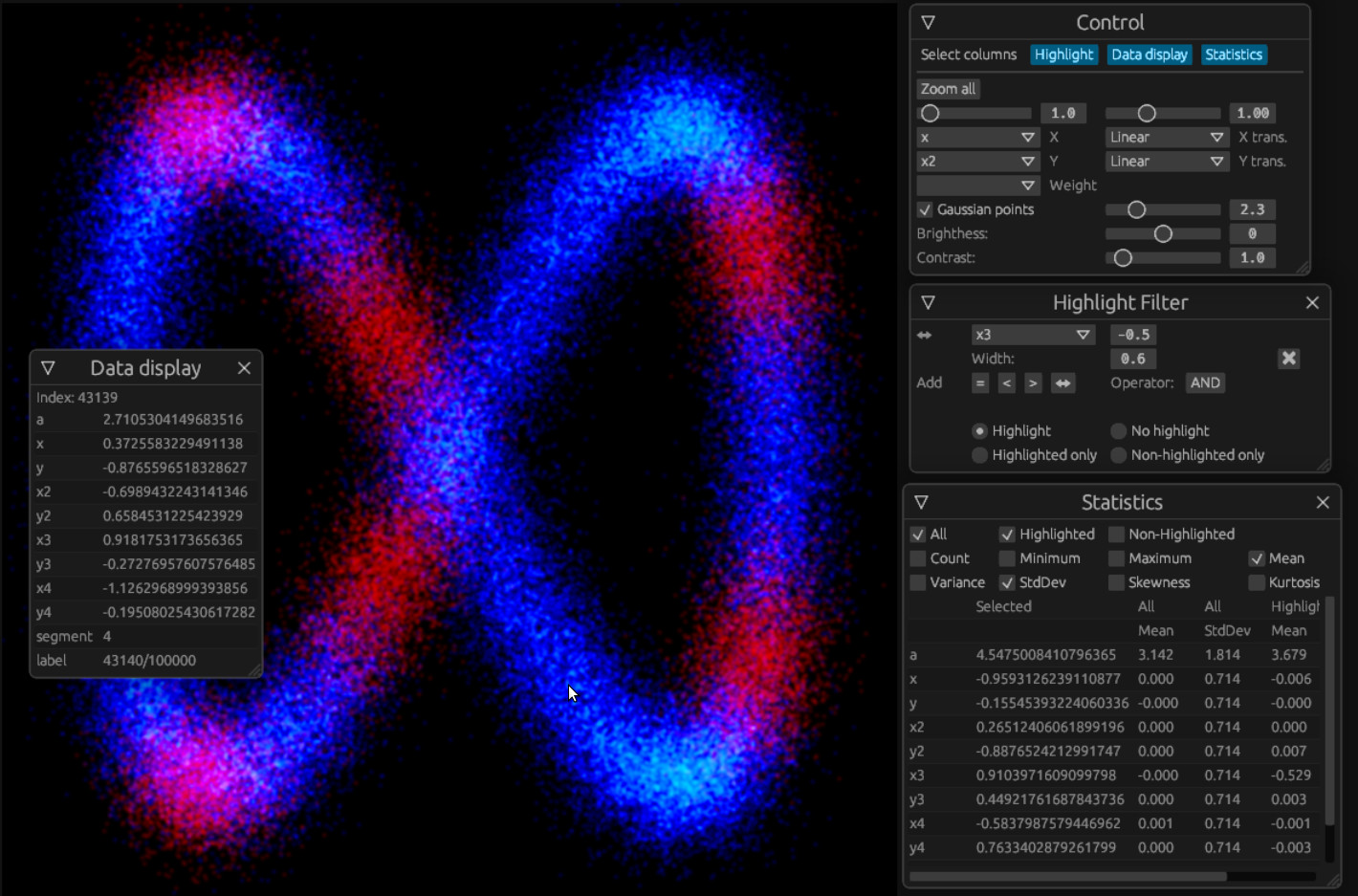
Pointcloud viewer is a tool for visualization and exploratory data analysis. It can read tabular data (i.e. a dataframe) and display selected columns in 2D. Pointcloud viewer is designed to handle large amount of points (tested up to 2M), where the point density is more relevant than individual points. Point density is shown by a color gradient. To help to make points more visible (especially in smaller datasets), points can be smeared by a Gaussian function.
See live demo.
Features
- Display selected columns
- Data in the selected columns can be transformed to a different scale: linear, logarithmic or quantile.
- Display the point density via a color gradient with tunable brightness
- Zoom, move, change aspect ratio
- Show the row of data under the mouse cursor
- Optional Gaussian smearing
- Optionally specify a weight for each point
- Highlighting groups of points
- Highlighting supports four different modes (depending what data are shown)
- Columns can be searched/reduced (which comes handy in datasets with many columns)
- Statistics
- Flexible filter for highlighting points and statistics
- Pointcloud viewer can be compiled to webassembly and used on the web - either in connection to LiQuer framework or standalone. It as well can be compiled to a desktop application.
LiQuer support
Pointcloud viewer is designed for LiQuer
Install
Assuming you have a LiQuer system set up, you can add Pointcloud viewer by
pip install liquer-pcv
In the code, when importing LiQuer command modules, use
import liquer_pcv
This will add a 'pointcloud' command, which can be used in an interractive LiQuer session to display the dataframe. Simply finish a LiQuer query with 'pointcloud-viewer.html' and the display will show up.
See example.
Standalone
Pointcloud viewer can as well be run as a standalone desktop application.
PLEASE NOTE: Currently there is a limitation, that the data are always read from the 'data.csv' file.
Install
If you don't have a rust toolchain, install it as described on the rust web-site:
curl --proto '=https' --tlsv1.2 -sSf https://sh.rustup.rs | sh
Then get the source code and build it
git clone https://github.com/orest-d/pointcloud-viewer-rs.git
cd pointcloud-viewer-rs
cargo build --release
The application can be found in 'target/release' directory. Copy your data into 'data.csv' in the same directory as the executable before you start it.
News
- 2021-11-27 - v0.3.0 - Flexible highlight filter and improved statistics, contrast and a nicer GUI
Credits
- Rust - It has been a great experience to use rust as a main language for this project.
- Egui - fantastic GUI library, easy to use, very portable. I would not even start working on this project without egui...
- Macroquad - another great library that Pointcloud Viewer is based on.
- Egui-macroquad - egui bindings for macroquad.


Download files
Download the file for your platform. If you're not sure which to choose, learn more about installing packages.
Source Distribution
Built Distribution
Filter files by name, interpreter, ABI, and platform.
If you're not sure about the file name format, learn more about wheel file names.
Copy a direct link to the current filters
File details
Details for the file liquer-pcv-0.3.0.tar.gz.
File metadata
- Download URL: liquer-pcv-0.3.0.tar.gz
- Upload date:
- Size: 1.2 MB
- Tags: Source
- Uploaded using Trusted Publishing? No
- Uploaded via: twine/3.2.0 pkginfo/1.6.1 requests/2.24.0 setuptools/41.2.0 requests-toolbelt/0.9.1 tqdm/4.51.0 CPython/3.8.2
File hashes
| Algorithm | Hash digest | |
|---|---|---|
| SHA256 |
cb71ffe8bca39dce9153a5ec108aa8730da9b4cbf96f2f9cc0183c167c71965b
|
|
| MD5 |
43af1d178acfeedcc607ac52c605bdb3
|
|
| BLAKE2b-256 |
608448bf5e468d3ead56f5f77e9cbf91108ce3320837cb17f5831ca526ac4e8d
|
File details
Details for the file liquer_pcv-0.3.0-py3-none-any.whl.
File metadata
- Download URL: liquer_pcv-0.3.0-py3-none-any.whl
- Upload date:
- Size: 1.2 MB
- Tags: Python 3
- Uploaded using Trusted Publishing? No
- Uploaded via: twine/3.2.0 pkginfo/1.6.1 requests/2.24.0 setuptools/41.2.0 requests-toolbelt/0.9.1 tqdm/4.51.0 CPython/3.8.2
File hashes
| Algorithm | Hash digest | |
|---|---|---|
| SHA256 |
0d1ce3f4002823e9f5cd3a5e45615e17f0f5cf752e76fd7299b5cd8e95d3871d
|
|
| MD5 |
d90adf88dccf43f3d68f10d330b0c500
|
|
| BLAKE2b-256 |
4d68865ce0a1816d2d6614f3d6b2a0cfb43df6ac7c94b35ce67a46e4d9dba5b5
|






