
liquiphy_gui
A quick and dirty GUI interface to the liquidsfz command-line using python's subprocess.
Need to listen to an .sfz file without a lot of hassle? Use liquiphy_gui!
$ liquiphy-gui <path-to-sfz>
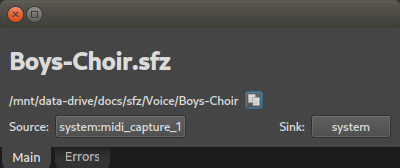
The above command loads the given .sfz file in a liquidsfz instance and
automatically connects the Jack MIDI input and Jack audio outputs to the first
available (physical) ports, displaying the SFZ name and ports connected in a
simple dialog.
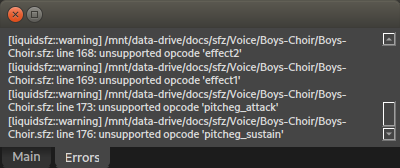
Errors that liquidsfsz reported during parsing show up in the "Errors" tab:
Hit the Escape key or ctrl-Q to exit.
Install
Install liquidsfz
You must install liquidsfz first for this package to work. To install:
- Make sure you have all the build dependencies:
$ sudo apt install \
	automake autoconf autoconf-archive libtool \
	libjack-jackd2-dev libreadline-dev lv2-dev libsndfile1-dev \
	libgl-dev libxrandr-dev libxcursor-dev libxext-dev
- Clone the repo:
$ git clone https://github.com/swesterfeld/liquidsfz.git
- Ensure the repo's submodules exist and are up-to-date. Enter the repo dir and update:
$ cd liquidsfz
$ git submodule update --init --recursive
- Run the autogen script found in the repo directory:
$ ./autogen.sh
- Then, do the configure, make, install routine:
./configure
make
make install
Install liquiphy_gui
Install this package (liquiphy_gui) using python pip:
$ pip install liquiphy_gui
...or...
$ python3 -m pip install liquiphy_gui
File associations
If you would like to open .sfz files in liquiphy-gui by double-clicking them in your file explorer, you can add an association.
-
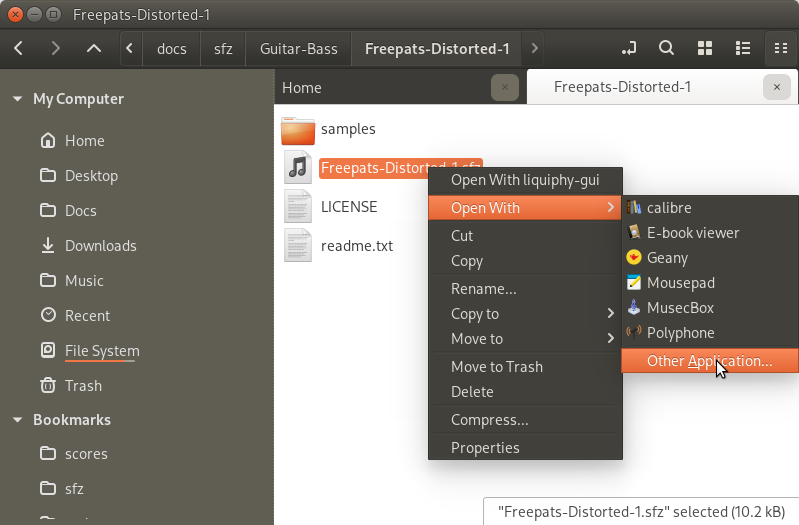
Right click on an .sfz file to bring up the context menu.
-
Select "Open With", and then "Other Application"
- In the dialog show, look for "liquiphy-gui" in the list of applications, and then click "Set as default".
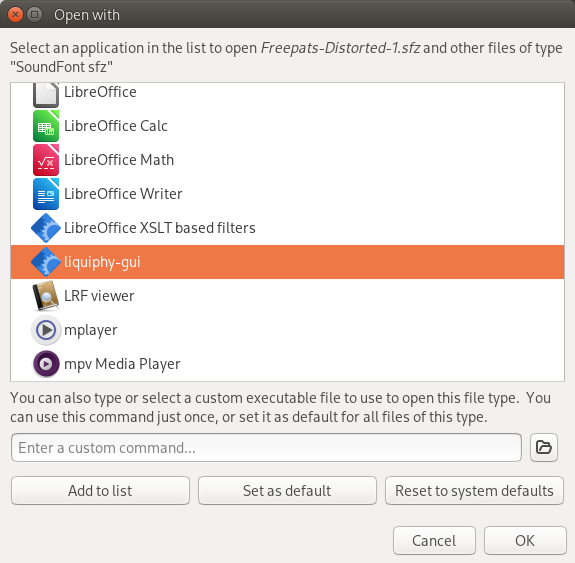
Now, all it takes to preview an .sfz is double-clicking on it. Jack ports are instantly connected, and you have your live preview.
1 maintainer

Download files
Download the file for your platform. If you're not sure which to choose, learn more about installing packages.
Source Distribution
Built Distribution
Filter files by name, interpreter, ABI, and platform.
If you're not sure about the file name format, learn more about wheel file names.
Copy a direct link to the current filters
File details
Details for the file liquiphy_gui-1.5.2.tar.gz.
File metadata
- Download URL: liquiphy_gui-1.5.2.tar.gz
- Upload date:
- Size: 16.8 kB
- Tags: Source
- Uploaded using Trusted Publishing? No
- Uploaded via:
twine/6.2.0 CPython/3.14.4
File hashes
| Algorithm | Hash digest | |
|---|---|---|
| SHA256 |
7964c3abf6701f303c2760cbfefdb086ebefe181a956e59119f0ccc1fa22e4cc
|
|
| MD5 |
00461e350067f66e835974445efbf43c
|
|
| BLAKE2b-256 |
09ad6b99395d4ab837e11d0c49bcd17027587aafee286d20f2bb7236253ce775
|
File details
Details for the file liquiphy_gui-1.5.2-py2.py3-none-any.whl.
File metadata
- Download URL: liquiphy_gui-1.5.2-py2.py3-none-any.whl
- Upload date:
- Size: 17.6 kB
- Tags: Python 2, Python 3
- Uploaded using Trusted Publishing? No
- Uploaded via:
twine/6.2.0 CPython/3.14.4
File hashes
| Algorithm | Hash digest | |
|---|---|---|
| SHA256 |
3678b240f94301e0a24a78400954331f5c4a23c45ffbd057c6d3b95cc69a5951
|
|
| MD5 |
cc95dd0e3b98e785756f9ae36b36988b
|
|
| BLAKE2b-256 |
44475ae3dad683edf3087f117520eb2bb74701131184744900120e8bef495b17
|














