
lc
lc lists local coding-agent sessions for the Git repository you are in. It reads local session stores only; no transcript leaves your machine.
Install
Install the published package with uv:
uv tool install list-coding-agents
pipx and pip work too:
pipx install list-coding-agents
python3 -m pip install --user list-coding-agents
To install a development checkout instead:
sh scripts/install.sh
The checkout installer prefers uv tool install, then pipx, then pip --user. Make sure the resulting scripts directory is on your PATH, then run lc.
The current PyPI distribution is list-coding-agents version 0.2.0. Its import package and command are both still lc:
lc --version
Quick start
# Sessions for the current repository
lc

# Browse another directory
lc -I ~/projects/lc

# Restrict to agents; an existing directory can be positional too
lc codex claude
lc ~/projects/lc codex

# Every repository or machine-readable output
lc --all
lc --json
By default, lc shows at most 40 matching sessions. Use --limit 0 for all of them.
Filters
lc --agent codex --agent claude
lc -X gemini
lc --only-folder api
lc --except-folder 'worktrees/*'
lc --ids
lc --no-size
--only-folder and --except-folder accept a subdirectory, absolute path, glob, or bare directory name. lc --help has the full option list.
Interactive browser
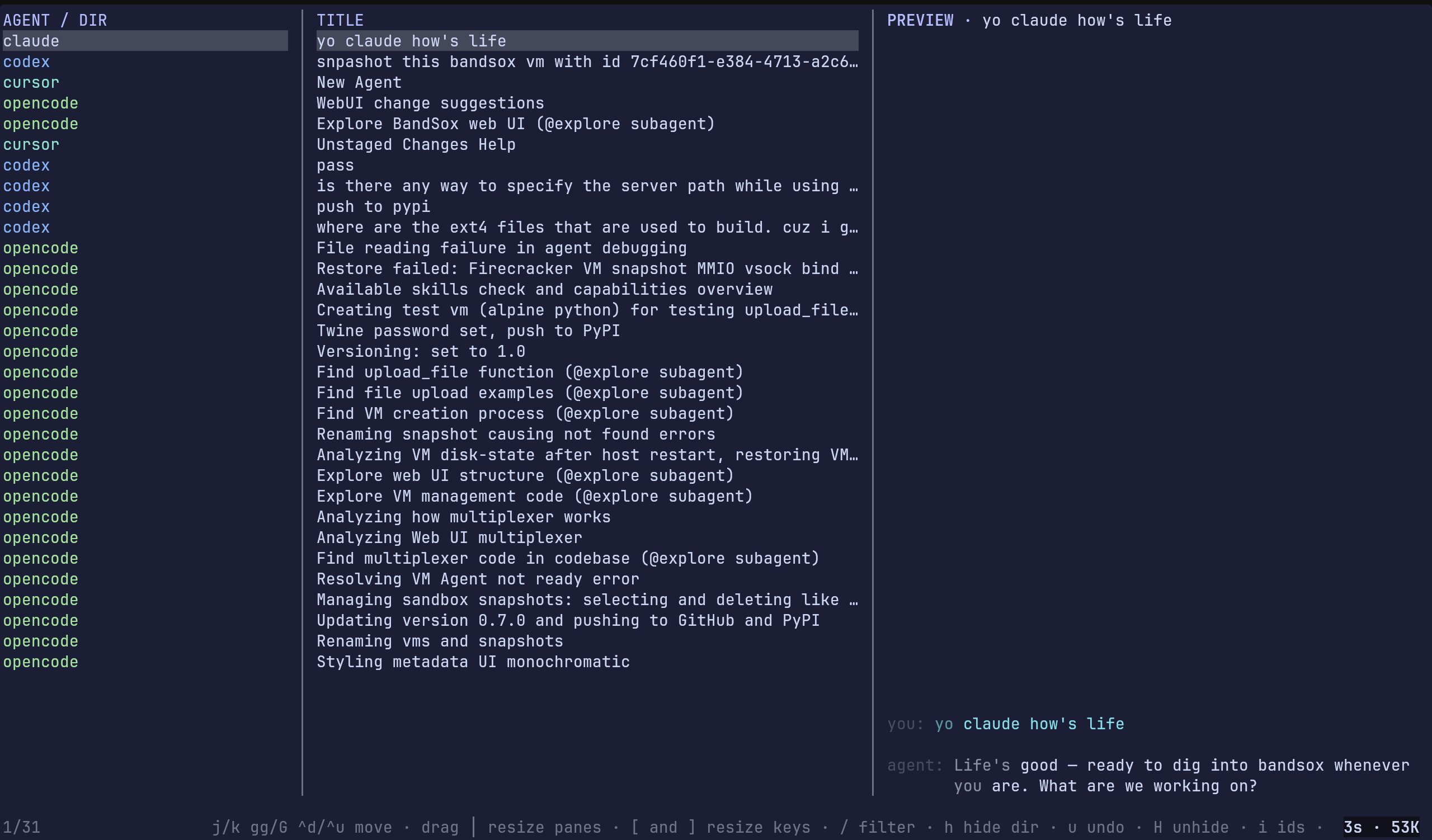
lc -I opens a terminal browser with an agent/directory pane, a title pane, and a Markdown-rendered preview. Codex is blue; Claude Code uses the orange accent.
| Key or action | Result |
|---|---|
j / k, arrows |
Move through sessions |
gg / G |
First / last session |
Ctrl-D / Ctrl-U, Page Up / Down |
Move by a page |
/ |
Filter agent, directory, or title |
Drag │ |
Resize panes |
[ / ] |
Resize the title pane without a mouse |
h, u, H |
Hide a directory, undo, or restore all |
i |
Toggle IDs |
Enter |
Resume when the agent supports it |
p |
Print the selected transcript path |
q or Esc |
Quit |
The selected session's age and transcript size appear at the bottom right.
Names and performance
Codex, Claude Code, and pi native names take precedence. Other stores fall back to the first useful user prompt. Generic startup titles and injected context are ignored.
Codex rollouts can add up. lc reads compact metadata first and only opens a full transcript when it needs a title. It keeps a disposable local cache at:
$XDG_CACHE_HOME/lc/codex-sessions.json
If XDG_CACHE_HOME is unset, the path is ~/.cache/lc/codex-sessions.json. The cache is validated with transcript timestamp and size. Delete it whenever you want; lc will rebuild it.
Supported stores
Claude Code, Codex, Droid, OpenCode, Cursor, GitHub Copilot, Grok, Kimi, Gemini, and pi. Missing stores are ignored.
Development
uv run --no-project python -m unittest discover -s tests -q
The tests cover title fallbacks and the Codex cache contract.
1 maintainer

Metadata
1 maintainer
Release files for list-coding-agents 0.2.0
For a detailed explanation of source distributions (sdists) and built distributions (wheels), please see the package formats documentation.
Source distribution (sdist)
| File | Size | Uploaded | Provenance | |
|---|---|---|---|---|
| list_coding_agents-0.2.0.tar.gz | 24.5 kB | Without provenance | Details |
Built distribution (wheel)
| File | Interpreter | ABI | Platform | Reset |
|---|---|---|---|---|
| list_coding_agents-0.2.0-py3-none-any.whl | Python 3 | none | any | Details |
Total release size: 50.7 kB
Release files / list_coding_agents-0.2.0.tar.gz
| Download URL | list_coding_agents-0.2.0.tar.gz |
|---|---|
| Size | 24.5 kB |
| Tags | Source |
|
SHA-256 checksum How to use checksums |
601664ea6cc63835a079abb0cf6347a648f551abce8edfb2cd80c377ac9c9ded
|
|
BLAKE2b-256 checksum How to use checksums |
c8bf10ea5abe0444b7785d42fc4344af8d9a1c5f0c579a9ff944638bd22d216c
|
| Upload date | |
|
Uploaded using Trusted Publishing? What is trusted publishing? |
No |
| Uploaded via |
uv/0.12.9 {"installer":{"name":"uv","version":"0.12.9","subcommand":["publish"]},"python":null,"implementation":{"name":null,"version":null},"distro":{"name":"Garuda Linux","version":null,"id":null,"libc":null},"system":{"name":null,"release":null},"cpu":null,"openssl_version":null,"setuptools_version":null,"rustc_version":null,"ci":null}
|
Release files / list_coding_agents-0.2.0-py3-none-any.whl
| Download URL | list_coding_agents-0.2.0-py3-none-any.whl |
|---|---|
| Size | 26.2 kB |
| Tags | Python 3 |
|
SHA-256 checksum How to use checksums |
92de74c73afe7585ec75c942b78ceebdb8a1c7478e53226a0fcd80c4b901a552
|
|
BLAKE2b-256 checksum How to use checksums |
a948f5d566fbfa7c4b84979d8b73821e75c1f47d3aba05f8adbbb892351a359f
|
| Upload date | |
|
Uploaded using Trusted Publishing? What is trusted publishing? |
No |
| Uploaded via |
uv/0.12.9 {"installer":{"name":"uv","version":"0.12.9","subcommand":["publish"]},"python":null,"implementation":{"name":null,"version":null},"distro":{"name":"Garuda Linux","version":null,"id":null,"libc":null},"system":{"name":null,"release":null},"cpu":null,"openssl_version":null,"setuptools_version":null,"rustc_version":null,"ci":null}
|
Security for list-coding-agents 0.2.0
Provenance
Provenance describes where a file came from. On PyPI, provenance is shared via attestations, which provide a verifiable record of the build or publishing details. View details, limitations and caveats.
No provenance found
None of the files in this release were uploaded with provenance metadata.
A note on package security
PyPI is a repository for distributing packages, not a service for auditing them. While third-party security researchers and our staff do their best to detect and remove malicious packages, PyPI cannot guarantee the quality, security or suitability of any given package.
To learn more about protecting yourself from malicious actors, visit our package security documentation.














