

Listenr
Build better speech-to-text and ASR models entirely on your machine.
Record your voice. Clean it up with local AI. Fine-tune Whisper or Moonshine. Deploy something that's actually yours.
Walkthrough | Setup | Configuration | Recording | Dataset | Troubleshooting

How it works
- Create good data - Use Listenr to record and collect natural speech with domain-specific vocabulary that generic models miss.
- Process & improve - Pipe it through Lemonade or any OpenAI-compatible provider to transcribe with Whisper and automatically correct grammar, punctuation, and homophones using a local LLM.
- Fine-tune & deploy - Use Listenr to build train/dev/test splits and fine-tune Whisper or Moonshine with LoRA. Merge the adapter into a self-contained model you can deploy.
Everything stays local - no audio, text, or weights ever leave on your machine.
Get started
Install Lemonade and pull models:
Lemonade guide: lemonade-server.ai/docs/guide/install
# after installing locally, download default models
lemonade pull Whisper-Base
lemonade pull gpt-oss-20b-mxfp4-GGUF
Install Listenr and start recording:
uv tool install listenr   # or: pipx install listenr
listenr record            # start recording
Working on Listenr itself? Clone the repo and uv pip install -e ".[dev]" instead.
Once you have recordings, process & fine-tune:
# Build train/dev/test splits from your manifest
listenr build-dataset --format hf

# Fine-tune Whisper or Moonshine (see docs/finetune-amd.md for AMD GPUs)
podman compose run --rm finetune

# Merge the LoRA adapter into a standalone model
podman compose run --rm merge

# Evaluate it on the held-out test split
listenr eval --compare-base --keyword YourDomainWord
See docs/setup.md for full installation details.
If you want to mix in an external ASR dataset, use the optional importers to
write a separate Listenr-compatible manifest — listenr import-mdc <dataset-id>
(Mozilla Data Collective) or listenr import-hf <dataset-id> (Hugging Face) —
then pass that manifest to listenr build-dataset alongside your normal one.
See docs/dataset.md for details.
Under the hood
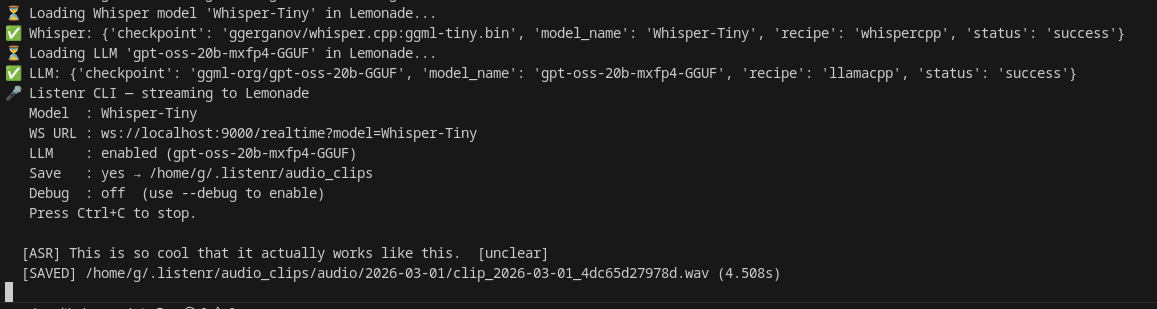
Recording & transcription - Listenr streams your microphone to Lemonade's /realtime WebSocket in ~85 ms chunks (16 kHz). Lemonade's voice activity detection segments speech, runs Whisper.cpp, and streams back transcripts.
Auto-correction - A local LLM cleans up punctuation, grammar, and homophones, producing a higher-quality training corpus than raw Whisper output alone.
Dataset & fine-tuning - Listenr saves each utterance as a .wav clip and a line in manifest.jsonl. One command builds train/dev/test splits in HuggingFace format. Another command fine-tunes any openai/whisper-* or UsefulSensors/moonshine-* model using LoRA (works on AMD and NVIDIA GPUs via Podman). Moonshine is the smaller, English-only, edge-oriented option; Whisper is the multilingual all-rounder.
Deployment - listenr merge folds the LoRA adapter into a self-contained model that loads with plain transformers. No PEFT dependency. Run inference locally or deploy it anywhere.
Documentation
| Guide | Description |
|---|---|
| docs/setup.md | Installation, Lemonade Server, microphone setup |
| docs/configuration.md | Full config.toml reference, VAD tuning, available models |
| docs/recording.md | CLI usage, how recording works, batch transcription |
| docs/dataset.md | Building train/dev/test splits, CSV and HF formats, and the optional Mozilla Data Collective import |
| docs/finetune-amd.md | Fine-tuning Whisper on AMD GPU via ROCm + Podman, merging, and inference testing |
| docs/troubleshooting.md | Common errors and fixes |
Acknowledgments
- Lemonade Server - unified local inference API
- whisper.cpp - fast local ASR
- llama.cpp - fast local LLMs
License
Mozilla Public License Version 2.0 - see LICENSE.
1 maintainer

Download files
Download the file for your platform. If you're not sure which to choose, learn more about installing packages.
Source Distribution
Built Distribution
Filter files by name, interpreter, ABI, and platform.
If you're not sure about the file name format, learn more about wheel file names.
Copy a direct link to the current filters
File details
Details for the file listenr-0.1.0.tar.gz.
File metadata
- Download URL: listenr-0.1.0.tar.gz
- Upload date:
- Size: 394.0 kB
- Tags: Source
- Uploaded using Trusted Publishing? Yes
- Uploaded via:
twine/7.0.0 CPython/3.13.14
File hashes
| Algorithm | Hash digest | |
|---|---|---|
| SHA256 |
fe13d376fd6bf380a4b0e7e53dccec086ed68948929952dcf06f4d2793eb1cbf
|
|
| MD5 |
6618ecddd70b82cc30f0195a858976f9
|
|
| BLAKE2b-256 |
b4fb376c68ea40d39cd24129a26e4116a99c2b893e4e0aabefe5f786a77f8799
|
Provenance
The following attestation bundles were made for listenr-0.1.0.tar.gz:
Publisher:
release.yml on Rebreda/listenr
-
Statement:
-
Statement type:
https://in-toto.io/Statement/v1 -
Predicate type:
https://docs.pypi.org/attestations/publish/v1 -
Subject name:
listenr-0.1.0.tar.gz -
Subject digest:
fe13d376fd6bf380a4b0e7e53dccec086ed68948929952dcf06f4d2793eb1cbf - Sigstore transparency entry: 2567450086
- Sigstore integration time:
-
Permalink:
Rebreda/listenr@ca85c6af6cfc929e78307d30574b6d64c8e29349 -
Branch / Tag:
refs/tags/v0.1.0 - Owner: https://github.com/Rebreda
-
Access:
public
-
Token Issuer:
https://token.actions.githubusercontent.com -
Runner Environment:
github-hosted -
Publication workflow:
release.yml@ca85c6af6cfc929e78307d30574b6d64c8e29349 -
Trigger Event:
push
-
Statement type:
File details
Details for the file listenr-0.1.0-py3-none-any.whl.
File metadata
- Download URL: listenr-0.1.0-py3-none-any.whl
- Upload date:
- Size: 71.0 kB
- Tags: Python 3
- Uploaded using Trusted Publishing? Yes
- Uploaded via:
twine/7.0.0 CPython/3.13.14
File hashes
| Algorithm | Hash digest | |
|---|---|---|
| SHA256 |
697e95a909e20c33cac8c91b2d32fd236af6e6c6fe74659f4a55ab34c81eb504
|
|
| MD5 |
4605eac763c40531d5ac30052a5436c8
|
|
| BLAKE2b-256 |
eb6a43df7898eee4b01115e2d4f87adaf72f7b2ce44b70b46625cb0db27c6762
|
Provenance
The following attestation bundles were made for listenr-0.1.0-py3-none-any.whl:
Publisher:
release.yml on Rebreda/listenr
-
Statement:
-
Statement type:
https://in-toto.io/Statement/v1 -
Predicate type:
https://docs.pypi.org/attestations/publish/v1 -
Subject name:
listenr-0.1.0-py3-none-any.whl -
Subject digest:
697e95a909e20c33cac8c91b2d32fd236af6e6c6fe74659f4a55ab34c81eb504 - Sigstore transparency entry: 2567450330
- Sigstore integration time:
-
Permalink:
Rebreda/listenr@ca85c6af6cfc929e78307d30574b6d64c8e29349 -
Branch / Tag:
refs/tags/v0.1.0 - Owner: https://github.com/Rebreda
-
Access:
public
-
Token Issuer:
https://token.actions.githubusercontent.com -
Runner Environment:
github-hosted -
Publication workflow:
release.yml@ca85c6af6cfc929e78307d30574b6d64c8e29349 -
Trigger Event:
push
-
Statement type:














