
This release has been yanked by its maintainers, and will be ignored by installers, except when explicitly specified.
Reason given by maintainers: deprecated since listme was rewritten in Go
listme
Summarize you FIXME, TODO, XXX (and other tags) comments so you don't forget them.
Features
- ⚡ Blazingly fast recursive search! Thanks to ripgrep, massive codebases can be scanned very quickly.
- 🌈 A nice and pretty summary with comment counts per tag is printed for each file.
- 🏷 Tags can be customized by the user.
- 🖨 Print the git author of each message, highlighting old commits.
This project was inspired by practical needs and by fixme. Since fixme is no longer maintained, it makes sense to have a new package (this time written in Python using ripgrep written in Rust) with some new features.
Installation
This package requires Python 3.8+, a recent version of git and ripgrep (13.0+). Both git and ripgrep should be available in your PATH. Then install with pip:
pip install listme
Usage
Simply call listme with the folder or file of interest as the first argument.
listme .
You should see an output like this:
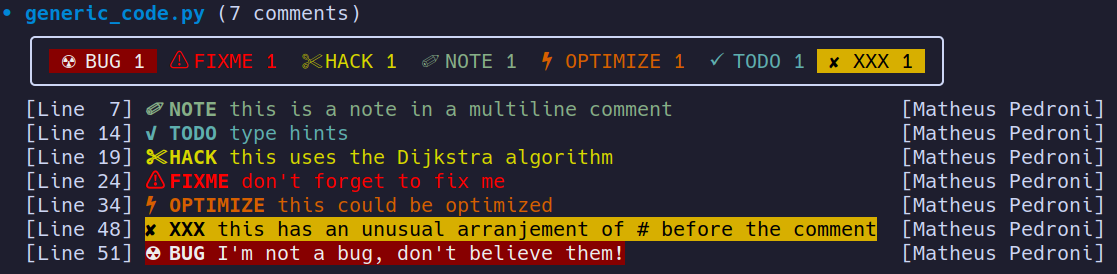
Ripgrep uses .gitignore files present in your folders to ignore certain directories and files. If you want to add filters on top of ripgrep, use the --glob (-g) option.
Comments that were commited too long ago (limit set be the --age-limit parameter) are maked as old before the author's name: [☠ OLD John Doe]
Configuration
Most terminals should support all the Unicode symbols used in this project. If not, a patched font (e.g. one of nerd fonts) is higly recommended. Still, to ensure compatibility across many terminal emulators and fonts, a configuration wizard will pop up the first time you run listme asking if some symbols are rendered correctly.
To run the configuration wizard again, simply run:
listme-config
Options
- path: Path to folder or file to scan for comments with tags.
- --tags (-T): The tags that will be searched, input should be separated by spaces. Tags are shown in the file summary in the order defined here. Default tags: BUG, FIXME, XXX, TODO, HACK, OPTIMIZE, NOTE.
- --glob (-g): Glob pattern to include/exclude files or folders in the search. Must be a single-quoted string. This argument is passed to ripgrep, so check ripgrep documentation for syntax details.
- --age-limit (-l): Age limit (commit age) for comments. Comments older than this limit are marked.
- --relative-path (-r): Use relative paths in the output. This is the default.
- --full-path (-R): Use full absolute paths in the output.
- --author (-a): Print git commit author names. This is the default.
- --no-author (-A): Do not print git commit author names.
- --summary (-s): Print a nice file summary. This is the default.
- --no-summary (-S): Do not print a nice file summary.
- --verbose (-v): print files which were ignored due to parsing errors.
Style options
The output can be printed in full (--full, the default), black-and-white (-b) or plain style (-p). Full style is recommended, and the only difference to black-and-white is (of course) colors.
Plain style is aimed towards machine consumption. The format is basically a filename line followed by all the comments in the format TAG:text. All comment lines are indented with one tab.
1 maintainer

Metadata
1 maintainer
Release files for listme 0.2
For a detailed explanation of source distributions (sdists) and built distributions (wheels), please see the package formats documentation.
Source distribution (sdist)
| File | Size | Uploaded | Provenance | |
|---|---|---|---|---|
| listme-0.2.tar.gz | 46.5 kB | Without provenance | Details |
Built distribution (wheel)
| File | Interpreter | ABI | Platform | Reset |
|---|---|---|---|---|
| listme-0.2-py3-none-any.whl | Python 3 | none | any | Details |
Total release size: 80.4 kB
Release files / listme-0.2.tar.gz
| Download URL | listme-0.2.tar.gz |
|---|---|
| Size | 46.5 kB |
| Tags | Source |
|
SHA-256 checksum How to use checksums |
cccc1e2013b18ef6f358da32357e68da376215f58ef1f5ce53db4d4c3a62a847
|
|
BLAKE2b-256 checksum How to use checksums |
fe3b19269196cc26ed2b3cb588c453e5d0341a735d194df87419649a43af973e
|
| Upload date | |
|
Uploaded using Trusted Publishing? What is trusted publishing? |
No |
| Uploaded via |
twine/4.0.2 CPython/3.10.8
|
Release files / listme-0.2-py3-none-any.whl
| Download URL | listme-0.2-py3-none-any.whl |
|---|---|
| Size | 33.9 kB |
| Tags | Python 3 |
|
SHA-256 checksum How to use checksums |
d6c1a9125b4a734d8d8dcd6890e4d3ffa91a5745581e8e5b0f8301c97dcfaddb
|
|
BLAKE2b-256 checksum How to use checksums |
8ec7e553326be4558a28073d6c5ffff52d9f598120320c7bd34f7f58ada5eda3
|
| Upload date | |
|
Uploaded using Trusted Publishing? What is trusted publishing? |
No |
| Uploaded via |
twine/4.0.2 CPython/3.10.8
|
Security for listme 0.2
Provenance
Provenance describes where a file came from. On PyPI, provenance is shared via attestations, which provide a verifiable record of the build or publishing details. View details, limitations and caveats.
No provenance found
None of the files in this release were uploaded with provenance metadata.
A note on package security
PyPI is a repository for distributing packages, not a service for auditing them. While third-party security researchers and our staff do their best to detect and remove malicious packages, PyPI cannot guarantee the quality, security or suitability of any given package.
To learn more about protecting yourself from malicious actors, visit our package security documentation.













