
listpick
listpick is a powerful TUI data tool for viewing, editing and operating upon tabulated data; can be used to build TUI applications, generate data columns, or function as a command-line utility.
NOTE: listpick is still in development.
Quickstart
Install listpick:
python -m pip installl "listpick[full]"
Create a Picker:
from listpick.listpick_app import Picker, start_curses, close_curses

if __name__ == "__main__":
    stdscr = start_curses()

    x = Picker(
        stdscr,
        items=[
            ["row zero column zero", "row zero column one"],
            ["row one column zero", "row one column one"]
        ],
        header=["H0", "H1"],
        cell_cursor=True,
    )
    x.run()

    close_curses(stdscr)
Overview
The application allows you to:
- Select multiple items from different file types and input streams
- Delete individual items
- Highlight specific items for quick selection
- Filtering: supports regular expressions for row- and column-based filtering.
- Searching: supports regular expressions for row- and column-based searching.
- Sort data based on specified columns and sort-type
- Save and load data.
- Copy/paste selections to clipboard
- Generate rows from a list of commands in an input.toml file.
Examples
listpick as a command-line tool
listpick can be used as a command-line tool for tabulating command outputs:
df -h | listpick --stdin

Applications
Aria2TUI
Aria2TUI: TUI client for the aria2c download utility.

lpfman
lpfman: Terminal file manager with extensive column support.
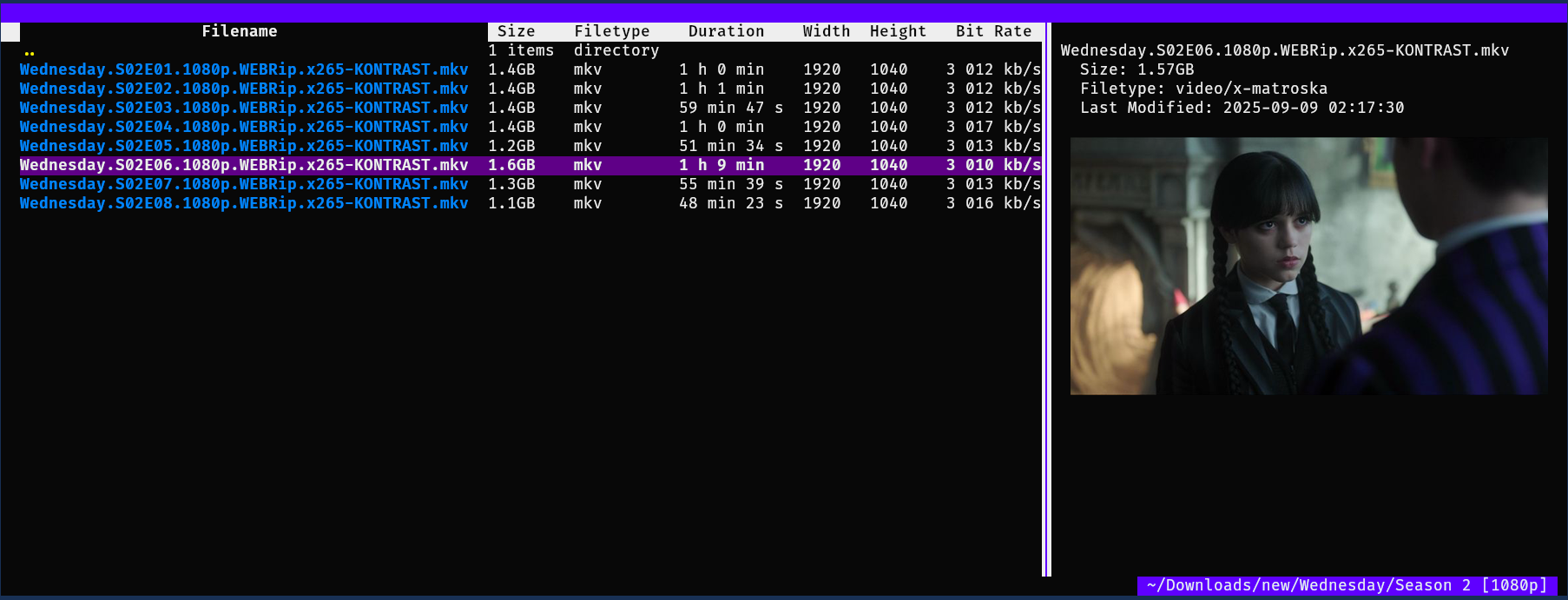
Data generation from toml file
listpick -g ./listpick/examples/data_generation/video_duplicates.toml
-
From the list of commands in the toml file we generate the properties we will use to identify the duplicates.
-
In the example file we set the directory and get the files with a simle
eza(ls) command. We could also usefindorcatfrom a list of files. -
We get the SHA1 hash to identify identical files; we also get the size, duration, resolution, and bitrate so that we can identify a video duplicate that may have the same duration but a lower resolution.

Description
Key Features:
- File Input Support:
listpick -i ~/items.csv
- Text files (TSV, CSV)
- JSON
- XLSX
- ODS
- Pickle
- Pipe data to listpick:
df -h | listpick --stdin
- Generate data based on an toml file with relevant commands to generate the rows.
listpick -g ./examples/data_generation/video_duplicates.toml
- See
./examples/data_generation/
- Highlighting:
- Highlight specific strings for display purposes.
- E.g., when we search for a string we will highlight strings in the rows that match the search.
- Filtering and Sorting:
- Apply custom filters and sort criteria on the fly
- Modes:
- Default modes are supported so that a certain filter/search/sort can structure the data in a way that is easy to move between.
- Options:
- Along with returning the selected rows, the user can also return options.
- Input field with readline support
- Options select box
- Colour themes:
- Several colour themes are available
- Copy rows:
- 'y' to copy rows in various formats: CSV, TSV, python list
- Save data:
- Data can be saved so that it can be loaded with the -i flag.
- This is very helpful if your data generation takes a long time.
- Customisable keybinds:
- The Picker object takes a keys_dict variable which allows all keys to be customised. Default keys can be seen in src/listpick/ui/keys.py.
- Also allows the restriction of certain functions by not assigning a key.
- Dynamic or manual refresh of data:
- If a refresh_function is passed with auto_refresh=True then listpick will automatically refresh the data. - If a refresh_function is passed then one can also manually refresh by pressing f5.
- Notifications.
- Supports notifications upon certain events
- Visual options
- Display/hide title.
- Display/hide footer with selection information
- Display/hide columns
- Display/hide highlights
- Option to centre in cells, centre in terminal and centre rows vertically.
- Change settings on the fly.
- Press '~' to see list of display settings or press '`' to enter a command to change display settings.
- Change visual options
- Cycle through themes
- Centre data in cells or centre rows vertically
- Show/hide the footer
- Show/hide a specific column.
- Select a column
- Toggle auto-refresh
- Toggle highlights
- Pipe the data from the selected rows in the focussed column to a bash command ('|')
- By default when you press '|' it will fill the input field with
xargs. You can remove this if you like (^U). - For example, if you run
xargs -d '\n' -I {} notify-send {}to this it will display notifications containing the data from the current column - Useful for:
- Opening files with a specific application
xargs -d \n -I{} mpv {}will open the files in mpv - Dumping data.
xargs -d \n -I{} echo {} > ~/stuff.txt
- Opening files with a specific application
Support and Feedback
Feel free to request features. Please report any errors you encounter with appropriate context.
1 maintainer

Metadata
1 maintainer
Release files for listpick 0.1.18.1
For a detailed explanation of source distributions (sdists) and built distributions (wheels), please see the package formats documentation.
Source distribution (sdist)
| File | Size | Uploaded | |
|---|---|---|---|
| listpick-0.1.18.1.tar.gz | 96.2 kB | Details |
Built distribution (wheel)
| File | Interpreter | ABI | Platform | Reset |
|---|---|---|---|---|
| listpick-0.1.18.1-py3-none-any.whl | Python 3 | none | any | Details |
Total release size: 204.2 kB
Release files / listpick-0.1.18.1.tar.gz
| Download URL | listpick-0.1.18.1.tar.gz |
|---|---|
| Size | 96.2 kB |
| Tags | Source |
|
SHA-256 checksum How to use checksums |
8bf0f4387144f704f2399ef4d8ff36000b30b3e2aae914a778c2f797c0aef0ef
|
|
BLAKE2b-256 checksum How to use checksums |
6db626918430385ccc61d21a8afeda5564c4321d1434f484706e2725d8a37e4f
|
| Upload date | |
|
Uploaded using Trusted Publishing? What is trusted publishing? |
No |
| Uploaded via |
twine/6.2.0 CPython/3.9.6
|
Release files / listpick-0.1.18.1-py3-none-any.whl
| Download URL | listpick-0.1.18.1-py3-none-any.whl |
|---|---|
| Size | 108.0 kB |
| Tags | Python 3 |
|
SHA-256 checksum How to use checksums |
48f622f57c82b5a549206ed3e088a6860cf1e83eef4833e33cb2e575c981eb21
|
|
BLAKE2b-256 checksum How to use checksums |
55ab5911427e3cfaa4ca2ffa12d85e7b094b5ce11123e8e11269c457cdee255e
|
| Upload date | |
|
Uploaded using Trusted Publishing? What is trusted publishing? |
No |
| Uploaded via |
twine/6.2.0 CPython/3.9.6
|














