
listpick
listpick is a powerful TUI data tool for viewing, editing and operating upon tabulated data; can be used to build TUI applications, generate data columns, or function as a command-line utility.
NOTE: listpick is still in development.
Quickstart
Install listpick:
python -m pip installl "listpick[full]"
Create a Picker:
from listpick.listpick_app import Picker, start_curses, close_curses

if __name__ == "__main__":
    stdscr = start_curses()

    x = Picker(
        stdscr,
        items=[
            ["row zero column zero", "row zero column one"],
            ["row one column zero", "row one column one"]
        ],
        header=["H0", "H1"],
        cell_cursor=True,
    )
    x.run()

    close_curses(stdscr)
Overview
The application allows you to:
- Select multiple items from different file types and input streams
- Delete individual items
- Highlight specific items for quick selection
- Filtering: supports regular expressions for row- and column-based filtering.
- Searching: supports regular expressions for row- and column-based searching.
- Sort data based on specified columns and sort-type
- Save and load data.
- Copy/paste selections to clipboard
- Generate rows from a list of commands in an input.toml file.
Examples
listpick as a command-line tool
listpick can be used as a command-line tool for tabulating command outputs:
df -h | listpick --stdin

Applications
Aria2TUI
Aria2TUI: TUI client for the aria2c download utility.

lpfman
lpfman: Terminal file manager with extensive column support.
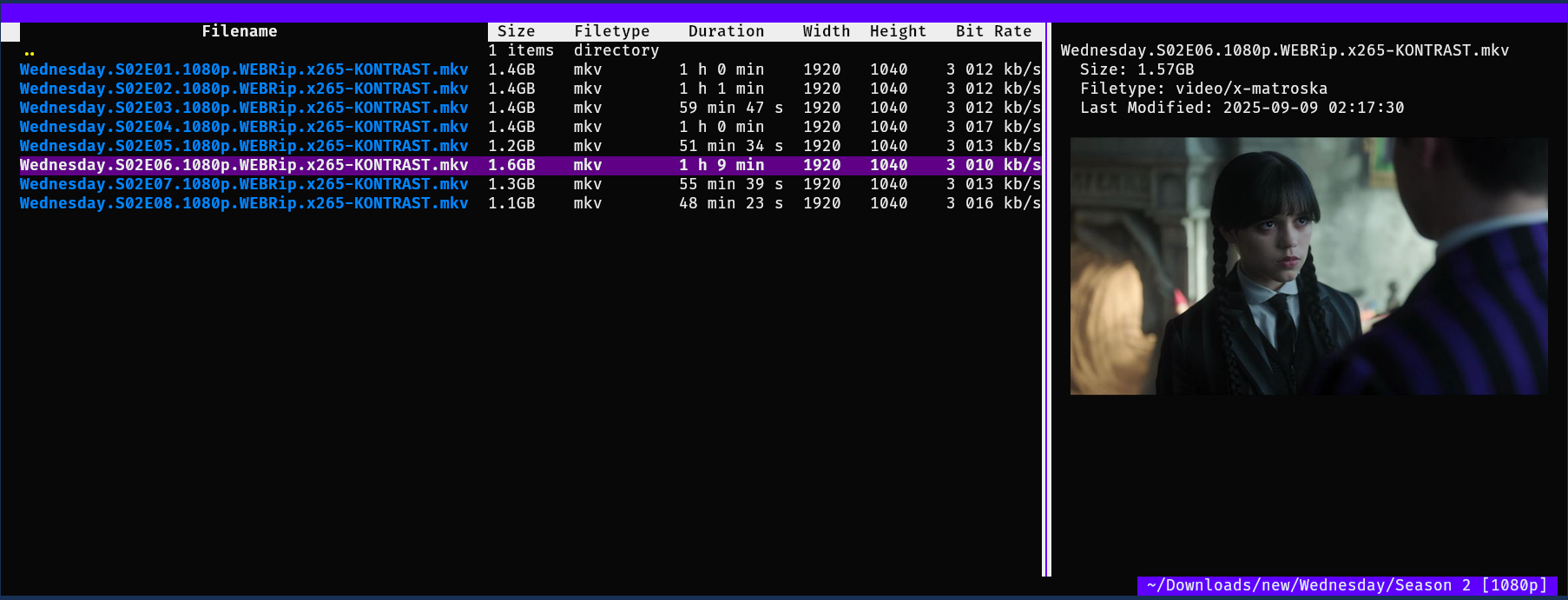
Data generation from toml file
listpick -g ./listpick/examples/data_generation/video_duplicates.toml
-
From the list of commands in the toml file we generate the properties we will use to identify the duplicates.
-
In the example file we set the directory and get the files with a simle
eza(ls) command. We could also usefindorcatfrom a list of files. -
We get the SHA1 hash to identify identical files; we also get the size, duration, resolution, and bitrate so that we can identify a video duplicate that may have the same duration but a lower resolution.

Description
Key Features:
- File Input Support:
listpick -i ~/items.csv
- Text files (TSV, CSV)
- JSON
- XLSX
- ODS
- Pickle
- Pipe data to listpick:
df -h | listpick --stdin
- Generate data based on an toml file with relevant commands to generate the rows.
listpick -g ./examples/data_generation/video_duplicates.toml
- See
./examples/data_generation/
- Highlighting:
- Highlight specific strings for display purposes.
- E.g., when we search for a string we will highlight strings in the rows that match the search.
- Filtering and Sorting:
- Apply custom filters and sort criteria on the fly
- Modes:
- Default modes are supported so that a certain filter/search/sort can structure the data in a way that is easy to move between.
- Options:
- Along with returning the selected rows, the user can also return options.
- Input field with readline support
- Options select box
- Colour themes:
- Several colour themes are available
- Copy rows:
- 'y' to copy rows in various formats: CSV, TSV, python list
- Save data:
- Data can be saved so that it can be loaded with the -i flag.
- This is very helpful if your data generation takes a long time.
- Customisable keybinds:
- The Picker object takes a keys_dict variable which allows all keys to be customised. Default keys can be seen in src/listpick/ui/keys.py.
- Also allows the restriction of certain functions by not assigning a key.
- Dynamic or manual refresh of data:
- If a refresh_function is passed with auto_refresh=True then listpick will automatically refresh the data. - If a refresh_function is passed then one can also manually refresh by pressing f5.
- Notifications.
- Supports notifications upon certain events
- Visual options
- Display/hide title.
- Display/hide footer with selection information
- Display/hide columns
- Display/hide highlights
- Option to centre in cells, centre in terminal and centre rows vertically.
- Change settings on the fly.
- Press '~' to see list of display settings or press '`' to enter a command to change display settings.
- Change visual options
- Cycle through themes
- Centre data in cells or centre rows vertically
- Show/hide the footer
- Show/hide a specific column.
- Select a column
- Toggle auto-refresh
- Toggle highlights
- Pipe the data from the selected rows in the focussed column to a bash command ('|')
- By default when you press '|' it will fill the input field with
xargs. You can remove this if you like (^U). - For example, if you run
xargs -d '\n' -I {} notify-send {}to this it will display notifications containing the data from the current column - Useful for:
- Opening files with a specific application
xargs -d \n -I{} mpv {}will open the files in mpv - Dumping data.
xargs -d \n -I{} echo {} > ~/stuff.txt
- Opening files with a specific application
Support and Feedback
Feel free to request features. Please report any errors you encounter with appropriate context.
1 maintainer

Metadata
1 maintainer
Release files for listpick 0.1.18.2
For a detailed explanation of source distributions (sdists) and built distributions (wheels), please see the package formats documentation.
Source distribution (sdist)
| File | Size | Uploaded | Provenance | Actions |
|---|---|---|---|---|
| listpick-0.1.18.2.tar.gz | 98.1 kB | Without provenance | Details for listpick-0.1.18.2.tar.gz |
Built distribution (wheel)
| File | Interpreter | ABI | Platform | Actions Reset |
|---|---|---|---|---|
| listpick-0.1.18.2-py3-none-any.whl | Python 3 | none | any | Details for listpick-0.1.18.2-py3-none-any.whl |
Total release size: 207.9 kB
Release files / listpick-0.1.18.2.tar.gz
| Download URL | listpick-0.1.18.2.tar.gz |
|---|---|
| Size | 98.1 kB |
| Tags | Source |
|
SHA-256 checksum How to use checksums |
17d64e92376061af61ce82ddc94ab7ceeb3698b892a750e1371d2803f55b554c
|
|
BLAKE2b-256 checksum How to use checksums |
ced39da5d0212cf0f985c9b4ca797af749475af26343d5b4dce73bb59685026d
|
| Upload date | |
|
Uploaded using Trusted Publishing? What is trusted publishing? |
No |
| Uploaded via |
twine/6.2.0 CPython/3.9.6
|
Release files / listpick-0.1.18.2-py3-none-any.whl
| Download URL | listpick-0.1.18.2-py3-none-any.whl |
|---|---|
| Size | 109.9 kB |
| Tags | Python 3 |
|
SHA-256 checksum How to use checksums |
ea28e5c203a7596e86b42a2e3e0d28917c006a20d26912a19ad2d84d3ed9f61b
|
|
BLAKE2b-256 checksum How to use checksums |
13231332983a68f13d28e7f1cc50d787dedc6b16610d603608cb462060f861fa
|
| Upload date | |
|
Uploaded using Trusted Publishing? What is trusted publishing? |
No |
| Uploaded via |
twine/6.2.0 CPython/3.9.6
|
Security for listpick 0.1.18.2
Provenance
Provenance describes where a file came from. On PyPI, provenance is shared via attestations, which provide a verifiable record of the build or publishing details. View details, limitations and caveats.
No provenance found
None of the files in this release were uploaded with provenance metadata.
A note on package security
PyPI is a repository for distributing packages, not a service for auditing them. While third-party security researchers and our staff do their best to detect and remove malicious packages, PyPI cannot guarantee the quality, security or suitability of any given package.
To learn more about protecting yourself from malicious actors, visit our package security documentation.














