
Interactive list selection and multiselect for POSIX terminals (non-curses)

Project description
python-listpicker
Interactive list selection for POSIX terminals.
pip install listpicker
Python 3.10+
Features
- Single and multiple selection from a sequence of strings
- Interactive substring filtering
- Paging for long lists
- Common navigation keybindings (vi, emacs, arrow keys, Home/End, etc)
- Direct terminal manipulation with CSI commands (i.e. no curses)
- Draw to main screen buffer without clearing the screen
- Proper truncation of long lines with SGR color sequences
- Redraw on terminal resize (SIGWINCH)
- Help menu and multiselect confirmation prompt
- Preselected options in multiselect prompts
Screenshots
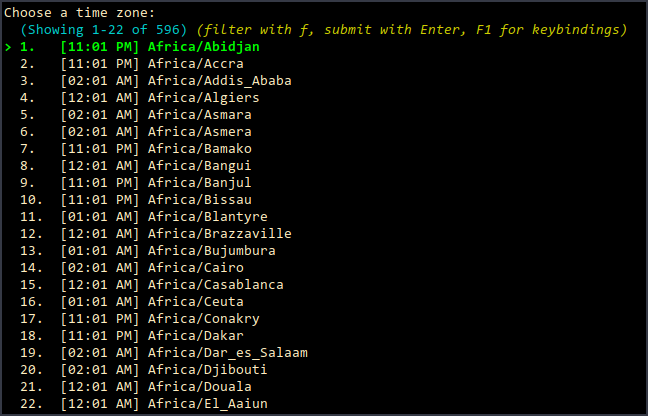
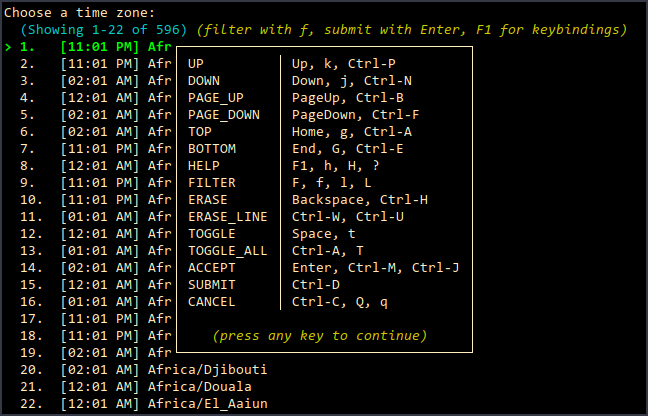
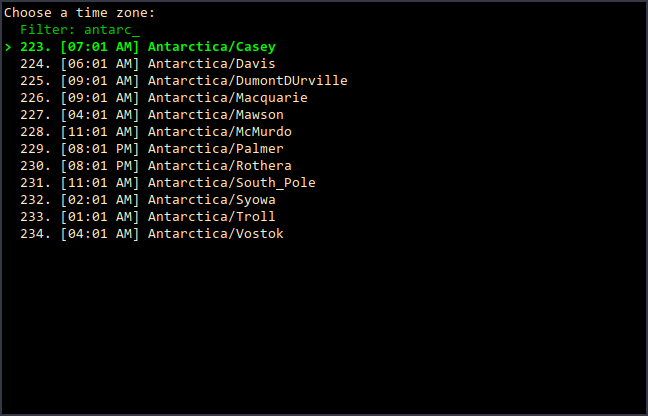
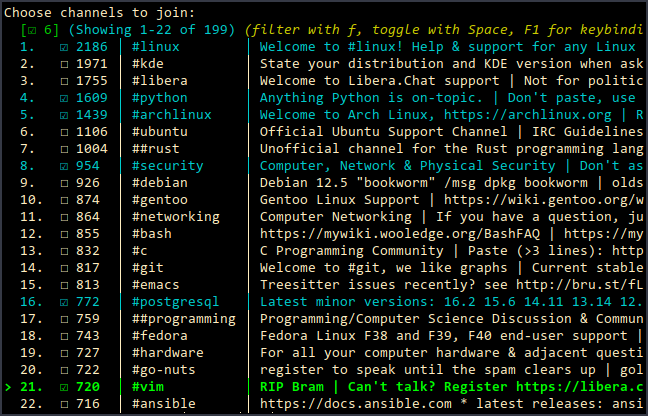

Examples
Basic usage
import listpicker

pizza_styles = ("Thin crust", "Stuffed crust", "Deep dish")
style = listpicker.pick("Choose pizza style:", pizza_styles)

# User can abort input, so handle the case where "pick()" returns "None"
if style is None:
    style = pizza_styles[0]

pizza_toppings = ("Pepperoni", "Sausage", "Mushroom", "Pineapple")
toppings = listpicker.pick_multiple("Choose toppings:", pizza_toppings)
Typical usage with dictionary
import dataclasses

import listpicker


@dataclasses.dataclass
class Book:
    isbn: str
    title: str
    authors: list[str]
    publication_year: int


books = [
    Book(
        "0201038013",
        "The Art of Computer Programming, Volume 1: Fundamental Algorithms",
        ["Knuth, Donald"],
        1968,
    ),
    Book(
        "0262010771",
        "Structure and Interpretation of Computer Programs",
        ["Harold Abelson", "Gerald Jay Sussman", "Julie Sussman"],
        1984,
    ),
    Book(
        "032163537X",
        "Elements of Programming",
        ["Stepanov, Alexander A.", "McJones, Paul"],
        2009,
    ),
]

options = {f"{b.title} ({b.publication_year})": b for b in books}
choice = listpicker.pick("Pick a book:", list(options.keys()))

# Pick a book:
#   (filter with f, submit with Enter, F1 for keybindings)
# > 1. The Art of Computer Programming, Volume 1: Fundamental Algorithms (1968)
#   2. Structure and Interpretation of Computer Programs (1984)
#   3. Elements of Programming (2009)

if choice:
    book = options[choice]
Release history Release notifications | RSS feed


Download files
Download the file for your platform. If you're not sure which to choose, learn more about installing packages.
Source Distribution
listpicker-0.3.5.tar.gz
(11.2 kB
view details)
Built Distribution
Filter files by name, interpreter, ABI, and platform.
If you're not sure about the file name format, learn more about wheel file names.
Copy a direct link to the current filters
File details
Details for the file listpicker-0.3.5.tar.gz.
File metadata
- Download URL: listpicker-0.3.5.tar.gz
- Upload date:
- Size: 11.2 kB
- Tags: Source
- Uploaded using Trusted Publishing? No
- Uploaded via: twine/6.2.0 CPython/3.13.7
File hashes
| Algorithm | Hash digest | |
|---|---|---|
| SHA256 |
b282ddf03e9955fbc1504afd84439bcb62ccd71c99089908ad154eeec22153bd
|
|
| MD5 |
49091dbf523b849862bab0e936a87c8d
|
|
| BLAKE2b-256 |
73f8d6d5e3af8e42b77f1d123f5bd50f78193ba27fbbedfd0dfbaa6f378a8664
|
File details
Details for the file listpicker-0.3.5-py3-none-any.whl.
File metadata
- Download URL: listpicker-0.3.5-py3-none-any.whl
- Upload date:
- Size: 15.0 kB
- Tags: Python 3
- Uploaded using Trusted Publishing? No
- Uploaded via: twine/6.2.0 CPython/3.13.7
File hashes
| Algorithm | Hash digest | |
|---|---|---|
| SHA256 |
95a73694aabd3fba92c2dd2c68f74532fe949b74c2ba0d70577cd9b038e66179
|
|
| MD5 |
1627636d7c74cb021a9b1c9ffd7c3b14
|
|
| BLAKE2b-256 |
b18c87dc4af246f3b961bb9d020dbf85a750192f16754bab888358d99e956b72
|






