
LiteALPR

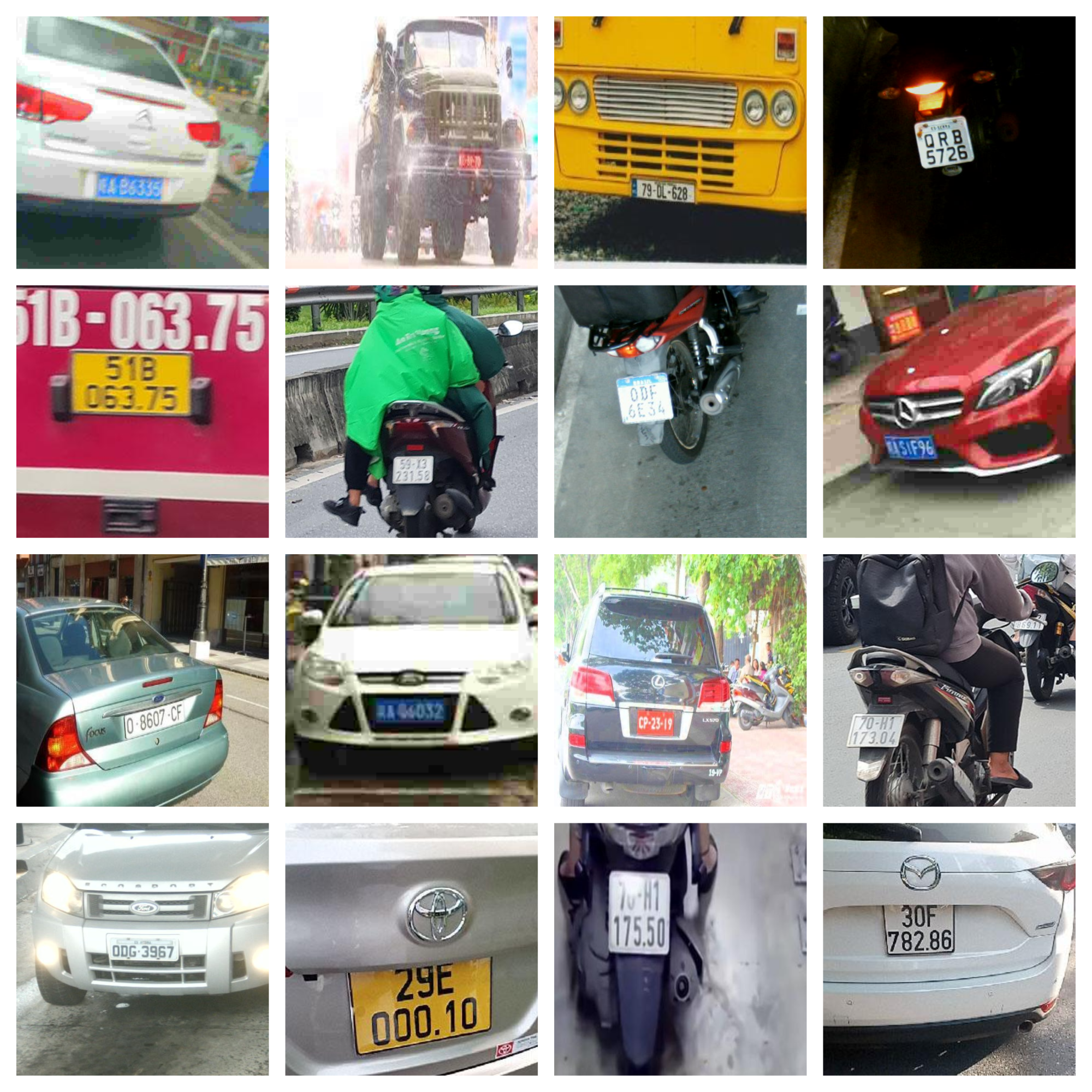
Visual samples of challenging real-world license plates (motion blur, diverse layouts, low light) that LiteALPR is built to handle.
🚀 LiteALPR is an accurate, extremely fast, and flexible End-to-End License Plate Recognition library.
Unlike traditional ALPR systems that rely on heavy architectures, LiteALPR introduces structural improvements designed specifically for high-throughput applications. Our framework achieves ultra-fast inference speeds without sacrificing accuracy on blurry or degraded license plates through two major architectural optimizations.
🧩 LiteALPR Pipeline
The framework is structured as a highly optimized two-stage sequential pipeline:


59P289136
Overview of the proposed highly optimized two-stage ALPR pipeline.
1. YOLOv8n-Efficient for Fast Detection
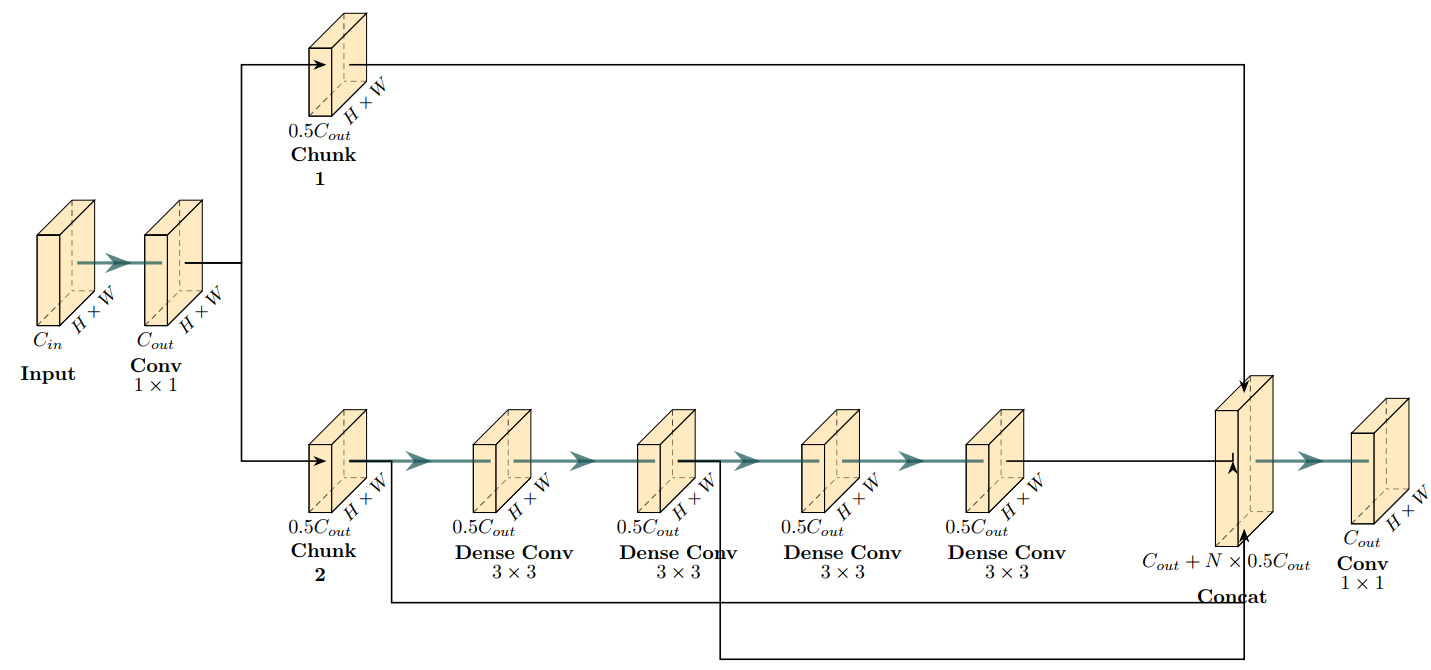
We replaced the original heavy C2f blocks in the YOLOv8 neck with lightweight C3Ghost blocks.
| Original: Heavy C2f Block | Proposed: Lightweight C3Ghost Block |
|---|---|
 |
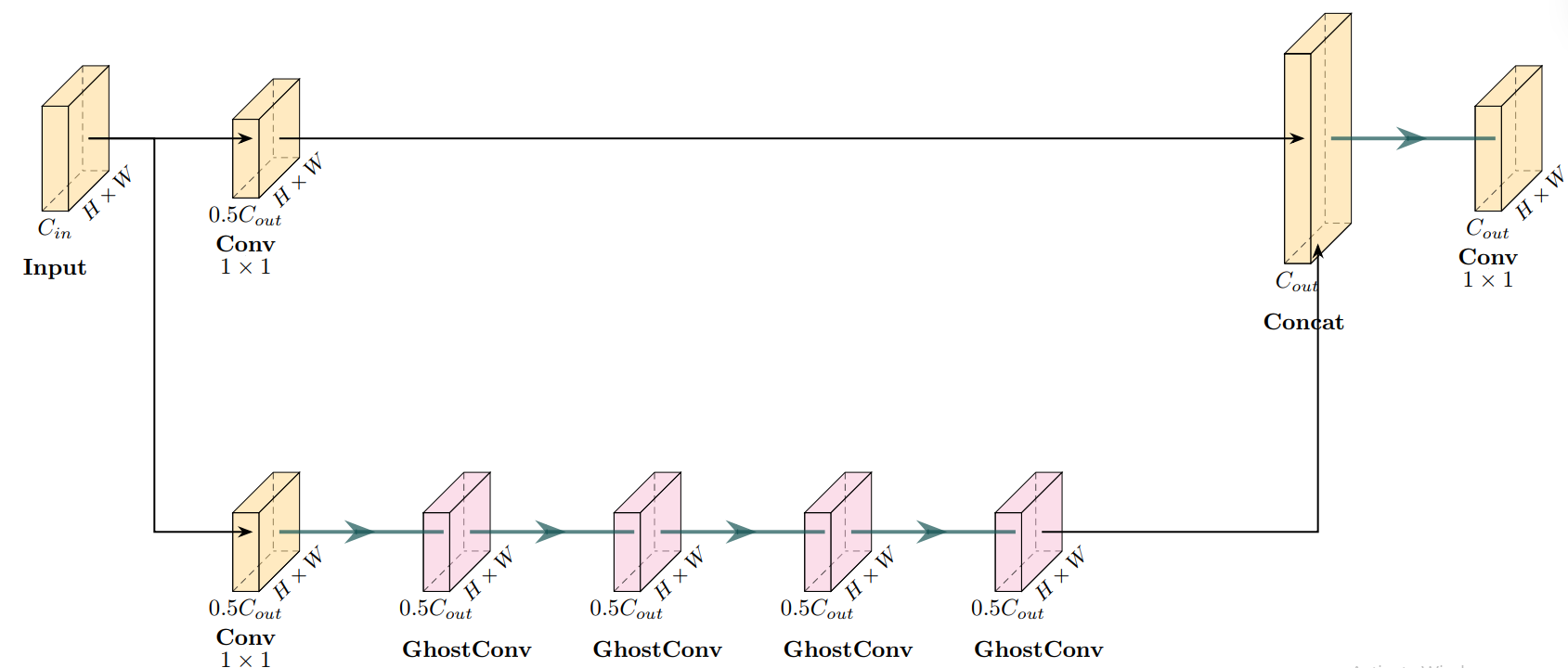 |
Leveraging Ghost modules, this architectural enhancement significantly increases detection speed while maintaining high localization accuracy. By generating more feature maps from cheap operations, it eliminates computational redundancy, enabling ultra-fast performance on consumer-grade hardware without compromising precision.
2. SVTR26-Tiny for Lightning-Fast Recognition
To make the SVTR26 OCR model viable for strict high-speed constraints, we applied a key modification:
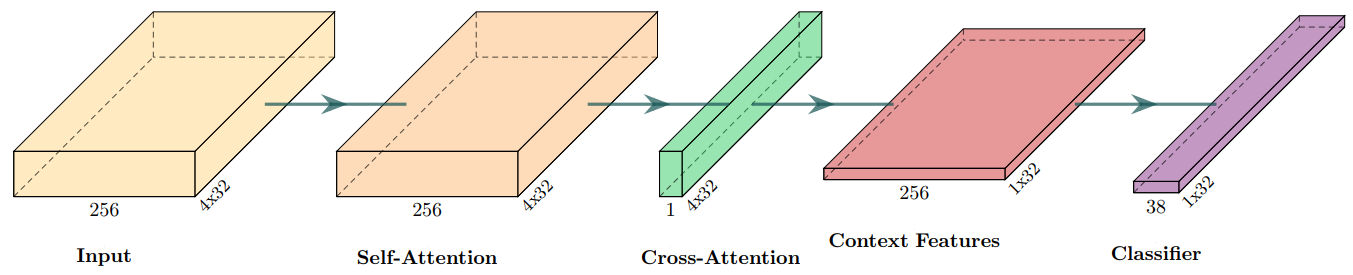
- Efficient RCTC Decoder: We entirely discarded the Original heavy attention-based RCTC Decoder. Since license plates have a rigid, horizontally aligned structure, we replaced 2D attention with a simple Height-wise Average Pooling operation. This elegantly compresses the 2D features into a 1D sequence, completely bypassing expensive matrix multiplications.
| Original: Heavy RCTC Decoder | Proposed: Efficient RCTC Decoder |
|---|---|
 |
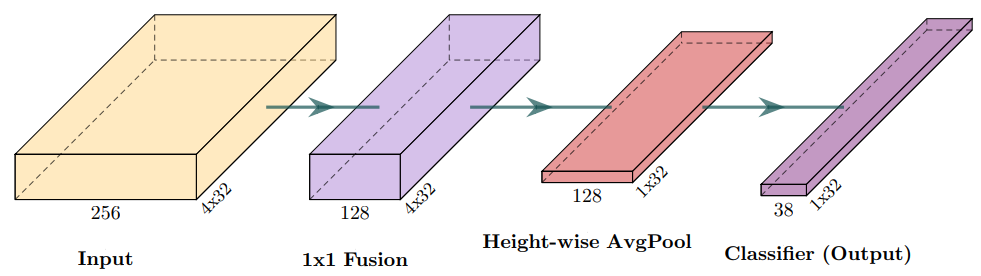 |
By integrating these specialized components, LiteALPR delivers unmatched production-ready performance, processing frames at blazing speeds!
🛠 Installation
pip install litealpr
(Note: To use the auto-download feature for pre-trained weights, please ensure huggingface_hub is installed).
⚡ Quick Start
LiteALPR automatically downloads the best pre-trained models from our HuggingFace repository the first time you run it. You don't need to manually configure any paths!
1. End-to-End Recognition (Detect & Read)
from litealpr import LiteALPR

# Initialize (auto-downloads weights if not found)
model = LiteALPR()

# Read the plate
results = model.read('sample.jpg')

for res in results:
    print(f"Plate Text: {res['text']} | Confidence: {res['score']:.4f}")
    print(f"Bounding Box: {res['box']}")
2. Flexible API: Detect Only
If you only need to locate the license plates without reading the text:
# Disable the recognition model
model = LiteALPR(use_rec=False)
boxes = model.detect('sample.jpg')
print("Detected boxes:", boxes)
3. Flexible API: Recognize Only
If you already have a cropped image of a license plate and just want to read the characters:
# Disable the detection model
model = LiteALPR(use_det=False)

crop_img = cv2.imread('sample_crop.jpg')
text, score = model.recognize(crop_img)
print(f"Text: {text} (Score: {score})")
4. Using Custom Local Weights
If you have fine-tuned your own models or downloaded the weights locally, you can easily load them:
model = LiteALPR(
    det_model_path="/path/to/your/yolov8n_efficient/best.pt",
    rec_model_path="/path/to/your/svtr26_tiny/best.pth"
)
🏋️ Training & Evaluation
LiteALPR provides a complete suite of scripts in the tools/ directory for dataset preparation, training, evaluation, and inference.
0. Model Weights Preparation
Before training or evaluation, download the official pre-trained models from our HuggingFace Repository and place them in the following structure:
LiteALPR/
├── pretrained_models/
│   ├── yolov8n_efficient/
│   │   └── best.pt
│   └── svtr26_tiny/
│       └── best.pth
You can download them manually or use wget:
wget -O pretrained_models/det/yolov8n_efficient/best.pt https://huggingface.co/anhone3/LiteALPR/resolve/main/yolov8n_efficient/best.pt
wget -O pretrained_models/rec/svtr26_tiny/best.pth https://huggingface.co/anhone3/LiteALPR/resolve/main/svtr26_tiny/best.pth
1. Data Preparation (Create LMDB)
Because our LMDB script uses hardcoded paths for simplicity, please open tools/create_lmdb_dataset.py and modify the data_dir variable in the __main__ block to match your dataset path before running:
if __name__ == '__main__':
    data_dir = './dataset/rec' # Set your dataset directory

    label_file_list = [
        os.path.join(data_dir, 'train_labels.txt'),
        os.path.join(data_dir, 'val_labels.txt'),
        os.path.join(data_dir, 'test_labels.txt')
    ]
After modifying the paths, generate the LMDB:
python tools/create_lmdb_dataset.py
2. Training (Det & Rec)
Before training, you must configure your dataset paths, batch sizes, and learning parameters:
For Detection:
Open tools/train_det.py and modify the parameters inside the model.train() function directly:
model.train(
    data='dataset/det/data.yaml', # Point this to your YOLO data.yaml
    epochs=50,
    batch=256,
    ...
)
For Recognition (configs/rec/svtr26/svtr26_tiny.yml):
Train:
  dataset:
    name: RatioDataSetTVResize
    data_dir_list: ['./dataset/rec/lmdb_data/train']

Eval:
  dataset:
    name: RatioDataSetTVResize
    data_dir_list: ['./dataset/rec/lmdb_data/val']
Once configured, start training:
[!TIP] Pre-trained Models (Fine-tuning) By default, the training process will load pre-trained weights to speed up convergence. You can change the path or remove it to train from scratch:
- For Detection: Edit the
.load(...)path directly inside thetools/train_det.pyscript.- For Recognition: Edit the
Global.pretrained_modelfield inside your.ymlconfig file (e.g.,configs/rec/svtr26/svtr26_tiny.yml).
# Train Detection Model (YOLOv8)
# For multi-GPU training, set device to a list of GPU IDs in train_det.py, e.g., device=[0, 1]
python tools/train_det.py -c configs/det/yolov8/yolov8n_efficient.yml

# Train Recognition Model (SVTR26)
# For multi-GPU training, set nproc_per_node to the number of GPUs being used for training
torchrun --nproc_per_node=1 tools/train_rec.py \
    -c configs/rec/svtr26/svtr26_tiny.yml
3. Evaluation (Validation)
Evaluate your trained checkpoints on the validation set:
# Evaluate Detection
python tools/eval_det.py -m output/det/yolov8n_efficient/train/weights/best.pt

# Evaluate Recognition
python tools/eval_rec.py -c configs/rec/svtr26/svtr26_tiny.yml -m output/rec/svtr26_tiny/train/best.pth
4. Batch Inference
Test your checkpoints directly on directories of images (supports --save_log to save predictions):
# Infer Detection
python tools/infer_det.py -m pretrained_models/det/yolov8n_efficient/best.pt -d dataset/det/test/images --save_log

# Infer Recognition
python tools/infer_rec.py -m pretrained_models/rec/svtr26_tiny/best.pth -d dataset/rec/test --save_log
5. Export to ONNX
Export your trained PyTorch models to the ONNX format for deployment in production environments (C++, C#, TensorRT, etc.).
# Export Detection
# The ONNX file will automatically be saved alongside the original `.pt` file
python tools/export_det.py -m output/det/yolov8n_efficient/train/weights/best.pt

# Export Recognition
# By default, the SVTR ONNX model expects a fixed 128x32 image. If you need it to accept dynamic width images in production, add the `--dynamic` flag
python tools/export_rec.py -m output/rec/svtr26_tiny/train/best.pth --save_path output/rec/svtr26_tiny/train/best.onnx --dynamic
🤝 Acknowledgements
- OpenOCR: LiteALPR is built upon the robust foundation of OpenOCR.
- YOLOv8 & SVTRv2: This work heavily leverages the architectural innovations from YOLOv8 for high-speed object detection and SVTRv2 for accurate text recognition.
- Read the YOLOv8 Paper
- Read the SVTRv2 Paper
- Datasets: Our evaluation utilizes datasets from Brazil (RodoSol-ALPR), China (CBLPRD-330k), and Vietnam public collections alongside self-collected traffic footage. We sincerely thank the original authors of these datasets for advancing the ALPR research community.
📧 Contact
For any questions or issues, please open an issue or contact: anhlone3@gmail.com.
1 maintainer

Download files
Download the file for your platform. If you're not sure which to choose, learn more about installing packages.
Source Distribution
Built Distribution
Filter files by name, interpreter, ABI, and platform.
If you're not sure about the file name format, learn more about wheel file names.
Copy a direct link to the current filters
File details
Details for the file litealpr-0.1.0.tar.gz.
File metadata
- Download URL: litealpr-0.1.0.tar.gz
- Upload date:
- Size: 26.4 MB
- Tags: Source
- Uploaded using Trusted Publishing? No
- Uploaded via:
twine/7.0.0 CPython/3.13.2
File hashes
| Algorithm | Hash digest | |
|---|---|---|
| SHA256 |
df265216c22b22dcbd72a9c4dd667e86e01be4904d1eda72fa8272dbdacc69d6
|
|
| MD5 |
96d13f397048d3d77ab858d9f33c5619
|
|
| BLAKE2b-256 |
4e7493124e0b01c99c2c6affcd9d15cf03fd81161b20cecd7bc6123ec34b9998
|
File details
Details for the file litealpr-0.1.0-py3-none-any.whl.
File metadata
- Download URL: litealpr-0.1.0-py3-none-any.whl
- Upload date:
- Size: 45.8 kB
- Tags: Python 3
- Uploaded using Trusted Publishing? No
- Uploaded via:
twine/7.0.0 CPython/3.13.2
File hashes
| Algorithm | Hash digest | |
|---|---|---|
| SHA256 |
74e38d0f6ac014b6407eb072aceb856706694f57e740de6defa74d996eef2a4b
|
|
| MD5 |
cfcaeec57283541f5d430d341c396480
|
|
| BLAKE2b-256 |
4c393d216232a5376c6a8e3a5c9820fac9ff1533c1a611877e2f491b59b500aa
|














