
LiteLLM Brownout
Move a LiteLLM team's chosen routes to cheaper models on budget tiers
No budget runaway, no quick drain of a team budget. Give a route a fallback and a percentage, and the gateway switches that route once the team's spend passes it.






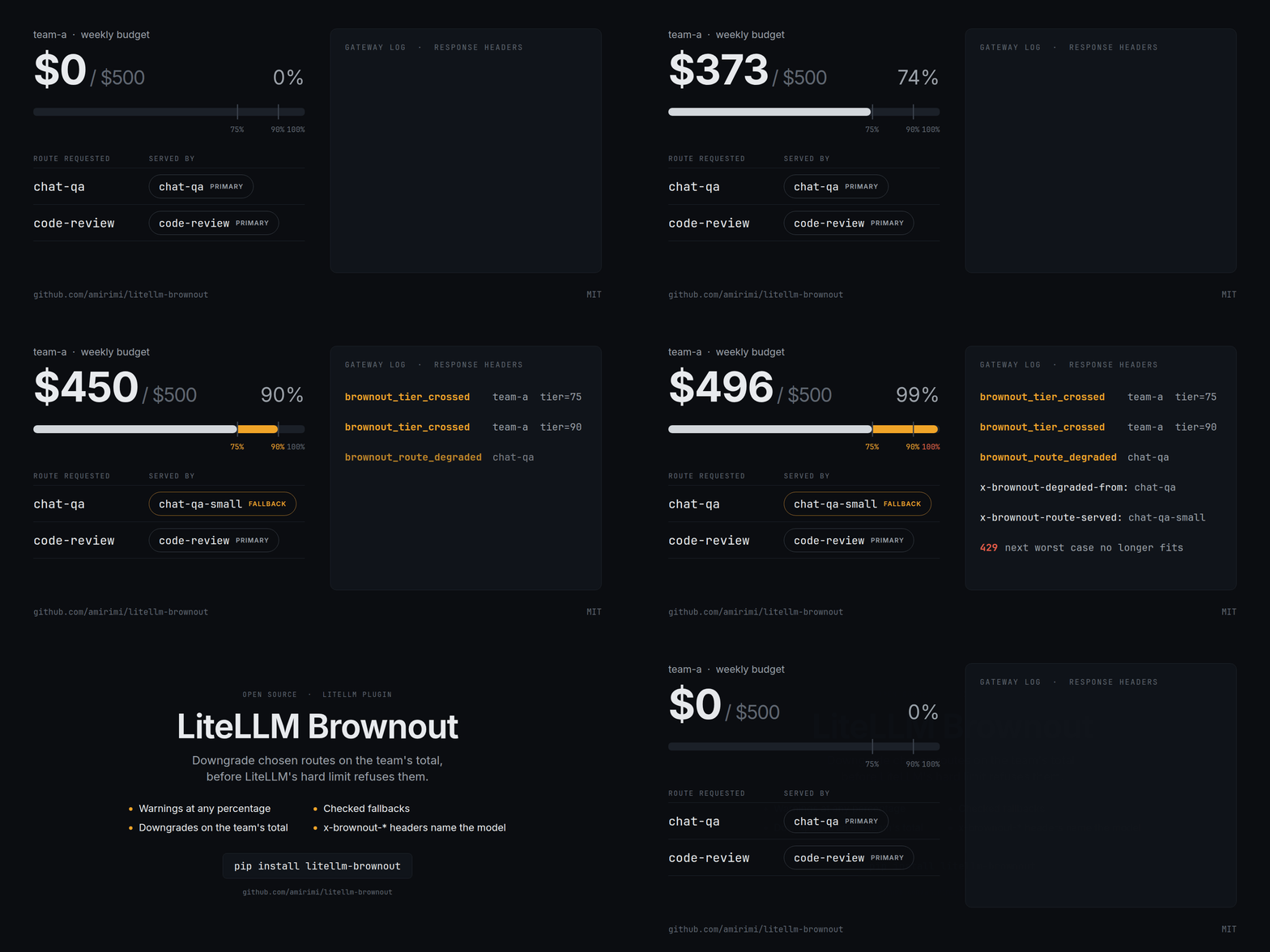
Example
Take a team with $500 a week. Its Q&A route falls back to a smaller model at 90%, and its code review route has no fallback.
| Team spend | Q&A route | Code review route | Signal |
|---|---|---|---|
| Below $375 | Primary | Primary | |
| $375 to $449.99 | Primary | Primary | 75% warning |
| $450 and above | Fallback | Primary | 90% warning and downgrade headers |
| Too little left for the next request | Refused | Refused | LiteLLM's 429 |
LiteLLM already reserves each request's cost, counts team spend across replicas and refuses requests past the budget. Brownout adds five things.
- Warnings at any percentage: each team and route sets its own tiers, logged once per budget window across replicas. LiteLLM's own budget alerts fire at 85% and 95%.
- Downgrades on the team's total: a route switches to its fallback at the percentage you set. LiteLLM's budget fallbacks switch only when a key exhausts a per-model budget.
- Coding agents included: chat, text completion, Anthropic's
/v1/messages, OpenAI's/v1/responsesand Google'sgenerateContentall downgrade, so a Claude Code or Codex session carries on with the fallback mid-task. - Checked fallbacks: brownout switches only to a fallback the gateway serves and prices, and that the caller's key and team may call.
- Disclosure:
x-brownout-*headers and the spend logs name the model that answered and why.
How it works
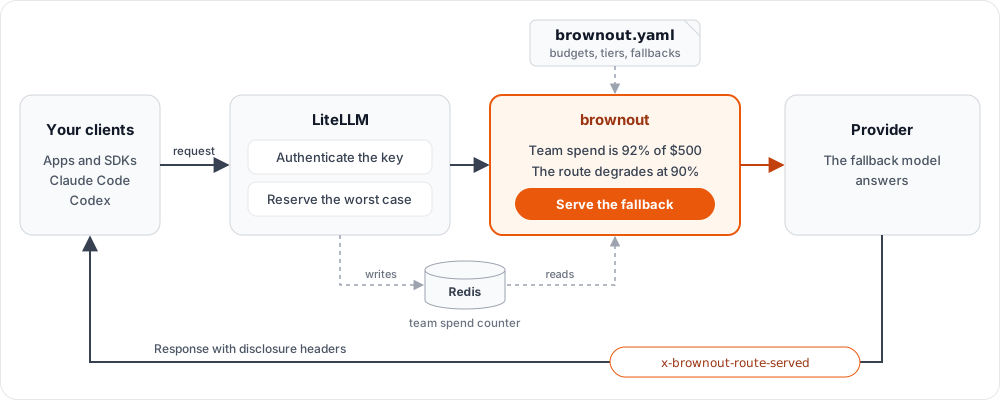
One manifest, brownout.yaml, holds every team's budget, tiers and fallbacks. It lives in your repo
next to the gateway config, so a policy change goes through code review, and brownout check runs
it in CI. LiteLLM keeps enforcing the budget, and brownout picks the model that serves each
request.
Requirements
Brownout governs every model call on the gateway, so the gateway needs a few things in place. init
checks each one and prints the fix.
- Every key that calls a model belongs to a team, and that team is in the manifest.
- Budgets sit on teams, never on keys.
- Clients use LiteLLM's unified routes. Provider pass-through routes, realtime, batches, fine-tuning and search tools are refused.
- LiteLLM is 1.101.6 to 1.106, with its image pinned by digest.
- One LiteLLM process needs nothing more. More than one needs Redis.
Get started
Brownout is configuration as code. Its manifest, its gateway settings and its Compose override are files in your repo, reviewed like any other change. One command writes all of them from your running gateway, so run it from the folder with your compose file.
1. Run init and fix what it lists.
export BROWNOUT_INIT_KEY="{gateway key}"
uvx --from litellm-brownout brownout init --gateway http://localhost:4000 --gateway-config config.yaml
{gateway key} is any key that can read the gateway, the master key included, because init only
reads. Each finding prints its fix, and a fix that calls LiteLLM's API uses $LITELLM_MASTER_KEY.
2. Write the files.
uvx --from litellm-brownout brownout init --gateway http://localhost:4000 --gateway-config config.yaml --write
3. Restart the gateway.
docker compose up -d
docker compose logs litellm | grep "brownout loaded"
What happened:
initadded brownout's settings toconfig.yaml, wrote the manifestbrownout.yaml, and checked both.- It copied the plugin into
plugins/and wrotedocker-compose.override.yml, which mounts it into your LiteLLM service. Your compose file and LiteLLM's image stay as they were. - The log line names the plugin version and the teams it governs.
Optional: send one request with a team's key to see the headers. The master key belongs to no team, so brownout refuses it.
curl -s -i http://localhost:4000/v1/chat/completions \
  -H "Authorization: Bearer {team key}" -H "Content-Type: application/json" \
  -d '{"model": "{model}", "messages": [{"role": "user", "content": "hi"}], "max_tokens": 20}' \
  | grep -io '^x-brownout-[a-z-]*: [^[:cntrl:]]*\|"reason": *"[a-z_]*"'
OpenRouter models need a price, which one command prints.
Other ways to run LiteLLM
The plugin needs three things in LiteLLM's container: plugins/ mounted at /app/plugins, the
manifest at /app/brownout.yaml and PYTHONPATH=/app/plugins.
docker run: with no compose file in the folder,init --writeprints the flags to add.- Kubernetes with LiteLLM's
litellm-helmchart: add--platform helm, then follow these steps. piporuv: installlitellm-brownoutinto the proxy's environment, add--platform pip, and start the proxy from the folder that holdsbrownout.yaml. No mount is needed.- Anywhere else: mount the same folder and file, and set the same variable.
To upgrade, run uvx --from litellm-brownout=={version} brownout plugin --dir plugins and restart the
gateway.
More than one LiteLLM process
Several replicas or workers share their spend through Redis. Brownout uses the Redis LiteLLM already
has, whether it comes from coordination_redis, a Redis response cache, router_settings or
REDIS_* variables. A gateway without one adds this service and passes --redis-host redis to
init --write.
services:
  redis:
    image: redis:7
    command: ["sh", "-c", "exec redis-server --requirepass \"$$REDIS_PASSWORD\" --appendonly yes --maxmemory-policy noeviction"]
    env_file:
      - .env
Your first fallback
Add a route under your team in brownout.yaml. Fill in each {placeholder}.
teams:
  "{team}":
    routes:
      "{route}":
        fallback: "{fallback}"
        degrade_at: 90
Add {fallback} to the team's model list in LiteLLM, check the manifest, then restart the gateway
with docker compose restart litellm. --gateway lets the check see models added in the admin UI.
uvx --from litellm-brownout brownout check --gateway http://localhost:4000 --gateway-config config.yaml --manifest brownout.yaml
Once the team's spend passes 90%, every {route} response carries these headers.
x-brownout-route-served: {fallback}
x-brownout-budget-tier: 90
x-brownout-degraded-from: {route}
x-brownout-degradation-reason: degrade_tier_reached
The fallback receives everything the route sends, tools and images included, so try it on the route's real requests first. To point Claude Code or Codex at a route, follow their setup. The lab drains a budget without spending anything.
Limits
- Only text generation downgrades: embeddings, images, audio and Codex's
/v1/responses/compactkeep their model at any spend. - Requests name a model group: a router alias, a wildcard group such as
openai/*or a list of models gets a 503. - No router fallbacks: a provider error on the chosen model reaches the caller. Failover between deployments of one model group still works.
- The reservation comes first: LiteLLM reserves each request's worst case on the model the
caller asked for. Set
max_tokens, or a large request near the ceiling gets LiteLLM's 429 before the downgrade. - Without Redis, one process only: several replicas or workers without Redis are unsupported. The gateway logs its mode on its first governed request.
- With Redis, Redis is on the request path: while LiteLLM cannot reach Redis it refuses every budgeted request.
The full list covers the rest. If you run brownout on a real workload, open an issue with the model pair, budget window, threshold and LiteLLM version, and say whether the fallback stayed useful.
Documentation
- Configuration: settings, manifest keys, rules and
initoptions. - Enforcement: refusals, headers and events.
- Limits: every known limit.
- Claude Code and Codex: pointing both tools at a route.
- Design: how the modules fit together.
- Security: what brownout reads and writes, and how to verify a release.
- Contributing: the tests, the supported LiteLLM releases and releasing.
License
1 maintainer

Metadata
1 maintainer
Release files for litellm-brownout 0.1.1
For a detailed explanation of source distributions (sdists) and built distributions (wheels), please see the package formats documentation.
Source distribution (sdist)
| File | Size | Uploaded | Provenance | Actions |
|---|---|---|---|---|
| litellm_brownout-0.1.1.tar.gz | 43.3 kB | With provenance | Details for litellm_brownout-0.1.1.tar.gz |
Built distribution (wheel)
| File | Interpreter | ABI | Platform | Actions Reset |
|---|---|---|---|---|
| litellm_brownout-0.1.1-py3-none-any.whl | Python 3 | none | any | Details for litellm_brownout-0.1.1-py3-none-any.whl |
Total release size: 95.7 kB
Release files / litellm_brownout-0.1.1.tar.gz
| Download URL | litellm_brownout-0.1.1.tar.gz |
|---|---|
| Size | 43.3 kB |
| Tags | Source |
|
SHA-256 checksum How to use checksums |
8797b08320d388caf57a5911adbe1ed2b03be578bb89627c27fcf18cbdbf82d3
|
|
BLAKE2b-256 checksum How to use checksums |
b0cd4b4ab95e8021a4f0f2d4b1d2c20918d9e1fbd798d822ed3124dde6d15aa8
|
| Upload date | |
|
Uploaded using Trusted Publishing? What is trusted publishing? |
Yes |
| Uploaded via |
twine/7.0.0 CPython/3.13.14
|
Provenance
Provenance describes where a file came from. On PyPI, provenance is shared via attestations, which provide a verifiable record of the build or publishing details. View details, limitations and caveats.


PyPI Publish Attestation
PyPI verified that this artifact, at this checksum, originated from the publisher listed below.
Signed by GitHub Actions, verified by PyPI on Oct 22, 2026.
Transparency logRelease files / litellm_brownout-0.1.1-py3-none-any.whl
| Download URL | litellm_brownout-0.1.1-py3-none-any.whl |
|---|---|
| Size | 52.4 kB |
| Tags | Python 3 |
|
SHA-256 checksum How to use checksums |
3715bc8e001b0587e5b45182d812714bce94291ce7f0e76c358fa5eb20133d09
|
|
BLAKE2b-256 checksum How to use checksums |
eb129bcd8807322320e8e2b9efd356d37b392daa21e41fee911f7fd248d9daeb
|
| Upload date | |
|
Uploaded using Trusted Publishing? What is trusted publishing? |
Yes |
| Uploaded via |
twine/7.0.0 CPython/3.13.14
|
Provenance
Provenance describes where a file came from. On PyPI, provenance is shared via attestations, which provide a verifiable record of the build or publishing details. View details, limitations and caveats.
PyPI Publish Attestation
PyPI verified that this artifact, at this checksum, originated from the publisher listed below.
Signed by GitHub Actions, verified by PyPI on Oct 22, 2026.
Transparency logSecurity for litellm-brownout 0.1.1
Provenance
Provenance describes where a file came from. On PyPI, provenance is shared via attestations, which provide a verifiable record of the build or publishing details. View details, limitations and caveats.
Full provenance
All 2 files in this release have been uploaded with provenance metadata.
Attestation for litellm_brownout-0.1.1.tar.gz
PyPI Publish Attestation
PyPI verified that this artifact, at this checksum, originated from the publisher listed below.
Signed by GitHub Actions, verified by PyPI on Oct 22, 2026.
Transparency logA note on package security
PyPI is a repository for distributing packages, not a service for auditing them. While third-party security researchers and our staff do their best to detect and remove malicious packages, PyPI cannot guarantee the quality, security or suitability of any given package.
To learn more about protecting yourself from malicious actors, visit our package security documentation.














