
litellm-lint
English summary — A static linter for LiteLLM proxy
config.yamlfiles (unofficial, not affiliated with LiteLLM). It catches typo'd keys, missingos.environ/variables and fallbacks or aliases that point at a model that does not exist, before you deploy. Install:uv tool install git+https://github.com/LeeGyeongPil/litellm-lint, run:litellm-lint check config.yaml.
LiteLLM 프록시는 설정 파일의 오타를 조용히 넘기는 경우가 많습니다. 이 도구는 프록시를 띄우기 전에 config.yaml 을 읽어 그런 실수를 줄 번호와 함께 알려 줍니다. 프록시를 실행하지 않고, 네트워크도 쓰지 않고, 키 값도 읽어 출력하지 않습니다.
비공식 도구입니다. 검사 기준은 litellm 1.108.4 에서 뽑아 둔 스냅숏입니다(아래 "지원 버전과 한계").
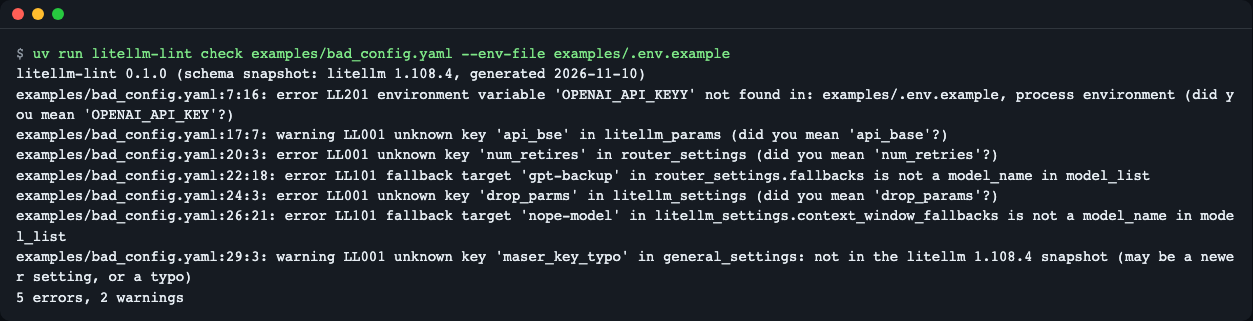
litellm-lint check 출력
이런 분께
- 배포 전에
config.yaml을 CI 나 pre-commit 에서 자동으로 확인하고 싶을 때 num_retires같은 오타가 에러 없이 무시된 경험이 있을 때fallbacks에 적은 모델 이름이model_list에 실제로 있는지 확인하고 싶을 때os.environ/NAME으로 적은 환경 변수가 배포 환경에 정의돼 있는지 미리 보고 싶을 때
설치
curl -LsSf https://astral.sh/uv/install.sh | sh        # uv 가 없다면 (Python 3.10 이상 필요)
uv tool install git+https://github.com/LeeGyeongPil/litellm-lint
litellm-lint --version
litellm-lint 0.1.0 (schema snapshot: litellm 1.108.4)
설치 없이 한 번만 돌려 보려면 uvx --from git+https://github.com/LeeGyeongPil/litellm-lint litellm-lint check config.yaml. 레포를 받아 직접 쓰려면 git clone 후 uv run litellm-lint .... 최소 리눅스 이미지에는 git 과 curl 이 필요합니다.
빠르게 시작하기
레포의 예제로 바로 해 볼 수 있습니다.
git clone https://github.com/LeeGyeongPil/litellm-lint && cd litellm-lint
uv run litellm-lint check examples/bad_config.yaml --env-file examples/.env.example
litellm-lint 0.1.0 (schema snapshot: litellm 1.108.4, generated 2026-11-10)
examples/bad_config.yaml:7:16: error LL201 environment variable 'OPENAI_API_KEYY' not found in: examples/.env.example, process environment (did you mean 'OPENAI_API_KEY'?)
examples/bad_config.yaml:17:7: warning LL001 unknown key 'api_bse' in litellm_params (did you mean 'api_base'?)
examples/bad_config.yaml:20:3: error LL001 unknown key 'num_retires' in router_settings (did you mean 'num_retries'?)
examples/bad_config.yaml:22:18: error LL101 fallback target 'gpt-backup' in router_settings.fallbacks is not a model_name in model_list
examples/bad_config.yaml:24:3: error LL001 unknown key 'drop_parms' in litellm_settings (did you mean 'drop_params'?)
examples/bad_config.yaml:26:21: error LL101 fallback target 'nope-model' in litellm_settings.context_window_fallbacks is not a model_name in model_list
examples/bad_config.yaml:29:3: warning LL001 unknown key 'maser_key_typo' in general_settings: not in the litellm 1.108.4 snapshot (may be a newer setting, or a typo)
5 errors, 2 warnings
각 줄은 파일:줄:열: 심각도 규칙코드 메시지 입니다. 종료 코드는 오류가 있으면 1 입니다. 문제없는 설정은 이렇게 끝납니다.
uv run litellm-lint check examples/good_config.yaml --env-file examples/.env.example
litellm-lint 0.1.0 (schema snapshot: litellm 1.108.4, generated 2026-11-10)
0 errors, 0 warnings

사용법
litellm-lint check [--env-file PATH] [--no-os-env] [--strict] [--ignore CODES] [--format {text,json}] config [config ...]
litellm-lint schema [-o PATH]
litellm-lint --version
| 명령·옵션 | 하는 일 | 예 |
|---|---|---|
check <config> [more ...] |
설정을 검사하고 지적을 출력. 파일 여러 개 가능 | litellm-lint check a.yaml b.yaml |
--env-file PATH |
dotenv 파일에 적힌 이름을 "정의됨"으로 침(여러 번 가능) | --env-file .env.prod |
--no-os-env |
지금 셸의 환경 변수는 정의된 것으로 치지 않음 | CI 에서 .env 만 기준으로 볼 때 |
--strict |
경고에도 종료 코드 1 | --strict |
--ignore CODES |
쉼표로 구분한 규칙 코드를 건너뜀 | --ignore LL001,LL402 |
--format json |
기계가 읽는 JSON 출력(파일이 여러 개면 파일별 객체의 배열) | --format json |
schema -o PATH |
편집기용 JSON Schema(Draft 2020-12) 내보내기 | schema -o litellm.schema.json |
종료 코드: 0 문제 없음(또는 경고만), 1 오류 있음(--strict 면 경고 포함), 2 사용법 오류 또는 입력을 읽을 수 없음(YAML 구문 오류, 없거나 깨진 include 파일, 너무 깊거나 큰 입력 = LL900). 파일이 여러 개면 가장 나쁜 값(2 > 1 > 0)이 종료 코드입니다.
파일을 여러 개 주면 헤더는 한 번만 나오고, 파일마다 지적과 요약 줄, 마지막에 total 줄이 붙습니다.
uv run litellm-lint check examples/good_config.yaml examples/bad_config.yaml --env-file examples/.env.example
litellm-lint 0.1.0 (schema snapshot: litellm 1.108.4, generated 2026-11-10)
examples/good_config.yaml: 0 errors, 0 warnings
examples/bad_config.yaml:7:16: error LL201 environment variable 'OPENAI_API_KEYY' not found in: examples/.env.example, process environment (did you mean 'OPENAI_API_KEY'?)
examples/bad_config.yaml:17:7: warning LL001 unknown key 'api_bse' in litellm_params (did you mean 'api_base'?)
examples/bad_config.yaml:20:3: error LL001 unknown key 'num_retires' in router_settings (did you mean 'num_retries'?)
examples/bad_config.yaml:22:18: error LL101 fallback target 'gpt-backup' in router_settings.fallbacks is not a model_name in model_list
examples/bad_config.yaml:24:3: error LL001 unknown key 'drop_parms' in litellm_settings (did you mean 'drop_params'?)
examples/bad_config.yaml:26:21: error LL101 fallback target 'nope-model' in litellm_settings.context_window_fallbacks is not a model_name in model_list
examples/bad_config.yaml:29:3: warning LL001 unknown key 'maser_key_typo' in general_settings: not in the litellm 1.108.4 snapshot (may be a newer setting, or a typo)
examples/bad_config.yaml: 5 errors, 2 warnings
total: 2 files, 5 errors, 2 warnings
시나리오 1 — 배포 파이프라인에서 막기. .env 가 없는 CI 에서는 --no-os-env --env-file deploy.env.example 처럼 "배포 환경에 있어야 할 변수 이름 목록"을 기준으로 삼습니다. 아래는 --ignore LL001 로 오타 규칙을 끄고 환경 변수를 하나도 주지 않은 경우입니다.
uv run litellm-lint check examples/bad_config.yaml --no-os-env --ignore LL001
litellm-lint 0.1.0 (schema snapshot: litellm 1.108.4, generated 2026-11-10)
examples/bad_config.yaml:7:16: error LL201 environment variable 'OPENAI_API_KEYY' not found in: no sources
examples/bad_config.yaml:12:16: error LL201 environment variable 'OPENAI_API_KEY' not found in: no sources
examples/bad_config.yaml:22:18: error LL101 fallback target 'gpt-backup' in router_settings.fallbacks is not a model_name in model_list
examples/bad_config.yaml:26:21: error LL101 fallback target 'nope-model' in litellm_settings.context_window_fallbacks is not a model_name in model_list
examples/bad_config.yaml:28:15: error LL201 environment variable 'LITELLM_MASTER_KEY' not found in: no sources
5 errors, 0 warnings
정의된 환경 변수가 하나도 없으니 os.environ/ 로 참조한 이름 3곳이 모두 LL201 로 잡힙니다.
시나리오 2 — JSON 으로 다른 도구에 넘기기. --format json 은 (파일 하나면 객체 하나, 여러 개면 객체의 배열로) tool, version, snapshot, file, summary, diagnostics[](code, severity, message, file, line, column, key, suggestion)를 냅니다.
uv run litellm-lint check examples/good_config.yaml --env-file examples/.env.example --format json
{
  "tool": "litellm-lint",
  "version": "0.1.0",
  "snapshot": {
    "litellm_version": "1.108.4",
    "generated_at": "2026-11-10"
  },
  "file": "examples/good_config.yaml",
  "summary": {
    "errors": 0,
    "warnings": 0,
    "info": 0
  },
  "diagnostics": []
}
시나리오 3 — 편집기에서 바로 보기. litellm-lint schema -o litellm.schema.json 으로 JSON Schema 를 만들어 YAML 편집기(예: VS Code 의 YAML 확장)에 연결하면 키 이름과 타입 오류를 저장 전에 볼 수 있습니다. 폴백·별칭·환경 변수 같은 참조 검사는 스키마로 표현할 수 없어 check 에서만 됩니다.
시나리오 4 — pre-commit. 이 레포는 .pre-commit-hooks.yaml 을 제공합니다. 파일 이름이 config*.yaml 인 것만 검사하고, 한 번에 바뀐 파일을 모두 받습니다. 개발자 셸에는 API 키가 없는 경우가 많으므로, 아래처럼 --no-os-env --env-file 로 "배포 환경에 있어야 할 변수 이름 목록"(deploy.env.example, 이름만 적은 dotenv 파일)을 기준으로 삼으면 os.environ/ 참조가 LL201 로 커밋을 막지 않습니다.
repos:
  - repo: https://github.com/LeeGyeongPil/litellm-lint
    rev: v0.1.0
    hooks:
      - id: litellm-lint
        args: [--no-os-env, --env-file, deploy.env.example]
Python 에서. 공개 API 는 check_file, export_schema, Diagnostic, Report, Severity, LintUsageError 입니다.
from litellm_lint import check_file

report = check_file("examples/bad_config.yaml", env_files=["examples/.env.example"], use_os_env=False)
for d in sorted(report.diagnostics, key=lambda d: (d.line or 0, d.code)):
    print(d.line, d.code, d.message)
report.diagnostics 는 줄 번호 순으로 정렬되어 있지 않아서 위처럼 직접 정렬합니다. 출력은 7건이며 첫 줄은 다음과 같습니다(위 check 결과와 같은 지적).
7 LL201 environment variable 'OPENAI_API_KEYY' not found in: examples/.env.example (did you mean 'OPENAI_API_KEY'?)
설정
설정 파일은 따로 없습니다. 동작은 위 옵션으로만 정합니다.
- 환경 변수 값은 읽어도 출력하지 않습니다. 이름만 확인합니다.
examples/.env.example은 가짜 값이 든 예시이고, 도구는 그 안의 이름만 봅니다. - LL201 은
--env-file들, 설정 안의environment_variables, (--no-os-env를 주지 않았다면) 현재 프로세스 환경 순으로 이름을 찾습니다. - API 키가 필요 없습니다. litellm 도 설치할 필요가 없습니다.
규칙 코드
| 코드 | 기본 심각도 | 무엇을 잡나 |
|---|---|---|
| LL000 | info | 설치된 litellm 버전이 스냅숏(1.108.4)과 다름. 패키지 메타데이터만 읽고 litellm 을 import 하지 않음 |
| LL001 | error / warning / info | 모르는 키. 같은 섹션의 비슷한 키가 있거나 다른 섹션에 있는 키면 error + 제안, 비슷한 게 없으면 warning(새 버전 키일 수 있음). litellm_params 안에서는 제안이 있으면 warning, 없으면 info |
| LL002 | error | 타입·구조 오류(num_retries: three, default_fallbacks: "gpt-main", 매핑이 아닌 섹션, 폴백 리스트 원소가 {출발: [대상, ...]} 모양이 아님, include 가 경로 리스트가 아님, 문자열이 아닌 최상위 키, model_name·litellm_params·model 이 없는 model_list 항목). os.environ/NAME·숫자 문자열·빈 값은 허용 |
| LL003 | error | router_settings 에 둔 health_check_interval/health_check_concurrency. 프록시가 기동을 거부함, general_settings 로 옮길 것 |
| LL101 | error | fallbacks·context_window_fallbacks·content_policy_fallbacks·default_fallbacks 의 대상이 model_name 이 아님(와일드카드·별칭은 인정). store_model_in_db: true 이거나 model_list 가 비어 있으면 warning |
| LL102 | warning | 폴백의 출발 그룹이 model_name 이 아님("*" 은 허용) |
| LL103 | error | model_group_alias 가 없는 그룹을 가리킴 |
| LL104 | warning | model_group_retry_policy 의 그룹이 model_name 이 아님 |
| LL201 | error | os.environ/NAME 이 어디에도 정의되지 않음. key_management_system 이 설정돼 있으면 info |
| LL202 | warning | api_key, *_password, *_secret, *_token 같은 키에 값을 직접 적음. 값은 출력하지 않음 |
| LL301 | error | general_settings.master_key 가 비어 있거나 공개된 예시 키. 우회 설정(dangerously_permit_weak_or_unset_master_key: true)이 있으면 warning |
| LL401 | warning | 앞의 배포와 model_name·litellm_params 가 완전히 같은 중복. 이름만 같고 파라미터가 다르면 로드밸런싱이라 지적하지 않음 |
| LL402 | warning / info | litellm_params.model 의 제공자 접두사가 litellm 제공자 목록에 없음. custom_llm_provider 가 있으면 건너뜀 |
| LL900 | error (종료 2) | 입력을 읽을 수 없음: YAML 구문 오류, 중첩 100단계 초과, 별칭 확장 후 50만 노드 초과(별칭 폭탄), 없거나 깨진 include 파일(체인 50개 초과 포함). 줄:열과 일반적인 설명만 출력하고 소스 줄은 출력하지 않음 |
LL301 은 약한 키 전반이 아니라 두 경우만 잡습니다. litellm 1.108.4 의 소스(master_key_boot_check.py)는 길이·복잡도 기준 없이 "비어 있음"과 "공개된 예시 키의 SHA-256 해시와 일치"만 거부하기 때문에, 그 기준에 맞췄습니다. sk-1234 가 아닌 짧은 키는 이 도구가 지적하지 않습니다.
자세한 규칙 설명은 docs/rules.md(영어) 를 보세요.
동작 원리
flowchart LR
    A[config.yaml] --> B[YAML 읽기<br/>줄·열 보존]
    S[(스냅숏<br/>litellm 1.108.4)] --> C
    B --> C[키·타입 검사<br/>LL001-003]
    B --> D[참조 검사<br/>LL101-104]
    B --> E[환경 변수 검사<br/>LL201-202]
    E -. 이름만 .-> F[.env 파일 / 프로세스 환경]
    C --> G[지적 모음]
    D --> G
    E --> G
    G --> H[텍스트 / JSON 출력<br/>종료 코드 0·1·2]
- YAML 읽기:
ruamel.yaml로 읽어 모든 값의 줄·열을 기억하므로 지적에 위치가 붙습니다. - 스냅숏: 실제 litellm 1.108.4 를 설치해
scripts/gen_snapshot.py로 뽑은 키 목록(JSON 파일)입니다. 검사할 때는 litellm 을 import 하지 않아 오프라인으로 빠릅니다. - 키·타입 검사: 섹션별(
router_settings,litellm_settings,general_settings,litellm_params)로 키가 스냅숏에 있는지 보고, 비슷한 이름이 있으면 제안합니다. - 참조 검사:
model_list의model_name들이 "모델 그룹"입니다. 폴백·별칭·재시도 정책이 가리키는 이름이 그룹에 있는지 확인합니다. 같은model_name을 여러 번 적는 것은 로드밸런싱이라 정상입니다. - 환경 변수 검사:
os.environ/NAME의 NAME 이 정의돼 있는지만 봅니다.
지원 버전과 한계
- 키 목록은 litellm 1.108.4(2026-11-05~09 릴리스 구간) 기준입니다. 더 새 버전의 설정 키는 "스냅숏에 없음" 경고(LL001)로 나올 수 있고, 더 옛 버전에서 사라진 키는 알 수 없습니다. 설치된 litellm 이 다르면 LL000 info 가 나옵니다.
- 정적 검사입니다. 프록시를 띄우지 않고, 제공자별 필수 파라미터는 확인하지 않습니다.
litellm_settings값의 타입은 검사하지 않습니다(그 값들은 litellm 이 그대로 대입하는 설정이라 오탐을 피하려고). 폴백 4종만 리스트 모양을 확인합니다.include로 쪼갠 파일은 따라가며 거기 정의된model_name을 폴백·별칭 대상으로 인정합니다(포함 파일 자체는 검사하지 않고, 없거나 깨진 파일은 LL900). DB 에 저장된 모델은 지원하지 않습니다. DB 모델을 쓰면(store_model_in_db: true) 폴백 대상 검사는 error 대신 warning 입니다.- 입력 상한: 중첩 100단계 초과, 별칭 확장 후 50만 노드 초과는 LL900(종료 2)로 거부합니다.
- Python 3.10, 3.12, 3.14 에서 테스트했습니다.
스냅숏 다시 만들기 — 더 새 litellm 에 맞추려면 격리 환경에서 스냅숏을 새로 뽑습니다(레포를 clone 한 상태에서).
uv run --isolated --python 3.12 --with "litellm[proxy]==<버전>" python scripts/gen_snapshot.py --out src/litellm_lint/snapshots/
LITELLM_LINT_ALLOW_LITELLM=1 PYTHONPATH=src python -m pytest tests/test_gen_snapshot.py 로 생성 코드의 전체 테스트를 돌릴 수 있습니다(litellm 이 설치된 환경에서만).
언제 쓰나
- 이럴 때: 배포 전에 설정 파일의 오타·끊어진 참조·빠진 환경 변수를 파일 단위로(여러 개를 한 번에도 가능) 빠르게 확인하고 싶을 때.
- 이럴 땐 다른 도구: 실제로 프록시가 요청을 처리하는지 확인 → LiteLLM 의 공식 문서 의 기동·헬스 체크, 일반 YAML 문법만 검사 → yamllint.
자주 겪는 문제
| 증상 | 원인 | 해결 |
|---|---|---|
LL201 ... not found in: no sources |
--no-os-env 를 줬는데 --env-file 이 없음 |
--env-file 로 이름 목록 파일을 주거나 --no-os-env 를 뺌 |
새 설정 키가 LL001 warning 으로 나옴 |
스냅숏(1.108.4)보다 새 버전의 키 | 스냅숏을 다시 만들거나 --ignore LL001 |
종료 코드 2 와 LL900 |
YAML 구문 오류, 없거나 깨진 include 파일, 너무 깊거나 큰 입력 |
보고된 줄:열 근처의 들여쓰기·따옴표, include 경로 확인 |
pre-commit 에서 LL201 로 커밋이 막힘 |
개발자 셸에 해당 환경 변수가 없음 | 훅 args 에 --no-os-env --env-file deploy.env.example 추가 |
LL202 경고가 계속 나옴 |
키 값을 설정에 직접 적음 | os.environ/NAME 으로 바꿈 |
| 경고만 있는데 CI 가 통과함 | 기본은 오류만 실패 처리 | --strict |
개발·기여
git clone https://github.com/LeeGyeongPil/litellm-lint && cd litellm-lint
uv run pytest
42 passed, 1 skipped in 3.14s
건너뛴 1개는 litellm 이 있어야 하는 스냅숏 전체 생성 테스트입니다. 버그·제안은 이슈로 남겨 주세요. 변경 기록은 CHANGELOG.md.
라이선스
MIT. litellm 은 BerriAI 의 별도 프로젝트이며, 이 도구는 litellm 에서 설정 키 이름 목록만 추출해 내장합니다(litellm 코드는 포함하지 않음).
1 maintainer

Metadata
1 maintainer
Release files for litellm-lint 0.1.0
For a detailed explanation of source distributions (sdists) and built distributions (wheels), please see the package formats documentation.
Source distribution (sdist)
| File | Size | Uploaded | Provenance | Actions |
|---|---|---|---|---|
| litellm_lint-0.1.0.tar.gz | 171.8 kB | Without provenance | Details for litellm_lint-0.1.0.tar.gz |
Built distribution (wheel)
| File | Interpreter | ABI | Platform | Actions Reset |
|---|---|---|---|---|
| litellm_lint-0.1.0-py3-none-any.whl | Python 3 | none | any | Details for litellm_lint-0.1.0-py3-none-any.whl |
Total release size: 217.6 kB
Release files / litellm_lint-0.1.0.tar.gz
| Download URL | litellm_lint-0.1.0.tar.gz |
|---|---|
| Size | 171.8 kB |
| Tags | Source |
|
SHA-256 checksum How to use checksums |
4d629155bca4cbcc864fb900e71286736cac6797813e8055b566b29712164fd4
|
|
BLAKE2b-256 checksum How to use checksums |
82be68d3f2acd82717e77542ae6f5a0e72bfb7062c1930c7049f47250da2b5aa
|
| Upload date | |
|
Uploaded using Trusted Publishing? What is trusted publishing? |
No |
| Uploaded via |
uv/0.13.6 {"installer":{"name":"uv","version":"0.13.6","subcommand":["publish"]},"python":null,"implementation":{"name":null,"version":null},"distro":{"name":"macOS","version":null,"id":null,"libc":null},"system":{"name":null,"release":null},"cpu":null,"openssl_version":null,"setuptools_version":null,"rustc_version":null,"ci":null}
|
Release files / litellm_lint-0.1.0-py3-none-any.whl
| Download URL | litellm_lint-0.1.0-py3-none-any.whl |
|---|---|
| Size | 45.9 kB |
| Tags | Python 3 |
|
SHA-256 checksum How to use checksums |
096b8b4bf730768853adfec5fa49789e3086f9c49b7064d6ac1b0ba73a25c9e6
|
|
BLAKE2b-256 checksum How to use checksums |
d7bca4648527fe712c75ac354c26901396a46b11893c0268de9baa6f57c55ffa
|
| Upload date | |
|
Uploaded using Trusted Publishing? What is trusted publishing? |
No |
| Uploaded via |
uv/0.13.6 {"installer":{"name":"uv","version":"0.13.6","subcommand":["publish"]},"python":null,"implementation":{"name":null,"version":null},"distro":{"name":"macOS","version":null,"id":null,"libc":null},"system":{"name":null,"release":null},"cpu":null,"openssl_version":null,"setuptools_version":null,"rustc_version":null,"ci":null}
|
Security for litellm-lint 0.1.0
Provenance
Provenance describes where a file came from. On PyPI, provenance is shared via attestations, which provide a verifiable record of the build or publishing details. View details, limitations and caveats.
No provenance found
None of the files in this release were uploaded with provenance metadata.
A note on package security
PyPI is a repository for distributing packages, not a service for auditing them. While third-party security researchers and our staff do their best to detect and remove malicious packages, PyPI cannot guarantee the quality, security or suitability of any given package.
To learn more about protecting yourself from malicious actors, visit our package security documentation.













