
This project is part of the Pyrustic Open Ecosystem.
Litemark
Litemark is a lightweight Markdown dialect originally created to be the markup language for the Codegame Platform project.
When you run litemark from the command line interface without any arguments, the Litemark Viewer opens and displays the rendered demo.
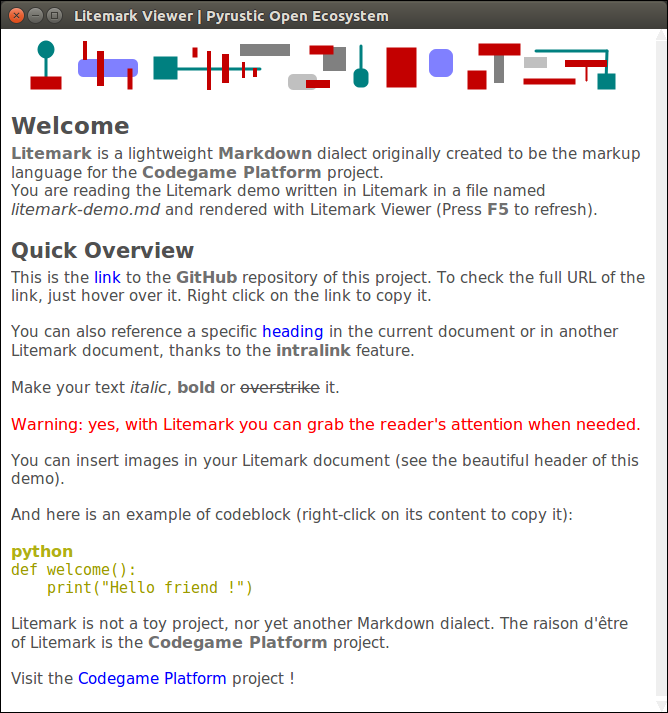
Litemark demo rendered in the Litemark Viewer
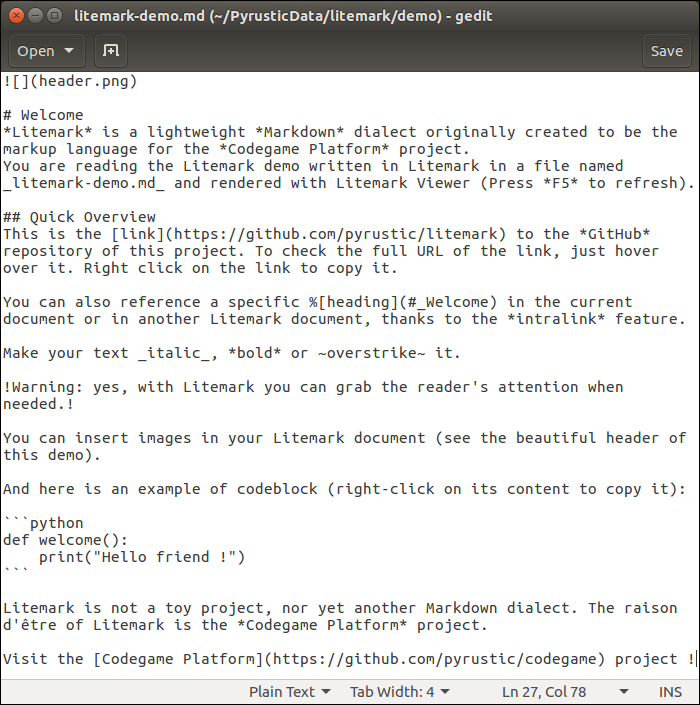
litemark-demo.md (plain text)
Usage
The name Litemark refers to both the markup language and the distribution package.
The distribution package comes with an API, a command line interface, and a graphical viewer.
API
It is easy to break an arbitrary plain text into a flat list of tokens:
import litemark


plain_text = """Hello *World* ! Visit the [repository](https://github.com/pyrustic/litemark) !"""

for token in litemark.scan(plain_text):
    # a token instance is a named tuple with 2 fields: name and data
    print(token)
The output:
Token(name='STRING', data='Hello ')
Token(name='BOLD', data='World')
Token(name='STRING', data=' ! Visit the ')
Token(name='LINK', data=('repository', 'https://github.com/pyrustic/litemark', ''))
Token(name='STRING', data=' !')
The formal names of the tokens are defined in litemark.Element:
class Element:
    CODEBLOCK = "CODEBLOCK"
    HEADING = "HEADING"
    BOLD = "BOLD"
    ITALIC = "ITALIC"
    WARNING = "WARNING"
    OVERSTRIKE = "OVERSTRIKE"
    IMAGE = "IMAGE"
    INLINK = "INLINK"
    LINK = "LINK"
    STRING = "STRING"
The token's data field represents a string for all elements except the following:
- Element.CODEBLOCK: 2-tuple (str-title, str-content)
- Element.HEADING: 2-tuple (int-level, str-content)
- Element.IMAGE: 3-tuple (str-inline, str-path, str-alt)
- Element.INLINK: 3-tuple (str-inline, str-path, str-alt)
- Element.LINK: 3-tuple (str-inline, str-URL, str-alt)
Command line interface
To open litemark-demo.md in the graphical Viewer:
$ litemark
To open a specific litemark file in the graphical Viewer:
$ cd /path/to/root
$ litemark my-file.md
Note:
Litemark is created for use in a desktop application. Thus, the Litemark Scanner assumes that the images referenced in a litemark document are relative to the
rootdirectory. Therootdirectory is simply the current working directory. For this reason, you must first do acd(change directory) to the root before rendering a document.
Graphical Viewer
It is easy to embed a Litemark Viewer in your Python desktop app:
import litemark
import tkinter as tk

root_directory = "/home/alex/demo"
litemark_filename = "/home/alex/demo/document.md"

# your GUI
gui = tk.Tk()
gui.geometry("500x500+0+0")

# let's embed a Litemark Viewer in this GUI

# -- text widget
text_widget = tk.Text(gui)
text_widget.pack(expand=1, fill=tk.BOTH)

# -- the viewer instance
viewer = litemark.Viewer(widget=text_widget, root=root_directory)
viewer.open(litemark_filename)
viewer.readonly = True

# done !
gui.mainloop()
This is a work in progress. A reference documentation will be released soon.
Installation
Install for the first time
pip install litemark
Upgrade
pip install litemark --upgrade --upgrade-strategy eager
Related projects
- Codegame Platform: create, distribute, and run codegames
- shared: library to store, expose, read, and edit collections of data
This is a work in progress...
1 maintainer

Metadata
1 maintainer
Release files for litemark 0.0.4
For a detailed explanation of source distributions (sdists) and built distributions (wheels), please see the package formats documentation.
Source distribution (sdist)
| File | Size | Uploaded | |
|---|---|---|---|
| litemark-0.0.4.tar.gz | 17.9 kB | Details |
Built distribution (wheel)
| File | Interpreter | ABI | Platform | Reset |
|---|---|---|---|---|
| litemark-0.0.4-py3-none-any.whl | Python 3 | none | any | Details |
Total release size: 38.3 kB
Release files / litemark-0.0.4.tar.gz
| Download URL | litemark-0.0.4.tar.gz |
|---|---|
| Size | 17.9 kB |
| Tags | Source |
|
SHA-256 checksum How to use checksums |
30e5e7b61c66e86dfd089032ce4df8a51fdd17315051c315e99b04b1eba320e6
|
|
BLAKE2b-256 checksum How to use checksums |
1125e19323c2cc63f06dff2bd424626f58b1edaf92d89277f055bc398588d66f
|
| Upload date | |
|
Uploaded using Trusted Publishing? What is trusted publishing? |
No |
| Uploaded via |
twine/1.15.0 pkginfo/1.6.1 requests/2.9.1 setuptools/50.3.2 requests-toolbelt/0.9.1 tqdm/4.54.0 CPython/3.5.2
|
Release files / litemark-0.0.4-py3-none-any.whl
| Download URL | litemark-0.0.4-py3-none-any.whl |
|---|---|
| Size | 20.5 kB |
| Tags | Python 3 |
|
SHA-256 checksum How to use checksums |
fd66f65e5eae06fb7fde8d785adb2cabe0843099580758d5da59f9ab25aa4f24
|
|
BLAKE2b-256 checksum How to use checksums |
507cb047988d9b215e40f97432d996c8a489f81faf179c9562aae50b38665c5a
|
| Upload date | |
|
Uploaded using Trusted Publishing? What is trusted publishing? |
No |
| Uploaded via |
twine/1.15.0 pkginfo/1.6.1 requests/2.9.1 setuptools/50.3.2 requests-toolbelt/0.9.1 tqdm/4.54.0 CPython/3.5.2
|














