
Runtime-governance and operational-launch tooling for Streamlit applications.

Project description
LitLaunch
LitLaunch is a runtime-governance and operational-launch layer for Streamlit applications. It helps developers run Streamlit apps cleanly, predictably, and locally first, without replacing Streamlit or hiding runtime ownership.
It starts Streamlit backends, resolves browser launch strategy, supports managed browser-window and Chromium app-mode flows, provides opt-in graceful shutdown, and exposes diagnostics without pretending to secure the app itself.
LitLaunch is developed and maintained by LatticeFoundry, a software division of Sierra Cognitive Group, LLC. LitLaunch is not affiliated with Streamlit.
Why LitLaunch?
LitLaunch gets Streamlit apps running cleanly with a small amount of code or a short CLI command, while handling the operational details most projects end up reinventing.
Launch your app with sensible defaults
litlaunch app.py --mode webapp
CLI examples use the installed litlaunch command. python -m litlaunch ...
is equivalent when a source checkout or environment has not exposed the console
script on PATH.
from litlaunch import LauncherConfig, StreamlitLauncher

launcher = StreamlitLauncher(LauncherConfig("app.py"))
session = launcher.start()
That is enough to get local-first defaults, explicit backend ownership, health checks, browser capability detection, an app-window experience where supported, isolated Chromium app-mode browser profiles, minimal Streamlit app chrome by default, clean shutdown handling, and diagnostics/reporting tools.
No shell scripts. No browser automation hacks. No custom runtime glue.
Go further with profiles and shortcuts
Profiles make launch behavior repeatable for local tools, internal dashboards, AI apps, and developer utilities:
[profiles.my-dashboard]
app_path = "app.py"
app_icon = "assets/my-dashboard.ico"
trust_mode = "strict_local"
mode = "webapp"
browser = "edge"
litlaunch create profile
litlaunch create shortcut --profile my-dashboard
litlaunch --profile my-dashboard
Simple workflows stay simple. Advanced launch, browser, monitoring, network,
and diagnostics settings are there when a project needs them.
Profiles may include app_icon for app identity. LitLaunch uses it for native
shortcut artifacts and, on Windows .ico app-window launches, applies the
strongest browser/window icon strategy the platform permits.
Eligible local Windows product apps can opt into Experimental height-only host
sizing with host_sizing = "initial" for one startup fit or
host_sizing = "continuous" for meaningful later content growth and shrink.
The app owns frontend measurement while LitLaunch owns authenticated native
sizing policy and safety. See the
host-sizing guide.
Built for real packaged applications
LitLaunch works cleanly inside packaged Streamlit applications and cross-platform runtime workflows, including apps built with tools such as PyInstaller, Inno Setup, or other desktop/runtime distribution systems.
It does not package your app or replace your installer. It handles the runtime layer those packaged apps still need: browser and app-mode startup, owned backend lifecycle, graceful shutdown, diagnostics/reporting, working-directory handling, repeatable launch workflows, and platform-specific launch behavior.
LitLaunch is designed to behave consistently across Windows, Linux, and macOS. Windows and Linux receive first-party manual validation. macOS is supported with lighter first-party validation while community coverage broadens.
That makes it a strong fit for internal business tools, analyst dashboards,
local AI utilities, and desktop-style Streamlit apps that need more operational
discipline than a bare streamlit run command.
Add shutdown hooks when cleanup matters
Apps can opt into graceful cleanup without adopting a complicated application structure:
from litlaunch import LauncherRuntime

runtime = LauncherRuntime.from_env()


@runtime.shutdown_hook(label="Saving app state")
def save_state():
    ...


runtime.enable_shutdown_endpoint()
Shutdown hooks are useful for saving state, syncing data, local AI workflows,
temporary resource cleanup, logging/export tasks, and other app-owned cleanup.
They are optional when you need them and invisible when you do not. Routine hook
messages can be marked verbose-only, and important success messages can opt into
quiet mode with show_in_quiet=True; failures remain visible in normal and
quiet output. Hooks that need run-specific messages can return
ShutdownHookStatus so app cleanup still flows through LitLaunch's standard
Hook: console lines instead of raw app prints.
Runtime governance without enterprise bloat
LitLaunch helps teams run Streamlit apps more safely and predictably without claiming to secure Streamlit applications.
It provides localhost-first defaults, trust modes, intentional network exposure workflows, runtime exposure diagnostics, Streamlit-native TLS awareness, governance/posture reporting, and sanitized diagnostics bundles. Normal localhost workflows stay frictionless; advanced runtime controls are available when the app is intentionally exposed beyond the local machine.
Generate app-owned support pages
LitLaunch can generate a Streamlit-native diagnostics/support page that host apps own, mount, and customize themselves. It gives packaged apps, internal tools, and local-first products a ready support hub for runtime posture, diagnostic sections, support artifacts, operational snapshot charts, and an optional runtime event trail.
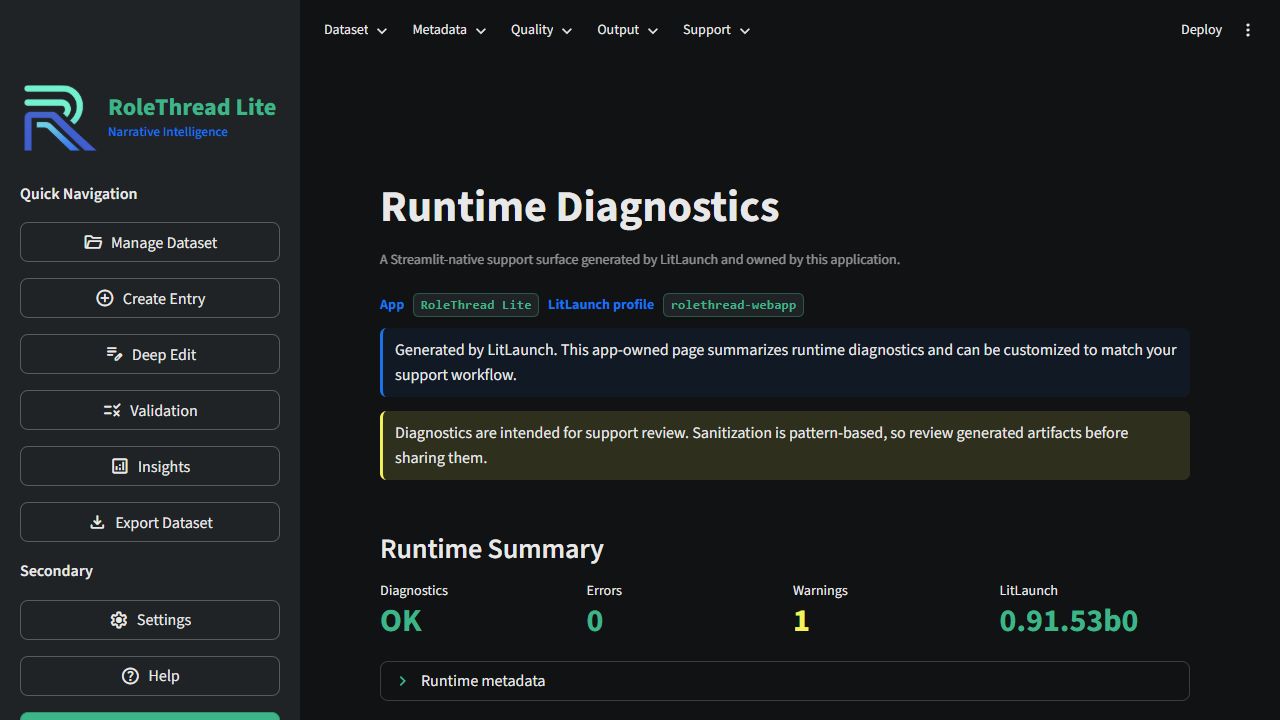
from litlaunch import create_diagnostics_page

create_diagnostics_page(
    output_path="ui/litlaunch_diagnostics.py",
    app_name="My App",
    profile_name="my-webapp",
)
Then mount the generated function wherever it belongs in your Streamlit app:
from ui.litlaunch_diagnostics import render_litlaunch_diagnostics

render_litlaunch_diagnostics()
The generated page imports Streamlit inside app-owned generated code; LitLaunch
itself does not add Streamlit as a package dependency. theme="auto" is the
default and preferred mode, dark is the polished LitLaunch/RoleThread support
style, and light is a functional starting point for light apps. The generated
theme tokens are centralized so teams can quickly adjust the page to match
their product.
What It Solves
- Start Streamlit through explicit, shell-free command construction.
- Hide Streamlit's default app toolbar/menu chrome by default where Streamlit
supports it, with
--show-streamlit-chrometo restore it. - Own and stop only the Streamlit backend process LitLaunch starts.
- Open a managed browser window or isolated Chromium app-mode window.
- Resolve Edge, Chrome/Chromium, and default-browser capability.
- Provide tokened loopback graceful shutdown hooks for app cleanup.
- Inspect local runtime readiness without launching the app.
- Keep failure output calm, concise, and actionable.
- Optionally apply authenticated height fitting (
initialone-shot orcontinuoussession-long) for eligible Windows Edge or Chrome webapp windows.
Runtime Philosophy
LitLaunch is infrastructure, not magic orchestration.
- Backend ownership is explicit through
RuntimeSession. - Browser processes are launched but never owned, killed, or controlled.
- Window monitoring is observational only. LitLaunch may observe a managed browser/app window, but it does not kill or close browser processes.
- Experimental host sizing is a separate explicit capability that can apply bounded height-only changes to an exactly authorized app window.
- Commands are argument tuples, never shell strings.
- Runtime dependencies remain stdlib-first; Python 3.10 uses the lightweight
tomlibackport for TOML profile loading. - Diagnostics are sanitized and avoid raw environment dumps.
- Localhost is the default. Non-loopback host bindings require explicit acknowledgement because LitLaunch does not secure Streamlit itself.
- Trust modes declare operational intent:
development,strict_local, orinternal_network. - Diagnostics report runtime governance, runtime exposure, and transport security posture, including Streamlit-native TLS awareness.
See docs/Public/Guides/philosophy.md and docs/Public/Reference/architecture.md for the full ownership model, and docs/Public/Reference/security.md for trust boundaries.
Install
Install from PyPI:
python -m pip install litlaunch
From a source checkout for development:
python -m pip install -e .[dev]
After changing versions or build metadata in a source checkout, rerun the
editable install command above. Python import metadata is produced during
installation, so stale editable installs can report an older package metadata
version even when litlaunch.__version__ has changed in the source tree.
Verify the CLI:
litlaunch --help
python -m litlaunch --help
Developer validation uses pytest, Ruff, mypy, and release hygiene checks:
python -m pytest
python -m ruff check .
python -m ruff format --check .
python -m mypy src/litlaunch
python scripts/check_release.py
The development environment currently uses Python 3.14.5. Package metadata allows Python 3.10 and newer, and CI currently tests Python 3.10 through 3.14 across Windows, Linux, and macOS.
Quickstart
Run your app from the CLI:
litlaunch app.py --mode webapp
Point LitLaunch at your own Streamlit app path. The explicit
litlaunch run app.py --mode webapp form remains available for scripts and
power-user workflows.
From a source checkout, you can also try the minimal example:
litlaunch examples/minimal_app/app.py --mode webapp
Use workflow help when you want guidance instead of command reference:
litlaunch help
litlaunch help launch
litlaunch help diagnostics
Use litlaunch --help or litlaunch run --help for argparse command and flag
reference.
Run in Chromium app-mode:
litlaunch examples/minimal_app/app.py --mode webapp --browser auto
LitLaunch hides Streamlit's default app toolbar/menu chrome by default through
Streamlit's supported client.toolbarMode = "minimal" setting. Use
--show-streamlit-chrome when you intentionally want Streamlit's default
toolbar/menu chrome visible for a launch.
LitLaunch also keeps raw backend console output quiet by default, including
Streamlit startup banners, usage-statistics notices, and app-side server
messages printed by the backend process. LitLaunch still reports the resolved
local URL in its own console output. Use --show-streamlit-output when you
intentionally want the raw Streamlit/backend output stream visible.
Inspect local readiness without launching:
litlaunch report app.py
Use a reusable project profile:
litlaunch create profile
litlaunch create shortcut --profile my-webapp
The profile wizard offers Simple and Advanced modes. Simple mode defaults to
LitLaunch's recommended app-window experience, detects common app-root defaults
such as app.py, writes litlaunch.toml, and can optionally create a
project-local launch shortcut after the profile is saved. Advanced mode exposes
the fuller runtime surface for network, browser, monitor, args, cwd, and env
settings.
[profiles.my-webapp]
app_path = "app.py"
title = "My App"
mode = "webapp"
browser = "edge"
trust_mode = "development"
port = 8501
headless = true
runtime_event_log = ".litlaunch/runtime-events.log"
graceful_timeout = 15

[profiles.my-webapp.window_monitor]
enabled = true
appear_timeout = 60
poll_interval = 1
stable_polls = 2
litlaunch --profile my-webapp
litlaunch command --profile my-webapp
litlaunch report --profile my-webapp --open
Profiles can live in litlaunch.toml or under [tool.litlaunch] in
pyproject.toml. Explicit CLI flags override profile values. Bare profile names
such as litlaunch my-webapp are intentionally not launch shorthand; use
--profile so profile-based launches stay unambiguous.
litlaunch report is the recommended human-facing diagnostics workflow. It
writes .litlaunch/reports/litlaunch-report.html by default. The explicit
litlaunch inspect --html, --json, and --bundle commands remain available
for power-user and machine-readable diagnostics.
Generated project artifacts
LitLaunch keeps persistent project artifacts under a project-local
.litlaunch/ directory by default:
.litlaunch/
  reports/              HTML reports, JSON output, and support bundles
  shortcuts/            generated launch shortcuts
Keep litlaunch.toml in the project root when you want profiles to travel with
the app. Add .litlaunch/ to .gitignore when generated reports, shortcuts,
and other project artifacts should stay out of source control. Explicit
--output paths still write exactly where you ask. Ephemeral browser/runtime
state uses system temp by default, and --runtime-state-root or profile
runtime_state_root can point it at an intentional app-owned location.
Shortcut generation uses native project-local artifacts by default: .lnk on
Windows, .desktop on Linux, and a small .app bundle on macOS. Use
litlaunch create shortcut --profile NAME --kind script when you prefer the
simple .bat, .sh, or .command script form. macOS shortcut support is
available with lighter first-party validation while community coverage broadens.
Python integrations can run the same configured profile through run_profile():
from litlaunch import load_profile, run_profile

profile = load_profile("my-webapp")
result = run_profile(profile)

if result.exit_code:
    print(result.message)
If profile.window_monitor is enabled, run_profile() uses the monitored
webapp runner. Otherwise it starts the normal StreamlitLauncher path and
returns the same structured MonitoredRunResult shape.
Use the Python API:
from litlaunch import LauncherConfig, StreamlitLauncher

config = LauncherConfig(
    app_path="app.py",
    title="My Streamlit App",
    mode="browser",
)

session = StreamlitLauncher(config).run()

try:
    print(f"Running at {session.url}")
finally:
    session.stop()
run() is the friendly common entry point. start() is the explicit lifecycle
entry point; both return a RuntimeSession.
For app-mode integrations that need close-to-shutdown behavior, LitLaunch also provides a high-level monitored runner:
from litlaunch import LauncherConfig, LaunchMode, run_monitored_webapp

result = run_monitored_webapp(
    LauncherConfig(
        app_path="app.py",
        title="My Streamlit App",
        mode=LaunchMode.WEBAPP,
        browser="edge",
    ),
    graceful_timeout_seconds=15,
)
The monitored runner observes the app window and returns a
MonitoredRunResult. Monitoring does not own, kill, or close browser windows;
the separate Experimental host-sizing policy may apply bounded height-only
changes when explicitly configured and fully eligible.
Show launch behavior without starting Streamlit or opening a browser:
plan = StreamlitLauncher(config).build_launch_plan()
print(plan.command_display)
print(plan.app_url)
print(plan.streamlit_chrome_policy)
print(plan.host_sizing_policy)
print(plan.host_sizing_eligibility)
build_launch_plan() is useful for diagnostics, integration tests, and
configuration parity checks. Sensitive command and environment values are
redacted in display fields.
Advanced integrations can inject a backend command provider when a packaged or
embedded app needs a custom backend executable while LitLaunch still owns env
injection, health checks, browser launch, and RuntimeSession lifecycle:
from litlaunch import BackendCommand, LauncherConfig, StreamlitLauncher


class PackagedBackend:
    def build_backend_command(self, context):
        return BackendCommand(
            (
                "dist/MyApp/MyApp.exe",
                "--host",
                context.host,
                "--port",
                str(context.port),
            ),
            description="packaged Streamlit backend",
            backend_kind="packaged",
        )


launcher = StreamlitLauncher(
    LauncherConfig(app_path="app.py"),
    backend_command_provider=PackagedBackend(),
)
Custom backend commands must bind the requested host/port and expose the Streamlit health endpoint used by LitLaunch.
Public API Surface
The supported public surfaces are the configuration, launcher, launch-plan, profile, monitored-runner, backend-command-provider, app shutdown, and inspect diagnostics APIs documented in docs/Public/Reference/architecture.md. Window provider internals, low-level browser/window matching details, and console presentation internals are implementation details and may evolve faster than the public API.
Supported Capabilities
| Area | Support | Notes |
|---|---|---|
| Streamlit backend launch | Supported | Shell-free command construction and owned backend process management. |
| Backend command providers | Supported | Optional command-only seam for packaged/embedded integrations. |
| Browser mode | Supported | Uses default browser or detected Chromium browser capability. |
| Chromium app-mode | Supported | Edge and Chrome/Chromium adapters first. |
| Browser fallback | Supported | Explicit browser choices can fall back unless disabled. |
| Graceful shutdown hooks | Supported | Opt-in app runtime, tokened loopback endpoint, optional app completion callback, fallback backend termination. |
| Inspect diagnostics | Supported | HTML, JSON, and sanitized bundle output. No app launch. |
| Window monitoring | Supported | Windows Chromium app-mode and managed browser-window observation where platform support is available. |
| Packaging guidance | Supported guidance | LitLaunch supports packaged app runtime workflows but does not own packaging. |
| Diagnostics dashboard | Out of scope | No local diagnostics server exists today. |
Common CLI Examples
litlaunch version
litlaunch platform
litlaunch browsers

litlaunch command app.py --server.runOnSave true -- --workspace demo
litlaunch run app.py --mode browser
litlaunch run app.py --mode webapp --browser edge
litlaunch run app.py --mode webapp --show-streamlit-chrome
litlaunch run app.py --port 8501 --no-auto-port
litlaunch run app.py --port 8501 --port-range 8501:8599
litlaunch run app.py --host 0.0.0.0 --allow-network-exposure
litlaunch run app.py --trust-mode strict_local
litlaunch run app.py --host 0.0.0.0 --trust-mode internal_network --allow-network-exposure
litlaunch run app.py --mode webapp --monitor-window --title "My Streamlit App"
litlaunch run app.py --mode webapp --monitor-window --graceful-timeout 15
litlaunch run app.py --mode webapp --monitor-window --monitor-appear-timeout 90

litlaunch inspect
litlaunch inspect app.py --html --output litlaunch-report.html
litlaunch inspect app.py --json
litlaunch inspect app.py --bundle --output litlaunch-report.txt --force
litlaunch report app.py --host 0.0.0.0 --trust-mode internal_network --allow-network-exposure
Unknown arguments before Streamlit's -- separator are passed through to
Streamlit. Arguments after -- are passed to the app.
Python integrations can set LauncherConfig.cwd and LauncherConfig.extra_env
to control the backend child process without mutating global environment state.
App-Mode And Monitoring
Browser mode can use a managed temporary Chromium profile and a new top-level browser window so closing that window can trigger graceful shutdown where supported. Webapp mode opens a Chromium app-mode window when an app-mode capable browser is available. Monitoring remains observational: LitLaunch does not own, close, or kill browser processes. If browser-window monitoring cannot identify a window confidently, Ctrl+C remains the shutdown path.
For monitored Streamlit windows, match the LitLaunch --title or profile
title to st.set_page_config(page_title="..."). LitLaunch tolerates
conservative near-title drift, but aligned titles give the most reliable close
detection.
Plain Streamlit apps do not need app-side shutdown setup for the default
window-close flow. Use LauncherRuntime hooks only when the app has custom
cleanup work.
See docs/Public/Reference/browser-support.md and docs/Public/Reference/window-monitoring.md.
Inspect And Troubleshooting
Use litlaunch inspect before launching or when a runtime fails. Plain
inspect prints format guidance; HTML is the recommended human-readable
diagnostics report, JSON is for tools, and bundle output is for support:
litlaunch inspect app.py --html --output litlaunch-report.html
litlaunch inspect app.py --json --output litlaunch-report.json
litlaunch inspect app.py --bundle --output litlaunch-report.txt
Reports include runtime governance, runtime exposure, and transport security sections. They show trust mode, host exposure scope, acknowledgement state, Streamlit-native TLS posture, and plaintext network-exposure risk. This is operational visibility, not a security guarantee: LitLaunch does not authenticate users, terminate TLS, or secure Streamlit applications.
See docs/Public/Reference/inspect.md and docs/Public/Troubleshooting/troubleshooting.md.
Documentation
- Overview
- Philosophy
- Installation
- Quickstart
- Experimental Host Sizing
- Host-Sizing FAQ
- CLI
- Security And Trust Boundaries
- Runtime Events
- Diagnostics Page Generator
- Browser Support
- Window Monitoring
- Inspect
- Troubleshooting
- Architecture
- Integration
- RoleThread Lite Integration
- Packaging Notes
- Changelog
Non-Goals
- Owning, killing, or controlling browser processes.
- Killing by process name, PID discovery, or port owner.
- Replacing Streamlit's CLI/config system.
- Running a local diagnostics dashboard or diagnostics server today.
- Owning PyInstaller, Nuitka, installer, updater, or full packaging workflows. LitLaunch does support project-local native shortcut generation for existing profiles, with script fallback when needed.
- Adding terminal UI frameworks or heavy runtime dependencies.
Versioning
LitLaunch uses PEP 440 public versions:
- Patch bumps are for fixes, cleanup, and basic hardening passes.
- Minor bumps are for larger internal milestones and feature work.
- Major versions are controlled manually by the project owner.
License
MIT. Copyright (c) 2026 Sierra Cognitive Group, LLC.


Download files
Download the file for your platform. If you're not sure which to choose, learn more about installing packages.
Source Distribution
Built Distribution
Filter files by name, interpreter, ABI, and platform.
If you're not sure about the file name format, learn more about wheel file names.
Copy a direct link to the current filters
File details
Details for the file litlaunch-1.1.3.tar.gz.
File metadata
- Download URL: litlaunch-1.1.3.tar.gz
- Upload date:
- Size: 514.9 kB
- Tags: Source
- Uploaded using Trusted Publishing? No
- Uploaded via: twine/6.2.0 CPython/3.14.5
File hashes
| Algorithm | Hash digest | |
|---|---|---|
| SHA256 |
e142617588faefe5bfcdddd4a568eb8d70a905092a86f9840dfad7a57b7f234c
|
|
| MD5 |
2215191c15108f4e6b5b9c170a33f8f5
|
|
| BLAKE2b-256 |
d17dfbd5cfe4c6dbbb33685b318712695bcf00a07bc89b794e6845f180303cda
|
File details
Details for the file litlaunch-1.1.3-py3-none-any.whl.
File metadata
- Download URL: litlaunch-1.1.3-py3-none-any.whl
- Upload date:
- Size: 222.9 kB
- Tags: Python 3
- Uploaded using Trusted Publishing? No
- Uploaded via: twine/6.2.0 CPython/3.14.5
File hashes
| Algorithm | Hash digest | |
|---|---|---|
| SHA256 |
80508e39b8c2e6aa1b9faad862d6bfab8f9367860b41f5979d2069c1863448ab
|
|
| MD5 |
4e46f56ec84a047221ba201eed7d5554
|
|
| BLAKE2b-256 |
5526938079c6eda603497bd656d2dc37674f78258015990ec32315cf4b5cfcd4
|






