
⚡ LitLogger - A minimal logger for AI experiments
Log and share inputs, outputs, metrics, prompts, and artifacts from any Python code so you can see what changed and why.
✅ Lightweight      ✅ Zero-setup           ✅ Any Python code
✅ Artifacts        ✅ Machine metadata     ✅ Cloud or on-prem
✅ Training         ✅ Inference            ✅ Agents, multi-modal
✅ Fine-grain RBAC  ✅ Share experiments    ✅ Free tier
Quick start • Examples • Docs
Why LitLogger?
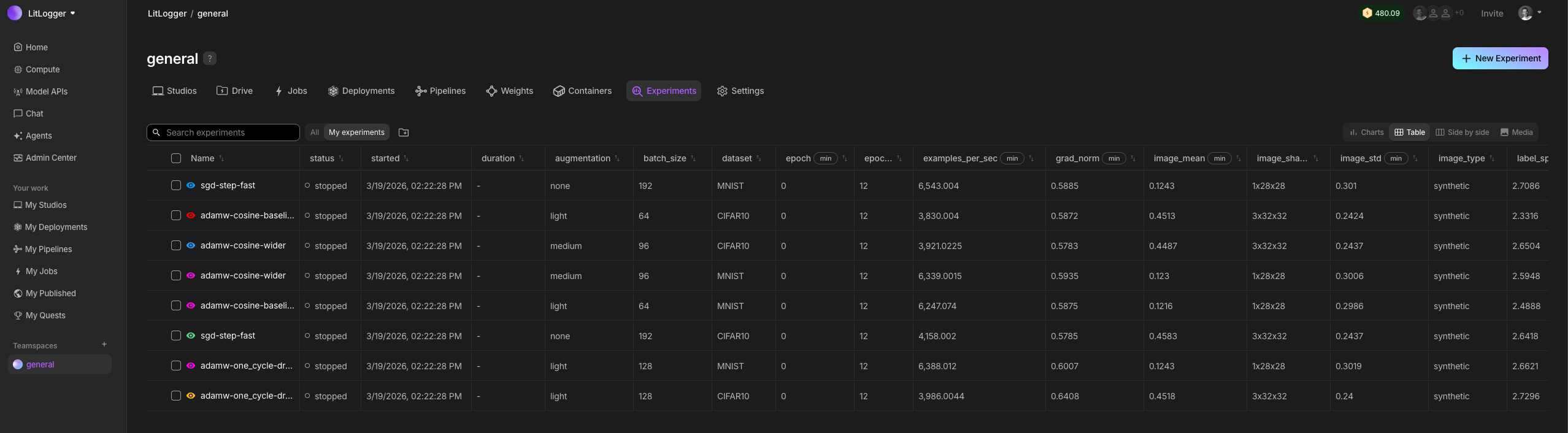
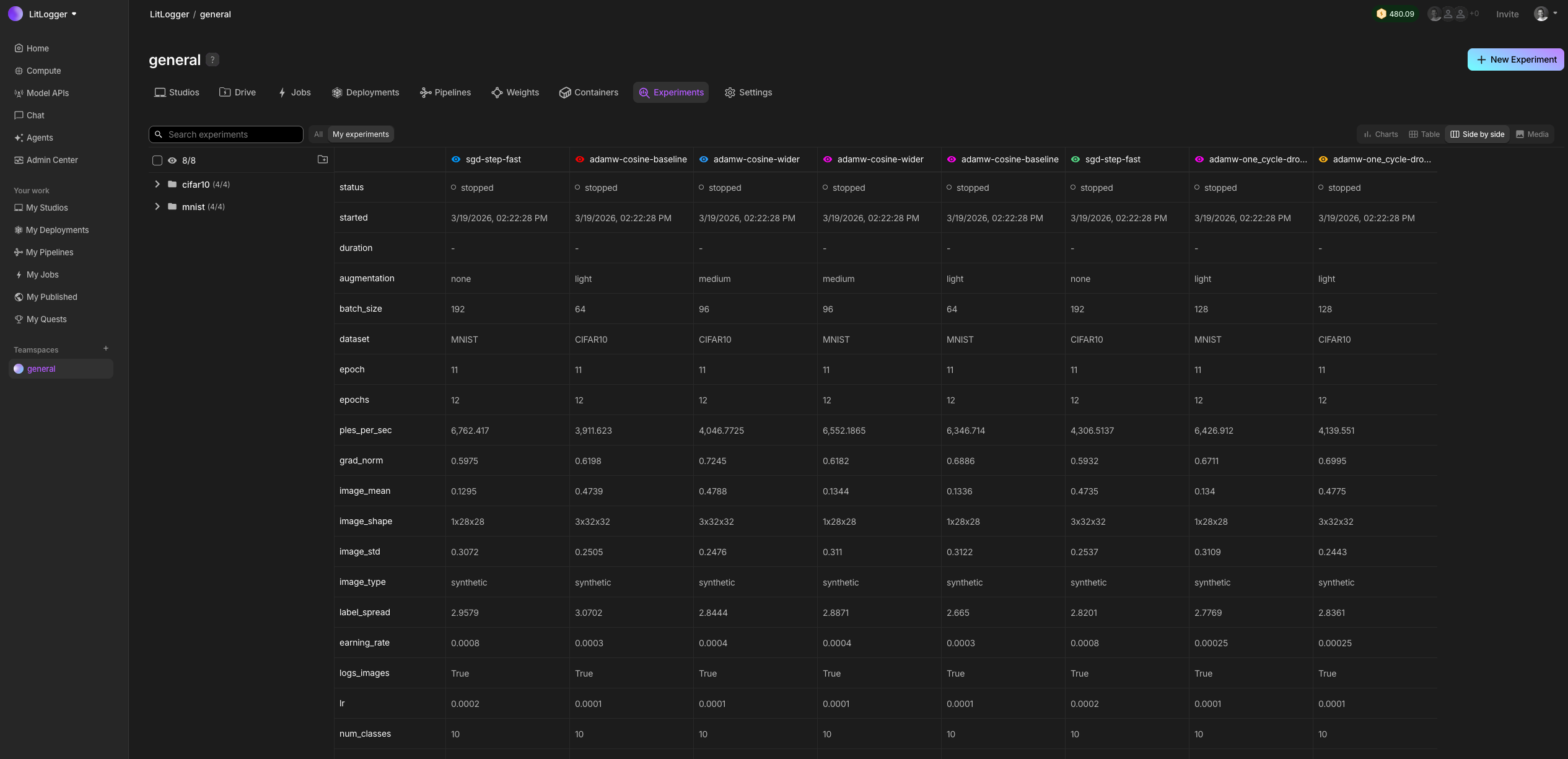
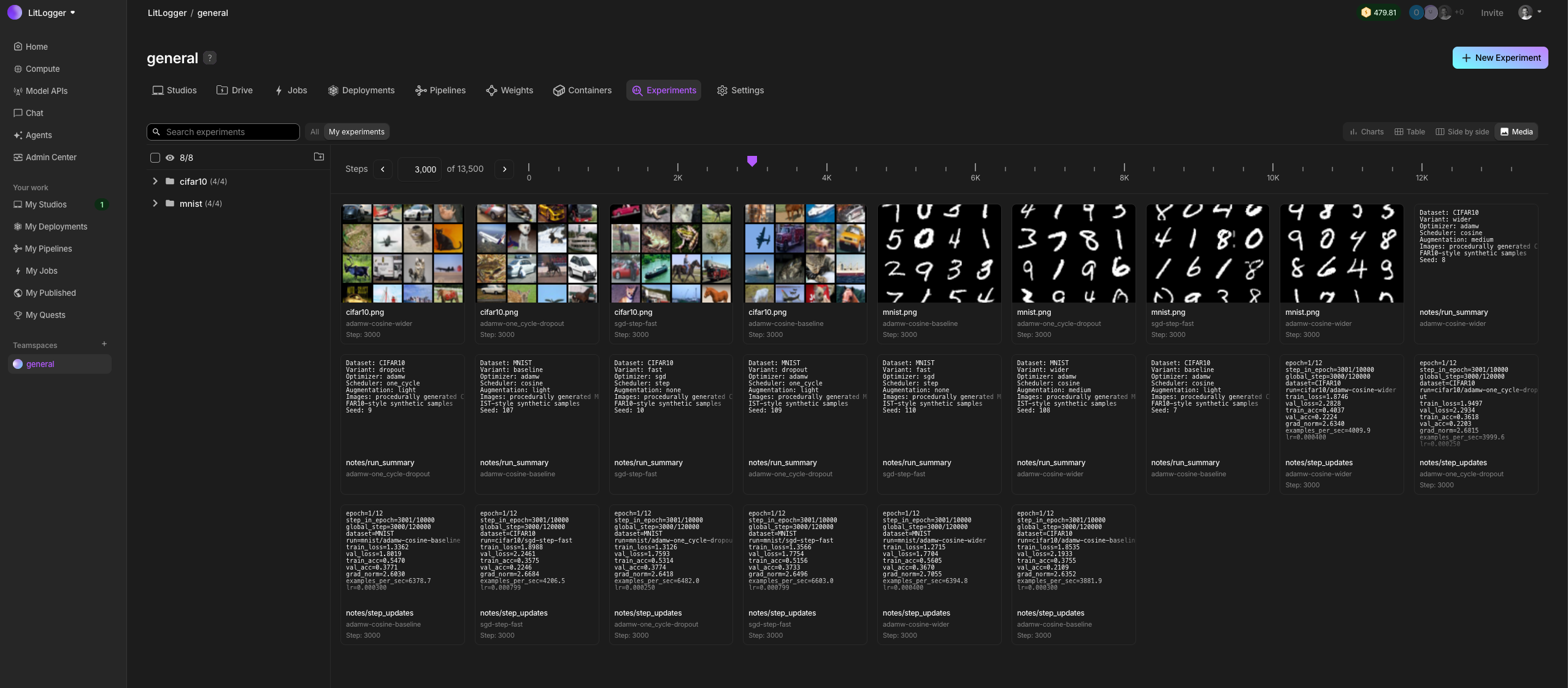
When building AI, you change many things at once: code, data, prompts, models. After a few runs, it becomes unclear what actually caused results to improve or regress. LitLogger records every run as it happens. It logs inputs, metrics, prompts, model outputs, and files, without requiring a framework, config files, or a workflow change. You can compare and share runs later instead of rerunning everything from scratch.
LitLogger runs locally (coming soon), in the cloud, or on-prem. It is free for developers and integrates with Lightning AI, but works without logging in.
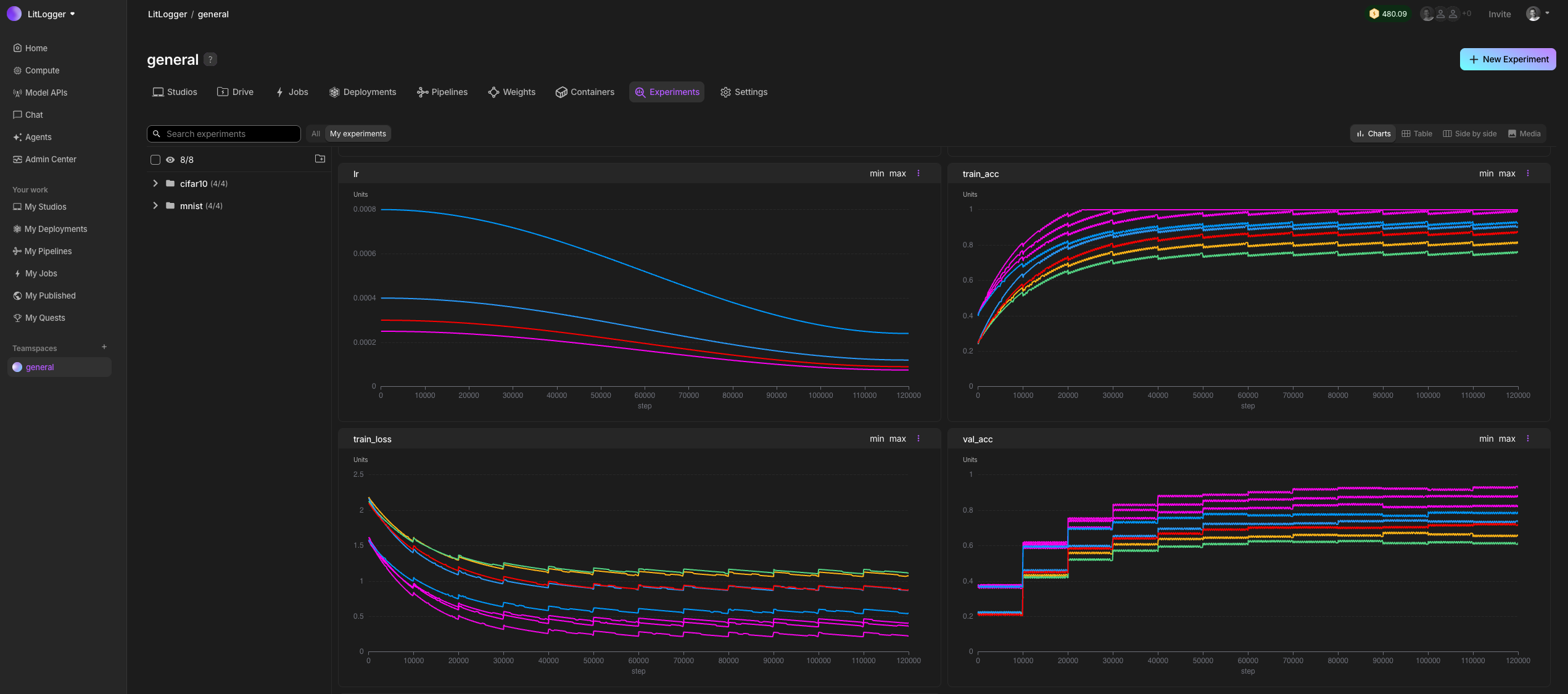
Quick start
Install LitLogger with pip.
pip install litlogger
Hello world example
Use LitLogger with any Python code (PyTorch, vLLM, LangChain, etc).
import litlogger

exp = litlogger.init(name="hello-world")

for i in range(10):
    exp["my_metric"].append(i, step=i)

# log more than just metrics (files, text, artifacts, model weights or series thereof)
# exp["config"] = File("/path/to/config.txt")
# exp["summary"] = Text("first run")
# exp["rollout"] = Video("/path/to/preview.mp4")
# exp["model"] = Model(torch.nn.Module)
# exp["config-series"].append(File("/path/to/config1.txt"))
# exp["config-series"].append(File("path/to/config2.txt"))
exp.finalize()
Examples
Use LitLogger for any usecase (training, inference, agents, etc).
Model training
Add LitLogger to any training framework, PyTorch, Jax, TensorFlow, Numpy, SKLearn, etc...
import torch
import torch.nn as nn
import torch.optim as optim
import litlogger
from litlogger import Model, File
import os

# define a simple neural network
class SimpleModel(nn.Module):
    def __init__(self):
        super().__init__()
        self.linear = nn.Linear(10, 1)

    def forward(self, x):
        return self.linear(x)

def train():
    # initialize LitLogger
    experiment = litlogger.init()
    experiment["task"] = "model_training"
    experiment["model_name"] = "SimpleModel"

    # hyperparameters
    num_epochs = 10
    learning_rate = 0.01

    # model, loss, and optimizer
    model = SimpleModel()
    criterion = nn.MSELoss()
    optimizer = optim.SGD(model.parameters(), lr=learning_rate)

    # dummy data
    X_train = torch.randn(100, 10)
    y_train = torch.randn(100, 1)

    # training loop
    for epoch in range(num_epochs):
        optimizer.zero_grad()
        outputs = model(X_train)
        loss = criterion(outputs, y_train)
        loss.backward()
        optimizer.step()

        # log training loss
        experiment["train/loss"].append(loss.item(), step=epoch)
        print(f"Epoch [{epoch+1}/{num_epochs}], Loss: {loss.item():.4f}")

    # log the trained model
    experiment["model"] = Model(model)
    print("model logged.")

    # create a dummy artifact file and log it
    with open("model_config.txt", "w") as f:
        f.write(f"learning_rate: {learning_rate}\n")
        f.write(f"num_epochs: {num_epochs}\n")
    experiment["model_config"] = File("model_config.txt")
    print("model config artifact logged.")

    # Clean up the dummy artifact file after logging
    os.remove("model_config.txt")

    # finalize the logger when training is done
    experiment.finalize()
    print("training complete and logger finalized.")

if __name__ == "__main__":
    train()
Model inference
Add LitLogger to any inference engine, LitServe, vLLM, FastAPI, etc...
import time
import litserve as ls
import litlogger

class InferenceEngine(ls.LitAPI):
    def setup(self, device):
        # initialize your models here
        self.text_model = lambda x: x**2
        self.vision_model = lambda x: x**3
        self.exp = litlogger.init(name="inference-engine", metadata={"service_name": "InferenceEngine", "device": device})

    def predict(self, request):
        start_time = time.time()
        x = request["input"]

        # perform calculations using both models
        a = self.text_model(x)
        b = self.vision_model(x)
        c = a + b
        output = {"output": c}

        end_time = time.time()
        latency = end_time - start_time

        self.exp["input_value"].append(x)
        self.exp["output_value"].append(c)
        self.exp["prediction_latency_ms"].append(latency * 1000)

        return output

    def teardown(self):
        self.exp.finalize()

if __name__ == "__main__":
    server = ls.LitServer(InferenceEngine(max_batch_size=1), accelerator="auto")
    server.run(port=8000)
Ping the server from the terminal to have it generate some metrics
curl -X POST http://127.0.0.1:8000/predict -H "Content-Type: application/json" -d '{"input": 4.0}'
curl -X POST http://127.0.0.1:8000/predict -H "Content-Type: application/json" -d '{"input": 5.5}'
curl -X POST http://127.0.0.1:8000/predict -H "Content-Type: application/json" -d '{"input": 2.1}'
PyTorch Lightning
PyTorch Lightning now comes with LitLogger natively built in. It's also built by the PyTorch Lightning team for guaranteed fast performance at multi-node GPU scale.
from lightning import Trainer
from lightning.pytorch.demos.boring_classes import BoringDataModule, BoringModel
from lightning.pytorch.loggers import LitLogger


class LoggingBoringModel(BoringModel):

    def training_step(self, batch, batch_idx):
        out = super().training_step(batch, batch_idx)
        self.log("train_loss", out["loss"])
        return out

    def validation_step(self, batch, batch_idx):
        out = super().validation_step(batch, batch_idx)
        self.log("val_loss", out["x"])
        return out


trainer = Trainer(max_epochs=10, logger=LitLogger(), log_every_n_steps=10)
trainer.fit(LoggingBoringModel(), BoringDataModule())
Long-running experiment simulator
This is a fun example that simulates a long model training run.
import random
from time import sleep

import litlogger

exp = litlogger.init(name="loss-simulator")

# Initial loss value
current_loss = 0.09

# Total number of steps
total_steps = 10000

for i in range(total_steps):
    if (i + 1) % 5 == 0:
        sleep(0.02)  # Simulate some delay

    if i % 100 == 0:
        # Apply small random fluctuation within 5% of the current loss
        fluctuation = random.uniform(-0.05 * current_loss, 0.05 * current_loss)
        current_loss += fluctuation

        # Determine direction of the major adjustment with weighted probabilities
        direction = random.choices(
            population=['decrease', 'increase'],
            weights=[0.6, 0.4],
            k=1
        )[0]

        # Apply major adjustment within 20% of the current loss
        if direction == 'decrease':
            adjustment = random.uniform(-0.2 * current_loss, 0)
        else:
            adjustment = random.uniform(0, 0.2 * current_loss)

        current_loss += adjustment

    # Ensure loss does not go negative
    current_loss = max(0, current_loss)

    # Log metrics less frequently to save resources
    if i % 1000 == 0:
        exp["loss"].append(current_loss, step=i)

exp.finalize()
Check the examples folder for more.
Community
LitLogger accepts community contributions - Let's make the world's most advanced AI experiment manager.
Metadata
Release files for litlogger 2026.8.28
For a detailed explanation of source distributions (sdists) and built distributions (wheels), please see the package formats documentation.
Built distribution (wheel)
| File | Interpreter | ABI | Platform | Reset |
|---|---|---|---|---|
| litlogger-2026.8.28-py3-none-any.whl | Python 3 | none | any | Details |
Release files / litlogger-2026.8.28-py3-none-any.whl
| Download URL | litlogger-2026.8.28-py3-none-any.whl |
|---|---|
| Size | 86.4 kB |
| Tags | Python 3 |
|
SHA-256 checksum How to use checksums |
eef3d6e5f3b75fcff80d69f5bbca7f6873ae963acaa89d49f9918a5721cbb5ea
|
|
BLAKE2b-256 checksum How to use checksums |
c068928d58afc70b61601b4604f77e7075bed991ed5024472806e8d87238c40f
|
| Upload date | |
|
Uploaded using Trusted Publishing? What is trusted publishing? |
Yes |
| Uploaded via |
twine/6.1.0 CPython/3.13.13
|
Provenance
Provenance describes where a file came from. On PyPI, provenance is shared via attestations, which provide a verifiable record of the build or publishing details. View details, limitations and caveats.


PyPI Publish Attestation
PyPI verified that this artifact, at this checksum, originated from the publisher listed below.
Signed by GitHub Actions, verified by PyPI on Aug 28, 2026.
Transparency log













