
litschema


Turn a folder of PDFs into a dataset you can defend.
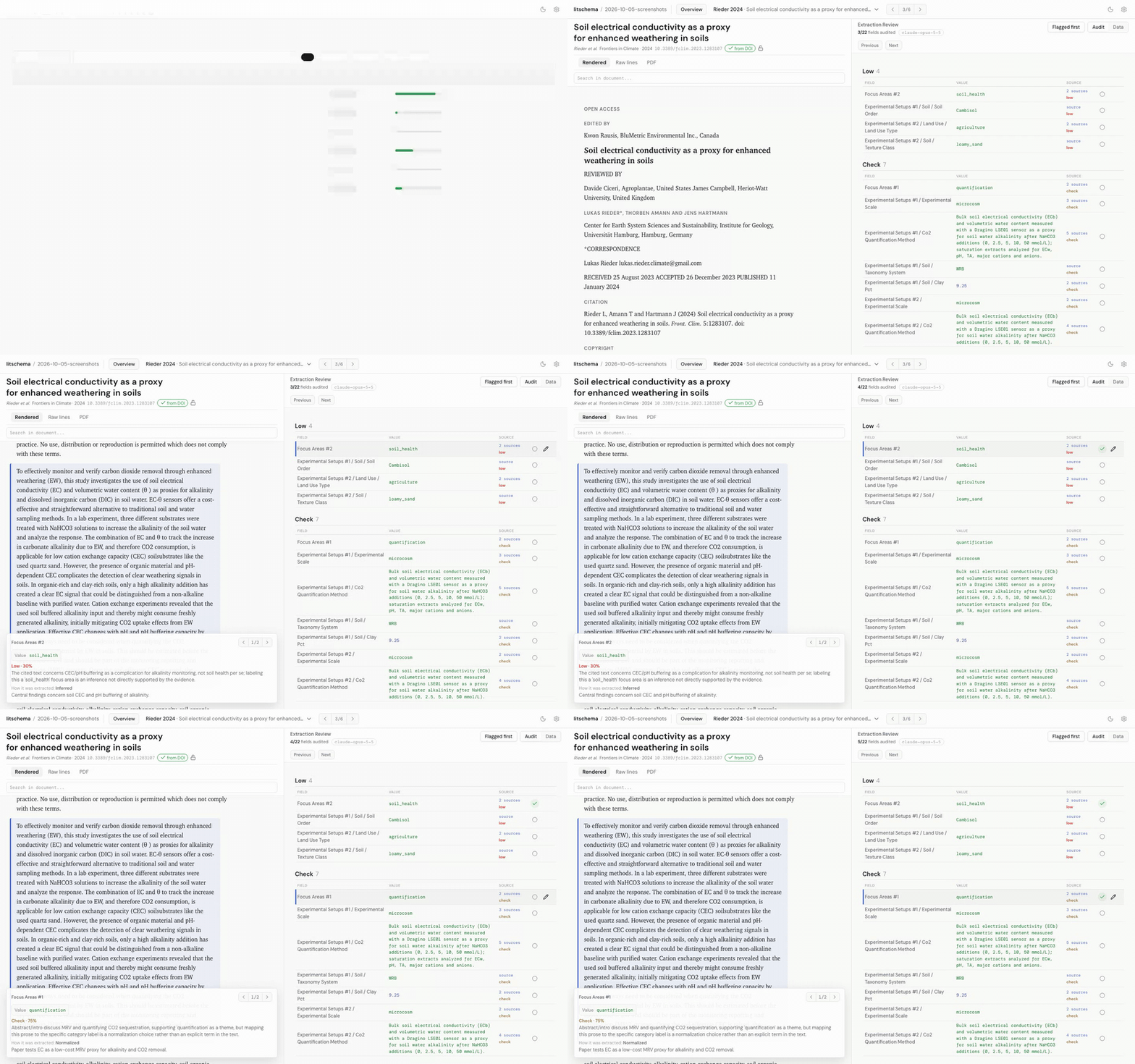
litschema extracts structured data from scientific papers into a LinkML schema you write. Every value comes with:
- the lines of the paper it came from;
- how it was derived (stated, converted, normalized, calculated, inferred, or assumed);
- the model and inputs that produced it, hashed;
- a second model's probability that it's correct;
- your verdict, once you've reviewed it.
It runs on your machine. Models run through your own Claude Code install; the only other network calls are optional DOI lookups and ORCID name lookups in the review app. Docs: litschema.readthedocs.io.
What you get
One folder per paper:
data/papers/<article-id>/
  <article-id>.pdf
  article-metadata.json                  identity and bibliographic metadata
  article.md                             prepared text
  prepared-text.json                     how the PDF was converted, hashed
  figures/                               images from the PDF
  active-run.json                        which run is current
  extraction-runs/<run-id>/
    agent-extraction.json                the values, valid against your schema
    agent-reasoning.json                 per value: cited lines, basis, note
    run.json                             input hashes and the model
    grades/<grade-id>.json               the grader's confidence per value
    review.json                          your verdicts
It's plain JSON, so you can diff it in git. The default .gitignore leaves
out the PDF, article.md, and figures, since most papers can't be
redistributed; prepare-text rebuilds them from the PDF. A published run
never changes, so a review of it stays valid. Re-extracting adds a new run
beside the old one.
Alpha software
litschema is early software. You may need to regenerate extracted data when you update it.
Tables that a PDF stores as images arrive as figures, so a value from one cites the figure rather than a row.
The changelog lists each release's breaking changes and known limits.
Specs
The specs describe what's implemented now. Anything deferred says so and links to where it's tracked.
The flow
litschema init my-project       # scaffold a project
                                # copy PDFs into papers-inbox/
/litschema-onboard              # agent: drafts your schema, pilots, extracts
litschema grade --all           # a second model scores every value
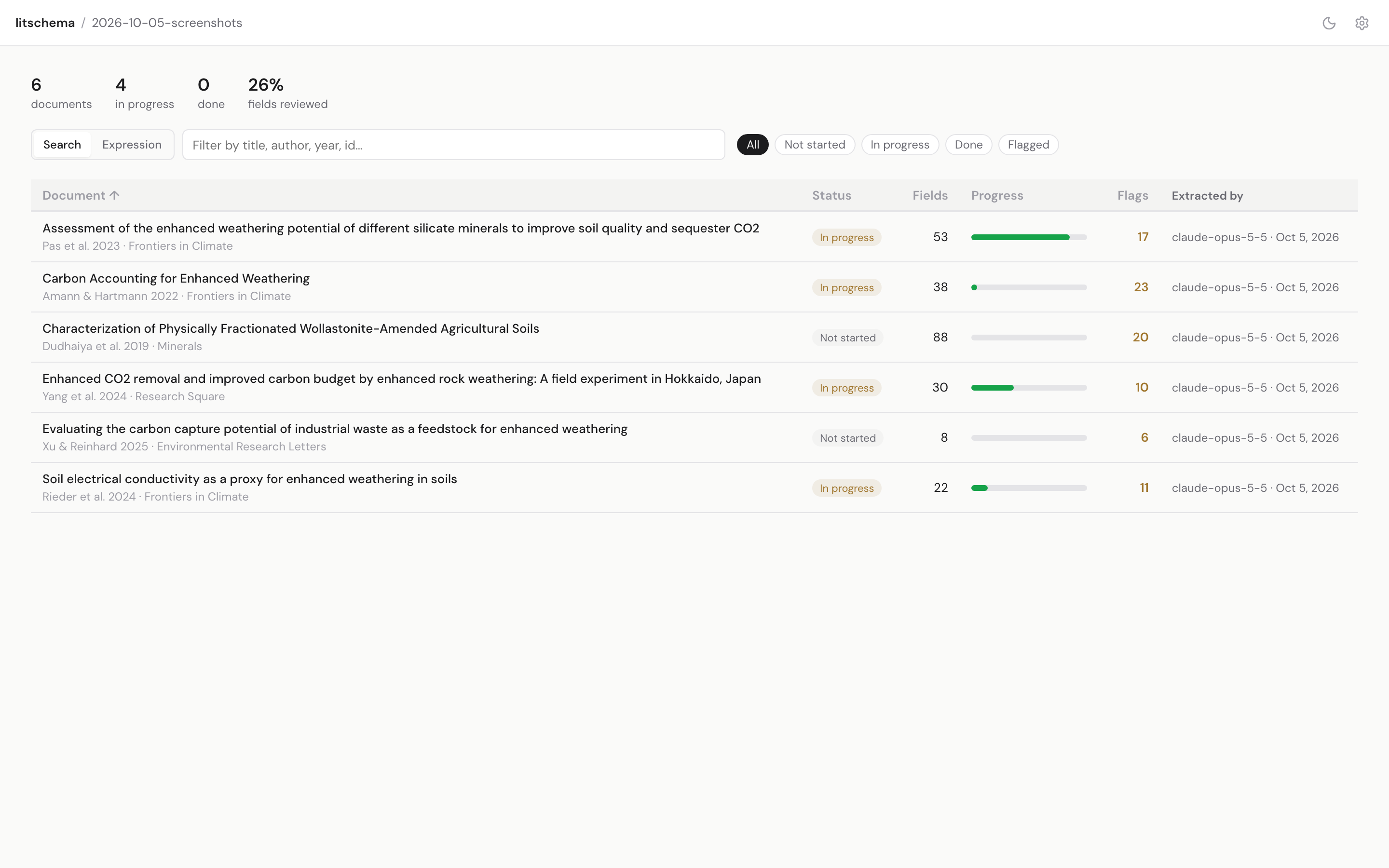
litschema verify                # you: review what was extracted
litschema export                # the reviewed data
init installs the /litschema-onboard skill into .claude/skills/. It
drafts a LinkML schema with you from your own papers, converts the PDFs,
extracts one paper as a pilot so you can adjust the schema, then extracts the
rest.
Install
uv tool install litschema      # or: pip install litschema
litschema --version
init pins each project to the installed version (litschema_version in
litschema.yaml), and commands refuse to run under any other. To move a
project to a new release, install it and edit the pin.
To try an unreleased commit or work on litschema itself:
uv tool install "litschema @ git+https://github.com/clevinson/litschema@main" --force
uv tool install --editable path/to/litschema --force   # edits apply immediately
Commands
litschema init <dir>               scaffold a project; installs agent skills locally
litschema doctor                   check config, schema, and skill installation
litschema status                   counts: inbox, articles, runs, reviews
litschema assemble                 papers-inbox PDFs -> per-article folders (offline)
litschema prepare-text <id>|--all  PDF -> article.md and figures (offline)
litschema meta show|set|sync <id>  bibliographic metadata, provenance-tagged
litschema validate [target]        validate extractions against the schema
litschema grade <id>|--all         score each value against its cited lines
litschema runs list|activate       list published runs; choose the active one
litschema verify [--port 8000]     local review app (loopback only)
litschema export [-f jsonl|csv]    reviewed data as flat files
litschema mcp                      DuckDB store served over MCP (experimental)
litschema skills install           install the agent skills
litschema agent ...                steps the extraction skill calls
Extraction runs as an agent skill (/extract-article <id>), and litschema
checks what the agent writes. A headless litschema extract is planned.
How it works
Intake is offline. assemble derives an article id from each PDF's
filename, moves the PDF into the store, and writes a minimal manifest. You
need no DOI, bibliography file, or network access to reach extraction, and
dropping the same PDF twice does nothing.
The agent extracts; litschema checks. The agent reads only the prepared text and its figures. It writes the values and a reasoning file that gives, for each value, the cited lines, a basis, and a note on how it got the value, and it loops until both validate. Validation is closed-world: litschema rejects any field the schema doesn't define and any citation to a line that doesn't exist.
A second model grades. litschema grade gives a separate model each value,
the extractor's basis and note, and the cited lines. It returns the
probability that the value is correct, with a one-line issue below 0.9. The
review app puts flagged values first. In an 18-paper pilot, 85% of stated
values scored 0.9 or higher; 29% of inferred values scored below 0.6.
Runs record their inputs. Publishing a run records the SHA-256 of the prepared text, the domain context, the extraction skill, and the schema, plus the litschema version and the conversion settings. The model name is recorded as the agent reports it.
DOI metadata is locked. Bibliographic fields fetched from a DOI registry are marked with their source and locked. Machine-written values can be upgraded, and litschema never overwrites your edits without asking. Papers without a DOI work the same way.
Review is per field and lives in git. litschema verify shows each value
beside its cited lines. You verify, correct, or remove it, and each action
writes one entry to the run's review.json. The diff of that file is the
audit log.
Export the reviewed data. export writes the extractions with your
corrections applied, as JSONL or CSV. mcp (experimental) loads them into a
DuckDB database built from your schema and serves it read-only. Both skip
runs that failed extraction, so they agree.
Project layout
src/litschema/: package code and CLIspecs/: capability specs and decision logs; start atspecs/README.mdskills/: the extraction and onboarding instructions for agentstests/: framework tests and small project fixtures
1 maintainer

Metadata
1 maintainer
Release files for litschema 0.1.2
For a detailed explanation of source distributions (sdists) and built distributions (wheels), please see the package formats documentation.
Source distribution (sdist)
| File | Size | Uploaded | Provenance | |
|---|---|---|---|---|
| litschema-0.1.2.tar.gz | 235.3 kB | With provenance | Details |
Built distribution (wheel)
| File | Interpreter | ABI | Platform | Reset |
|---|---|---|---|---|
| litschema-0.1.2-py3-none-any.whl | Python 3 | none | any | Details |
Total release size: 488.2 kB
Release files / litschema-0.1.2.tar.gz
| Download URL | litschema-0.1.2.tar.gz |
|---|---|
| Size | 235.3 kB |
| Tags | Source |
|
SHA-256 checksum How to use checksums |
b97ca2093e74ec702f3a641a24f9fc3353d7f83f11ed828c380cd2c4dc2f4dc9
|
|
BLAKE2b-256 checksum How to use checksums |
ded5e38b3717399c1954d586b465cc6077e446cd5016127871ec093950f903c0
|
| Upload date | |
|
Uploaded using Trusted Publishing? What is trusted publishing? |
Yes |
| Uploaded via |
twine/7.0.0 CPython/3.13.14
|
Provenance
Provenance describes where a file came from. On PyPI, provenance is shared via attestations, which provide a verifiable record of the build or publishing details. View details, limitations and caveats.


PyPI Publish Attestation
PyPI verified that this artifact, at this checksum, originated from the publisher listed below.
Signed by GitHub Actions, verified by PyPI on Oct 6, 2026.
Transparency logRelease files / litschema-0.1.2-py3-none-any.whl
| Download URL | litschema-0.1.2-py3-none-any.whl |
|---|---|
| Size | 252.8 kB |
| Tags | Python 3 |
|
SHA-256 checksum How to use checksums |
0260eb4a9edbb2af68c5441104d5695484fc0ec0ca58b4020011ebf9038d59e2
|
|
BLAKE2b-256 checksum How to use checksums |
e38aae72a8a00a0728caff5d3426b53196928bb89b796c5884489b3bf0716f46
|
| Upload date | |
|
Uploaded using Trusted Publishing? What is trusted publishing? |
Yes |
| Uploaded via |
twine/7.0.0 CPython/3.13.14
|
Provenance
Provenance describes where a file came from. On PyPI, provenance is shared via attestations, which provide a verifiable record of the build or publishing details. View details, limitations and caveats.
PyPI Publish Attestation
PyPI verified that this artifact, at this checksum, originated from the publisher listed below.
Signed by GitHub Actions, verified by PyPI on Oct 6, 2026.
Transparency logSecurity for litschema 0.1.2
Provenance
Provenance describes where a file came from. On PyPI, provenance is shared via attestations, which provide a verifiable record of the build or publishing details. View details, limitations and caveats.
Full provenance
All 2 files in this release have been uploaded with provenance metadata.
Attestation for litschema-0.1.2.tar.gz
PyPI Publish Attestation
PyPI verified that this artifact, at this checksum, originated from the publisher listed below.
Signed by GitHub Actions, verified by PyPI on Oct 6, 2026.
Transparency logA note on package security
PyPI is a repository for distributing packages, not a service for auditing them. While third-party security researchers and our staff do their best to detect and remove malicious packages, PyPI cannot guarantee the quality, security or suitability of any given package.
To learn more about protecting yourself from malicious actors, visit our package security documentation.














