
Live-updating elapsed timer

Project description
LiveChrono

LiveChrono is a lightweight, dependency-free Python package that shows a live updating stopwatch in the terminal, with pause/resume support and millisecond precision.
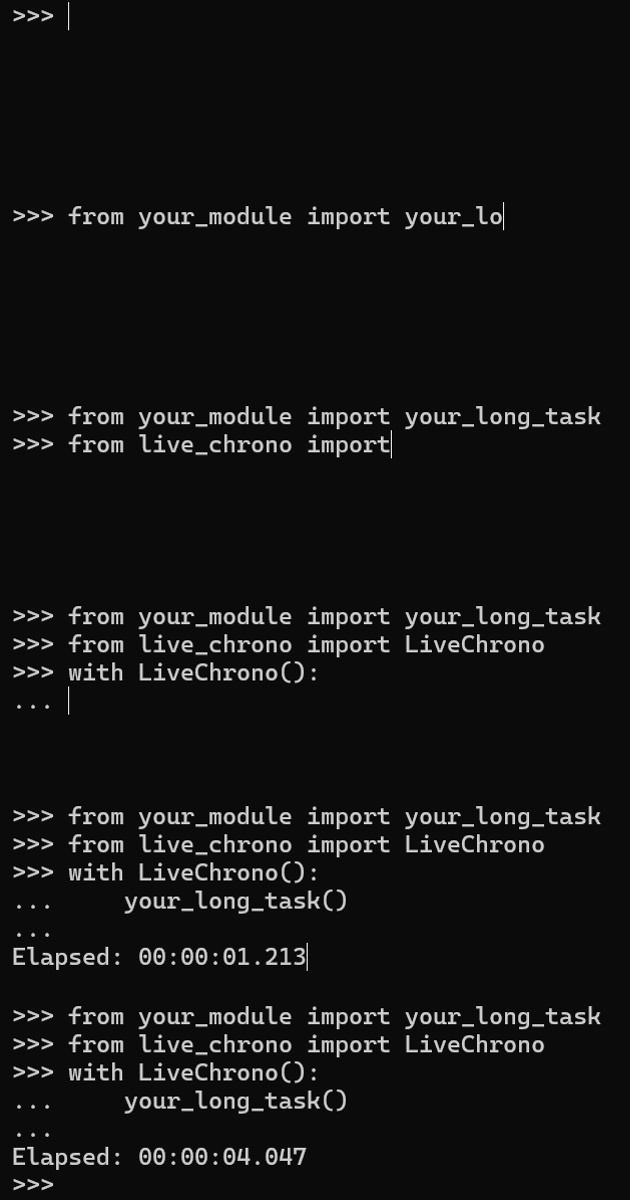
Why LiveChrono?
Perfect for CLI scripts, quick profiling, demo timers, and any situation where a human-friendly live elapsed display is handy.
- Tiny & dependency-free — single module, minimal surface area.
- Human-friendly customizable output —
HH:MM:SS.msby default; fully customizable with format tokens. - Interruptible & accurate — pause/resume support; uses
time.perf_counter()for elapsed measurement.
Installation
Install from PyPI:
pip install live-chrono
Features
- Real-time terminal display on a single line that updates at a configurable interval.
- Customizable format tokens (see below).
- Pause/resume the chrono to measure the execution time of the desired methods.
- Context-manager friendly (
with LiveChrono()). - Returns a
ChronoResultobject with wall-clock timestamps and elapsed seconds.
Format Tokens
| Token | Meaning |
|---|---|
%D |
days (unlimited) |
%H |
hours (00-23) |
%M |
minutes (00–59) |
%S |
seconds (00–59) |
%f |
milliseconds (000–999) |
%ms |
alias for milliseconds |
Note: Lower units roll over only if you include the higher unit.
Example: a format string with only%Smay display120for two minutes.
Quickstart
Basic usage (context manager — recommended):
from live_chrono import LiveChrono
import time

with LiveChrono():
    time.sleep(0.35)
Pause/resume and capture the result with a custom output format:
from live_chrono import LiveChrono
import time

with LiveChrono(display_format="Elapsed: %S seconds and %f ms") as chrono:
    time.sleep(2.30)  # simulate work
    chrono.pause()    # temporary chrono pause
    time.sleep(1)     # simulate non-relevant work for timer
    chrono.resume()   # resume the chrono
    time.sleep(2.2)

# timer.result is available after the context exits
res = chrono.result
print(f"Elapsed seconds: {res.elapsed:.3f}")
# prints something like: Elapsed: 04 seconds and 500 ms
Manual start / pause / resume /stop:
from live_chrono import LiveChrono
import time

chrono = LiveChrono(update_interval=0.05)
chrono.start()
time.sleep(0.2)  # simulate work

chrono.pause()  # stop counting, display indicates paused
time.sleep(0.2)  # this work does NOT count for the chrono

chrono.resume()  # continue measuring the elapsed time
time.sleep(0.15)

result = chrono.stop()  # stops background thread, returns ChronoResult
print("Final:", result.elapsed)  # float seconds (e.g. 0.35)
API Reference
LiveChrono
LiveChrono(update_interval=0.1, display_format="Elapsed: %H:%M:%S.%f")
Create a live-updating timer.
Parameters
- update_interval (float, default
0.1) – Refresh rate in seconds. Lower values update the display more frequently. - display_format (str, default
"Elapsed: %H:%M:%S.%f") – Format string for rendering elapsed time (see format tokens above).
Methods
start() → LiveChrono– Begin timing and return the instance.stop() → ChronoResult– Stop timing, join the background thread, and return aChronoResult.pause()– Pause the timer. No effect if already paused. RaisesRuntimeErrorif called beforestart().resume()– Resume from a paused state. No effect if not paused.__enter__() / __exit__()– Context-manager support.
ChronoResult object
The ChronoResult model contains:
start_time: wall-clock start time (UNIX epoch seconds)end_time: wall-clock end time (UNIX epoch seconds)elapsed: elapsed time in seconds (float)elapsed_format: elapsed time formated according thedisplay_formatdisplay_format: the format string used
Notes & Best Practices
- The timer uses
time.perf_counter()for high-resolution measurement of elapsed intervals, whiletime.time()is used for wall-clockstart_timeandend_time. - Small variations (a few ms) may appear due to thread scheduling or terminal printing.
- Output is printed to
stdouton a single line that refreshes each update. - The
update_intervalaffects display smoothness only, not timing accuracy. - Multiple pause/resume cycles are supported, with elapsed time accumulating only while the timer is running.
- For CLI usage, avoid extremely low
update_intervalvalues on slow terminals — printing overhead may affect readability.
License
This project is licensed under the MIT License.
You are free to use, copy, modify, merge, publish, distribute, sublicense, and/or sell copies of the software, provided that the copyright notice and permission notice appear in all copies.
See the LICENSE file for the full text.
Release history Release notifications | RSS feed

Download files
Download the file for your platform. If you're not sure which to choose, learn more about installing packages.
Source Distribution
Built Distribution
Filter files by name, interpreter, ABI, and platform.
If you're not sure about the file name format, learn more about wheel file names.
Copy a direct link to the current filters
File details
Details for the file live_chrono-1.0.0.tar.gz.
File metadata
- Download URL: live_chrono-1.0.0.tar.gz
- Upload date:
- Size: 9.3 kB
- Tags: Source
- Uploaded using Trusted Publishing? No
- Uploaded via: twine/6.2.0 CPython/3.12.9
File hashes
| Algorithm | Hash digest | |
|---|---|---|
| SHA256 |
275930ccaf993ca696c2ade94ab59883418c61b92d88a87092e9f7e1374aca0d
|
|
| MD5 |
91028c790009786b61d8206282b52207
|
|
| BLAKE2b-256 |
7222002005170a93b6f22c891b708fd3f7b5699363f3c46fc0828323baaf974e
|
File details
Details for the file live_chrono-1.0.0-py3-none-any.whl.
File metadata
- Download URL: live_chrono-1.0.0-py3-none-any.whl
- Upload date:
- Size: 7.8 kB
- Tags: Python 3
- Uploaded using Trusted Publishing? No
- Uploaded via: twine/6.2.0 CPython/3.12.9
File hashes
| Algorithm | Hash digest | |
|---|---|---|
| SHA256 |
1d859df445d5b37bcc0e148ca750df2d1f9184689ee50430cc0d36cc0937282e
|
|
| MD5 |
d043faa4f7caa6ce5ca2a47e52f12b10
|
|
| BLAKE2b-256 |
40553750196680b323ac3e19595ac09be40fc3d22e72a02fd552eb04122bb230
|






