
Live-Translation
A real-time speech-to-text translation system built on a modular server–client architecture.






















Demos
NOTE: This project is not meant to be a plug-and-play translation app for web browsers. Instead, it serves as a foundational enabler for building real-time translation experiences.
🌐 Browser Client Experience
A javascript example client for the live translation server
See Under the Hood

🪛 Under the Hood
On the left, the live translation CLI server
On the right, the live translation CLI client
For a deeper dive into more ways to use live translation server and clients, see the Usage section

👷🏼♂️ Architecture Overview
The diagram omits finer details
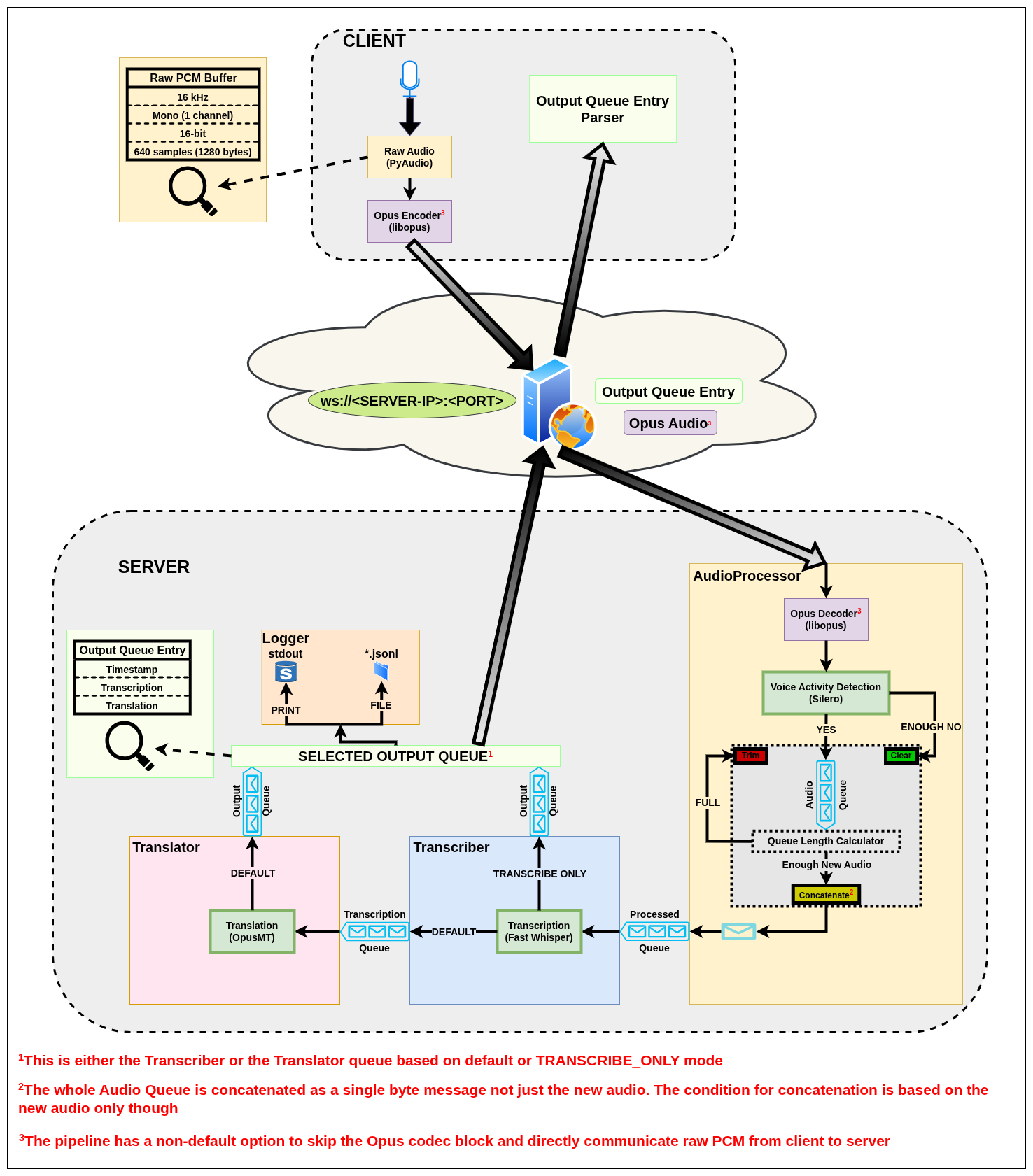
⭐ Features
- Real-time speech capture using PyAudio
- Voice Activity Detection (VAD) using Silero for more efficient processing
- Speech-to-text transcription using OpenAI's Whisper
- Translation of transcriptions using Helsinki-NLP's OpusMT
- Full-duplex WebSocket streaming between client and server
- Audio compression via Opus codec support for lower bandwidth usage
- Multithreaded design for parallelized processing
- Optional server logging:
- Print to stdout
- Save transcription/translation logs to a structured .jsonl file
- Designed for both:
- Simple CLI usage (live-translate-server, live-translate-client)
- Python API usage (LiveTranslationServer, LiveTranslationClient) with Asynchronous support for embedding in larger systems
📜 Prerequisites
Before running the project, you need to install the following system dependencies:
Linux
NOTE: The client captures audio as 16 kHz mono PCM. On systems using raw ALSA devices, opening the audio stream may fail if the default input device does not support this format directly. Using PulseAudio or PipeWire sound servers (including their ALSA compat-layers/plugins) is recommended, as they provide automatic resampling and format conversion e.g. the
pipewire-alsa,pulseaudio-alsaor similar distro-specific packages for PipeWire/PulseAudio users.
- Debian
- PortAudio
sudo apt install portaudio19-dev
- PipeWire/PulseAudio bridges (see NOTE: above)
sudo apt install pipewire-alsa # PipeWire users, Also see https://wiki.debian.org/PipeWire#Installation for older Debian versions
sudo apt install pulseaudio    # PulseAudio users
- PortAudio
- Arch
- PortAudio
sudo pacman -Syu portaudio
- PipeWire/PulseAudio bridges (see NOTE: above)
sudo pacman -Syu pipewire-alsa   # PipeWire users
sudo pacman -Syu pulseaudio-alsa # PulseAudio users
- PortAudio
MacOS
- PortAudio (for audio input handling)
brew install portaudio
📥 Installation
(RECOMMENDED): install this package inside a virtual environment to avoid dependency conflicts.
python -m venv .venv
source .venv/bin/activate
Install the PyPI package:
pip install live-translation
Verify the installation:
python -c "import live_translation; print(f'live-translation installed successfully\n{live_translation.__version__}')"
🚀 Usage
NOTE: One can safely ignore similar warnings that might appear on Linux systems when running the client as it tries to open the mic:
ALSA lib pcm_dsnoop.c:567:(snd_pcm_dsnoop_open) unable to open slave ALSA lib pcm_dmix.c:1000:(snd_pcm_dmix_open) unable to open slave ALSA lib pcm.c:2722:(snd_pcm_open_noupdate) Unknown PCM cards.pcm.rear ALSA lib pcm.c:2722:(snd_pcm_open_noupdate) Unknown PCM cards.pcm.center_lfe ALSA lib pcm.c:2722:(snd_pcm_open_noupdate) Unknown PCM cards.pcm.side ALSA lib pcm_dmix.c:1000:(snd_pcm_dmix_open) unable to open slave Cannot connect to server socket err = No such file or directory Cannot connect to server request channel jack server is not running or cannot be started JackShmReadWritePtr::~JackShmReadWritePtr - Init not done for -1, skipping unlock JackShmReadWritePtr::~JackShmReadWritePtr - Init not done for -1, skipping unlock
CLI
-
demo can be run directly from the command line:
NOTE: This is a convenience demo cli tool to run both the server and the client with default configs. It should only be used for a quick demo. It's highly recommended to start a separate server and client for full customization as shown below.
live-translate-demo
-
server can be run directly from the command line:
NOTE: Running the server for the first time will download the required models in the Cache folder (e.g.
~/.cacheon linux). The downloading process in the first run might clutter the terminal view leading to scattered and unpredicted locations of the initial server logs. It is advised to rerun the server after all models finish downloading for better view of the initial server logs.live-translate-server [OPTIONS]
[OPTIONS]
usage: live-translate-server [-h] [--silence_threshold SILENCE_THRESHOLD] [--vad_aggressiveness {0,1,2,3,4,5,6,7,8,9}] [--max_buffer_duration {5,6,7,8,9,10}] [--codec {pcm,opus}]
                            [--device {cpu,cuda}] [--whisper_model {tiny,base,small,medium,large,large-v2,large-v3,large-v3-turbo}]
                            [--trans_model {Helsinki-NLP/opus-mt,Helsinki-NLP/opus-mt-tc-big}] [--src_lang SRC_LANG] [--tgt_lang TGT_LANG] [--log {print,file}] [--ws_port WS_PORT]
                            [--transcribe_only] [--version]

Live Translation Server - Configure runtime settings.

options:
  -h, --help            show this help message and exit
  --silence_threshold SILENCE_THRESHOLD
                        Number of consecutive seconds to detect SILENCE.
                        SILENCE clears the audio buffer for transcription/translation.
                        NOTE: Minimum value is 1.5.
                        Default is 2.
  --vad_aggressiveness {0,1,2,3,4,5,6,7,8,9}
                        Voice Activity Detection (VAD) aggressiveness level (0-9).
                        Higher values mean VAD has to be more confident to detect speech vs silence.
                        Default is 8.
  --max_buffer_duration {5,6,7,8,9,10}
                        Max audio buffer duration in seconds before trimming it.
                        Default is 7 seconds.
  --codec {pcm,opus}    Audio codec for WebSocket communication ('pcm', 'opus').
                        Default is 'opus'.
  --device {cpu,cuda}   Device for processing ('cpu', 'cuda').
                        Default is 'cpu'.
  --whisper_model {tiny,base,small,medium,large,large-v2,large-v3,large-v3-turbo}
                        Whisper model size ('tiny', 'base', 'small', 'medium', 'large', 'large-v2', 'large-v3', 'large-v3-turbo).
                        NOTE: Running large models like 'large-v3', or 'large-v3-turbo' might require a decent GPU with CUDA support for reasonable performance.
                        NOTE: large-v3-turbo has great accuracy while being significantly faster than the original large-v3 model. see: https://github.com/openai/whisper/discussions/2363
                        Default is 'base'.
  --trans_model {Helsinki-NLP/opus-mt,Helsinki-NLP/opus-mt-tc-big}
                        Translation model ('Helsinki-NLP/opus-mt', 'Helsinki-NLP/opus-mt-tc-big').
                        NOTE: Don't include source and target languages here.
                        Default is 'Helsinki-NLP/opus-mt'.
  --src_lang SRC_LANG   Source/Input language for transcription (e.g., 'en', 'fr').
                        Default is 'en'.
  --tgt_lang TGT_LANG   Target language for translation (e.g., 'es', 'de').
                        Default is 'es'.
  --log {print,file}    Optional logging mode for saving transcription output.
                          - 'file': Save each result to a structured .jsonl file in ./transcripts/transcript_{TIMESTAMP}.jsonl.
                          - 'print': Print each result to stdout.
                        Default is None (no logging).
  --ws_port WS_PORT     WebSocket port the of the server.
                        Used to listen for client audio and publish output (e.g., 8765).
  --transcribe_only     Transcribe only mode. No translations are performed.
  --version             Print version and exit.
-
client can be run directly from the command line:
live-translate-client [OPTIONS]
[OPTIONS]
usage: live-translate-client [-h] [--server SERVER] [--codec {pcm,opus}] [--version]

Live Translation Client - Stream audio to the server.

options:
  -h, --help          show this help message and exit
  --server SERVER     WebSocket URI of the server (e.g., ws://localhost:8765)
  --codec {pcm,opus}  Audio codec for WebSocket communication ('pcm', 'opus').
                      Default is 'opus'.
  --version           Print version and exit.
Python API
You can also import and use live_translation directly in your Python code. The following is simple examples of running live_translation's server and client in a blocking fashion. For more detailed examples showing non-blocking and asynchronous workflows, see ./examples/.
NOTE: The examples below assumes the live_translation package has been installed as shown in the Installation.
NOTE: To run a provided example using the Python API, see instructions in the ./examples/ directory.
-
Server
from live_translation import LiveTranslationServer, ServerConfig

def main():
    config = ServerConfig(
        device="cpu",
        ws_port=8765,
        log="print",
        transcribe_only=False,
        codec="opus",
    )

    server = LiveTranslationServer(config)
    server.run(blocking=True)

# Main guard is CRITICAL for systems that uses spawn method to create new processes
# This is the case for Windows and MacOS
if __name__ == "__main__":
    main()
-
Client
from live_translation import LiveTranslationClient, ClientConfig

def parser_callback(entry, *args, **kwargs):
    """Callback function to parse the output from the server.

    Args:
        entry (dict): The message from the server.
        *args: Optional positional args passed from the client.
        **kwargs: Optional keyword args passed from the client.
    """
    print(f"📝 {entry['transcription']}")
    print(f"🌍 {entry['translation']}")

    # Returning True signals the client to shutdown
    return False

def main():
    config = ClientConfig(
        server_uri="ws://localhost:8765",
        codec="opus",
    )

    client = LiveTranslationClient(config)
    client.run(
        callback=parser_callback,
        callback_args=(),  # Optional: positional args to pass
        callback_kwargs={},  # Optional: keyword args to pass
        blocking=True,
    )

if __name__ == "__main__":
    main()
Non-Python Integration
If you're writing a custom client or integrating this system into another application, you can interact with the server directly using the WebSocket protocol.
Protocol Overview
The server listens on a WebSocket endpoint (default: ws://localhost:8765) and expects the client to:
-
Send: encoded PCM audio using the Opus codec with the following specs:
- Format: 16-bit signed integer (
int16) - Sample Rate: 16,000 Hz
- Channels: Mono (1 channel)
- Chunk Size: 640 samples = 1280 bytes per message (40 ms)
- Each encoded chunk should be sent immediately over the WebSocket
NOTE: The server also supports receiving raw PCM using the --codec pcm server option. The specs are identical to above, except not encoded.
- Format: 16-bit signed integer (
-
Receive: structured JSON messages with timestamp, transcription and translation fields
{
  "timestamp": "2025-05-25T12:58:35.259085+00:00",
  "transcription": "Good morning, I hope everyone's doing great.",
  "translation": "Buenos días, espero que todo el mundo esté bien"
}
Client Examples
For fully working, yet simple, examples in multiple languages, see ./examples/clients
To create more complex clients, look at the python client for guidance.
Available Examples:
- Node.js
- Browser JS
- Go
- C#
- Kotlin/Android
🤝 Development & Contribution
To contribute or modify this project, these steps might be helpful:
NOTE: This workflow below is developed with Linux-based systems with typical build tools installed e.g. Make in mind. One might need to install Make and possibly other tools on other systems. However, one can still do things manually without Make, for example, run test manually using
python -m pytest -s tests/instead ofmake test. See Makefile for more details.
Fork & Clone the repository:
git clone git@github.com:<your-username>/live-translation.git
cd live-translation
Create a virtual environment:
python -m venv .venv
source .venv/bin/activate
Install the package and its dependencies in editable mode:
pip install --upgrade pip
pip install -e .[dev,examples]  # Install with optional examples dependencies
This is equivalent to:
make install
Test the package:
make test
Build the package:
make build
NOTE: Building does lint and checks for formatting using ruff. One can do that separately using
make formatandmake lint. For linting and formatting rules, see the ruff config.
NOTE: Building generates a .whl file that can be pip installed in a new environment for testing
Check more available make commands
make help
For quick testing, run the server and the client within the virtual environment:
live-translate-server [OPTIONS]
live-translate-client [OPTIONS]
NOTE: Since the package was installed in editable mode, any changes will be reflected when the cli tools are run
For contribution:
- Make your changes in a feature branch
- Ensure all tests pass
- Open a Pull Request (PR) with a clear description of your changes
🌱 Tested Environments
This project was tested and developed on the following system configuration:
- Architecture: x86_64 (64-bit)
- Operating System: Ubuntu 24.10 (Oracular Oriole)
- Kernel Version: 6.11.0-18-generic
- Python Version: 3.12.7
- Processor: 13th Gen Intel(R) Core(TM) i9-13900HX
- GPU: GeForce RTX 4070 Max-Q / Mobile 1
- NVIDIA Driver Version: 560.35.03
- CUDA Toolkit Version: 12.1
- cuDNN Version: 9.7.1
- RAM: 32GB DDR5
- Dependencies: All required dependencies are listed in
pyproject.tomland Prerequisites
📈 Improvements
- ARM64 Support: Ensure support for ARM64 based systems.
- Concurrency Design Check: Review and optimize the threading design to ensure thread safety and prevent issues like race conditions or deadlocks, etc., revisit the current design of WebSocketIO being a thread while AudioProcessor, Transcriber, and Translator being processes.
- Logging: Integrate detailed logging to track system activity, errors, and performance metrics using a more formal logging framework.
- Translation Models: Some of the models downloaded in Translator from OpusMT's Hugging Face are not the best performing when compared with top models in Opus-MT's Leaderboard. Find a way to automatically download best performing models using the user's input of
src_langandtgt_langas it's currently done. - System Profiling & Resource Guidelines: Benchmark and document CPU, memory, and GPU usage across all multiprocessing components. For example, "~35% CPU usage on 24-core Intel i9-13900HX", or "GPU load ~20% on Nvidia RTX 4070 with
large-v3-turboWhisper model"). This will help with hardware requirements and deployment decisions. - Proper Handshake Protocol: Instead of duplicate server and client options (e.g. --codec), establish a handshake protocol where, for example, server advertises its capabilities and negotiate with client over what options to use.
- Configurable Input Device: Right now, LiveTranslationClient uses the system's default input device with no other option. Make it default to the system's default but with an option to pass other devices through Config.
📚 Citations
 @article{Whisper,
   title = {Robust Speech Recognition via Large-Scale Weak Supervision},
   url = {https://arxiv.org/abs/2212.04356},
   author = {Radford, Alec and Kim, Jong Wook and Xu, Tao and Brockman, Greg and McLeavey, Christine and Sutskever, Ilya},
   publisher = {arXiv},
   year = {2022}
 }

 @misc{Silero VAD,
   author = {Silero Team},
   title = {Silero VAD: pre-trained enterprise-grade Voice Activity Detector (VAD), Number Detector and Language Classifier},
   year = {2021},
   publisher = {GitHub},
   journal = {GitHub repository},
   howpublished = {\url{https://github.com/snakers4/silero-vad}},
   email = {hello@silero.ai}
 }

 @article{tiedemann2023democratizing,
   title={Democratizing neural machine translation with {OPUS-MT}},
   author={Tiedemann, J{\"o}rg and Aulamo, Mikko and Bakshandaeva, Daria and Boggia, Michele and Gr{\"o}nroos, Stig-Arne and Nieminen, Tommi and Raganato, Alessandro and Scherrer, Yves and Vazquez, Raul and Virpioja, Sami},
   journal={Language Resources and Evaluation},
   number={58},
   pages={713--755},
   year={2023},
   publisher={Springer Nature},
   issn={1574-0218},
   doi={10.1007/s10579-023-09704-w}
 }

 @InProceedings{TiedemannThottingal:EAMT2020,
   author = {J{\"o}rg Tiedemann and Santhosh Thottingal},
   title = {{OPUS-MT} — {B}uilding open translation services for the {W}orld},
   booktitle = {Proceedings of the 22nd Annual Conference of the European Association for Machine Translation (EAMT)},
   year = {2020},
   address = {Lisbon, Portugal}
 }
-
CUDA as the
DEVICEis probably needed for heavier models likelarge-v3-turbofor Whisper. Nvidia drivers, CUDA Toolkit, cuDNN installation needed if option"cuda"was to be used. ↩
1 maintainer

Metadata
1 maintainer
Release files for live-translation 0.10.0
For a detailed explanation of source distributions (sdists) and built distributions (wheels), please see the package formats documentation.
Source distribution (sdist)
| File | Size | Uploaded | |
|---|---|---|---|
| live_translation-0.10.0.tar.gz | 35.7 kB | Details |
Built distribution (wheel)
| File | Interpreter | ABI | Platform | Reset |
|---|---|---|---|---|
| live_translation-0.10.0-py3-none-any.whl | Python 3 | none | any | Details |
Total release size: 69.5 kB
Release files / live_translation-0.10.0.tar.gz
| Download URL | live_translation-0.10.0.tar.gz |
|---|---|
| Size | 35.7 kB |
| Tags | Source |
|
SHA-256 checksum How to use checksums |
637ed57bf944cd9e828c939400ba4d6085817280221cc93006057b931108fbd1
|
|
BLAKE2b-256 checksum How to use checksums |
b8ba9bc57480b43365cc753dd8c01614899654247546f331112a836843f59f79
|
| Upload date | |
|
Uploaded using Trusted Publishing? What is trusted publishing? |
Yes |
| Uploaded via |
twine/6.1.0 CPython/3.13.12
|
Provenance
Provenance describes where a file came from. On PyPI, provenance is shared via attestations, which provide a verifiable record of the build or publishing details. View details, limitations and caveats.


PyPI Publish Attestation
PyPI verified that this artifact, at this checksum, originated from the publisher listed below.
Signed by GitHub Actions, verified by PyPI on May 30, 2026.
Transparency logRelease files / live_translation-0.10.0-py3-none-any.whl
| Download URL | live_translation-0.10.0-py3-none-any.whl |
|---|---|
| Size | 33.8 kB |
| Tags | Python 3 |
|
SHA-256 checksum How to use checksums |
08da6fb51e54b14a464ff2b6a0eeaa7cb2e883dfc1d57784fcc2e36589aad78b
|
|
BLAKE2b-256 checksum How to use checksums |
58ea90540a5a1d7fb16e534c62d4d3b71a54c4600294473e9e341f6bb480b828
|
| Upload date | |
|
Uploaded using Trusted Publishing? What is trusted publishing? |
Yes |
| Uploaded via |
twine/6.1.0 CPython/3.13.12
|
Provenance
Provenance describes where a file came from. On PyPI, provenance is shared via attestations, which provide a verifiable record of the build or publishing details. View details, limitations and caveats.
PyPI Publish Attestation
PyPI verified that this artifact, at this checksum, originated from the publisher listed below.
Signed by GitHub Actions, verified by PyPI on May 30, 2026.
Transparency log













