
LiveF1 - An Open-Source Formula 1 Data Processing Toolkit




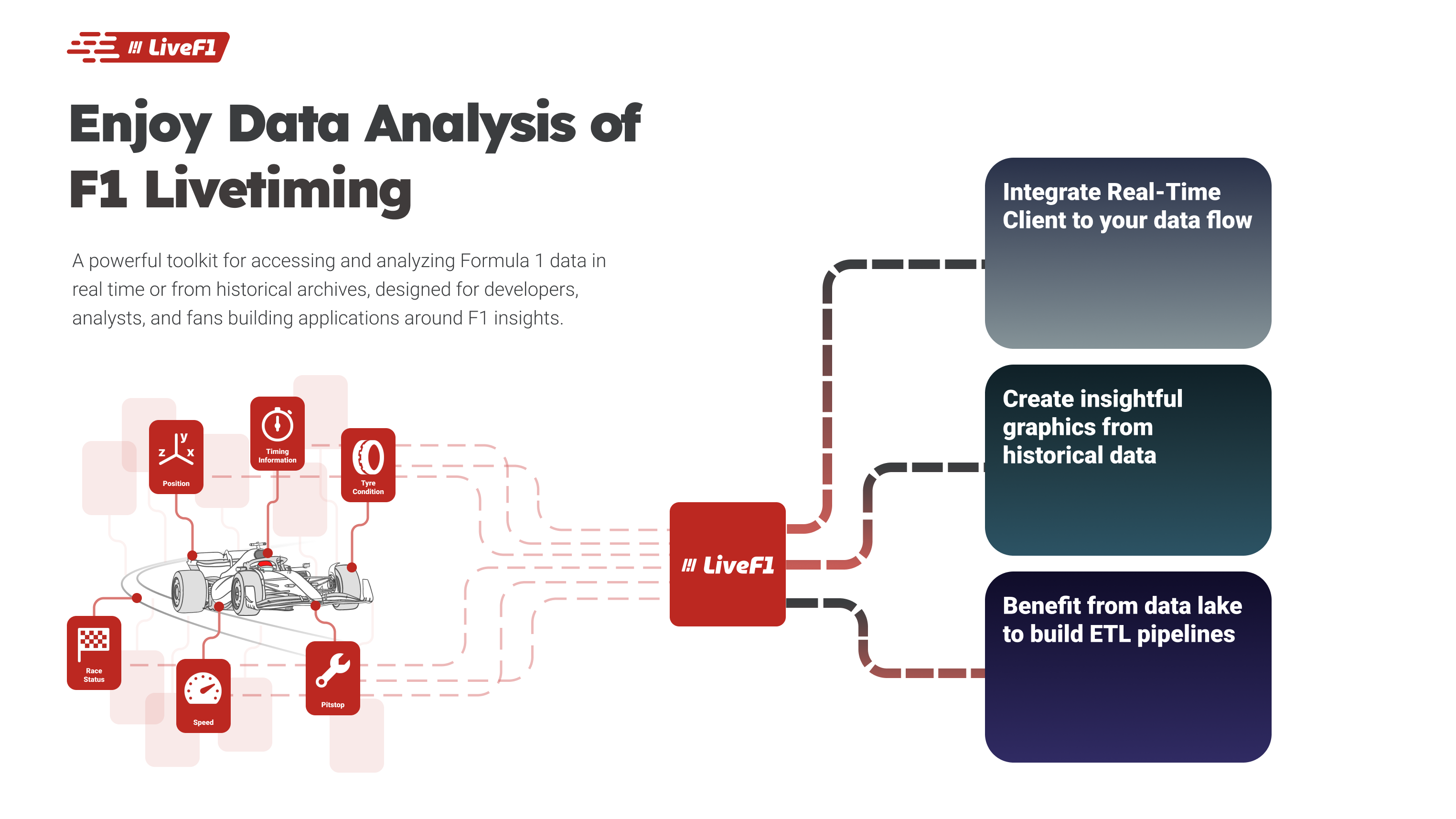
LiveF1 is a powerful Python toolkit for accessing and analyzing Formula 1 data in real-time or from historical archives. It's designed for developers, analysts, and F1 fans building applications around Formula 1 insights.
Features
- Real-Time Race Data: Provides live telemetry, timing, and position updates, ideal for powering dashboards and live analytics.
- Historical Data Access: Includes comprehensive race data from past seasons, perfect for performance analysis and comparisons.
- Data Processing Modules: Built-in ETL tools make raw data immediately usable, supporting analysis and seamless data storage.
- Easy Integration: Simple API for both real-time and historical data
In a nutshell:
Using LiveF1, you can access real-time and historical racing data, making it easy to feed analytics and visualizations.
Data sources
LiveF1 combines two backends:
- Formula 1 Livetiming — Official timing static JSON and feeds for session discovery and archived high-frequency topics (telemetry, timing, position, weather, etc.).
- Jolpica F1 API — Community Ergast-style JSON REST API for seasons, calendars, drivers, constructors, results, standings, and related structured data.
Livetiming alone does not cover every object shape users need; Jolpica fills and enriches the season calendar when Livetiming is incomplete and supplies championship-oriented data. The HTTP client for Jolpica is BaseF1 (source), a separate library that LiveF1 depends on.
Installation
Install using pip:
pip install livef1
Authentication
Live timing data requires an F1 account with an active F1TV subscription. Put your credentials in a .env file (or export them as environment variables):
F1_USERNAME='you@example.com'
F1_PASSWORD='your-password'
LiveF1 uses the first .env found in the working directory or one of its parents, so notebooks in subfolders use your project's .env. If the credentials are missing, LiveF1 asks for them and saves them to .env. The token is saved to ~/.livef1/f1tv_auth_token.json and reused until it expires.
import livef1

livef1.login()                      # reuse the saved token, or sign in
livef1.login(force=True)            # always sign in again
livef1.login(save_token=False)      # keep the token in memory only
livef1.login(token_path="/path/to/token.json")  # also remembered in .env as LIVEF1_TOKEN_PATH
livef1.logout()                     # delete the saved token
Calling login() is optional: LiveF1 signs in automatically when live timing rejects a request.
Quick Start
Timing, telemetry, and the live stream need an F1 account with an active F1TV subscription. Set that up in Authentication above. Calendar and championship data does not need one.
Historical Data
Access data from past races:
import livef1

# Get a specific race session
session = livef1.get_session(
    season=2024,
    meeting_identifier="Spa",
    session_identifier="Race"
)

# Load position data
position_data = session.get_data(
    dataNames="Position.z"
)

print(position_data.head())
  |    |   SessionKey | timestamp    | Utc                          |   DriverNo | Status   |   X |   Y |   Z |
  |---:|-------------:|:-------------|:-----------------------------|-----------:|:---------|----:|----:|----:|
  |  0 |         9574 | 00:01:45.570 | 2024-07-28T12:10:22.7877313Z |          1 | OnTrack  |   0 |   0 |   0 |
  |  1 |         9574 | 00:01:45.570 | 2024-07-28T12:10:22.7877313Z |          2 | OnTrack  |   0 |   0 |   0 |
  |  2 |         9574 | 00:01:45.570 | 2024-07-28T12:10:22.7877313Z |          3 | OnTrack  |   0 |   0 |   0 |
  |  3 |         9574 | 00:01:45.570 | 2024-07-28T12:10:22.7877313Z |          4 | OnTrack  |   0 |   0 |   0 |
  |  4 |         9574 | 00:01:45.570 | 2024-07-28T12:10:22.7877313Z |         10 | OnTrack  |   0 |   0 |   0 |
Data Processing
LiveF1 uses a medallion architecture to process F1 data into analysis-ready formats:
# Generate processed data tables
session.generate(silver=True)

# Access refined data
laps_data = session.get_laps()
telemetry_data = session.get_car_telemetry()

print(laps_data.head())
    |    |   lap_number | lap_time               | in_pit                 | pit_out   | sector1_time           | sector2_time           | sector3_time           | None   |   speed_I1 |   speed_I2 |   speed_FL |   speed_ST |   no_pits | lap_start_time         |   DriverNo | lap_start_date             |
    |---:|-------------:|:-----------------------|:-----------------------|:----------|:-----------------------|:-----------------------|:-----------------------|:-------|-----------:|-----------:|-----------:|-----------:|----------:|:-----------------------|-----------:|:---------------------------|
    |  0 |            1 | NaT                    | 0 days 00:17:07.661000 | NaT       | NaT                    | 0 days 00:00:48.663000 | 0 days 00:00:29.571000 |        |        314 |        204 |            |        303 |         0 | NaT                    |         16 | 2024-07-28 13:03:52.742000 |
    |  1 |            2 | 0 days 00:01:50.240000 | NaT                    | NaT       | 0 days 00:00:31.831000 | 0 days 00:00:48.675000 | 0 days 00:00:29.734000 |        |        303 |        203 |        219 |            |         0 | 0 days 00:57:07.067000 |         16 | 2024-07-28 13:05:45.045000 |
    |  2 |            3 | 0 days 00:01:50.519000 | NaT                    | NaT       | 0 days 00:00:31.833000 | 0 days 00:00:49.132000 | 0 days 00:00:29.554000 |        |        311 |        202 |        215 |        304 |         0 | 0 days 00:58:57.307000 |         16 | 2024-07-28 13:07:35.285000 |
    |  3 |            4 | 0 days 00:01:49.796000 | NaT                    | NaT       | 0 days 00:00:31.592000 | 0 days 00:00:48.778000 | 0 days 00:00:29.426000 |        |        312 |        201 |        217 |        309 |         0 | 0 days 01:00:47.870000 |         16 | 2024-07-28 13:09:25.848000 |
    |  4 |            5 | 0 days 00:01:49.494000 | NaT                    | NaT       | 0 days 00:00:31.394000 | 0 days 00:00:48.729000 | 0 days 00:00:29.371000 |        |        313 |        197 |        217 |        311 |         0 | 0 days 01:02:37.721000 |         16 | 2024-07-28 13:11:15.699000 |
Real-Time Data
Stream live race data:
from livef1.adapters import RealF1Client

# Initialize client with topics to subscribe
client = RealF1Client(
    topics=["CarData.z", "Position.z"],
    log_file_name="race_data.json"  # Optional: log data to file
)

# Define callback for incoming data
@client.callback("telemetry_handler")
async def handle_data(records):
    for record in records:
        print(record)  # Process incoming data

# Start receiving data
client.run()
Documentation
For detailed documentation, examples, and API reference, visit our documentation page.
Testing
The project uses pytest for unit tests. Install dev dependencies and run the test suite:
pip install -r requirements-dev.txt
pytest tests/ -v
With coverage:
pytest tests/ -v --cov=livef1 --cov-report=term-missing
Example scripts that use the library (without assertions) live in the examples/ directory.
Contributing
Contributions are welcome! Please feel free to submit a Pull Request. For major changes, please open an issue first to discuss what you would like to change.
License
This project is licensed under the MIT License - see the LICENSE file for details.
Support
- Report bugs and request features in GitHub Issues
- For questions and discussions, use GitHub Discussions
FEEL FREE TO CONTACT ME
1 maintainer

Metadata
1 maintainer
Release files for livef1 1.3.0
For a detailed explanation of source distributions (sdists) and built distributions (wheels), please see the package formats documentation.
Source distribution (sdist)
| File | Size | Uploaded | Provenance | |
|---|---|---|---|---|
| livef1-1.3.0.tar.gz | 98.5 kB | With provenance | Details |
Built distribution (wheel)
| File | Interpreter | ABI | Platform | Reset |
|---|---|---|---|---|
| livef1-1.3.0-py3-none-any.whl | Python 3 | none | any | Details |
Total release size: 183.9 kB
Release files / livef1-1.3.0.tar.gz
| Download URL | livef1-1.3.0.tar.gz |
|---|---|
| Size | 98.5 kB |
| Tags | Source |
|
SHA-256 checksum How to use checksums |
5992bb550243a2388fadcd677e5751204dac40ca05434836f1ff2ff4c89db4f0
|
|
BLAKE2b-256 checksum How to use checksums |
e919d81c7572bff088871cf6d6cd2617affb4b40e1b9529740bc6b7deed4dd01
|
| Upload date | |
|
Uploaded using Trusted Publishing? What is trusted publishing? |
Yes |
| Uploaded via |
twine/7.0.0 CPython/3.13.16
|
Provenance
Provenance describes where a file came from. On PyPI, provenance is shared via attestations, which provide a verifiable record of the build or publishing details. View details, limitations and caveats.


PyPI Publish Attestation
PyPI verified that this artifact, at this checksum, originated from the publisher listed below.
Signed by GitHub Actions, verified by PyPI on Oct 24, 2026.
Transparency logRelease files / livef1-1.3.0-py3-none-any.whl
| Download URL | livef1-1.3.0-py3-none-any.whl |
|---|---|
| Size | 85.5 kB |
| Tags | Python 3 |
|
SHA-256 checksum How to use checksums |
e437d1cc2344030800114dc5149ea87848df57b00f51c355d531a20185bff8ac
|
|
BLAKE2b-256 checksum How to use checksums |
b35185420aa88f9c988ac8f1b2ebe1da0238955d2d37d5c759249a9975ff20a0
|
| Upload date | |
|
Uploaded using Trusted Publishing? What is trusted publishing? |
Yes |
| Uploaded via |
twine/7.0.0 CPython/3.13.16
|
Provenance
Provenance describes where a file came from. On PyPI, provenance is shared via attestations, which provide a verifiable record of the build or publishing details. View details, limitations and caveats.
PyPI Publish Attestation
PyPI verified that this artifact, at this checksum, originated from the publisher listed below.
Signed by GitHub Actions, verified by PyPI on Oct 24, 2026.
Transparency logSecurity for livef1 1.3.0
Provenance
Provenance describes where a file came from. On PyPI, provenance is shared via attestations, which provide a verifiable record of the build or publishing details. View details, limitations and caveats.
Full provenance
All 2 files in this release have been uploaded with provenance metadata.
Attestation for livef1-1.3.0.tar.gz
PyPI Publish Attestation
PyPI verified that this artifact, at this checksum, originated from the publisher listed below.
Signed by GitHub Actions, verified by PyPI on Oct 24, 2026.
Transparency logA note on package security
PyPI is a repository for distributing packages, not a service for auditing them. While third-party security researchers and our staff do their best to detect and remove malicious packages, PyPI cannot guarantee the quality, security or suitability of any given package.
To learn more about protecting yourself from malicious actors, visit our package security documentation.














