
LiveJS
A Jupyter kernel for JavaScript that executes code directly in your web app.
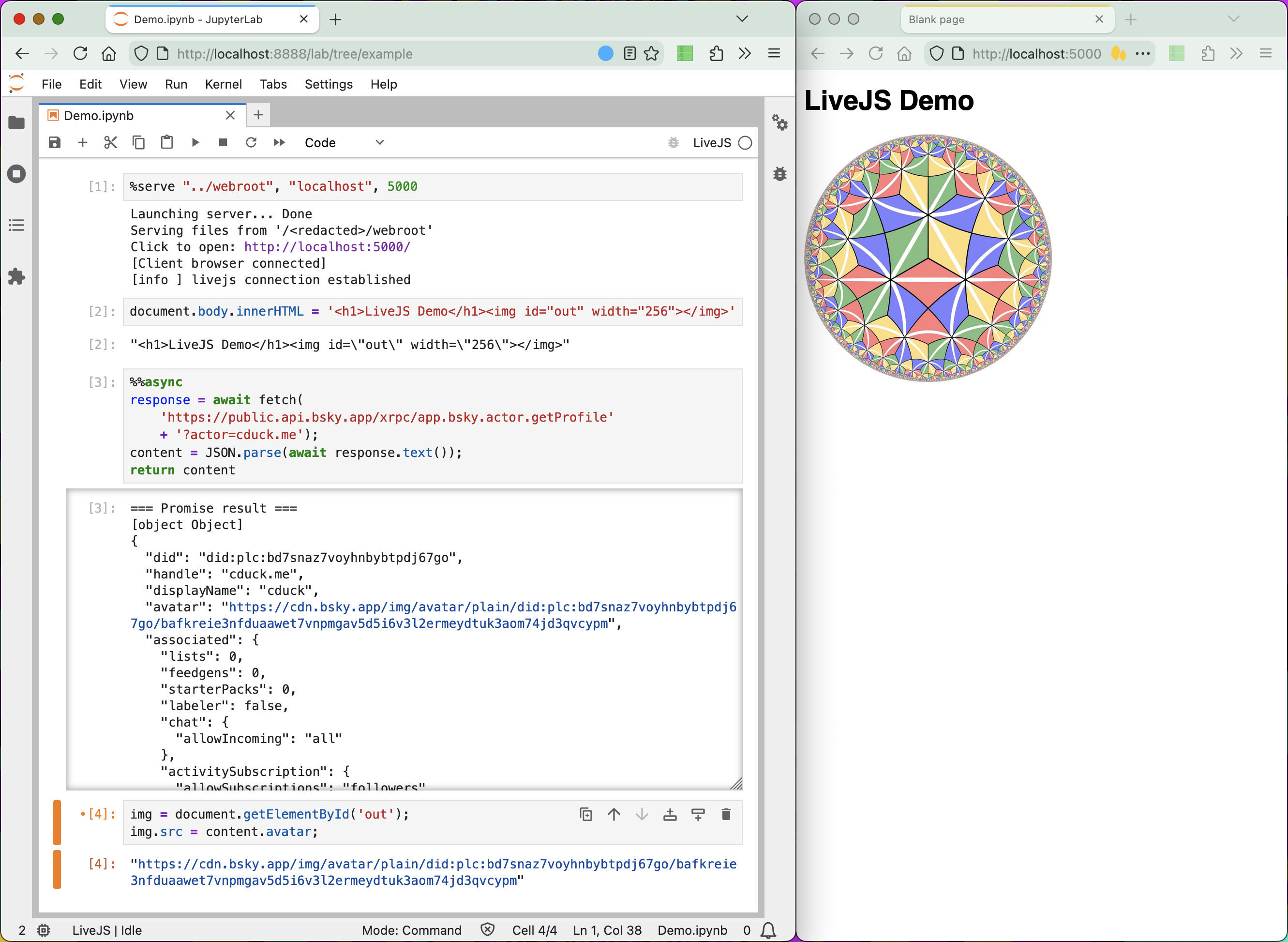
- Use this kernel for quick interactive feedback by running snippets of JavaScript within your web app and viewing the results from Jupyter.
- Written from scratch with the kernel hosted from Python.
- No JavaScript dependencies. No NodeJS.
Note: This project is in very early development and may not have a smooth user experience.
Install
- Install the uv Python package manager
$ curl -LsSf https://astral.sh/uv/install.sh | sh
- Install Jupyter
$ uv tool install jupyterlab
$ uv tool install jupyter-core
- Install LiveJS
$ uv tool install git+https://tangled.org/cduck.me/livejs
- Install the LiveJS kernel into Jupyter
$ livejs-install --user
OR
$ livejs-install --sys-prefix
Usage
- Launch Jupyter
$ cd my/working/directory
$ jupyter lab
- Within the Jupyter interface, create a new notebook and select the kernel "LiveJS"
- In the first cell, run
%serve "path/to/my/webroot", "localhost", 5000 - In the other cells, run JavaScript!
- Advanced: For async Javascript, put the
%%asyncmagic at the top of each cell
Demo
1 maintainer

Metadata
1 maintainer
Release files for livejs 0.1.2
For a detailed explanation of source distributions (sdists) and built distributions (wheels), please see the package formats documentation.
Source distribution (sdist)
| File | Size | Uploaded | |
|---|---|---|---|
| livejs-0.1.2.tar.gz | 9.0 kB | Details |
Built distribution (wheel)
| File | Interpreter | ABI | Platform | Reset |
|---|---|---|---|---|
| livejs-0.1.2-py3-none-any.whl | Python 3 | none | any | Details |
Total release size: 20.6 kB
Release files / livejs-0.1.2.tar.gz
| Download URL | livejs-0.1.2.tar.gz |
|---|---|
| Size | 9.0 kB |
| Tags | Source |
|
SHA-256 checksum How to use checksums |
a715d42ae5f291aac4e3ad85d2f73fced3bb6f614966df5e39d138bd6fb87e92
|
|
BLAKE2b-256 checksum How to use checksums |
671465d774893e9b196c45bc7cb4106a03f78fe7f11d2283a59a1d1019ea1355
|
| Upload date | |
|
Uploaded using Trusted Publishing? What is trusted publishing? |
No |
| Uploaded via |
uv/0.9.0
|
Release files / livejs-0.1.2-py3-none-any.whl
| Download URL | livejs-0.1.2-py3-none-any.whl |
|---|---|
| Size | 11.6 kB |
| Tags | Python 3 |
|
SHA-256 checksum How to use checksums |
d9d9658bb01213552944042625e492ded86b98e0e36df163bb76c57efcf123d3
|
|
BLAKE2b-256 checksum How to use checksums |
2ed550b94934cb06d5191140baa9f3c3c4cdf526d986d6617f6ca8c818469f40
|
| Upload date | |
|
Uploaded using Trusted Publishing? What is trusted publishing? |
No |
| Uploaded via |
uv/0.9.0
|














