
Live training loss plot in Jupyter Notebook for Keras, PyTorch and others.

Project description
livelossplot








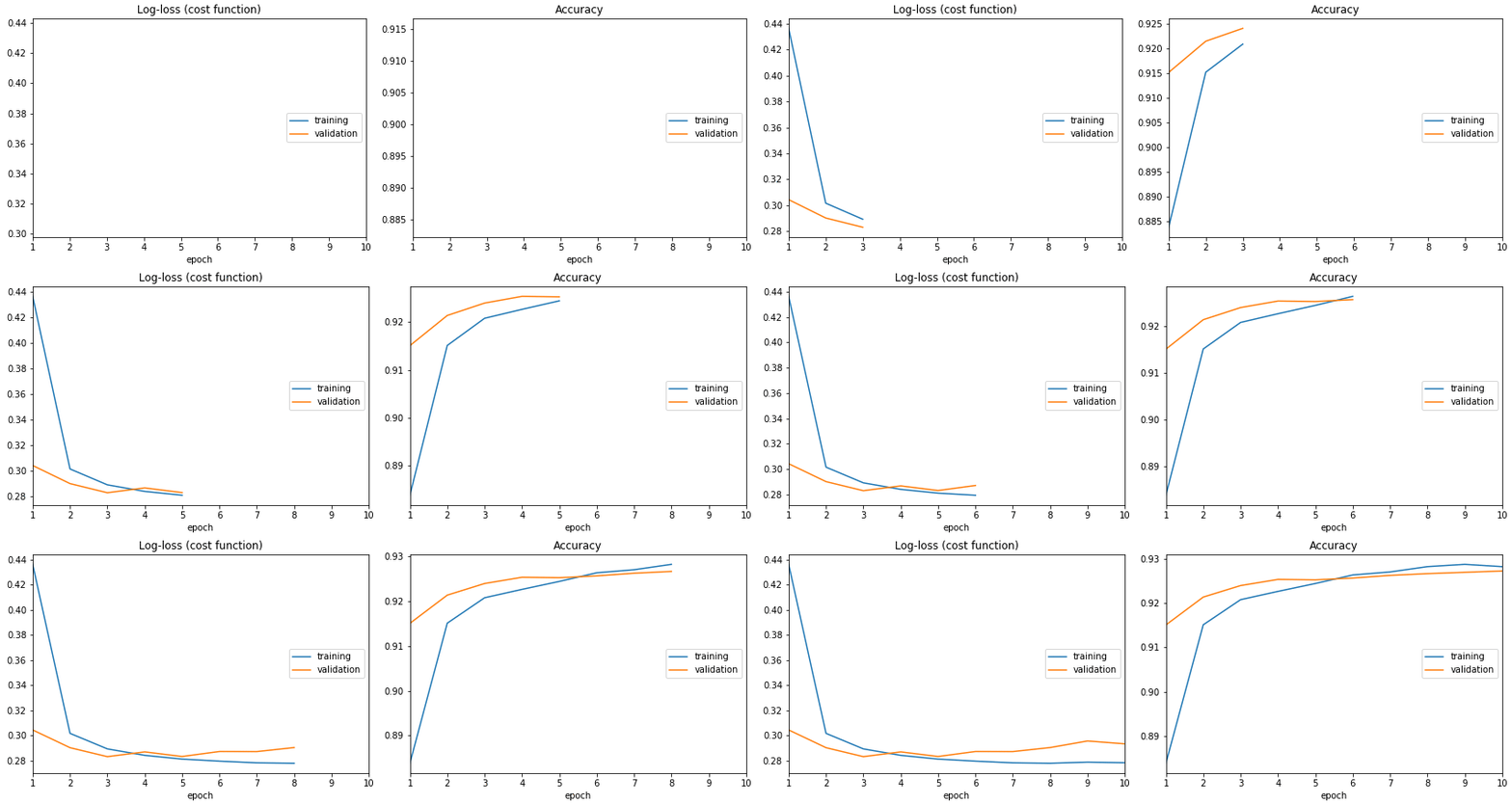
Don't train deep learning models blindfolded! Be impatient and look at each epoch of your training!
(RECENT CHANGES, EXAMPLES IN COLAB, CODE)
A live training loss plot in Jupyter Notebook for Keras, PyTorch and other frameworks. An open-source Python package by Piotr Migdał, Bartłomiej Olechno and others. Open for collaboration! (Some tasks are as simple as writing code docstrings, so - no excuses! :))
from livelossplot import PlotLossesKeras

model.fit(X_train, Y_train,
          epochs=10,
          validation_data=(X_test, Y_test),
          callbacks=[PlotLossesKeras()],
          verbose=0)
- (The most FA)Q: Why not TensorBoard?
- A: Jupyter Notebook compatibility (for exploration and teaching). The simplicity of use.
Installation
To install this version from PyPI, type:
pip install livelossplot
To get the newest one from this repo (note that we are in the alpha stage, so there may be frequent updates), type:
pip install git+git://github.com/stared/livelossplot.git
Examples
Look at notebook files with full working examples:
- keras.ipynb - a Keras callback
- minimal.ipynb - a bare API, to use anywhere
- script.py - to be run as a script,
python script.py - bokeh.ipynb - a bare API, plots with Bokeh (open it in Colab to see the plots)
- pytorch.ipynb - a bare API, as applied to PyTorch
- 2d_prediction_maps.ipynb - example of custom plots - 2d prediction maps (0.4.1+)
- poutyne.ipynb - a Poutyne callback (Poutyne is a Keras-like framework for PyTorch)
- torchbearer.ipynb - an example using the built in functionality from torchbearer (torchbearer is a model fitting library for PyTorch)
- matplotlib.ipynb - a Matplotlib output example
- various_options.ipynb - an extended API for metrics grouping and custom outputs
Overview
Text logs are easy, but it's easy to miss the most crucial information: is it learning, doing nothing or overfitting? Visual feedback allows us to keep track of the training process. Now there is one for Jupyter.
If you want to get serious - use TensorBoard, .
But what if you just want to train a small model in Jupyter Notebook? Here is a way to do so, using livelossplot as a plug&play component
from livelossplot import ...
PlotLosses for a generic API.
plotlosses = PlotLosses()
plotlosses.update({'acc': 0.7, 'val_acc': 0.4, 'loss': 0.9, 'val_loss': 1.1})
plotlosses.send()  # draw, update logs, etc
There are callbacks for common libraries and frameworks: PlotLossesKeras, PlotLossesKerasTF, PlotLossesPoutyne, PlotLossesIgnite.
Feel invited to write, and contribute, your adapter.
If you want to use a bare logger, there is MainLogger.
from livelossplot.outputs import ...
Plots: MatplotlibPlot, BokehPlot.
Loggers: ExtremaPrinter (to standard output), TensorboardLogger, TensorboardTFLogger.
To use them, initialize PlotLosses with some outputs:
plotlosses = PlotLosses(outputs=[MatplotlibPlot(), TensorboardLogger()])
There are custom matplotlib plots in livelossplot.outputs.matplotlib_subplots you can pass in MatplotlibPlot arguments.
If you like to plot with Bokeh instead of matplotlib, use
plotlosses = PlotLosses(outputs=[BokehPlot()])
Sponsors
This project supported by Jacek Migdał, Marek Cichy, Casper da Costa-Luis, and Piotr Zientara. Join the sponsors - show your ❤️ and support, and appear on the list! It will give me time and energy to work on this project.
This project is also supported by a European program Program Operacyjny Inteligentny Rozwój for GearShift - building the engine of behavior of wheeled motor vehicles and map’s generation based on artificial intelligence algorithms implemented on the Unreal Engine platform lead by ECC Games (NCBR grant GameINN).
Trivia
It started as this gist. Since it went popular, I decided to rewrite it as a package.
Oh, and I am in general interested in data vis, see Simple diagrams of convoluted neural networks (and overview of deep learning architecture diagrams):
A good diagram is worth a thousand equations — let’s create more of these!
...or my other data vis projects.
Todo
If you want more functionality - open an Issue or even better - prepare a Pull Request.
Release history Release notifications | RSS feed


Download files
Download the file for your platform. If you're not sure which to choose, learn more about installing packages.
Source Distribution
Built Distribution
Filter files by name, interpreter, ABI, and platform.
If you're not sure about the file name format, learn more about wheel file names.
Copy a direct link to the current filters
File details
Details for the file livelossplot-0.5.7.tar.gz.
File metadata
- Download URL: livelossplot-0.5.7.tar.gz
- Upload date:
- Size: 23.0 kB
- Tags: Source
- Uploaded using Trusted Publishing? No
- Uploaded via: twine/6.2.0 CPython/3.13.2
File hashes
| Algorithm | Hash digest | |
|---|---|---|
| SHA256 |
3f69cc9ae5254ed53ff17322dd1915178c5e297723080a65161c99f3d1b67494
|
|
| MD5 |
e1e48a1a8afceece2cbe536e3fe7321a
|
|
| BLAKE2b-256 |
123a742a14ae258bc649be9de12fb92d261788d12e36adb5b5fdc0137ff08741
|
File details
Details for the file livelossplot-0.5.7-py3-none-any.whl.
File metadata
- Download URL: livelossplot-0.5.7-py3-none-any.whl
- Upload date:
- Size: 23.4 kB
- Tags: Python 3
- Uploaded using Trusted Publishing? No
- Uploaded via: twine/6.2.0 CPython/3.13.2
File hashes
| Algorithm | Hash digest | |
|---|---|---|
| SHA256 |
8725046e77bc4ebd22453f3160d41ea5bd308e55140bc79c1a7e6829d12cd773
|
|
| MD5 |
80ebbcce14f09e4f4727ea6cce0db151
|
|
| BLAKE2b-256 |
7fc9a075ae99396fb80f03356469e71de7cc1140ccd84ae285e5bbfdb650ad7c
|






