
liveness_primer





liveness_primer is a differential testing harness for Python dead-code
detectors and static linters. It runs two revisions of a detector against the
same pinned open-source projects and reports the blast radius: which
findings appeared, disappeared, changed, or could not be produced at all.
Open the static report explorer.
Why use it?
A detector's own test suite can prove that selected examples behave correctly.
It is much harder to see how a change affects real projects outside that suite.
liveness_primer makes that impact reviewable before a release or merge.
Use it to:
- validate that an internal refactor preserves the detector's findings;
- assess whether a new analysis finds the intended cases without producing a wave of unrelated false positives;
- verify that a bug fix removes or adds the expected findings without creating new false negatives elsewhere;
- catch parser, packaging, dependency, timeout, and execution failures that only appear on some projects;
- compare releases and review changes to locations, messages, confidence, or rule attribution;
- publish a human-readable PR summary and a complete machine-readable report from CI; and
- feed the JSON report into deterministic automation or LLM-assisted triage.
The comparison uses byte-identical, commit-pinned target projects for both detector revisions. Managed runs resolve the requested detector refs, prepare separate fingerprint-keyed environments, run the same configured targets, and normalize detector-specific output into one deterministic report model.
Installation
liveness_primer requires Python 3.12 or newer.
pip install liveness_primer
The built-in adapters support Vulture and Skylos.
License verification (corpus license-check) requires the [license] extra.
Quick start
Compare two Vulture refs on the pinned pluggy corpus project:
liveness-primer run --tool vulture \
  --repo https://github.com/jendrikseipp/vulture \
  --old v2.15 \
  --new v2.16 \
  -k pluggy \
  --output text
Project selection is explicit:
-k NAMEselects matching projects from the packaged, commit-pinned corpus;--allselects every corpus project supported by the adapter;--max-cost SECONDSselects a useful subset within an estimated runtime budget; and--project URLcompares against one ad-hoc target repository instead of the packaged corpus.
With --all or --max-cost, --ignore-include-tools also considers projects
omitted by include_tools. An exclude_tools entry still prevents the tool
from running, and --max-cost selects a project only if it declares a cost for
the tool being run, including the projects this flag admits.
Reading the result
| Result | Meaning | What to investigate |
|---|---|---|
+ new |
Present only at the head revision | Intended new coverage or a new false positive |
- dropped |
Present only at the base revision | Intended removal or a new false negative |
~ changed |
A matched finding has different recorded details | Message, confidence, or severity drift |
| error | A detector invocation did not produce a valid result | Crash, timeout, or unparseable output |
Reports also record the exact detector revisions, corpus pins, environment and dependency differences, requested refs or commands, timing, and isolation status needed to interpret or reproduce the comparison.
Explore a report in the browser
Write the complete JSON report alongside the terminal output:
liveness-primer run --tool vulture \
  --repo https://github.com/jendrikseipp/vulture \
  --old v2.15 \
  --new v2.16 \
  --all \
  --output text \
  --json-out liveness-primer-report.json
Then open the static report explorer
and choose liveness-primer-report.json. The report is processed locally in
the browser rather than uploaded to an application server. The explorer can:
- search, filter, group, and sort findings;
- compare base and head analyzer output with pinned source evidence;
- select or hide findings while reviewing a large change;
- preserve review state in a versioned JSON record; and
- export a focused Markdown or JSON handoff.
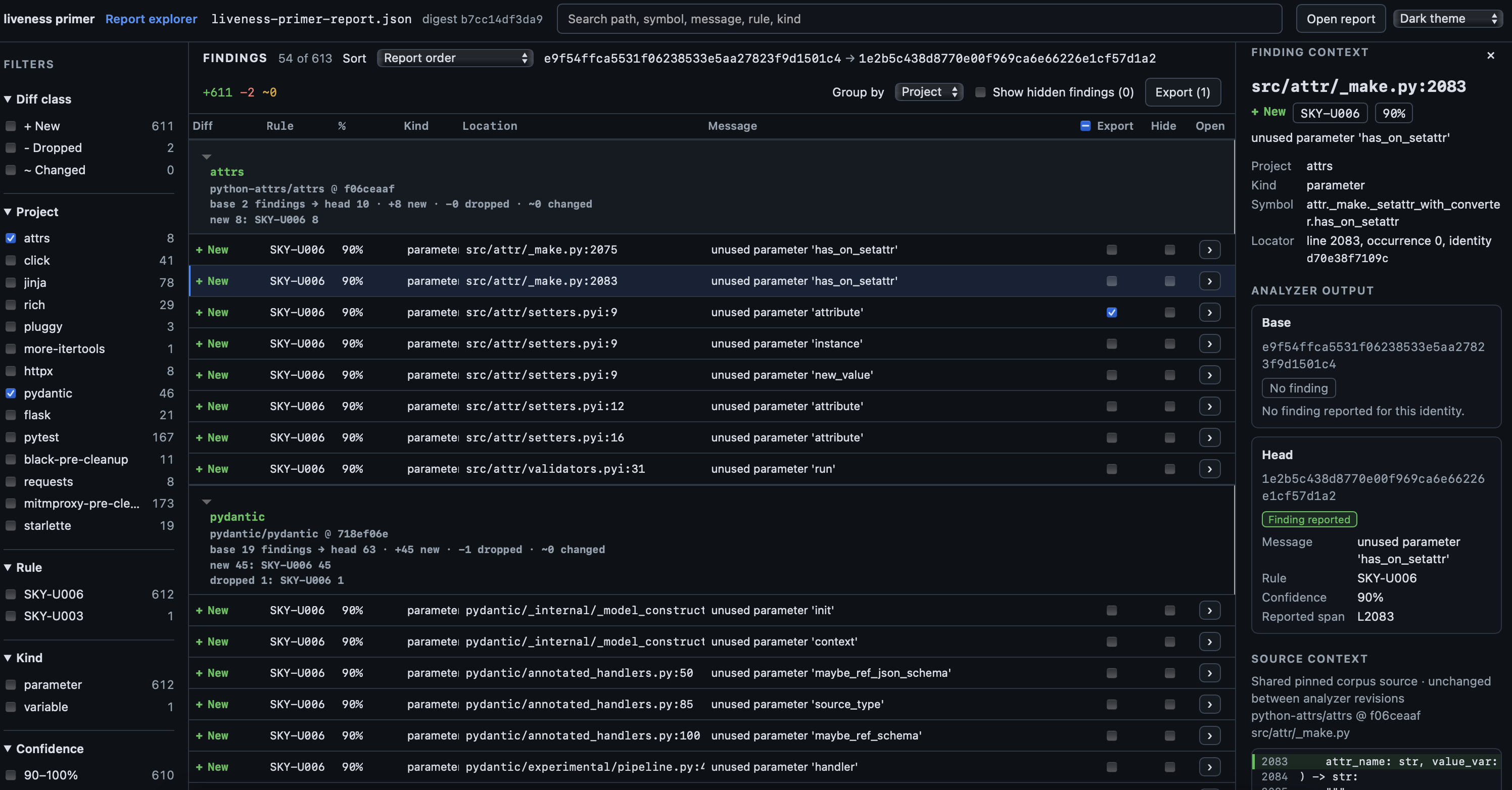
To build and serve the explorer locally:
cd explorer
npm ci
npm run build
npm run serve
Open http://127.0.0.1:4173/liveness-primer/explorer/. See
explorer/README.md
for development and verification commands.
GitHub Actions
The following workflow runs on detector pull requests. It writes a compact human report to the GitHub step summary and uploads the complete JSON report for the explorer, automation, or later review.
name: Liveness Primer

on:
  pull_request:

concurrency:
  group: liveness-primer-${{ github.event.pull_request.number }}
  cancel-in-progress: true

env:
  LIVENESS_PRIMER_REF: main
  PYTHON_VERSION: "3.13"

permissions:
  contents: read

jobs:
  skylos:
    name: Skylos blast radius
    runs-on: ubuntu-latest
    timeout-minutes: 45
    steps:
      - name: Check out liveness_primer
        uses: actions/checkout@9c091bb21b7c1c1d1991bb908d89e4e9dddfe3e0  # v7.0.0
        with:
          repository: mcdigman/liveness_primer
          ref: ${{ env.LIVENESS_PRIMER_REF }}
          path: _liveness_primer
          persist-credentials: false

      - name: Install uv
        uses: astral-sh/setup-uv@37802adc94f370d6bfd71619e3f0bf239e1f3b78  # v7.6.0
        with:
          enable-cache: true
          python-version: ${{ env.PYTHON_VERSION }}
          cache-dependency-glob: _liveness_primer/pyproject.toml

      - name: Compare Skylos revisions across the corpus
        run: |
          set -o pipefail
          uvx --from ./_liveness_primer \
            liveness-primer run \
            --tool skylos \
            --repo "${{ github.server_url }}/${{ github.repository }}" \
            --old "${{ github.event.pull_request.base.sha }}" \
            --new "${{ github.event.pull_request.head.sha }}" \
            --all \
            --output github \
            --json-out liveness-primer-report.json \
            --jobs 2 \
            --timeout 300 \
            | tee liveness-primer-report.md >> "$GITHUB_STEP_SUMMARY"

      - name: Upload liveness_primer report
        if: ${{ always() }}
        uses: actions/upload-artifact@043fb46d1a93c77aae656e7c1c64a875d1fc6a0a  # v7.0.1
        with:
          name: liveness-primer-report
          path: |
            liveness-primer-report.md
            liveness-primer-report.json
          if-no-files-found: error
Detector crashes, timeouts, and unparseable output fail the run without an
extra gate. --fail-on adds project-specific regression policy and is
repeatable:
--fail-on new,dropped, orchangedrejects that diff class;--fail-on anyrequires the normalized finding set to remain unchanged; and--fail-on corpus-integrityrejects corpus-integrity warnings.
For a new feature, leaving finding-diff gates off makes CI an evidence-producing
review job. For a semantics-preserving refactor, --fail-on any turns the same
workflow into a strict regression gate.
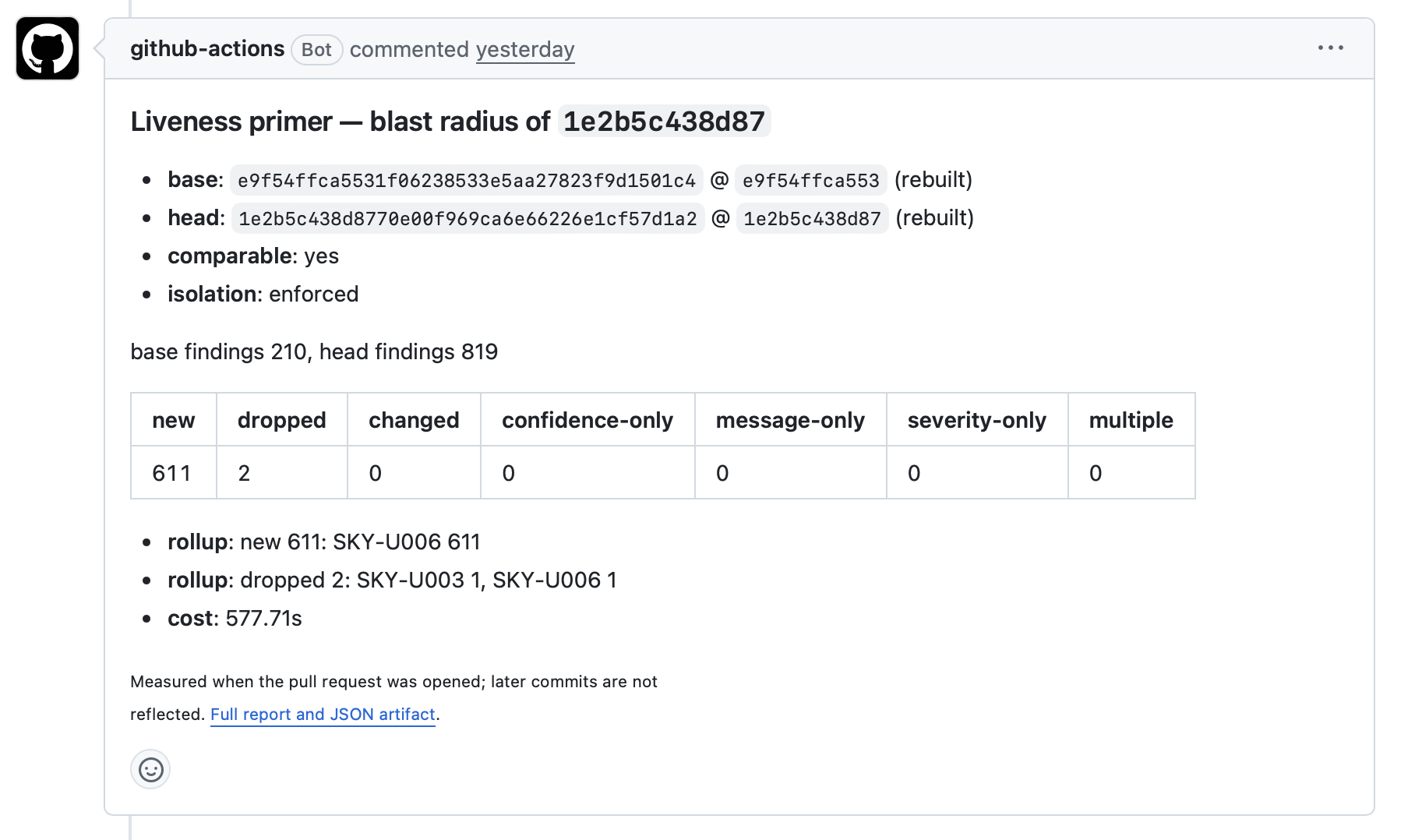
Instead of or in addition to the step summary, a workflow can post a compact digest as a pull-request comment and link reviewers to the complete report and JSON artifact:
LLM-assisted triage
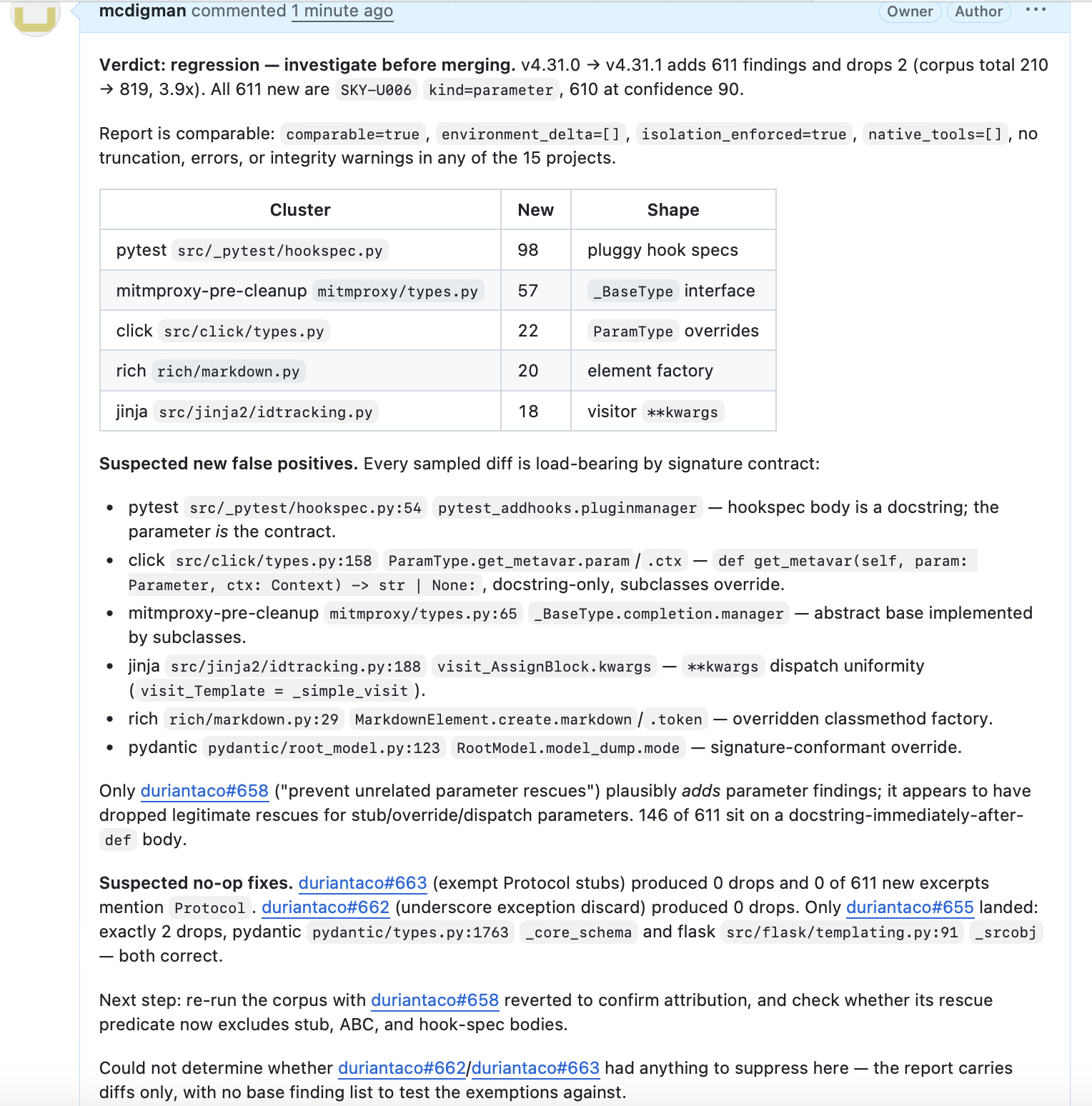
The complete JSON report is also suitable as input to an LLM-assisted review step. A downstream job can group changes by project or rule, highlight large or surprising clusters, call out detector failures, suggest which changes need human attention, and post an advisory digest as a pull-request comment.
Keep the versioned JSON artifact as the source of truth and link every digest back to it. Finding messages and source excerpts originate in detector output and analyzed repositories, so treat them as untrusted content: run the model step without release credentials or unnecessary write permissions, and do not let generated prose replace deterministic gates or human review.
Example simulated LLM-assisted triage digest
Run inside Docker containers
For stronger containment of untrusted/attacker-controlled PR code,
--container moves the build and execution of both detector revisions into
separate ephemeral Docker containers:
liveness-primer run --tool vulture \
  --repo https://github.com/jendrikseipp/vulture \
  --old v2.15 \
  --new v2.16 \
  -k pluggy \
  --container
Container mode uses digest-pinned Chainguard Python images in a
multi-stage build:
dependencies and the detector are built in a development image, then the resulting
virtual environment is copied into a minimal distroless runtime.
With the default images, detector invocations run without network access,
pip, a shell, or a package manager, and with a read-only root filesystem.
Each container is force-removed before results are written; the run fails
if Docker cannot confirm its removal.
This mode requires the Docker CLI and a running Docker daemon.
--container-builder-image IMAGE and --container-image IMAGE
select custom images, which must provide matching Python
versions and architectures. Containers specified in this manner can have
tools omitted from the default distroless image.
See the usage guide for dependency isolation, caching, platform limits, and other compatibility details.
Pre-built detector commands
The escape hatch compares commands you have already built:
liveness-primer run --tool vulture \
  --project https://github.com/pytest-dev/pluggy \
  --old-cmd 'vulture-old' \
  --new-cmd 'vulture-new'
Because the primer did not construct and verify these detector environments,
the report marks the run as non-comparable and records that isolation was not
enforced. --fail-on refuses to gate an escape-hatch run; use this mode for
trusted local investigation, not as a managed CI substitute.
Output and exit codes
--output text produces terminal-oriented output, --output github produces
GitHub-flavored Markdown, and --output json writes the report to standard
output. --json-out PATH archives the complete JSON report alongside any of
those display modes.
Exit codes are:
0: comparison completed and no enabled gate fired;1: run or configuration failure, including detector invocation failures;2: command-line usage error; and3: an enabled--fail-ongate fired.
Corpus and schema maintenance
liveness-primer corpus validate
liveness-primer corpus license-check
liveness-primer schema export
1 maintainer

Metadata
1 maintainer
Release files for liveness-primer 0.2.0
For a detailed explanation of source distributions (sdists) and built distributions (wheels), please see the package formats documentation.
Source distribution (sdist)
| File | Size | Uploaded | |
|---|---|---|---|
| liveness_primer-0.2.0.tar.gz | 296.9 kB | Details |
Built distribution (wheel)
| File | Interpreter | ABI | Platform | Reset |
|---|---|---|---|---|
| liveness_primer-0.2.0-py3-none-any.whl | Python 3 | none | any | Details |
Total release size: 492.7 kB
Release files / liveness_primer-0.2.0.tar.gz
| Download URL | liveness_primer-0.2.0.tar.gz |
|---|---|
| Size | 296.9 kB |
| Tags | Source |
|
SHA-256 checksum How to use checksums |
c7f85e762245b98c297478778c2debed9ce49250f6dddd3cb68151b131e3b47f
|
|
BLAKE2b-256 checksum How to use checksums |
d65afdf4610ec3d90454a155ecbc77b0ca3587bcc702f50ad49aed96dabeecfe
|
| Upload date | |
|
Uploaded using Trusted Publishing? What is trusted publishing? |
Yes |
| Uploaded via |
twine/7.0.0 CPython/3.13.14
|
Provenance
Provenance describes where a file came from. On PyPI, provenance is shared via attestations, which provide a verifiable record of the build or publishing details. View details, limitations and caveats.


PyPI Publish Attestation
PyPI verified that this artifact, at this checksum, originated from the publisher listed below.
Signed by GitHub Actions, verified by PyPI on Sep 19, 2026.
Transparency logRelease files / liveness_primer-0.2.0-py3-none-any.whl
| Download URL | liveness_primer-0.2.0-py3-none-any.whl |
|---|---|
| Size | 195.7 kB |
| Tags | Python 3 |
|
SHA-256 checksum How to use checksums |
aa57bfd67b85fb6d5512692a2ec31dcf8dd3a2f2c62c5e837ca90e4420c31087
|
|
BLAKE2b-256 checksum How to use checksums |
56af0994252a8912deebab34f98d87e9da96e93baf31f6881c732936e990a1cc
|
| Upload date | |
|
Uploaded using Trusted Publishing? What is trusted publishing? |
Yes |
| Uploaded via |
twine/7.0.0 CPython/3.13.14
|
Provenance
Provenance describes where a file came from. On PyPI, provenance is shared via attestations, which provide a verifiable record of the build or publishing details. View details, limitations and caveats.
PyPI Publish Attestation
PyPI verified that this artifact, at this checksum, originated from the publisher listed below.
Signed by GitHub Actions, verified by PyPI on Sep 19, 2026.
Transparency log













